dentalreel
 Dr. Hirwa Kothari
**PROJECT: DentalReel AI** Build a fully functional, AI-powered web application called DentalReel AI that creates animated dental educational videos and promotional reels for dental clinics. **MAIN GOAL:** I want to build and test this application with a ₹0 budget. Do not require paid APIs, subscriptions, credit cards, or paid services for the basic features. Use free, open-source, or browser-native technologies wherever possible. ### 1. DESIGN Create a premium, modern, responsive dashboard using: * Warm ivory beige (#EDE1D2), white, and pastel blue. * Minimal, elegant design with rounded cards and subtle shadows. * Clean navigation and a professional dental aesthetic. * Desktop and mobile compatibility. Tagline: "From Dental Ideas to Animated Reels." ### 2. DASHBOARD Include: * Create New Reel * My Projects * Character Library * Video Templates * Brand Settings * Voice & Language * Export Videos ### 3. CREATE A REEL Let users enter a text prompt describing their desired video. Provide these options: **Categories:** Dental Awareness, Dental Implants, Root Canal Treatment, Gum Health, Oral Hygiene, Teeth Whitening, Smile Designing, Braces, Children's Dentistry, Dental Myths vs Facts, Funny Dental Reels, Clinic Promotion, Festival Greetings, Custom Video. **Animation styles:** High-quality 3D cartoon, Pixar-inspired original aesthetic, educational 3D animation, cute character animation, and minimal 3D motion graphics. Do not use copyrighted characters. **Duration:** 15, 30, 45, or 60 seconds. **Languages:** English, Hindi, Gujarati, and Hinglish. **Aspect ratios:** 9:16, 1:1, and 16:9. Allow users to select dentist and patient characters, add clinic branding, and generate a storyboard. ### 4. AI STORYBOARD GENERATOR Convert the user's prompt into a structured storyboard containing: * Scene-by-scene descriptions. * Character appearance and actions. * Camera movements. * Animation instructions. * Voice-over narration. * On-screen text and subtitles. * Scene durations. * Background music suggestions. * Final call to action. Allow users to edit, add, delete, rearrange, and preview scenes before exporting. If a real AI text-generation service is unavailable, implement a functional template-based storyboard generator rather than showing fake AI results. ### 5. CHARACTER LIBRARY Allow users to create and save reusable female dentists, male dentists, adult patients, children, and elderly patients. Store character descriptions, clothing, appearance, reference images, and notes. Allow users to reuse characters across projects. Be transparent about limitations in maintaining character consistency across AI-generated scenes. ### 6. VOICE AND SUBTITLES Support English, Hindi, Gujarati, and Hinglish narration. Allow users to edit scripts, upload audio, preview available browser voices, edit subtitles, and adjust subtitle timing. Use free browser speech synthesis where supported. Clearly identify unavailable voices instead of pretending they work. ### 7. VIDEO CREATION AND EXPORT Build a modular pipeline for: 1. Script generation. 2. Storyboard creation. 3. Scene image creation or upload. 4. Animation. 5. Voice-over and subtitles. 6. Scene transitions. 7. Video assembly and export. Support MP4 export if technically possible. Otherwise, offer a working alternative such as WebM and explain the limitation. Do not pretend that static images or storyboards are completed animated videos. Keep AI image, voice, and video generation providers optional so free or open-source alternatives can be integrated later. ### 8. PROJECT MANAGEMENT Allow users to create, save, rename, duplicate, reopen, search, and delete projects. Use localStorage or IndexedDB for the initial version. Keep the application functional without user accounts or cloud storage. ### 9. CLINIC BRANDING Create editable brand settings for: * Clinic name and logo. * Contact number. * Address. * Website. * Brand colors. * Social media handle. * Call-to-action text. Include this sample profile: Clinic: Smile Crest Dental & Implant Studio Tagline: Your Trusted Dental Partner Website: [www.smilecrestdental.com](http://www.smilecrestdental.com) Allow users to replace these details. ### 10. TECHNICAL REQUIREMENTS Use the technologies best supported by the development environment. Build reusable components, validate forms, handle errors, show generation progress, and save projects reliably. Never expose API keys in frontend code. Do not require paid services for basic project management, storyboard editing, or image uploads. ### 11. DEVELOPMENT PRIORITIES Build the application in stages: **Stage 1:** Functional dashboard, navigation, project creation, saving, and settings. **Stage 2:** Prompt-to-storyboard generation and scene editor. **Stage 3:** Character library, image uploads, narration, and subtitles. **Stage 4:** Scene preview, video assembly, and export. **Stage 5:** Optional integrations for real AI image, voice, and video generation. Start by implementing Stages 1 and 2 completely. Test the application and ensure its buttons and essential features work before adding more features. Do not build only a static mockup. Do not leave buttons nonfunctional. Clearly label prototype features and external API requirements. **FINAL GOAL:** Create a working, free-to-test foundation for DentalReel AI that can eventually generate professional, consistent 3D animated dental reels without requiring expensive subscriptions.


Comments (0)
Sign in to leave a comment
System Requirements
System Requirements Document for dentalreel
1. Introduction
DentalReel AI is a free-to-test, browser-based creative workspace that turns a plain-language dental idea into a structured, editable animated-reel storyboard for dental clinics. A clinic content creator types a prompt, picks a dental category, an original animation style, a duration, a language and an aspect ratio, selects dentist and patient characters, attaches clinic branding, and generates a scene-by-scene storyboard that can be edited, reordered, previewed, narrated, subtitled and exported as a video file.
The product is built and tested on a ₹0 budget: no paid APIs, subscriptions, credit cards or paid services are required for the basic features. Free, open-source and browser-native technologies are used wherever possible, and any AI image, voice or video generation provider remains optional so free or open-source alternatives can be integrated later.
The primary audience is dental clinics and small practice owners — often non-designers working in a clinical but friendly context — who need trustworthy, approachable, creative social content rather than an enterprise tool. The product tagline is "From Dental Ideas to Animated Reels."
The requester is Dr. Hirwa Kothari (India). This document is the System Requirements Document for the project named dentalreel.
1.1 Success Criteria
- A user can open the app, create a reel from a prompt, receive a real (template-based or AI-backed) storyboard, edit its scenes, save the project locally, reopen it, and export a working video file — all without paying for anything.
- Every button and essential control on the delivered surfaces performs its stated action; nothing is a static mockup.
- Prototype features and external API requirements are visibly labeled wherever they appear.
- The application remains fully functional without user accounts or cloud storage.
2. System Overview
DentalReel AI is delivered as a React single-page application served alongside a shared FastAPI backend process and a MariaDB database, orchestrated with docker-compose. The frontend owns the creative workspace: dashboard, reel creation, storyboard editing, character library, brand settings, voice and subtitle work, and export. Project data, characters, brand settings and voice/subtitle settings persist in the browser via localStorage or IndexedDB so the application works without accounts or cloud storage. The backend provides application APIs and domain modules (for example storyboard generation and provider configuration) and holds any provider credentials server-side; API keys are never exposed in frontend code. MariaDB is provisioned infrastructure for application-owned data but does not by itself introduce accounts, authentication or user-owned cloud storage.
Actors. Three active human personas use the product: the Dental Clinic Content Creator, the Clinic Brand Manager, and the Character & Voice Curator. External AI image, voice and video generation providers are optional non-persona actors; the browser speech synthesis engine is a browser-native capability, not a persona.
Accepted behavior in scope. A premium responsive dashboard with the seven named destinations; reel creation with the full category, animation-style, duration, language and aspect-ratio option sets; prompt-to-storyboard generation with a functional template-based fallback; storyboard editing (edit, add, delete, rearrange, preview); a reusable character library with transparency about consistency limits; narration scripts, audio upload, browser voice previews with unavailable voices clearly marked, subtitle editing and timing; a modular video pipeline with MP4-or-WebM export and honest limitation messaging; local project management (create, save, rename, duplicate, reopen, search, delete); editable clinic branding with the Smile Crest sample profile; and staged delivery beginning with Stages 1 and 2.
Exclusions. No user accounts, no cloud storage, no paid services for basic features, no copyrighted characters, no fake AI results, no presentation of static images or storyboards as completed animated videos, and no static mockup with nonfunctional buttons.
Removed from scope
- User accounts and cloud storage for the initial version (also: cloud sync, sign-in, login)
- Paid APIs, subscriptions, credit cards and paid services for basic features (also: paid tiers, paid plans)
- Copyrighted characters in animation styles (also: Pixar characters, licensed characters)
- Fake AI results (also: simulated AI output, pretend AI)
- Presenting static images or storyboards as completed animated videos (also: fake video, mock video)
- Static mockups with nonfunctional buttons (also: dead buttons, placeholder-only UI)
2.1 Product Interpretation and Delivery Boundary
DentalReel AI is a first-party web application. All ten surfaces are application-owned custom pages reachable without sign-in; the product deliberately keeps working without accounts or cloud storage, so no identity establishment, verification or account management is part of the current scope. Durable state lives in the browser (localStorage or IndexedDB) and is owned by the person using that browser profile.
The current delivery horizon covers Stages 1–5 as described in the requirement thread, with Stages 1 and 2 implemented completely and tested first: functional dashboard, navigation, project creation, saving and settings, then prompt-to-storyboard generation and the scene editor. Stages 3 and 4 (character library, image uploads, narration, subtitles, scene preview, video assembly, export) are current product surfaces whose features are built after Stages 1–2 are verified. Stage 5 — real AI image, voice and video generation integrations — is optional and provider-dependent; the product must remain fully usable without any provider connected, and must clearly label where a provider would be required.
The shared FastAPI backend serves application APIs and domain modules; the React frontend renders the workspace; MariaDB is available for application-owned persistent data. Provider credentials, if any are ever configured, live server-side only.
2.2 Source Content Inventory
The following sample brand profile is supplied by the user and must ship as the default, replaceable brand profile:
| Field | Value |
|---|---|
| Clinic | Smile Crest Dental & Implant Studio |
| Tagline | Your Trusted Dental Partner |
| Website | www.smilecrestdental.com (http://www.smilecrestdental.com) |
All fields are editable and replaceable by the user.
2.3 Page Content and Component Coverage
Landing
- Information/state: Product name DentalReel AI, tagline "From Dental Ideas to Animated Reels.", a short explanation of what the product does and who it is for, and a clear entry into the workspace.
- Primary actions: Enter the workspace (Dashboard); start a new reel.
- Supporting actions: Read the explanation of free-to-test operation and optional provider integrations.
- Domain entities: None persisted; static product framing only.
- Component responsibilities: Hero band with headline, subline and entry CTA; illustrated layered scene composed of accepted content (storyboard tiles, character, tooth icon); sticker accents; footer note that the app works without accounts.
- States: Loading (font/asset load), empty (n/a), success (rendered), error (asset failure falls back to text-only hero), recovery (retry link).
Dashboard
- Information/state: Navigation to Create New Reel, My Projects, Character Library, Video Templates, Brand Settings, Voice & Language and Export Videos; recent projects summary; current brand profile name.
- Primary actions: Create New Reel; open any of the six other destinations.
- Supporting actions: Resume a recent project; view current brand profile.
- Domain entities: Project (summary), Brand Profile (summary).
- Component responsibilities: Left rail navigation (desktop) / bottom tab bar or slide-over drawer (mobile) with pill active state and illustrated icons; hero band with tagline and Create New Reel CTA; modular grid of quick-action cards each with illustrated icon and one-line description; recent projects strip.
- States: Loading (skeleton cards), empty (no projects yet — friendly empty state with Create New Reel), success (cards + recent projects), error (storage unavailable — banner explaining local storage is blocked, with retry), recovery (retry / continue read-only).
Create New Reel
- Information/state: Prompt text; selected category; selected animation style; selected duration; selected language; selected aspect ratio; selected dentist and patient characters; clinic branding toggle; generation progress.
- Primary actions: Enter prompt; select options; select characters; toggle clinic branding; Generate Storyboard.
- Supporting actions: Clear form; open Character Library or Brand Settings in context; view generation progress steps.
- Domain entities: Reel Draft, Category, Animation Style, Duration, Language, Aspect Ratio, Character (reference), Brand Profile (reference), Storyboard (output).
- Component responsibilities: Two-column layout — form on the left, live storyboard preview rail on the right (stacked on mobile); category chip row (horizontally scrollable pills, pastel-blue idle, apricot selected); style/duration/language/aspect-ratio selectors; character pickers; branding toggle; segmented generation progress bar (script → storyboard → scenes → voice → export) with friendly captions; validation messages.
- States: Loading (progress bar animating through steps), empty (no prompt yet — helper text), success (storyboard generated and handed to Storyboard Editor), error (validation failure per field; generation failure with retry and explanation that template-based generation is used when no AI service is configured), recovery (retry generation, edit inputs and regenerate).
Storyboard Editor
- Information/state: Ordered list of scenes, each with scene description, character appearance and actions, camera movement, animation instructions, voice-over narration, on-screen text and subtitles, scene duration, background music suggestion; final call to action; total duration vs selected duration.
- Primary actions: Edit a scene; add a scene; delete a scene; rearrange scenes by drag; preview scenes; save project.
- Supporting actions: Regenerate storyboard; jump to Voice & Language; jump to Export Videos.
- Domain entities: Storyboard, Scene, Character (reference), Brand Profile (reference).
- Component responsibilities: Vertical list of sticker-style scene cards (rounded 16px, numbered apricot badge, drag handle, inline edit/add/delete icon buttons); scene edit panel; preview player for scenes; sticky Generate/Export bar at the bottom of the viewport; duration reconciliation indicator.
- States: Loading (scene cards fade-and-slide in staggered), empty (no scenes — prompt to add or regenerate), success (edited storyboard saved), error (invalid scene field, save failure with retry), recovery (undo last destructive action where feasible, retry save).
My Projects
- Information/state: List of locally persisted projects with name, category, language, aspect ratio, last-modified time and thumbnail/placeholder.
- Primary actions: Create project; open (reopen) project; rename; duplicate; delete; search.
- Supporting actions: Sort/filter by search query; confirm destructive delete.
- Domain entities: Project.
- Component responsibilities: Search field; project cards/list; per-project action menu (rename, duplicate, delete); create button; confirmation dialog for delete.
- States: Loading (skeleton list), empty (no projects — Create New Reel CTA), success (list rendered, search filters live), error (storage read/write failure banner with retry), recovery (retry; export/backup note if storage is unavailable).
Character Library
- Information/state: Saved characters of types female dentist, male dentist, adult patient, child, elderly patient; each with description, clothing, appearance, reference images and notes; persistent banner about character-consistency limitations across AI-generated scenes.
- Primary actions: Create character; save character; edit character; delete character; reuse character in a new reel.
- Supporting actions: Upload reference images; filter by role type.
- Domain entities: Character (type, description, clothing, appearance, reference images, notes).
- Component responsibilities: Grid of large rounded avatar cards (name in Fraunces, role as uppercase tracked label, "Reuse in new reel" pill); character form; reference image uploader; consistency-limitation banner.
- States: Loading (skeleton grid), empty (no characters — create CTA), success (grid rendered, reuse launches Create New Reel with character preselected), error (image upload failure or storage failure with retry), recovery (retry upload/save).
Video Templates
- Information/state: Reusable starting points organized by animation style and category, all original and free of copyrighted characters.
- Primary actions: Browse templates; apply a template to start a new reel.
- Supporting actions: Preview a template's style and category.
- Domain entities: Template (style, category, description).
- Component responsibilities: Template grid with illustrated previews; apply action that seeds Create New Reel.
- States: Loading (skeleton grid), empty (no templates — explanatory note), success (grid rendered, apply navigates to Create New Reel with selections prefilled), error (load failure with retry), recovery (retry).
Brand Settings
- Information/state: Editable clinic name, logo, contact number, address, website, brand colors, social media handle and call-to-action text; default sample profile (Smile Crest Dental & Implant Studio / Your Trusted Dental Partner / www.smilecrestdental.com).
- Primary actions: Edit fields; upload logo; save brand profile; reset to sample profile.
- Supporting actions: Preview brand application on a sample card.
- Domain entities: Brand Profile.
- Component responsibilities: Brand form with validation; logo uploader; color pickers; live preview card; save/reset controls.
- States: Loading (form hydration), empty (fields blank after reset — validation prompts), success (saved confirmation, applied across projects), error (validation errors per field; save failure with retry), recovery (retry save; revert to last saved).
Voice & Language
- Information/state: Narration script per scene; language (English, Hindi, Gujarati, Hinglish); available browser voices with availability status; uploaded audio; subtitles with timing.
- Primary actions: Edit script; upload audio; preview available browser voices; edit subtitles; adjust subtitle timing.
- Supporting actions: Mark unavailable voices clearly; switch language.
- Domain entities: Narration Script, Audio Asset, Subtitle Cue, Voice (browser-provided).
- Component responsibilities: Script editor; audio uploader; voice list with availability badges and preview buttons; subtitle editor with timing controls; language selector.
- States: Loading (voice list enumeration), empty (no voices available — explicit message that browser speech synthesis is unsupported here), success (preview plays, subtitles saved), error (voice preview failure or unsupported language — clearly identified, not simulated), recovery (retry enumeration; fall back to uploaded audio).
Export Videos
- Information/state: Modular pipeline status (script generation, storyboard creation, scene image creation or upload, animation, voice-over and subtitles, scene transitions, video assembly and export); export format availability (MP4 if technically possible, otherwise WebM with explanation); honest labeling that static images/storyboards are not completed animated videos.
- Primary actions: Upload or create scene images; configure transitions; assemble video; export MP4 or WebM; download.
- Supporting actions: Review pipeline steps; read limitation explanations; retry failed step.
- Domain entities: Scene Image, Transition, Video Export.
- Component responsibilities: Pipeline step list with status; scene image uploader; transition selector; assembly progress; export format selector with capability detection; download control; limitation notice.
- States: Loading (assembly progress), empty (no scenes ready — prompt to complete storyboard), success (file downloaded, format and limitation shown), error (unsupported format or assembly failure with explanation and retry), recovery (retry step; switch to WebM alternative).
3. Functional Requirements
Each story point carries provenance: explicit (source-stated), basic_default (accepted default), or required_inference (indispensable inferred mechanics).
Design and shell
- As a Dental Clinic Content Creator, I should see a premium, modern, responsive dashboard using warm ivory beige (#EDE1D2), white and pastel blue, with minimal elegant design, rounded cards, subtle shadows, clean navigation and a professional dental aesthetic, working on desktop and mobile. (explicit) — Observable: layout renders correctly at 375px, 768px and 1280px; palette tokens applied; navigation usable on all three widths.
- As any persona, I should see the tagline "From Dental Ideas to Animated Reels." on the product entry. (explicit) — Observable: tagline rendered on Landing and Dashboard hero.
Dashboard and navigation
- As any persona, I should reach Create New Reel, My Projects, Character Library, Video Templates, Brand Settings, Voice & Language and Export Videos from the Dashboard. (explicit) — Observable: each destination opens from the Dashboard navigation; active state reflects current destination.
Reel creation
- As a Dental Clinic Content Creator, I should enter a text prompt describing my desired video. (explicit) — Observable: prompt accepted; empty prompt blocks generation with a validation message.
- As a Dental Clinic Content Creator, I should choose a category from Dental Awareness, Dental Implants, Root Canal Treatment, Gum Health, Oral Hygiene, Teeth Whitening, Smile Designing, Braces, Children's Dentistry, Dental Myths vs Facts, Funny Dental Reels, Clinic Promotion, Festival Greetings, Custom Video. (explicit) — Observable: all fourteen options selectable; selection reflected in generated storyboard.
- As a Dental Clinic Content Creator, I should choose an animation style from high-quality 3D cartoon, Pixar-inspired original aesthetic, educational 3D animation, cute character animation, and minimal 3D motion graphics, with no copyrighted characters. (explicit) — Observable: five styles selectable; generated content never references copyrighted characters.
- As a Dental Clinic Content Creator, I should choose a duration of 15, 30, 45 or 60 seconds. (explicit) — Observable: four durations selectable; storyboard scene durations sum to the selected duration.
- As a Dental Clinic Content Creator, I should choose a language from English, Hindi, Gujarati and Hinglish. (explicit) — Observable: four languages selectable; narration and subtitles generated in the selected language.
- As a Dental Clinic Content Creator, I should choose an aspect ratio of 9:16, 1:1 or 16:9. (explicit) — Observable: three ratios selectable; preview and export honor the selection.
- As a Dental Clinic Content Creator, I should select dentist and patient characters, add clinic branding, and generate a storyboard. (explicit) — Observable: character pickers populated from Character Library; branding toggle applies Brand Profile; Generate Storyboard produces a storyboard.
- As a Dental Clinic Content Creator, I should see generation progress while the storyboard is produced. (explicit) — Observable: segmented progress bar advances through script → storyboard → scenes → voice → export with captions.
Storyboard generation
- As a Dental Clinic Content Creator, I should receive a structured storyboard containing scene-by-scene descriptions, character appearance and actions, camera movements, animation instructions, voice-over narration, on-screen text and subtitles, scene durations, background music suggestions, and a final call to action. (explicit) — Observable: every listed field present per scene; final CTA present.
- As a Dental Clinic Content Creator, I should get a functional template-based storyboard when no real AI text-generation service is available, rather than fake AI results. (explicit) — Observable: generation succeeds with template engine; UI labels the engine used; no simulated AI claims.
- As a Dental Clinic Content Creator, I should edit, add, delete, rearrange and preview storyboard scenes before exporting. (explicit) — Observable: each action mutates the storyboard and persists; preview plays scenes in order.
Character library
- As a Character & Voice Curator, I should create and save reusable female dentists, male dentists, adult patients, children and elderly patients, storing descriptions, clothing, appearance, reference images and notes. (explicit) — Observable: character saved with all fields; appears in library grid.
- As a Character & Voice Curator, I should reuse characters across projects. (explicit) — Observable: "Reuse in new reel" seeds Create New Reel with the character selected.
- As a Character & Voice Curator, I should see transparency about limitations in maintaining character consistency across AI-generated scenes. (explicit) — Observable: persistent banner on Character Library and relevant notices in Create New Reel.
Voice and subtitles
- As a Character & Voice Curator, I should work with narration in English, Hindi, Gujarati and Hinglish. (explicit) — Observable: language selector offers all four; scripts and subtitles stored per language.
- As a Character & Voice Curator, I should edit scripts, upload audio, preview available browser voices, edit subtitles and adjust subtitle timing. (explicit) — Observable: each control performs its action and persists.
- As a Character & Voice Curator, I should see free browser speech synthesis used where supported, with unavailable voices clearly identified instead of pretending they work. (explicit) — Observable: voice list shows availability badges; unsupported voices disabled with explanation; no simulated playback.
Video pipeline and export
- As a Dental Clinic Content Creator, I should have a modular pipeline covering script generation, storyboard creation, scene image creation or upload, animation, voice-over and subtitles, scene transitions, and video assembly and export. (explicit) — Observable: each pipeline step visible with status and controls.
- As a Dental Clinic Content Creator, I should get MP4 export if technically possible, otherwise a working WebM alternative with the limitation explained. (explicit) — Observable: capability detection selects format; export produces a downloadable file; limitation text shown when MP4 unavailable.
- As a Dental Clinic Content Creator, I should never see static images or storyboards presented as completed animated videos. (explicit) — Observable: export surface distinguishes storyboard preview from assembled video; labels are explicit.
- As a Dental Clinic Content Creator, I should have AI image, voice and video generation providers kept optional so free or open-source alternatives can be integrated later. (explicit) — Observable: no provider required for any basic feature; provider slots labeled as optional.
Project management
- As a Dental Clinic Content Creator, I should create, save, rename, duplicate, reopen, search and delete projects. (explicit) — Observable: each operation succeeds against local storage and is reflected in My Projects.
- As a Dental Clinic Content Creator, I should have projects persist in localStorage or IndexedDB and the application remain functional without user accounts or cloud storage. (explicit) — Observable: reload restores projects; no sign-in prompt anywhere.
Branding
- As a Clinic Brand Manager, I should edit clinic name and logo, contact number, address, website, brand colors, social media handle and call-to-action text. (explicit) — Observable: all fields editable and saved.
- As a Clinic Brand Manager, I should see the sample profile Smile Crest Dental & Implant Studio / Your Trusted Dental Partner / www.smilecrestdental.com and be able to replace these details. (explicit) — Observable: sample profile present by default; edits replace it and persist.
Technical and quality
- As any persona, I should experience reusable components, validated forms, handled errors, visible generation progress and reliable project saving. (explicit) — Observable: validation messages per field; error banners with retry; progress indicators; save confirmations.
- As any persona, I should never have API keys exposed in frontend code. (explicit) — Observable: no provider credentials in client bundle; any provider calls proxied server-side.
- As any persona, I should not be required to use paid services for basic project management, storyboard editing or image uploads. (explicit) — Observable: all three work with zero configuration.
- As any persona, I should see prototype features and external API requirements clearly labeled. (explicit) — Observable: labels present on affected controls and surfaces.
- As any persona, I should never encounter a static mockup or a nonfunctional button. (explicit) — Observable: every control performs its stated action or is disabled with an explanation.
- As a Dental Clinic Content Creator, I should have browser localStorage or IndexedDB available for local project persistence. (required_inference) — Observable: storage adapter initializes; fallback message if blocked.
- As a Character & Voice Curator, I should have browser speech synthesis availability checked and unavailable voices clearly identified. (required_inference) — Observable: availability enumeration runs on load; badges reflect results.
- As a Dental Clinic Content Creator, I should have a template-based storyboard generator available when no AI text service is configured. (required_inference) — Observable: generation succeeds without provider configuration.
- As a Dental Clinic Content Creator, I should have video export capability checked with MP4 or a working WebM alternative and the limitation explained. (required_inference) — Observable: capability probe runs before export; format and limitation shown.
4. User Personas
Dental Clinic Content Creator
- Product context: Runs or works with a dental clinic and produces educational and promotional reels for social channels. Often a non-designer working in a clinical but friendly context; needs a trustworthy, approachable creative workspace rather than an enterprise tool.
- Primary goal: Turn a dental idea into a finished, exported reel and keep the project saved for later reopening.
- Distinct responsibilities: Enters the prompt; picks category, animation style, duration, language and aspect ratio; selects dentist and patient characters; toggles clinic branding; generates the storyboard; edits, adds, deletes, rearranges and previews scenes; runs the video pipeline; exports MP4 or WebM; manages projects (create, save, rename, duplicate, reopen, search, delete).
- Relevant inputs or decisions: Prompt text; option selections; character choices; branding toggle; scene edits; export format choice.
- Interactions with other participants: Consumes characters curated by the Character & Voice Curator and brand identity maintained by the Clinic Brand Manager; sees the consistency-limitation banner and voice-availability notices.
- Observable success: A finished reel file is exported, the project is saved, and reopening it restores the storyboard and settings.
Clinic Brand Manager
- Product context: Owns the clinic's reusable brand identity and ensures every reel represents the clinic consistently.
- Primary goal: Maintain accurate brand settings and have them applied consistently across projects.
- Distinct responsibilities: Edits clinic name and logo, contact number, address, website, brand colors, social media handle and call-to-action text; replaces the Smile Crest sample profile; saves and resets the profile.
- Relevant inputs or decisions: Brand field values; logo upload; color choices; CTA wording; whether to reset to the sample profile.
- Interactions with other participants: Supplies the Brand Profile consumed by the Dental Clinic Content Creator during reel creation and export.
- Observable success: Brand settings are saved and appear consistently in generated storyboards and exports.
Character & Voice Curator
- Product context: Builds and maintains the reusable cast and the narration/subtitle layer that give reels their voice and continuity.
- Primary goal: Keep characters and voice/subtitle settings reusable across projects.
- Distinct responsibilities: Creates and saves female dentists, male dentists, adult patients, children and elderly patients with descriptions, clothing, appearance, reference images and notes; reuses characters across projects; edits narration scripts; uploads audio; previews available browser voices; edits subtitles and adjusts subtitle timing; acknowledges the character-consistency limitation.
- Relevant inputs or decisions: Character type and attributes; reference images; language; voice selection among available browser voices; subtitle timing.
- Interactions with other participants: Provides characters and narration settings consumed by the Dental Clinic Content Creator; relies on Brand Settings for clinic identity in narration.
- Observable success: Characters and voice/subtitle settings are saved and reusable across projects, with unavailable voices clearly identified.
5. Core User Flows
Flow A — First visit and orientation (Dental Clinic Content Creator)
- The creator opens the app and lands on Landing, which shows the tagline "From Dental Ideas to Animated Reels." and a short explanation of what the product does and who it is for.
- The creator selects the entry CTA and arrives at Dashboard, which shows the seven destinations and a recent-projects strip.
- If no projects exist, the Dashboard shows a friendly empty state with a Create New Reel CTA. Next step: Flow B.
Flow B — Create a reel and generate a storyboard (Dental Clinic Content Creator)
- From Dashboard, the creator opens Create New Reel.
- The creator types a prompt describing the desired video. An empty prompt blocks generation with a validation message.
- The creator selects a category from the fourteen options, an animation style from the five original styles, a duration (15/30/45/60 s), a language (English/Hindi/Gujarati/Hinglish) and an aspect ratio (9:16, 1:1, 16:9).
- The creator selects dentist and patient characters from the Character Library and toggles clinic branding to apply the Brand Profile.
- The creator selects Generate Storyboard. The segmented progress bar advances through script → storyboard → scenes → voice → export with friendly captions.
- The system produces a structured storyboard. If no AI text-generation service is configured, the template-based generator produces it and the UI labels the engine used — no fake AI results are shown.
- The storyboard opens in Storyboard Editor. Next step: Flow C. If generation fails, the creator sees an error with a retry action and can adjust inputs and regenerate.
Flow C — Edit, rearrange and preview scenes (Dental Clinic Content Creator)
- In Storyboard Editor, the creator reviews scene cards, each showing description, character appearance and actions, camera movement, animation instructions, voice-over narration, on-screen text and subtitles, scene duration and background music suggestion, plus the final call to action.
- The creator edits a scene inline, adds a new scene, deletes a scene, or drags scenes to rearrange them. Scene durations reconcile to the selected total duration.
- The creator previews scenes in order.
- The creator saves the project; it appears in My Projects. Next step: Flow D or Flow E.
Flow D — Manage projects (Dental Clinic Content Creator)
- The creator opens My Projects and sees locally persisted projects with name, category, language, aspect ratio and last-modified time.
- The creator searches by name; the list filters live.
- The creator renames, duplicates, reopens or deletes a project. Delete requires confirmation.
- Reopening a project restores its storyboard and settings in Storyboard Editor. If storage is unavailable, the creator sees a banner with a retry action.
Flow E — Curate characters (Character & Voice Curator)
- The curator opens Character Library and sees the persistent banner explaining that character consistency across AI-generated scenes is a known limitation of current free providers.
- The curator creates a character, choosing a type (female dentist, male dentist, adult patient, child, elderly patient) and entering description, clothing, appearance, reference images and notes.
- The curator saves the character; it appears in the grid with name in Fraunces and role as an uppercase tracked label.
- The curator selects Reuse in new reel, which opens Create New Reel with the character preselected. Next step: Flow B.
Flow F — Maintain clinic branding (Clinic Brand Manager)
- The manager opens Brand Settings and sees the default sample profile: Smile Crest Dental & Implant Studio / Your Trusted Dental Partner / www.smilecrestdental.com.
- The manager edits clinic name, logo, contact number, address, website, brand colors, social media handle and call-to-action text, replacing the sample details.
- The manager saves; the profile is applied across projects. If validation fails, per-field messages appear; if saving fails, a retry action is offered.
Flow G — Narration and subtitles (Character & Voice Curator)
- The curator opens Voice & Language and selects a language (English, Hindi, Gujarati or Hinglish).
- The curator edits the narration script, uploads audio, and previews available browser voices. Unavailable voices are clearly identified and disabled with an explanation — never simulated.
- The curator edits subtitles and adjusts subtitle timing.
- The curator saves; settings persist for the project. If browser speech synthesis is unsupported, an explicit message is shown and uploaded audio remains usable.
Flow H — Assemble and export (Dental Clinic Content Creator)
- The creator opens Export Videos and sees the modular pipeline: script generation, storyboard creation, scene image creation or upload, animation, voice-over and subtitles, scene transitions, video assembly and export.
- The creator uploads or creates scene images and configures transitions.
- The creator assembles the video; the export surface distinguishes the storyboard preview from the assembled video and never presents static images or storyboards as completed animated videos.
- The creator exports. Capability detection selects MP4 if technically possible, otherwise a working WebM alternative with the limitation explained. The file downloads.
- If assembly or export fails, the creator sees an explanation and a retry action, and can switch to the WebM alternative.
Flow I — Start from a template (Dental Clinic Content Creator)
- The creator opens Video Templates and browses original starting points by animation style and category.
- The creator applies a template, which opens Create New Reel with selections prefilled. Next step: Flow B.
6. Visuals Colors and Theme
The creative direction is authoritative for this section. Muse: Pablo Stanley — modular illustration, rounded shapes, generous colour on cream/ivory, friendly copy, pill buttons and soft offset shadows. Headline: "From Dental Ideas to Animated Reels."
Palette (light mode only — no dark mode, no graphite ground):
| Role | Hex | Usage |
|---|---|---|
| Background | #EDE1D2 | Warm ivory beige page ground (~55% of surface) |
| Surface | #FFFFFF | Card surface (~30%) |
| Text | #1F2A2E | Near-black ink for body |
| Primary | #2E6E8E | Deeper pastel blue — buttons, active nav, key labels |
| Pastel tint | #D6E6EF | Chips, storyboard rails, secondary panels |
| Accent | #F2A65A | Warm apricot — CTAs, active category pills, progress bars, sticker moments (~5%) |
| Muted | #8A7E70 | Captions and metadata |
| Hairline | #E3D6C4 | 1px warm borders on ivory sections |
No gradients-as-blobs; any gradient is a soft two-stop tint used only inside a card background, never behind text. No blue–indigo primary (#0057FF, #2563EB, #4F46E5, #6366F1, #7C3AED) on white.
Typography:
- Headings: Fraunces at 600–700 weight, tight leading (1.05–1.15) on display sizes, small optical-size variation for large headlines. Used for page titles, card titles, section openers and the wordmark "DentalReel".
- Body/UI: DM Sans 400/500/700, line-height 1.55, slightly loose tracking.
- Scale (1.333 modular): display 56px mobile → 88px desktop (
clamp(56px, 8vw, 88px)), h1 40/56, h2 28/36, h3 22/24, body 16/17, caption 13, micro-label 11 uppercase tracked +0.08em. - Line-heights: display 1.05, headings 1.15, body 1.55.
- Avoid Inter, Roboto, Arial, Helvetica, Poppins or system-ui as heading or body font.
Shape language: Cards 20–24px radius; buttons and pills fully rounded (999px); inputs 14px; chips 999px. Soft offset "sticker" shadows: 0 6px 0 rgba(31,42,46,0.06) plus 0 2px 8px rgba(31,42,46,0.08). Blob and sticker shapes as decorative accents behind hero and empty states, never behind readable text. Storyboard scene tiles are rounded 16px cards with a small numbered sticker badge in the corner. Soft 1px hairline borders in #E3D6C4 on ivory sections.
Layout: Left rail navigation on desktop (icon + label, pill-shaped active state in primary blue with white text), collapsing to a bottom tab bar or slide-over drawer on mobile. Main content in a 12-column grid, max-width 1200px, gutters 24px mobile / 40px desktop. Dashboard = hero band with tagline and Create New Reel CTA, then a modular grid of quick-action cards each with an illustrated icon and one-line description. Create Reel is two-column (form left, live storyboard preview rail right, stacked on mobile). Storyboard Editor is a vertical list of scene cards with drag handles, edit/add/delete controls, and a sticky Generate/Export bar at the bottom of the viewport.
Imagery: Modular vector illustration in the Pablo Stanley tradition — rounded, friendly dentist and patient characters (female dentist with hijab variant, male dentist, adult patient, child, elderly patient) drawn as simple geometric shapes with warm skin tones, pastel-blue scrubs and apricot accents. Scene thumbnails are placeholder illustrated frames (flat colour blocks with a small character, a tooth icon, and a caption) clearly labelled "Illustrated placeholder — no AI image provider connected". Decorative sticker shapes (tooth, sparkle, smile arc, blob) as small accents around empty states and the hero. No stock photography of real people, no gradient-blob hero, no glassmorphism.
Readable text and controls stay whole at every viewport: headlines, wordmarks, labels, numbers, cards' text and controls stay entirely inside the viewport and their container at 375px, 768px and 1280px, wrapping or scaling to fit; no other element covers any part of them. Imagery and decoration may be cropped, bled, rotated or overlapped as the direction asks, as long as they cover no readable text or control.
7. Signature Design Concept
The public entry is a full-width ivory-beige band (#EDE1D2) with a two-column composition. On the left, the Fraunces headline "From Dental Ideas to Animated Reels." set large (clamp(56px, 8vw, 88px)) in ink #1F2A2E, with a short DM Sans subline and a single apricot pill CTA "Create New Reel" (#F2A65A, white text) plus a secondary ghost "Open a project". On the right, a layered illustrated scene: a rounded white card tilted ~-4deg showing a mini storyboard (three scene tiles with a smiling dentist character and a tooth icon), overlapping a pastel-blue rounded panel (#D6E6EF) and a floating sticker badge. The illustration is built from layered 2D shapes with a subtle 6px parallax on cursor (disabled under reduced motion). No centred text, no gradient blob, no blue button on white — the ground is the requested warm ivory, the CTA is the apricot accent, and the composition reads as a creative-workspace hero, not a generic SaaS hero.
Signature moves carried through the product: pill-shaped left-rail navigation with a filled primary-blue active state and a small illustrated icon per item (bottom tab bar on mobile with the same pill treatment); storyboard scene cards as "stickers" (rounded 16px white cards, numbered apricot badge top-left, soft offset shadow, drag handle, inline add/delete icon buttons); category chips as a horizontally scrollable pill row (pastel-blue idle, solid apricot with white text when selected — the single hot accent moment on the Create Reel form); a segmented generation progress bar (script → storyboard → scenes → voice → export) filling in apricot with friendly DM Sans captions ("Writing your script…", "Sketching scenes…"); and a character library grid of large rounded avatar cards with the name in Fraunces, role as a small uppercase tracked label, a "Reuse in new reel" pill button, and a persistent banner explaining the character-consistency limitation of current free providers.
8. Interaction Model & Motion Direction
Interaction Model: Animated Motion Tempo: expressive Hero Dimensionality: layered_2d
Landing Hero Motion Brief
- Focal subject: The layered illustrated mini-storyboard card (three scene tiles with a smiling dentist character and a tooth icon) overlapping a pastel-blue panel and a floating sticker badge, per the hero direction.
- Input → transformation → outcome thesis: Cursor movement over the hero produces a subtle 6px parallax offset on the layered illustration; the outcome is a sense of depth and creative playfulness that invites the visitor to press the apricot "Create New Reel" CTA — using only accepted entry behavior.
- Motion vocabulary: Springy but restrained — buttons have a 120ms press scale (0.97) and a 180ms hover lift (
translateY(-1px)+ shadow grow); category chips pop in with a 220ms staggered scale (0.9→1); storyboard scene cards fade-and-slide up on generation (staggered 60ms); progress bars animate with a soft ease-out; character avatars gently bob on hover; page transitions are a 200ms crossfade. - Composed first frame: Ivory-beige band, Fraunces headline left, apricot pill CTA and ghost secondary below, layered illustration right at rest with the tilted white card, pastel-blue panel and sticker badge fully composed.
- Reduced-motion state: Disable stagger, lift and parallax; keep only opacity fades. No parallax, no scroll-jacking, no continuous ambient loops.
9. Non-Functional Requirements
- Zero-budget operation (explicit): No paid APIs, subscriptions, credit cards or paid services are required for basic features; free, open-source or browser-native technologies are used wherever possible.
- No copyrighted characters (explicit): Animation styles and generated content never reference copyrighted characters.
- No API keys in frontend code (explicit): Any provider credentials live server-side; the client bundle contains none.
- No paid services for basic project management, storyboard editing or image uploads (explicit): All three work with zero configuration.
- Optional AI providers (explicit): AI image, voice and video generation providers remain optional so free or open-source alternatives can be integrated later.
- Honest representation (explicit): Static images and storyboards are never presented as completed animated videos; fake AI results are never shown; unavailable browser voices are clearly identified.
- No accounts or cloud storage (explicit): The application remains functional without user accounts or cloud storage; localStorage or IndexedDB is used for the initial version.
- No static mockup (explicit): Buttons are functional; prototype features and external API requirements are clearly labeled.
- Responsive design (explicit): Desktop and mobile compatibility; readable text and controls stay whole at 375px, 768px and 1280px.
- Reliability and error handling (explicit): Reusable components, form validation, error handling, visible generation progress and reliable project saving.
- Staged delivery (explicit): Stages 1 and 2 are implemented completely and tested before more features are added.
- Accessibility (basic_default): Respect
prefers-reduced-motion; maintain readable contrast on ivory and white surfaces.
10. Tech Stack
- Frontend: React single-page application (custom UI), with the design tokens, typography (Fraunces, DM Sans) and component library described in Sections 6–8. Browser-native APIs used for local persistence (localStorage or IndexedDB), speech synthesis, file upload and video assembly/export (e.g. MediaRecorder/WebM where MP4 is not technically possible).
- Backend: Shared FastAPI process for application APIs and domain modules (storyboard generation including the template-based engine, provider configuration, and any server-side provider proxying). Reused for all feature APIs; no separate service per feature.
- Database: MariaDB for application-owned persistent data. Provisioned infrastructure only; it does not by itself introduce accounts, authentication or user-owned cloud storage.
- Orchestration: docker-compose with the three services —
frontend,backend,database— and their connections (frontend → backend API; backend → MariaDB). - Provider integrations (optional, Stage 5): AI image, voice and video generation providers integrated only when configured, with credentials held server-side.
11. Assumptions and Constraints
- Assumption: The user's browser supports localStorage or IndexedDB; if blocked, the app shows a clear banner and retry path rather than failing silently.
- Assumption: Browser speech synthesis availability varies by browser and OS; the app enumerates voices and marks unavailable ones rather than simulating them.
- Assumption: MP4 export may not be technically possible in all browsers; WebM is the accepted working alternative with the limitation explained.
- Assumption: No AI text-generation service is configured by default; the template-based storyboard generator is the default engine and is labeled as such.
- Constraint: ₹0 budget — no paid APIs, subscriptions, credit cards or paid services for basic features.
- Constraint: No copyrighted characters in animation styles or generated content.
- Constraint: API keys are never exposed in frontend code.
- Constraint: No user accounts or cloud storage in the initial version; localStorage or IndexedDB only.
- Constraint: No static mockups; every button performs its stated action or is disabled with an explanation.
- Constraint: Stages 1 and 2 must be implemented completely and tested before later stages.
- Constraint: AI image, voice and video generation providers remain optional.
12. Glossary
- Reel: A short animated dental educational or promotional video produced in the app.
- Storyboard: The structured, scene-by-scene plan for a reel, including descriptions, character actions, camera movements, animation instructions, narration, on-screen text and subtitles, durations, music suggestions and a final call to action.
- Scene: One ordered unit of the storyboard with its own fields and duration.
- Template-based storyboard generator: The functional fallback engine that produces a real storyboard from the prompt and selections when no AI text-generation service is configured.
- Character Library: The reusable collection of female dentists, male dentists, adult patients, children and elderly patients with descriptions, clothing, appearance, reference images and notes.
- Brand Profile: The editable clinic identity — name, logo, contact number, address, website, brand colors, social media handle and call-to-action text.
- Pipeline: The modular video creation sequence — script generation, storyboard creation, scene image creation or upload, animation, voice-over and subtitles, scene transitions, video assembly and export.
- Hinglish: A mixed Hindi–English narration language option.
- Prototype feature: A feature that is functional but limited, clearly labeled as such.
- External API requirement: A capability that needs an optional provider to be configured, clearly labeled as such.
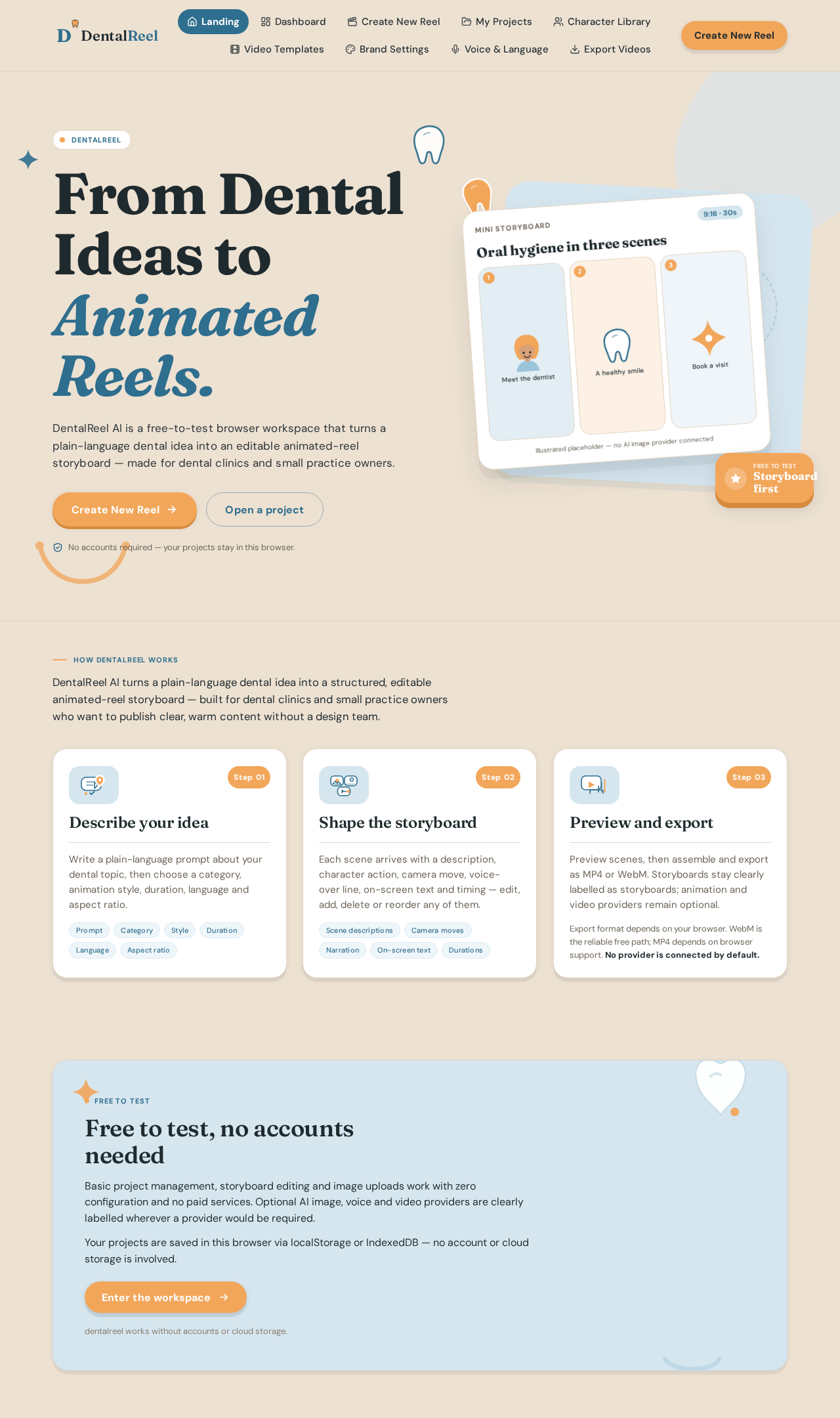
dentalreel
From Dental Ideas to
Animated Reels.
DentalReel AI is a free-to-test browser workspace that turns a plain-language dental idea into an editable animated-reel storyboard — made for dental clinics and small practice owners.
No accounts required — your projects stay in this browser.
Oral hygiene in three scenes
How DentalReel works
DentalReel AI turns a plain-language dental idea into a structured, editable animated-reel storyboard — built for dental clinics and small practice owners who want to publish clear, warm content without a design team.
- Step 01
Describe your idea
Write a plain-language prompt about your dental topic, then choose a category, animation style, duration, language and aspect ratio.
- Step 02
Shape the storyboard
Each scene arrives with a description, character action, camera move, voice-over line, on-screen text and timing — edit, add, delete or reorder any of them.
- Step 03
Preview and export
Preview scenes, then assemble and export as MP4 or WebM. Storyboards stay clearly labelled as storyboards; animation and video providers remain optional.
Export format depends on your browser. WebM is the reliable free path; MP4 depends on browser support. No provider is connected by default.
Free to test
Free to test, no accounts needed
Basic project management, storyboard editing and image uploads work with zero configuration and no paid services. Optional AI image, voice and video providers are clearly labelled wherever a provider would be required.
Your projects are saved in this browser via localStorage or IndexedDB — no account or cloud storage is involved.
dentalreel works without accounts or cloud storage.
dentalreel
From Dental Ideas to
Animated Reels.
DentalReel AI is a free-to-test browser workspace that turns a plain-language dental idea into an editable animated-reel storyboard — made for dental clinics and small practice owners.
No accounts required — your projects stay in this browser.
Oral hygiene in three scenes
How DentalReel works
DentalReel AI turns a plain-language dental idea into a structured, editable animated-reel storyboard — built for dental clinics and small practice owners who want to publish clear, warm content without a design team.
- Step 01
Describe your idea
Write a plain-language prompt about your dental topic, then choose a category, animation style, duration, language and aspect ratio.
- Step 02
Shape the storyboard
Each scene arrives with a description, character action, camera move, voice-over line, on-screen text and timing — edit, add, delete or reorder any of them.
- Step 03
Preview and export
Preview scenes, then assemble and export as MP4 or WebM. Storyboards stay clearly labelled as storyboards; animation and video providers remain optional.
Export format depends on your browser. WebM is the reliable free path; MP4 depends on browser support. No provider is connected by default.
Free to test
Free to test, no accounts needed
Basic project management, storyboard editing and image uploads work with zero configuration and no paid services. Optional AI image, voice and video providers are clearly labelled wherever a provider would be required.
Your projects are saved in this browser via localStorage or IndexedDB — no account or cloud storage is involved.
dentalreel works without accounts or cloud storage.
No comments yet. Be the first!