dentalreel
 Dr. Hirwa Kothari
**PROJECT: DentalReel AI** Build a fully functional, AI-powered web application called DentalReel AI that creates animated dental educational videos and promotional reels for dental clinics. **MAIN GOAL:** I want to build and test this application with a ₹0 budget. Do not require paid APIs, subscriptions, credit cards, or paid services for the basic features. Use free, open-source, or browser-native technologies wherever possible. ### 1. DESIGN Create a premium, modern, responsive dashboard using: * Warm ivory beige (#EDE1D2), white, and pastel blue. * Minimal, elegant design with rounded cards and subtle shadows. * Clean navigation and a professional dental aesthetic. * Desktop and mobile compatibility. Tagline: "From Dental Ideas to Animated Reels." ### 2. DASHBOARD Include: * Create New Reel * My Projects * Character Library * Video Templates * Brand Settings * Voice & Language * Export Videos ### 3. CREATE A REEL Let users enter a text prompt describing their desired video. Provide these options: **Categories:** Dental Awareness, Dental Implants, Root Canal Treatment, Gum Health, Oral Hygiene, Teeth Whitening, Smile Designing, Braces, Children's Dentistry, Dental Myths vs Facts, Funny Dental Reels, Clinic Promotion, Festival Greetings, Custom Video. **Animation styles:** High-quality 3D cartoon, Pixar-inspired original aesthetic, educational 3D animation, cute character animation, and minimal 3D motion graphics. Do not use copyrighted characters. **Duration:** 15, 30, 45, or 60 seconds. **Languages:** English, Hindi, Gujarati, and Hinglish. **Aspect ratios:** 9:16, 1:1, and 16:9. Allow users to select dentist and patient characters, add clinic branding, and generate a storyboard. ### 4. AI STORYBOARD GENERATOR Convert the user's prompt into a structured storyboard containing: * Scene-by-scene descriptions. * Character appearance and actions. * Camera movements. * Animation instructions. * Voice-over narration. * On-screen text and subtitles. * Scene durations. * Background music suggestions. * Final call to action. Allow users to edit, add, delete, rearrange, and preview scenes before exporting. If a real AI text-generation service is unavailable, implement a functional template-based storyboard generator rather than showing fake AI results. ### 5. CHARACTER LIBRARY Allow users to create and save reusable female dentists, male dentists, adult patients, children, and elderly patients. Store character descriptions, clothing, appearance, reference images, and notes. Allow users to reuse characters across projects. Be transparent about limitations in maintaining character consistency across AI-generated scenes. ### 6. VOICE AND SUBTITLES Support English, Hindi, Gujarati, and Hinglish narration. Allow users to edit scripts, upload audio, preview available browser voices, edit subtitles, and adjust subtitle timing. Use free browser speech synthesis where supported. Clearly identify unavailable voices instead of pretending they work. ### 7. VIDEO CREATION AND EXPORT Build a modular pipeline for: 1. Script generation. 2. Storyboard creation. 3. Scene image creation or upload. 4. Animation. 5. Voice-over and subtitles. 6. Scene transitions. 7. Video assembly and export. Support MP4 export if technically possible. Otherwise, offer a working alternative such as WebM and explain the limitation. Do not pretend that static images or storyboards are completed animated videos. Keep AI image, voice, and video generation providers optional so free or open-source alternatives can be integrated later. ### 8. PROJECT MANAGEMENT Allow users to create, save, rename, duplicate, reopen, search, and delete projects. Use localStorage or IndexedDB for the initial version. Keep the application functional without user accounts or cloud storage. ### 9. CLINIC BRANDING Create editable brand settings for: * Clinic name and logo. * Contact number. * Address. * Website. * Brand colors. * Social media handle. * Call-to-action text. Include this sample profile: Clinic: Smile Crest Dental & Implant Studio Tagline: Your Trusted Dental Partner Website: [www.smilecrestdental.com](http://www.smilecrestdental.com) Allow users to replace these details. ### 10. TECHNICAL REQUIREMENTS Use the technologies best supported by the development environment. Build reusable components, validate forms, handle errors, show generation progress, and save projects reliably. Never expose API keys in frontend code. Do not require paid services for basic project management, storyboard editing, or image uploads. ### 11. DEVELOPMENT PRIORITIES Build the application in stages: **Stage 1:** Functional dashboard, navigation, project creation, saving, and settings. **Stage 2:** Prompt-to-storyboard generation and scene editor. **Stage 3:** Character library, image uploads, narration, and subtitles. **Stage 4:** Scene preview, video assembly, and export. **Stage 5:** Optional integrations for real AI image, voice, and video generation. Start by implementing Stages 1 and 2 completely. Test the application and ensure its buttons and essential features work before adding more features. Do not build only a static mockup. Do not leave buttons nonfunctional. Clearly label prototype features and external API requirements. **FINAL GOAL:** Create a working, free-to-test foundation for DentalReel AI that can eventually generate professional, consistent 3D animated dental reels without requiring expensive subscriptions.


Comments (0)
Sign in to leave a comment
dentalreel
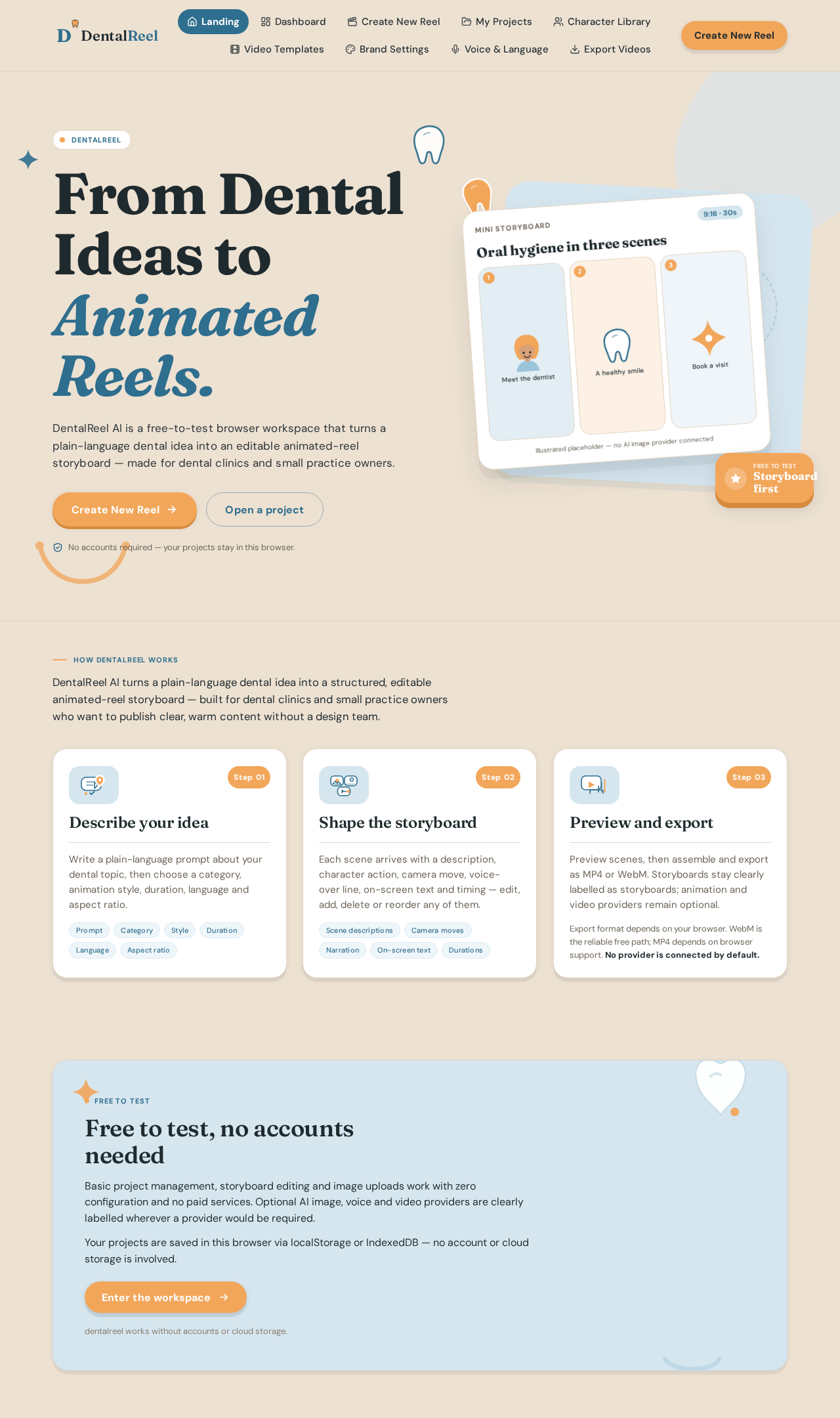
From Dental Ideas to
Animated Reels.
DentalReel AI is a free-to-test browser workspace that turns a plain-language dental idea into an editable animated-reel storyboard — made for dental clinics and small practice owners.
No accounts required — your projects stay in this browser.
Oral hygiene in three scenes
How DentalReel works
DentalReel AI turns a plain-language dental idea into a structured, editable animated-reel storyboard — built for dental clinics and small practice owners who want to publish clear, warm content without a design team.
- Step 01
Describe your idea
Write a plain-language prompt about your dental topic, then choose a category, animation style, duration, language and aspect ratio.
- Step 02
Shape the storyboard
Each scene arrives with a description, character action, camera move, voice-over line, on-screen text and timing — edit, add, delete or reorder any of them.
- Step 03
Preview and export
Preview scenes, then assemble and export as MP4 or WebM. Storyboards stay clearly labelled as storyboards; animation and video providers remain optional.
Export format depends on your browser. WebM is the reliable free path; MP4 depends on browser support. No provider is connected by default.
Free to test
Free to test, no accounts needed
Basic project management, storyboard editing and image uploads work with zero configuration and no paid services. Optional AI image, voice and video providers are clearly labelled wherever a provider would be required.
Your projects are saved in this browser via localStorage or IndexedDB — no account or cloud storage is involved.
dentalreel works without accounts or cloud storage.
No comments yet. Be the first!