00 LANDING
delta-script-prompt
byRiley Musgrave
Make me a delta script generator with a prompt


Comments (0)
Sign in to leave a comment
System Requirements
System Requirements Document for delta-script-prompt
1. Introduction
delta-script-prompt is a prompt-to-delta-script generator. A script author describes a desired change in a prompt, submits it, and receives a generated delta script they can read and inspect. The product's intent is narrow and exacting: turn a found instruction (the prompt) into a coded artefact (the delta script) and present that artefact as the hero subject — a printed plate, not a chat reply.
The audience is script authors who want a precise, inspectable change specification rather than a conversational toy. The emotional register is cool, exacting, and slightly archival: sparse metadata, one diagram doing all the work, and a single spot colour that carries meaning.
This document is the System Requirements Document for the product. It specifies the two accepted pages (Landing and Generator), the single accepted persona (Script Author), the generation lifecycle, and the visual and technical constraints that govern delivery.
Page 1 of 18
2. System Overview
delta-script-prompt is a small, two-surface web application backed by a shared FastAPI service. The Landing page is an anonymous public entry that explains the prompt-to-delta-script generator and routes to the generator. The Generator page is an anonymous, cohesive workspace where the Script Author enters a prompt, triggers generation, and views the resulting delta script in a dark code plate.
The backend calls a model provider through a LiteLLM gateway to produce the delta script from the submitted prompt. Application-owned persistent data lives in MariaDB; LiteLLM keeps its own state in PostgreSQL. The frontend is a React application.
Actors: one active human persona, the Script Author. The model provider (reached via LiteLLM) is a non-persona system actor that performs generation on the backend's behalf.
Removed from scope
- None. No concept from the authoritative requirement thread was removed.
Page 2 of 18
2a. Product Interpretation and Delivery Boundary
The product is delivered as a first-party web application with custom UI. Both accepted surfaces — Landing and Generator — are anonymously reachable; no account, sign-in, or identity establishment is required or implied by the accepted requirements. The Script Author's work is a single-session interaction: enter a prompt, generate, read the output. No durable per-user history, saved library, or account continuity is accepted, so none is introduced.
Generation is performed by the backend through the provisioned LiteLLM gateway. The model provider is an external dependency owned outside this product; the product owns the prompt input, the generation request, the loading and error states, and the presentation of the returned delta script. The delta script output is treated as a printed artefact rendered in a dark code plate with line numbers and an orange caret.
Everything described here is current. No future-horizon capabilities are accepted.
2b. Source Content Inventory
Not applicable — no reference directive with content_source was supplied.
2c. Page Content and Component Coverage
Page 3 of 18
Landing
- Information and state: The public entry surface. Presents the wordmark
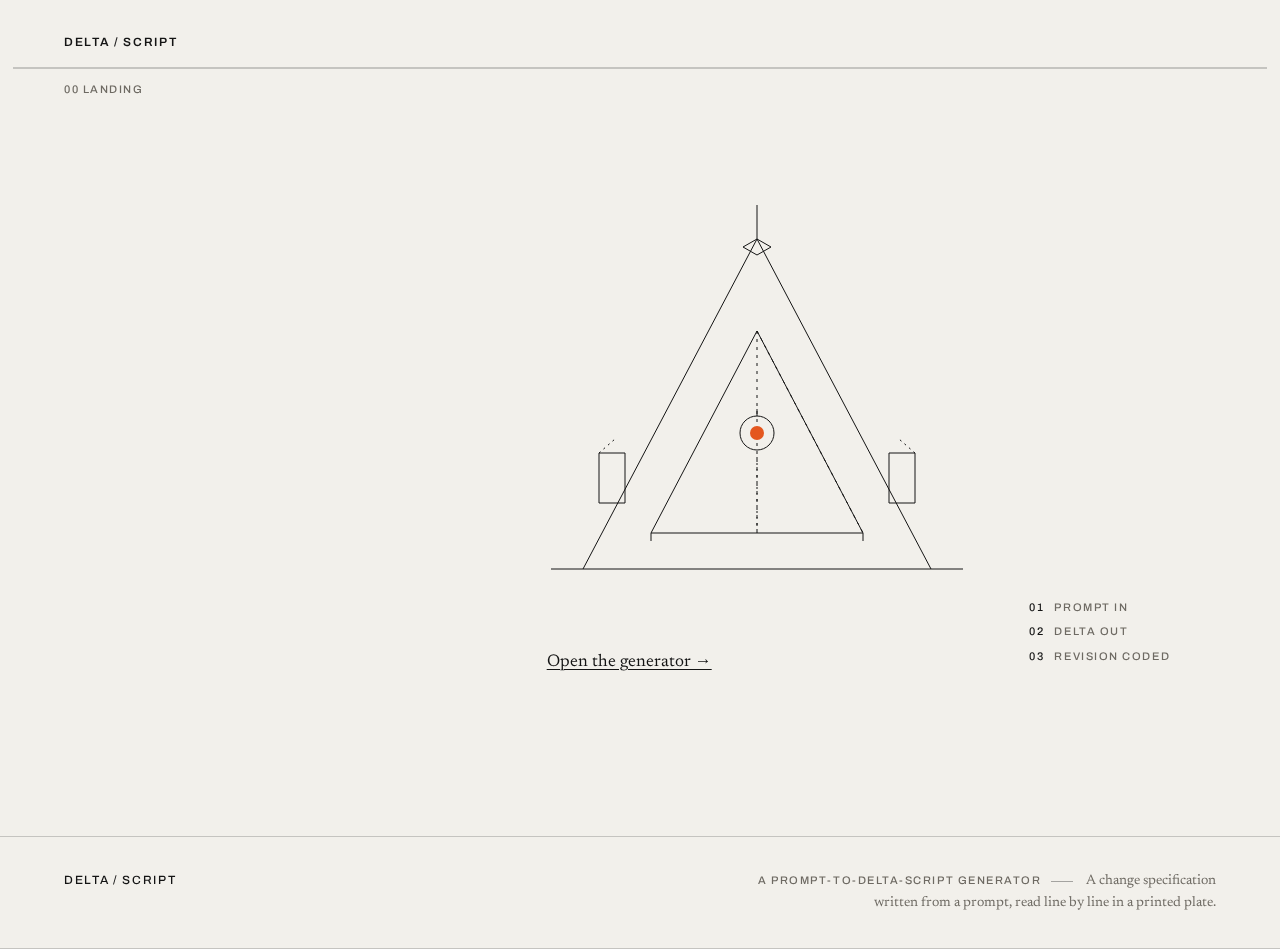
DELTA / SCRIPTset small and letterspaced in the top-left, a full-viewport-width hairline rule beneath it, a large centred geometric delta diagram (~420px, 1px black strokes, one orange node) in a vast quiet bone-paper field, and a narrow right-hand column of small uppercase metadata (PROMPT IN · DELTA OUT · REVISION CODED) aligned to the baseline grid. A numbered caption00 LANDINGsits above a full-bleed hairline rule. - Primary action: A single underlined
Open the generator →link, set at body size, flush left under the diagram, navigating to the Generator. - Supporting actions: None beyond the single entry link.
- Domain entities: None persisted; the page is static explanatory content plus the delta diagram.
- Component responsibilities:
- Wordmark component — uppercase, letterspaced, top-left.
- Full-bleed rule component — 1px
#141414at 20% opacity, edge to edge. - Delta diagram component — thin-stroke geometric delta/triangle derived from a data-flow schematic, 1px
#141414lines, one#E4571Fnode; the only orange on the page besides the entry link. - Metadata column — small uppercase labels aligned to the baseline grid.
- Entry link — underlined body-size link to the Generator.
- States:
- Loading: not applicable (static content).
- Empty: not applicable.
- Success: the composed record-sleeve layout renders at 375px, 768px, and 1280px with all readable text and the entry link fully inside the viewport and container.
- Error: not applicable.
- Recovery: not applicable.
Page 4 of 18
Generator
- Information and state: The working surface, laid out as a two-pane split on a strict 12-column grid with a wide left metadata rail (columns 1–3) and a dominant right field (columns 4–12). Pane one is the prompt input above a horizontal rule; pane two is the output plate below. Each pane carries its own numbered caption in the rail (
01 PROMPT,02 DELTA SCRIPT) with a hairline rule running edge to edge above it. The active pane's rule is thickened to 2px and tinted orange as a wayfinding device. - Primary action: Submit the entered prompt to generate a delta script.
- Supporting actions: Edit the prompt text; re-submit after an error; read and scroll the generated output.
- Domain entities:
- Prompt — the free-text instruction entered by the Script Author.
- Delta script — the generated text output returned by the backend and rendered in the dark code plate.
- Component responsibilities:
- Metadata rail — numbered uppercase captions and step labels.
- Prompt field — multi-line free-text input, 2px radius, hairline border.
- Generate control — a 2px-radius rectangle with an uppercase letterspaced label and a 1px offset underline on hover; never a filled pill; sits flush left on the grid under the prompt field.
- Output plate — a 1px framed plate with
#141414ground,#F2F0EBtext, JetBrains Mono 13px at 1.6 line-height, line numbers in muted grey, and a 1px orange caret blinking at the insertion point.
- States:
- Loading: after submission, the output plate shows a resolving state; the generate control is disabled while generation is in flight; a 400ms crossfade resolves the plate when output arrives.
- Empty: before any submission, the output plate shows an empty framed plate with its
02 DELTA SCRIPTcaption and no code.
Page 5 of 18
- Success: the generated delta script renders in the dark code plate with line numbers and the orange caret.
- Error: if generation fails, the output plate shows an error message in place of code, the prompt text is preserved, and the generate control is re-enabled so the Script Author can retry.
- Recovery: re-submitting the preserved prompt retries generation; the plate crossfades to the new result on success.
Page 6 of 18
3. Functional Requirements
FR-1 — Generate a delta script from a prompt (explicit) As a Script Author, I should enter a prompt describing a desired change and submit it so that the system generates a delta script from it.
- Trigger/input: the Script Author types free text into the prompt field on the Generator and activates the generate control.
- Observable result: the backend receives the prompt, calls the model provider through the LiteLLM gateway, and returns a generated delta script; the output plate resolves to show it.
- Access state: anonymous; no identity required.
- Failure/recovery: if the provider call fails or returns no usable output, the output plate shows an error, the prompt is preserved, and the generate control is re-enabled for retry.
- Continuation: on success the Script Author can read the output and edit the prompt to generate again.
FR-2 — View the generated delta script output (explicit) As a Script Author, I should view the generated delta script so that I can read and inspect the resulting change specification.
- Trigger/input: a successful generation response.
- Observable result: the delta script renders in the dark code plate with
#141414ground,#F2F0EBtext, JetBrains Mono 13px at 1.6 line-height, line numbers in muted grey, and a 1px orange caret at the insertion point. - Access state: anonymous; no identity required.
- Failure/recovery: if the output is empty or malformed, the plate shows an error state rather than a blank success.
- Continuation: the Script Author can scroll the plate to read the full output and return to the prompt to generate another.
Page 7 of 18
FR-3 — Reach the generator from the public entry (required_inference) As a Script Author, I should understand what the product does from the Landing page and open the generator from it.
- Trigger/input: the Script Author opens the Landing page and activates the
Open the generator →link. - Observable result: the Generator page opens with the prompt field ready for input.
- Access state: anonymous; no identity required.
- Failure/recovery: if navigation fails, the link remains available to retry.
- Continuation: the Script Author proceeds to enter a prompt.
4. User Personas
Page 8 of 18
Script Author
- Product context: A developer-facing user who needs a precise, inspectable change specification. They arrive at delta-script-prompt with a change in mind and want to describe it in a prompt and receive a delta script they can read line by line — not a conversational reply.
- Primary goal: Produce a delta script by describing the desired change in a prompt, generating the script, and reviewing the resulting output as the successful outcome.
- Distinct accepted responsibilities: Entering the prompt, triggering generation, reading and inspecting the generated delta script, and retrying after a failure. The Script Author is the sole active human actor; there is no reviewer, approver, or counterparty in the accepted scope.
- Relevant inputs or decisions: The prompt text (free-form instruction) and the decision to submit, re-submit, or edit the prompt after reading the output.
- Interactions with other accepted participants: None beyond the system's generation response; the model provider is a non-persona system actor.
- Observable success: A delta script appears in the dark code plate, rendered with line numbers and the orange caret, and is fully readable.
5. Core User Flows
Page 9 of 18
Flow A — Discover the product and open the generator
- The Script Author opens the Landing page in a browser. No sign-in is required.
- The page renders the
DELTA / SCRIPTwordmark top-left, a full-width hairline rule, the large centred delta diagram with its single orange node, the right-hand metadata column (PROMPT IN · DELTA OUT · REVISION CODED), and the00 LANDINGcaption above its rule. - The Script Author reads the composition and activates the underlined
Open the generator →link. - The Generator page opens with the prompt field ready for input.
- Failure/recovery: if navigation fails, the link remains available and the Script Author retries.
Page 10 of 18
Flow B — Generate a delta script from a prompt
- On the Generator, the Script Author sees the two-pane split:
01 PROMPTabove the rule with the prompt field, and02 DELTA SCRIPTbelow with an empty framed output plate. - The Script Author types a prompt describing the desired change into the prompt field.
- The Script Author activates the generate control (2px-radius rectangle, uppercase letterspaced label, flush left under the prompt field).
- The generate control becomes disabled while generation is in flight; the output plate shows a resolving state.
- The backend sends the prompt to the model provider through the LiteLLM gateway and receives the generated delta script.
- The output plate crossfades over 400ms to the resolved delta script, rendered in the dark code plate with line numbers and the blinking orange caret.
- The Script Author reads and scrolls the output.
- Failure/recovery: if generation fails, the output plate shows an error in place of code, the prompt text is preserved, and the generate control is re-enabled; the Script Author re-submits to retry.
- Continuation: the Script Author edits the prompt and generates again, or returns to the Landing page.
Page 11 of 18
6. Visuals Colors and Theme
Muse: Peter Saville. Headline: One coded artefact, a lot of silence, and a spot colour that means something.
Mode: Light mode as the primary surface; dark code inserts inside the output plate.
Colour tokens (exact):
| Role | Hex | Usage |
|---|---|---|
| Background | #F2F0EB | Bone-paper ground |
| Surface | #E7E4DD | Slightly darker card stock |
| Text | #141414 | Near-black ink for all type and rules |
| Primary | #141414 | Primary ink |
| Accent | #E4571F | Factory-orange spot colour — active state, output caret, the single diagram node only; never a button fill everywhere |
| Muted | #6E6A63 | Warm grey for metadata and line numbers |
| Code ground | #141414 | Dark code plate ground |
| Code text | #F2F0EB | Code plate text (contrast above 7:1 at body size) |
| Code caret | #E4571F | Orange caret in the code plate |
Page 12 of 18
Typography:
- Headings: Archivo (grotesque), 500–600 weight, uppercase for labels and the wordmark with +0.14em tracking; sentence case for the one display line at 44–72px with tight -0.02em leading. Hierarchy comes from weight, rules, and position, not size inflation.
- Body: Newsreader.
- Code: JetBrains Mono at 13px with 1.6 line-height.
- Scale: 1.25 modular — 64 / 40 / 28 / 20 / 16 / 14 / 12. Metadata and labels at 11–12px uppercase with wide tracking.
Shape language: Almost no radius — 0px on panels, 2px on inputs and the generate control. Hairline rules at 1px in #141414 at 20% opacity, full-bleed horizontal dividers edge to edge, and one thin 1px framed plate around the output. No shadows, no pills, no blobs.
Layout: Strict 12-column grid on bone paper with a wide left metadata rail (columns 1–3) holding small uppercase labels and numbered steps, and a dominant right field (columns 4–12) holding the prompt and the output plate. Landing is a single centred artefact — an oversized abstract delta mark — with silence around it and metadata blocks aligned to the baseline grid. The Generator is a two-pane split: prompt above a horizontal rule, output plate below, each with its own numbered caption (01 / 02) in the rail.
Imagery: One abstract diagram as the identity — a thin-stroke geometric delta/triangle derived from a data-flow schematic, drawn in 1px #141414 lines with a single orange node. Output rendered in a dark code plate with line numbers. No photography, no illustration, no stock people.
Accessibility: Readable text and controls stay whole at 375px, 768px, and 1280px, wrapping or scaling (e.g. clamp(...)) to fit; no element covers any part of them. The generic indigo/blue-on-white SaaS template is forbidden.
Page 13 of 18
7. Signature Design Concept
The Landing first screen is not a SaaS hero — it is a record sleeve. A bone-paper field (#F2F0EB) carries the wordmark DELTA / SCRIPT set small and letterspaced in the top-left, with a thin rule running the full viewport width beneath it. The dominant element is a large centred geometric delta diagram (~420px, 1px black strokes, one orange node) sitting inside a vast quiet field — roughly 60% empty bone-paper space. To its right, a narrow column of small uppercase metadata (PROMPT IN · DELTA OUT · REVISION CODED) aligns to the baseline grid. The only orange on screen is the diagram node and a single underlined Open the generator → link set at body size, flush left under the diagram. Nothing is centred as a headline-plus-button stack; the composition reads like a printed plate.
Signature moves carried through the product:
- Oversized abstract delta diagram as the sole hero subject — 1px black strokes, one orange node, floating in empty bone-paper space with metadata columns aligned to its baseline.
- Numbered metadata rail: every section and both generator panes carry a small uppercase caption (
00 LANDING,01 PROMPT,02 DELTA SCRIPT) with a hairline rule running edge to edge above it. - Dark code plate for the generated delta script: black ground, bone text, JetBrains Mono 13px, line numbers in muted grey, and a 1px orange caret blinking at the insertion point — the output is a printed artefact, not a chat bubble.
- Full-bleed horizontal rules as the only section divider, with the active section's rule thickened to 2px and tinted orange — a wayfinding device borrowed from a record sleeve's colour code.
- Generate control is a 2px-radius rectangle with an uppercase letterspaced label and a 1px offset underline on hover, never a filled pill; it sits flush left on the grid under the prompt field.
Page 14 of 18
8. Interaction Model & Motion Direction
Interaction Model: Static Motion Tempo: still Hero Dimensionality: flat
Landing Hero Motion Brief
- Focal subject: the oversized geometric delta diagram (~420px, 1px
#141414strokes, one#E4571Fnode) centred in the bone-paper field, with the wordmark top-left and the metadata column to its right. - Input → transformation → outcome thesis: the page is composed, not animated. The single orange node marks the point where a prompt becomes a delta; the
Open the generator →link is the only transition, carrying the Script Author from the diagram to the prompt field. - Motion vocabulary: precise 160ms fades on state changes; a single 400ms crossfade when the output plate resolves; a blinking 1px orange caret in the code plate. No parallax, no marquees, no hover-lift.
- Composed first frame: wordmark
DELTA / SCRIPTtop-left, full-width hairline rule beneath, the delta diagram centred with its one orange node, metadata column right-aligned to the baseline grid, and the underlined entry link flush left under the diagram. - Reduced-motion state: all fades collapse to instant swaps and the caret becomes static; the layout is unchanged and fully readable.
Page 15 of 18
9. Non-Functional Requirements
- NFR-1 — Anonymous access (explicit via page contract): Both Landing and Generator are reachable without sign-in; no account, session, or identity establishment is required.
- NFR-2 — Provider isolation (required_inference): Model-provider calls are made by the backend through the provisioned LiteLLM gateway; the frontend never holds provider credentials.
- NFR-3 — Output legibility (explicit via creative direction): The dark code plate maintains contrast above 7:1 at body size (
#F2F0EBon#141414). - NFR-4 — Responsive integrity (explicit via creative direction): Readable text and controls remain whole and inside the viewport and container at 375px, 768px, and 1280px.
- NFR-5 — Reduced motion (explicit via creative direction): With
prefers-reduced-motion, fades collapse to instant swaps and the caret is static. - NFR-6 — Failure transparency (required_inference): Generation failures surface as an error state in the output plate with the prompt preserved and the generate control re-enabled.
Page 16 of 18
10. Tech Stack
- Frontend: React application UI.
- Backend: shared FastAPI process for application APIs and domain modules, including the generation endpoint that calls the model provider.
- Database: MariaDB for application-owned persistent data.
- Model gateway: LiteLLM gateway for the backend's model-provider calls.
- Gateway storage: PostgreSQL supporting LiteLLM; separate from application-owned storage.
- Orchestration: docker-compose with the services
backend,database,frontend,litellm, andpostgres.
11. Assumptions and Constraints
- A-1 (assumption): The delta script is returned as plain text and rendered verbatim in the code plate; no diff application, file writing, or repository integration is accepted.
- A-2 (assumption): Generation is synchronous from the Script Author's perspective — submit, wait, read — with no background job or notification.
- A-3 (constraint): No durable per-user history, saved library, or account continuity is introduced; the accepted surfaces are anonymous.
- A-4 (constraint): The generic indigo/blue-on-white SaaS template is forbidden; no blue, indigo, or violet accent and no gradients.
- A-5 (constraint): The output is never framed as a chat bubble or conversational UI.
Page 17 of 18
12. Glossary
- Delta script: The generated text output describing a change, rendered in the dark code plate.
- Prompt: The free-text instruction the Script Author enters to describe the desired change.
- Delta diagram: The thin-stroke geometric delta/triangle with a single orange node that serves as the product's sole hero imagery.
- Code plate: The 1px framed dark output surface with line numbers and an orange caret.
- Metadata rail: The left column (grid columns 1–3) holding numbered uppercase captions and step labels.
- LiteLLM gateway: The provisioned model gateway through which the backend calls the model provider.
Page 18 of 18
00 LANDING
No comments yet. Be the first!