deep-spicy
 Kia Rio
هاي

Comments (0)
Sign in to leave a comment
System Requirements
System Requirements Document for deep-spicy
1. Introduction
deep-spicy is an Android game, delivered as an installable APK package. The product intent is deliberately narrow and comes directly from the authoritative user requirement: build an Android game and ship it as an APK. No genre, theme, or specific gameplay mechanic was specified by the user, so this document treats the game itself as the core deliverable and defines only the mechanics that are indispensable to make an installable, playable Android game usable end to end.
The audience is a Player — a person who installs the APK on an Android device, launches it, plays a session through the game's core interactive loop, and reaches a win/lose or score outcome. The product is Arabic-first: the interface defaults to Arabic with right-to-left layout, and a language toggle allows switching to Latin/left-to-right presentation.
This document preserves the explicit hard constraint that delivery format must be an Android APK, and it does not add adjacent product capabilities (no accounts, no storefront, no social features, no monetization) that the user did not request.
2. System Overview
deep-spicy is a single Android application distributed as an APK. The player installs the package on an Android device, launches the app, and is presented with a playable entry screen. From there the player starts a session, plays the game's core loop using touch input, and reaches a results outcome that shows the session's score and best score, with the option to play again or return to the entry screen.
Actors
- Player (human, active) — installs the APK, launches the game, plays sessions, and views results.
- Android OS / device (non-persona system actor) — hosts the installed APK, provides touch input, safe-area insets, and lifecycle events.
- Build/distribution toolchain (non-persona system actor) — produces the signed APK artifact that the player installs.
Accepted behavior
- The game is delivered as an Android APK.
- The player installs the APK on an Android device before launching the game.
- The player can start a session from the entry screen.
- The player plays the game's core interactive loop with touch input.
- The player reaches a win/lose or score outcome at the end of a session.
- The player can continue into a new session from the results outcome.
- The interface is Arabic-first with RTL layout and a language toggle.
Ownership and exclusions
- The three screens — Landing, Game, Results — are first-party custom pages owned by the application.
- No account, login, or identity system is part of the product; all three pages are anonymously reachable.
- No backend service, network API, or cloud persistence is required by the accepted requirements. Session state (current score, best score) is local to the device.
- No app store listing, in-app purchase, advertising, or social sharing is in scope.
2a. Product Interpretation and Delivery Boundary
The product is a self-contained Android game. Its delivery boundary is the APK artifact: the player obtains the APK, installs it on an Android device, and runs it locally. There is no server-side component in the accepted scope, and no online account is required to play.
The current delivery horizon covers the three in-app screens (Landing, Game, Results) and the APK packaging itself. Everything the player does — starting a session, playing, seeing a result, and starting again — happens on the device. The language toggle is an in-app control, not a separate destination.
Future ideas that were not accepted as current requirements (for example additional game modes, online leaderboards, or store distribution) are explicitly out of the current scope and are not represented as pages or capabilities in this document.
2b. Source Content Inventory
Not applicable. No reference directive in the authoritative sources declares a content_source, so no source content inventory is included.
2c. Page Content and Component Coverage
Landing
- Information / state: The game's wordmark
deep-spicy, a single primary call to action to start playing, and the current language state (Arabic default, Latin alternative). No score or session data is shown here. - Primary action: Start a game session, which navigates to the Game page.
- Supporting actions: Toggle the interface language between Arabic (RTL) and Latin (LTR).
- Domain entities: Language preference (Arabic | Latin); session (not yet started).
- Component responsibilities:
- Wordmark — displays the product name as the entry identity.
- Primary CTA — the single, oversized start control that begins a session.
- Language toggle — switches the active language and mirrors the layout direction.
- States:
- Loading: brief app-launch state while the entry screen initializes.
- Empty: not applicable — the entry screen always has content.
- Success: the entry screen is interactive and the CTA starts a session.
- Error / recovery: if the app fails to initialize, the player can relaunch the app; no partial state is persisted from a failed launch.
- Access: Anonymous; no identity required.
Game
- Information / state: The live session state — current score, and whether the session is active or paused.
- Primary action: Play the core interactive loop using touch input.
- Supporting actions: Pause the session; resume the session.
- Domain entities: Session (active | paused | ended); current score; player input.
- Component responsibilities:
- Playfield — the interactive area that receives touch input and drives the core loop.
- Score display — shows the current score for the active session.
- Pause control — pauses and resumes the session.
- States:
- Loading: brief transition from Landing into the first playable frame.
- Empty: not applicable — a session always begins with a defined starting state (score 0).
- Success: the player plays the loop and the session reaches an end condition, navigating to Results.
- Error / recovery: if the session is interrupted (for example the app is backgrounded), the player can resume or restart the session from the Game page; no corrupted partial score is carried into Results.
- Access: Anonymous; no identity required.
Results
- Information / state: The completed session's outcome — the session score and the best score achieved on the device.
- Primary action: Start a new session, which returns to the Game page.
- Supporting actions: Return to the Landing page.
- Domain entities: Completed session; session score; best score.
- Component responsibilities:
- Outcome display — presents the win/lose or score outcome of the completed session.
- Score display — shows the session score and the best score.
- Primary action control — starts a new session.
- Secondary action control — returns to the entry screen.
- States:
- Loading: brief transition from Game into the results view.
- Empty: not applicable — Results is only reached after a completed session.
- Success: the outcome, session score, and best score are shown, and the player can start a new session or return to Landing.
- Error / recovery: if the results view fails to render, the player can return to Landing and start a new session; the best score is not corrupted by a failed render.
- Access: Anonymous; no identity required.
3. Functional Requirements
Each requirement is stated as a story point with provenance, lifecycle facts, and observable acceptance.
FR-1 — Android game delivered as an APK As a Player, I should receive the game as an installable Android APK package, so that I can install and play it on my Android device.
- Provenance: explicit
- Trigger / input: the build produces the game artifact.
- Observable result: a signed Android APK package containing the game is produced.
- Access state: not applicable (build-time artifact).
- Failure / recovery: if the build fails, no APK is produced and the build must be corrected and re-run.
- Continuation: the produced APK is the artifact the player installs (FR-2).
FR-2 — Install the APK on an Android device As a Player, I should install the delivered APK on my Android device, so that the game is available to launch.
- Provenance: required_inference
- Trigger / input: the player opens the APK on an Android device and confirms installation.
- Observable result: the game appears as an installed application on the device.
- Access state: anonymous; no account required.
- Failure / recovery: if installation is blocked or fails, the player can retry installation after enabling installation from the source; no partial install state is relied upon.
- Continuation: the player launches the installed game (FR-3).
FR-3 — Launch the game to the entry screen As a Player, I should launch the installed game and see the entry screen, so that I can begin playing.
- Provenance: required_inference
- Trigger / input: the player taps the game's launcher icon.
- Observable result: the Landing page is displayed with the wordmark, the start CTA, and the language toggle.
- Access state: anonymous; no identity required.
- Failure / recovery: if the app fails to initialize, the player can relaunch it; no session state is assumed from a failed launch.
- Continuation: the player starts a session (FR-4) or toggles language (FR-8).
FR-4 — Start a game session As a Player, I should start a game session from the entry screen, so that I can play.
- Provenance: required_inference
- Trigger / input: the player activates the primary start CTA on the Landing page.
- Observable result: the Game page opens with a fresh session at its defined starting state (score 0).
- Access state: anonymous; no identity required.
- Failure / recovery: if the session fails to start, the player can retry from the Landing page.
- Continuation: the player plays the core loop (FR-5).
FR-5 — Play the core interactive loop with touch input As a Player, I should play the game's core interactive loop using touch input, so that I can progress through a session.
- Provenance: explicit (the game is the product's core deliverable; the loop is its indispensable mechanic)
- Trigger / input: the player's touch input on the playfield.
- Observable result: the session state advances and the current score updates in response to play.
- Access state: anonymous; no identity required.
- Failure / recovery: if the session is interrupted (for example the app is backgrounded), the player can resume or restart the session from the Game page.
- Continuation: the session reaches an end condition (FR-6).
FR-6 — Reach a win/lose or score outcome As a Player, I should reach a win/lose or score outcome at the end of a session, so that I know how I did.
- Provenance: required_inference
- Trigger / input: the session's end condition is met during play.
- Observable result: the session ends and the Results page is shown with the session outcome and score.
- Access state: anonymous; no identity required.
- Failure / recovery: if the results view fails to render, the player can return to Landing and start a new session.
- Continuation: the player starts a new session (FR-7) or returns to Landing (FR-9).
FR-7 — Continue into a new session As a Player, I should start a new session from the results outcome, so that I can keep playing.
- Provenance: required_inference
- Trigger / input: the player activates the primary action on the Results page.
- Observable result: a new session begins on the Game page at its defined starting state.
- Access state: anonymous; no identity required.
- Failure / recovery: if the new session fails to start, the player can retry from the Results page or return to Landing.
- Continuation: the player plays the new session (FR-5).
FR-8 — Toggle the interface language As a Player, I should toggle the interface language between Arabic and Latin, so that I can read the game in my preferred language.
- Provenance: explicit (Arabic-first interface with a language toggle)
- Trigger / input: the player activates the language toggle on the Landing page.
- Observable result: the interface language switches, and the layout direction mirrors accordingly (Arabic = RTL, Latin = LTR).
- Access state: anonymous; no identity required.
- Failure / recovery: if the toggle does not apply, the player can retry; the previously active language remains usable.
- Continuation: the player continues on the current page in the selected language.
FR-9 — Return to the entry screen As a Player, I should return to the entry screen from the results outcome, so that I can leave the session and start fresh later.
- Provenance: required_inference
- Trigger / input: the player activates the secondary action on the Results page.
- Observable result: the Landing page is displayed.
- Access state: anonymous; no identity required.
- Failure / recovery: if navigation fails, the player can relaunch the app.
- Continuation: the player can start a new session (FR-4) or exit the app.
FR-10 — Pause and resume a session As a Player, I should pause and resume an active session, so that I can interrupt play without losing my session.
- Provenance: required_inference
- Trigger / input: the player activates the pause control during an active session, and later the resume control.
- Observable result: the session state changes between active and paused, and play continues from the paused state on resume.
- Access state: anonymous; no identity required.
- Failure / recovery: if the session cannot be resumed, the player can restart the session from the Game page.
- Continuation: the player continues the session (FR-5) or ends it (FR-6).
4. User Personas
Player
Product context. The Player is the sole active human actor in deep-spicy. They have obtained the game's APK and installed it on an Android device. They open the game to play, not to configure or manage anything — there is no account, no profile, and no setup step beyond installation.
Primary goal. To install the game, start playing quickly, and complete a session with a clear outcome they can understand and try to beat.
Distinct accepted responsibilities.
- Installing the delivered APK on an Android device (FR-2).
- Launching the game to its entry screen (FR-3).
- Starting a session from the entry screen (FR-4).
- Playing the core interactive loop with touch input (FR-5).
- Reaching a win/lose or score outcome (FR-6).
- Continuing into a new session from the results outcome (FR-7).
- Toggling the interface language between Arabic and Latin (FR-8).
- Returning to the entry screen from the results outcome (FR-9).
- Pausing and resuming an active session (FR-10).
Relevant inputs or decisions. The Player decides when to start a session, how to play within the loop, whether to pause, whether to continue into a new session or return to the entry screen, and which interface language to use.
Interactions with other accepted participants. The Player is the only active human participant. The Android OS/device is a non-persona system actor that hosts the installed APK, supplies touch input, safe-area insets, and lifecycle events. The build/distribution toolchain is a non-persona system actor that produces the APK the Player installs. No other human participant is affected by the Player's actions.
Observable success. The Player installs the APK, launches the game, plays a session, sees a clear outcome with their score and best score, and can immediately start another session or return to the entry screen.
Source-backed constraints. The Player's device is Android, and the game reaches them as an APK. The interface is Arabic-first with RTL layout and a language toggle. No account or identity is required.
5. Core User Flows
Flow A — Install and first launch (Player)
- The Player obtains the deep-spicy APK produced by the build (FR-1).
- The Player opens the APK on their Android device and confirms installation (FR-2).
- The game appears as an installed application on the device.
- The Player taps the game's launcher icon (FR-3).
- The Landing page is displayed with the wordmark, the start CTA, and the language toggle, in Arabic with RTL layout by default.
- Failure / recovery: if installation is blocked or fails, the Player retries after enabling installation from the source; if the app fails to initialize, the Player relaunches it.
- Next step: the Player starts a session (Flow B) or toggles the language (Flow D).
Flow B — Play a session (Player)
- Starting context: the Player is on the Landing page with the game installed and launched.
- The Player activates the primary start CTA (FR-4).
- The Game page opens with a fresh session at its defined starting state (score 0).
- The Player plays the core interactive loop using touch input, and the current score updates in response to play (FR-5).
- The Player may pause the session at any point; the session state changes to paused, and on resume play continues from the paused state (FR-10).
- The session reaches its end condition (FR-6).
- Failure / recovery: if the session is interrupted (for example the app is backgrounded), the Player resumes or restarts the session from the Game page; no corrupted partial score is carried into Results.
- Next step: the Results page is shown (Flow C).
Flow C — Review the outcome and continue (Player)
- Starting context: the Player has just completed a session.
- The Results page is displayed with the session outcome (win/lose or score), the session score, and the best score on the device (FR-6).
- The Player reads the outcome and compares the session score with the best score.
- The Player chooses one of two continuations:
- Activate the primary action to start a new session, which returns to the Game page at its defined starting state (FR-7); or
- Activate the secondary action to return to the Landing page (FR-9).
- Failure / recovery: if the results view fails to render, the Player returns to Landing and starts a new session; the best score is not corrupted by a failed render.
- Next step: the Player plays another session (Flow B) or leaves the game from the Landing page.
Flow D — Switch interface language (Player)
- Starting context: the Player is on the Landing page.
- The Player activates the language toggle (FR-8).
- The interface language switches between Arabic and Latin, and the layout direction mirrors accordingly (Arabic = RTL, Latin = LTR).
- Failure / recovery: if the toggle does not apply, the Player retries; the previously active language remains usable.
- Next step: the Player continues on the current page in the selected language, then starts a session (Flow B).
6. Visuals, Colors and Theme
The creative direction is authoritative for this section. It names Bruno Simon as the muse and the headline idea: a playable world, built for thumbs. The register is a mobile game as a toy you hold — tactile, bright, immediate, forgiving — with playful discovery rather than tension or prestige as the emotional target. The product is Arabic-first, so the visual language must read right-to-left as naturally as left-to-right, with type that carries warmth in Arabic script.
Palette (light mode)
| Role | Hex | Usage |
|---|---|---|
| Background | #FFF3E2 | Warm cream ground — the "table" the toy sits on (~60%) |
| Surface | #FFFFFF | Crisp white cards and score tiles (~20%) |
| Text | #1B1A2E | Ink for all readable type (13.6:1 on cream) |
| Primary | #FF5A5F | Coral — primary action and player token (~10%) |
| Accent | #FFC93C | Lemon — reward/score accent and highlight on interactive shapes (~7%) |
| Muted | #6B6478 | Secondary text and subdued labels |
| Secondary (scene only) | #4ECDC4 (mint), #5AA9FF (sky) | Low-poly scene material only (~3%); never used as text |
Proportions: ~60% cream ground, ~20% white surface, ~10% coral, ~7% lemon, ~3% mint/sky. No blue-indigo anywhere in the UI layer; sky blue is reserved for 3D geometry only.
Typography
- Headings: Baloo Bhaijaan 2 — a rounded, heavy Arabic + Latin family that reads like a toy-box label and sets Arabic script with the same chunky warmth as Latin, so
العب الآنandPLAY NOWsit at the same visual weight. Headings at weight 800, tight tracking (-0.01em), sentence case in Latin and unlettered Arabic. - Body: Nunito at 400/700, generous 1.65 line-height, 1.9 for Arabic paragraphs.
- Type scale: 1.25 modular with a display jump — 34 / 48 / 64 / 88 / 120px. Mobile hero 48px, tablet 64px, desktop 120px (
clamp(48px, 9vw, 120px)). Body 16/18/20px, labels 13px, score numerals 56px mobile → 96px desktop.
Shape language
- Soft toy geometry: 18–28px radii on every card and button, full-pill buttons (999px), and low-poly faceted shapes with visible flat planes — triangles and trapezoids stacked into chunky objects, never smooth spheres.
- Offset shadows
0 6px 0 rgba(27,26,46,0.18)give panels a physical, pressable thickness. - Hard 2px ink outlines on interactive shapes so a 375px screen still reads the affordance.
Layout
Three screens, one continuous diorama. Landing: a full-bleed low-poly scene (floating island, blocks, a ramp) with the wordmark and a single giant pill CTA resting on the island's surface, plus a language toggle pinned top-right (Arabic default, RTL mirroring the whole layout). Game: the scene becomes the playfield; a minimal HUD — score chip top-centre, pause chip top-left (mirrored to top-right in RTL) — floats over it at 16px inset from the safe area, with the player's thumb controls in the bottom third. Results: the scene dims to 40% and a white scoreboard card slides up from the bottom edge, showing score, best, and two pill actions. Grid is 4/8pt; content column maxes at 1120px on desktop but the scene always bleeds edge-to-edge.
Imagery
No photography, no stock people. Everything visible is built geometry: low-poly 3D props (blocks, cones, a ramp, a spinning collectible), faceted in flat-shaded material with three-tone shading per face. Decorative spot art on the results screen is flat vector confetti and chunky star shapes in coral, lemon and mint. Icons are 2px-outline rounded pictograms with the same corner radius as the cards.
7. Signature Design Concept
The landing screen is a playable diorama, not a headline block.
A full-bleed low-poly island floats on a warm cream sky (#FFF3E2), rendered as a real-time 3D scene, with the coral player token sitting on it and gently bobbing. The wordmark deep-spicy is set in Baloo Bhaijaan 2 at clamp(48px, 9vw, 120px), ink on cream, placed on the island's upper plateau — it is a physical object in the scene, casting a soft offset shadow, not an overlay. Beneath it, resting on the island surface, is one oversized coral pill CTA (العب الآن / PLAY) at 64px tall on mobile and 80px on desktop, pinned so it never leaves the viewport. A lemon chip in the top-right (top-left in RTL) toggles language.
There is no centred headline + subtext + blue button stack and no gradient blob: the hero is a place you are about to touch. The player token doubles as the cursor — on desktop it follows the pointer with spring physics and squashes on contact; on mobile it is the drag target, so the landing screen is already a tutorial for the game's input. This concept only recomposes accepted content, states, and controls (wordmark, start CTA, language toggle, player token) and introduces no new behavior, page, or destination.
8. Interaction Model & Motion Direction
Interaction Model: Animated Motion Tempo: expressive Hero Dimensionality: webgl
Landing Hero Motion Brief
- Focal subject: the low-poly floating island with the coral player token resting on it, the wordmark set as a physical object on the island's upper plateau, and the oversized coral pill CTA resting on the island surface.
- Input → transformation → outcome thesis: the player's pointer or touch moves the coral token across the island with spring physics and squash-and-stretch on contact; the island responds with a single slow idle bob; the outcome is that the entry screen has already taught the player the game's input before they press the CTA to start a session.
- Motion vocabulary: physics-driven and bouncy but purposeful — real inertia on the player token, squash-and-stretch on collision, buttons compressing 4% on press (120ms) and overshooting 6% on release (240ms,
cubic-bezier(0.34,1.56,0.64,1)), score numerals counting up with a 60ms per-digit tick, and the results card sliding up with a single soft bounce. The landing scene has one slow idle loop — the island bobs 8px over 6s and a few low-poly props rotate gently — which is the only ambient motion. - Composed first frame: the island centred and fully visible on the cream ground, the wordmark legible on the upper plateau, the coral token at rest on the surface, the coral pill CTA resting beneath the wordmark and fully inside the viewport, and the lemon language chip in the scene's corner.
- Reduced-motion state: under
prefers-reduced-motion, the idle loop stops, the island sits still, and all transitions become 120ms fades with no overshoot. No motion survives reduced-motion as an infinite loop, and no decorative motion plays during active gameplay.
Landing Hero 3D Scene Brief — DIRECTION-DERIVED
The direction specifies webgl hero dimensionality, so a real-time 3D hero is expected. Build one crafted real-time object: a compact low-poly floating island scene that shows the product's defining state — a playable world with a coral player token resting on it. The scene uses flat-shaded, faceted geometry with three-tone shading per face (no smooth high-poly spheres, no soft ambient-occlusion realism), material colours drawn from the palette (cream ground, coral token, lemon highlights, mint and sky as scene material only). The wordmark and CTA are placed as objects on the geometry with offset shadows, not as HTML floating over a background image. The scene supports the single slow idle loop described above and degrades to a still, fully legible arrangement under prefers-reduced-motion.
9. Non-Functional Requirements
NFR-1 — Android APK delivery format (explicit) The game must be delivered as an Android APK package. This is a hard constraint from the authoritative user requirement. Rationale: the user explicitly requested an Android game in APK format.
NFR-2 — Android device compatibility (required_inference) The APK must install and run on an Android device. Rationale: installation on an Android device is the indispensable prerequisite for the accepted play journey.
NFR-3 — Touch input (required_inference) The game's core loop must be operable with touch input. Rationale: the accepted play journey requires the player to play the loop on an Android device, whose primary input is touch.
NFR-4 — Arabic-first interface with RTL support (explicit) The interface must default to Arabic with right-to-left layout, and must support switching to Latin/left-to-right presentation via the language toggle. Rationale: the user requested the product in Arabic, and the creative direction establishes full RTL mirroring as a first-class mode.
NFR-5 — Local session state (required_inference) Session state (current score, best score) must be maintained locally on the device. Rationale: the accepted requirements include a results outcome showing session and best score, and no backend or account is in scope.
NFR-6 — Readable text and controls at every viewport (explicit, from the creative direction)
Headlines, wordmarks, labels, numbers, cards' text, and controls must stay entirely inside the viewport and their container at 375px, 768px, and 1280px, wrapping or scaling (for example font-size: clamp(...) with its mobile size) to fit, with no other element covering any part of them. Imagery, decoration, and motion may be cropped, bled off an edge, rotated, overlapped, or cut exactly as the direction asks, as long as they cover no readable text or control.
NFR-7 — Reduced-motion support (explicit, from the creative direction)
Under prefers-reduced-motion, the idle loop must stop, the island must sit still, and all transitions must become 120ms fades with no overshoot. No motion may survive reduced-motion as an infinite loop, and no decorative motion may play during active gameplay.
NFR-8 — No backend or network dependency (required_inference) The game must be fully playable without a network connection or backend service. Rationale: no backend, API, or online account is part of the accepted requirements, and the game is delivered as a self-contained APK.
10. Tech Stack
The authoritative sources do not specify a technology stack beyond the Android APK delivery format. The following choices are labeled defaults and are selected to satisfy the accepted requirements without adding product scope.
- Game client: Android application packaged as an APK.
[Default — not specified by user] - 3D rendering: a real-time WebGL/3D rendering approach for the landing hero and game scene, consistent with the creative direction's
webglhero dimensionality.[Default — not specified by user] - Local storage: on-device storage for the best score and language preference.
[Default — not specified by user] - Build toolchain: an Android build pipeline that produces the signed APK artifact.
[Default — not specified by user]
No backend service, database server, container orchestration, or cloud deployment is required by the accepted requirements. If a backend were later introduced, it would be out of the current scope.
11. Assumptions and Constraints
Assumptions
- A1: The player has access to an Android device on which the APK can be installed. (required_inference)
- A2: The player is able to install an APK from the source through which they obtained it. (required_inference)
- A3: The game's core loop, win/lose condition, and scoring rule are defined by the implementation, since the user did not specify a genre or mechanic. (required_inference)
- A4: The best score is stored locally on the device and is not synchronized across devices. (required_inference)
- A5: Arabic is the default interface language, with Latin available via the toggle. (explicit)
Constraints
- C1: Delivery format must be an Android APK. (explicit)
- C2: The game must be playable on an Android device with touch input. (required_inference)
- C3: No account, login, or identity system is part of the product; all three pages are anonymously reachable. (explicit via planning scope access contract)
- C4: No backend service, network API, or cloud persistence is in scope. (required_inference)
- C5: No app store listing, in-app purchase, advertising, or social sharing is in scope. (required_inference)
- C6: The generic indigo/blue-on-white SaaS template is forbidden for this project. (explicit, from the creative direction)
- C7: Headings and body must use Baloo Bhaijaan 2 and Nunito only; Inter, Roboto, Arial, Helvetica, Poppins, and system-ui are excluded. (explicit, from the creative direction)
- C8: No blue-indigo primary colours (
#0057FF,#2563EB,#4F46E5) or blue-on-white buttons; the accent is coral and lemon on warm cream. (explicit, from the creative direction) - C9: No photorealistic stock imagery, dark sci-fi HUD panels, glassmorphism blur cards, neon glow effects, or smooth high-poly spheres with soft ambient-occlusion realism. (explicit, from the creative direction)
12. Glossary
- APK — Android Package Kit; the installable package format for Android applications, and the required delivery format for deep-spicy.
- Player — the sole active human persona; the person who installs the APK, plays sessions, and views results.
- Session — one continuous playthrough of the game's core loop, from start to a win/lose or score outcome.
- Core loop — the repeating interactive cycle the player performs with touch input during a session.
- Score — the numeric result of a session.
- Best score — the highest session score achieved on the device, stored locally.
- Landing — the anonymous entry page presenting the wordmark, the start CTA, and the language toggle.
- Game — the page that owns the core interactive loop and touch-input play session.
- Results — the page that presents the completed session's outcome and provides continuation into a new session.
- RTL — right-to-left layout direction, used when Arabic is the active language.
- LTR — left-to-right layout direction, used when Latin is the active language.
- HUD — the minimal floating overlay on the Game page containing the score chip and pause chip.
- Player token — the coral object representing the player in the scene; it doubles as the cursor on desktop and the drag target on mobile.
- prefers-reduced-motion — the user's operating-system accessibility preference to reduce motion; when active, the idle loop stops and transitions become 120ms fades with no overshoot.
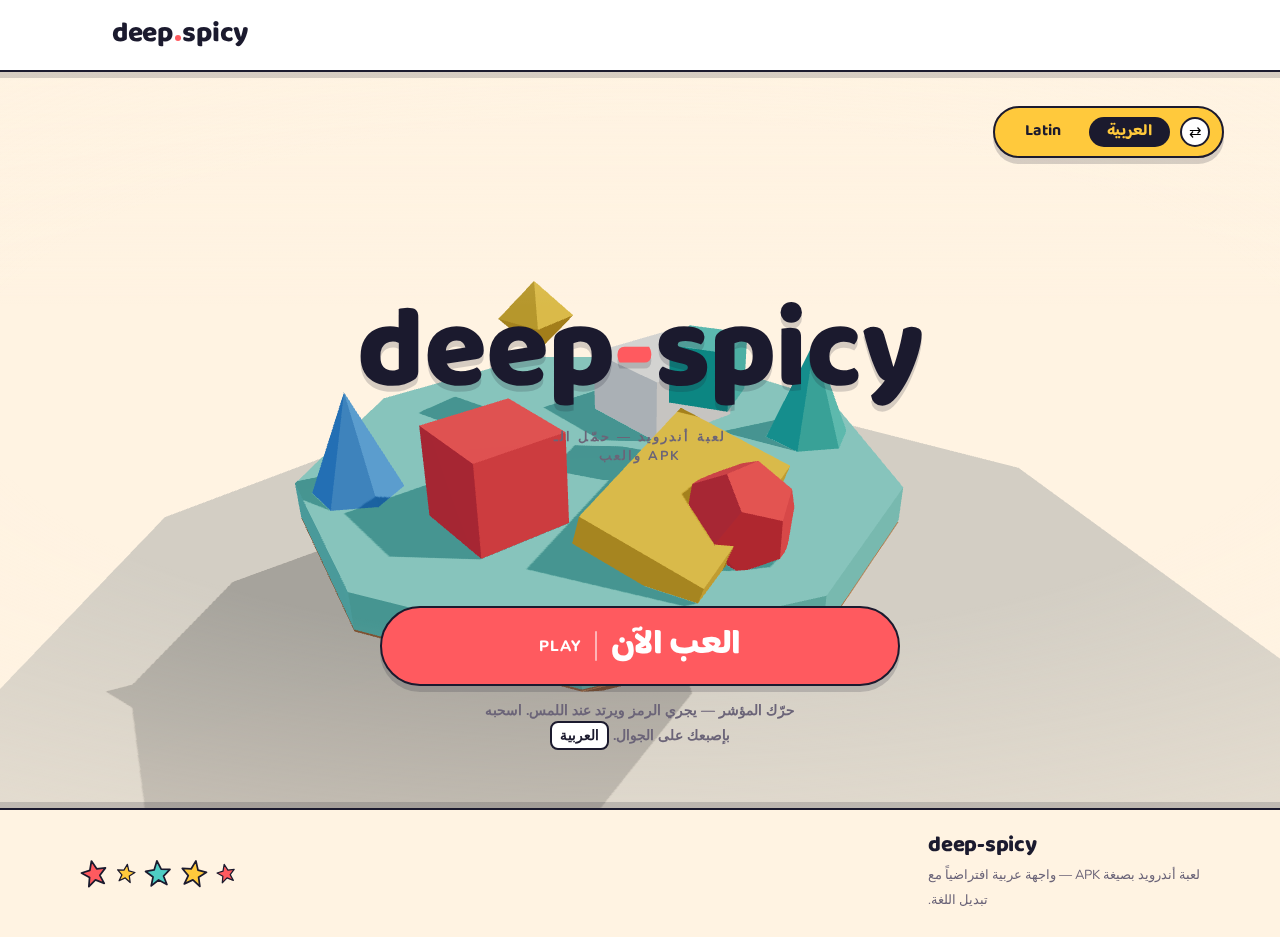
deep-spicy
لعبة أندرويد — حمّل الـ APK والعب
حرّك المؤشر — يجري الرمز ويرتد عند اللمس. اسحبه بإصبعك على الجوال. العربية
deep-spicy
لعبة أندرويد — حمّل الـ APK والعب
حرّك المؤشر — يجري الرمز ويرتد عند اللمس. اسحبه بإصبعك على الجوال. العربية
No comments yet. Be the first!