deep-simple
 Diya Trivedi
create a project to build a simple single design of todo

Comments (0)
Sign in to leave a comment
System Requirements
System Requirements Document for deep-simple
1. Introduction
deep-simple is a simple todo application built around a single, honest design. The product's whole promise is "one simple design, no variants, no noise": a solo user captures tasks, focuses on what is open, and finishes them, with the interface communicating state (open, done) instantly while staying warm and uncluttered.
The product intent, derived from the authoritative requirement thread, is to deliver a working todo application with exactly one layout/design — not multiple design variants, themes, or alternate views. The audience is a single Todo user who wants to capture and finish tasks with calm clarity and a quiet sense of craft. The visual language is typographic infrastructure in the spirit of Erik Spiekermann: humanist sans systems, wayfinding clarity, warm neutrals with signal colours used like transit lines.
This document specifies the current delivery: a public Landing page, self-service Sign Up, returning Login, and a protected Todos workspace where the user views their current list, adds todo items, and marks items complete — all in the single accepted design.
2. System Overview
deep-simple is a small, full-stack web application with application-owned identity and durable per-user todo state.
Current delivery
- A public Landing page that explains the simple single-design todo app, its audience, and what it does before identity establishment.
- Anonymous Sign Up for self-service first-use enrollment and anonymous Login for returning verification.
- A protected Todos workspace where the authenticated Todo user views the current list, adds todo items, and marks items complete.
- A shared backend that persists user identity and each user's todo items so the list survives across sessions and devices.
Actors
- Todo user (human, the only accepted persona): creates tasks and tracks them to completion.
- Application backend (system actor): stores identity records and todo items, enforces that a user only sees their own list, and returns the current list state.
Accepted behavior
- Self-service enrollment and returning verification.
- Viewing the current list of outstanding and completed tasks.
- Adding a todo item.
- Marking a todo item complete, with completed items receding into a muted band with strikethrough.
Narrow exclusions
- No multiple design variants, themes, or alternate layouts — one design only.
- No blue or indigo accent anywhere in the palette.
- No photography, 3D renders, playful illustrations, emoji, or character mascots.
- No pill buttons, gradient blobs, glassmorphism, or floating card grids.
- No bouncy or springy motion; no parallax or decorative loops.
2a. Product Interpretation and Delivery Boundary
deep-simple is delivered as a first-party web application. The application owns identity: a new user enrolls themselves through Sign Up, and a returning user verifies through Login. The Todos workspace is protected — it cannot be reached without an established identity, and the interaction that establishes access (Sign Up, Login) is anonymous and lives on its own pages rather than inside the protected workspace.
Durable state is required: each user's todo items are stored server-side and bound to that user, so the list is the same on return. The application does not establish differentiated permissions or role-based visibility; every authenticated user sees only their own list, and there is no shared or administrative state.
The current horizon is the simple single-design todo lifecycle described above. Nothing beyond capturing, viewing, and completing tasks is in scope for this generation.
2b. Source Content Inventory
Not applicable — no reference directive declares a content_source.
2c. Page Content and Component Coverage
Landing
- Purpose and access: Public, anonymous entry surface. Explains the simple single-design todo app, its audience, and what it does before identity establishment or protected work.
- Information and state: The product promise "One list. One design. Done."; a short three-line explanatory paragraph; numbered wayfinding labels (01 / CAPTURE, 02 / FOCUS, 03 / FINISH) introducing each band; a schematic task-flow diagram (three numbered stops connected by a red line with an arrowhead); a static specimen card showing a single todo row (checkbox, task text, small red "today" tag) framed by a 2px ink border.
- Primary actions: Navigate to Sign Up (red text link in the top nav and in the hero band); navigate to Login for returning users.
- Supporting actions: Read the explanatory bands; view the task-flow diagram and specimen card.
- Domain entities: None persisted; the specimen card is illustrative of a todo row.
- Component responsibilities:
- Thin top nav: wordmark "deep-simple" in Extra Bold left, three text links center, red "Sign up" text link right — no buttons in the nav.
- Editorial hero: left-aligned, 9-column-wide Fira Sans Extra Bold headline at
clamp(56px, 10vw, 128px)with the final word "Done." in signal red and a 6px red rule extending past the headline to the right edge of the viewport. - Two-column band beneath the hero: left is the three-line paragraph with the "01 / CAPTURE" numbered label above; right is the static specimen todo row.
- Wayfinding bands separated by full-width hairline rules, each with a numbered label and an oversized watermark numeral (01/02/03) at 20% opacity behind it.
- Inline SVG task-flow diagram at 2px stroke.
- States:
- Loading: static content; no data fetch required.
- Empty: not applicable (static editorial content).
- Success: page renders fully; Sign Up and Login links are reachable.
- Error: not applicable to static content; if a navigation target fails, the user can retry the link.
- Recovery: links remain available at all viewports; readable text and controls stay whole at 375px, 768px, and 1280px.
Login
- Purpose and access: Public, anonymous identity-access surface for returning verification so the Todo user can reach their durable todo list.
- Information and state: A form for returning verification (email and password fields), a link to Sign Up for users who do not yet have an identity, and inline validation/error messaging.
- Primary actions: Submit credentials to verify identity and be taken to the Todos workspace.
- Supporting actions: Navigate to Sign Up; correct invalid input.
- Domain entities: User identity (email, credential).
- Component responsibilities:
- Form with 4px-radius inputs, 2px hairline rules, and a signal-red primary action.
- Inline error region for invalid credentials or missing fields.
- Link to Sign Up.
- States:
- Loading: submit control shows a pending state while verification is in flight.
- Empty: fields blank on first arrival.
- Success: identity verified; user is routed to Todos.
- Error: invalid credentials or missing fields show a clear inline message; the form remains editable and resubmittable.
- Recovery: the user can correct input and resubmit, or navigate to Sign Up.
Sign Up
- Purpose and access: Public, anonymous identity-access surface for self-service first-use enrollment. No invitation or provisioning boundary exists.
- Information and state: A form for creating a new identity (email and password fields, with confirmation), a link to Login for users who already have an identity, and inline validation/error messaging.
- Primary actions: Submit enrollment to create the identity and be taken to the Todos workspace.
- Supporting actions: Navigate to Login; correct invalid input.
- Domain entities: User identity (email, credential).
- Component responsibilities:
- Form with 4px-radius inputs, 2px hairline rules, and a signal-red primary action.
- Inline error region for missing fields, mismatched confirmation, or an already-registered email.
- Link to Login.
- States:
- Loading: submit control shows a pending state while enrollment is in flight.
- Empty: fields blank on first arrival.
- Success: identity created; user is routed to Todos with an empty list.
- Error: validation or duplicate-email errors show a clear inline message; the form remains editable and resubmittable.
- Recovery: the user can correct input and resubmit, or navigate to Login.
Todos
- Purpose and access: Protected workspace (requires login). The cohesive working context where the Todo user views the current list, adds todo items, and marks items complete in the single accepted design.
- Information and state: The user's current list of todo items, split into an outstanding band and a lower, muted completed band with strikethrough. Each row shows a checkbox, task text, and where applicable a small red "today" tag. A single 720px column centered on the warm paper ground.
- Primary actions: Add a todo item via the add-task input pinned to the top of the list; mark a todo item complete via its checkbox.
- Supporting actions: Read the current list; distinguish outstanding from completed items.
- Domain entities: Todo item (task text, completion state, owner identity, created timestamp).
- Component responsibilities:
- Add-task input pinned to the top of the list, with a 4px radius and a focus underline that expands from the left in 160ms.
- Todo rows as ruled specimens: each row separated by a 1px warm-grey hairline; the currently focused row grows a 6px signal-red left edge; hover lifts the hairline rule to signal red.
- Checkbox with a 160ms ease-out tick on completion.
- Completed band: lower, muted, with a red strikethrough that draws itself left-to-right in 160ms.
- Empty state: a clear message that the list is empty and a prompt to add the first task.
- States:
- Loading: list area shows a pending state while the current list is fetched.
- Empty: no todo items yet; the add-task input remains available and the empty message invites the first task.
- Success: a newly added item appears in the outstanding band; a completed item moves to the completed band with strikethrough.
- Error: if the list fails to load, a clear message with a retry action; if an add or complete action fails, the row returns to its prior state and an inline message explains the failure.
- Recovery: retry the failed load or action; the add-task input remains available.
3. Functional Requirements
FR-1 — Single-design todo application
As a Todo user I should use a todo application that presents exactly one design so that I get one simple, consistent experience with no variants or noise.
- Provenance: explicit
- Lifecycle: The single design applies across Landing, Login, Sign Up, and Todos. There are no theme switchers, layout variants, or alternate views.
- Access state: Public pages are anonymous; Todos requires login.
- Observable acceptance: Every page renders in the same warm-paper, ink, red, and yellow visual system; no control offers an alternate design.
- Failure/recovery: Not applicable — the single design is a constant, not a stateful operation.
- Continuation: The user proceeds through the accepted journeys in the one design.
FR-2 — Self-service enrollment
As a new Todo user I should create my own identity through Sign Up so that I can start using the todo list without an invitation or provisioning step.
- Provenance: required_inference
- Trigger/input: The user opens Sign Up from Landing or Login and submits an email and password (with confirmation).
- Observable result: A new identity is created and the user is routed to the Todos workspace with an empty list.
- Access state: Anonymous entry; the protected Todos workspace is not reachable until enrollment succeeds.
- Failure/recovery: Missing fields, mismatched confirmation, or an already-registered email show a clear inline message; the form remains editable and resubmittable.
- Continuation: On success the user lands on Todos and can add the first task; on failure the user corrects input or navigates to Login.
FR-3 — Returning verification
As a returning Todo user I should verify my identity through Login so that I can reach my durable todo list.
- Provenance: required_inference
- Trigger/input: The user opens Login from Landing or Sign Up and submits their email and password.
- Observable result: Identity is verified and the user is routed to the Todos workspace showing their stored list.
- Access state: Anonymous entry; Todos remains unavailable until verification succeeds.
- Failure/recovery: Invalid credentials or missing fields show a clear inline message; the form remains editable and resubmittable.
- Continuation: On success the user sees their current list; on failure the user corrects input or navigates to Sign Up.
FR-4 — View the current list
As a Todo user I should see my current list of outstanding and completed tasks so that I have a clear picture of what remains and what is done.
- Provenance: required_inference
- Trigger/input: The user opens the Todos workspace after verification.
- Observable result: Outstanding items appear in the main band; completed items appear in a lower, muted band with strikethrough.
- Access state: Requires login; each user sees only their own list.
- Failure/recovery: If the list fails to load, a clear message with a retry action is shown.
- Continuation: The user adds a task or marks one complete.
FR-5 — Add a todo item
As a Todo user I should add a todo item from the add-task input pinned to the top of my list so that I can capture a task I need to do.
- Provenance: required_inference
- Trigger/input: The user types task text into the add-task input and submits.
- Observable result: The new item appears in the outstanding band of the current list and is persisted to the user's durable state.
- Access state: Requires login.
- Failure/recovery: If the add fails, the item does not appear and an inline message explains the failure; the input remains available for retry.
- Continuation: The user can add another task or mark the new one complete.
FR-6 — Mark a todo item complete
As a Todo user I should mark a todo item complete via its checkbox so that I can track tasks to completion.
- Provenance: required_inference
- Trigger/input: The user activates the checkbox on an outstanding todo row.
- Observable result: The row's text receives a red strikethrough that draws left-to-right in 160ms, and the item moves to the lower, muted completed band; the completion is persisted.
- Access state: Requires login.
- Failure/recovery: If the completion fails to persist, the row returns to its prior outstanding state and an inline message explains the failure.
- Continuation: The user continues with the remaining outstanding items.
FR-7 — Durable per-user state
As a Todo user I should have my list persist across sessions so that returning to the app shows the same tasks I captured and completed.
- Provenance: required_inference
- Trigger/input: Any add or complete action, and any subsequent Login.
- Observable result: The stored list is returned on the next visit and is bound to the correct user.
- Access state: Requires login; state is scoped to the authenticated user.
- Failure/recovery: If persistence fails, the affected action reports failure inline and the row returns to its prior state.
- Continuation: The user retries the action or continues with the current list.
4. User Personas
Todo user
Product context. The Todo user is the single user of deep-simple. They want a simple todo app with one design — no variants, no noise — that lets them capture tasks and finish them with calm clarity. They arrive either for the first time (through Landing and Sign Up) or as a returning user (through Login) to reach their durable list.
Primary goal. Keep a clear, current list of outstanding and completed tasks, and move tasks from capture to completion.
Distinct accepted responsibilities.
- Enroll themselves through Sign Up (self-service, no invitation or provisioning).
- Verify their identity through Login on return.
- View the current list of outstanding and completed tasks.
- Add todo items from the add-task input pinned to the top of the list.
- Mark todo items complete via their checkbox.
Relevant inputs and decisions. Task text for each new item; the decision to mark an item complete; credentials for enrollment and verification.
Interactions with other accepted participants. The Todo user interacts with the application backend, which stores identity and todo items and returns the current list. There is no other human participant in the accepted scope; the user's own list is the only state affected.
Observable success. The user sees their tasks in one consistent design, adds new tasks that persist, marks tasks complete and sees them recede into the muted completed band with strikethrough, and returns later to find the same list.
What makes this role distinct. The Todo user is both the sole author and the sole audience of the list: every action changes only their own durable state, and the product's value is the clarity of that single list rather than collaboration, sharing, or administration.
5. Core User Flows
Flow A — First-time enrollment and first task
- The Todo user opens the public Landing page and reads the product promise "One list. One design. Done.", the three explanatory bands (01 / CAPTURE, 02 / FOCUS, 03 / FINISH), the task-flow diagram, and the specimen todo row.
- The user selects the red "Sign up" text link in the top nav (or the hero band) and arrives at Sign Up.
- The user enters an email and password (with confirmation) and submits.
- Success: the identity is created and the user is routed to the protected Todos workspace with an empty list; the empty message invites the first task. Failure: missing fields, mismatched confirmation, or an already-registered email show a clear inline message; the form remains editable. The user corrects input and resubmits, or navigates to Login if they already have an identity.
- On Todos, the user types task text into the add-task input pinned to the top of the list and submits.
- Success: the new item appears in the outstanding band and is persisted to the user's durable state. Failure: the item does not appear and an inline message explains the failure; the input remains available for retry.
- The user continues by adding another task or marking the new one complete (Flow C).
Flow B — Returning verification
- The returning Todo user opens Landing and selects the Login link, or opens Login directly.
- The user enters their email and password and submits.
- Success: identity is verified and the user is routed to Todos, which shows their stored list of outstanding and completed tasks. Failure: invalid credentials or missing fields show a clear inline message; the form remains editable. The user corrects input and resubmits, or navigates to Sign Up.
- The user reviews the current list and continues with Flow C or Flow D.
Flow C — Add a todo item
- From the Todos workspace, the user places focus in the add-task input pinned to the top of the list; the focus underline expands from the left in 160ms.
- The user types the task text and submits.
- Success: the new item appears in the outstanding band, separated by a 1px warm-grey hairline, and is persisted. Failure: the item does not appear and an inline message explains the failure; the input remains available for retry.
- The user can add another task or mark the new one complete.
Flow D — Mark a todo item complete
- From the Todos workspace, the user locates an outstanding todo row and activates its checkbox.
- Success: the checkbox ticks in 160ms ease-out, the row's text receives a red strikethrough that draws left-to-right in 160ms, and the item moves to the lower, muted completed band; the completion is persisted. Failure: the row returns to its prior outstanding state and an inline message explains the failure; the user can retry.
- The user continues with the remaining outstanding items, or returns later through Flow B to find the completed item still in the completed band.
6. Visuals Colors and Theme
Muse and headline. Erik Spiekermann — typographic infrastructure for a single, honest todo list. The headline is "One list. One design. Done."
Mode. Light mode only.
Colour tokens (exact hex by role).
- Background (warm paper ground):
#F4EFE6 - Surface (slightly lighter card surfaces):
#FBF8F2 - Text (near-black ink):
#1C1A17 - Primary (signal red, used like a transit line):
#C8342B - Accent (signal yellow, secondary code for "in progress" and hover states):
#E8B23A - Muted (warm grey for metadata and secondary labels):
#6E675C
No blue or indigo anywhere. Contrast of ink on paper is ~14:1; red on paper ~5.5:1; both readable at body size.
Typography.
- Headings: Fira Sans — Extra Bold (800) at oversized display sizes with tight tracking (-0.02em) for the hero and section heads; Medium (500) at small caps with wide tracking (+0.08em) for numbered labels and wayfinding chips; italic used sparingly for the single "human" line in the hero. Never light weights.
- Body: Fira Sans.
- Scale: 1.25 modular with a display jump — 96/64/40/28/20/16/14. Mobile hero 56px, desktop hero 128px via
clamp(56px, 10vw, 128px). Body 16px with 1.55 line-height; labels 12px uppercase at 0.08em tracking.
Shape language. Squared-off, honest geometry: 4px radii on inputs and buttons (not pills, not blobs), 2px hairline rules as section dividers, and one thick 6px signal-red bar used as a wayfinding element under the active nav item and as the left edge of the currently focused todo row. Numbered circles (28px, 1.5px stroke) act as step markers, echoing transit line bullets.
Layout. A strict 12-column grid with generous 64px outer margins on desktop, 24px on mobile. The landing page runs as a vertical sequence of wayfinding bands, each introduced by a numbered label (01 / Capture, 02 / Focus, 03 / Finish) and separated by full-width hairline rules. The Todos page uses a single 720px column centered on the warm paper ground, with the add-task input pinned to the top of the list and completed items receding into a lower, muted band with strikethrough. Navigation is a thin top bar with a wordmark left, three text links center, and a red "Sign up" text link right — no buttons in the nav.
Imagery style. No photography. Visual interest comes from typography, rules, and two hand-built diagrams: a schematic "flow" of a task moving from Capture to Focus to Finish rendered as a small transit-map-style line with three stops and a red line, and a pictogram set (check, plus, clock, arrow) drawn at 2px stroke in the same warm ink. A single large decorative numeral ("01", "02", "03") sits as a watermark in each band at 20% opacity — type as image.
Readable text and controls. Headlines, wordmarks, labels, numbers, cards' text and controls stay entirely inside the viewport and their container at 375px, 768px, and 1280px, wrapping or scaling (for example font-size: clamp(...) with its mobile size) to fit. No other element covers any part of them. Decoration and motion may be cropped, bled off an edge, rotated, overlapped, or cut as the direction asks, as long as it covers no readable text or control.
7. Signature Design Concept
The public entry is an editorial hero on warm paper that reads like a page from a transit manual.
- Composition: A thin top nav sits above with the wordmark "deep-simple" in Extra Bold left, three text links center, and a red "Sign up" text link right — no buttons in the nav.
- Headline: A left-aligned, 9-column-wide Fira Sans Extra Bold headline at
clamp(56px, 10vw, 128px)reading "One list. One design. Done." with the word "Done." set in signal red and underlined by a 6px red rule that extends past the headline to the right edge of the viewport. - Two-column band beneath: Left is a short three-line paragraph in Fira Sans Regular with a numbered label "01 / CAPTURE" above; right is a live, static mock of a single todo row (checkbox, task text, small red "today" tag) tilted 0° and framed by a 2px ink border, sized to feel like a specimen card rather than a product screenshot.
- Wayfinding bands: Below the hero, the page continues as a vertical sequence of bands, each introduced by a numbered label (01 / CAPTURE, 02 / FOCUS, 03 / FINISH) in Fira Sans Medium small caps at 0.08em tracking, each sitting above a full-width hairline rule that separates the bands like transit stops.
- Watermark numerals: A single oversized watermark numeral (01/02/03) at 20% opacity sits behind each band, so type itself becomes the imagery.
- Task-flow diagram: A hand-built schematic of a task moving from Capture to Focus to Finish — three numbered stops connected by a red line with a small arrowhead — rendered as inline SVG at 2px stroke, doubling as the page's only illustration.
- No gradient, no blob, no centered stack: The composition is asymmetric, type-led, and reads like a page from a transit manual.
This concept recomposes only accepted content, states, and controls: the product promise, the explanatory bands, the specimen todo row, the task-flow diagram, and the Sign Up and Login links.
8. Interaction Model & Motion Direction
Interaction Model: Animated Motion Tempo: restrained Hero Dimensionality: flat
Landing Hero Motion Brief
- Focal subject: The oversized left-aligned headline "One list. One design. Done." with the final word in signal red and a 6px red underline running off the right edge of the viewport, paired with the static specimen todo row in the two-column band beneath.
- Input → transformation → outcome thesis: As the page loads and the user scrolls, each wayfinding band enters the viewport with a subtle 8px upward translate and opacity fade over 240ms, revealing its numbered label, hairline rule, and watermark numeral in sequence — the page assembles like a printed manual being read top to bottom, ending with the Sign Up link available for the user to begin.
- Motion vocabulary: Functional and short — 160ms ease-out on state changes (checkbox tick, row strike, input focus underline expanding from left), 240ms on section reveals via a subtle 8px upward translate. No bounce, no parallax, no decorative loops. Hover on todo rows lifts the hairline rule to signal red.
- Composed first frame: Warm paper ground
#F4EFE6; thin top nav with the Extra Bold wordmark "deep-simple" left and the red "Sign up" text link right; the 9-column headline at its clamp size with "Done." in signal red and the 6px red rule extending to the right edge; beneath it the two-column band with the "01 / CAPTURE" label and three-line paragraph on the left and the 2px-ink-bordered specimen todo row on the right; the first hairline rule and watermark numeral "01" beginning the next band below the fold. - Reduced-motion state:
prefers-reduced-motionremoves the translate and keeps only the opacity fade; the page remains fully readable and all links and controls remain available.
9. Non-Functional Requirements
- NFR-1 — Single design. The application presents exactly one design across all pages; no theme switcher, layout variant, or alternate view exists. (Provenance: explicit — "Keep the todo app simple and limited to a single design.")
- NFR-2 — Durable state. Todo items and identity records are persisted server-side and bound to the correct user, so the list survives across sessions and devices. (Provenance: required_inference — durable_state_required.)
- NFR-3 — Per-user isolation. Each authenticated user sees only their own todo list; no shared or administrative state is exposed. (Provenance: required_inference — application-owned identity with durable per-user state.)
- NFR-4 — Protected workspace. The Todos workspace is reachable only after successful verification; Sign Up and Login are anonymously reachable. (Provenance: required_inference — access contract.)
- NFR-5 — Readable text and controls. Headlines, wordmarks, labels, numbers, cards' text and controls stay entirely inside the viewport and their container at 375px, 768px, and 1280px, wrapping or scaling to fit; no other element covers any part of them. (Provenance: explicit — creative direction.)
- NFR-6 — Reduced motion.
prefers-reduced-motionremoves the translate and keeps only the opacity fade; the page remains fully usable. (Provenance: explicit — creative direction.) - NFR-7 — Palette and typography fidelity. The warm-paper, ink, red, and yellow palette and Fira Sans typography are preserved; no blue or indigo accent appears anywhere. (Provenance: explicit — creative direction and user design constraints.)
- NFR-8 — Contrast. Ink on paper is ~14:1 and red on paper ~5.5:1, both readable at body size. (Provenance: explicit — creative direction.)
10. Tech Stack
- Frontend: React (web) with the single design system described in Sections 6–8.
- Backend: Python / FastAPI, extending a single shared backend process for identity and todo APIs.
- Storage: A relational database for user identity records and todo items, bound per user.
- Backend: Python / FastAPI, extending a single shared backend process for identity and todo APIs. New feature APIs and domain modules are added as routes and modules inside this existing backend process, reusing its port, dependencies, and deployment.
- Storage: MariaDB, a relational database, for user identity records and todo items, bound per user.
- Deployment: Docker and docker-compose for the frontend, backend, and database services.
No additional services, queues, or Kubernetes orchestration are required for the current scope.
11. Assumptions and Constraints
Constraints (binding).
- The todo app stays simple and limited to a single design — no variants, themes, or alternate layouts.
- No blue or indigo accent anywhere; the palette is warm paper, ink, red, and yellow only.
- No pill buttons, gradient blobs, glassmorphism, or floating card grids.
- No centered hero stacks with a subheadline and a filled CTA button.
- No Inter, Roboto, Arial, Helvetica, Open Sans, Lato, Poppins, or system-ui anywhere.
- No playful illustrations, emoji, or character mascots.
- No bouncy or springy motion; no photography or 3D renders.
- No more than one accent colour competing with the signal red at the same hierarchy level.
Assumptions (narrow, labeled).
- [Default — not specified by user] Identity is established with email and password; no third-party identity provider is specified.
- [Default — not specified by user] The relational database is PostgreSQL, chosen as a practical default for durable per-user state.
- [Default — not specified by user] The relational database is MariaDB, provided by the project's initial scaffold services, used for durable per-user state.
- [Default — not specified by user] The application is delivered as a web application; no native mobile client is specified.
- [Default — not specified by user] The "today" tag on the specimen todo row is illustrative of the design; the accepted current scope covers capturing, viewing, and completing tasks, not due-date management.
12. Glossary
- Todo user: The single accepted human persona; the sole author and audience of their own todo list.
- Todo item: A task with text, a completion state, an owner identity, and a created timestamp.
- Outstanding band: The main area of the Todos workspace listing items not yet complete.
- Completed band: The lower, muted area of the Todos workspace listing completed items with red strikethrough.
- Specimen card: The static, 2px-ink-bordered mock of a single todo row on the Landing page.
- Wayfinding band: A landing-page section introduced by a numbered label (01 / CAPTURE, 02 / FOCUS, 03 / FINISH) and separated by a full-width hairline rule.
- Signal red: The primary colour
#C8342B, used like a transit line for primary actions, active nav, the "important" tag, and the hero underline. - Signal yellow: The accent colour
#E8B23A, a secondary code for "in progress" and hover states. - Watermark numeral: The oversized 01/02/03 numeral at 20% opacity behind each landing band.
- Task-flow diagram: The inline SVG schematic of a task moving from Capture to Focus to Finish, rendered at 2px stroke.
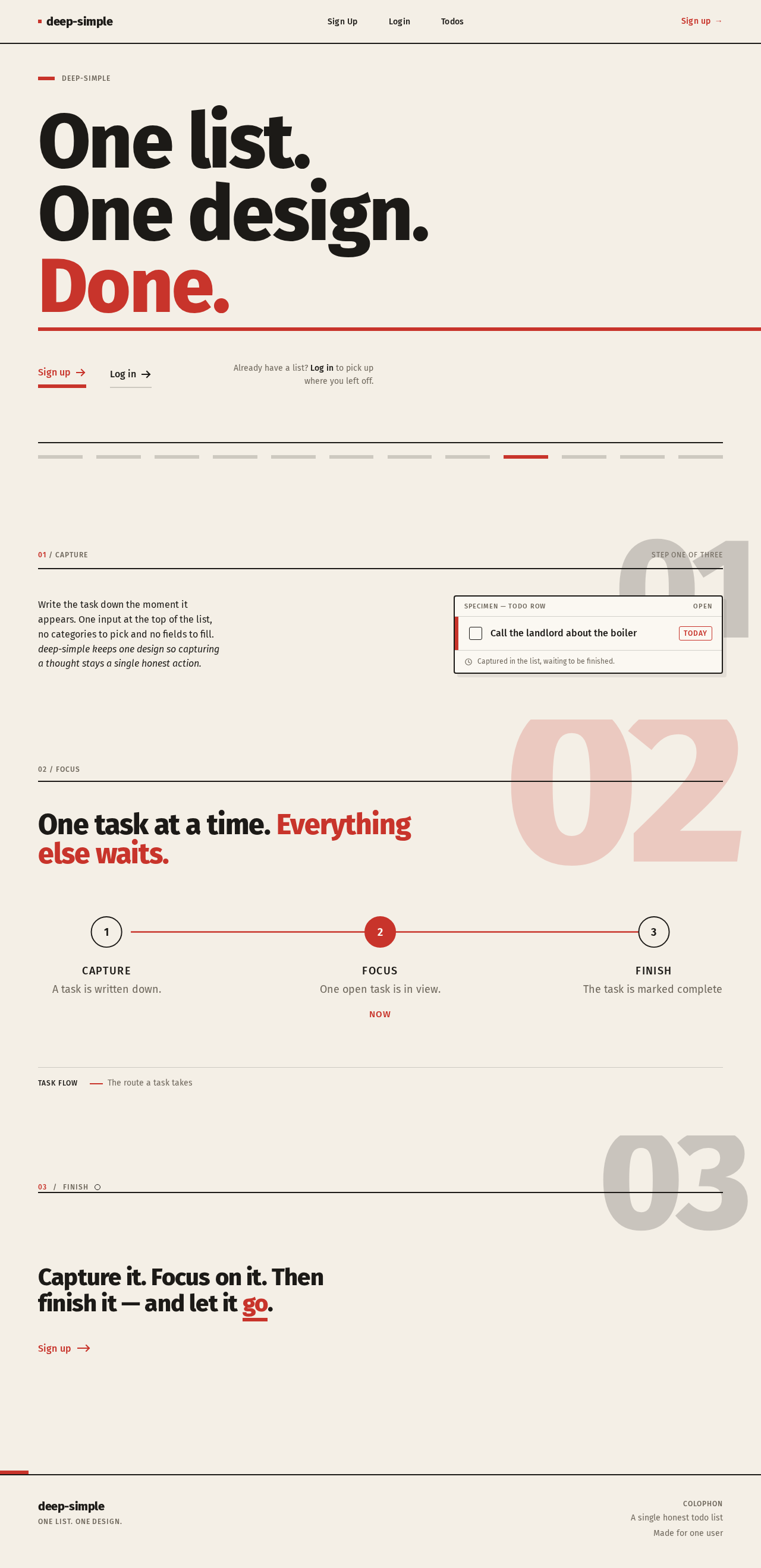
01/ Capture
Step one of three
Write the task down the moment it appears. One input at the top of the list, no categories to pick and no fields to fill.
deep-simple keeps one design so capturing a thought stays a single honest action.
Call the landlord about the boiler
TodayOne task at a time. Everything else waits.
- CaptureA task is written down.
- Focus · NowOne open task is in view.
- FinishThe task is marked complete.
03Finish
Capture it. Focus on it. Then finish it — and let it go.
01/ Capture
Step one of three
Write the task down the moment it appears. One input at the top of the list, no categories to pick and no fields to fill.
deep-simple keeps one design so capturing a thought stays a single honest action.
Call the landlord about the boiler
TodayOne task at a time. Everything else waits.
- CaptureA task is written down.
- Focus · NowOne open task is in view.
- FinishThe task is marked complete.
03Finish
No comments yet. Be the first!