deep-landing
 Bhawesh Matre
Create a simple landing page for a coffee shop by integrating all the features init

Comments (0)
Sign in to leave a comment
System Requirements
System Requirements Document (SRD)
Project Name: deep-landing
1. Introduction
The deep-landing project is a system designed to create a simple yet impactful landing page for a coffee shop. This document outlines the requirements, features, and design concepts for the project, ensuring it meets the needs of Bhawesh Matre and aligns with the vision of showcasing the shop's cozy vibe while integrating functional elements like menu highlights, location details, contact information, and online ordering or reservation capabilities.
This SRD is tailored for Bhawesh Matre, based in India (IN), and considers locale-specific defaults such as INR currency, IST timezone, and cultural preferences for design and functionality.
2. System Overview
The deep-landing system will serve as a digital front door for the coffee shop, combining aesthetic storytelling with functional features. The landing page will:
- Reflect the shop's branding and ambiance.
- Provide essential information such as menu highlights, location, and contact details.
- Enable users to place online orders or make reservations seamlessly.
- Be optimized for both desktop and mobile devices.
The system will be built using modern web technologies to ensure scalability, responsiveness, and ease of maintenance.
3. Functional Requirements
Story Points:
- As a User, I should be able to view the coffee shop's menu highlights.
- As a User, I should be able to see the shop's location on an interactive map.
- As a User, I should be able to contact the shop via a form or phone number.
- As a User, I should be able to place an online order for coffee and snacks.
- As a User, I should be able to make a reservation for a table.
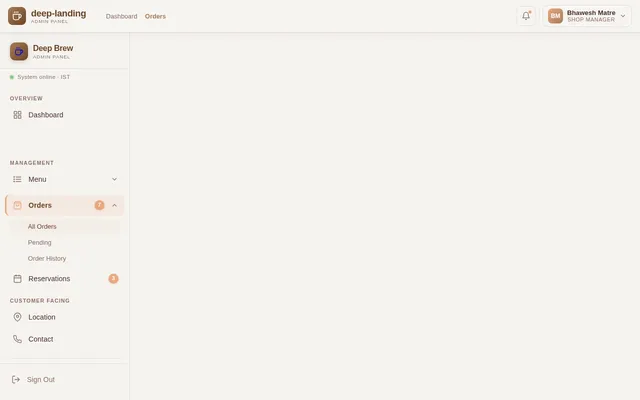
- As an Admin, I should be able to update the menu and reservation availability.
- As an Admin, I should be able to view and manage online orders and reservations.
4. User Personas
1. User (Customer)
- Description: Regular visitors or potential customers of the coffee shop.
- Goals: Explore the menu, find the shop's location, contact the shop, place orders, and make reservations.
- Technical Proficiency: Basic internet users.
2. Admin (Shop Manager)
- Description: The coffee shop's manager or staff responsible for maintaining the landing page.
- Goals: Update menu items, manage reservations, and oversee online orders.
- Technical Proficiency: Intermediate users familiar with basic admin tools.
5. Visuals Colors and Theme
Color Palette:
The theme will reflect the warm, inviting ambiance of a coffee shop.
- Background: #F5F3F0 (Soft Cream)
- Surface: #D9C5B2 (Warm Beige)
- Text: #4A2C2A (Rich Coffee Brown)
- Accent: #A67C5B (Caramel Gold)
- Muted Tones: #8C6E63 (Muted Mocha)
This palette is designed to evoke the feeling of comfort and warmth associated with coffee shops while maintaining readability and aesthetic appeal.
6. Signature Design Concept
Concept: Interactive Coffee Journey
The homepage will feature an immersive coffee journey experience:
- Visuals: A dynamic, scrollable coffee cup animation where the user "pours" coffee as they scroll down. Each section of the page (menu, location, contact, order/reservation) is revealed as layers in the cup — starting with the base (menu), followed by the middle (location), and topped with frothy details (contact/order).
- Animations: Smooth transitions between sections, with steam rising from the cup and subtle coffee bean particles floating in the background.
- Micro-interactions: Buttons and links will have hover effects resembling ripples in coffee.
- Color Shifts: The background subtly transitions from light cream to warm beige as the user scrolls, mimicking the brewing process.
- Interactive Map: The location section will feature a draggable map with animated pins.
This design will make the landing page unforgettable, engaging users with a unique storytelling experience while maintaining functionality.
7. Non-Functional Requirements
- Performance: The landing page must load within 2 seconds on standard internet connections.
- Scalability: The system should support up to 10,000 monthly visitors without degradation.
- Accessibility: The design must comply with WCAG 2.1 standards for accessibility.
- Responsiveness: The page must be fully functional on both desktop and mobile devices.
- Localization: Default settings for INR currency and IST timezone.
8. Tech Stack
Frontend:
- React for Web
Backend:
- Python
- FastAPI
Database:
- MySQL (with Alembic for migrations)
AI Models:
- GPT 5.4 for user-friendly responses
AI Tools:
- Langchain
Local Orchestration:
- Docker
- docker-compose
Server-Side Orchestration:
- Kubernetes
9. Assumptions and Constraints
Assumptions:
- The coffee shop has an existing menu and reservation system that can be integrated.
- Users will primarily access the landing page via mobile devices.
- Admins will have basic technical knowledge to manage the system.
Constraints:
- The system must adhere to India's data protection laws.
- Limited budget for hosting and maintenance.
10. Glossary
- Landing Page: A single web page designed to capture user attention and provide essential information.
- Interactive Map: A map that allows users to zoom, pan, and interact with location pins.
- Micro-interactions: Small animations or design elements that enhance user experience.
- WCAG 2.1: Web Content Accessibility Guidelines, version 2.1, for ensuring web accessibility.
- IST: Indian Standard Time.
End of Document.

Your Coffee Journey Awaits
Every great cup tells a story. Explore the layers of our coffee experience — from discovering our menu to finding us in your neighborhood and engaging with us for orders and reservations.
Discover
Browse our handcrafted menu of signature coffees, fresh pastries, and seasonal specials curated for every palate.
Learn More→Explore
Find our cozy neighborhood cafe with an interactive map, opening hours, and directions to your next coffee escape.
Learn More→Engage
Place an order for pickup, reserve your favorite table, or reach out to us directly. Your journey starts here.
Learn More→Menu Highlights
Handcrafted beverages and freshly baked treats made with locally sourced ingredients.
Caramel Macchiato
Rich espresso layered with velvety steamed milk and house-made caramel drizzle.
Hazelnut Cold Brew
Slow-steeped 20-hour cold brew with a hint of roasted hazelnut and oat milk.
Artisan Croissant
Flaky, butter-layered croissant baked fresh every morning with French technique.
Masala Chai Latte
Traditional Indian spiced chai blended with frothy milk and a touch of jaggery.
Chocolate Brownie
Dense, fudgy dark chocolate brownie topped with sea salt and walnut crumble.
Avocado Toast
Sourdough topped with smashed avocado, cherry tomatoes, microgreens and chili flakes.
Our Brewing Process
From hand-picked beans to your perfect cup, every step is crafted with care and passion.
Select Your Beans
We source premium single-origin beans from ethical farms across South India, Ethiopia, and Colombia. Each batch is hand-selected for peak flavor and freshness.
Precision Roasting
Our artisan roasters carefully roast each batch in small quantities, monitoring temperature curves to unlock rich caramel, chocolate, and fruity notes unique to every origin.
Expert Grinding
Beans are ground to the perfect consistency moments before brewing. Whether pour-over, espresso, or cold brew, the grind is calibrated for optimal extraction.
Craft Brewing
Our baristas bring it all together with precision timing and water temperature control, delivering a cup that captures the full journey from farm to your table.
Find Us Here
Our Address
42, Koregaon Park Road, Near Osho Ashram, Pune, Maharashtra 411001, India
Call Us
+91 98765 43210| Monday - Friday | 7:00 AM - 10:00 PM |
| Saturday | 8:00 AM - 11:00 PM |
| Sunday | 8:00 AM - 9:00 PM |
A Warm Corner in Koregaon Park
Nestled in the heart of Pune's vibrant Koregaon Park, our coffee shop is more than just a place to grab a cup. It's a sanctuary where the aroma of freshly roasted beans mingles with the gentle hum of conversation and soft acoustic melodies.
Whether you're looking for a quiet corner to work, a cozy spot to catch up with friends, or simply a moment of calm with a perfectly crafted latte, you'll find it here. Our space is designed to feel like an extension of home — warm lighting, earthy tones, and greenery that brings the outdoors in.
The neighborhood itself is a tapestry of art galleries, boutique stores, and tree-lined avenues — making it the perfect destination for a leisurely afternoon stroll that ends with your favorite brew.
- Cozy indoor seating with free Wi-Fi
- Lush garden patio for open-air sipping
- Live acoustic music on weekends
- Reading nook with curated book collection
What Customers Say
Hear from our beloved patrons who make every cup worth brewing
“The best cappuccino I have ever had in this city. The ambiance is so cozy, it feels like a warm hug on a rainy day. Absolutely love this place!”
“I come here every morning before work. Their cold brew is perfectly balanced, and the staff always remembers my order. A true neighbourhood gem.”
“From the hand-crafted latte art to the freshly baked croissants, everything here speaks of quality and passion. A must-visit for any coffee lover!”
“Perfect spot for remote work. Great Wi-Fi, unlimited coffee refills, and the most friendly baristas. My productivity has never been better!”
Ready to Experience More?
Whether you want your favorite brew delivered or a cozy table waiting, we have you covered.
Quick Order
Order your favorite coffee & snacks for pickup or delivery. Fresh brews and artisan bites, ready when you are.
Make a Reservation
Reserve a table for your next visit. Enjoy the ambiance, the aroma, and the company at your favorite spot.
Get In Touch
Have a question about our coffee, catering, or reservations? We would love to hear from you.
Ready for Your Coffee Journey?
Whether you crave a perfectly brewed cup or a cozy corner to unwind, we are here to make every visit memorable. Start your journey with us today.
No comments yet. Be the first!