Page 1 of 6
deep-crm System Requirements Document
1. Introduction
The deep-crm project aims to develop a comprehensive CRM dashboard that facilitates lead tracking and automated follow-ups. This document outlines the system requirements necessary to achieve the project's objectives.
2. System Overview
The deep-crm system is designed to provide CRM users with a centralized dashboard for managing leads and automating follow-up actions. The system will support durable, persistent lead and follow-up records, ensuring identity continuity for private ownership and recovery.
Page 2 of 6
2a. Product Interpretation and Delivery Boundary
Page 3 of 6
2c. Page Content and Component Coverage
-
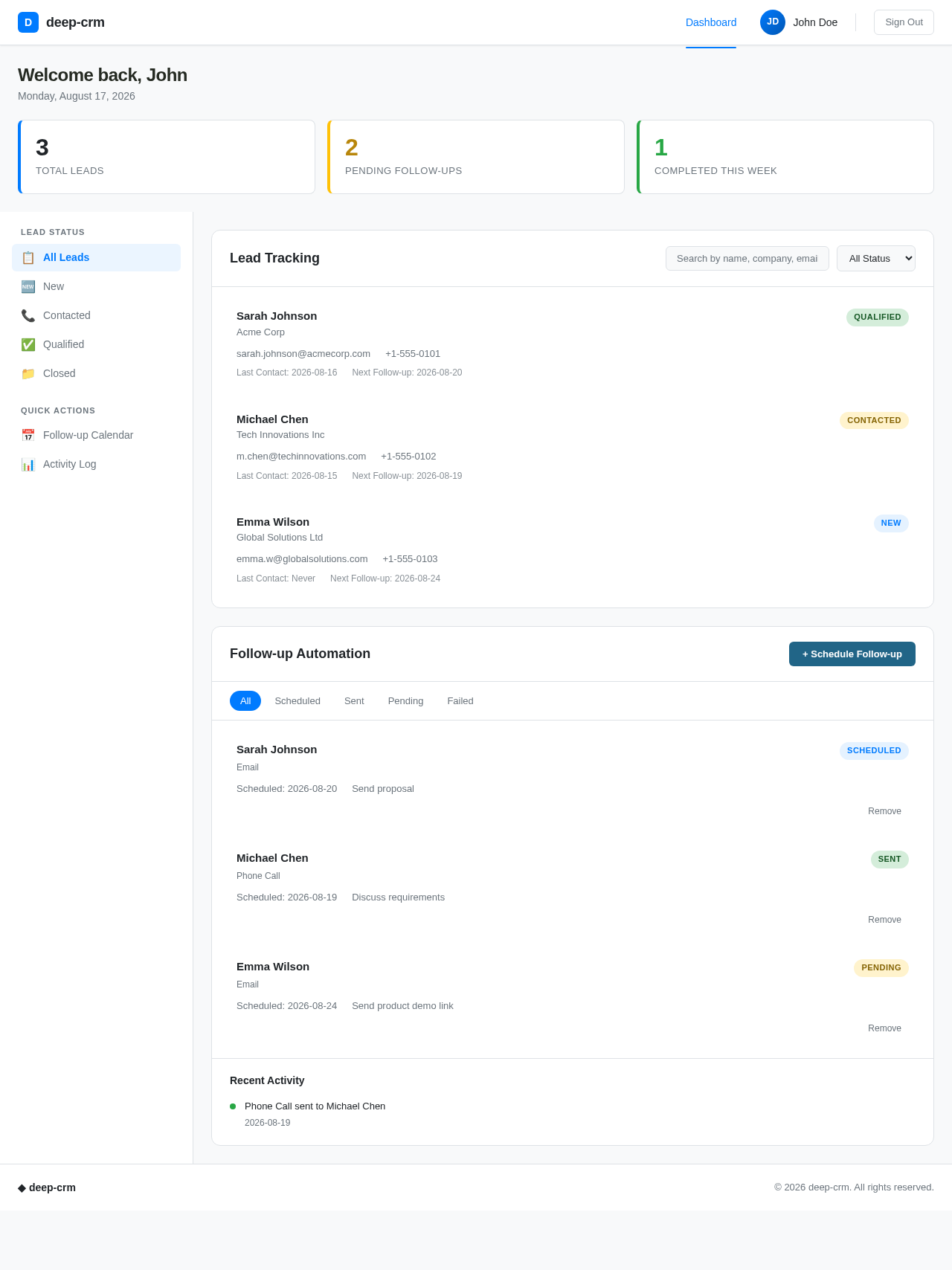
CRM Dashboard:
- Information and Actions:
- Lead details display
- Lead status updates
- Automated follow-up scheduling
- Follow-up activity logs
- Components:
- Lead information panel
- Status update controls
- Follow-up scheduler
- Activity log viewer
- States:
- Empty state for no leads
- Loading state while fetching data
- Success state upon successful updates
- Error state for failed operations
-
Authentication:
- Information and Actions:
- User sign-up
- User login
- Session management
- Components:
- Sign-up form
- Login form
- Session status indicator
- States:
- Empty state for no user input
- Loading state during authentication
- Success state upon successful login
- Error state for failed authentication
Page 4 of 6
3. Functional Requirements as Story Points
- As a CRM User, I should be able to track leads by logging into the CRM dashboard to view and update lead details.
explicit
- As a CRM User, I should be able to automate follow-ups by scheduling them and ensuring follow-up emails are sent and logged.
explicit
- As a CRM User, I should be able to sign up, log in, and manage my session to access the CRM dashboard.
required_inference
4. User Personas
- CRM User: A user interacting with the CRM dashboard for lead tracking and follow-ups.
5. Core User Flows
- CRM User Flow:
- User signs up or logs into the system via the Authentication page.
- User accesses the CRM Dashboard.
- User views and updates lead details.
- User schedules automated follow-ups.
- System sends follow-up emails and logs activities.
Page 5 of 6
6. Visuals Colors and Theme
- Primary: #007BFF
- Primary Light: #66B2FF
- Secondary: #6C757D
- Accent: #28A745
- Highlight: #FFC107
- Background: #F8F9FA
- Surface: #FFFFFF
- Text: #212529
- Text Muted: #6C757D
- Border: #DEE2E6
7. Signature Design Concept
The CRM Dashboard will feature a clean and intuitive layout, focusing on ease of navigation and clarity of information. The design will incorporate a responsive header with product identity and navigation controls, adapting between anonymous and authenticated states. The dashboard will use a restrained color palette to maintain a professional look, with emphasis on readability and accessibility.
8. Interaction Model & Motion Direction
- CRM Dashboard: Animated interaction model with moderate scroll-triggered reveals and hover transitions to enhance user experience without overwhelming the user.
- Authentication Page: Static interaction model prioritizing clarity and simplicity for user sign-up and login processes.
Page 6 of 6
9. Non-Functional Requirements
- Authentication Security: Ensure secure access control for user sign-up, login, and session management.
required_inference
10. Tech Stack
- Frontend: React for Web
- Backend: Python, FastAPI
- Database: MySQL or MariaDB, using Alembic for migrations
- Local Orchestration: Docker, docker-compose
- Server-side Orchestration: Kubernetes
11. Assumptions and Constraints
- The system assumes that users will have internet access to interact with the CRM dashboard.
- The system is constrained to operate within the specified tech stack and design guidelines.
12. Glossary
- CRM: Customer Relationship Management
- Lead: A potential customer or client
- Follow-up: An action taken to maintain or enhance a relationship with a lead
- Authentication: The process of verifying a user's identity
This document serves as a comprehensive guide for the development of the deep-crm project, ensuring all requirements are met and providing a clear framework for implementation.


No comments yet. Be the first!