dbaseextractor
 Hello Mcdonald
make an app that can crawl the web and web directory to find and extract email leads on the internet


Comments (0)
Sign in to leave a comment
System Requirements
System Requirements Document for dbaseextractor
1. Introduction
dbaseextractor is a web application that crawls the web and web directories to find and extract email leads on the internet. A lead researcher supplies one or more starting web pages or web directory locations, the application crawls them in the background, extracts every email address it finds, and stores the results as durable, reviewable lead records tied to that researcher's account.
The product intent is narrow and deliberate: turn the open web and public web directories into a usable, persistent contact list. The audience is the solo lead researcher who spends long sessions reading dense result tables and needs a calm, trustworthy tool that keeps crawl history and extracted leads available across sessions rather than a one-shot scraper.
This document is the System Requirements Document for dbaseextractor. It covers the current delivery: public entry, self-service identity establishment, crawl initiation, background crawl execution, and lead review.
2. System Overview
dbaseextractor is delivered as a React frontend, a shared FastAPI backend, MariaDB for durable application-owned data, and Redis for crawl job coordination and progress state. The backend runs crawls and extraction as background work and persists crawl and lead records. Identity is application-owned: a new researcher enrolls through Sign Up, and a returning researcher verifies through Login before reaching any protected crawl or lead work.
The single active human actor is the Lead researcher. The application itself (backend crawl and extraction process) is a non-persona system actor that performs the crawl and extraction work the researcher initiates.
Current accepted behavior:
- Crawling the web and web directories to find email leads on the internet.
- Extracting email leads from crawled web pages and directories.
- Self-service enrollment and returning verification before protected crawl and lead work.
- Backend execution of crawls and extraction with durable crawl and lead records.
Removed from scope
- None. No concept was removed by the authoritative requirement thread.
2a. Product Interpretation and Delivery Boundary
dbaseextractor is a first-party, application-owned product. All six destinations — Landing, Sign Up, Login, Crawls, New Crawl, and Leads — are custom application pages. There is no provider-owned surface, no external destination, and no headless delivery boundary in the current scope.
Access is split into two boundaries. Landing, Sign Up, and Login are anonymously reachable so a new researcher can understand the product and establish identity, and a returning researcher can verify identity. Crawls, New Crawl, and Leads require login, because crawl history and extracted leads are durable records privately owned by the researcher who created them. A protected destination never owns the interaction that establishes access to itself; enrollment and verification live on their own anonymous pages.
Crawl execution is background automation. The researcher starts a crawl and then observes its progress and results; the backend performs fetching, parsing, and email extraction without further researcher input. Redis coordinates the queued crawl work and progress state; MariaDB holds the durable crawl and lead records.
Everything described in this document is current. No future-horizon capabilities are accepted.
2b. Source Content Inventory
Not applicable. No reference directive with content_source authority was supplied.
2c. Page Content and Component Coverage
Landing
- Information/state: Product name dbaseextractor; a plain statement that the app crawls the web and web directories to find and extract email leads; a short explanation of how a crawl becomes a stored lead list; entry points to Sign Up and Login. Anonymous state only.
- Primary action: Begin enrollment via Sign Up. Supporting action: Go to Login for a returning researcher.
- Domain entities: None persisted on this page.
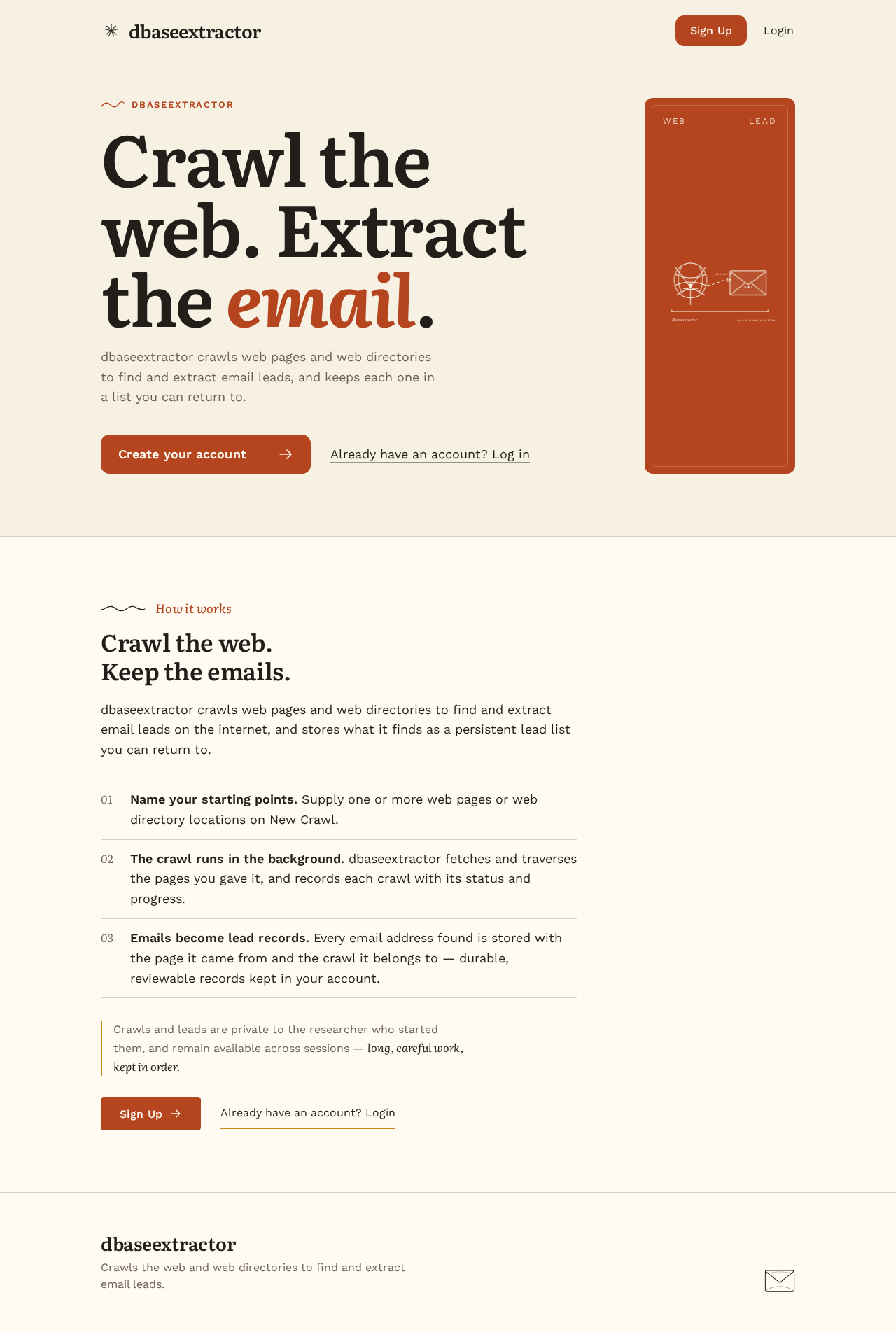
- Component responsibilities: Hero headline and rust CTA bar; web-to-envelope diagram block; section openers with drawn marks; navigation to Sign Up and Login.
- States: Loading — static content, no data fetch. Empty — not applicable. Success — page renders fully. Error — not applicable beyond generic page load failure with a retry. Recovery — reload the page.
Sign Up
- Information/state: Enrollment form for a new lead researcher; explanation that an account keeps crawl and lead records.
- Primary action: Submit enrollment to create the account and establish a session. Supporting action: Navigate to Login if already enrolled.
- Domain entities: Researcher account (identity, credential).
- Component responsibilities: Email and password inputs with inline validation; submit control; link to Login; error region.
- States: Loading — submit disabled with progress indication during submission. Empty — blank form. Success — account created, session established, redirect to Crawls. Error — invalid or already-registered email, weak or mismatched password, or server failure shown inline with the form preserved for correction. Recovery — correct the field and resubmit.
Login
- Information/state: Returning verification form.
- Primary action: Submit credentials to verify identity and open a session. Supporting action: Navigate to Sign Up.
- Domain entities: Researcher account.
- Component responsibilities: Email and password inputs; submit control; link to Sign Up; error region.
- States: Loading — submit disabled with progress indication. Empty — blank form. Success — session established, redirect to Crawls. Error — incorrect credentials or server failure shown inline without revealing which field was wrong. Recovery — re-enter credentials and resubmit.
Crawls
- Information/state: The researcher's crawl list with each crawl's starting target, status (queued, running, completed, failed), progress, and count of emails found; entry point to start a new crawl.
- Primary action: Open a crawl to see its progress and extracted leads. Supporting action: Start a new crawl via New Crawl; open Leads.
- Domain entities: Crawl (target, status, progress, timestamps, owner), Lead (email, source page, crawl reference).
- Component responsibilities: Ruled crawl table with alternating cream and paper fills; mustard crawl status bar that grows in steps with a plain text count beside it; status labels; empty-state panel; error banner.
- States: Loading — table skeleton while crawls load. Empty — message that no crawls exist yet with a control to start one. Success — crawl rows with live status. Error — load failure banner with retry. Recovery — retry the fetch; a failed crawl row shows its failure state and can be inspected.
New Crawl
- Information/state: Form to define a crawl: one or more starting web page URLs or web directory locations.
- Primary action: Submit the crawl to the backend, which queues it and begins background execution. Supporting action: Cancel and return to Crawls.
- Domain entities: Crawl (target list, status, owner).
- Component responsibilities: Target input(s) with URL validation; submit control; inline validation and error region.
- States: Loading — submit disabled with progress indication during creation. Empty — blank target input. Success — crawl created and queued, redirect to Crawls with the new crawl visible. Error — invalid URL, empty target list, or server failure shown inline with input preserved. Recovery — correct the target and resubmit.
Leads
- Information/state: The researcher's extracted email leads across crawls, with each lead's email address, the source page it was found on, and the crawl it belongs to.
- Primary action: Review extracted leads. Supporting action: Filter or locate leads by crawl; return to Crawls.
- Domain entities: Lead (email, source page, crawl reference, owner), Crawl.
- Component responsibilities: Ruled lead table with alternating cream and paper fills, 1px ink rules, and monospace email columns; lead card with faint offset shadow; empty-state panel; error banner.
- States: Loading — table skeleton while leads load. Empty — message that no leads have been extracted yet with a link to start a crawl. Success — lead rows. Error — load failure banner with retry. Recovery — retry the fetch.
3. Functional Requirements
FR-1 — Crawl the web and web directories for email leads (explicit) As a Lead researcher, I should be able to start a crawl against one or more web pages or web directory locations so that the application searches the internet for email leads.
- Trigger/input: the researcher submits one or more starting URLs or web directory locations on New Crawl.
- Observable result: a new crawl record is created for the researcher with status queued, then running, and the backend fetches and traverses the supplied pages and directories in the background.
- Access state: requires login.
- Failure/recovery: invalid or empty targets are rejected inline before submission; a backend failure marks the crawl failed and the researcher can start a new crawl.
- Continuation: the crawl appears on Crawls with live status and progress.
FR-2 — Extract email leads from crawled pages and directories (explicit) As a Lead researcher, I should have email addresses extracted from every crawled page and directory so that I obtain a usable contact list.
- Trigger/input: the backend processes each fetched page during a running crawl.
- Observable result: each discovered email address is stored as a lead record linked to its source page and crawl, and the crawl's email count increases.
- Access state: requires login (results are visible only to the owning researcher).
- Failure/recovery: pages that cannot be fetched or parsed are skipped without aborting the crawl; a crawl that yields no emails completes with an empty result and the researcher sees the empty state on Leads.
- Continuation: extracted leads are available on Leads and counted on Crawls.
FR-3 — Self-service enrollment and returning verification (required_inference) As a Lead researcher, I should be able to create an account on Sign Up and verify my identity on Login so that my crawl and lead records stay private to me and available across sessions.
- Trigger/input: a new researcher submits enrollment details on Sign Up; a returning researcher submits credentials on Login.
- Observable result: a session is established and the researcher reaches Crawls.
- Access state: Sign Up and Login are anonymous; Crawls, New Crawl, and Leads require login.
- Failure/recovery: invalid enrollment or incorrect credentials are shown inline with the form preserved; the researcher corrects and resubmits.
- Continuation: after verification the researcher proceeds to Crawls.
FR-4 — Background crawl execution with durable records (required_inference) As a Lead researcher, I should have my crawls run in the background and their progress and results stored durably so that I can leave and return without losing work.
- Trigger/input: a crawl created on New Crawl is queued for background execution.
- Observable result: crawl status and progress are updated as work proceeds, and crawl and lead records persist in the database.
- Access state: requires login to view.
- Failure/recovery: a crawl that fails is recorded with a failed status and remains visible for inspection; the researcher can start a new crawl.
- Continuation: the researcher revisits Crawls and Leads in a later session and sees the same records.
4. User Personas
Lead researcher
- Product context: A solo researcher who spends long sessions hunting for contact information across the open web and public web directories. They need a calm, readable tool that keeps their crawl history and extracted leads organized across sessions.
- Primary goal: Turn web pages and web directories into a durable, reviewable list of email leads.
- Distinct accepted responsibilities: Defining crawl targets (web pages or web directory locations); starting crawls; monitoring crawl progress and status; reviewing extracted email leads and their source pages; establishing and verifying their own identity so records stay private and resumable.
- Relevant inputs or decisions: Which URLs or directories to crawl; when to start a new crawl; which leads to review.
- Interactions with other accepted participants: The only other actor is the application's background crawl and extraction process, which the researcher initiates and whose progress and results the researcher observes. No other human participant is affected.
- Observable success: A completed crawl whose extracted email leads appear on Leads, linked to their source pages and crawl, and remain available on return.
5. Core User Flows
Flow A — New researcher enrolls and runs a first crawl
- The researcher opens Landing anonymously and reads what dbaseextractor does.
- The researcher selects the rust CTA bar and arrives at Sign Up.
- The researcher enters an email and password and submits. The form shows a progress state while submitting.
- On success, a session is established and the researcher lands on Crawls, which shows the empty state with a control to start a crawl.
- The researcher selects the control and arrives at New Crawl.
- The researcher enters one or more web page URLs or web directory locations and submits.
- The backend creates the crawl, queues it in Redis, and begins background fetching and email extraction. The researcher is returned to Crawls, where the new crawl appears with a queued/running status and a mustard progress bar that grows in steps beside a plain text count.
- As extraction proceeds, the crawl's email count increases. When the crawl completes, its status shows completed.
- The researcher opens Leads and reviews the extracted email addresses in the ruled table, each with its source page and crawl.
- Failure/recovery: if enrollment fails (invalid or already-registered email), the error appears inline and the researcher corrects the form. If a crawl fails, its row shows a failed status; the researcher starts a new crawl from New Crawl. If a crawl finds no emails, Leads shows its empty state with a link to start a crawl.
Flow B — Returning researcher verifies and reviews prior leads
- The researcher opens Login anonymously (directly or from Landing).
- The researcher enters credentials and submits; the form shows a progress state.
- On success, a session is established and the researcher lands on Crawls, which lists their prior crawls with statuses and email counts.
- The researcher opens Leads and reviews previously extracted leads, which persist from earlier sessions.
- Failure/recovery: incorrect credentials show an inline error without revealing which field was wrong; the researcher re-enters credentials and resubmits, or navigates to Sign Up if not yet enrolled.
Flow C — Researcher monitors a running crawl
- From Crawls, the researcher opens a crawl that is still running.
- The status bar advances in steps with the plain text count beside it, and the status label reflects queued, running, or completed.
- When the crawl completes, the researcher proceeds to Leads to review the newly extracted addresses.
- Failure/recovery: if the crawl fails, the row shows the failed status and the researcher can start a replacement crawl from New Crawl.
6. Visuals Colors and Theme
The creative direction is authoritative: warm editorial for a lead-hunting tool, after Frank Chimero — calm, trustworthy, humane, never hype.
Mode: Light only. No dark mode for this product.
Colour tokens (light mode):
| Role | Hex | Usage |
|---|---|---|
| Background | #F7F1E4 | Cream ground, ~70% of surface |
| Surface | #FFFBF2 | Panels, cards, alternating table rows |
| Text | #221E1A | Ink text and 1px rules, ~20% |
| Primary | #B4451F | Rust CTA bar, primary actions, hero block |
| Accent | #C98A16 | Mustard crawl status fill and links, ~10% |
| Muted | #6E6255 | Secondary labels and metadata |
| Done signal | #4E6E7E | Dusty blue, rare third signal for completed states |
Typography: Headings in Literata at 600 weight, tight leading, sentence case, large and calm. Body in Work Sans. Modular scale 1.25: 56 / 44 / 34 / 26 / 18 / 16 px; body 18px with 1.6 line height. No Inter, Roboto, or system fonts.
Shape language: Soft 12px radii on panels and inputs. Thin 1px ink rules divide rows. No shadows except a faint offset on the lead card.
Layout: Single reading column at 680px for copy. Lead tables span 1120px in a ruled grid. Wide margins; section openers carry small drawn marks.
Imagery: Warm flat spot illustrations of a spider, a folder, and an envelope. Hand-drawn rule marks open each section.
Avoid: No blue or indigo accents on white; no gradient blobs or glass panels; no grid of identical hover-lift cards; no Inter, Roboto, or system fonts; no dark mode.
Responsive readability: Headlines, wordmarks, labels, numbers, card text, and controls stay entirely inside the viewport and their container at 375px, 768px, and 1280px, wrapping or scaling (for example clamp() with a mobile size) to fit, with no element covering them. Imagery and decoration may crop, bleed, or overlap freely as long as they cover no readable text or control.
7. Signature Design Concept
The public entry is a warm editorial front page. An oversized Literata headline at clamp(56px, 8vw, 112px) sits flush left over the cream #F7F1E4 ground, occupying a left-aligned nine-column measure. To its right, a solid rust #B4451F colour block holds a hand-drawn web-to-envelope diagram in hairline strokes — a spider's web on one side, an envelope on the other, connected by a thin line — expressing the product's single promise: crawl the web, extract the email. Under the headline, the CTA is a solid rust bar (not a pill) leading to Sign Up, with a quiet text link to Login. A small drawn mark and a short serif label open the section below, which states in the 680px reading column that dbaseextractor crawls web pages and web directories and stores the extracted email leads. The concept recomposes only accepted content and controls: the product statement, the Sign Up and Login entry points.
8. Interaction Model & Motion Direction
Interaction Model: Animated Motion Tempo: restrained Hero Dimensionality: flat
Landing Hero Motion Brief
- Focal subject: the hand-drawn web-to-envelope diagram inside the rust block, paired with the oversized Literata headline.
- Input → transformation → outcome thesis: as the page settles, the hairline web strokes and the envelope strokes fade in gently in sequence, resolving into the connected web-to-envelope figure — the visual equivalent of a crawl turning pages into an extracted email. No new behavior is depicted; the diagram only illustrates the accepted crawl-and-extract promise.
- Motion vocabulary: gentle fades, one slow crawl-progress bar, no bounce. The rust CTA bar and headline are static and immediately readable.
- Composed first frame: cream ground, flush-left headline fully legible, rust block with the diagram at partial opacity, CTA bar solid and ready.
- Reduced-motion state:
prefers-reduced-motionshows the diagram fully drawn and static, with the crawl status bar rendered as a static filled state and plain text count.
The crawl status bar on Crawls uses the same restrained vocabulary: a mustard #C98A16 fill that grows in steps beside a plain text count, with no bounce.
9. Non-Functional Requirements
- Durable state (required_inference): crawl and lead records persist in MariaDB so a researcher's history survives sessions and restarts.
- Redis coordination (required_inference): Redis holds crawl job coordination and progress state so background crawls can be queued and their progress tracked.
- Background automation (required_inference): crawls execute in the backend without blocking the researcher's session; the UI reflects status and progress.
- Access control (required_inference): Crawls, New Crawl, and Leads are reachable only with an established session; each researcher sees only their own crawl and lead records.
- Readability and accessibility (explicit design constraint): readable text and controls remain whole at 375px, 768px, and 1280px; reduced-motion users receive a usable static arrangement; the palette meets readable contrast on the cream ground.
- Crawl resilience (required_inference): individual page fetch or parse failures do not abort an entire crawl; the crawl records its outcome.
10. Tech Stack
- Frontend: React application UI.
- Backend: shared FastAPI process hosting application APIs, crawl orchestration, and email extraction modules.
- Database: MariaDB for durable application-owned crawl and lead records and researcher accounts.
- Cache/queue: Redis for crawl job coordination and progress state.
- Deployment: Docker with docker-compose covering frontend, backend, database, and redis services.
11. Assumptions and Constraints
- Assumption (required_inference): Crawl targets are public web pages and web directory locations supplied by the researcher; the crawler follows links within those targets to discover further pages.
- Assumption (required_inference): Email extraction identifies email addresses present in fetched page content and records the source page for each.
- Assumption (required_inference): Each researcher's crawl and lead records are private to that researcher; no shared or role-differentiated visibility is accepted.
- Constraint (explicit design constraint): Light mode only; no dark mode. No blue or indigo accents on white; no gradient blobs or glass panels; no grid of identical hover-lift cards; no Inter, Roboto, or system fonts.
- Constraint (explicit design constraint): Readable text and controls stay whole at 375px, 768px, and 1280px.
- Constraint (required_inference): Sign Up and Login are anonymously reachable; Crawls, New Crawl, and Leads require login.
12. Glossary
- Crawl: A background job started by a researcher against one or more web pages or web directory locations to discover and fetch pages.
- Web directory: A public directory site or listing location on the web that the researcher supplies as a crawl target.
- Lead: A single email address extracted from a crawled page, stored with its source page and crawl reference.
- Extraction: The process of identifying email addresses in fetched page content and storing them as leads.
- Lead researcher: The single active human user of dbaseextractor who starts crawls and reviews extracted leads.
- Session: The verified identity state established by Sign Up or Login that grants access to protected crawl and lead work.
dbaseextractor
Crawl the web. Extract the email.
dbaseextractor crawls web pages and web directories to find and extract email leads, and keeps each one in a list you can return to.
Crawl the web. Keep the emails.
dbaseextractor crawls web pages and web directories to find and extract email leads on the internet, and stores what it finds as a persistent lead list you can return to.
- Name your starting points. Supply one or more web pages or web directory locations on New Crawl.
- The crawl runs in the background. dbaseextractor fetches and traverses the pages you gave it, and records each crawl with its status and progress.
- Emails become lead records. Every email address found is stored with the page it came from and the crawl it belongs to — durable, reviewable records kept in your account.
Crawls and leads are private to the researcher who started them, and remain available across sessions — long, careful work, kept in order.
dbaseextractor
Crawl the web. Extract the email.
dbaseextractor crawls web pages and web directories to find and extract email leads, and keeps each one in a list you can return to.
Crawl the web. Keep the emails.
dbaseextractor crawls web pages and web directories to find and extract email leads on the internet, and stores what it finds as a persistent lead list you can return to.
- Name your starting points. Supply one or more web pages or web directory locations on New Crawl.
- The crawl runs in the background. dbaseextractor fetches and traverses the pages you gave it, and records each crawl with its status and progress.
- Emails become lead records. Every email address found is stored with the page it came from and the crawl it belongs to — durable, reviewable records kept in your account.
Crawls and leads are private to the researcher who started them, and remain available across sessions — long, careful work, kept in order.
No comments yet. Be the first!