dawn-simple
 Hamza Gan
a simple notes app with user login and a database to store notes


Comments (0)
Sign in to leave a comment
System Requirements
System Requirements Document for Notes App
1. Introduction
Notes App (delivered under the project name dawn-simple) is a simple personal notes application. A single note taker registers and logs in with a password, then creates, reads, edits, and deletes their own notes. Every note is stored in a real database and persists per user, so the note taker's words wait for them across sessions and devices.
The product intent is calm speed and trust in saved work: a quiet, personal tool with a sharp editorial identity rather than a template dashboard. The audience is one note taker who wants to write something down quickly and know it is kept safely under their own account.
This document is the System Requirements Document for the product. It specifies the required backend API server, the real database with a users table and a notes table, password-authenticated register and login endpoints, and database-backed CRUD endpoints for notes. A frontend-only application is explicitly out of scope.
2. System Overview
Notes App is a full-stack web application composed of three provisioned services:
- frontend — a React application UI that renders the Landing, Login, Notes, and Note Details pages.
- backend — a shared FastAPI process that exposes the authentication and notes APIs and owns all domain logic.
- database — MariaDB holding application-owned persistent data, including the
usersandnotestables.
The only active human actor is the Note taker. The note taker arrives anonymously at the Landing page, establishes or verifies identity on the Login page, and then works with their own notes on the Notes and Note Details pages. The backend and database are non-persona system actors that execute and persist the note taker's work.
Accepted current behavior: self-service registration and password login; creation of notes; viewing the note taker's saved notes; editing saved notes; deleting saved notes; and durable per-user storage of notes in the database.
Narrow exclusions: there is no frontend-only delivery, no note sharing or collaboration, no rich media attachments, and no administrative or role-based controls. Notes are private to the account that created them.
Removed from scope
- Frontend-only application delivery (also: no-backend app, client-only storage).
2a. Product Interpretation and Delivery Boundary
Dawn Simple is delivered as a first-party web application with application-owned identity. The Landing page is publicly reachable and explains what the app is and who it is for. The Login page is also publicly reachable and is where the note taker either registers a new account or verifies an existing one with a password; it is the anonymous entry boundary for protected work. The Notes and Note Details pages require login and are only reachable after identity is established.
All note data is owned by the backend and persisted in the MariaDB database. The frontend never stores notes as its source of truth; it reads and writes through the backend API. Notes are scoped to the authenticated user, so one account never sees another account's notes.
Everything described in this document is current scope. No future-horizon features are committed.
2c. Page Content and Component Coverage
Landing
- Information and state: Public, anonymous. Product name "Dawn Simple", the hero headline "Write it down. Keep it yours.", the subline "Dawn Simple saves every note to your own account, so your words wait for you.", and a primary call to action "Start a note". A full-bleed ink-black band separates the landing promise from the login entry.
- Primary action: "Start a note" routes an anonymous visitor to the Login page.
- Supporting actions: A link to log in for a returning note taker.
- Domain entities: None persisted; presents product intent only.
- Component responsibilities: Hero headline block (Fraunces display type, one vermilion word), hairline ink rule under the headline, CTA bar at the left edge of the rule, ink-black separator band, and a short statement of what the app does.
- States: Loading — static content, no data fetch. Empty — not applicable. Success — page renders fully. Error — not applicable. Recovery — if the visitor is already authenticated, the CTA leads to the Notes page instead of Login.
Login
- Information and state: Public, anonymous. Two modes: register a new account and log in to an existing account. Fields: email, password, and (in register mode) password confirmation.
- Primary action: Submit registration or login credentials to the backend.
- Supporting actions: Switch between register and login modes; return to Landing.
- Domain entities: User account (email, password credential).
- Component responsibilities: Mode toggle, credential form, inline validation messages, submit control, and error banner.
- States: Loading — submit control disabled with a pending indicator while the request is in flight. Empty — blank form. Success — on registration or login the note taker is taken to the Notes page. Error — invalid credentials, duplicate email on registration, mismatched passwords, or a network/server failure shown as an inline message with the form preserved for retry. Recovery — the note taker can correct fields and resubmit without losing entered values.
Notes
- Information and state: Requires login. Lists the authenticated note taker's saved notes as ruled index rows with the date in a narrow left column. Holds note creation.
- Primary action: Create a new note.
- Supporting actions: Open a note to view or edit it; log out.
- Domain entities: Note (title, body, created and updated timestamps), scoped to the current user.
- Component responsibilities: Ruled note list, date column, new-note composer or create control, empty-state message, and session/logout control.
- States: Loading — list skeleton or pending indicator while notes are fetched. Empty — a message inviting the note taker to write their first note, with the create control still available. Success — notes listed newest first. Error — fetch failure shown with a retry control. Recovery — retry reloads the list; a failed create keeps the entered text so it can be resubmitted.
Note Details
- Information and state: Requires login. Shows one saved note with its title set in Fraunces 600 at 40px above a hairline rule, its body, and its timestamps. Holds edit and delete actions.
- Primary action: Save edits to the note.
- Supporting actions: Delete the note; return to the Notes list.
- Domain entities: The selected Note, scoped to the current user.
- Component responsibilities: Title field, body editor, save control, delete control with confirmation, timestamp display, and back navigation.
- States: Loading — pending indicator while the note is fetched. Empty — not applicable for a valid note; a missing or unauthorized note shows a not-found message with a link back to Notes. Success — saved edits are confirmed and reflected in the note. Error — save or delete failure shown inline with the note content preserved. Recovery — retry save or delete; a deleted note returns the note taker to the Notes list.
3. Functional Requirements
FR-1 — Register an account (explicit; required_inference for self-service enrollment) As a Note taker, I should be able to register a new account with an email and password on the Login page, so that I have my own private space for notes.
- Trigger/input: email, password, and password confirmation submitted from Login in register mode.
- Observable result: a new row in the
userstable with a securely hashed password; the note taker is authenticated and taken to the Notes page. - Access state: anonymous entry on Login.
- Failure/recovery: duplicate email, mismatched passwords, or invalid input shows an inline error and preserves entered values for correction.
- Continuation: the note taker lands on Notes ready to create a first note.
FR-2 — Log in with a password (explicit) As a Note taker, I should be able to log in with my email and password, so that I can reach my own saved notes.
- Trigger/input: email and password submitted from Login in login mode.
- Observable result: the backend verifies the password against the stored hash and issues an authenticated session; the note taker is taken to the Notes page.
- Access state: anonymous entry on Login.
- Failure/recovery: invalid credentials show a generic error without revealing which field was wrong; the form is preserved for retry.
- Continuation: the authenticated session allows access to Notes and Note Details until logout.
FR-3 — Create a note (explicit) As a Note taker, I should be able to create a note with a title and body, so that I can write something down and keep it.
- Trigger/input: title and body submitted from the Notes page.
- Observable result: a new row in the
notestable owned by the authenticated user; the note appears in the note list. - Access state: login required.
- Failure/recovery: a failed save shows an error and keeps the entered text so it can be resubmitted.
- Continuation: the note taker can open the new note on Note Details or create another.
FR-4 — View saved notes (explicit) As a Note taker, I should be able to view my saved notes, so that I can find and reread what I wrote.
- Trigger/input: opening the Notes page or returning in a later session.
- Observable result: the backend returns only the authenticated user's notes from the database, listed as ruled index rows with dates.
- Access state: login required.
- Failure/recovery: a fetch failure shows an error with a retry control.
- Continuation: selecting a row opens that note on Note Details.
FR-5 — Edit a saved note (explicit) As a Note taker, I should be able to edit a saved note, so that I can correct or extend what I wrote.
- Trigger/input: changed title or body submitted from Note Details.
- Observable result: the corresponding
notesrow is updated and its updated timestamp changes; the change is visible on return to Notes. - Access state: login required; only the owning user's note can be edited.
- Failure/recovery: a failed save shows an inline error and preserves the edited content for retry.
- Continuation: the note taker stays on Note Details or returns to Notes.
FR-6 — Delete a saved note (explicit) As a Note taker, I should be able to delete a saved note, so that I can remove notes I no longer want.
- Trigger/input: delete confirmed on Note Details.
- Observable result: the
notesrow is removed from the database and the note disappears from the list. - Access state: login required; only the owning user's note can be deleted.
- Failure/recovery: a failed delete shows an inline error and leaves the note intact for retry.
- Continuation: the note taker returns to the Notes list.
FR-7 — Durable per-user storage (explicit) As a Note taker, I should have my notes stored in a real database under my own account, so that they persist across sessions and are never mixed with another user's notes.
- Trigger/input: any create, edit, or delete operation.
- Observable result: the
notestable holds the note with a foreign key to the owningusersrow; every read is filtered by the authenticated user. - Access state: enforced by the backend on every request.
- Failure/recovery: database errors surface as API errors and are shown to the note taker without corrupting existing data.
- Continuation: notes remain available on the next login.
FR-8 — Real backend API with register and login endpoints (explicit) As a Note taker, I should have my registration and login handled by a real backend API server, so that authentication is genuine and not simulated in the browser.
- Trigger/input: registration and login requests from the frontend.
- Observable result: the backend exposes register and login endpoints with password authentication and returns an authenticated session.
- Access state: endpoints reachable anonymously; all note endpoints require the session.
- Failure/recovery: invalid requests return structured errors the frontend displays.
- Continuation: the session authorizes subsequent note requests.
FR-9 — CRUD API endpoints for notes (explicit) As a Note taker, I should have my note operations served by database-backed CRUD endpoints, so that every action I take is actually saved.
- Trigger/input: create, list, read, update, and delete requests from the frontend.
- Observable result: the backend performs the corresponding operation on the
notestable and returns the result. - Access state: login required; requests are scoped to the authenticated user.
- Failure/recovery: unauthorized or invalid requests return errors without changing data.
- Continuation: the frontend reflects the returned state.
4. User Personas
Note taker
- Product context: A single person who wants a quiet, fast place to write notes and trust that they are saved. They arrive at Dawn Simple anonymously, create an account, and return in later sessions to reread and revise what they wrote.
- Primary goal: Write something down quickly and keep it safely under their own account.
- Distinct accepted responsibilities: Registers and logs in with a password; creates notes; views their saved notes; edits saved notes; deletes notes they no longer want. They are the sole owner of their notes and never see another account's notes.
- Relevant inputs and decisions: Email and password for identity; note title and body when writing; the decision to save an edit or confirm a delete.
- Interactions with other accepted participants: None beyond the application itself. The backend and database are system actors that execute and persist the note taker's work; there is no second human participant in any accepted journey.
- Observable success: After logging in, the note taker sees their own notes listed with dates, can open any note, save an edit that persists, and delete a note that then disappears — with all of it still present on the next login.
5. Core User Flows
Flow A — First-time registration and first note
- The Note taker opens the Landing page anonymously and reads the hero promise.
- The Note taker selects "Start a note" and is routed to the Login page.
- On Login, the Note taker switches to register mode and enters an email, password, and password confirmation.
- The Note taker submits. The backend validates the input, hashes the password, and inserts a row into the
userstable. - On success the Note taker is authenticated and taken to the Notes page, which shows the empty state inviting a first note.
- The Note taker enters a title and body and submits. The backend inserts a row into the
notestable owned by the new user. - The new note appears in the ruled list. The Note taker can open it on Note Details or write another.
- Failure/recovery: a duplicate email or mismatched passwords shows an inline error on Login with the entered values preserved; a failed note save keeps the entered text for resubmission.
Flow B — Returning login and reading notes
- The Note taker opens the Landing page and follows the login link to the Login page.
- The Note taker enters their email and password in login mode and submits.
- The backend verifies the password against the stored hash and issues an authenticated session.
- The Note taker lands on the Notes page, which fetches only their own notes from the database and lists them as ruled rows with dates.
- The Note taker selects a row and opens that note on Note Details, where the title is set in Fraunces above a hairline rule and the body and timestamps are shown.
- The Note taker returns to the Notes list to continue reading.
- Failure/recovery: invalid credentials show a generic error with the form preserved; a list fetch failure shows an error with a retry control that reloads the list.
Flow C — Editing a saved note
- From the Notes page, the Note taker opens a saved note on Note Details.
- The Note taker changes the title or body.
- The Note taker saves. The backend updates the owning
notesrow and its updated timestamp. - The Note Details page confirms the save and shows the updated content.
- The Note taker returns to Notes, where the updated note reflects the change.
- Failure/recovery: a failed save shows an inline error and preserves the edited content so the Note taker can retry.
Flow D — Deleting a saved note
- From the Notes page, the Note taker opens a saved note on Note Details.
- The Note taker selects delete and confirms.
- The backend removes the owning
notesrow from the database. - The Note taker is returned to the Notes list, where the note no longer appears.
- Failure/recovery: a failed delete shows an inline error and leaves the note intact so the Note taker can retry.
Flow E — Session end
- From the Notes page, the Note taker logs out.
- The session is cleared and the Note taker is returned to the Landing page.
- Attempting to open Notes or Note Details without a session routes the Note taker to Login.
6. Visuals Colors and Theme
The creative direction is authoritative: editorial confidence for a quiet notes tool, after Tobias van Schneider — huge type, warm paper, one hot accent, no clutter.
Palette (light mode)
- Background:
#F4EFE6(warm off-white paper ground, ~70% of the page) - Surface:
#FFFDF8 - Text:
#141312(ink black) - Primary:
#141312(ink black for type and rules) - Accent:
#E2401B(vermilion — primary action, active note tab, one headline word only) - Muted:
#7A736A
Typography
- Headings: Fraunces, 600 weight, tight leading, high optical size; sentence case and very large.
- Body: Karla.
- Small labels: Karla 700, wide tracking, capitals.
- Scale (1.333 modular): 44 / 64 / 96 / 128 display, 28 section, 18 body, 14 label. Body line height 1.55.
Shape language
- Sharp corners, hairline 1px ink rules, full-bleed colour bands. No rounded cards, no soft shadows, no glass panels.
Layout
- Asymmetric editorial grid: a 7-column text block against a 5-column empty margin at 1280px. Notes list as ruled rows with the date in a narrow left column. One column at 375px with the same rules.
Imagery
- No stock photos. The interface is the image: oversized type, ruled paper texture at low opacity, and one full-bleed ink-black panel on the landing page.
Avoid: blue or indigo accents, violet gradients, rounded card grids with hover lift, Inter/Roboto/system-ui fonts, centred hero with pill button, drop shadows, glass panels.
7. Signature Design Concept
The public entry is a warm paper ground with a 128px Fraunces headline set flush left across 9 of 12 columns: "Write it down. Keep it yours." — with the word "yours" in vermilion #E2401B. A thin ink rule runs under the headline, and the CTA "Start a note" sits as a small black bar at the left edge of that rule. Below the promise, a full-bleed ink-black band separates the landing statement from the login entry, carrying the subline "Dawn Simple saves every note to your own account, so your words wait for you." and the login link in white type. The note list on the Notes page echoes the same ruled-index language: rows ruled with hairline ink lines, dates in a narrow left column, and the active note tab shown as a solid vermilion block with white type.
8. Interaction Model & Motion Direction
Interaction Model: Animated Motion Tempo: restrained Hero Dimensionality: flat
Landing Hero Motion Brief
- Focal subject: the oversized Fraunces headline "Write it down. Keep it yours." with the vermilion word "yours".
- Input → transformation → outcome thesis: on load, the headline reveals slowly line by line; the hairline ink rule draws in beneath it; the black CTA bar settles at the left edge of the rule. The outcome is a composed, readable hero that invites "Start a note".
- Motion vocabulary: slow type reveals on load, a crossfade when a note opens, and a hover that swaps a note row's rule to vermilion. No bounce, no parallax.
- Composed first frame: warm paper ground, headline flush left across 9 columns, ink rule beneath, black CTA bar at the rule's left edge, ink-black band below.
- Reduced-motion state: all reveals resolve instantly to the composed final frame; hover rule swaps become instant colour changes; the crossfade on note open becomes an instant swap.
9. Non-Functional Requirements
- Real backend and database (explicit): The application must run a real backend API server and a real database. A frontend-only build is prohibited. The database must contain a
userstable and anotestable. - Password authentication (explicit): Register and login endpoints must authenticate with passwords; passwords are stored hashed, never in plaintext.
- Per-user persistence (explicit): Notes must persist per user; every note read and write is scoped to the authenticated user, and one user's notes are never exposed to another.
- Database-backed CRUD (explicit): All note CRUD endpoints must operate on the database, not in-memory or client-side storage.
- Readable text and controls (explicit design constraint): Headlines, wordmarks, labels, numbers, and controls stay entirely inside the viewport and their container at 375px, 768px, and 1280px, wrapping or scaling (e.g.
clamp()) to fit; no element covers readable text or controls. Decoration and imagery may bleed or crop instead. - Reduced motion (explicit design constraint): With
prefers-reduced-motion, provide a usable static arrangement of all content. - Accessibility (required_inference): Form fields have labels, errors are announced, and colour contrast meets WCAG AA for text on the specified palette.
10. Tech Stack
- Frontend: React application UI.
- Backend: Python with FastAPI, a single shared process exposing the authentication and notes APIs and owning domain logic.
- Database: MariaDB, holding the
usersandnotestables. - Infrastructure: Docker and docker-compose with the three provisioned services —
frontend,backend, anddatabase— wired together; the frontend calls the backend, and the backend connects to the database.
11. Assumptions and Constraints
- Assumption: Identity is application-owned and self-service; the note taker registers on the Login page rather than being invited or provisioned. (required_inference)
- Assumption: A note consists of a title and a body plus created and updated timestamps. (required_inference)
- Assumption: Notes are private to their owner; there is no sharing, collaboration, or administrative visibility. (explicit exclusion)
- Constraint: The app must not be frontend-only; the backend and database are mandatory. (explicit)
- Constraint: The visual direction (palette, Fraunces/Karla typography, sharp corners, ruled rows, ink-black band, vermilion accent) is binding; the generic indigo/blue-on-white SaaS template is forbidden. (explicit)
12. Glossary
- Note taker: The single active human user of Dawn Simple; registers, logs in, and owns their notes.
- Note: A saved record with a title, body, and timestamps, owned by one user and stored in the
notestable. - Users table: The database table holding registered accounts and hashed password credentials.
- Notes table: The database table holding notes, each linked by foreign key to its owning user.
- Session: The authenticated state established by login that authorizes access to Notes and Note Details.
- Ruled index row: A note list row styled as a printed index line with a hairline rule and the date in a narrow left column.
- Vermilion: The accent colour
#E2401B, used only on the primary action, the active note tab, and one headline word.
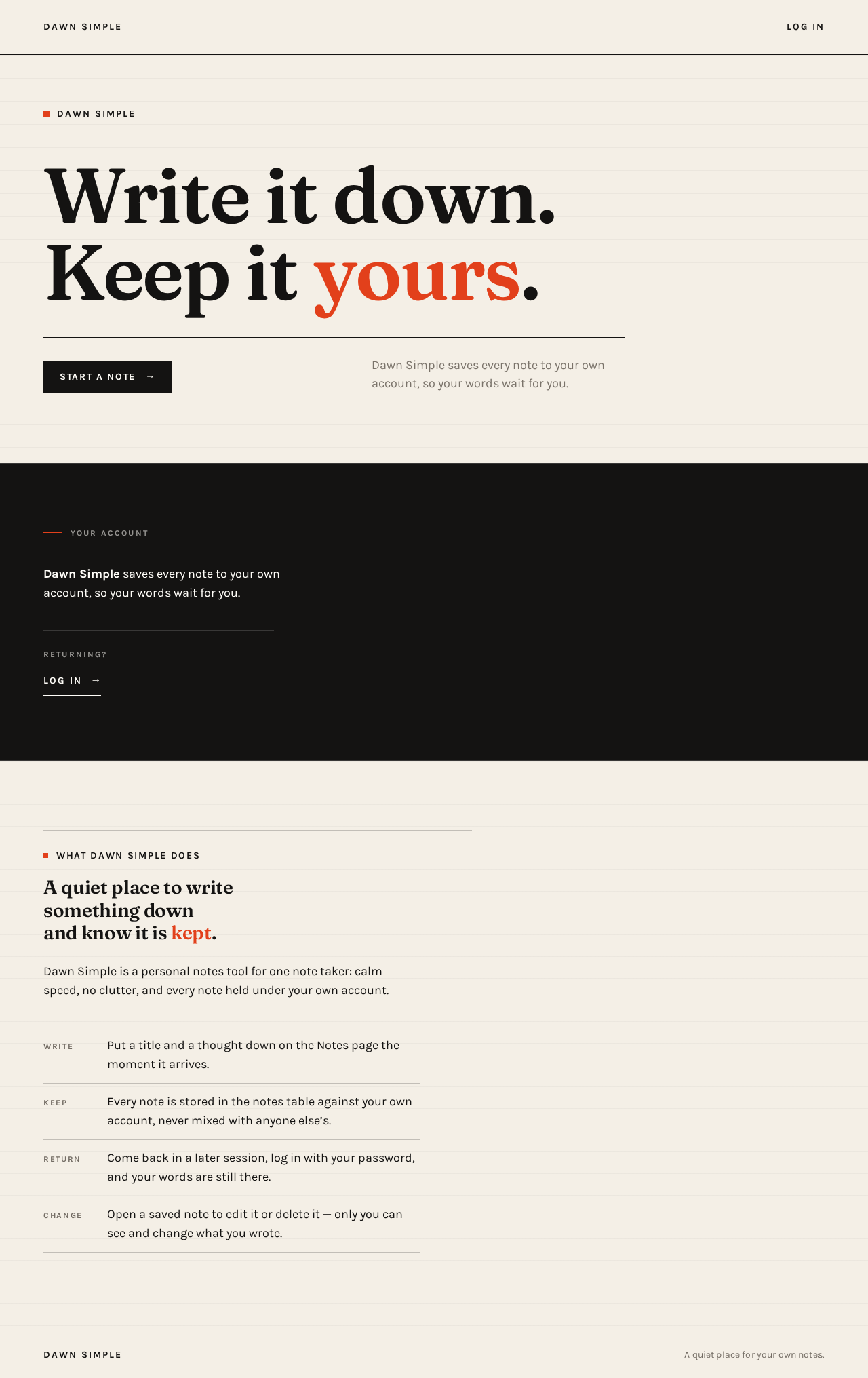
Dawn Simple
Write it down.Keep it yours.
Dawn Simple saves every note to your own account, so your words wait for you.
What Dawn Simple does
A quiet place to write something down and know it is kept.
Dawn Simple is a personal notes tool for one note taker: calm speed, no clutter, and every note held under your own account.
- WritePut a title and a thought down on the Notes page the moment it arrives.
- KeepEvery note is stored in the notes table against your own account, never mixed with anyone else’s.
- ReturnCome back in a later session, log in with your password, and your words are still there.
- ChangeOpen a saved note to edit it or delete it — only you can see and change what you wrote.
Dawn Simple
Write it down.Keep it yours.
Dawn Simple saves every note to your own account, so your words wait for you.
What Dawn Simple does
A quiet place to write something down and know it is kept.
Dawn Simple is a personal notes tool for one note taker: calm speed, no clutter, and every note held under your own account.
- WritePut a title and a thought down on the Notes page the moment it arrives.
- KeepEvery note is stored in the notes table against your own account, never mixed with anyone else’s.
- ReturnCome back in a later session, log in with your password, and your words are still there.
- ChangeOpen a saved note to edit it or delete it — only you can see and change what you wrote.
No comments yet. Be the first!