
dawn-kindly

bysujith kumar

Kindly anaylse the requirement pdf.

HomeProduct SearchLoginProfile
Home

Comments (0)

No comments yet. Be the first!

System Requirements

System Requirement Document
Page 1 of 6

System Requirements Document

Introduction

This document outlines the system requirements for the ShopKart project, which consists of two interconnected applications: an E-Commerce App and an Admin App. The E-Commerce App is a customer-facing platform for browsing and purchasing products, while the Admin App is an internal tool for managing products, inventory, and order tracking.

System Overview

The ShopKart project involves two separate applications that interact with a shared database. The E-Commerce App allows customers to browse products, manage their accounts, and place orders. The Admin App provides administrative capabilities for managing products, tracking orders, and generating reports. Both applications are essential for maintaining a seamless shopping experience and efficient backend operations.

Functional Requirements

E-Commerce App

Account Management

  • As a customer, I want to sign up with my name, email, phone, and password, so that I can create an account.
  • As a customer, I want to log in and log out, so that I can access my account securely.
  • As a customer, I want to view and edit my profile, so that I can keep my information up to date.
  • As a customer, I want to save multiple delivery addresses and mark one as default, so that I can choose where my orders are delivered.
Page 2 of 6

Browsing Products

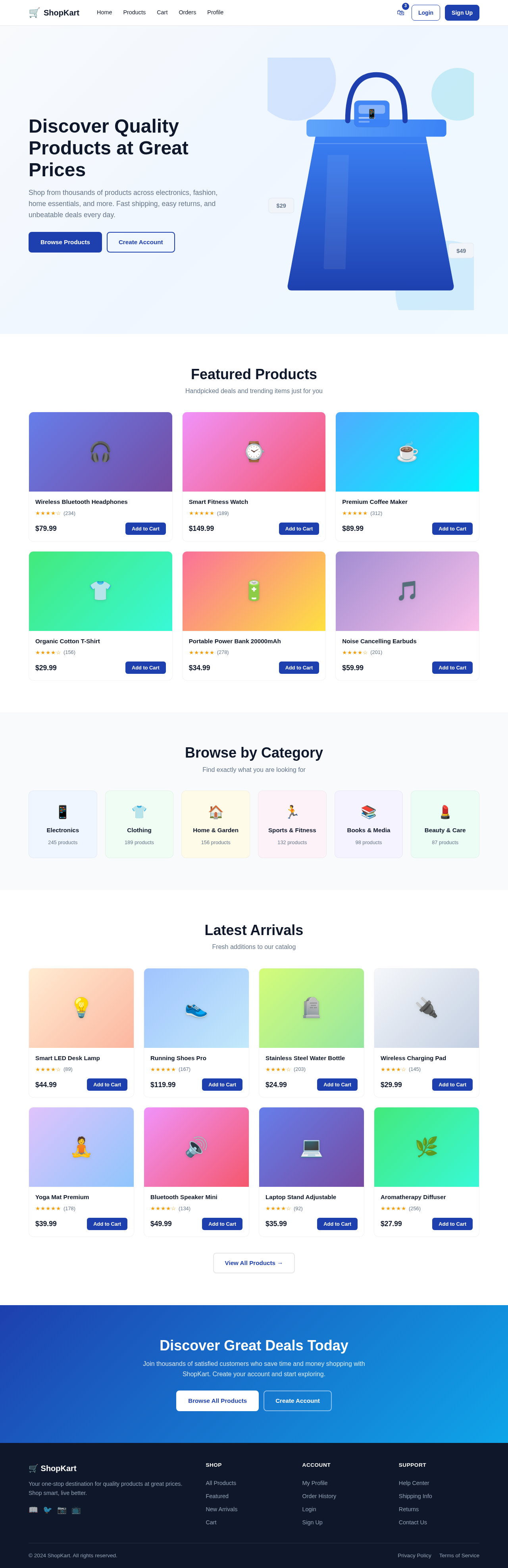
  • As a customer, I want to view a home page with featured or latest products, so that I can see what's new or popular.
  • As a customer, I want to browse products by category, so that I can find items of interest easily.
  • As a customer, I want to search products by name or keyword, so that I can quickly locate specific items.
  • As a customer, I want to filter products by category, price range, rating, and availability, so that I can narrow down my options.
  • As a customer, I want to sort products by price, newest, or rating, so that I can organize the product list according to my preference.
  • As a customer, I want to view a product's detail page, including its variants, price, description, images, and customer reviews, so that I can make informed purchasing decisions.

Cart Management

  • As a customer, I want to add a product with a chosen variant to my cart, so that I can purchase it later.
  • As a customer, I want to adjust the quantity or remove items from my cart, so that I can manage my purchases.
  • As a customer, I want to see a live cart summary including subtotal, discount, tax, shipping fee, and total, so that I know the cost before checkout.
  • As a customer, I want to apply or remove a discount coupon code, so that I can take advantage of promotions.

Checkout and Orders

  • As a customer, I want to choose a delivery address and place an order from my cart, so that I can complete my purchase.
  • As a customer, I want to simulate a payment step to mark the order as paid, so that I can finalize the transaction.
  • As a customer, I want to view my order history with each order's current status, so that I can track my purchases.
  • As a customer, I want to view a single order's details, including products and quantities, so that I can verify my order.
  • As a customer, I want to cancel an order if it hasn't shipped yet, so that I can change my mind.
  • As a customer, I want to track a shipped order's delivery status, so that I know when to expect it.

Reviews

  • As a customer, I want to leave a star rating and written review for a product I have received, so that I can share my feedback.
  • As a customer, I want to edit my review for a short window after posting it, so that I can correct any mistakes.

Admin App

Page 3 of 6

Product and Inventory Management

  • As an admin, I want to view, add, edit, and archive products and their variants, so that I can manage the product catalog.
  • As an admin, I want to adjust stock levels for a specific variant/SKU, so that inventory is accurately reflected.

Order Tracking

  • As an admin, I want to view all orders with their current status, so that I can monitor order fulfillment.
  • As an admin, I want to update an order's status as it moves through fulfillment and attach tracking info, so that customers are informed.

User and Product Traceability

  • As an admin, I want to search for a customer by name, email, phone, or ID, and view their purchase history, so that I can assist with inquiries.
  • As an admin, I want to search for a product and view a list of customers who bought it, so that I can analyze sales data.
  • As an admin, I want a combined search screen to filter purchase records by customer, product, SKU, order status, and date range, and export results, so that I can generate reports.

Reporting

  • As an admin, I want to view reports showing top-selling products, revenue by day, and repeat-customer rate, so that I can assess business performance.

Additional Admin Capabilities

  • As an admin, I want to confirm that a customer's purchase shows up under their purchases after they buy a product, so that I can verify transaction accuracy.
  • As an admin, I want to confirm that a customer shows up in a product's buyers list after purchasing it, so that I can ensure data integrity.
  • As an admin, I want to see a cancelled order reflected as cancelled in the system, so that I can maintain accurate order records.

User Personas

Page 4 of 6

Customer

  • A user who browses products, manages their account, and places orders through the E-Commerce App.

Admin

  • A user who manages products, inventory, and orders through the Admin App, ensuring smooth operations and accurate data.

Core User Flows

Customer Flow

  1. Sign up or log in to the E-Commerce App.
  2. Browse or search for products.
  3. Add products to the cart and proceed to checkout.
  4. Choose a delivery address and simulate payment.
  5. View order history and track order status.

Admin Flow

  1. Log in to the Admin App.
  2. Manage products and inventory.
  3. Track and update order statuses.
  4. Search for customers or products to view purchase history.
  5. Generate and view reports.

Visuals Colors and Theme

  • Professional and clean design with a focus on usability.
  • Use a modern color palette with blues and grays to convey trust and reliability.
Page 5 of 6

Signature Design Concept

  • Clean and simple design prioritizing functionality and ease of use.
  • Table-heavy layouts for data presentation in the Admin App.

Interaction Model & Motion Direction

  • Intuitive navigation with clear feedback for user actions.
  • Smooth transitions and animations to enhance user experience.

Non-Functional Requirements

  • The system must be responsive and accessible on various devices.
  • Ensure data consistency and integrity across both applications.
  • Provide clear and friendly error messages for user guidance.

Tech Stack

  • Frontend: React.js
  • Backend: Python + FastAPI
  • Database: MySQL with Alembic migrations

Assumptions and Constraints

  • Both applications will run on separate local ports (3000 for E-Commerce App, 4000 for Admin App).
  • The shared database must support concurrent access by both applications.
  • The system will not integrate with real payment gateways; payment is simulated.
Page 6 of 6

Glossary

  • SKU: Stock Keeping Unit, a unique identifier for each product variant.
  • CSV: Comma-Separated Values, a file format for exporting data.
Home design preview
Login: Sign In
Products: View Catalog
Products: Add Product
Products: Edit Product
Inventory: Adjust Stock
Orders: View All Orders
Orders: Update Status
Customer Search: Search Customer
Customer Search: View Purchase History
Product Search: View Buyers List
Combined Search: Filter Records
Combined Search: Export Results
Reports: View Sales Reports
Home design preview
Login: Sign In
Products: View Catalog
Products: Add Product
Products: Edit Product
Inventory: Adjust Stock
Orders: View All Orders
Orders: Update Status
Customer Search: Search Customer
Customer Search: View Purchase History
Product Search: View Buyers List
Combined Search: Filter Records
Combined Search: Export Results
Reports: View Sales Reports