
dawn-bot

byJaseel O.P

create heart rate monitor iOS app design (PPG)

HomeHistoryMeasurement
Home

Comments (0)

No comments yet. Be the first!

System Requirements

System Requirement Document
Page 1 of 4

dawn-bot System Requirements Document

1. Introduction

The dawn-bot project aims to develop a heart rate monitoring iOS application using Photoplethysmography (PPG) technology. The application is designed for personal tracking, providing users with an intuitive and efficient way to monitor their heart rate.

2. System Overview

The dawn-bot application will leverage PPG technology to measure heart rate through the user's iOS device. The app will focus on delivering accurate and real-time heart rate data, ensuring a seamless user experience with a clean, non-stroke-based UI design. The application will cater to individuals seeking to track their heart health conveniently.

3. Functional Requirements

  • As a User, I should be able to measure my heart rate using the iOS app.
  • As a User, I should be able to view my heart rate history over time.
  • As a User, I should be able to set alerts for abnormal heart rate readings.
  • As a User, I should be able to export my heart rate data for medical consultations.
  • As a User, I should be able to customize the app's interface to suit my preferences.
Page 2 of 4

4. User Personas

  • Health-Conscious Individual: A user who regularly monitors their heart rate for fitness and health purposes.
  • Medical Patient: A user who needs to track heart rate data for medical reasons and share it with healthcare providers.
  • Fitness Enthusiast: A user who integrates heart rate monitoring into their workout routines for optimal performance.

5. Core User Flows

  • User opens the app -> Initiates heart rate measurement -> Views real-time heart rate data -> Saves data to history.
  • User accesses history -> Reviews past heart rate data -> Sets alerts for specific heart rate thresholds.
  • User customizes app interface -> Adjusts settings for personal preferences -> Exports data for external use.

6. Visuals Colors and Theme

  • primary: #4A90E2 (a calming blue for trust and reliability)
  • primary_light: #A6C8F7 (a lighter blue for hover states)
  • secondary: #F5A623 (a warm orange for emphasis and highlights)
  • accent: #50E3C2 (a vibrant teal for CTAs and active states)
  • highlight: #F8E71C (a bright yellow for notifications and alerts)
  • bg: #FFFFFF (a clean white background)
  • surface: rgba(255, 255, 255, 0.9) (a subtle white for cards and panels)
  • text: #333333 (a dark grey for primary text)
  • text_muted: #888888 (a softer grey for secondary text)
  • border: rgba(0, 0, 0, 0.1) (a light grey for borders)
Page 3 of 4

7. Signature Design Concept

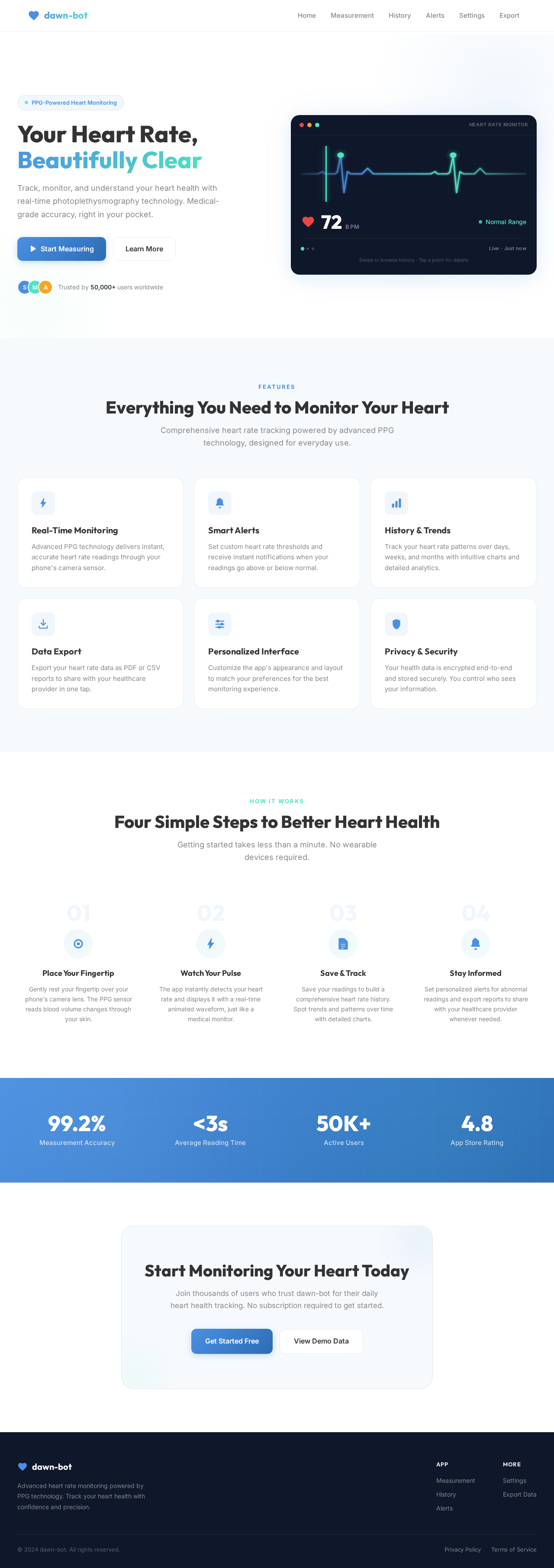
The dawn-bot app will feature an interactive, minimalist interface where users can visualize their heart rate data through a dynamic waveform display. The waveform will animate in real-time, reflecting the user's current heart rate. Users can interact with the waveform by tapping to view detailed data points or swiping to navigate through historical data. The design will utilize framer-motion for smooth animations and transitions, ensuring a fluid user experience. The app's clean, non-stroke-based design will emphasize simplicity and ease of use, with intuitive touch interactions enhancing user engagement.

8. Interaction Model & Motion Direction

The landing page of the dawn-bot app will adopt an "animated" interaction model. This will include moderate scroll-triggered reveals and hover transitions, with spring physics applied to interactive elements. The design will focus on providing a polished experience, suitable for a feature-rich product page. Internal pages, such as settings and data history, will maintain a "static" interaction model to prioritize readability and user efficiency.

9. Non-Functional Requirements

  • The application must ensure data privacy and comply with relevant health data regulations.
  • The app should perform real-time heart rate monitoring with minimal latency.
  • The user interface must remain responsive across different iOS devices and screen sizes.
Page 4 of 4

10. Tech Stack

  • Frontend: React Native for mobile app development.
  • Backend: FastAPI for server-side operations.
  • Database: MongoDB for storing user data.
  • AI Models: Not applicable.
  • AI Tools: Not applicable.
  • Local Orchestration: Docker for containerization.
  • Server-side Orchestration: Kubernetes for managing deployments.

11. Assumptions and Constraints

  • The application will be developed exclusively for iOS devices.
  • Users must have an iOS device with a camera capable of PPG measurements.
  • The app will require internet connectivity for data synchronization and updates.

12. Glossary

  • PPG (Photoplethysmography): A non-invasive method to detect blood volume changes in the microvascular bed of tissue.
  • UI (User Interface): The space where interactions between humans and machines occur.
  • CTA (Call to Action): Elements in the app designed to prompt an immediate response or encourage an immediate sale.
Home design preview
Home: View Overview
Home: Start Workout
Measurement: View Real-Time Data
Measurement: Save Reading
History: View Trends
History: Review Past Data
Alerts: Set Thresholds
Settings: Customize Interface
Export: Export Data