data-packets
 Gajalafirdos S
create a 3d working model of data and packets flow from the above source


Comments (0)
Sign in to leave a comment
System Requirements
System Requirements Document for Data and Packets Flow
1. Introduction
Data and Packets Flow is a browser-based product that presents a 3D working model of data and packet flow. The user supplies a source, and the product renders that source's data and packets moving through a three-dimensional scene: nodes, links, and packets in motion, inspectable by the viewer.
The product intent is joyful technical discovery. The audience is network-curious viewers — people who want to see how data moves in three dimensions and to touch it, rather than read about it in a diagram. The model is the product: a full-bleed, playable 3D scene is the first screen, not a picture of one.
The requester, Gajalafirdos S, asked for a 3D working model of data and packet flow from a supplied source. This document specifies that product.
2. System Overview
2a. Product Interpretation and Delivery Boundary
The product is a first-party web application with two current destinations:
- Landing — the public entry surface. It introduces the 3D data and packet flow model and carries the entry hero: a full-bleed dark navy 3D scene with a source node at the left and a receiver cluster at the right, coral packet cubes travelling mint links, and a cream headline on the lower left. Its call to action opens the model.
- Model — the working 3D model itself. The viewer supplies a source, the scene renders that source's nodes, links, and packets in motion, and the viewer inspects flow paths and nodes.
Both destinations are public and require no account or sign-in. There is no application-owned identity, no private per-user state to resume, and no differentiated permissions: the model is a shared, inspectable visualization, and nothing in the accepted requirements creates a durable relationship, entitlement, or value transfer bound to a particular person. The viewer's source selection and inspection state live in the working session of the Model page.
The 3D scene is rendered in the browser with real-time WebGL. The shared backend serves the application's APIs and domain modules; the database stores application-owned persistent data. Neither the backend nor the database adds product behavior beyond what is specified in Section 3.
Everything specified here is current. No future-horizon capabilities are accepted.
2b. Source Content Inventory
Not applicable — no reference directive supplies a content_source.
2c. Page Content and Component Coverage
Landing
Information and state
- Product name "Data and Packets Flow" and the entry hero copy: headline "Watch data move in three dimensions"; subline "Follow each packet from the source to the receiver and inspect every node on the path."; call to action "Open the model".
- A full-bleed 3D scene as the first screen: one source node at the left, a receiver cluster at the right, coral packet cubes travelling mint links between them.
- A HUD legend panel at the top right listing node types with colour chips.
- No loading spinner over the hero: the scene composes its first frame immediately; if the 3D scene cannot initialize, the hero copy and the call to action remain fully readable and usable over the navy ground.
Primary action
- "Open the model" — navigates to the Model page.
Supporting actions
- Pointer movement over the scene eases the camera so the viewer looks around the model.
- Hovering a node pulses it once.
Domain entities
- Source node, receiver cluster, link, packet cube, node type (as listed in the legend).
Component responsibilities
- Hero scene canvas: renders the low-poly source node, receiver cluster, mint links, and coral packet cubes; owns pointer-eased camera and node hover pulse.
- Headline block: Fredoka headline at
clamp(40px, 9vw, 112px), positioned lower left over the scene, never centred; subline in Nunito; call-to-action control. Stays whole and uncovered at 375px, 768px, and 1280px. - HUD legend panel: top right, chunky rounded panel, colour chips per node type, labels in Fredoka Medium caps.
States
- Loading: first frame composes without a blocking overlay.
- Empty: not applicable — the hero scene is composed from fixed scene content, not user data.
- Success: scene animates; call to action is reachable.
- Error/recovery: if WebGL is unavailable, the navy ground, headline, subline, legend, and call to action render as a static arrangement; the viewer can still open the model.
- Reduced motion: static arrangement of the scene with all readable text and controls whole.
Model
Information and state
- The working 3D model of data and packet flow for the source the viewer supplies.
- The current source selection, the rendered node graph (nodes and links), and packets in motion along links.
- Inspection state: which node or flow path the viewer is currently inspecting.
- A side rail of flow controls.
- A HUD legend panel at the top right listing node types with colour chips.
Primary action
- Supply a source, then view the resulting 3D model with packets flowing from that source to the receiver.
Supporting actions
- Inspect a node or flow path to see its role in the movement.
- Use the side rail flow controls to drive the model's flow.
- Move the pointer to ease the camera around the model; hover a node to pulse it once.
Domain entities
- Source, node, link, packet, flow path, node type.
Component responsibilities
- Source input: accepts the viewer's source and submits it to produce the model.
- 3D model canvas: renders nodes as low-poly spheres and capsules, links as thick rounded shapes, packets as coral cubes travelling mint links with a small bounce and slowing at each node; owns pointer-eased camera and hover pulse.
- Side rail: chunky rounded flow controls for the model.
- HUD legend panel: top right, node types with colour chips.
- Inspection readout: identifies the inspected node or flow path and its place in the movement.
States
- Loading: while the model for a supplied source is being produced, the canvas shows a loading state and the source input and side rail remain usable.
- Empty: before a source is supplied, the canvas shows an empty state inviting the viewer to supply a source; no packets are in motion.
- Success: nodes, links, and packets render and animate; inspection and flow controls respond.
- Error/recovery: if the supplied source cannot produce a model, an error state names the problem, keeps the supplied source editable, and lets the viewer supply another source; the previous model, if any, is not silently replaced by a broken scene.
- Reduced motion: packets and camera settle into a static arrangement; every readable label and control stays whole and reachable.
3. Functional Requirements
FR-1 — 3D working model of data and packet flow (explicit) As a Model Viewer, I should see a 3D working model of data and packet flow, so that I can understand how data and packets move.
- Trigger/input: the viewer opens the Model page with a source supplied.
- Observable result: a three-dimensional scene renders nodes, links, and packets in motion along the links.
- Access state: public; no account required.
- Failure/recovery: if the scene cannot render, an error state is shown and the viewer can retry or supply another source.
- Continuation: the viewer inspects nodes and flow paths and uses the flow controls.
- Owner: Model page.
FR-2 — Model reflects the supplied source (explicit) As a Model Viewer, I should see the model show the flow from the source I supply, so that the model is about my source rather than a generic example.
- Trigger/input: the viewer supplies a source on the Model page.
- Observable result: the rendered nodes, links, and packet movement correspond to that supplied source.
- Access state: public.
- Failure/recovery: if the source cannot produce a model, an error state names the problem and the source remains editable.
- Continuation: the viewer inspects the resulting model or supplies a different source.
- Owner: Model page.
FR-3 — Supply a source (required_inference) As a Model Viewer, I should be able to supply a source for the flow model, so that the model has something to show.
- Trigger/input: the viewer enters or selects a source in the Model page's source input and submits it.
- Observable result: the model is produced for that source; the empty state is replaced by the rendered model.
- Access state: public.
- Failure/recovery: invalid or unusable input produces an error state that keeps the input editable.
- Continuation: the viewer views the model or edits the source.
- Owner: Model page.
FR-4 — Inspect flow paths and nodes (required_inference) As a Model Viewer, I should inspect the flow paths and nodes of the model, so that I can understand the movement in detail.
- Trigger/input: the viewer points at or selects a node or flow path in the 3D scene.
- Observable result: the hovered node pulses once; the inspected node or flow path is identified with its place in the movement.
- Access state: public.
- Failure/recovery: selecting empty space clears the inspection without disturbing the model.
- Continuation: the viewer inspects another node or returns to watching the flow.
- Owner: Model page.
FR-5 — Drive the model with flow controls (required_inference) As a Model Viewer, I should use the side rail flow controls to drive the model, so that I can explore the movement at my own pace.
- Trigger/input: the viewer operates a control in the Model page's side rail.
- Observable result: the model's flow responds accordingly and the scene reflects the new state.
- Access state: public.
- Failure/recovery: controls remain usable and reflect the current state if the scene is paused or in an error state.
- Continuation: the viewer continues inspecting or watching the flow.
- Owner: Model page.
FR-6 — Entry to the model (required_inference) As a Model Viewer, I should reach the model from the public entry page, so that I know what the product is before I start.
- Trigger/input: the viewer activates "Open the model" on the Landing page.
- Observable result: the Model page opens.
- Access state: public; no account required.
- Failure/recovery: if the Model page fails to load, the viewer can return to Landing and try again.
- Continuation: the viewer supplies a source on the Model page.
- Owner: Landing page.
4. User Personas
Model Viewer
Product context. The Model Viewer is network-curious: someone who wants to see how data and packets move and to touch the model rather than read a static diagram. They arrive at the public Landing page, see the 3D scene as the first screen, and open the model.
Primary goal. See a 3D working model of data and packet flow for a source they supply, and understand the movement by inspecting it.
Distinct accepted responsibilities.
- Supply the source that the model should show (FR-3).
- View the resulting 3D model of data and packet flow (FR-1, FR-2).
- Inspect flow paths and nodes to understand the movement (FR-4).
- Drive the model with the side rail flow controls (FR-5).
- Enter the model from the public entry page (FR-6).
Relevant inputs and decisions. What source to model; which node or flow path to inspect; how to drive the flow with the controls.
Interactions with other accepted participants. None. The Model Viewer is the only accepted active human persona; there is no counterparty, recipient, or approver in the accepted behavior.
Observable success. The scene shows nodes, links, and packets in motion for the supplied source; hovering a node pulses it; inspecting a node or flow path identifies it; the flow controls change the model's flow.
5. Core User Flows
Flow A — Enter the product and open the model
- The Model Viewer opens the public Landing page. The full-bleed dark navy 3D scene composes as the first screen: a source node at the left, a receiver cluster at the right, coral packet cubes travelling mint links.
- The viewer reads the headline "Watch data move in three dimensions" and the subline "Follow each packet from the source to the receiver and inspect every node on the path." on the lower left, and the HUD legend at the top right listing node types with colour chips.
- The viewer moves the pointer; the camera eases slowly so they look around the model. Hovering a node pulses it once.
- The viewer activates "Open the model". The Model page opens.
- Failure/recovery: if the 3D scene cannot initialize, the hero copy, legend, and call to action remain whole and readable over the navy ground, and the viewer can still open the model. With reduced motion, the scene is a static arrangement and every readable element stays whole.
- Continuation: the viewer proceeds to Flow B.
Flow B — Supply a source and see the model
- On the Model page, before a source is supplied, the canvas shows an empty state inviting the viewer to supply a source; no packets are in motion.
- The viewer enters or selects a source in the source input and submits it.
- While the model is produced, the canvas shows a loading state; the source input and side rail remain usable.
- The model renders: nodes as low-poly spheres and capsules, links as thick rounded shapes, coral packet cubes travelling the mint links with a small bounce, slowing at each node.
- Failure/recovery: if the source cannot produce a model, an error state names the problem, the supplied source stays editable, and the viewer supplies another source. A previous model is not silently replaced by a broken scene.
- Continuation: the viewer inspects the model (Flow C) or drives it with the flow controls (Flow D).
Flow C — Inspect flow paths and nodes
- With the model rendered on the Model page, the viewer moves the pointer; the camera eases around the model.
- The viewer hovers a node; it pulses once.
- The viewer selects a node or flow path; the inspection readout identifies it and its place in the movement.
- The viewer selects empty space to clear the inspection; the model keeps running undisturbed.
- Continuation: the viewer inspects another node or returns to watching the flow.
Flow D — Drive the model with the flow controls
- With the model rendered on the Model page, the viewer operates a control in the side rail.
- The model's flow responds and the scene reflects the new state.
- Failure/recovery: if the scene is paused or in an error state, the controls remain usable and reflect the current state.
- Continuation: the viewer continues inspecting or watching the flow.
6. Visuals Colors and Theme
Muse and headline. Bruno Simon — playable 3D worlds with toy physics. The headline idea: a technical demo you can touch, staged on a deep navy ground with coral packets in motion and mint nodes and links.
Mode. Dark mode only.
Colour tokens (exact hex, by role)
- Background:
#101828— deep navy ground covering most of the screen. - Surface:
#1B2440— chunky rounded panels (HUD legend, side rail, source input). - Text:
#F4F1E8— cream, readable on navy. - Primary:
#FF6B4A— coral; marks packets in motion and the primary call to action. - Accent:
#7CE0C3— mint; marks nodes and links. - Muted:
#8A93AD— secondary labels and inactive controls.
Typography
- Headings: Fredoka — rounded bold at large sizes with tight leading. Labels use Fredoka Medium in caps.
- Body: Nunito.
- Scale: 1.25 modular — 64 / 48 / 32 / 20 / 16 px.
- Entry headline:
clamp(40px, 9vw, 112px).
Shape language. Low-poly spheres and capsules for nodes. Thick rounded links. Soft shadows. Chunky rounded panels for controls.
Layout. The 3D model fills the first screen. A small HUD panel sits at the lower left; a ruled legend sits at the top right. The Model page adds a side rail of flow controls.
Imagery. Low-poly 3D nodes and packet cubes. Soft pastel lights. No photographs and no flat clip art.
Readability rule. Headlines, wordmarks, labels, numbers, and controls stay entirely inside the viewport and their container at 375px, 768px, and 1280px, wrapping or scaling to fit, with no other element covering them. Imagery and decoration may bleed, crop, or overlap freely.
7. Signature Design Concept
The Landing page's first screen is a full-bleed playable 3D scene, not a picture of one. A deep navy field (#101828) holds one low-poly source node at the left and a receiver cluster at the right, joined by thick rounded mint links (#7CE0C3). Coral packet cubes (#FF6B4A) travel the links with a small bounce, slowing at each node. The pointer eases the camera with slow, cinematic damping so the viewer looks around the model. A chunky rounded HUD legend panel at the top right lists node types with colour chips. The headline — Fredoka at clamp(40px, 9vw, 112px), cream (#F4F1E8) — sits on the lower left over the scene, never centred, with the subline beneath it and the "Open the model" control below that. No gradient blobs, no glass cards, no centred headline stack, no stock photography, no grid of identical hover-lift cards.
8. Interaction Model & Motion Direction
Interaction Model: Animated Motion Tempo: cinematic Hero Dimensionality: webgl
Landing Hero Motion Brief
- Focal subject: the source node at the left and the receiver cluster at the right, joined by mint links, with coral packet cubes in transit — the product's defining state, rendered as a real-time WebGL scene.
- Input → transformation → outcome thesis: pointer movement over the scene → the camera eases slowly around the model → the viewer looks around the flow from a new angle while packets continue travelling the links. Hovering a node → the node pulses once → the viewer registers that node as a distinct, inspectable object.
- Motion vocabulary: packets travel along links with a small bounce and slow at each node; camera follows the pointer with slow easing; node hover pulses once. Cinematic, immersive, never twitchy.
- Composed first frame: navy ground; source node left; receiver cluster right; mint links between; coral packets mid-transit; cream headline lower left; HUD legend top right with colour chips.
- Reduced-motion state: the scene settles into a static arrangement — nodes, links, and packets held in place — with the headline, subline, legend, and "Open the model" control whole, readable, and reachable.
Landing Hero 3D Scene Brief — DIRECTION-DERIVED One crafted real-time scene: a low-poly source node (sphere/capsule) at the left, a receiver cluster at the right, thick rounded mint links, and coral packet cubes travelling the links with a small bounce and node-by-node slowdown. Soft pastel lighting, soft shadows, no photographs. The scene is the hero subject and fills the first screen; the camera is pointer-eased. Built with WebGL/R3F.
9. Non-Functional Requirements
- Real-time 3D rendering (explicit, from the 3D working model requirement): the model must render and animate in the browser in real time; a static image does not satisfy the requirement.
- Readable text and controls at every viewport (explicit design constraint): headlines, labels, numbers, and controls stay entirely inside the viewport and their container at 375px, 768px, and 1280px, wrapping or scaling to fit, with no other element covering them.
- Reduced motion (explicit design constraint): with
prefers-reduced-motion, a usable static arrangement is provided in which every readable item can be brought fully into view. - Public access (explicit via Planning Scope): both destinations are reachable without an account; no sign-in, profile, or permission model is part of the product.
- Forbidden visual template (explicit design constraint): the generic indigo/blue-on-white SaaS template is forbidden; the palette, fonts, surfaces, and tone in Section 6 are binding.
10. Tech Stack
- Frontend: React application UI, rendering the 3D scene with WebGL (React Three Fiber / Three.js) per the creative direction's
webglhero dimensionality. - Backend: shared FastAPI process for application APIs and domain modules.
- Database: MariaDB for application-owned persistent data.
- Infrastructure: Docker / docker-compose with the three provisioned services —
frontend,backend,database. The backend is reused for feature APIs; no additional service is required by the accepted workflows.
11. Assumptions and Constraints
- A-1 (required_inference): "the above source" is interpreted as a source the viewer supplies on the Model page; the product provides a source input for this purpose. No specific source format is specified by the user, so the input accepts a source the viewer provides and the model is produced from it.
- A-2 (required_inference): the flow controls in the Model page's side rail are the means by which the viewer drives the model; their exact control set is not specified by the user and is limited to driving the model's flow.
- A-3 (explicit): both pages are public; no application-owned identity, account management, or differentiated permissions are introduced.
- A-4 (explicit): the creative direction is authoritative for Section 6–8; the user's design constraints take priority over catalogue defaults.
- A-5 (explicit): no future-horizon capabilities are accepted; everything in this document is current.
12. Glossary
- Packet — a coral cube travelling along a link in the 3D model, representing a unit of data in motion.
- Node — a low-poly sphere or capsule in the 3D model representing a point in the flow; nodes pulse once on hover.
- Link — a thick rounded mint connection between nodes along which packets travel.
- Source — the input the viewer supplies that determines what the model shows.
- Flow path — the route packets take through nodes and links from the source to the receiver.
- Receiver cluster — the group of nodes at the right of the scene where packets arrive.
- HUD legend — the chunky rounded panel at the top right listing node types with colour chips.
- Side rail — the panel of flow controls on the Model page.
- Model Viewer — the sole accepted active human persona; the network-curious viewer who supplies a source and inspects the 3D model.
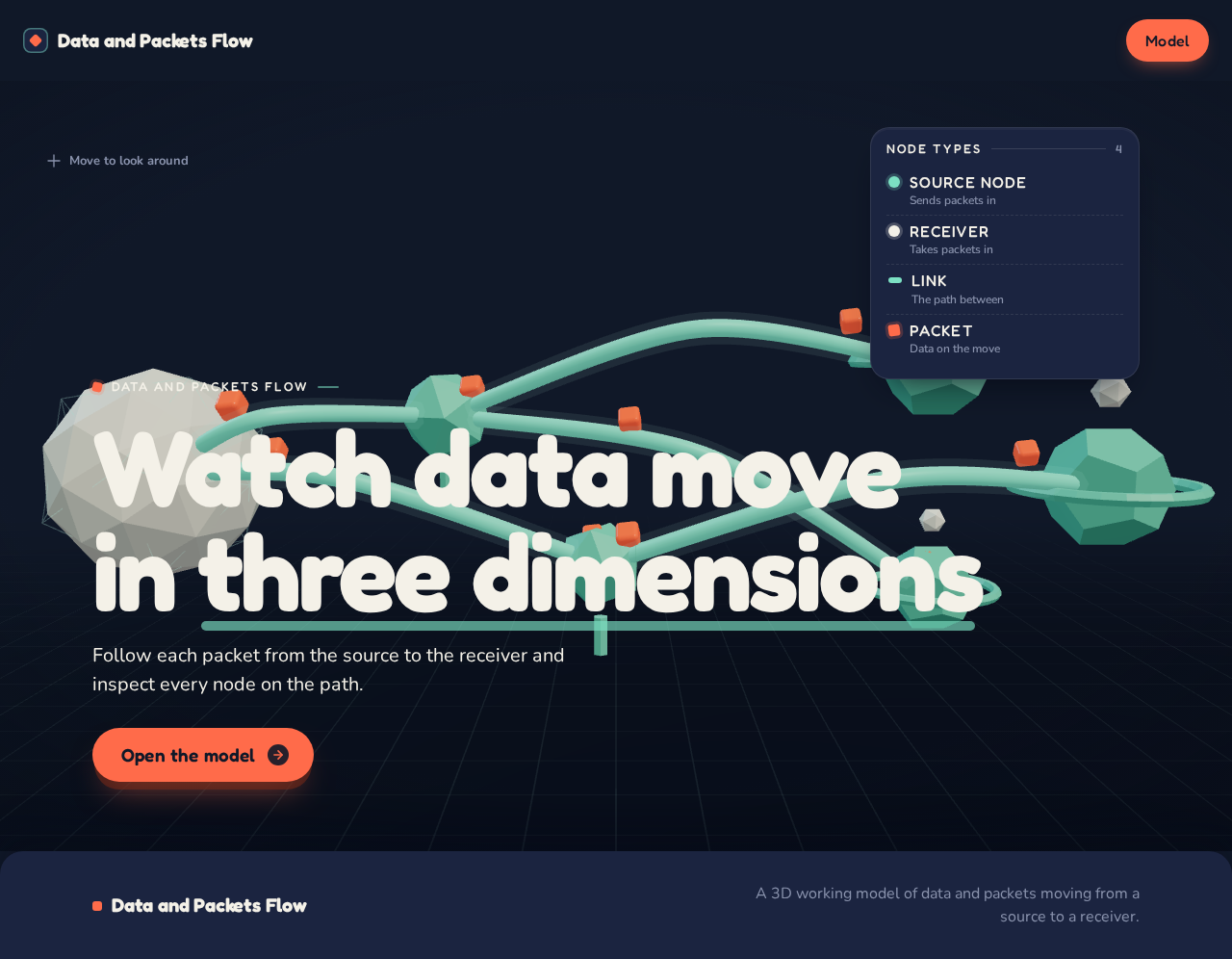
A three-dimensional flow model: one source node on the left, relay nodes in the middle and a receiver cluster on the right, joined by mint links, with coral packets travelling along them.
Data and Packets Flow
Watch data movein three dimensions
Follow each packet from the source to the receiver and inspect every node on the path.
Open the modelA three-dimensional flow model: one source node on the left, relay nodes in the middle and a receiver cluster on the right, joined by mint links, with coral packets travelling along them.
Data and Packets Flow
Watch data movein three dimensions
Follow each packet from the source to the receiver and inspect every node on the path.
Open the model
No comments yet. Be the first!