Page 1 of 25
System Requirements Document for data-entry
1. Introduction
data-entry is a SaaS application for data entry work. Its product intent is stated directly by the user: it is an app "for data entry who can problems in data entry and solve the problem" — that is, a data-entry product whose defining purpose is not merely to accept typed rows, but to surface the problems that arise during data entry and to enable those problems to be solved.
The audience is the people who do and oversee data entry work:
- Data Entry Operator — the person performing data entry who encounters problems while doing it (bad formats, duplicate rows, missing fields, mismatched totals) and needs to identify and resolve each problem so the entry can be completed correctly.
- Data Entry Team Lead — the person responsible for the data entry work of others, who reviews the problems that occur and the resolutions applied, so recurring issues are addressed rather than repeatedly blocking the team's entry work.
The product is delivered as a first-party web application with application-owned identity: operators and team leads establish an account, sign in, and return to durable data-entry records and problem resolutions.
Page 2 of 25
2. System Overview
data-entry is a current, single-product SaaS application. Its accepted behavior is:
- A person performs data-entry work in a focused entry workspace.
- Problems that arise during that work are surfaced in the flow of the entry itself — not hidden behind a modal — and are collected in a revisitable problems workspace.
- Each surfaced problem can be opened in a focused resolution workspace, resolved, and the operator returns to the affected entry.
- A team lead reviews the data-entry problems and the resolutions applied across the team.
- Data-entry records and problem resolutions persist, so users can return to incomplete work and review prior outcomes.
Actors. The closed active-human catalog is exactly two personas: Data Entry Operator and Data Entry Team Lead. No other human personas are introduced. The application itself (backend persistence, validation, and state transitions) is a non-persona system actor.
Delivery and ownership. The application owns its identity and its custom UI. All eight destinations are first-party application pages. There is no provider-owned surface, no external destination, and no headless-only delivery in the current scope.
Narrow exclusions. This document does not add adjacent capabilities that the source did not accept: no billing, no subscription management, no third-party data-source connectors, no OCR/scanning intake, no reporting/analytics suite, no notification or messaging system, no audit-log product, and no account-management surface beyond the identity establishment and verification required to make the accepted journeys executable. Problems are never presented as modal dialogs — they appear in place, in the flow of the row.
Page 3 of 25
2a. Product Interpretation and Delivery Boundary
What is current. Everything in Sections 2c, 3, and 5 is current delivery. The product is a working data-entry application: an operator signs up or signs in, opens or starts an entry, types data, sees problems surface as they occur, resolves them, and completes the entry. A team lead signs in and reviews the problems and resolutions across the team.
Who owns what. The application owns the landing surface, identity establishment and verification, the entries overview, the entry workspace, the problems workspace, the resolution workspace, and the team-lead review workspace. The application also owns the durable state behind all of them: entries, their field values, the problems detected against them, and the resolutions recorded against those problems. No accepted behavior is delegated to a provider surface or an external destination.
Access boundary. The landing surface is anonymously reachable. Identity establishment (Sign Up) and returning verification (Login) are themselves anonymously reachable — a protected destination cannot own the interaction that establishes access to itself. The working destinations (Entries, Data Entry, Problems, Resolve Problem, Problem Review) require an established, verified identity, and each is scoped to the role whose work it carries.
Current vs. future. There is no accepted future horizon in the source. Nothing in this document is deferred; nothing outside it is promised.
2b. Source Content Inventory
Not applicable. No reference directive in this request declares content_source authority, so no source content inventory is produced.
Page 4 of 25
2c. Page Content and Component Coverage
The page inventory is the supplied versioned page contract, copied exactly and in order: Landing, Login, Sign Up, Entries, Data Entry, Problems, Resolve Problem, Problem Review.
Page 5 of 25
Landing
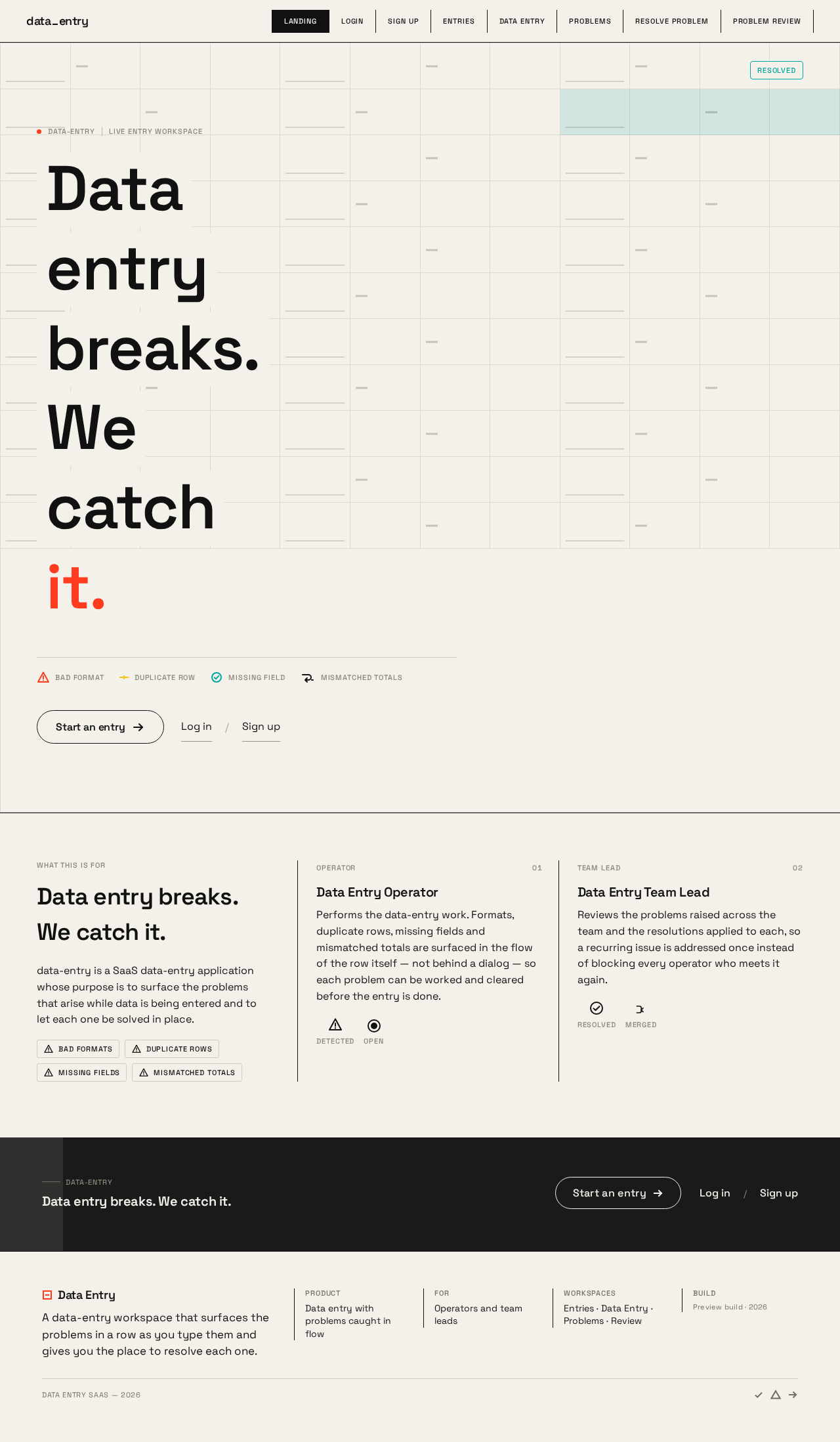
- Information and state. Anonymous public entry surface. Explains the SaaS data-entry product, who uses it (operators and team leads), and how it helps solve problems that arise during data entry. No user-specific state; no session required.
- Primary action. Start an entry — the single primary CTA, a pill with a 1px ink border and hot-red hover fill, positioned bottom-left of the grid (full-width bottom bar at 375px). It routes an unauthenticated visitor into identity establishment, and a returning visitor into verification.
- Supporting actions. Navigate to Login; navigate to Sign Up.
- Domain entities. None persisted. The hero renders a procedural, non-persistent data-grid mock.
- Component responsibilities.
- Hero data grid — full-bleed 12-column live grid filling the viewport beneath the type; cells flash red in a 1.6s pulse in the top-right corner, a teal scan line crosses the row, and the cells settle to teal. Purely presentational; it visualizes the product's own subject matter and carries no product behavior.
- Headline word tiles — the nine-column headline "Data entry breaks. We catch it." set as individual word tiles on solid paper blocks with ink type, sitting directly on the grid; tiles drift 4–12px toward the cursor, revealing the grid through the gaps.
- Primary CTA pill — the only call to action.
- Product explanation block — states what the product is for and who it serves, in the direction's flat print-like treatment.
- States.
- Loading — none required; the grid is generated client-side.
- Empty — not applicable.
- Success — the visitor understands the product and chooses Start an entry, Login, or Sign Up.
- Error — not applicable on this surface.
- Recovery — not applicable.
- Reduced motion — cursor physics disabled; the pulse becomes a static red left border; the scan line becomes an instant state change; the grid renders as a static arrangement.
Page 6 of 25
Login
- Information and state. Anonymous identity-access surface for returning Data Entry Operator and Data Entry Team Lead. Collects the credentials that verify an existing application account.
- Primary action. Log in — verifies identity and opens the destination appropriate to the verified role.
- Supporting actions. Navigate to Sign Up for a person without an account; return to Landing.
- Domain entities. Account identity (email/identifier and credential); verified session.
- Component responsibilities.
- Credential form — identifier and password fields with inline validation.
- Submit control — the single primary pill on the screen.
- Error region — in-place message for failed verification.
- Cross-link — to Sign Up.
- States.
- Loading — submit control shows an in-progress state; fields are held.
- Empty — fields blank, submit disabled until both are present.
- Success — session established; the user lands on Entries (operator) or Problem Review (team lead).
- Error — invalid credentials produce an in-place message; the form retains the entered identifier and clears the credential.
- Recovery — the user may retry immediately, or follow the Sign Up link if they have no account.
- Reduced motion — no cursor physics; state changes are instant.
Page 7 of 25
Sign Up
- Information and state. Anonymous identity-establishment surface. No invitation, provisioning, provider, or pre-existing-account boundary is established, so enrollment is self-service.
- Primary action. Create account — establishes the application account and the role the person will work in.
- Supporting actions. Navigate to Login for a person who already has an account; return to Landing.
- Domain entities. Account identity (identifier, credential, display name, role selection: Data Entry Operator or Data Entry Team Lead).
- Component responsibilities.
- Enrollment form — identifier, credential, display name, and role selection.
- Role selector — the choice between Data Entry Operator and Data Entry Team Lead, which determines which working destinations the account opens.
- Submit control — the single primary pill on the screen.
- Error region — in-place messages for an already-registered identifier or an unmet field requirement.
- Cross-link — to Login.
- States.
- Loading — submit control shows an in-progress state.
- Empty — fields blank, submit disabled until required fields are present.
- Success — account created and session established; the user lands on Entries (operator) or Problem Review (team lead).
- Error — an identifier already in use, or a missing/invalid field, produces an in-place message with the offending field marked.
- Recovery — the user corrects the field and resubmits, or follows the Login link if the account already exists.
- Reduced motion — no cursor physics; state changes are instant.
Page 8 of 25
Entries
- Information and state. Revisitable overview of the signed-in Data Entry Operator's durable data-entry work. Lists entries with their identity, current status, and problem count, so incomplete work can be found and continued.
- Primary action. Open entry — selects an entry and moves into the Data Entry workspace.
- Supporting actions. Start a new entry; filter or sort the list by status; navigate to Problems; navigate to Problem Review when the signed-in account holds the team-lead role.
- Domain entities. Entry (identifier, label, status, created/updated timestamps, problem count); the operator's ownership of each entry.
- Component responsibilities.
- Entry list — rows of entries with tabular numerals so columns align; each row shows status and problem count.
- Status marker — resolved state in flat teal, in-review state in flat lemon, problem state in hot signal red.
- New-entry control — the single primary pill on the screen.
- Left rail — persistent navigation (Entries / Problems / Review), 48px collapsed and 240px expanded; becomes a bottom tab bar at 375px.
- States.
- Loading — list skeleton in the row rhythm of the final list.
- Empty — no entries yet; the surface states that no data-entry work exists and presents Start a new entry as the next step.
- Success — the operator sees their entries and opens the one to continue.
- Error — the list fails to load; an in-place message with a retry control replaces the list.
- Recovery — retry reloads the list; the operator can still start a new entry.
- Reduced motion — no cursor physics; row state changes are instant.
Page 9 of 25
Data Entry
- Information and state. Focused workspace for performing and updating data-entry work on one selected entry. Shows the entry's fields and their current values, and surfaces problems in place, in the flow of the row, as they are detected.
- Primary action. Save entry — commits the current field values to the durable entry.
- Supporting actions. Edit a field value; move between fields and rows; open a surfaced problem in Resolve Problem; return to Entries.
- Domain entities. Entry; field (name, value, validation state); problem (detected against a specific field or row, with a severity and an acknowledgement state).
- Component responsibilities.
- Entry grid — the row-and-field work surface; typing in a field triggers a 120ms underline draw; row validation runs as a left-to-right scan line across the row.
- Problem pulse indicator — the one soft shape in the system: a circular indicator that orbits the broken field, pulses in a 1.6s loop until acknowledged, and collapses into a resolved check.
- Right inspector — morphs in place to show the selected field, then the problem, then the resolution, without the layout jumping; becomes a full-screen sheet at 375px.
- Save control — the single primary pill on the screen.
- Left rail — persistent navigation; bottom tab bar at 375px.
- States.
- Loading — the grid renders in its final row rhythm while the entry loads.
- Empty — a new entry with no values yet; the grid presents its fields ready for input.
- Success — values are committed; the row settles and the entry's status updates.
- Error — a field fails validation: the scan line crosses the row, the problem pulse appears on the broken field, and the problem is recorded against the entry. A save that cannot reach the backend leaves the values in place with an in-place message and a retry control.
- Recovery — the operator acknowledges the pulse, opens the problem in Resolve Problem, resolves it, and returns to the affected entry with the field corrected; a failed save is retried without losing typed values.
- Reduced motion — cursor physics disabled; the pulse becomes a static red left border; the scan line becomes an instant state change.
Page 10 of 25
Problems
- Information and state. Workspace for surfacing and revisiting the problems that occur during data entry. Lists problems with the entry and field they belong to, their severity, and whether they are open, in review, or resolved.
- Primary action. Open problem — selects a problem and moves into Resolve Problem.
- Supporting actions. Filter by status or by entry; return to the affected entry; navigate to Entries; navigate to Problem Review when the signed-in account holds the team-lead role.
- Domain entities. Problem (identifier, the entry and field it belongs to, description, severity, status, detected timestamp, acknowledgement state); resolution (recorded against a problem).
- Component responsibilities.
- Problem list — rows with tabular numerals; each row shows the entry, the field, the severity, and the status marker.
- Status marker — hot signal red for open, flat lemon for in review, flat teal for resolved.
- Filter control — narrows the list by status or entry.
- Left rail — persistent navigation; bottom tab bar at 375px.
- States.
- Loading — list skeleton in the row rhythm of the final list.
- Empty — no problems recorded; the surface states that no data-entry problems are outstanding.
- Success — the operator sees the outstanding problems and opens one.
- Error — the list fails to load; an in-place message with a retry control replaces the list.
- Recovery — retry reloads the list; the operator can still return to the affected entry.
- Reduced motion — no cursor physics; status changes are instant.
Page 11 of 25
Resolve Problem
- Information and state. Focused workspace for resolving one surfaced data-entry problem and returning to the affected entry. Shows the problem, the entry and field it belongs to, and the resolution being recorded.
- Primary action. Resolve problem — records the resolution against the problem and marks it resolved.
- Supporting actions. Acknowledge the problem; record the resolution note; return to the affected entry; return to Problems.
- Domain entities. Problem; resolution (note, the resolving account, the resolved timestamp); the affected entry and field.
- Component responsibilities.
- Problem detail — the problem description, its entry and field, and its severity.
- Resolution form — the resolution note and the resolve control.
- Right inspector — shows the problem, then the resolution, in the same panel without the layout jumping; full-screen sheet at 375px.
- Return control — takes the operator back to the affected entry.
- Left rail — persistent navigation; bottom tab bar at 375px.
- States.
- Loading — the problem detail renders in its final layout while it loads.
- Empty — not applicable; this surface always opens on a selected problem.
- Success — the resolution is recorded, the problem's status becomes resolved (flat teal), and the operator returns to the affected entry with the field corrected.
- Error — the resolution cannot be recorded; an in-place message with a retry control preserves the entered note.
- Recovery — retry records the resolution without re-entering the note; the operator can also return to the entry and come back.
- Reduced motion — no cursor physics; the resolved state change is instant.
Page 12 of 25
Problem Review
- Information and state. Team-lead workspace for reviewing the data-entry problems and the resolutions applied across the team. Shows problems grouped by entry and by operator, with the resolutions recorded against them, so recurring issues can be identified.
- Primary action. Mark in review — sets a problem's status to in review (flat lemon) while the lead works it.
- Supporting actions. Filter by operator, entry, status, or severity; open a problem's resolution detail; navigate to Entries; navigate to Problems.
- Domain entities. Problem; resolution; entry; the operator account each entry and problem belongs to.
- Component responsibilities.
- Team problem list — rows showing the operator, the entry, the field, the severity, and the status marker.
- Resolution detail — the resolution recorded against a selected problem, with the resolving account and timestamp.
- Filter control — narrows by operator, entry, status, or severity.
- Left rail — persistent navigation; bottom tab bar at 375px.
- States.
- Loading — list skeleton in the row rhythm of the final list.
- Empty — no team problems recorded; the surface states that no data-entry problems are outstanding across the team.
- Success — the lead sees the team's problems and resolutions and can mark one in review.
- Error — the list fails to load; an in-place message with a retry control replaces the list.
- Recovery — retry reloads the list.
- Reduced motion — no cursor physics; status changes are instant.
Page 13 of 25
3. Functional Requirements
Each requirement is a distinct story point with its provenance, lifecycle facts, and observable acceptance.
FR-1 — SaaS data-entry application (explicit)
As a Data Entry Operator, I should use a SaaS application for data-entry work, so that my data entry is performed in one place.
- Trigger/input: the operator opens the application.
- Observable result: the application presents the data-entry product and its working surfaces.
- Access state: the public surface is anonymous; the working surfaces require an established, verified identity.
- Failure/recovery: if the application cannot be reached, the operator retries.
- Continuation: the operator proceeds to sign in or sign up.
FR-2 — Problems in data entry are addressed (explicit)
As a Data Entry Operator, I should have the application address the problems that arise in data entry, so that problems do not silently corrupt or block my work.
- Trigger/input: a problem arises while the operator is entering data (bad format, duplicate row, missing field, mismatched total).
- Observable result: the problem is detected and surfaced in place, in the flow of the row, and recorded against the entry.
- Access state: requires an established, verified identity.
- Failure/recovery: if detection cannot run, the row is left unvalidated and the operator can re-trigger validation by editing the field.
- Continuation: the operator acknowledges the problem and opens it for resolution.
FR-3 — Problems in data entry are solved (explicit)
As a Data Entry Operator, I should be able to solve the data-entry problems that are surfaced, so that the entry can be completed correctly.
- Trigger/input: the operator opens a surfaced problem.
- Observable result: a resolution is recorded against the problem, the problem's status becomes resolved, and the operator returns to the affected entry with the field corrected.
- Access state: requires an established, verified identity.
- Failure/recovery: if the resolution cannot be recorded, the entered note is preserved and the operator retries.
- Continuation: the operator returns to the affected entry and continues entering data.
FR-4 — Self-service enrollment (required_inference)
As a Data Entry Operator or Data Entry Team Lead, I should be able to establish an application account myself before first use, so that I can begin working without an invitation or provisioning step.
- Trigger/input: a person without an account chooses to begin.
- Observable result: an account is created with an identifier, a credential, a display name, and a role selection, and a session is established.
- Access state: the enrollment surface is anonymously reachable.
- Failure/recovery: an identifier already in use, or a missing/invalid field, produces an in-place message with the offending field marked; the person corrects it and resubmits, or follows the link to verification if the account already exists.
- Continuation: the person lands on the working destination for their selected role.
FR-5 — Returning verification (required_inference)
As a Data Entry Operator or Data Entry Team Lead, I should verify my identity when I return, so that I can reach my durable data-entry records and problem resolutions.
- Trigger/input: a returning person submits their identifier and credential.
- Observable result: a verified session is established and the person reaches the destination appropriate to their role.
- Access state: the verification surface is anonymously reachable; the destinations it opens are protected.
- Failure/recovery: invalid credentials produce an in-place message; the identifier is retained, the credential is cleared, and the person may retry immediately.
- Continuation: the person continues their data-entry work or their review.
FR-6 — Role-aware authorization (required_inference)
As a Data Entry Team Lead, I should have my review work distinguished from operator entry work, so that the team's problems and resolutions are reviewed in the right place.
- Trigger/input: a verified account opens a working destination.
- Observable result: the operator's destinations (Entries, Data Entry, Problems, Resolve Problem) carry operator work; the team-lead destination (Problem Review) carries review of the team's problems and resolutions.
- Access state: requires an established, verified identity; each working destination is scoped to the role whose work it carries.
- Failure/recovery: an account that reaches a destination outside its role is returned to the destination for its role.
- Continuation: the person continues in the destination that matches their responsibility.
FR-7 — Durable entries and resolutions (required_inference)
As a Data Entry Operator, I should have my data-entry records and problem resolutions persist, so that I can return to incomplete work and review prior outcomes.
- Trigger/input: the operator saves an entry or records a resolution.
- Observable result: the entry's values and the problem's resolution are stored and reappear when the operator returns.
- Access state: requires an established, verified identity; the records are bound to the account that owns them.
- Failure/recovery: a save that cannot reach the backend leaves the values in place with an in-place message and a retry control, so nothing typed is lost.
- Continuation: the operator resumes the entry from the overview.
FR-8 — Revisitable entries overview (required_inference)
As a Data Entry Operator, I should see and select my durable data-entry work, so that I can continue an incomplete entry.
- Trigger/input: the operator opens the entries overview.
- Observable result: the operator's entries are listed with their status and problem count, and selecting one opens it.
- Access state: requires an established, verified identity.
- Failure/recovery: if the list cannot load, an in-place message with a retry control replaces it; the operator can still start a new entry.
- Continuation: the operator opens the selected entry in the entry workspace.
FR-9 — Focused entry workspace (required_inference)
As a Data Entry Operator, I should perform and update data-entry work in a focused workspace, so that I can enter and correct values on one entry.
- Trigger/input: the operator opens an entry and edits its field values.
- Observable result: values are committed to the durable entry and the entry's status updates.
- Access state: requires an established, verified identity.
- Failure/recovery: a field that fails validation is marked in place and recorded as a problem; a failed save preserves the typed values and offers a retry.
- Continuation: the operator resolves any surfaced problem and continues entering data.
FR-10 — Problems workspace (required_inference)
As a Data Entry Operator, I should surface and revisit the problems that occur during data entry, so that no problem is lost between sessions.
- Trigger/input: the operator opens the problems workspace.
- Observable result: problems are listed with their entry, field, severity, and status, and can be filtered and opened.
- Access state: requires an established, verified identity.
- Failure/recovery: if the list cannot load, an in-place message with a retry control replaces it.
- Continuation: the operator opens a problem for resolution or returns to the affected entry.
FR-11 — Focused resolution workspace (required_inference)
As a Data Entry Operator, I should resolve a surfaced problem in a focused workspace and return to the affected entry, so that the fix lands where the problem occurred.
- Trigger/input: the operator opens a problem and records a resolution.
- Observable result: the resolution is recorded, the problem is marked resolved, and the operator returns to the affected entry.
- Access state: requires an established, verified identity.
- Failure/recovery: if the resolution cannot be recorded, the entered note is preserved and the operator retries.
- Continuation: the operator continues the affected entry with the field corrected.
FR-12 — Team problem review (required_inference)
As a Data Entry Team Lead, I should review the data-entry problems and the resolutions applied across the team, so that recurring issues are addressed rather than repeatedly blocking the team's entry work.
- Trigger/input: the lead opens the review workspace.
- Observable result: the team's problems are listed with their operator, entry, field, severity, and status, with the resolution recorded against each, and the lead can mark a problem in review.
- Access state: requires an established, verified identity in the team-lead role.
- Failure/recovery: if the list cannot load, an in-place message with a retry control replaces it.
- Continuation: the lead continues reviewing the team's problems and resolutions.
Page 14 of 25
4. User Personas
Page 15 of 25
Data Entry Operator
Product context. The operator is the primary active human in the accepted premise: a person who performs data entry work and encounters problems while doing it. They spend their working time inside the entry workspace, moving field to field, and they hit friction constantly — bad formats, duplicate rows, missing fields, mismatched totals. Their relationship to the product is daily and repetitive, and the product's value to them is measured in whether a problem is caught and cleared without breaking their momentum.
Primary goal. Enter data correctly, and when a problem arises, identify and resolve that problem so the entry can be completed rather than abandoned.
Distinct accepted responsibilities.
- Perform and update data-entry work on a selected entry (FR-1, FR-9).
- Encounter and have problems in data entry addressed as they occur (FR-2).
- Solve the surfaced problems so the entry can be completed correctly (FR-3).
- Establish an account before first use and verify identity on return (FR-4, FR-5).
- Return to incomplete work and review prior outcomes through durable records (FR-7, FR-8).
- Surface and revisit problems across sessions (FR-10).
- Resolve a problem in a focused workspace and return to the affected entry (FR-11).
Relevant inputs and decisions. Field values typed into the entry grid; the decision to acknowledge a problem pulse; the decision of how to correct the broken field; the resolution note recorded against the problem; the decision to save or continue editing.
Interactions with other accepted participants. The operator's work is the subject of the team lead's review. The problems the operator surfaces and the resolutions the operator records are what the lead reads in Problem Review. The operator does not review other people's work.
Observable success. Data-entry problems are surfaced and solved rather than blocking the work: the entry is completed, its problems are marked resolved, and the operator can return later to find the record and its resolutions intact.
What makes this role different. The operator is the one who produces the entry and encounters the problem in the moment. Their work is hands-on, in-flow, and measured in uninterrupted momentum — the problem must appear where they are typing, not in a separate queue they have to go find.
Page 16 of 25
Data Entry Team Lead
Product context. The lead is the second supported role in the SaaS data-entry product: someone responsible for the data entry work of others and for the recurring problems that arise in it. They do not primarily type rows; they read the pattern of what is breaking across the team.
Primary goal. Ensure the team's data-entry problems are resolved and do not recur.
Distinct accepted responsibilities.
- Establish an account and verify identity on return (FR-4, FR-5).
- Reach the review workspace scoped to the team-lead role (FR-6).
- Review the data-entry problems that occur and the resolutions applied across the team (FR-12).
- Mark a problem in review while it is being worked (FR-12).
- Filter the team's problems by operator, entry, status, or severity to find recurring issues (FR-12).
Relevant inputs and decisions. The team's problem list with each problem's operator, entry, field, severity, and status; the resolution recorded against each problem; the decision to mark a problem in review; the decision of which recurring issue to address.
Interactions with other accepted participants. The lead reads the operators' entries, problems, and resolutions. The lead's review is downstream of the operator's work and does not replace it — the lead does not resolve the operator's problem in the operator's workspace.
Observable success. The team's data-entry problems are resolved and do not recur: the lead can see which problems occurred, what was done about them, and which ones are still in review.
What makes this role different. The lead's work is across entries and across people, not inside one row. Their unit of attention is the recurring pattern, and their surface is a review list with resolution detail — not a typing grid.
Page 17 of 25
5. Core User Flows
Flow A — An operator begins and completes a data entry with a problem
- Start (anonymous). The operator arrives at Landing and reads what the product is for. They choose Start an entry.
- Establish access. Because they have no account, they land on Sign Up, enter an identifier, a credential, and a display name, and select the Data Entry Operator role. They submit Create account.
- Observable result. The account is created and a session is established; the operator lands on Entries.
- Select work. On Entries, the operator sees their durable entries with status and problem count. They choose Start a new entry (or Open entry on an existing one).
- Observable result. The Data Entry workspace opens on the selected entry with its fields ready for input.
- Enter data. The operator types into the entry grid. Each field's underline draws as they type.
- Problem occurs. A field fails validation. A scan line crosses the row left to right, and a circular problem pulse appears on the broken field, pulsing in a 1.6s loop. The problem is recorded against the entry.
- Observable result. The problem is visible in place, in the flow of the row — not in a modal — and the entry's problem count increases.
- Acknowledge and open. The operator acknowledges the pulse (it collapses into a resolved check) and opens the problem, which takes them to Resolve Problem.
- Resolve. On Resolve Problem, the operator sees the problem, the entry and field it belongs to, and its severity. They record a resolution note and choose Resolve problem.
- Observable result. The resolution is recorded against the problem, the problem's status becomes resolved (flat teal), and the operator returns to the affected entry with the field corrected.
- Continue and commit. Back on Data Entry, the operator continues entering data and chooses Save entry. The values are committed to the durable entry and the entry's status updates.
- Failure and recovery. If the save cannot reach the backend, the typed values remain in place with an in-place message and a retry control; the operator retries without losing anything. If the resolution could not be recorded, the entered note is preserved and the operator retries.
- Next step. The operator returns to Entries, where the entry now shows its updated status and problem count.
Page 18 of 25
Flow B — An operator returns to incomplete work
- Start (anonymous). The operator returns to Landing and chooses Start an entry.
- Verify. They land on Login, enter their identifier and credential, and submit Log in.
- Observable result. A verified session is established and they land on Entries.
- Find the work. On Entries, they locate the incomplete entry by its status and problem count and choose Open entry.
- Observable result. The Data Entry workspace opens with the previously saved values intact.
- Continue. They finish the remaining fields and choose Save entry.
- Failure and recovery. If verification fails, an in-place message appears, the identifier is retained, the credential is cleared, and they retry immediately — or follow the link to Sign Up if they have no account.
- Next step. They return to Entries, or open Problems to revisit anything still outstanding.
Flow C — An operator revisits outstanding problems
- Start. From Entries (or the left rail), the operator opens Problems.
- Observable result. The problems workspace lists problems with their entry, field, severity, and status — open in hot signal red, in review in flat lemon, resolved in flat teal.
- Narrow. The operator filters by status or by entry to find what is still outstanding.
- Open. They choose Open problem, which takes them to Resolve Problem.
- Resolve and return. They record the resolution and return to the affected entry, or return to Problems to work the next one.
- Failure and recovery. If the list cannot load, an in-place message with a retry control replaces it; the operator retries, or returns to the affected entry directly.
- Next step. When nothing is outstanding, the surface states that no data-entry problems remain.
Page 19 of 25
Flow D — A team lead reviews the team's problems and resolutions
- Start (anonymous). The lead arrives at Landing and chooses Start an entry.
- Establish or verify access. A new lead lands on Sign Up, enters their details, and selects the Data Entry Team Lead role. A returning lead lands on Login and submits their credential.
- Observable result. A verified session is established and the lead lands on Problem Review.
- Review. On Problem Review, the lead sees the team's problems listed with their operator, entry, field, severity, and status, and the resolution recorded against each.
- Narrow to a pattern. The lead filters by operator, entry, status, or severity to find recurring issues.
- Act. The lead opens a problem's resolution detail and chooses Mark in review, setting the problem's status to in review (flat lemon) while it is worked.
- Observable result. The problem's status changes and the lead can see which problems are resolved and which remain in review.
- Failure and recovery. If the list cannot load, an in-place message with a retry control replaces it; the lead retries.
- Next step. The lead continues reviewing the team's problems and resolutions, or moves to Entries or Problems through the left rail.
Page 20 of 25
6. Visuals Colors and Theme
The creative direction is authoritative for this section. Muse: Yugo Nakamura. Headline idea: Interaction as relief — data entry that responds the moment something breaks.
Colour tokens (light mode).
| Role | Hex | Use |
|---|
| Background | #F4F1EA | Warm paper ground; the page ground everywhere |
| Surface | #FFFFFF | Cards, panels, the inspector, form surfaces |
| Text | #111111 | Ink black for all type |
| Primary | #1A1A1A | The primary action bar and primary pills |
| Accent | #FF3B1F | Hot signal red — reserved for the moment a problem is detected and for the resolve action; never decorative |
| Resolved | #00A6A0 | Flat teal — marks a resolved state |
| In review | #F2C400 | Flat lemon — marks an in-review state |
| Muted | #8A8578 | Grey-brown for metadata and column rules |
No gradients, no glass, no blue anywhere. The generic indigo/blue-on-white SaaS template is forbidden for this project.
Typography.
- Headings: Space Grotesk, 600 weight,
-0.02em tracking, sentence case. Headlines are treated as kinetic objects — individual words may shift on cursor proximity.
- Body: Space Grotesk.
- Micro-labels and column headers: Space Grotesk, 500, 11px,
+0.08em tracking, uppercase.
- Numerals: tabular, set at the same optical weight as the surrounding text so rows align without a separate mono font.
- Scale: 1.25 modular, mobile-first — display
clamp(40px, …, 96px), h1 32/56, h2 24/36, h3 20/24, body 16/17, label 11/12, data-cell 14/14 tabular.
- Inter, Roboto, Arial, Helvetica, Open Sans, Lato, Poppins and
system-ui are excluded for all type.
Shape language. Hard-edged rectangles and pure circles. No border radius above 4px on data surfaces. Buttons are full pills only when they are the single primary action on a screen. Section boundaries are drawn with 1px ink rules, not shadows. The one soft shape in the system is the circular problem pulse indicator that orbits a broken field. Everything else is rectilinear so the motion reads clearly against it.
Spacing rhythm. A strict 12-column grid inside the app: a persistent left rail (48px collapsed, 240px expanded), a centre work surface, and a right inspector for the selected field or problem. Section transitions are horizontal wipes, not scroll reveals. At 375px the rail becomes a bottom tab bar and the inspector becomes a full-screen sheet.
Imagery style. No photography, no 3D renders, no illustration. The imagery is the interface itself: a live, procedurally generated data grid where cells flicker, validate, and resolve in real time. Small procedural glyphs (checks, warnings, merge arrows) are drawn as SVG at 16/20/24px with 2px strokes.
Page 21 of 25
7. Signature Design Concept
The landing hero is the product's own subject matter, alive.
The public entry is a full-bleed 12-column live data grid that fills the viewport beneath the type. The nine-column headline — "Data entry breaks. We catch it." — is set as individual word tiles sitting directly on the grid, each tile a solid paper-coloured block with ink type. As the cursor moves, the tiles shift 4–12px toward it, revealing the grid beneath through the gaps. Type and product subject are the same object.
The grid itself is alive: cells in the top-right corner flash red in a slow 1.6s pulse, then a teal scan line crosses the row and they settle to teal. This is the product thesis made visible — a problem detected, then resolved — using only the accepted behavior of detection and resolution, rendered as a non-persistent presentational mock.
The only CTA is a pill in the bottom-left of the grid reading "Start an entry", with a 1px ink border and the hot red as its hover fill. There is no centred stack, no sub-headline paragraph, no blue button, no gradient.
At 375px the grid reduces to 4 columns, the headline tiles stack to two lines at 40px, and the CTA moves to a full-width bar pinned to the bottom of the viewport. Headline tiles, the CTA, and all readable text stay entirely inside the viewport and their container at 375px, 768px and 1280px, wrapping or scaling to fit; no element covers any part of them.
Page 22 of 25
8. Interaction Model & Motion Direction
Interaction Model: Animated
Motion Tempo: expressive
Hero Dimensionality: layered_2d
Landing Hero Motion Brief
- Focal subject. The live data grid beneath the headline — a full-bleed 12-column field of cells that flicker, validate, and resolve. The headline word tiles sit directly on it as solid paper blocks.
- Input → transformation → outcome thesis. Cursor movement over the hero → word tiles drift 4–12px toward the pointer with spring easing, opening gaps that reveal the grid beneath → the visitor reads the product's thesis (problems appear, then clear) as a physical response to their own presence, and the Start an entry pill is the single next step.
- Motion vocabulary. Cursor-reactive physics on the headline tiles; a 1.6s red pulse on the top-right cells; a teal scan line crossing the row; the cells settling to teal. Spring easing throughout, no bounce above 8% overshoot, no particle fields.
- Composed first frame. The grid fills the viewport; the nine-column headline sits on it as paper tiles; the top-right cells are mid-pulse in hot red; the Start an entry pill rests bottom-left with its 1px ink border.
- Reduced-motion state. All cursor physics is disabled; the pulse becomes a static red left border; the scan line becomes an instant state change; the grid renders as a usable static arrangement with the headline tiles and CTA fully readable and whole.
In-app motion. Typing in a field triggers a 120ms underline draw. Row validation runs as a left-to-right scan line across the row. Problem indicators pulse in a 1.6s loop until acknowledged, then collapse into a resolved check. Resolved rows briefly flash teal and settle. Page transitions are horizontal wipes with a 400ms cubic-bezier(0.22, 1, 0.36, 1), so moving between Entries, Data Entry, Problems and Review feels like sliding a physical panel. The right-hand inspector morphs in place — the same panel shows the field, then the problem, then the resolution, without the layout jumping. Under prefers-reduced-motion, all cursor physics is disabled, pulses become a static red left border, and the scan line becomes an instant state change.
Page 23 of 25
9. Non-Functional Requirements
NFR-1 — Durable persistence (required_inference)
Data-entry records, field values, problems, and resolutions must persist so users can return to incomplete work and review prior outcomes (FR-7). Rationale: the accepted journeys require returning to incomplete work and reviewing prior outcomes; without durable storage those journeys cannot complete.
NFR-2 — Identity-bound records (required_inference)
Entries, problems, and resolutions must remain bound to the account that owns them, so a returning user reaches their own work and the team lead's review reads the team's work (FR-5, FR-6, FR-7). Rationale: the accepted role split between operator work and team-lead review requires that records stay attached to the correct participant.
NFR-3 — In-place problem presentation (explicit, from the creative direction)
Problems must appear in place, in the flow of the row. Modal dialogs for problems are excluded. Rationale: the product's stated value is that problems are visible and fixable in the same breath; a modal breaks the flow the product exists to protect.
NFR-4 — Readable text and controls at every viewport (explicit, from the creative direction)
Headlines, wordmarks, labels, numbers, cards' text and controls must stay entirely inside the viewport and their container at 375px, 768px and 1280px, wrapping or scaling to fit, with no other element covering any part of them. Rationale: stated as a hard constraint in the creative direction.
NFR-5 — Reduced-motion usability (explicit, from the creative direction)
Under prefers-reduced-motion, all cursor physics must be disabled, pulses must become a static red left border, and the scan line must become an instant state change, with a usable static arrangement. Rationale: stated as a hard constraint in the creative direction.
NFR-6 — Motion bounds (explicit, from the creative direction)
No bounce above 8% overshoot and no particle effects. Rationale: stated as a hard constraint in the creative direction.
NFR-7 — Palette exclusion (explicit, from the creative direction)
No blue, indigo or violet in the palette; no glassmorphism, frosted panels, gradient blobs or soft drop shadows; no photography, 3D renders or stock illustration. Rationale: stated as a hard constraint in the creative direction.
NFR-8 — Typeface exclusion (explicit, from the creative direction)
Inter, Roboto, Arial, Helvetica, Open Sans, Lato, Poppins and system-ui must not be used for any type. Rationale: stated as a hard constraint in the creative direction.
NFR-9 — Backend integration (required_inference)
The application requires backend integration to store and serve entries, problems, and resolutions. Rationale: the accepted persistence and role-scoped review behavior cannot be delivered client-side alone.
Page 24 of 25
10. Tech Stack
No technology choices were specified by the user. The following are the minimum coherent defaults for the accepted behavior, labeled as defaults.
- Frontend: React (web), single-page application.
[Default — not specified by user]
- Backend: Python with FastAPI, exposing the entry, problem, and resolution operations.
[Default — not specified by user]
- Storage: A relational database for accounts, entries, field values, problems, and resolutions.
[Default — not specified by user]
- Identity: Application-owned account identity with self-service enrollment and returning verification, as required by the accepted journeys.
[Default — not specified by user]
- Packaging: Docker with docker-compose for local and single-host deployment.
[Default — not specified by user]
- Orchestration: Kubernetes is not required by any accepted constraint and is not included.
[Default — not specified by user]
11. Assumptions and Constraints
Assumptions.
- A-1. The two personas in the closed catalog — Data Entry Operator and Data Entry Team Lead — are the complete set of active human actors. No additional human role is introduced. (from Planning Scope)
- A-2. Self-service enrollment is the correct bootstrap because no invitation, provisioning, provider, or pre-existing-account boundary is established. (from Planning Scope)
- A-3. The role selected at enrollment determines which working destinations an account opens: operator destinations for the operator, the review destination for the team lead. (required_inference, FR-6)
- A-4. The hero data grid on Landing is a presentational mock. It visualizes the product's subject matter and carries no product behavior, no persistence, and no real data. (from the creative direction)
- A-5. "Problems in data entry" means problems that arise during data entry — bad formats, duplicate rows, missing fields, mismatched totals — detected against a specific field or row of an entry. (from the user requirement thread and the creative direction's industry read)
Constraints.
- C-1. The page inventory is fixed to the eight supplied pages, in order: Landing, Login, Sign Up, Entries, Data Entry, Problems, Resolve Problem, Problem Review. No page is added, removed, merged, split, renamed, or reordered.
- C-2. Landing is anonymously reachable. Login and Sign Up are anonymously reachable — a protected destination cannot own the interaction that establishes access to itself. Entries, Data Entry, Problems, Resolve Problem, and Problem Review require an established, verified identity.
- C-3. Problems are never presented as modal dialogs; they appear in place, in the flow of the row.
- C-4. The palette, typography, shape language, layout, motion, and imagery constraints in Sections 6 and 8 are binding, including the exclusions in NFR-7 and NFR-8.
- C-5. No adjacent capability is added: no billing, subscription management, third-party data-source connectors, OCR/scanning intake, reporting/analytics suite, notification or messaging system, audit-log product, or account-management surface beyond the identity establishment and verification required by the accepted journeys.
- C-6. There is no accepted future horizon. Nothing is deferred, and nothing outside the accepted behavior is promised.
Page 25 of 25
12. Glossary
- Entry — one unit of durable data-entry work, owned by an operator, made up of fields and their values, with a status and a problem count.
- Field — a single named value position within an entry, with a current value and a validation state.
- Problem — a condition detected against a specific field or row of an entry during data entry (bad format, duplicate row, missing field, mismatched total), with a severity, a status, and an acknowledgement state.
- Resolution — the record of how a problem was solved, including the note, the resolving account, and the resolved timestamp.
- Problem pulse — the circular indicator that orbits a broken field, pulses in a 1.6s loop until acknowledged, and collapses into a resolved check.
- Scan line — the left-to-right validation pass drawn across a row when a problem is detected, turning the error into a visible event rather than a red border.
- Left rail — the persistent in-app navigation for Entries, Problems, and Review; 48px collapsed, 240px expanded, and a bottom tab bar at 375px.
- Inspector — the right-hand panel that morphs in place to show the selected field, then the problem, then the resolution; a full-screen sheet at 375px.
- Data Entry Operator — the persona who performs data-entry work and encounters and resolves problems while doing it.
- Data Entry Team Lead — the persona who reviews the data-entry problems and the resolutions applied across the team.
- In review — the problem status marked in flat lemon, set by the team lead while a problem is being worked.
- Resolved — the problem status marked in flat teal, set when a resolution has been recorded.
 Yasu Tousif
No comments yet. Be the first!