3D World Construction
- Floors, walls, ceilings, ramps
- Boxes and cover geometry
- Collision, gravity, friction
- Acceleration, air movement
- Jumping and falling states
 Wyatt
Wyattjust base it off the text doc, and have the gui clean too


Sign in to leave a comment
This document outlines the requirements for a major upgrade to the existing project, "Neuro Duel." Neuro Duel is a reinforcement-learning experiment where a blank-slate AI learns to play a simplified CS2-style 1v1 game entirely through trial and error. The upgrade involves transitioning from a 2D simulation to a real-time 3D first-person FPS simulation while preserving existing learning, statistics, progression, and training concepts.
The upgraded system will feature a real-time 3D first-person simulation using a browser-compatible 3D engine such as Three.js/WebGL. The AI will perceive the world through its own first-person camera and internal physical state, while a human spectator can view a top-down representation. The AI must learn spatial awareness and enemy location from its first-person visual input and experience.
The system will deliver a real-time 3D simulation where the AI interacts with the environment through its first-person perspective. The human spectator will have access to a top-down view, but this information will not be shared with the AI. The project will maintain a dark technical training-lab aesthetic, focusing on simulation speed and correctness over visual quality. The application will support persistent AI training with reliable save/load functionality.
AI Developer: Responsible for implementing and maintaining the AI's learning algorithms and ensuring the simulation environment is conducive to reinforcement learning. The AI Developer focuses on the reinforcement-learning loop, observation/action/reward mechanisms, and persistent brain controls.
Game Designer: Focuses on the design and mechanics of the 3D world, ensuring the AI's interactions are realistic and challenging. The Game Designer is responsible for the environment's physics, opponent tiers, and progression mechanics.
Human Spectator: Observes the AI's progress and performance through the top-down spectator view and AI VISION panel. The Human Spectator monitors the AI's learning progress and training statistics.
AI Training Flow:
Human Observation Flow:
The design should evoke an experimental AI research laboratory, emphasizing the technical and experimental nature of the project. The interface will feature immersive 3D environments as heroes, with floating glass UI panels and data streams.
Neuro Duel
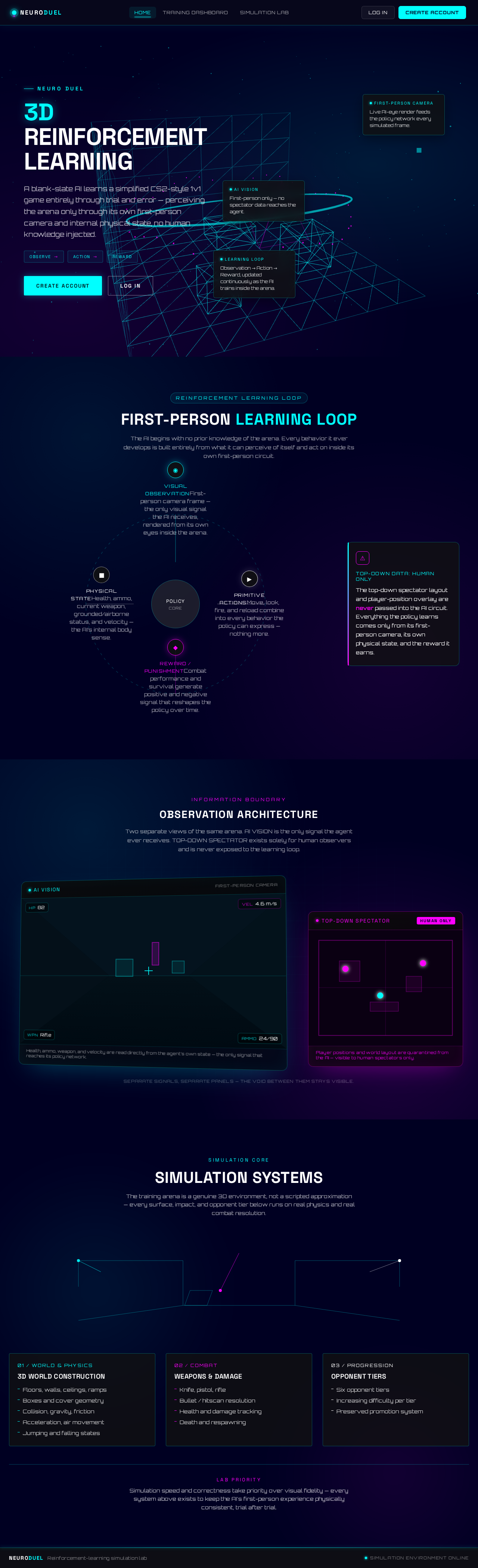
A blank-slate AI learns a simplified CS2-style 1v1 game entirely through trial and error — perceiving the arena only through its own first-person camera and internal physical state, no human knowledge injected.
First-Person Camera
Live AI-eye render feeds the policy network every simulated frame.
Learning Loop
Observation → Action → Reward, updated continuously as the AI trains inside the arena.
AI Vision
First-person only — no spectator data reaches the agent.
Training Arena
First-person camera, learning loop, and AI vision run inside this live chamber.
The AI begins with no prior knowledge of the arena. Every behavior it ever develops is built entirely from what it can perceive of itself and act on inside its own first-person circuit.
Two separate views of the same arena. AI VISION is the only signal the agent ever receives. TOP-DOWN SPECTATOR exists solely for human observers and is never exposed to the learning loop.
Player positions and world layout are quarantined from the AI — visible to human spectators only.
Separate signals, separate panels — the void between them stays visible.
The training arena is a genuine 3D environment, not a scripted approximation — every surface, impact, and opponent tier below runs on real physics and real combat resolution.
Simulation speed and correctness take priority over visual fidelity — every system above exists to keep the AI's first-person experience physically consistent, trial after trial.
Neuro Duel
A blank-slate AI learns a simplified CS2-style 1v1 game entirely through trial and error — perceiving the arena only through its own first-person camera and internal physical state, no human knowledge injected.
First-Person Camera
Live AI-eye render feeds the policy network every simulated frame.
Learning Loop
Observation → Action → Reward, updated continuously as the AI trains inside the arena.
AI Vision
First-person only — no spectator data reaches the agent.
Training Arena
First-person camera, learning loop, and AI vision run inside this live chamber.
The AI begins with no prior knowledge of the arena. Every behavior it ever develops is built entirely from what it can perceive of itself and act on inside its own first-person circuit.
Two separate views of the same arena. AI VISION is the only signal the agent ever receives. TOP-DOWN SPECTATOR exists solely for human observers and is never exposed to the learning loop.
Player positions and world layout are quarantined from the AI — visible to human spectators only.
Separate signals, separate panels — the void between them stays visible.
The training arena is a genuine 3D environment, not a scripted approximation — every surface, impact, and opponent tier below runs on real physics and real combat resolution.
Simulation speed and correctness take priority over visual fidelity — every system above exists to keep the AI's first-person experience physically consistent, trial after trial.
No comments yet. Be the first!