crystal-test
 ayushi Darji
I want to create attached project


Comments (0)
Sign in to leave a comment
System Requirements
System Requirements Document for crystal-test
Introduction
This document outlines the requirements for developing an AI-powered QA Agent designed to perform end-to-end software testing automatically. The agent will operate based on a Jira Ticket ID provided by the user, autonomously understanding requirements, generating test cases, executing them, capturing evidence, and updating the Jira ticket with the results.
System Overview
The AI QA Agent aims to automate the software testing process by leveraging AI to interpret Jira tickets, generate comprehensive test cases, execute them, and report the results back to the Jira system. This process minimizes human intervention and enhances testing efficiency and accuracy.
Product Interpretation and Delivery Boundary
The AI QA Agent is designed to function autonomously with minimal human intervention. It integrates with Jira to fetch and update tickets, ensuring that all testing processes are documented and traceable. The system is constrained by the accuracy of AI in understanding requirements and generating test cases. It must handle multiple Jira tickets simultaneously while ensuring data security and privacy.
Page Content and Component Coverage
Landing
- Information/State: Introduction to the AI QA Agent, its purpose, and how it works.
- Primary Actions: None.
- Supporting Actions: Link to Login page.
- Components: Overview text, link to Login.
Login
- Information/State: User authentication for accessing the system.
- Primary Actions: User login.
- Supporting Actions: Password reset link.
- Components: Username field, password field, login button, password reset link.
Dashboard
- Information/State: Overview of active and completed testing jobs.
- Primary Actions: View job details, initiate new test.
- Supporting Actions: Filter jobs, sort by status.
- Components: Job list, filter options, sort options.
Test Setup
- Information/State: Input Jira Ticket ID to initiate testing.
- Primary Actions: Start testing process.
- Supporting Actions: Validate Jira Ticket ID.
- Components: Jira Ticket ID input field, start button.
Ticket Analysis
- Information/State: Display of Jira ticket details and interpreted requirements.
- Primary Actions: Confirm analysis.
- Supporting Actions: View linked tickets, view attachments.
- Components: Ticket details, linked tickets section, attachments section.
Test Cases
- Information/State: Generated test cases for the Jira ticket.
- Primary Actions: Review test cases.
- Supporting Actions: Edit test cases, add new test case.
- Components: Test case list, edit button, add button.
Environment
- Information/State: Details of the test environment setup.
- Primary Actions: Confirm environment setup.
- Supporting Actions: Modify environment settings.
- Components: Environment details, modify button.
Execution
- Information/State: Execution status of test cases.
- Primary Actions: Start execution.
- Supporting Actions: Pause execution, view logs.
- Components: Execution status, start button, pause button, logs section.
Evidence
- Information/State: Screenshots and evidence captured during testing.
- Primary Actions: Review evidence.
- Supporting Actions: Download evidence, link to test cases.
- Components: Evidence gallery, download button, link button.
Failure Analysis
- Information/State: Analysis of failed test cases.
- Primary Actions: Review failure analysis.
- Supporting Actions: Suggest fixes, escalate issue.
- Components: Failure details, suggest fix button, escalate button.
Reports
- Information/State: Summary metrics and downloadable test reports.
- Primary Actions: Download report.
- Supporting Actions: View detailed metrics.
- Components: Summary metrics, download button, detailed metrics section.
Jira Update
- Information/State: Status of Jira ticket update with test results.
- Primary Actions: Confirm update.
- Supporting Actions: View update log.
- Components: Update status, confirm button, log section.
Functional Requirements
As a User
- I want to provide only a Jira Ticket ID to initiate the testing process.
- I want the agent to fetch and analyze the Jira ticket to understand the requirements, acceptance criteria, and any additional information.
- I want the agent to generate comprehensive test cases covering functional, UI, user flow, data, API/integration, and regression testing scenarios.
- I want the agent to determine the appropriate test environment before executing test cases.
- I want the agent to execute all test cases, capturing evidence for each, and continue testing even after encountering failures.
- I want the agent to analyze failures and provide detailed insights into the cause and severity.
- I want the agent to generate a structured test report in Excel or CSV format, detailing all test cases and their outcomes.
- I want the agent to update the Jira ticket with the test report and a summary of the testing results.
As an AI QA Agent
- I must fetch the Jira ticket and extract all relevant information, including title, description, acceptance criteria, requirements, comments, attachments, and linked tickets.
- I must generate test cases that include positive, negative, boundary-value scenarios, input validation, business logic, error handling, and success/failure scenarios.
- I must create UI test cases covering layout, content, buttons, links, forms, alignment, spacing, visibility, and responsive behavior across devices.
- I must generate user flow test cases for complete end-to-end journeys, navigation, redirects, session behavior, and back/forward behavior.
- I must perform data testing to ensure correct data display, persistence, updates, and handling of incorrect/invalid data.
- I must conduct API/integration testing where applicable, including request/response validation, status codes, and error responses.
- I must identify and create regression test cases for existing functionalities potentially impacted by new changes.
- I must capture screenshots as evidence for each test case, linking them to the corresponding test case in the report.
- I must analyze test failures, providing insights into the failed step, expected vs. actual behavior, and possible root causes.
- I must generate a test summary, including total test cases created, executed, passed, failed, blocked, and the pass percentage.
- I must update the Jira ticket with the test report and a summary comment, mentioning important failures and providing references to evidence.
User Personas
User
- A software tester or developer who provides the Jira Ticket ID to initiate the testing process and receives the final QA summary and report.
AI QA Agent
- An autonomous system that performs the entire testing workflow, from understanding requirements to executing tests and reporting results.
Core User Flows
User Flow
- User provides Jira Ticket ID.
- Agent fetches and analyzes the Jira ticket.
- Agent generates comprehensive test cases.
- Agent prepares the test environment.
- Agent executes test cases, capturing evidence.
- Agent analyzes failures and generates a report.
- Agent updates the Jira ticket with the report and summary.
Visuals Colors and Theme
- Muse: Rasmus Andersson
- Palette (dark mode): background #141517, surface #1e1f23, text #e7e7ea, primary #f4a261, accent #2a9d8f, muted #6d6d6d.
- Typography: Headings in Space Grotesk — Bold weight, large size, tight tracking; body in Inter Tight; scale 1.25 modular.
- Shape language: Compact controls with tight spacing, editorial numerals as subtle decorative elements.
- Layout: A structured grid system with clear columns.
- Motion: Fast, functional transitions with purposeful reveals.
- Imagery: Interface elements and schematic diagrams take precedence.
Signature Design Concept
A streamlined, intuitive interface that guides the user through providing the Jira Ticket ID and receiving the final report. The design features a split-screen hero with a central focus on the Jira Ticket ID entry and interactive data visualizations.
Interaction Model & Motion Direction
- Interaction Model: Static
- Motion Tempo: Restrained
- Hero Dimensionality: Flat
- Landing Hero Motion Brief: A split-screen hero with a focus on the Jira Ticket ID entry, using fast, functional transitions to maintain focus on content.
Non-Functional Requirements
- The system must be reliable, with a high degree of accuracy in test case generation and execution.
- The system must be scalable to handle multiple Jira tickets simultaneously.
- The system must ensure data security and privacy, particularly when accessing Jira tickets.
Tech Stack
- Integration with Jira for ticket retrieval and updates.
- AI and machine learning components for requirement analysis and test case generation.
- Automated testing frameworks for executing test cases.
- Reporting tools for generating Excel/CSV reports.
Assumptions and Constraints
- The system assumes access to Jira and the necessary permissions to read and update tickets.
- The system is constrained by the accuracy of the AI in understanding requirements and generating test cases.
Glossary
- Jira Ticket ID: A unique identifier for a task or issue in the Jira system.
- Test Case: A set of conditions or variables under which a tester determines whether a system or software application is working correctly.
- Regression Testing: Testing existing software applications to ensure that a change or addition hasn't broken any existing functionality.
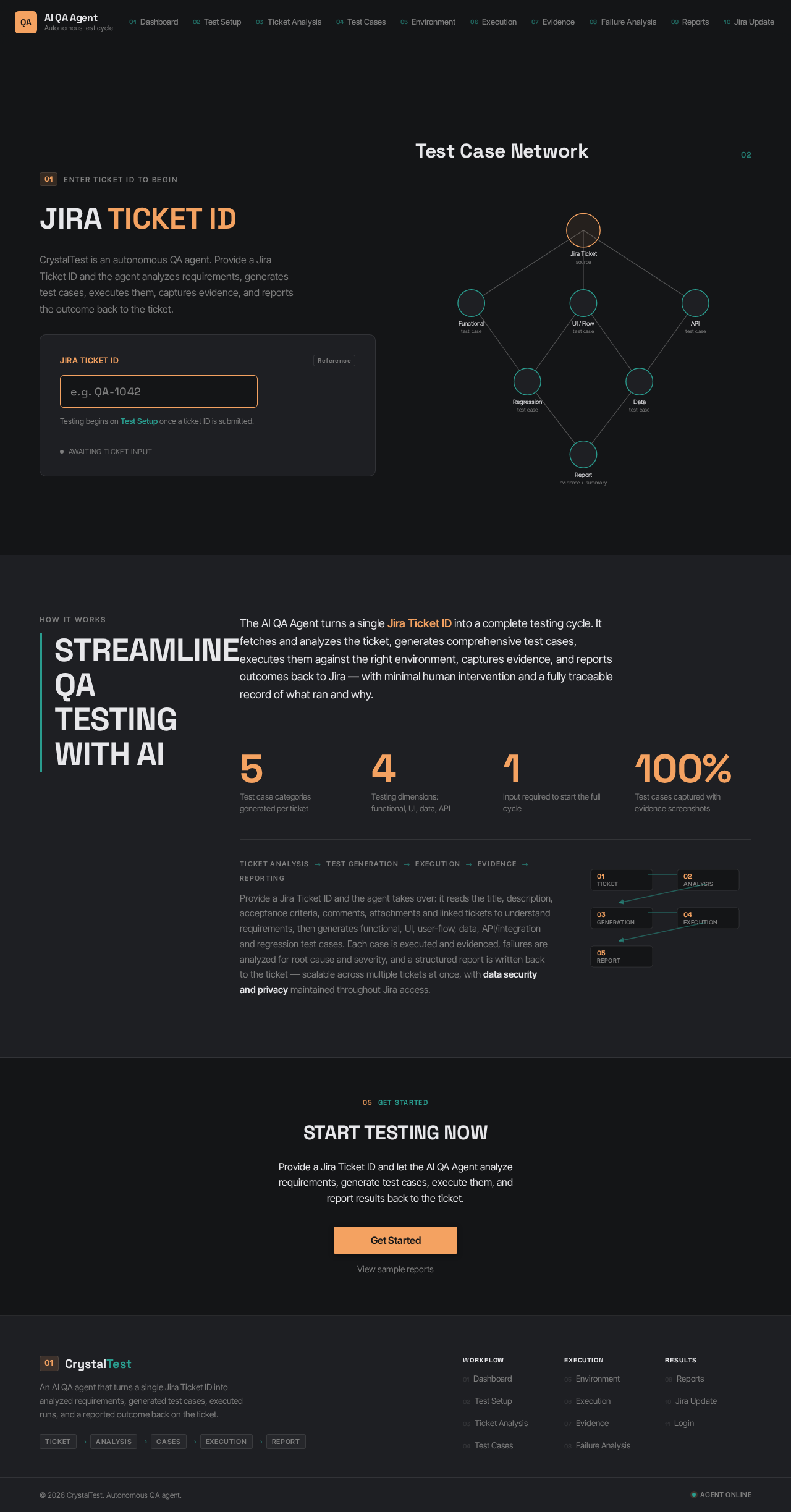
Jira Ticket ID
CrystalTest is an autonomous QA agent. Provide a Jira Ticket ID and the agent analyzes requirements, generates test cases, executes them, captures evidence, and reports the outcome back to the ticket.
Testing begins on Test Setup once a ticket ID is submitted.
Test Case Network
02Streamline QA Testing with AI
The AI QA Agent turns a single Jira Ticket ID into a complete testing cycle. It fetches and analyzes the ticket, generates comprehensive test cases, executes them against the right environment, captures evidence, and reports outcomes back to Jira — with minimal human intervention and a fully traceable record of what ran and why.
Provide a Jira Ticket ID and the agent takes over: it reads the title, description, acceptance criteria, comments, attachments and linked tickets to understand requirements, then generates functional, UI, user-flow, data, API/integration and regression test cases. Each case is executed and evidenced, failures are analyzed for root cause and severity, and a structured report is written back to the ticket — scalable across multiple tickets at once, with data security and privacy maintained throughout Jira access.
Start Testing Now
Provide a Jira Ticket ID and let the AI QA Agent analyze requirements, generate test cases, execute them, and report results back to the ticket.
Jira Ticket ID
CrystalTest is an autonomous QA agent. Provide a Jira Ticket ID and the agent analyzes requirements, generates test cases, executes them, captures evidence, and reports the outcome back to the ticket.
Testing begins on Test Setup once a ticket ID is submitted.
Test Case Network
02Streamline QA Testing with AI
The AI QA Agent turns a single Jira Ticket ID into a complete testing cycle. It fetches and analyzes the ticket, generates comprehensive test cases, executes them against the right environment, captures evidence, and reports outcomes back to Jira — with minimal human intervention and a fully traceable record of what ran and why.
Provide a Jira Ticket ID and the agent takes over: it reads the title, description, acceptance criteria, comments, attachments and linked tickets to understand requirements, then generates functional, UI, user-flow, data, API/integration and regression test cases. Each case is executed and evidenced, failures are analyzed for root cause and severity, and a structured report is written back to the ticket — scalable across multiple tickets at once, with data security and privacy maintained throughout Jira access.
Start Testing Now
Provide a Jira Ticket ID and let the AI QA Agent analyze requirements, generate test cases, execute them, and report results back to the ticket.
No comments yet. Be the first!