crystal-rain
 Sebastien Drure


Comments (0)
Sign in to leave a comment
Architecture
No Services Diagrams Yet
Crystal Rain Studio
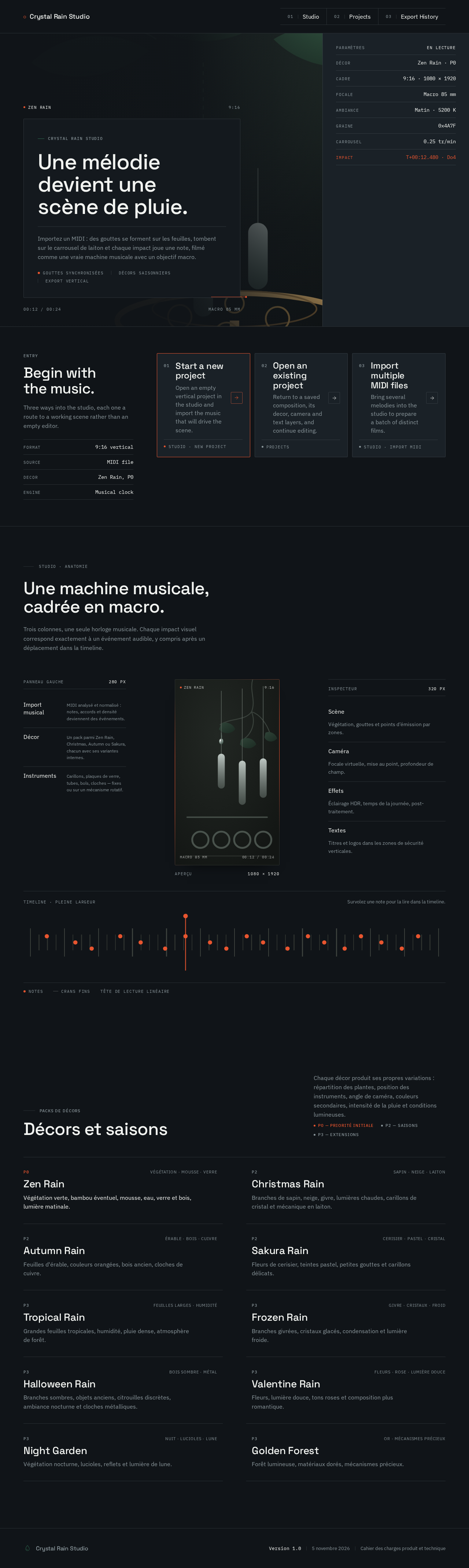
Une mélodie devient une scène de pluie.
Importez un MIDI : des gouttes se forment sur les feuilles, tombent sur le carrousel de laiton et chaque impact joue une note, filmé comme une vraie machine musicale avec un objectif macro.
- Décor
- Zen Rain · P0
- Cadre
- 9:16 · 1080 × 1920
- Focale
- Macro 85 mm
- Ambiance
- Matin · 5200 K
- Graine
- 0x4A7F
- Carrousel
- 0.25 tr/min
- Impact
- T+00:12.480 · Do4
Entry
Begin with the music.
Three ways into the studio, each one a route to a working scene rather than an empty editor.
- Format9:16 vertical
- SourceMIDI file
- DecorZen Rain, P0
- EngineMusical clock
Studio · anatomie
Une machine musicale, cadrée en macro.
Trois colonnes, une seule horloge musicale. Chaque impact visuel correspond exactement à un événement audible, y compris après un déplacement dans la timeline.
- Import musicalMIDI analysé et normalisé : notes, accords et densité deviennent des événements.
- DécorUn pack parmi Zen Rain, Christmas, Autumn ou Sakura, chacun avec ses variantes internes.
- InstrumentsCarillons, plaques de verre, tubes, bols, cloches — fixes ou sur un mécanisme rotatif.
- ScèneVégétation, gouttes et points d’émission par zones.
- CaméraFocale virtuelle, mise au point, profondeur de champ.
- EffetsÉclairage HDR, temps de la journée, post-traitement.
- TextesTitres et logos dans les zones de sécurité verticales.
Décors et saisons
Chaque décor produit ses propres variations : répartition des plantes, position des instruments, angle de caméra, couleurs secondaires, intensité de la pluie et conditions lumineuses.
P0 — priorité initialeP2 — saisonsP3 — extensions
- Zen Rain
- Végétation verte, bambou éventuel, mousse, eau, verre et bois, lumière matinale.
- Christmas Rain
- Branches de sapin, neige, givre, lumières chaudes, carillons de cristal et mécanique en laiton.
- Autumn Rain
- Feuilles d'érable, couleurs orangées, bois ancien, cloches de cuivre.
- Sakura Rain
- Fleurs de cerisier, teintes pastel, petites gouttes et carillons délicats.
- Tropical Rain
- Grandes feuilles tropicales, humidité, pluie dense, atmosphère de forêt.
- Frozen Rain
- Branches givrées, cristaux glacés, condensation et lumière froide.
- Halloween Rain
- Branches sombres, objets anciens, citrouilles discrètes, ambiance nocturne et cloches métalliques.
- Valentine Rain
- Fleurs, lumière douce, tons roses et composition plus romantique.
- Night Garden
- Végétation nocturne, lucioles, reflets et lumière de lune.
- Golden Forest
- Forêt lumineuse, matériaux dorés, mécanismes précieux.
Crystal Rain Studio
Une mélodie devient une scène de pluie.
Importez un MIDI : des gouttes se forment sur les feuilles, tombent sur le carrousel de laiton et chaque impact joue une note, filmé comme une vraie machine musicale avec un objectif macro.
- Décor
- Zen Rain · P0
- Cadre
- 9:16 · 1080 × 1920
- Focale
- Macro 85 mm
- Ambiance
- Matin · 5200 K
- Graine
- 0x4A7F
- Carrousel
- 0.25 tr/min
- Impact
- T+00:12.480 · Do4
Entry
Begin with the music.
Three ways into the studio, each one a route to a working scene rather than an empty editor.
- Format9:16 vertical
- SourceMIDI file
- DecorZen Rain, P0
- EngineMusical clock
Studio · anatomie
Une machine musicale, cadrée en macro.
Trois colonnes, une seule horloge musicale. Chaque impact visuel correspond exactement à un événement audible, y compris après un déplacement dans la timeline.
- Import musicalMIDI analysé et normalisé : notes, accords et densité deviennent des événements.
- DécorUn pack parmi Zen Rain, Christmas, Autumn ou Sakura, chacun avec ses variantes internes.
- InstrumentsCarillons, plaques de verre, tubes, bols, cloches — fixes ou sur un mécanisme rotatif.
- ScèneVégétation, gouttes et points d’émission par zones.
- CaméraFocale virtuelle, mise au point, profondeur de champ.
- EffetsÉclairage HDR, temps de la journée, post-traitement.
- TextesTitres et logos dans les zones de sécurité verticales.
Décors et saisons
Chaque décor produit ses propres variations : répartition des plantes, position des instruments, angle de caméra, couleurs secondaires, intensité de la pluie et conditions lumineuses.
P0 — priorité initialeP2 — saisonsP3 — extensions
- Zen Rain
- Végétation verte, bambou éventuel, mousse, eau, verre et bois, lumière matinale.
- Christmas Rain
- Branches de sapin, neige, givre, lumières chaudes, carillons de cristal et mécanique en laiton.
- Autumn Rain
- Feuilles d'érable, couleurs orangées, bois ancien, cloches de cuivre.
- Sakura Rain
- Fleurs de cerisier, teintes pastel, petites gouttes et carillons délicats.
- Tropical Rain
- Grandes feuilles tropicales, humidité, pluie dense, atmosphère de forêt.
- Frozen Rain
- Branches givrées, cristaux glacés, condensation et lumière froide.
- Halloween Rain
- Branches sombres, objets anciens, citrouilles discrètes, ambiance nocturne et cloches métalliques.
- Valentine Rain
- Fleurs, lumière douce, tons roses et composition plus romantique.
- Night Garden
- Végétation nocturne, lucioles, reflets et lumière de lune.
- Golden Forest
- Forêt lumineuse, matériaux dorés, mécanismes précieux.
No comments yet. Be the first!