crystal-idea
create new project to design a simple web application for calcualtor app

Comments (0)
Sign in to leave a comment
System Requirements
Crystal-Idea System Requirements Document
Introduction
The purpose of this document is to outline the system requirements for the Crystal-Idea project, which involves designing a simple web application for a calculator app. The application will be developed for desktop platforms only, as per the updated requirements.
System Overview
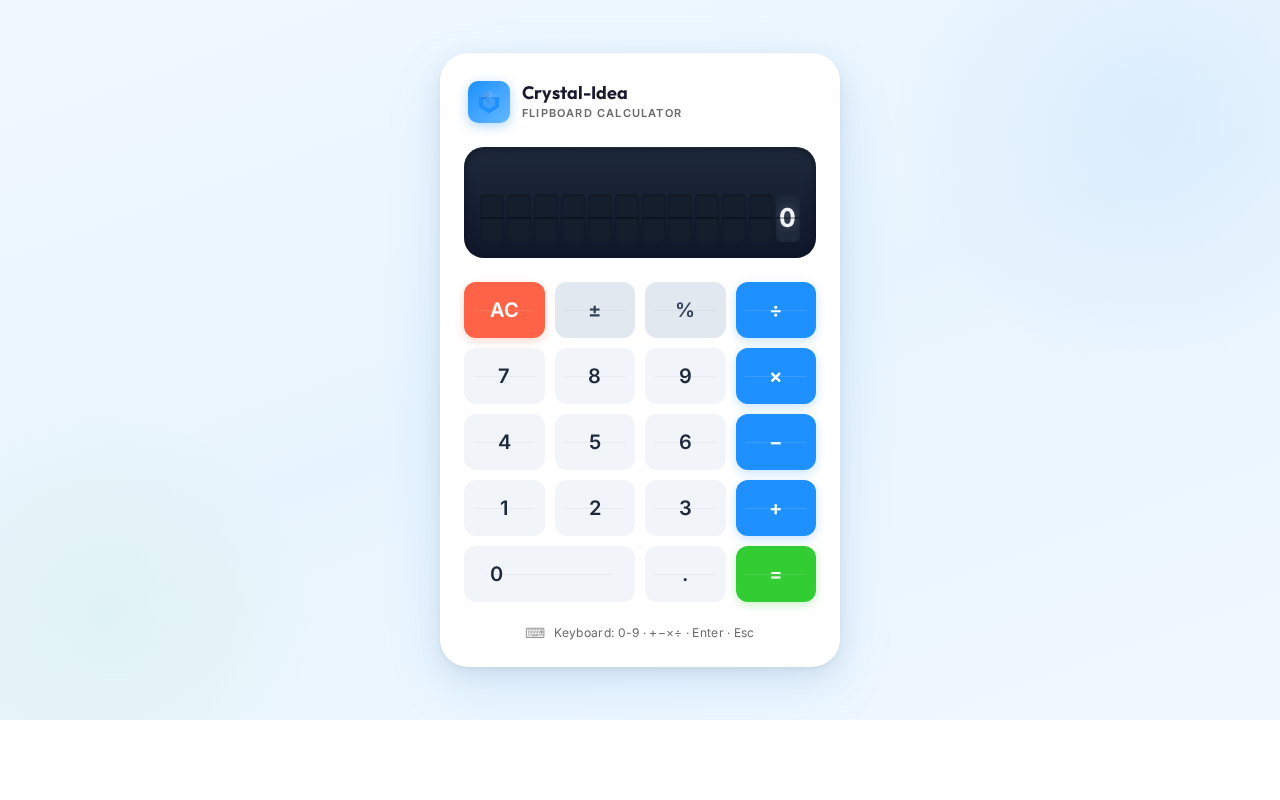
Crystal-Idea is a web-based calculator application designed to provide users with basic arithmetic operations. The application will be accessible exclusively on desktop platforms, ensuring a straightforward and user-friendly interface for performing calculations.
Functional Requirements
- As a User, I should be able to perform basic arithmetic operations such as addition, subtraction, multiplication, and division.
- As a User, I should be able to clear the current input to start a new calculation.
- As a User, I should be able to view the result of my calculations immediately after input.
- As a User, I should be able to use a keyboard to input numbers and operations for calculations.
User Personas
- User: An individual who uses the calculator application for basic arithmetic operations on a desktop computer.
Core User Flows
- User opens the calculator application -> User inputs numbers and selects an operation -> User views the result -> User clears the input for a new calculation.
Visuals Colors and Theme
- primary: #1E90FF (Dodger Blue)
- primary_light: #63B8FF (Light Sky Blue)
- secondary: #FF6347 (Tomato)
- accent: #32CD32 (Lime Green)
- highlight: #FFD700 (Gold)
- bg: #F0F8FF (Alice Blue)
- surface: rgba(255, 255, 255, 0.9)
- text: #000000 (Black)
- text_muted: #696969 (Dim Gray)
- border: rgba(0, 0, 0, 0.1)
Signature Design Concept
The Crystal-Idea calculator app will feature an interactive digital flipboard design. Each number and operation key will appear as a flipboard tile that animates with a flipping motion when pressed. This dynamic interaction will provide a tactile and engaging user experience. The flipboard effect will be implemented using framer-motion for smooth animations and transitions. The home page will greet users with a large, central flipboard display that shows the current calculation, enhancing the visual appeal and usability of the application.
Interaction Model & Motion Direction
- Interaction Model: Animated
- The calculator will feature smooth animations for button presses and result displays, providing a polished and responsive user experience.
- The animated flipboard effect will be the core mechanic, offering a unique interaction style for each calculation.
Non-Functional Requirements
- The application must load within 2 seconds on a standard desktop browser.
- The application should be responsive to different screen resolutions on desktop platforms.
- The application should handle up to 100 concurrent users without performance degradation.
Tech Stack
- Frontend: React for Web
- Backend: Python with FastAPI
- Database: Not applicable for this simple calculator application
- Local orchestration: Docker
Assumptions and Constraints
- The application will only be accessible on desktop platforms.
- No mobile or tablet support is required.
- The application will not store any user data or calculations.
Glossary
- Arithmetic Operations: Basic mathematical operations including addition, subtraction, multiplication, and division.
- Flipboard: A visual effect that mimics the flipping of physical tiles, often used in digital displays for dynamic content updates.
No comments yet. Be the first!