crypto-trading-bitcoin
 Hello Mcdonald
build me a crypto trading website where i can have access to control the amount of bitcoin in the wallet


Comments (0)
Sign in to leave a comment
System Requirements
System Requirements Document for crypto-trading-bitcoin
1. Introduction
crypto-trading-bitcoin is a crypto trading website whose defining act is taking direct control of the amount of bitcoin held in a wallet. The product is built for a single kind of user — the wallet owner who wants to see exactly how much bitcoin they hold and to change that amount on their own terms. The site is not a market-browsing portal or a social trading feed; it is an instrument for custody and adjustment, where the wallet balance is the central object and the adjust action is the primary control.
The audience is a US-based individual wallet owner (the requester, Hello Mcdonald, is representative) who expects a serious, precise, instrument-grade surface: a dark titanium ground, a dial-like balance readout, and a machined control for changing the amount. The product intent is narrow and deliberate: view the bitcoin amount in the wallet, and control it.
2. System Overview
crypto-trading-bitcoin is delivered as a first-party web application with application-owned identity. The current delivery consists of:
- A React frontend presenting five destinations: an anonymous Landing page, anonymous Sign Up and Login access surfaces, and two protected destinations — Wallet (view the bitcoin amount) and Adjust Bitcoin (change the amount).
- A shared FastAPI backend that owns the application APIs and domain modules for identity, wallet state, and bitcoin amount adjustment.
- A MariaDB database holding application-owned persistent data: wallet-owner identity records and each owner's durable bitcoin wallet amount.
The only active human actor is the Wallet Owner / Trader, who enrolls, verifies, views their bitcoin balance, and adjusts the amount held in the wallet. The backend and database are non-persona system actors that persist and apply the owner's changes.
Accepted current behavior is limited to: self-service enrollment, returning verification, viewing the current bitcoin amount in the wallet, and changing that amount so the updated amount is reflected in the wallet. No market data feeds, order books, fiat on/off-ramps, multi-asset portfolios, or social features are part of the current scope.
Removed from scope
- None. No concept from the authoritative requirement thread has been removed or superseded.
2a. Product Interpretation and Delivery Boundary
The product is a first-party, application-owned experience. Identity is established by the wallet owner through self-service Sign Up and verified on return through Login; the protected Wallet and Adjust Bitcoin destinations are reachable only after verification. The anonymous Landing page explains the product and routes the visitor to enrollment or verification.
The wallet's bitcoin amount is durable application state owned by the signed-in wallet owner. Changing the amount is a first-party action performed on the Adjust Bitcoin destination and reflected on the Wallet destination. The current delivery horizon covers only viewing and controlling the bitcoin amount; any future trading, market, or transfer capabilities are explicitly out of the current boundary and are not represented in current pages or acceptance.
2c. Page Content and Component Coverage
Landing
- Information/state: Anonymous public entry. Explains the crypto trading website, who it is for, and that a wallet owner can view and control the bitcoin in their wallet. Presents the hero headline "YOUR BITCOIN, UNDER YOUR HAND", a capsule crown CTA, and the micro-label rule "CUSTODY · ADJUST · VERIFY". A circular instrument bezel on the right shows a representative bitcoin amount with a thin teal delta line.
- Primary actions: Enter Sign Up (enroll); enter Login (returning owner).
- Supporting actions: Read the three ruled sections (hold, adjust, verify) explaining the product.
- Domain entities: None persisted; presentation only.
- Component responsibilities: Hero composition (headline + instrument bezel), crown CTA, ruled explanatory sections, topographic contour texture band.
- States: Loading (static content, no data fetch); empty (n/a); success (rendered); error (n/a); recovery (n/a).
Sign Up
- Information/state: Anonymous first-use enrollment surface for a new wallet owner. Collects the identity fields needed to establish an application-owned account and initialize a wallet.
- Primary actions: Submit enrollment to create the account and initialize the wallet.
- Supporting actions: Navigate to Login if already enrolled.
- Domain entities: Wallet Owner identity record; initialized wallet with a starting bitcoin amount.
- Component responsibilities: Enrollment form, validation feedback, submit crown control, link to Login.
- States: Loading (submitting); empty (blank form); success (account created, wallet initialized, routed to Wallet); error (validation failure or duplicate identity — inline message, form preserved); recovery (correct and resubmit).
Login
- Information/state: Anonymous returning-verification surface for an existing wallet owner.
- Primary actions: Submit credentials to verify identity and reach protected wallet state.
- Supporting actions: Navigate to Sign Up if not yet enrolled.
- Domain entities: Wallet Owner identity record.
- Component responsibilities: Credential form, validation feedback, submit crown control, link to Sign Up.
- States: Loading (verifying); empty (blank form); success (verified, routed to Wallet); error (invalid credentials — inline message, form preserved); recovery (retry).
Wallet
- Information/state: Protected destination. Shows the current amount of bitcoin held in the wallet inside a concentric hairline bezel with 12 tick marks, a delta row, and a ruled holdings readout (label left, tabular value right). A one-third control rail offers the adjust entry point.
- Primary actions: Open Adjust Bitcoin to change the amount.
- Supporting actions: Read the current balance, delta, and holdings rows.
- Domain entities: Wallet (bitcoin amount, delta, holdings rows).
- Component responsibilities: Balance dial, delta row, ruled holdings table, control rail with adjust entry.
- States: Loading (fetching wallet); empty (wallet with zero or no holdings — dial shows 0.00000000 BTC); success (balance rendered, ring drawn); error (fetch failure — retry control); recovery (retry fetch).
Adjust Bitcoin
- Information/state: Protected focused instrument. Current amount fixed at top, a large editable amount with a crown-style stepper, quick fractions, and a confirm panel pinned below.
- Primary actions: Enter or step a new bitcoin amount and confirm the change.
- Supporting actions: Use quick fractions; cancel and return to Wallet.
- Domain entities: Wallet (bitcoin amount).
- Component responsibilities: Current-amount readout, editable amount field with stepper, quick-fraction crowns, confirm panel, cancel control.
- States: Loading (fetching current amount); empty (n/a); success (amount updated, routed to Wallet with new balance); error (invalid amount or save failure — inline message, entered value preserved); recovery (correct and reconfirm).
3. Functional Requirements
FR-1 — Crypto trading website (explicit). As a Wallet Owner / Trader, I should reach a crypto trading website that presents the product and its wallet-control purpose, so that I understand what the site does and how to begin. Trigger: visiting the site anonymously. Observable result: the Landing page renders the product purpose and routes to Sign Up or Login. Access: anonymous. Failure/recovery: n/a (static). Continuation: proceed to Sign Up or Login.
FR-2 — Self-service enrollment (required_inference). As a Wallet Owner / Trader, I should be able to enroll myself on Sign Up, so that I have an application-owned account and an initialized wallet. Trigger: submitting the enrollment form. Observable result: an account and wallet are created and I am routed to Wallet. Access: anonymous. Failure/recovery: validation or duplicate-identity error shown inline with the form preserved; correct and resubmit. Continuation: view the wallet.
FR-3 — Returning verification (required_inference). As a Wallet Owner / Trader, I should be able to verify my identity on Login, so that I can reach my protected wallet state. Trigger: submitting credentials. Observable result: verified session and routing to Wallet. Access: anonymous entry, protected state after verification. Failure/recovery: invalid-credential message with form preserved; retry. Continuation: view the wallet.
FR-4 — View bitcoin amount in wallet (explicit). As a Wallet Owner / Trader, I should see the current amount of bitcoin held in my wallet on the Wallet page, so that I know exactly what I hold. Trigger: opening Wallet while verified. Observable result: the balance is displayed in the instrument dial with delta and holdings readout. Access: login required. Failure/recovery: fetch error shows a retry control. Continuation: open Adjust Bitcoin.
FR-5 — Control the amount of bitcoin in the wallet (explicit). As a Wallet Owner / Trader, I should be able to change the amount of bitcoin in my wallet on Adjust Bitcoin and confirm it, so that the wallet reflects the amount I intend to hold. Trigger: entering or stepping a new amount and confirming. Observable result: the wallet's bitcoin amount is updated and reflected on Wallet. Access: login required. Failure/recovery: invalid amount or save failure shows an inline message with the entered value preserved; correct and reconfirm. Continuation: return to Wallet to see the updated balance.
4. User Personas
Wallet Owner / Trader
- Product context: An individual who uses crypto-trading-bitcoin as a personal instrument for holding and controlling bitcoin. They arrive either as a new visitor or as a returning owner with an existing wallet.
- Primary goal: Know exactly how much bitcoin is in the wallet and change that amount deliberately.
- Distinct accepted responsibilities: Enroll (first use), verify on return, view the current bitcoin amount, and adjust the amount and confirm it.
- Relevant inputs or decisions: Enrollment details; login credentials; the target bitcoin amount and confirmation of the change.
- Interactions with other accepted participants: None beyond the system; the owner is the sole human actor, and the backend/database persist and apply their changes.
- Observable success: The Wallet page shows the updated bitcoin amount after a confirmed adjustment.
5. Core User Flows
Flow A — First-time enrollment and first wallet view
- The visitor opens the anonymous Landing page and reads the product purpose and the "CUSTODY · ADJUST · VERIFY" framing.
- The visitor selects the crown CTA to enter Sign Up.
- On Sign Up, the visitor enters enrollment details and submits.
- The backend creates the account and initializes the wallet; on validation or duplicate-identity error, an inline message appears and the form is preserved for correction.
- On success, the owner is routed to Wallet, where the balance dial renders the current bitcoin amount (0.00000000 BTC if none yet).
- Continuation: the owner opens Adjust Bitcoin to set an amount.
Flow B — Returning verification
- The returning owner opens Login from Landing.
- The owner enters credentials and submits.
- On invalid credentials, an inline message appears and the form is preserved; the owner retries.
- On success, the owner is routed to Wallet and sees the current bitcoin amount.
Flow C — View the bitcoin amount
- The verified owner opens Wallet.
- The balance dial draws its arc and displays the current bitcoin amount, with the delta row and ruled holdings readout.
- If the fetch fails, a retry control appears; the owner retries.
- Continuation: the owner opens Adjust Bitcoin.
Flow D — Adjust the bitcoin amount
- From Wallet, the owner opens Adjust Bitcoin.
- The current amount is fixed at the top; the owner enters or steps a new amount using the crown-style stepper or quick fractions.
- The owner reviews the confirm panel and confirms.
- On invalid amount or save failure, an inline message appears with the entered value preserved; the owner corrects and reconfirms.
- On success, the wallet's bitcoin amount is updated and the owner is routed to Wallet, where the dial shows the new amount.
6. Visuals Colors and Theme
Muse: MARQ by Garmin — titanium precision for a bitcoin cockpit. Headline: "YOUR BITCOIN, UNDER YOUR HAND".
Palette (dark mode):
| Role | Hex |
|---|---|
| Background (graphite-titanium) | #14161A |
| Surface (brushed metal) | #1D2127 |
| Text (warm off-white) | #EDE8DF |
| Primary (champagne gold) | #C9A227 |
| Accent (teal, positive deltas) | #3FA9A0 |
| Muted (steel grey) | #8A8F98 |
| Hairline divider | #2A2F37 |
Gold is reserved for the balance figure, the adjust crown, and key CTAs — never a large fill. Teal signals "up"/positive deltas only. No blue anywhere; no white ground.
Typography: Headings and numerals in Saira Condensed (uppercase micro-labels at 11–12px with +0.18em tracking; tabular semibold numerals for the bitcoin amount). Body in Saira regular at 15–16px with open leading. Scale: 12 / 15 / 19 / 28 / clamp(44px, 6vw, 96px) balance display / clamp(56px, 9vw, 148px) hero headline.
Shape language: Circular gauges and bezels as the dominant motif — the balance sits inside a thin concentric ring (2px hairline gold at 60% opacity, 1px tick marks at 12 positions) with an 18px continuous-curve card radius. Controls are capsule "crowns" with a machined inner shadow and 1px top highlight. Ruled data rows with hairline dividers, label left / value right. Sharp corners only on the outer frame.
Layout: 12-column instrument-panel grid at 1280px collapsing to a single column at 375px. Wallet is a two-thirds dial panel beside a one-third control rail; Adjust Bitcoin is a focused single-column instrument. Landing leads with an edge-to-edge dark hero, then three alternating ruled sections separated by hairline rules. Vertical rhythm 96px desktop / 56px mobile.
Imagery: Macro material detail only — brushed titanium, sapphire-crystal edge, topographic contour lines at 8% opacity. The primary "image" is the data: the balance dial, ruled readouts, a thin gold sparkline on graphite. Small 1.5px line-art pictograms for hold, adjust, verify. No stock photography, no 3D blobs, no illustration.
7. Signature Design Concept
The public entry is a two-object composition, never a centered hero stack. On a full-bleed graphite ground, the left 7 columns carry the oversized Saira Condensed headline "YOUR BITCOIN, UNDER YOUR HAND" set flush left in two ragged lines with the second line indented one column, warm off-white on graphite. Beneath it sits a single capsule crown CTA in champagne gold with dark text, followed by a hairline rule with three uppercase micro-labels: "CUSTODY · ADJUST · VERIFY". The right 5 columns hold a large circular instrument bezel — concentric hairline rings with 12 tick marks, the live bitcoin amount in Saira Condensed at 96px centered inside, and a thin teal delta line beneath it — bleeding slightly off the right edge, with a topographic contour texture at 8% opacity over the far right band. The balance reads like a watch dial; the adjust action reads like turning a crown.
8. Interaction Model & Motion Direction
Interaction Model: Animated Motion Tempo: restrained Hero Dimensionality: dimensional_css
Landing Hero Motion Brief
- Focal subject: The circular instrument bezel holding the bitcoin amount, paired with the oversized condensed headline.
- Input → transformation → outcome thesis: On load, the balance ring draws its arc over 900ms with a slow ease-out while the numerals count up once; hovering the crown CTA raises its top highlight by 1px and shifts gold to 100%; page transitions crossfade over 200ms.
- Motion vocabulary: Instrument-precise — arc draw, single count-up, 1px highlight lift, 200ms crossfade. No bounce, no spring.
- Composed first frame: Graphite ground, headline flush left in two ragged lines, gold crown CTA and micro-label rule beneath, bezel bleeding off the right edge with the amount centered and a teal delta line below.
- Reduced-motion state: Ring appears fully drawn, numbers jump to final value, no count-up; hover highlight remains a static state.
9. Non-Functional Requirements
- NFR-1 — Durable wallet state (explicit, from Planning Scope
durable_state_required): The wallet's bitcoin amount and owner identity persist in MariaDB across sessions. - NFR-2 — Protected access (required_inference): Wallet and Adjust Bitcoin require a verified session; Landing, Sign Up, and Login are anonymously reachable.
- NFR-3 — Readable text and controls (explicit design constraint): Headlines, labels, numbers, and controls stay entirely inside the viewport and their container at 375px, 768px, and 1280px, wrapping or scaling via
clamp(...); decoration and imagery may bleed but never cover readable text or controls. - NFR-4 — Reduced motion (explicit design constraint): With
prefers-reduced-motion, provide a usable static arrangement — ring fully drawn, numbers at final value, no count-up. - NFR-5 — No blue-on-white template (explicit design constraint): The generic indigo/blue-on-white SaaS template is forbidden; the dark titanium palette and Saira typography are preserved.
10. Tech Stack
- Frontend: React application UI.
- Backend: Shared FastAPI process for application APIs and domain modules (identity, wallet, bitcoin adjustment).
- Database: MariaDB for application-owned persistent data.
- Infrastructure: Docker/docker-compose provisioning the backend, database, and frontend services.
11. Assumptions and Constraints
- A-1: Identity is application-owned and self-service; no invitation or provisioning boundary is established (from Planning Scope).
- A-2: The wallet's bitcoin amount is a durable application-owned value; no external custody provider or on-chain transfer is in current scope.
- A-3: The single active human persona is Wallet Owner / Trader; no differentiated permissions or roles are established.
- A-4: The five pages (Landing, Sign Up, Login, Wallet, Adjust Bitcoin) are the closed current page contract.
- A-5: Trading, market data, and fiat on/off-ramps are outside the current delivery horizon.
12. Glossary
- Wallet Owner / Trader: The sole active human persona who enrolls, verifies, views, and adjusts the bitcoin amount.
- Wallet: The owner's durable holding of bitcoin, displayed on the Wallet page.
- Bitcoin amount: The quantity of bitcoin held in the wallet, expressed in BTC with tabular numerals.
- Crown: A capsule control styled as a machined instrument crown, used for primary actions.
- Balance dial: The concentric hairline bezel with 12 tick marks that displays the bitcoin amount.
- Delta: The change indicator shown beneath the balance, teal for positive movement.
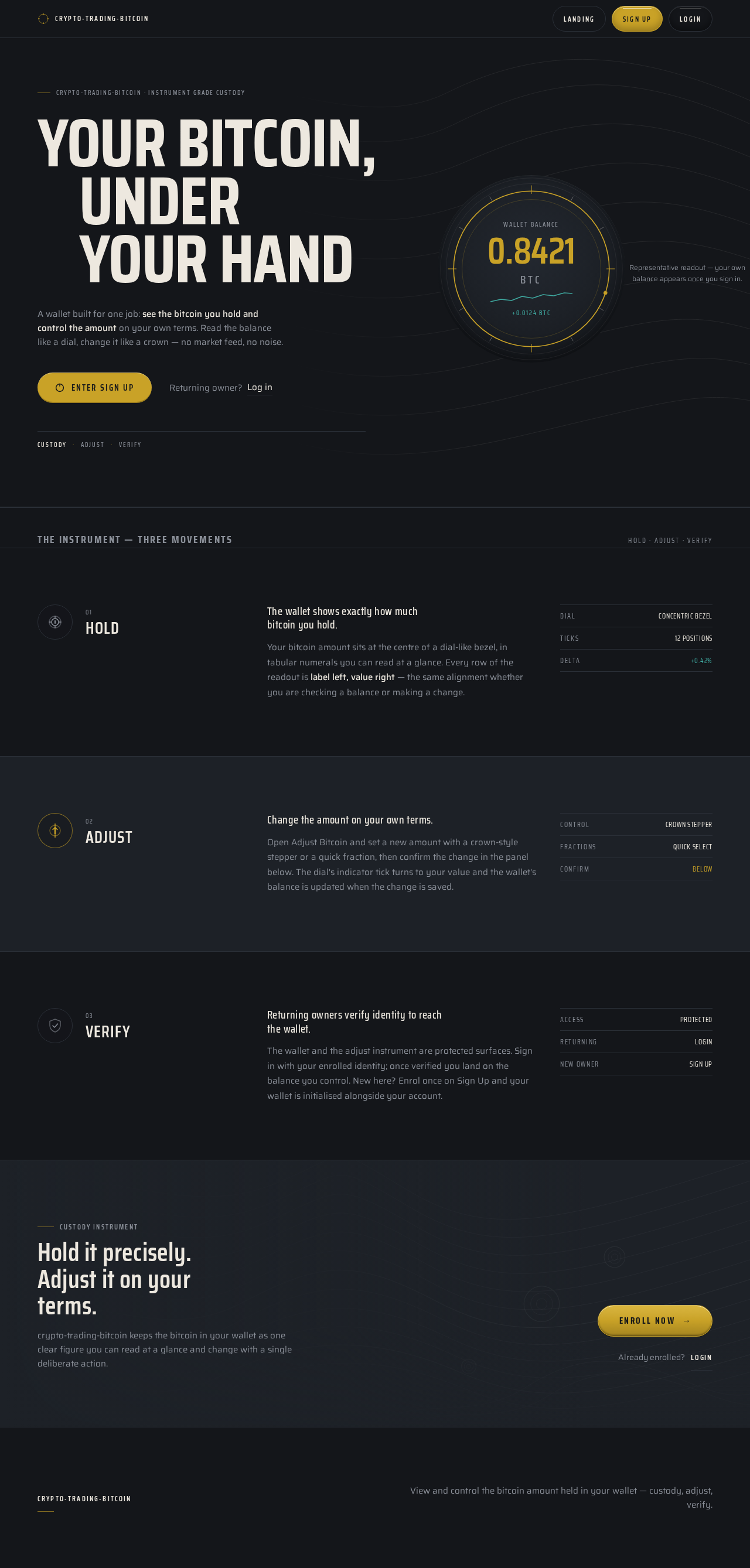
crypto-trading-bitcoin · Instrument grade custody
Your bitcoin,under your hand
A wallet built for one job: see the bitcoin you hold and control the amount on your own terms. Read the balance like a dial, change it like a crown — no market feed, no noise.
- Custody
- Adjust
- Verify
Representative readout — your own balance appears once you sign in.
The instrument — three movements
Hold · Adjust · Verify- 01
Hold
The wallet shows exactly how much bitcoin you hold.
Your bitcoin amount sits at the centre of a dial-like bezel, in tabular numerals you can read at a glance. Every row of the readout is label left, value right — the same alignment whether you are checking a balance or making a change.
- Dial
- Concentric bezel
- Ticks
- 12 positions
- Delta
- +0.42%
- 02
Adjust
Change the amount on your own terms.
Open Adjust Bitcoin and set a new amount with a crown-style stepper or a quick fraction, then confirm the change in the panel below. The dial's indicator tick turns to your value and the wallet's balance is updated when the change is saved.
- Control
- Crown stepper
- Fractions
- Quick select
- Confirm
- Below
- 03
Verify
Returning owners verify identity to reach the wallet.
The wallet and the adjust instrument are protected surfaces. Sign in with your enrolled identity; once verified you land on the balance you control. New here? Enrol once on Sign Up and your wallet is initialised alongside your account.
- Access
- Protected
- Returning
- Login
- New owner
- Sign Up
Custody instrument
Hold it precisely. Adjust it on your terms.
crypto-trading-bitcoin keeps the bitcoin in your wallet as one clear figure you can read at a glance and change with a single deliberate action.
crypto-trading-bitcoin · Instrument grade custody
Your bitcoin,under your hand
A wallet built for one job: see the bitcoin you hold and control the amount on your own terms. Read the balance like a dial, change it like a crown — no market feed, no noise.
- Custody
- Adjust
- Verify
Representative readout — your own balance appears once you sign in.
The instrument — three movements
Hold · Adjust · Verify- 01
Hold
The wallet shows exactly how much bitcoin you hold.
Your bitcoin amount sits at the centre of a dial-like bezel, in tabular numerals you can read at a glance. Every row of the readout is label left, value right — the same alignment whether you are checking a balance or making a change.
- Dial
- Concentric bezel
- Ticks
- 12 positions
- Delta
- +0.42%
- 02
Adjust
Change the amount on your own terms.
Open Adjust Bitcoin and set a new amount with a crown-style stepper or a quick fraction, then confirm the change in the panel below. The dial's indicator tick turns to your value and the wallet's balance is updated when the change is saved.
- Control
- Crown stepper
- Fractions
- Quick select
- Confirm
- Below
- 03
Verify
Returning owners verify identity to reach the wallet.
The wallet and the adjust instrument are protected surfaces. Sign in with your enrolled identity; once verified you land on the balance you control. New here? Enrol once on Sign Up and your wallet is initialised alongside your account.
- Access
- Protected
- Returning
- Login
- New owner
- Sign Up
Custody instrument
Hold it precisely. Adjust it on your terms.
crypto-trading-bitcoin keeps the bitcoin in your wallet as one clear figure you can read at a glance and change with a single deliberate action.
No comments yet. Be the first!