crm420
 AKUL GAMER
create a crm for real estate comapny


Comments (0)
Sign in to leave a comment
System Requirements
System Requirements Document for crm420
1. Introduction
The crm420 project aims to develop a Customer Relationship Management (CRM) system specifically tailored for a real estate company. The CRM will facilitate real estate agents and brokerage managers in managing customer relationships, sales activities, and overseeing business performance. The system is designed to provide a clear, orderly, and typographic-centric interface that supports effective user interaction.
2. System Overview
The crm420 system will deliver a CRM solution for real estate professionals, focusing on managing customer relationships and sales processes. The system will support two primary user personas: Real Estate Agents and Brokerage Managers. Real Estate Agents will manage customer relationships and sales activities, while Brokerage Managers will oversee CRM activities and monitor business performance. The system will include role-based authorization to distinguish between agent and manager functionalities.
2a. Product Interpretation and Delivery Boundary
The crm420 system will be delivered as a web-based application with custom UI, supporting app-owned identity for user access. The system will include pages for Landing, Login, Sign Up, Contacts, Contact Details, Pipeline, Prospect Details, and Dashboard. The system will require backend integration to support CRM functionalities. The system will adhere to the specified creative direction, focusing on a typographic-centric design inspired by Erik Spiekermann.
2b. Source Content Inventory
Not applicable as there is no explicit content_source directive.
2c. Page Content and Component Coverage
Landing
- Purpose: Provide an anonymous first impression explaining the CRM's purpose and audience.
- Components:
- Introduction to the CRM and its benefits for real estate professionals.
- Overview of features and functionalities.
- Call-to-action for Sign Up or Login.
Login
- Purpose: Allow returning users to verify their identity and access CRM records.
- Components:
- Username and password fields.
- Forgot password link.
- Login button.
Sign Up
- Purpose: Enable self-service enrollment for new real estate agents.
- Components:
- Registration form with fields for personal and professional information.
- Terms and conditions acceptance.
- Sign Up button.
Contacts
- Purpose: Browse and revisit customer relationship records.
- Components:
- List of contacts with search and filter options.
- Add new contact button.
- Contact summary details.
Contact Details
- Purpose: Review and maintain individual customer relationship records.
- Components:
- Detailed contact information.
- Edit and save options.
- Interaction history and notes.
Pipeline
- Purpose: Manage prospects across the sales workflow.
- Components:
- Visual representation of sales stages.
- Drag-and-drop functionality for moving prospects.
- Add new prospect button.
Prospect Details
- Purpose: Update a prospect's stage and sales information.
- Components:
- Detailed prospect information.
- Stage progression options.
- Notes and interaction history.
Dashboard
- Purpose: Provide a summary of CRM activity and pipeline progress for brokerage managers.
- Components:
- Key performance indicators (KPIs) and metrics.
- Recent activity feed.
- Overview of agent performance.
3. Functional Requirements
-
As a Real Estate Agent, I should be able to self-enroll to create and maintain CRM records.
- Provenance: required_inference
- Lifecycle: Initiate enrollment, complete registration, access CRM features.
- Acceptance: Successful registration and access to CRM functionalities.
-
As a Brokerage Manager, I should be provisioned or invited to access brokerage-level oversight.
- Provenance: required_inference
- Lifecycle: Receive invitation, complete setup, access oversight features.
- Acceptance: Successful setup and access to managerial functionalities.
-
As a user, I should be able to log in to resume access to durable CRM records.
- Provenance: required_inference
- Lifecycle: Enter credentials, verify identity, access CRM records.
- Acceptance: Successful login and access to previous records.
-
As a user, I should have role-based authorization to distinguish between agent and manager functionalities.
- Provenance: required_inference
- Lifecycle: Access system, perform role-specific actions, view role-specific data.
- Acceptance: Role-specific access and functionalities are enforced.
4. User Personas
Real Estate Agent
- Context: Manages customer relationships and sales activities within the CRM.
- Primary Goal: Maintain organized client information and progress prospects toward property transactions.
- Responsibilities: Enroll in the system, manage contacts, update prospect details, and utilize the pipeline.
- Interactions: Collaborates with brokerage managers for oversight and performance monitoring.
- Success: Successfully manages client relationships and progresses sales activities.
Brokerage Manager
- Context: Oversees CRM activity and relationship pipeline for the real estate company.
- Primary Goal: Monitor business performance and support agents in client work.
- Responsibilities: Access dashboard, monitor KPIs, and oversee agent activities.
- Interactions: Provides guidance and support to real estate agents.
- Success: Effectively monitors and supports CRM activities and business performance.
5. Core User Flows
5.1 Real Estate Agent Enrollment
- Start: Agent accesses the Sign Up page.
- Action: Completes the registration form with personal and professional details.
- Result: Agent account is created, and access to CRM features is granted.
- Next Step: Agent can log in and begin managing contacts and prospects.
5.2 Brokerage Manager Invitation
- Start: Manager receives an invitation email.
- Action: Completes the setup process via the provided link.
- Result: Manager account is provisioned with access to oversight features.
- Next Step: Manager can log in and access the Dashboard for monitoring.
5.3 User Login
- Start: User accesses the Login page.
- Action: Enters username and password.
- Result: User identity is verified, and access to CRM records is resumed.
- Next Step: User can navigate to Contacts, Pipeline, or Dashboard as per role.
5.4 Managing Contacts
- Start: Agent accesses the Contacts page.
- Action: Searches for or selects a contact to view details.
- Result: Contact details are displayed, and the agent can edit information.
- Next Step: Agent saves changes or adds notes to the contact record.
5.5 Pipeline Management
- Start: Agent accesses the Pipeline page.
- Action: Views prospects and updates their stages.
- Result: Prospect stages are updated, reflecting progress in the sales workflow.
- Next Step: Agent can add new prospects or move existing ones through stages.
5.6 Dashboard Monitoring
- Start: Manager accesses the Dashboard page.
- Action: Reviews KPIs and recent activities.
- Result: Manager gains insights into CRM activities and agent performance.
- Next Step: Manager can provide feedback or support to agents.
6. Visuals Colors and Theme
- Muse: Erik Spiekermann
- Palette:
- Background: #FCFCFC
- Surface: #FFFFFF
- Text: #333333
- Primary: #E63946
- Accent: #457B9D
- Muted: #F1FAEE
- Typography:
- Headings: Fira Sans — Bold, uppercase, tight tracking
- Body: Source Sans Pro
- Scale: 1.25 modular, 48/32/24/18/16
- Shape Language: Clear columns, generous margins, numbered systems, iconography with type
- Layout: Structured grid with clear sections for information hierarchy
- Imagery: Pictograms and schematic maps, documentary photography when needed
7. Signature Design Concept
The Landing page will feature a full-width hero section with a large, bold typographic statement over a warm neutral background. The design will incorporate the primary and accent colors to create visual highlights. Oversized typographic headers and a structured grid layout will ensure clarity and focus.
8. Interaction Model & Motion Direction
- Interaction Model: Static
- Motion Tempo: Restrained
- Hero Dimensionality: Flat
- Landing Hero Motion Brief: The hero section will feature a large typographic statement that transitions smoothly into the main content area, guiding the user's focus without distraction. The motion will be functional and purposeful, enhancing user interaction.
9. Non-Functional Requirements
- Performance: The system should load pages within 2 seconds under normal network conditions.
- Security: User data must be encrypted in transit and at rest.
- Scalability: The system should support up to 10,000 concurrent users.
10. Tech Stack
- Frontend: React
- Backend: Python/FastAPI
- Database: PostgreSQL
- Containerization: Docker
- Orchestration: Kubernetes (if required for deployment)
11. Assumptions and Constraints
- The CRM will be accessed primarily via web browsers.
- Real estate agents and brokerage managers are the only user personas.
- Role-based authorization will be implemented to distinguish functionalities.
12. Glossary
- CRM: Customer Relationship Management
- Real Estate Agent: A user who manages customer relationships and sales activities.
- Brokerage Manager: A user who oversees CRM activities and monitors business performance.
- Pipeline: A visual representation of the sales workflow stages.
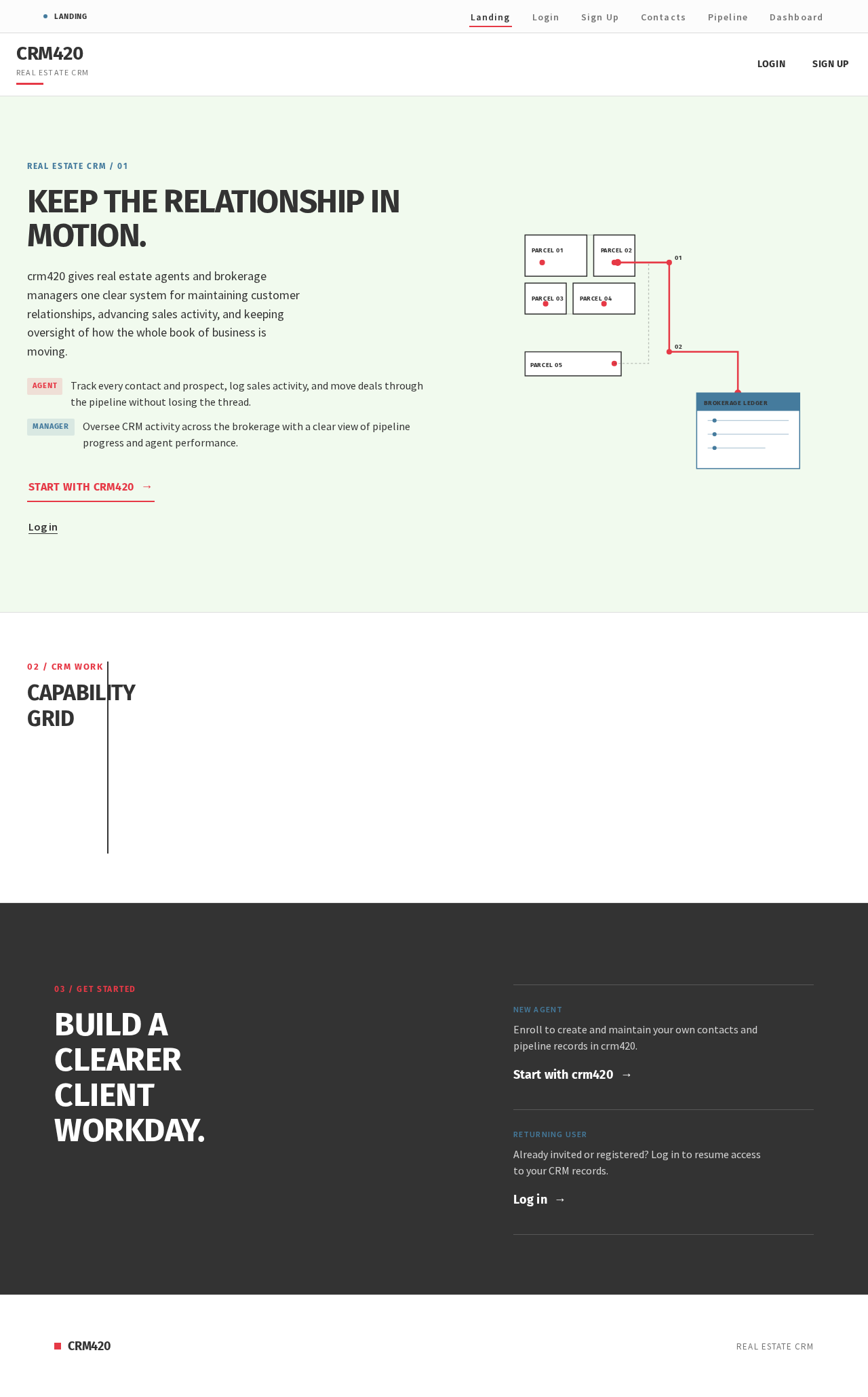
Real Estate CRM / 01
Keep the relationship in motion.
crm420 gives real estate agents and brokerage managers one clear system for maintaining customer relationships, advancing sales activity, and keeping oversight of how the whole book of business is moving.
- AgentTrack every contact and prospect, log sales activity, and move deals through the pipeline without losing the thread.
- ManagerOversee CRM activity across the brokerage with a clear view of pipeline progress and agent performance.
Capability Grid
01 INDEX
Contacts
Keep organized relationship records for every client and prospect, with details and history in one place for real estate work.
02 INDEX
Pipeline
Track prospects visually as they progress through defined sales stages, from first contact to closed transaction.
03 INDEX
Oversight
Give brokerage managers activity monitoring and performance visibility across agents and the relationship pipeline.
03 / Get Started
Build a clearer client workday.
New agent
Enroll to create and maintain your own contacts and pipeline records in crm420.
Start with crm420Real Estate CRM / 01
Keep the relationship in motion.
crm420 gives real estate agents and brokerage managers one clear system for maintaining customer relationships, advancing sales activity, and keeping oversight of how the whole book of business is moving.
- AgentTrack every contact and prospect, log sales activity, and move deals through the pipeline without losing the thread.
- ManagerOversee CRM activity across the brokerage with a clear view of pipeline progress and agent performance.
Capability Grid
01 INDEX
Contacts
Keep organized relationship records for every client and prospect, with details and history in one place for real estate work.
02 INDEX
Pipeline
Track prospects visually as they progress through defined sales stages, from first contact to closed transaction.
03 INDEX
Oversight
Give brokerage managers activity monitoring and performance visibility across agents and the relationship pipeline.
03 / Get Started
Build a clearer client workday.
New agent
Enroll to create and maintain your own contacts and pipeline records in crm420.
Start with crm420
No comments yet. Be the first!