crm-leads

byMarketing 8080AI

We’re a growing B2B SaaS company looking to build an AI assistant that helps our sales and operations teams spend less time on repetitive CRM tasks. We manage a growing number of leads and customer records, and keeping everything organized is becoming increasingly time-consuming. We’d like to automate tasks such as identifying duplicate contacts, categorizing incoming leads, summarizing customer interactions, and updating CRM records. What we need: -Build an AI assistant using Python and LLM APIs. -Implement duplicate detection and basic customer data validation. -Automate lead categorization and customer interaction summaries. -Connect the assistant to our existing CRM through REST APIs. -Use FastAPI and PostgreSQL for the backend and data processing. -Deploy the solution to AWS.

LandingCRM UpdatesLoginValidationDuplicatesSign UpSummariesLeads
Landing

Comments (0)

No comments yet. Be the first!

System Requirements

System Requirements Document for crm-leads

1. Introduction

crm-leads is an AI assistant for a growing B2B SaaS company whose sales and operations teams are spending too much time on repetitive CRM chores. The company manages a growing number of leads and customer records, and keeping everything organized has become increasingly time-consuming. crm-leads automates the repetitive work: identifying duplicate contacts, categorizing incoming leads, summarizing customer interactions, and updating CRM records.

The assistant is built in Python using LLM APIs, runs on a FastAPI and PostgreSQL backend for data processing, connects to the company's existing CRM through REST APIs, and is deployed to AWS. Its audience is the company's own sales team members and operations team members — internal colleagues, not external customers.

The product's intent is relief and trust: the assistant should behave like a thoughtful colleague who reads carefully and writes things down plainly. Every AI-produced result is presented as a readable, reviewable artifact with its source, so a human always sees what the assistant concluded and can act on it.

Page 1 of 32

2. System Overview

crm-leads is a first-party web application with an application-owned identity boundary and a role-aware authorization boundary. Two active human personas use it:

  • Sales team member — works a growing pipeline of leads; needs incoming leads categorized and customer interactions summarized so they spend less time on repetitive CRM upkeep.
  • Operations team member — owns keeping the growing set of leads and customer records organized; relies on duplicate contact detection, basic customer data validation, and CRM record updates to keep data clean.

Current delivery includes:

  • An anonymous Landing page that explains the assistant, its sales and operations audience, and the repetitive CRM tasks it automates.
  • Anonymous Login and Sign Up pages that establish and verify application-owned identity for self-service enrollment.
  • Role-restricted working pages: Leads and Summaries for sales team members; Duplicates, Validation, and CRM Updates for operations team members.
  • Background automation that runs duplicate detection, basic customer data validation, lead categorization, and interaction summarization, and that applies CRM record updates through the existing CRM's REST API.
  • A FastAPI + PostgreSQL backend, LLM API calls in Python, and AWS deployment.

The existing CRM remains the system of record for contacts, leads, and customer interactions. crm-leads reads from and writes to it through its REST APIs; it does not replace it.

Removed from scope

Page 2 of 32
  • None. No concept from the authoritative requirement thread was removed or superseded.

2a. Product Interpretation and Delivery Boundary

crm-leads is delivered as a first-party web application backed by a first-party API. The application owns user identity: sales and operations team members enroll themselves through Sign Up and verify their identity through Login before reaching any protected working page. Landing, Login, and Sign Up are reachable anonymously; every working page requires a verified session.

Access is role-aware. Sales team members reach Leads and Summaries; operations team members reach Duplicates, Validation, and CRM Updates. This separation reflects the two accepted responsibilities — pipeline-facing lead and summary review versus data-quality and record-update work — and nothing broader.

The existing CRM is an external, provider-owned system reached only through its REST APIs. crm-leads does not host or replace CRM data of record; it reads CRM records, runs AI-assisted processing, and writes accepted updates back through the same REST connection. LLM providers are external services invoked by the Python assistant; their outputs are always surfaced to a human for review rather than silently committed.

Automation runs in the background on the backend. Human review surfaces are first-party pages. No capability in this document is deferred to a future horizon.

2c. Page Content and Component Coverage

Page 3 of 32

Landing

  • Information/state: Anonymous public entry. Explains the AI CRM assistant, its sales and operations audience, and the repetitive CRM tasks it automates (duplicate contacts, lead categorization, interaction summaries, CRM record updates). Presents the product name crm-leads and the eyebrow "AI ASSISTANT FOR SALES & OPS".
  • Primary actions: Follow the rust underlined text-link CTA into Sign Up; follow a secondary text link into Login for returning members.
  • Supporting actions: Read the illustrated section openers describing each automated task.
  • Domain entities: None persisted; product description only.
  • Component responsibilities: Editorial hero (oversized Literata headline "Your CRM, read carefully.", 62ch sub-paragraph, rust text-link CTA, flat stacked-contact-card illustration bleeding off the top edge); illustrated section openers for duplicate detection, lead categorization, interaction summaries, and CRM updates; footer with Login and Sign Up links.
  • States: Loading — static content, no spinner. Empty — not applicable. Success — page renders fully. Error — if the page fails to load, a plain retry message. Recovery — retry reload.
Page 4 of 32

Login

  • Information/state: Anonymous identity-verification surface for returning sales and operations team members. Fields: email, password. Inline error region.
  • Primary actions: Submit credentials to verify identity and open the session.
  • Supporting actions: Link to Sign Up for members without an account; link back to Landing.
  • Domain entities: User identity (email, credential), session.
  • Component responsibilities: Credential form with labeled inputs and a rust primary action; inline validation messages; error banner for rejected credentials; post-verification redirect to the member's role-appropriate working page.
  • States: Loading — submit control shows a pending state and is disabled. Empty — fields blank with labels visible. Success — session established, redirect to Leads (sales) or Duplicates (operations). Error — invalid credentials show a plain message and keep entered email. Recovery — correct and resubmit; no lockout messaging beyond the plain error.
Page 5 of 32

Sign Up

  • Information/state: Anonymous self-service enrollment for sales and operations team members. Fields: full name, work email, password, role selection (Sales team member / Operations team member).
  • Primary actions: Create the account and establish the first session.
  • Supporting actions: Link to Login for existing members; link back to Landing.
  • Domain entities: User identity (name, email, credential, role).
  • Component responsibilities: Enrollment form with labeled inputs, role selector, password guidance, rust primary action; inline field validation; duplicate-email error; post-enrollment redirect to the role-appropriate working page.
  • States: Loading — submit control pending and disabled. Empty — blank form with labels and role selector default unselected. Success — account created, session established, redirect to Leads (sales) or Duplicates (operations). Error — invalid field or already-registered email shows a plain inline message. Recovery — correct the field and resubmit.
Page 6 of 32

Leads

  • Information/state: Role-restricted to sales team members. Lists incoming leads with the category the assistant assigned to each, plus lead name, company, source, and received date. Each row shows a mustard AI-generated marker on the assigned category.
  • Primary actions: Open a lead row to read its assigned category and the lead details behind it.
  • Supporting actions: Filter the list by assigned category; refresh the list to pick up newly categorized leads.
  • Domain entities: Lead (name, company, source, received date, assigned category, categorization status), CRM record reference.
  • Component responsibilities: Calm table with generous row height, serif row title over sans metadata; category tag with mustard AI marker; filter control; empty and error regions.
  • States: Loading — table skeleton rows. Empty — "No leads categorized yet" with a note that incoming leads are categorized automatically. Success — categorized leads listed. Error — CRM REST API unreachable shows a plain message with retry. Recovery — retry refresh; previously loaded rows remain readable.
Page 7 of 32

Summaries

  • Information/state: Role-restricted to sales team members. Lists generated summaries of customer interactions, each styled as a paper note: serif title, sans metadata (customer, interaction date, interaction type), a mustard left rule marking AI-generated content, and a muted small-caps "source" line naming the CRM interaction the summary was drawn from.
  • Primary actions: Open a summary to read the full text and its source line.
  • Supporting actions: Filter by customer; refresh to pick up newly generated summaries.
  • Domain entities: Customer interaction (customer, date, type, source reference), generated summary (title, body, source line, generation status).
  • Component responsibilities: Single-column reading measure for summary detail; note cards in the list; mustard left rule; source line; empty and error regions.
  • States: Loading — note-card skeleton. Empty — "No summaries yet" with a note that summaries are generated automatically from customer interactions. Success — summaries listed and readable. Error — LLM or CRM failure shows a plain message with retry. Recovery — retry; existing summaries remain readable.
Page 8 of 32

Duplicates

  • Information/state: Role-restricted to operations team members. Lists detected duplicate contact pairs, each shown as two overlapping record cards with the matched fields highlighted in mustard and a hand-drawn bracket annotation naming the match. Shows contact names, matched fields, and detection status.
  • Primary actions: Open a duplicate pair to inspect the overlapping records and matched fields.
  • Supporting actions: Filter by detection status; refresh to pick up newly detected duplicates.
  • Domain entities: Contact record (name, email, phone, company), duplicate pair (record A, record B, matched fields, detection status).
  • Component responsibilities: Overlapping record-card component with mustard field highlights; bracket annotation; status tag; empty and error regions.
  • States: Loading — card-pair skeleton. Empty — "No duplicates detected" with a note that contacts are checked automatically. Success — duplicate pairs listed. Error — CRM REST API unreachable shows a plain message with retry. Recovery — retry refresh.
Page 9 of 32

Validation

  • Information/state: Role-restricted to operations team members. Lists basic customer data validation results per customer record: which fields failed validation (for example missing or malformed email, missing phone, incomplete company), the record identity, and validation status.
  • Primary actions: Open a validation result to read the failing fields and the record they belong to.
  • Supporting actions: Filter by validation status; refresh to pick up newly validated records.
  • Domain entities: Customer record (name, email, phone, company), validation result (record reference, failing fields, status, checked date).
  • Component responsibilities: Single-column reading measure for validation detail; result rows with serif record title over sans metadata; failing-field list; status tag; empty and error regions.
  • States: Loading — result-row skeleton. Empty — "No validation issues" with a note that records are validated automatically. Success — validation results listed. Error — CRM REST API unreachable shows a plain message with retry. Recovery — retry refresh.
Page 10 of 32

CRM Updates

  • Information/state: Role-restricted to operations team members. Lists CRM record updates applied through the CRM REST API connection: which record, which fields changed, the previous and new values, when the update was applied, and whether the CRM accepted it.
  • Primary actions: Open an update entry to read the field-level change and the CRM's acceptance result.
  • Supporting actions: Filter by update status (applied / failed); refresh to pick up newly applied updates.
  • Domain entities: CRM record reference, update entry (record, changed fields, previous value, new value, applied timestamp, CRM acceptance status, failure reason).
  • Component responsibilities: Update list with serif record title over sans metadata; field-level before/after display; status tag; failure reason line; empty and error regions.
  • States: Loading — update-row skeleton. Empty — "No CRM updates yet" with a note that updates are applied automatically through the CRM connection. Success — updates listed with acceptance status. Error — CRM REST API rejection shows the failed entry with its reason and a retry refresh. Recovery — retry refresh; failed entries remain visible with their reason.
Page 11 of 32

3. Functional Requirements

FR-1 — AI assistant reduces repetitive CRM work (explicit) As a sales or operations team member, I should have an AI assistant that performs repetitive CRM tasks for me, so that I spend less time on CRM upkeep.

  • Trigger: the assistant runs against CRM records pulled through the CRM REST API.
  • Observable result: duplicate detection, lead categorization, interaction summaries, and CRM record updates are produced without manual entry.
  • Access: results are visible on the role-appropriate working page.
  • Failure/recovery: if the assistant cannot reach the CRM or the LLM API, the affected page shows a plain error with retry; previously produced results remain readable.
  • Continuation: newly produced results appear on refresh.

FR-2 — Duplicate contact detection (explicit) As an operations team member, I should have duplicate contacts identified automatically, so that duplicate customer records are surfaced for resolution.

  • Trigger: contacts are read from the CRM through its REST API.
  • Observable result: each detected duplicate pair appears on Duplicates as two overlapping record cards with the matched fields highlighted.
  • Access: role-restricted to operations team members.
  • Failure/recovery: CRM unreachable shows a plain error with retry; existing pairs remain readable.
  • Continuation: newly detected pairs appear on refresh.
Page 12 of 32

FR-3 — Basic customer data validation (explicit) As an operations team member, I should have basic customer data validation results surfaced for customer records, so that incomplete or malformed data is visible.

  • Trigger: customer records are read from the CRM through its REST API.
  • Observable result: each record's failing fields and validation status appear on Validation.
  • Access: role-restricted to operations team members.
  • Failure/recovery: CRM unreachable shows a plain error with retry.
  • Continuation: newly validated records appear on refresh.

FR-4 — Automated lead categorization (explicit) As a sales team member, I should have incoming leads categorized automatically, so that I can see each lead's category without triaging it by hand.

  • Trigger: incoming leads are read from the CRM through its REST API and processed by the LLM API.
  • Observable result: each lead appears on Leads with its assigned category and a mustard AI-generated marker.
  • Access: role-restricted to sales team members.
  • Failure/recovery: LLM or CRM failure shows a plain error with retry; previously categorized leads remain readable.
  • Continuation: newly categorized leads appear on refresh.
Page 13 of 32

FR-5 — Automated customer interaction summaries (explicit) As a sales team member, I should have customer interactions summarized automatically, so that I can read the gist of an interaction without reconstructing it.

  • Trigger: customer interactions are read from the CRM through its REST API and summarized via the LLM API.
  • Observable result: each summary appears on Summaries as a paper note with a mustard left rule and a source line naming the CRM interaction.
  • Access: role-restricted to sales team members.
  • Failure/recovery: LLM or CRM failure shows a plain error with retry; existing summaries remain readable.
  • Continuation: newly generated summaries appear on refresh.

FR-6 — Automated CRM record updates (explicit) As an operations team member, I should have CRM records updated automatically through the CRM REST API, so that records stay current without manual entry.

  • Trigger: the assistant determines a record change from its processing and submits it to the CRM REST API.
  • Observable result: each applied update appears on CRM Updates with the record, changed fields, previous and new values, timestamp, and CRM acceptance status.
  • Access: role-restricted to operations team members.
  • Failure/recovery: a CRM rejection appears as a failed entry with its reason; the entry remains visible.
  • Continuation: newly applied updates appear on refresh.
Page 14 of 32

FR-7 — CRM REST API connection (explicit) As the crm-leads system, I should connect to the existing CRM through its REST APIs, so that the assistant reads and writes real CRM records.

  • Trigger: any read or write of CRM data.
  • Observable result: CRM data flows into the assistant and accepted updates flow back to the CRM.
  • Failure/recovery: connection failure surfaces as a plain error on the affected page with retry.
  • Continuation: retry re-attempts the connection.

FR-8 — Python and LLM API assistant (explicit) As the crm-leads system, I should implement the assistant in Python using LLM APIs, so that categorization and summarization are produced by an LLM.

  • Observable result: lead categories and interaction summaries originate from LLM API calls.
  • Failure/recovery: LLM API failure surfaces as a plain error on the affected page with retry.

FR-9 — FastAPI and PostgreSQL backend (explicit) As the crm-leads system, I should use FastAPI and PostgreSQL for the backend and data processing, so that the assistant's API and durable state run on the specified stack.

  • Observable result: the backend serves the working pages' data and persists assistant results in PostgreSQL.

FR-10 — AWS deployment (explicit) As the crm-leads system, I should be deployed to AWS, so that the assistant runs in the company's AWS environment.

  • Observable result: the FastAPI and PostgreSQL backend is hosted on AWS.
Page 15 of 32

FR-11 — Self-service enrollment (required_inference) As a sales or operations team member, I should be able to enroll myself on Sign Up with my name, work email, password, and role, so that I can begin using the assistant.

  • Trigger: the member opens Sign Up from Landing.
  • Observable result: the account is created, a session is established, and the member lands on the role-appropriate working page.
  • Access: anonymous entry.
  • Failure/recovery: invalid field or already-registered email shows a plain inline message; the member corrects and resubmits.
  • Continuation: the member proceeds to their working page.

FR-12 — Returning identity verification (required_inference) As a returning sales or operations team member, I should verify my identity on Login, so that I can reach protected CRM assistant pages.

  • Trigger: the member opens Login from Landing.
  • Observable result: a session is established and the member lands on the role-appropriate working page.
  • Access: anonymous entry; protected pages unavailable until verified.
  • Failure/recovery: invalid credentials show a plain message and keep the entered email; the member corrects and resubmits.
  • Continuation: the member proceeds to their working page.

FR-13 — Role-aware authorization (required_inference) As the crm-leads system, I should separate operations data-quality work from sales lead and summary work by role, so that each member reaches the pages for their responsibility.

  • Observable result: sales team members reach Leads and Summaries; operations team members reach Duplicates, Validation, and CRM Updates.
  • Failure/recovery: a member attempting a page outside their role is returned to their role-appropriate page.
Page 16 of 32

4. User Personas

Sales team member

  • Product context: Works a growing pipeline of leads. Incoming leads arrive faster than they can be triaged by hand, and customer interactions accumulate without anyone having time to write them up. The repetitive CRM upkeep — deciding what category a lead belongs to, reconstructing what happened in an interaction — is what crm-leads removes.
  • Primary goal: See each incoming lead already categorized and each customer interaction already summarized, so attention goes to selling rather than to CRM data entry.
  • Distinct accepted responsibilities: Reviews the category assigned to each incoming lead on Leads; reviews generated summaries of customer interactions on Summaries. Does not own duplicate resolution, validation review, or CRM record updates.
  • Relevant inputs or decisions: Reads the assigned category and the lead details behind it; reads a summary and its source line to confirm it reflects the interaction.
  • Interactions with other accepted participants: Relies on the assistant's automated categorization and summarization; the operations team member keeps the underlying customer records clean, which the sales member's reading depends on.
  • Observable success: Leads show categories with AI markers; Summaries show readable notes with source lines; the sales member no longer triages or writes up interactions by hand.
  • Provenance: required_inference (Planning Scope).
Page 17 of 32

Operations team member

  • Product context: Owns keeping the growing set of leads and customer records organized. Duplicate contacts accumulate, records drift out of completeness, and CRM updates need to be applied and confirmed. This is the data-quality half of the repetitive work crm-leads removes.
  • Primary goal: Have duplicates and invalid customer data surfaced and CRM records corrected through the CRM connection, so the record set stays clean without manual auditing.
  • Distinct accepted responsibilities: Reviews detected duplicate contacts on Duplicates; reviews basic customer data validation results on Validation; reviews CRM record updates applied through the CRM REST API on CRM Updates. Does not own lead categorization or interaction summaries.
  • Relevant inputs or decisions: Inspects overlapping record cards and matched fields to judge a duplicate; reads failing fields on a validation result; reads field-level before/after values and the CRM's acceptance status on an update.
  • Interactions with other accepted participants: Depends on the assistant's detection, validation, and update automation; the clean records it maintains are what the sales team member reads against.
  • Observable success: Duplicate pairs appear with matched fields highlighted; validation results name failing fields; CRM updates show acceptance status and any failure reason.
  • Provenance: required_inference (Planning Scope).

5. Core User Flows

Page 18 of 32

Flow A — A sales team member enrolls and reviews categorized leads

  1. The prospective sales team member opens Landing anonymously and reads the editorial hero and the illustrated openers describing duplicate detection, lead categorization, interaction summaries, and CRM updates.
  2. They follow the rust underlined text-link CTA to Sign Up.
  3. On Sign Up they enter full name, work email, and password, and select "Sales team member" as their role.
  4. They submit. The account is created, a session is established, and they land on Leads.
  5. On Leads they see incoming leads listed with the category the assistant assigned to each, each category carrying a mustard AI-generated marker.
  6. They open a lead row to read its assigned category and the lead details behind it.
  7. Failure/recovery: if the CRM REST API is unreachable, Leads shows a plain message with retry; previously loaded rows remain readable. They retry the refresh.
  8. Continuation: on refresh, newly categorized leads appear in the list.
Page 19 of 32

Flow B — A returning sales team member reads interaction summaries

  1. The sales team member opens Landing and follows the secondary text link to Login.
  2. On Login they enter email and password and submit. A session is established and they land on Leads.
  3. They move to Summaries from the navigation rail.
  4. On Summaries they see generated summaries as paper notes: serif title, sans metadata (customer, interaction date, type), a mustard left rule marking AI-generated content, and a muted small-caps source line naming the CRM interaction.
  5. They open a summary to read the full text in the single-column reading measure and confirm it against its source line.
  6. Failure/recovery: if the LLM API or CRM fails, Summaries shows a plain message with retry; existing summaries remain readable. They retry.
  7. Continuation: on refresh, newly generated summaries appear.
Page 20 of 32

Flow C — An operations team member enrolls and reviews duplicate contacts

  1. The prospective operations team member opens Landing anonymously and reads the openers.
  2. They follow the CTA to Sign Up.
  3. On Sign Up they enter full name, work email, and password, and select "Operations team member" as their role.
  4. They submit. The account is created, a session is established, and they land on Duplicates.
  5. On Duplicates they see detected duplicate pairs as two overlapping record cards with the matched fields highlighted in mustard and a hand-drawn bracket annotation naming the match.
  6. They open a pair to inspect the overlapping records and matched fields.
  7. Failure/recovery: if the CRM REST API is unreachable, Duplicates shows a plain message with retry; existing pairs remain readable. They retry.
  8. Continuation: on refresh, newly detected pairs appear.
Page 21 of 32

Flow D — A returning operations team member reviews validation results

  1. The operations team member opens Landing and follows the secondary text link to Login.
  2. On Login they enter email and password and submit. A session is established and they land on Duplicates.
  3. They move to Validation from the navigation rail.
  4. On Validation they see basic customer data validation results per customer record, each naming the failing fields and the record they belong to.
  5. They open a result to read the failing fields in the single-column reading measure.
  6. Failure/recovery: if the CRM REST API is unreachable, Validation shows a plain message with retry. They retry.
  7. Continuation: on refresh, newly validated records appear.

Flow E — An operations team member reviews applied CRM updates

  1. The operations team member is signed in and moves to CRM Updates from the navigation rail.
  2. On CRM Updates they see updates applied through the CRM REST API connection: record, changed fields, previous and new values, applied timestamp, and CRM acceptance status.
  3. They open an update entry to read the field-level change and the CRM's acceptance result.
  4. Failure/recovery: if the CRM rejects an update, the entry appears as failed with its reason and remains visible.
  5. Continuation: on refresh, newly applied updates appear.
Page 22 of 32

Flow F — Background automation produces the reviewed results

  1. The crm-leads backend reads contacts, leads, customer records, and customer interactions from the existing CRM through its REST APIs.
  2. The Python assistant calls the LLM API to categorize incoming leads and summarize customer interactions.
  3. The assistant runs duplicate detection and basic customer data validation over the retrieved records.
  4. The assistant submits determined record changes to the CRM REST API and records the CRM's acceptance result.
  5. Results are persisted in PostgreSQL and become visible on the role-appropriate page on the member's next refresh.
  6. Failure/recovery: a CRM or LLM failure is recorded and surfaced as a plain error on the affected page with retry; previously produced results remain readable.
Page 23 of 32

6. Visuals Colors and Theme

The visual direction is a warm editorial order inspired by Frank Chimero: cream paper ground, readable serif prose, generous measure, and a few muted warm accents, so a dense CRM assistant feels humane and legible rather than sterile.

Palette (light mode)

RoleHexUse
Background#F7F1E4Cream paper ground, ~70% of surface
Surface#FFFBF1Cards, notes, table rows
Text#241F1AWarm ink for all reading (≈13:1 on cream)
Primary#A64B2ARust: primary actions, active nav marker, illustration line work (≈5.4:1 on cream)
Accent#C99A2EMustard: AI-generated markers, tags, focus rings, large marks only
Muted#6F6455Dusty blue-grey: secondary metadata, rules
Rule#E3D9C6Hairline 1px rules in warm grey

Surfaces are uncoated paper, never glass. Mustard is used for fills and large marks only, never for small body text.

Typography

Page 24 of 32
  • Headings: Literata, weight 500–600, large and calm, sentence case, slightly negative tracking on display sizes.
  • Body: Work Sans 400 at 17–18px with 1.65 line-height and a 62ch measure.
  • Data and numerals: Work Sans tabular.
  • Scale (1.25 modular): display clamp(34px, 6vw, 64px); h1 clamp(28px, 4.5vw, 44px); h2 clamp(22px, 3vw, 30px); h3 20px; body 17px; label 13px caps with 0.08em tracking.

Shape language

  • Soft, paper-like rectangles with 10–14px radii and hairline 1px rules in #E3D9C6.
  • No glass, no heavy shadows; depth comes from a single soft offset shadow 0 2px 0 rgba(36,31,26,0.08).
  • Illustration uses rounded, flat shapes with rust and mustard fills.

Layout

  • Single-column reading measure for summaries and validation detail, flanked on desktop by a narrow 220px nav rail.
  • Leads and Duplicates use a calm table with generous row height and a serif row title over sans metadata.
  • Section openers are illustrated bands that break the grid once, then return to strict columns.
  • Generous 96–128px vertical rhythm between sections.
  • Navigation is a narrow left rail of small-caps labels with a rust active marker — never a top bar of pill tabs.

Imagery

Page 25 of 32
  • Warm flat vector illustrations in rust, mustard, and dusty blue: a hand holding a stack of contact cards, a magnifying glass over two overlapping records, a speech bubble being folded into a note.
  • Hand-drawn diagrams of the duplicate-match flow.
  • No stock photography, no 3D, no gradients.

Avoid: blue/indigo accents or white-on-white SaaS ground; glassmorphism, gradient blobs, glow effects; identical hover-lift card grids; Inter, Roboto, Arial, Poppins, or system-ui fonts; centred headline + subtext + blue button hero; photographic stock imagery of smiling salespeople; heavy drop shadows or neon data viz.

Readability constraint: headlines, wordmarks, labels, numbers, cards' text, and controls stay entirely inside the viewport and their container at 375px, 768px, and 1280px, wrapping or scaling to fit; no other element covers any part of them. Imagery and decoration may bleed, crop, or overlap as the direction asks, but never over readable text or controls.

Page 26 of 32

7. Signature Design Concept

The Landing first screen is an editorial spread, not a SaaS hero.

  • Left two-thirds: a cream #F7F1E4 field. A thin mustard #C99A2E rule and a small-caps eyebrow — "AI ASSISTANT FOR SALES & OPS" — sit above an oversized Literata headline set flush-left across 9 columns: "Your CRM, read carefully." Beneath it, a 62ch sub-paragraph in Work Sans explains that crm-leads identifies duplicate contacts, categorizes incoming leads, summarizes customer interactions, and updates CRM records for sales and operations teams. The CTA is a rust #A64B2A underlined text link — no pill button, no gradient.
  • Right third: a large flat illustration of stacked contact cards with two overlapping and a rust magnifier, bleeding off the top edge.
  • Below the fold: illustrated section openers — a rust/mustard flat drawing on a full-width band that interrupts the reading column before returning to strict layout — one each for duplicate detection, lead categorization, interaction summaries, and CRM updates.
  • No centred stack, no blue, no blob.

The same signature moves carry into the working pages: summary cards styled as paper notes with a mustard left rule and a muted small-caps source line; duplicate detection shown as two overlapping record cards with matched fields highlighted in mustard and a hand-drawn bracket annotation; navigation as a narrow left rail of small-caps labels with a rust active marker.

Page 27 of 32

8. Interaction Model & Motion Direction

Interaction Model: Animated Motion Tempo: restrained Hero Dimensionality: flat

Landing Hero Motion Brief
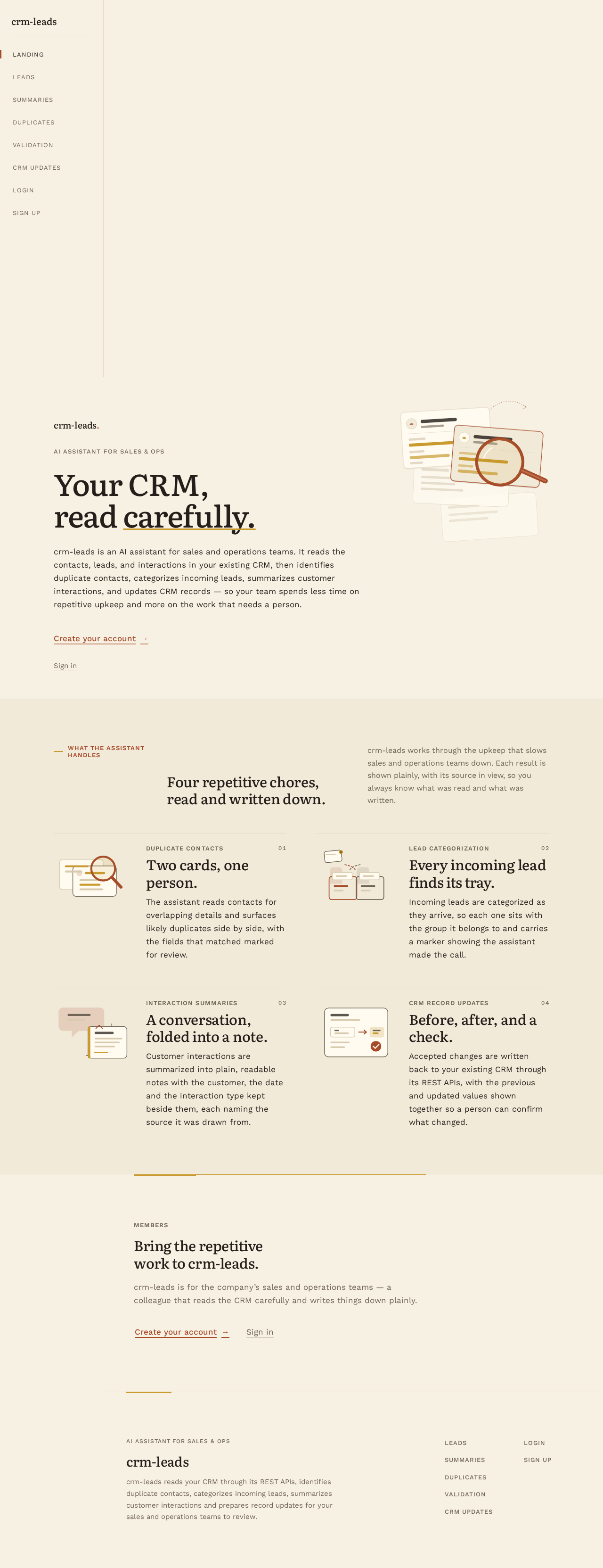
  • Focal subject: the flat illustration of stacked contact cards with two overlapping and a rust magnifier, bleeding off the top edge of the right third.
  • Input → transformation → outcome thesis: as the visitor scrolls the editorial spread, the illustrated spot drifts 4px and the section openers fade in at 200–280ms ease-out; the outcome is a calm, readable first impression of what the assistant automates — no bounce, no parallax theatre.
  • Motion vocabulary: gentle 200–280ms ease-out fades; a small illustrated spot that drifts 4px on scroll; AI results appear with a soft crossfade and a one-time mustard underline sweep.
  • Composed first frame: cream field, mustard rule and small-caps eyebrow, oversized Literata headline flush-left, 62ch sub-paragraph, rust underlined text link, and the contact-card illustration bleeding off the top edge.
  • Reduced-motion state: all fades and drifts resolve to their final positions immediately; the illustration and text remain fully visible and readable; no motion plays.
Page 28 of 32

9. Non-Functional Requirements

  • NFR-1 — Python and LLM APIs (explicit): the assistant is implemented in Python and calls LLM APIs for lead categorization and interaction summarization.
  • NFR-2 — FastAPI and PostgreSQL (explicit): the backend and data processing use FastAPI and PostgreSQL; assistant results and CRM update records are persisted in PostgreSQL.
  • NFR-3 — CRM REST API integration (explicit): all CRM reads and writes go through the existing CRM's REST APIs; crm-leads does not replace the CRM as system of record.
  • NFR-4 — AWS deployment (explicit): the solution is deployed to AWS, hosting the FastAPI and PostgreSQL backend.
  • NFR-5 — Durable state (required_inference): assistant results, duplicate pairs, validation results, and CRM update records persist in PostgreSQL so members can revisit them across sessions.
  • NFR-6 — Identity and session continuity (required_inference): application-owned identity with self-service enrollment and returning verification; protected pages are unavailable until a session is established.
  • NFR-7 — Role-aware authorization (required_inference): sales team members reach Leads and Summaries; operations team members reach Duplicates, Validation, and CRM Updates.
  • NFR-8 — Readable, accessible surfaces (explicit design constraint): text and controls stay whole and inside their containers at 375px, 768px, and 1280px; contrast meets the palette's stated ratios; focus rings use mustard.
  • NFR-9 — Graceful failure (required_inference): CRM or LLM failures surface as plain messages with retry on the affected page, and previously produced results remain readable.
Page 29 of 32

10. Tech Stack

  • Assistant: Python, using LLM APIs for lead categorization and customer interaction summarization.
  • Backend: FastAPI.
  • Data processing and storage: PostgreSQL.
  • CRM integration: the existing CRM's REST APIs for reading and writing CRM records.
  • Deployment: AWS.
  • Frontend: React web application styled per the warm editorial direction (Literata headings, Work Sans body, cream paper ground, rust primary, mustard AI markers).
Page 30 of 32

11. Assumptions and Constraints

  • A-1 (explicit): the assistant must be built using Python and LLM APIs.
  • A-2 (explicit): the backend and data processing must use FastAPI and PostgreSQL.
  • A-3 (explicit): the assistant must connect to the existing CRM through REST APIs.
  • A-4 (explicit): the solution must be deployed to AWS.
  • A-5 (required_inference): the existing CRM exposes REST APIs sufficient to read contacts, leads, customer records, and customer interactions, and to write record updates.
  • A-6 (required_inference): sales and operations team members enroll themselves and select their role at Sign Up; role-aware authorization separates their working pages.
  • A-7 (required_inference): automation runs in the background on the backend; members review results on their role-appropriate pages rather than triggering each task manually.
  • A-8 (required_inference): the existing CRM remains the system of record; crm-leads persists assistant results and update records in PostgreSQL.
  • A-9 (design constraint): the generic indigo/blue-on-white SaaS template is forbidden for this project.
Page 31 of 32

12. Glossary

  • AI assistant — the Python service that calls LLM APIs to categorize leads and summarize customer interactions, and that runs duplicate detection and data validation.
  • CRM — the company's existing customer relationship management system, reached only through its REST APIs and retained as system of record.
  • CRM REST API — the REST interface of the existing CRM through which crm-leads reads records and applies updates.
  • Duplicate contact — two contact records detected as referring to the same person or company, shown as overlapping record cards with matched fields highlighted.
  • Basic customer data validation — checks that customer records contain complete, well-formed basic fields (for example email, phone, company), with failing fields surfaced.
  • Lead categorization — the LLM-assigned category attached to each incoming lead.
  • Interaction summary — the LLM-generated summary of a customer interaction, presented as a paper note with a source line naming the CRM interaction.
  • CRM update — a record change submitted to the CRM REST API, recorded with previous and new values, timestamp, and CRM acceptance status.
  • Sales team member — the persona that reviews categorized leads and interaction summaries.
  • Operations team member — the persona that reviews duplicate contacts, validation results, and CRM updates.
  • AI-generated marker — the mustard highlight or left rule that marks content produced by the assistant.
Page 32 of 32
Landing design preview
Landing: Read editorial hero and openers
Sign Up: Enter name, email, password
Sign Up: Select Operations team member role
Sign Up: 1. Submit enrollment
Sign Up: 2. Correct field and resubmit
Duplicates: 1. Review duplicate pairs
Duplicates: Open pair and matched fields
Duplicates: Filter by detection status
Duplicates: 2. Retry refresh after CRM error
Duplicates: 3. Refresh for new duplicates
Login: 1. Enter email and password
Login: 2. Correct and resubmit credentials
Validation: 1. Review validation results
Validation: Open result and failing fields
Validation: Filter by validation status
Validation: 2. Retry refresh after CRM error
Validation: 3. Refresh for new validations
CRM Updates: 1. Review applied updates
CRM Updates: Open update and acceptance result
CRM Updates: Read failed entry reason
CRM Updates: Filter by update status
CRM Updates: 2. Refresh for new updates
Landing design preview
Landing: Read editorial hero and openers
Sign Up: Enter name, email, password
Sign Up: Select Operations team member role
Sign Up: 1. Submit enrollment
Sign Up: 2. Correct field and resubmit
Duplicates: 1. Review duplicate pairs
Duplicates: Open pair and matched fields
Duplicates: Filter by detection status
Duplicates: 2. Retry refresh after CRM error
Duplicates: 3. Refresh for new duplicates
Login: 1. Enter email and password
Login: 2. Correct and resubmit credentials
Validation: 1. Review validation results
Validation: Open result and failing fields
Validation: Filter by validation status
Validation: 2. Retry refresh after CRM error
Validation: 3. Refresh for new validations
CRM Updates: 1. Review applied updates
CRM Updates: Open update and acceptance result
CRM Updates: Read failed entry reason
CRM Updates: Filter by update status
CRM Updates: 2. Refresh for new updates