crm-gym-app
 Mokhles Mokhles
CRM For GYM APP


Comments (0)
Sign in to leave a comment
System Requirements
System Requirements Document for crm-gym-app
1. Introduction
The CRM Gym App is designed to facilitate the management of gym-member relationships and associated customer information. It aims to provide a user-friendly interface for gym staff to manage CRM records and for gym members to access and maintain their membership information. The application targets both gym staff and members, ensuring an engaging and energetic experience that reflects the lively atmosphere of a fitness environment.
2. System Overview
The CRM Gym App is a web-based application that supports the management of gym-member relationships. It provides functionalities for gym staff to manage customer relationships and for gym members to access their membership information. The application requires authenticated sessions to preserve member relationship records across visits. The app is designed with a friendly and energetic interface, aligning with the lively atmosphere of a gym.
2a. Product Interpretation and Delivery Boundary
The CRM Gym App is delivered as a custom web application with app-owned identity management. Gym staff require invitation or organizational provisioning to access staff-restricted CRM management, while gym members can self-enroll and verify their identity for access. The application includes a set of predefined pages that facilitate the required functionalities, and it adheres to the creative direction of big-hearted boldness, ensuring a visually engaging experience.
2b. Source Content Inventory
Not applicable as no explicit content source directive was provided.
2c. Page Content and Component Coverage
Landing
- Purpose: Public entry surface explaining the gym CRM, its users, and its member-relationship purpose.
- Components:
- Introduction to the CRM Gym App
- Overview of features for gym staff and members
- Call-to-action buttons for Login and Sign Up
- Energetic and welcoming design elements
Login
- Purpose: Identity access surface for returning verification of gym staff and members.
- Components:
- Input fields for username and password
- Role-aware access controls
- Error messages for failed login attempts
- Links to password recovery and Sign Up
Sign Up
- Purpose: Self-service enrollment for gym members.
- Components:
- Input fields for personal and membership details
- Confirmation of successful enrollment
- Error handling for invalid inputs
- Link to Login page
Members
- Purpose: Staff-facing destination for browsing and searching gym member information.
- Components:
- Search bar and filters for member information
- List of members with basic details
- Pagination controls
- Access to Member Details page
Member Details
- Purpose: Staff workspace for managing individual member relationship records.
- Components:
- Detailed view of member information
- Edit and update functionalities
- Save and cancel buttons
- Notifications for successful updates
Member Profile
- Purpose: Member-facing destination for accessing and maintaining CRM relationship information.
- Components:
- View and edit personal information
- Membership status and history
- Update preferences and settings
- Notifications for changes
3. Functional Requirements
- As a Gym Staff, I should be able to manage gym-member relationships and CRM records to support gym operations. (Provenance: explicit)
- As a Gym Member, I should be able to enroll and verify my identity to access my membership information. (Provenance: required_inference)
- As a Gym Staff, I should be able to browse and search for gym member information efficiently. (Provenance: required_inference)
- As a Gym Member, I should be able to update my personal and membership information through a self-service interface. (Provenance: required_inference)
4. User Personas
- Gym Staff: Manages gym customer relationships and CRM records. Responsible for updating and maintaining member information.
- Gym Member: Participates as the customer whose relationship and membership information is managed in the gym CRM. Responsible for self-enrollment and maintaining personal information.
5. Core User Flows
Gym Staff
- Login: Access the application using credentials.
- Members Page: Browse and search for members using filters.
- Member Details: View and update member information.
- Logout: Securely exit the application.
Gym Member
- Sign Up: Enroll by providing personal and membership details.
- Login: Access the application using credentials.
- Member Profile: View and update personal and membership information.
- Logout: Securely exit the application.
6. Visuals Colors and Theme
- Muse: Haraldur Thorleifsson
- Palette:
- Background: #FFFAF0
- Surface: #FFFFFF
- Text: #333333
- Primary: #FF5733
- Accent: #FFC300
- Muted: #E0E0E0
- Typography:
- Headings: Sora — Bold, oversized, tight tracking, sentence case
- Body: Outfit
- Scale: 1.25 modular, 64/48/32/24/16
- Shape Language: Chunky rounded cards, color-blocked sections
- Layout: Playful, asymmetric blocks with generous padding
- Imagery: Custom character and spot illustration, bold iconography
7. Signature Design Concept
The public entry page features a bold hero section with oversized type overlapping a vibrant coral block with a yellow accent stripe. Chunky, rounded cards are used for content sections with playful hover animations. Large, friendly illustrations of gym-related activities and characters are integrated throughout. Dynamic, color-blocked transitions maintain energy, and a sticky navigation bar with bold type and interactive icons enhances usability.
8. Interaction Model & Motion Direction
- Interaction Model: Animated
- Motion Tempo: Expressive
- Hero Dimensionality: Layered_2d
- Landing Hero Motion Brief: The hero section features a bold, oversized type that transforms into a vibrant coral block with a yellow accent stripe upon interaction. The motion vocabulary includes lively entrance animations and playful hover pops, maintaining a dynamic and energetic feel.
9. Non-Functional Requirements
- The application must support authenticated sessions to preserve member relationship records across visits. (Provenance: required_inference)
- The interface should be responsive and accessible, ensuring usability across various devices and screen sizes. (Provenance: basic_default)
10. Tech Stack
- Frontend: React
- Backend: Python/FastAPI
- Database: PostgreSQL
- Containerization: Docker
- Deployment: Kubernetes (if required for scaling)
11. Assumptions and Constraints
- Gym staff access is restricted and requires organizational provisioning or invitation.
- Gym members can self-enroll and verify their identity for access.
- The application must maintain session persistence for user interactions.
12. Glossary
- CRM: Customer Relationship Management
- Gym Staff: Employees responsible for managing gym operations and member relationships.
- Gym Member: Individuals who have a membership with the gym and use its facilities.
- Enrollment: The process of signing up for access to the gym CRM application.
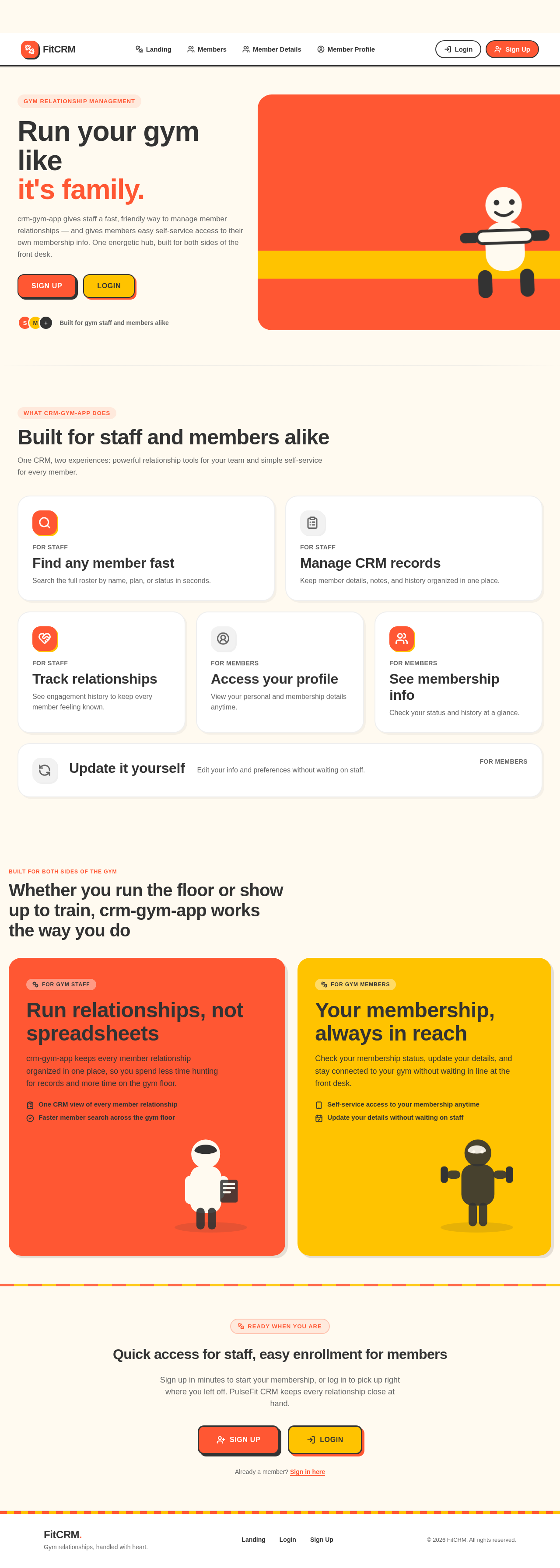
Built for staff and members alike
One CRM, two experiences: powerful relationship tools for your team and simple self-service for every member.
Find any member fast
Search the full roster by name, plan, or status in seconds.
Manage CRM records
Keep member details, notes, and history organized in one place.
Track relationships
See engagement history to keep every member feeling known.
Access your profile
View your personal and membership details anytime.
See membership info
Check your status and history at a glance.
Update it yourself
Edit your info and preferences without waiting on staff.
Built for both sides of the gym
Whether you run the floor or show up to train, crm-gym-app works the way you do
Run relationships, not spreadsheets
crm-gym-app keeps every member relationship organized in one place, so you spend less time hunting for records and more time on the gym floor.
- One CRM view of every member relationship
- Faster member search across the gym floor
Your membership, always in reach
Check your membership status, update your details, and stay connected to your gym without waiting in line at the front desk.
- Self-service access to your membership anytime
- Update your details without waiting on staff
Quick access for staff, easy enrollment for members
Sign up in minutes to start your membership, or log in to pick up right where you left off. PulseFit CRM keeps every relationship close at hand.
Already a member? Sign in here
Built for staff and members alike
One CRM, two experiences: powerful relationship tools for your team and simple self-service for every member.
Find any member fast
Search the full roster by name, plan, or status in seconds.
Manage CRM records
Keep member details, notes, and history organized in one place.
Track relationships
See engagement history to keep every member feeling known.
Access your profile
View your personal and membership details anytime.
See membership info
Check your status and history at a glance.
Update it yourself
Edit your info and preferences without waiting on staff.
Built for both sides of the gym
Whether you run the floor or show up to train, crm-gym-app works the way you do
Run relationships, not spreadsheets
crm-gym-app keeps every member relationship organized in one place, so you spend less time hunting for records and more time on the gym floor.
- One CRM view of every member relationship
- Faster member search across the gym floor
Your membership, always in reach
Check your membership status, update your details, and stay connected to your gym without waiting in line at the front desk.
- Self-service access to your membership anytime
- Update your details without waiting on staff
Quick access for staff, easy enrollment for members
Sign up in minutes to start your membership, or log in to pick up right where you left off. PulseFit CRM keeps every relationship close at hand.
Already a member? Sign in here
No comments yet. Be the first!