crimson-vivid
 Happybhai


Comments (0)
Sign in to leave a comment
System Requirements
System Requirements Document for crimson-vivid
1. Introduction
College Core — Master App Prompt
Page 1
COLLEGE CORE
Master AI Prompt for Android Studio / Claude Code
Project: ITG Gopeshwar College Management App | Package: com.itg.collegecore
mentor. Help me build a complete Android college-management application named “College Core”
for Govt. Institute of Technology (ITG) Gopeshwar.
MAIN PURPOSE:
Create one central app where students can access academic material, notices, exam papers,
gallery and college updates. Administrators should be able to manage content without editing
the app code.
College Core — Master App Prompt
Page 2
College Core — Master App Prompt
Page 3
College Core — Master App Prompt
The project name is crimson-vivid.
2. System Overview
CORE MODULES:
3. Functional Requirements
USER ROLES AND AUTHENTICATION:
- Student login:
-
Login using a college-issued email/ID or approved credentials.
-
Student profile should include name, student ID/roll number, course, branch, year, semester
and profile photo (optional).
- Students must only see content relevant to their course/branch/semester where applicable.
USER ROLES AND AUTHENTICATION:
- Admin login:
-
Separate admin sign-in and protected admin dashboard.
-
Only authorized admins can create, edit, publish or delete notices, study material, papers
and gallery items.
- Add logout, session handling, loading states, validation and useful error messages.
A. Student Dashboard
-
Clean home screen with welcome message and profile summary.
-
Quick access cards for Notices, Syllabus, Notes, Previous Papers, Gallery and Profile.
-
Show latest notices and recently added study material.
-
Bottom navigation where appropriate.
B. Notices / Notifications
-
Admin can publish notices with title, message, date, attachment and target audience.
-
Target audience filters: all students, course, branch, year and semester.
-
Students see only notices relevant to them plus general notices.
-
Include read/unread status and notice details screen.
-
Plan push notifications for important notices; ask before adding a paid service.
C. Syllabus
-
Organize syllabus by course → branch → year → semester → subject.
-
Support PDF links/files and subject descriptions.
-
Admin can add, update or remove syllabus entries.
-
Students can view and open/download permitted PDFs.
D. Notes / Study Material
-
Organize notes by course, branch, year, semester and subject.
-
Support PDF documents and optionally images.
-
Include title, subject, unit, upload date and uploaded-by information.
-
Add search and filters.
-
Admin can upload, edit and delete material.
E. Previous Year / Exam Papers
-
Support 2 internal examinations and 1 external examination as configurable exam categories.
-
Organize papers by course, branch, year, semester, subject, exam type and year.
-
Students can search and download/view papers.
-
Admin can add papers and update metadata.
F. Photo Gallery
-
Show college events, cultural programs, technical events, sports and other activities.
-
Albums with event title, date, description and multiple photos.
-
Admin-only upload and management.
G. Admin Dashboard
-
Summary counts for students, notices, notes, syllabus files, papers and gallery albums.
-
Forms to add/edit content with validation.
-
Content preview before publishing.
-
Confirmation before destructive actions.
-
Clear success/failure messages.
-
Courses: B.Tech, BCA (and future courses)
-
B.Tech: 5 configurable branches, 4 academic years
-
BCA: 3 academic years
-
Semesters: configurable according to course duration
-
Subjects mapped to the correct course/branch/year/semester
Do not invent the names of the five branches. Make them manageable by the admin.
-
Store documents and images in cloud storage, and keep metadata in the database.
-
Validate file type and size for uploads.
-
Explain how to create the first admin account safely.
DELIVERABLES:
-
First inspect my existing Android Studio project and tell me what is already present.
-
Propose the complete folder/package structure.
-
Create a phase-wise development roadmap.
-
Explain the database tables/collections and relationships before implementation.
-
Build one working module at a time.
-
For every phase, provide:
-
files to create or edit,
-
complete code,
-
exact paste location,
-
required Gradle dependencies,
-
setup/configuration steps,
-
how to run and test,
-
common errors and fixes.
- Add sample/demo data clearly marked as demo data.
DEVELOPMENT ORDER:
Phase 3: Authentication and student/admin roles.
DEVELOPMENT ORDER:
Phase 4: Student dashboard and profile.
DEVELOPMENT ORDER:
Phase 5: Notices.
DEVELOPMENT ORDER:
Phase 6: Syllabus and notes.
DEVELOPMENT ORDER:
Phase 7: Previous exam papers.
DEVELOPMENT ORDER:
Phase 8: Gallery.
DEVELOPMENT ORDER:
Phase 9: Admin content-management dashboard.
Phase 10: Security rules, testing, performance and bug fixing.
Phase 11: APK build, installation and project backup.
Important project notes
• Test admin and student permissions separately. A hidden admin screen is not a security system; backend rules must
enforce permissions.
4. User Personas
College Core serves two human roles, each with a separate sign-in path. Content storage and notification delivery are supporting systems, not personas.
| Role | Responsibilities and goals | Inputs | Decisions | Access |
|---|---|---|---|---|
| Student | Reach academic material, notices, exam papers, gallery and college updates from one central app; see what is new and relevant to their own programme | College-issued email/ID or approved credentials; profile details (name, student ID/roll number, course, branch, year, semester, optional profile photo) | Which notices, syllabus, notes and papers to view, search or download | Student dashboard with welcome message, profile summary, latest notices, recently added study material, quick-access cards (Notices, Syllabus, Notes, Previous Papers, Gallery, Profile) and bottom navigation where appropriate; content filtered to their course/branch/semester where applicable; read-only on admin content; no access to another student's private profile data |
| Administrator | Keep app content current without editing app code; manage notices, study material, syllabus, papers and gallery | Admin credentials; content files (PDFs, optional images) and metadata (title, subject, unit, upload date, uploaded-by, date, target audience, exam type, year) | What to create, edit, publish or delete; which audience a notice targets; how courses, branches, years, semesters and subjects are configured | Separate admin sign-in and protected admin dashboard with summary counts for students, notices, notes, syllabus files, papers and gallery albums; sole authority for uploads and content management |
4.1 Student journey
- Sign in with college-issued credentials.
- Land on the home screen with welcome message, profile summary, latest notices and recently added study material.
- Move via quick-access cards or bottom navigation to Notices, Syllabus, Notes, Previous Papers, Gallery or Profile.
- Browse or search within their course, branch, year and semester; view or download permitted PDFs.
- See only content targeted at them and only their own profile data.
4.2 Administrator journey
- Sign in through the separate admin entry point.
- Review dashboard summary counts.
- Add or update syllabus entries, notes, papers and notices, setting metadata and target audience (all students, course, branch, year, semester).
- Publish, edit or delete content; changes reach students without an app update.
4.3 Configuration defaults
Administrators maintain the course structure: B.Tech with five admin-managed branches and four academic years, BCA with three academic years, and semesters configurable per course duration, with subjects mapped to the correct course/branch/year/semester. Branch names are deliberately left to admin configuration rather than fixed in the app. This batch establishes these two roles only; it does not define a complete persona catalog.
5. Core User Flows
5.1 Student signs in and reaches a scoped dashboard
Trigger: A student opens the app and chooses student login.
- The student authenticates with a college-issued email/ID or another approved credential.
- The app resolves the student's profile (name, student ID/roll number, course, branch, year, semester; profile photo optional) and uses course/branch/semester to scope content.
- The student lands on the dashboard: welcome message, profile summary, quick-access cards (Notices, Syllabus, Notes, Previous Papers, Gallery, Profile), latest notices and recently added study material; bottom navigation where appropriate.
- The student opens any card to continue into that module.
Failure/recovery: If credentials are rejected, the student remains on the login screen and can retry; no dashboard content is shown until authentication succeeds.
5.2 Student reads notices relevant to them
Trigger: The student opens Notices from the dashboard or bottom navigation.
- The app lists only notices targeted to the student's course/branch/year/semester plus general notices.
- Each entry shows read/unread status; the student opens a notice to see its details screen (title, message, date, attachment).
- Opening a notice marks it read; the student returns to the list and continues browsing.
Failure/recovery: If no notices match the student's scope, the list shows only general notices rather than an error.
5.3 Student finds and opens syllabus PDFs
Trigger: The student opens Syllabus.
- The student navigates the hierarchy course → branch → year → semester → subject.
- The student selects a subject to see its description and permitted PDF link/file.
- The student views or downloads the PDF and returns to the hierarchy to continue.
Failure/recovery: If a subject has no syllabus entry yet, the subject shows no document; the student can pick another subject.
5.4 Student searches notes and study material
Trigger: The student opens Notes.
- The student browses by course, branch, year, semester and subject, or uses search and filters.
- Results show title, subject, unit, upload date and uploaded-by information.
- The student opens a PDF (or optional image) to view or download it, then returns to results.
Failure/recovery: A search with no matches returns an empty result set; the student can clear filters and browse instead.
5.5 Student finds previous exam papers
Trigger: The student opens Previous Papers.
- The student searches or filters by course, branch, year, semester, subject, exam type and year.
- The student selects a paper to view or download it, then returns to the results.
Failure/recovery: No matching papers yields an empty result set; the student can broaden the filters.
5.6 Admin signs in to the protected dashboard
Trigger: An authorized admin chooses the separate admin sign-in.
- The admin authenticates and enters the protected admin dashboard.
- The dashboard shows summary counts for students, notices, notes, syllabus files, papers and gallery albums.
- The admin selects a content area to manage.
Failure/recovery: Unauthenticated or unauthorized attempts do not reach the dashboard; the admin remains at sign-in.
5.7 Admin publishes or edits a notice
Trigger: The admin opens notice management.
- The admin fills the notice form (title, message, date, attachment, target audience: all students, course, branch, year, semester); validation runs on submit.
- The admin previews the notice before publishing.
- On publish, the notice becomes visible to students in the selected audience plus general notices.
- The admin can later edit or delete the notice.
Failure/recovery: Validation errors block publishing and return the admin to the form with the entered values.
5.8 Admin manages syllabus, notes and papers
Trigger: The admin opens the relevant content area.
- For syllabus, the admin adds, updates or removes entries under course → branch → year → semester → subject, attaching PDF links/files and subject descriptions.
- For notes, the admin uploads, edits or deletes material organized by course, branch, year, semester and subject, with title, subject, unit, upload date and uploaded-by.
- For papers, the admin adds papers and updates metadata (course, branch, year, semester, subject, exam type, year).
- Each form validates input and offers a preview before publishing.
Failure/recovery: Invalid or incomplete forms are rejected with validation messages; existing content stays unchanged until a valid save.
5.9 Admin maintains courses, branches and subjects
Trigger: The admin opens course configuration.
- The admin manages courses (B.Tech, BCA, and future courses), the five configurable B.Tech branches (names are admin-managed, not fixed), academic years (4 for B.Tech, 3 for BCA), semesters configurable per course duration, and subjects mapped to the correct course/branch/year/semester.
- Saved mappings determine which students see which notices, syllabus, notes and papers.
Failure/recovery: A mapping that omits a level leaves that content unscoped for students until the admin completes it.
5.10 Admin curates the gallery
Trigger: The admin opens gallery management.
- The admin creates albums and adds images, previewing before publishing.
- Published albums appear in the student Gallery card and count toward the dashboard summary.
Failure/recovery: Unpublished changes remain hidden from students until the admin publishes.
Page 4
Recommended first message after pasting the prompt
“I have opened my College Core project in Android Studio. Please inspect the existing project first. Do not change any
file yet. Tell me the current project structure, what is already working, and the exact next step for Phase 1.”
6. Visuals Colors and Theme
[Design proposal; unspecified choices are defaults.]
Muse and headline. Tobias van Schneider's editorial swagger, tuned for an Android college companion: College Core, all your college in one place. Paper ground, oversized crimson type, one hot accent — clear and professional, warm enough for a first-year student.
Palette (light theme only; dark theme is a later phase). Paper #F4F0EA covers roughly 70% of every screen; surface #FFFFFF for cards and sheets; ink #141414 for all text; primary crimson #B3122B for the active section and main buttons; ember #E4572E reserved for notices only, at about 5%; muted #6E6660 for secondary labels and counts. No blue or indigo anywhere.
Typography. Headings in Archivo — Archivo Black caps, tight tracking, flush left, large scale contrast. Body in Source Serif 4. Modular scale of 1.333: display 44px mobile to 96px desktop, then 32 / 24 / 18 / 16.
Shape and spacing. Sharp corners only — no rounded cards, no soft shadows. Full-width ink rules separate sections. At most one crimson block per screen. Spacing follows a consistent rhythm so reusable components (buttons, notice rows, photo cards, form fields) share one set of tokens across student and admin screens.
Layout. Asymmetric two-column grid: a wide left text column against a narrow right rail of labels and counts. Sections stack with full-width rules. Layouts stay responsive across Android screen sizes, and headlines, wordmarks, labels, numbers, card text and controls stay whole inside the viewport and their container at 375px, 768px and 1280px, wrapping or scaling (e.g. clamp()) to fit.
Imagery. Large campus and classroom photos with a warm monochrome tint; type carries the page when no photo is present.
Avoid. Rounded cards with soft shadows, blue/indigo buttons on white, gradient blobs and glass panels, identical hover-lift card grids, centred headline with small subtext and one button.
States. Loading, empty, offline and error states use the same paper ground and ink rules, with clear success/failure messages and confirmation before destructive actions styled as crimson primary actions.
DESIGN DIRECTION:
-
Modern, professional, simple college-app design.
-
Consistent colors, typography, spacing, icons and reusable components.
-
Easy for first-year students to understand.
-
Responsive layouts for different Android screen sizes.
-
Avoid clutter, unnecessary animations and heavy effects.
-
Provide a light theme; dark theme can be added as a later phase.
7. Signature Design Concept
[Design proposal; unspecified choices are defaults.]
Signature moves.
- A display headline spanning the viewport width in Archivo Black at
clamp(44px, 9vw, 96px). - A solid crimson
#B3122Bblock at the hero edge holding the CTA in white. - Section openers with a full-width ink rule and a small crimson section number.
- Notice rows with the date in large serif numerals on the left and the title on the right.
- Photo cards that swap to a warm monochrome version on hover, with no lift.
Public entry hero. Paper ground #F4F0EA. A huge Archivo Black headline in ink fills the left 8 of 12 columns and wraps to three lines: College Core, all your college in one place. A thin ink rule runs under it. The subline reads Notices, syllabus, notes and papers for ITG Gopeshwar, sorted by your branch and semester. A solid crimson block sits at the right edge holding the white CTA Open dashboard. This recomposes only accepted content and the accepted entry control — no new behaviour or destination.
Component coverage. The same tokens carry the student dashboard, notices, syllabus, notes, previous papers, gallery and profile, plus the admin content-management screens: one reusable button, notice row, photo card, form field and section opener, so admins manage content without touching app code and first-year students meet the same familiar shapes everywhere.
8. Interaction Model & Motion Direction
[Design proposal; unspecified choices are defaults.]
Interaction Model: Static (direction) Motion Tempo: restrained Hero Dimensionality: flat
Landing Hero Motion Brief. Focal subject: the oversized Archivo Black headline on paper ground, with the crimson CTA block at the right edge. Input → transformation → outcome: on load, the headline reveals once with a slow type reveal (line-by-line, no bounce); the ink rule draws under it; the crimson block and Open dashboard CTA settle last, ready to open the dashboard. Motion vocabulary: one slow type reveal and a slow crossfade on image hover — nothing bouncy, no parallax, no heavy effects. Composed first frame: headline fully legible, rule and CTA in place, so the page reads complete even before motion runs. Reduced-motion state: the same static arrangement with no reveal — headline, rule and CTA simply present, all text and controls whole at every viewport.
9. Non-Functional Requirements
- Do not store plain-text passwords. Use a secure authentication provider and proper access
rules.
-
Optimize image loading and avoid downloading full-resolution images unnecessarily.
-
Implement role-based access control and server/database security rules. Hiding admin buttons
in the UI is NOT sufficient security.
-
Use pagination or lazy loading for lists and efficient image loading.
-
Add basic offline/error/loading/empty states where practical.
-
Include validation, crash-safe error handling and basic accessibility.
SECURITY AND PRIVACY:
-
Students must not be able to modify admin content.
-
Students must not access another student's private profile data.
-
Admin permissions must be verified by the backend/database rules.
-
Do not expose private student information in public lists.
-
Provide a testing checklist for student and admin accounts.
-
Explain how to build a signed APK and install it on a phone.
-
Explain how to back up the project and continue on a second laptop using Git.
10. Tech Stack
APP IDENTITY:
-
App name: College Core
-
College context: Govt. Institute of Technology (ITG) Gopeshwar
-
Android application ID / package: com.itg.collegecore
-
Platform: Android
-
Preferred development environment: Android Studio
-
Preferred language: Kotlin
-
UI: Jetpack Compose with Material 3
-
Target users: students and college administrators
TECHNICAL REQUIREMENTS:
-
Use Kotlin and Jetpack Compose + Material 3.
-
Use a maintainable architecture (MVVM, repositories, ViewModels and UI state).
-
Recommend a suitable backend/database/storage solution for a beginner and explain its
free-tier limits, security and future cost. Prefer Firebase or Supabase only after comparing
the trade-offs; do not silently assume one.
- Use Git so the project can be backed up and continued on another laptop.
11. Assumptions and Constraints
How to use this PDF
Copy the master prompt below and paste it into Claude Code or your coding AI while working in your Android Studio
project. Ask the AI to complete the app in small phases. Do not ask it to generate the entire project in one huge step.
MASTER PROMPT (copy from here)
You are a senior Android developer, software architect, UI/UX designer, and patient coding
IMPORTANT ABOUT ME:
-
I am a complete beginner. Assume I know almost nothing about programming.
-
Explain every step in very simple Hinglish (Hindi written in English letters).
-
Give exact Android Studio menu paths, file names, and where each code block must be pasted.
-
Never skip setup steps or assume I know a technical term.
-
Build the app in small, testable phases. After each phase, tell me how to run it and what I
should see.
- Do not overwrite working code without first explaining what will change. If editing an
existing project, inspect its current structure and reuse working code where possible.
- Give complete files when needed, not disconnected snippets. Keep code clean and
beginner-friendly.
-
Initial expected scale: approximately 200–500 students
-
Academic structure: B.Tech with 5 branches and 4 years; also allow BCA with 3 years. Make
courses, branches, semesters and academic years configurable rather than hard-coded.
- Never make admin access available through a public sign-up option.
ACADEMIC DATA MODEL:
Design the database so it can support:
- Keep secrets, API keys and service credentials out of public source code and Git.
DEVELOPMENT ORDER:
Phase 1: Inspect project, confirm Android Studio setup, app launch and navigation.
DEVELOPMENT ORDER:
Phase 2: Design system, data model and backend choice.
WORKING RULES:
- Start with Phase 1 only. Do not generate the whole app at once.
- Before writing code, inspect the existing project files and identify the current launcher
activity, package name, Gradle setup and existing screens.
- If you cannot inspect files directly, ask me to share the relevant file or screenshot; do not
guess.
-
Ask only one important question at a time.
-
If a feature requires a paid plan or service, warn me before implementation and suggest a
low-cost alternative.
-
Never claim something is completed unless the code and steps are actually provided.
-
At the end of each phase, give me a short checklist and wait for my confirmation before
moving to the next phase.
Begin now by inspecting my current project and guiding me through Phase 1 in Hinglish.
Important project notes
• Keep a backup or Git commit before major code changes.
Important project notes
• Do not share passwords, private keys, student personal data or production credentials in chat.
Important project notes
• Build and test one module at a time. A working small app is better than a large app full of errors.
12. Glossary
College Core — the Android college-management application (package com.itg.collegecore) built for Govt. Institute of Technology (ITG) Gopeshwar.
Course — a configurable programme of study offered by the college. B.Tech and BCA are the courses in scope; further courses are anticipated and must be addable without code changes.
Branch — a configurable specialization within a course. B.Tech has five branches, whose names are not fixed by the requirements and are managed by the admin.
Academic year — a configurable year of study within a course. B.Tech spans four academic years; BCA spans three.
Semester — a configurable division of a course, with the number of semesters derived from the course duration rather than hard-coded.
Subject — a unit of study mapped to the correct course, branch, academic year and semester.
Admin — the human role responsible for managing courses, branches, semesters, academic years and subject mappings.
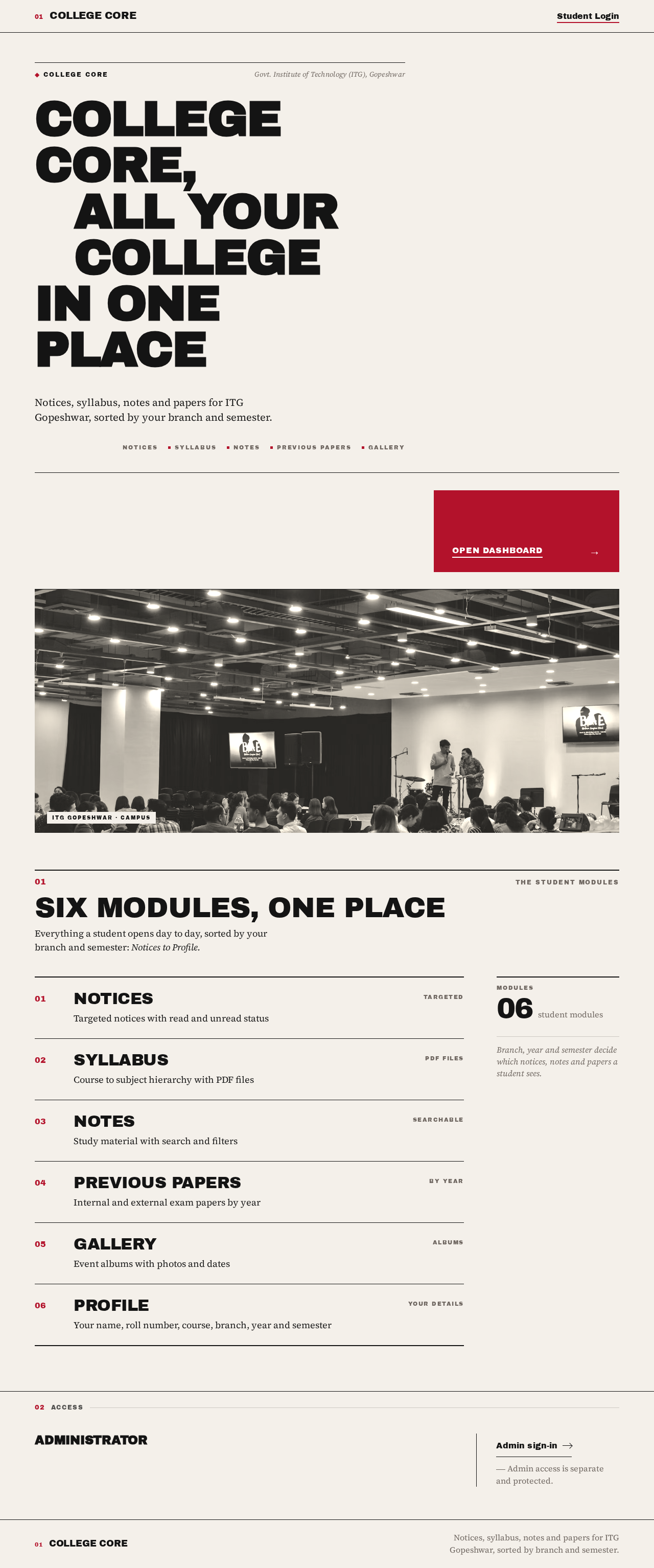
College Core,all your collegein one place
Notices, syllabus, notes and papers for ITG Gopeshwar, sorted by your branch and semester.

Six modules, one place
Everything a student opens day to day, sorted by your branch and semester: Notices to Profile.
Notices
Targeted notices with read and unread status
Syllabus
Course to subject hierarchy with PDF files
Notes
Study material with search and filters
Previous Papers
Internal and external exam papers by year
Gallery
Event albums with photos and dates
Profile
Your name, roll number, course, branch, year and semester
Administrator
Admin access is separate and protected.
College Core,all your collegein one place
Notices, syllabus, notes and papers for ITG Gopeshwar, sorted by your branch and semester.
Six modules, one place
Everything a student opens day to day, sorted by your branch and semester: Notices to Profile.
Notices
Targeted notices with read and unread status
Syllabus
Course to subject hierarchy with PDF files
Notes
Study material with search and filters
Previous Papers
Internal and external exam papers by year
Gallery
Event albums with photos and dates
Profile
Your name, roll number, course, branch, year and semester
Administrator
Admin access is separate and protected.
No comments yet. Be the first!