crimson-header
 Jaat deshwal
Header: Website ka naam aur "On/Off" toggle switch. Full website
Comments (0)
Sign in to leave a comment
System Requirements
System Requirements Document (SRD) for Crimson-Header
1. Introduction
The Crimson-Header project is a modern, interactive web application designed to provide users with a clean and functional interface. The primary focus is on simplicity, usability, and delivering key information at a glance. This document outlines the system requirements for the Crimson-Header project, ensuring alignment with the vision of Jaat Deshwal from India. Locale-specific considerations, such as time zones (IST) and user preferences, have been incorporated.
2. System Overview
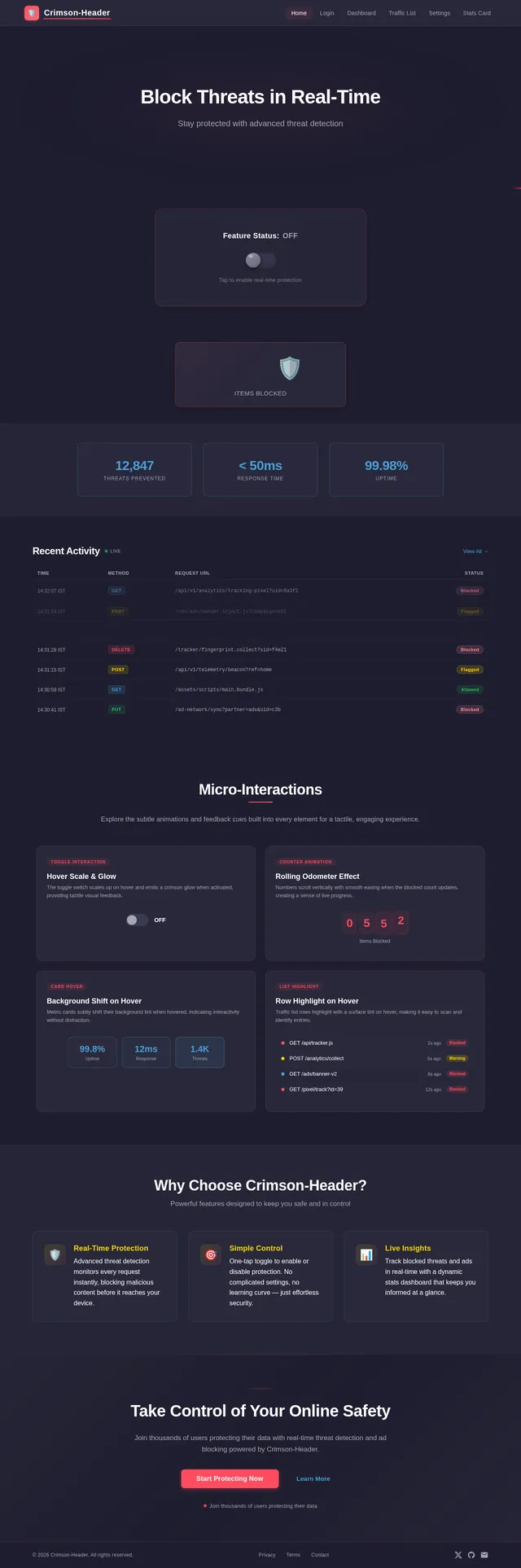
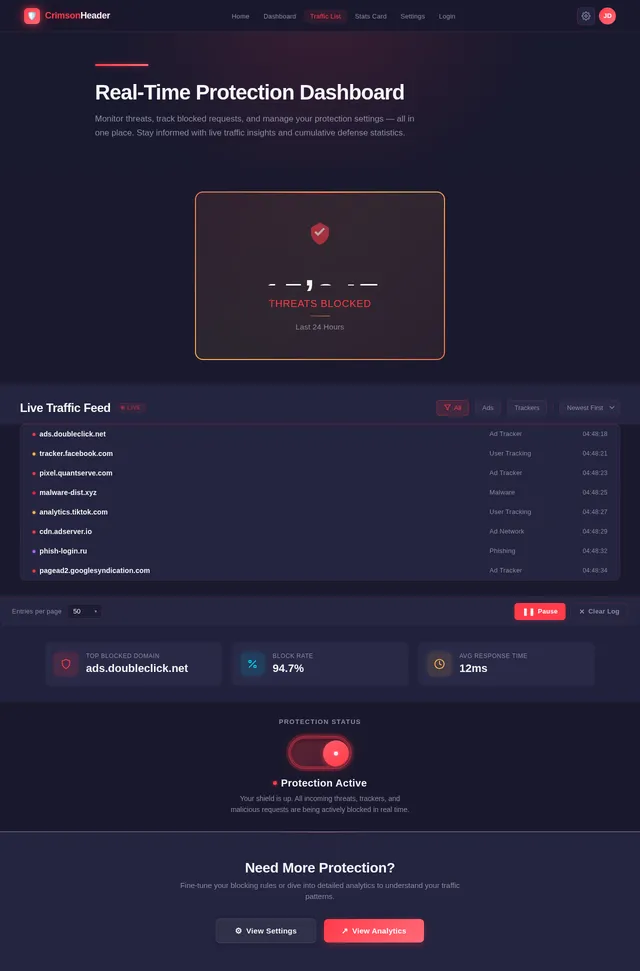
The Crimson-Header project aims to create a visually appealing and interactive header component for a website. The header will include the website's name, an "On/Off" toggle switch for controlling specific features, a dynamically updating stats card that displays the cumulative count of threats or ads blocked, and a live traffic list that showcases real-time blocked requests. The system will prioritize responsiveness, real-time updates, and a seamless user experience.
Key features include:
- A minimalist header design with essential interactive elements.
- A stats card that builds user trust by showcasing the effectiveness of the service.
- A live traffic list that provides transparency by displaying real-time blocked requests.
- Dynamic updates to ensure real-time accuracy of displayed information.
3. Functional Requirements
Header Component
- As a User, I should see the website's name prominently displayed in the header.
- As a User, I should be able to toggle an "On/Off" switch to control a specific feature of the website.
Stats Card Component
- As a User, I should see a large number on the stats card that displays the cumulative count of threats or ads blocked (e.g., "547 Items Blocked").
- As a User, I should see the stats card update dynamically in real-time to reflect the latest count of blocked items.
Live Traffic List Component
- As a User, I should see a small list that displays real-time blocked requests (e.g., "ads.doubleclick.net - Blocked").
- As a User, I should see the list continuously update with new entries as requests are blocked.
- As a User, I should see older entries scroll out of view automatically as new entries are added.
4. User Personas
1. General User
- Description: A typical visitor to the website who interacts with the header, stats card, and live traffic list.
- Goals: To toggle features on/off, view the effectiveness of the service through the stats card, and monitor real-time blocked requests.
- Pain Points: Wants a clear, responsive, and easy-to-use interface with real-time feedback.
2. Admin
- Description: The website administrator who configures the header, monitors the stats, and oversees the live traffic list.
- Goals: To ensure the toggle switch, stats card, and live traffic list function correctly and provide accurate data.
- Pain Points: Needs reliable backend support for real-time updates and seamless integration.
5. Visuals Colors and Theme
The Crimson-Header project will use a unique, bold color palette to create a striking yet professional appearance. The theme will reflect modernity, trustworthiness, and interactivity.
Color Palette
- Background: #1A1A2E (Deep Indigo)
- Surface: #2E2E4F (Slate Gray)
- Text: #F5F5F5 (Soft White)
- Accent: #FF3B4A (Vivid Crimson)
- Muted: #8C8CA1 (Muted Lavender)
This palette ensures high contrast for readability while maintaining a sleek, modern aesthetic.
6. Signature Design Concept
The Dynamic Crimson Header with Live Traffic Insights
The Crimson-Header homepage will feature a dynamic, interactive header that captivates users from the moment they land on the site. The design will include:
-
3D Toggle Animation: The "On/Off" toggle switch will have a 3D effect, with smooth transitions and a glowing crimson outline when toggled "On." The switch will emit a subtle pulse animation to draw attention.
-
Live Stats Counter: The stats card will display a real-time counter that dynamically increments as threats or ads are blocked. The number will animate with a "rolling odometer" effect, giving users a sense of progress and engagement.
-
Crimson Glow Effect: The website's name in the header will have a glowing crimson underline that subtly pulses every few seconds, reinforcing the brand identity.
-
Live Traffic List Animation: The live traffic list will display real-time blocked requests in a scrolling marquee-style list. Each new entry will slide in from the top with a fade-in effect, while older entries will scroll out of view at the bottom. Hovering over the list will pause the scrolling, allowing users to inspect specific entries.
-
Micro-Interactions: Hovering over the toggle switch, stats card, or live traffic list will trigger micro-interactions, such as slight scaling, color shifts, or tooltip displays, to enhance the tactile feel of the interface.
This bold and interactive design will make the Crimson-Header instantly memorable and engaging for users.
7. Non-Functional Requirements
- Performance: The header, stats card, and live traffic list must load within 2 seconds on a standard broadband connection.
- Scalability: The system should handle up to 10,000 concurrent users without performance degradation.
- Accessibility: The interface must comply with WCAG 2.1 AA standards for accessibility.
- Localization: The system should support Indian locale settings, including time zones (IST) and language preferences.
8. Tech Stack
Frontend
- React for Web
Backend
- Python
- FastAPI
Database
- MySQL (with Alembic for migrations)
AI Models
- GPT 5.4 for user-friendly responses
AI Tools
- Langchain
Local Orchestration
- Docker
- docker-compose
Server-Side Orchestration
- Kubernetes
9. Assumptions and Constraints
Assumptions
- Users will primarily access the website from modern browsers (Chrome, Firefox, Edge).
- The stats card and live traffic list will rely on backend APIs to fetch real-time data.
Constraints
- The system must operate within the constraints of a MySQL database for storing and retrieving stats and traffic data.
- The toggle switch functionality must be limited to features defined during the development phase.
10. Glossary
- Header: The top section of a webpage that typically contains the website's name, navigation links, and interactive elements.
- Toggle Switch: A UI element that allows users to switch between two states, such as "On" and "Off."
- Stats Card: A visual component displaying numerical data, such as the count of threats or ads blocked.
- Live Traffic List: A UI component that displays real-time blocked requests in a scrolling or paginated format.
- Micro-Interactions: Small animations or design effects that enhance user experience by providing feedback or visual cues.
- WCAG: Web Content Accessibility Guidelines, a set of standards for making web content accessible to people with disabilities.
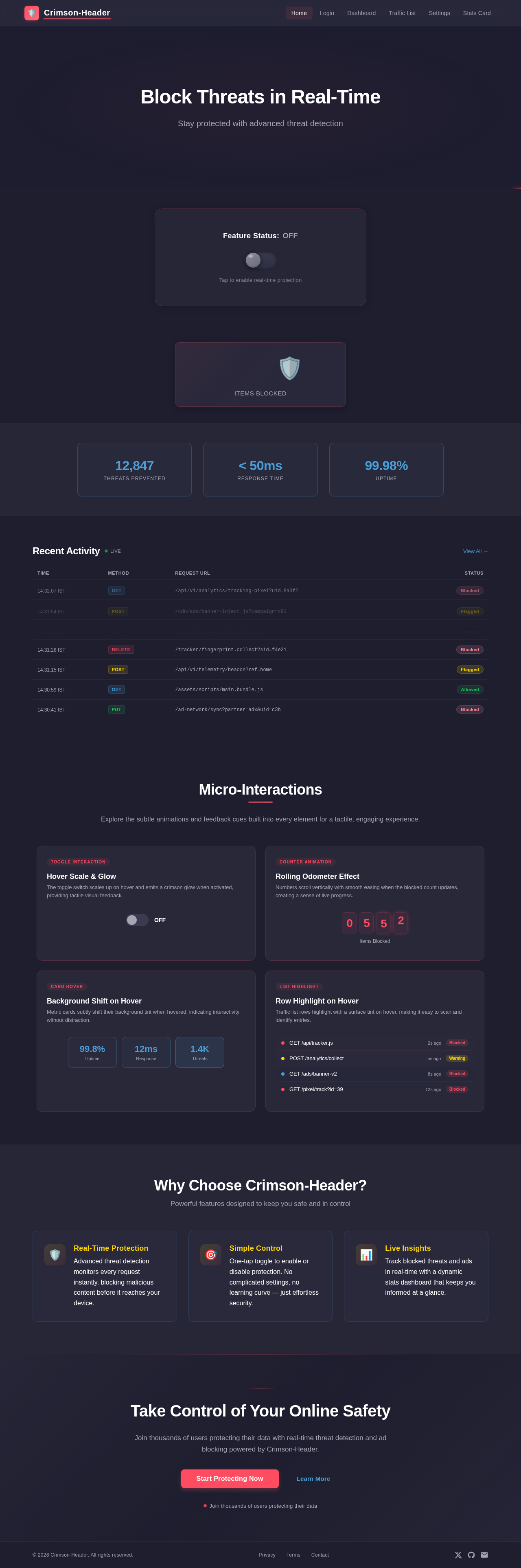
Block Threats in Real-Time
Stay protected with advanced threat detection
Recent Activity
Live| Time | Method | Request URL | Status |
|---|---|---|---|
| GET | /api/v1/analytics/tracking-pixel?uid=8a3f2 | Blocked | |
| POST | /cdn/ads/banner-inject.js?campaign=x91 | Flagged | |
| GET | /api/v1/user/profile/settings | Allowed | |
| DELETE | /tracker/fingerprint.collect?sid=f4e21 | Blocked | |
| POST | /api/v1/telemetry/beacon?ref=home | Flagged | |
| GET | /assets/scripts/main.bundle.js | Allowed | |
| PUT | /ad-network/sync?partner=adx&uid=c3b | Blocked |
Micro-Interactions
Explore the subtle animations and feedback cues built into every element for a tactile, engaging experience.
Why Choose Crimson-Header?
Powerful features designed to keep you safe and in control
Real-Time Protection
Advanced threat detection monitors every request instantly, blocking malicious content before it reaches your device.
Simple Control
One-tap toggle to enable or disable protection. No complicated settings, no learning curve — just effortless security.
Live Insights
Track blocked threats and ads in real-time with a dynamic stats dashboard that keeps you informed at a glance.
Take Control of Your Online Safety
Join thousands of users protecting their data with real-time threat detection and ad blocking powered by Crimson-Header.
No comments yet. Be the first!