
crimson-find

bymutaz zuhairy

Find unerrated saas theat actually give reveune

LandingSearchProductsLoginWishlist
Landing

Comments (0)

No comments yet. Be the first!

System Requirements

System Requirement Document

crimson-find System Requirements Document

1. Introduction

The "crimson-find" project aims to develop a comprehensive e-commerce warehouse website. This document outlines the system requirements to ensure the successful implementation of the project, focusing on user needs, functional capabilities, and design aesthetics.

2. System Overview

The crimson-find project is designed to facilitate the discovery and management of underrated SaaS products that generate revenue. The platform will serve as an e-commerce warehouse, providing users with a streamlined interface to explore, evaluate, and purchase SaaS solutions.

Page 1 of 6

3. Functional Requirements as Story Points

  • As a User, I should be able to search for SaaS products by category and keywords.
  • As a User, I should be able to view detailed information about each SaaS product, including features, pricing, and reviews.
  • As a User, I should be able to add SaaS products to a wishlist for future reference.
  • As a User, I should be able to purchase SaaS products directly through the platform.
  • As an Admin, I should be able to manage product listings, including adding, updating, and removing products.
  • As an Admin, I should be able to view sales analytics and generate reports.
  • As a Guest, I should be able to browse products without creating an account.

4. User Personas

  • User: Individuals looking to discover and purchase SaaS products.
  • Admin: Personnel responsible for managing the product listings and overseeing platform operations.
  • Guest: Visitors who browse the platform without logging in or creating an account.
Page 2 of 6

5. Core User Flows

  • User searches for a SaaS product -> Views product details -> Adds product to wishlist or cart -> Proceeds to checkout -> Completes purchase.
  • Admin logs in -> Manages product listings -> Reviews sales analytics -> Generates reports.
  • Guest browses products -> Views product details -> Decides to create an account or continue browsing.

6. Visuals Colors and Theme

  • primary: #FF5733 (a vibrant orange to capture attention and evoke energy)
  • primary_light: #FF8F66 (a lighter tint of the primary color for hover states)
  • secondary: #33A1FF (a calming blue to complement the primary color)
  • accent: #FFC300 (a bright yellow for call-to-action elements)
  • highlight: #DAF7A6 (a soft green for notifications and active states)
  • bg: #FFFFFF (a clean white background for clarity)
  • surface: #F2F2F2 (a light grey for card and panel backgrounds)
  • text: #333333 (a dark grey for primary text and headings)
  • text_muted: #777777 (a medium grey for secondary text and labels)
  • border: #DDDDDD (a subtle grey for borders)
Page 3 of 6

7. Signature Design Concept

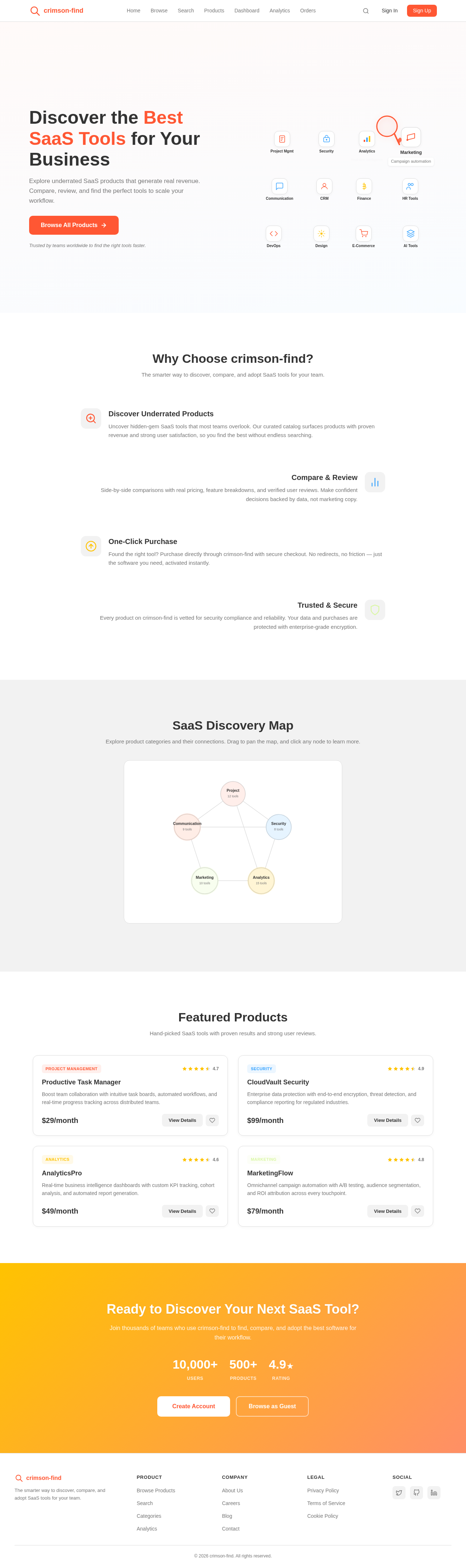
The homepage of crimson-find will feature an interactive "SaaS Discovery Map." This map will visually represent different categories of SaaS products as interconnected nodes. Users can click on a node to expand it, revealing detailed information about the products within that category. The map will be dynamic, with nodes gently pulsing to indicate activity. Users can drag to navigate the map, and hovering over a node will highlight its connections to related categories. This concept will be implemented using motion/react for smooth animations and interactions.

Landing Hero Motion Brief

The landing page will feature a continuous loop animation where a magnifying glass moves over a grid of SaaS product icons. As the magnifying glass passes over each icon, the icon enlarges and displays a brief product description. This animation will be created using motion/react to ensure smooth transitions and interactions. The animation will loop every 10 seconds, providing a seamless and engaging introduction to the platform.

8. Interaction Model & Motion Direction

  • Intended Interaction Model: Animated
    • The landing page will feature moderate scroll-triggered reveals and hover transitions.
    • Interactive elements will have spring physics to enhance user engagement.
  • Internal Pages: Static
    • Focus on layout clarity with minimal motion for dashboards, settings, and data-heavy pages.
Page 4 of 6

9. Non-Functional Requirements

  • The platform must be responsive and accessible across all devices and screen sizes.
  • The system should ensure data security and user privacy.
  • The website should load within 3 seconds on standard internet connections.

10. Tech Stack

  • Frontend: React for Web
  • Backend: Python, FastAPI
  • Database: MySQL or MariaDB, using Alembic for migrations
  • AI Models: GPT 5.4 for user-friendly responses
  • AI Tools: Litellm for LLM Routing, Langchain
  • Local Orchestration: Docker, docker-compose
  • Server-Side Orchestration: Kubernetes

11. Assumptions and Constraints

  • The platform will primarily target users in Palestine, with currency and timezone settings defaulting to local standards.
  • The system will support English as the primary language, with potential for future localization.
Page 5 of 6

12. Glossary

  • SaaS: Software as a Service
  • Admin: Administrator responsible for managing the platform
  • User: Individual using the platform to discover and purchase SaaS products
  • Guest: Visitor browsing the platform without an account
Page 6 of 6
Landing design preview
Login: Sign In
Dashboard: View Overview
Products: Manage Listings
Products: Add Product
Products: Update Product
Products: Remove Product
Analytics: View Sales Analytics
Reports: Generate Reports
Orders: Review Orders
Landing design preview
Login: Sign In
Dashboard: View Overview
Products: Manage Listings
Products: Add Product
Products: Update Product
Products: Remove Product
Analytics: View Sales Analytics
Reports: Generate Reports
Orders: Review Orders