cosmic-lawyer
 Maulik Patel
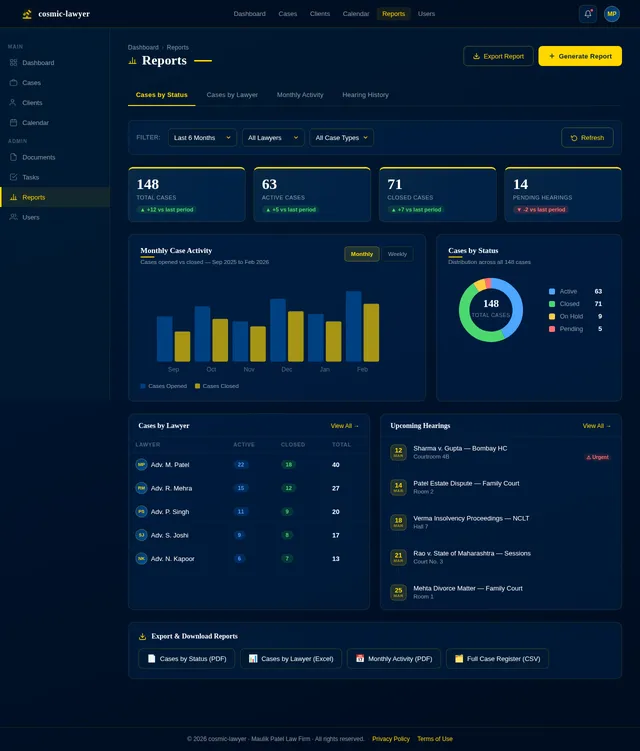
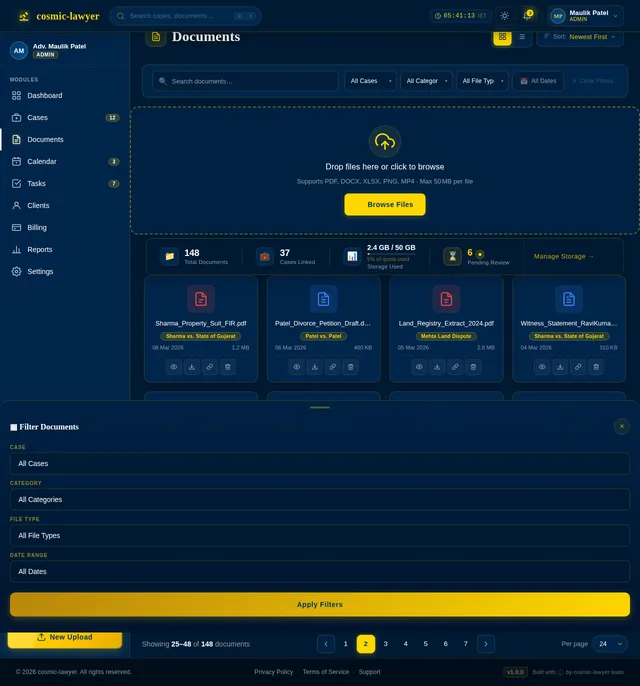
Create a modern web application for a Law Firm Case Management System. The platform should be used internally by the law firm team to manage legal cases, clients, and case progress. The system must have two roles: 1. Admin (Law firm owner / senior lawyer) 2. Users (Lawyers, associates, and staff) The system should include the following modules: CLIENT MANAGEMENT - Add new clients - Store client details (Name, Phone, Email, Address) - Client ID generation - Client notes - View all cases related to a client CASE MANAGEMENT - Create new case - Assign case to lawyer or team member - Case fields: - Case title - Case number - Case type (Civil / Criminal / Corporate / Family etc) - Court name - Opponent party details - Case description - Case start date - Next hearing date - Case status (Ongoing / Pending / Completed / Closed) - Priority level CASE TIMELINE - Show timeline of events for each case - Hearing history - Notes from each hearing - Upcoming hearing reminders DOCUMENT & EVIDENCE MANAGEMENT - Upload case documents - Upload evidence files (PDF, images, videos) - Categorize documents - Attach documents to cases - Download and preview files TASK MANAGEMENT - Create tasks related to a case - Assign tasks to lawyers or staff - Task deadlines - Task status tracking CALENDAR & HEARING SCHEDULE - Calendar showing all upcoming hearing dates - Alerts for upcoming hearings - Daily and weekly schedule view DASHBOARD Admin dashboard showing: - Total cases - Active cases - Completed cases - Upcoming hearings - Recently added clients - Tasks pending SEARCH & FILTER - Search by client name - Search by case number - Filter cases by status or lawyer USER MANAGEMENT Admin can: - Add new team members - Assign roles - Control access permissions NOTIFICATIONS - Reminder for upcoming hearing dates - Task deadline alerts REPORTS - Cases by status - Cases by lawyer - Monthly case activity DESIGN REQUIREMENTS - Modern and clean UI - Mobile responsive - Simple navigation - Secure login system TECH REQUIREMENTS - Secure authentication - Role-based access control - File storage for documents and evidence
Comments (0)
Sign in to leave a comment
System Requirements
System Requirements Document (SRD)
Project Name: cosmic-lawyer
1. Introduction
The cosmic-lawyer project is a modern web application designed to serve as a comprehensive Law Firm Case Management System. This platform will be used internally by law firm teams to manage legal cases, clients, and case progress efficiently. The system will cater to two primary roles: Admin (law firm owner or senior lawyer) and Users (lawyers, associates, and staff).
The goal is to streamline legal operations, improve productivity, and ensure seamless collaboration within the firm. The application will feature modules for client and case management, document handling, task tracking, scheduling, and reporting, all within a secure and intuitive interface.
This document outlines the system requirements for cosmic-lawyer, tailored to meet the needs of Maulik Patel's law firm in India, considering locale-specific defaults such as time zones (IST) and currency (INR).
2. System Overview
The cosmic-lawyer system will provide a centralized platform for managing all aspects of legal case workflows. It will include:
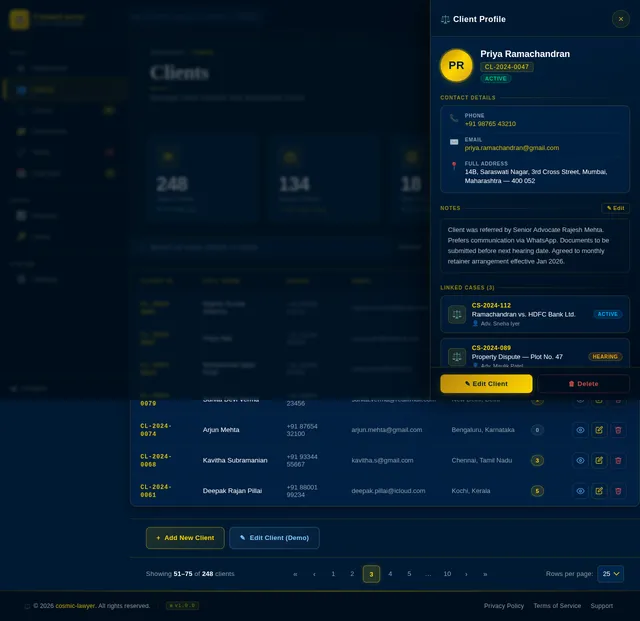
- Client Management: Maintain detailed client records and track associated cases.
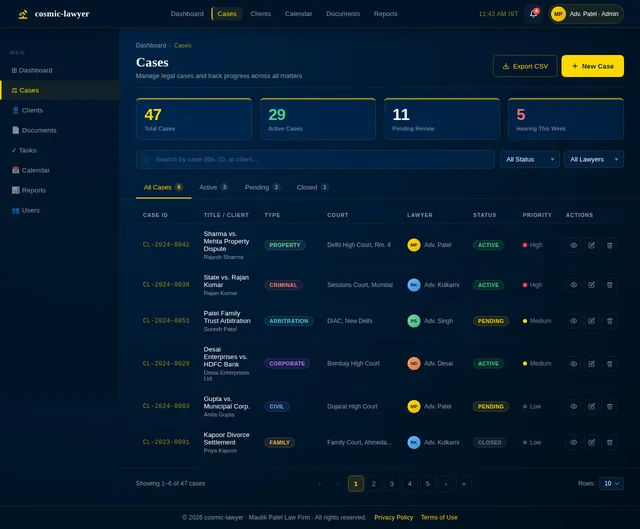
- Case Management: Create, assign, and monitor cases with detailed fields and statuses.
- Document & Evidence Management: Upload, categorize, and attach files to cases.
- Task Management: Assign and track tasks related to cases.
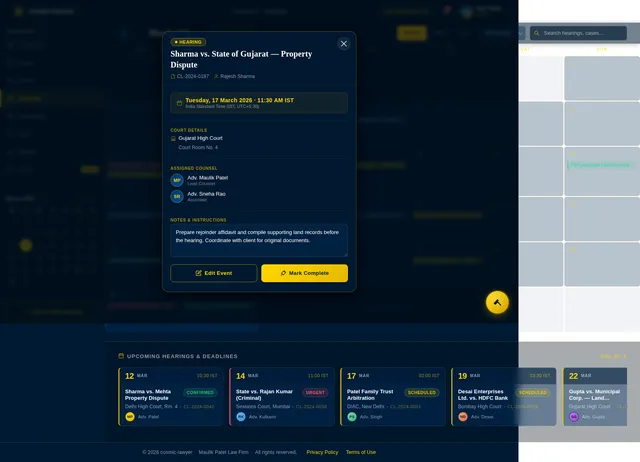
- Calendar & Hearing Schedule: View and manage hearing dates and schedules.
- Dashboard: Provide an overview of key metrics and activities.
- Notifications: Ensure timely reminders for hearings and deadlines.
- Reports: Generate insights into case activities and performance.
The system will be accessible via a web application with a responsive design to ensure usability across devices.
3. Functional Requirements
-
Client Management:
- As Admin, I should be able to add new clients.
- As Admin or User, I should be able to store client details (Name, Phone, Email, Address).
- As Admin or User, I should be able to generate unique Client IDs.
- As Admin or User, I should be able to add notes to a client profile.
- As Admin or User, I should be able to view all cases related to a client.
-
Case Management:
- As Admin or User, I should be able to create new cases.
- As Admin, I should be able to assign cases to lawyers or team members.
- As Admin or User, I should be able to manage case fields (title, number, type, court name, opponent details, description, dates, status, priority).
-
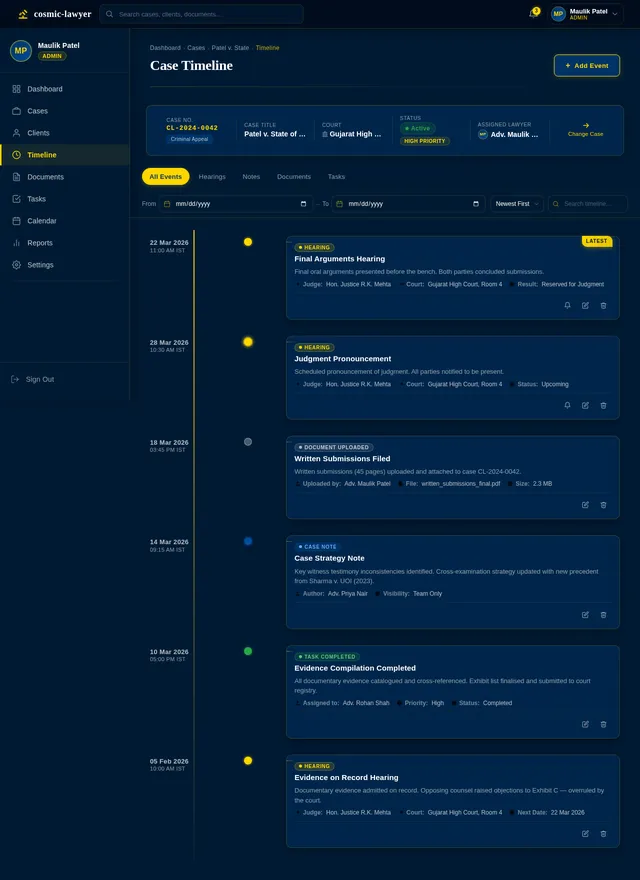
Case Timeline:
- As Admin or User, I should be able to view a timeline of events for each case.
- As Admin or User, I should be able to track hearing history and notes.
- As Admin or User, I should receive reminders for upcoming hearings.
-
Document & Evidence Management:
- As Admin or User, I should be able to upload case documents and evidence files.
- As Admin or User, I should be able to categorize and attach documents to cases.
- As Admin or User, I should be able to download and preview files.
-
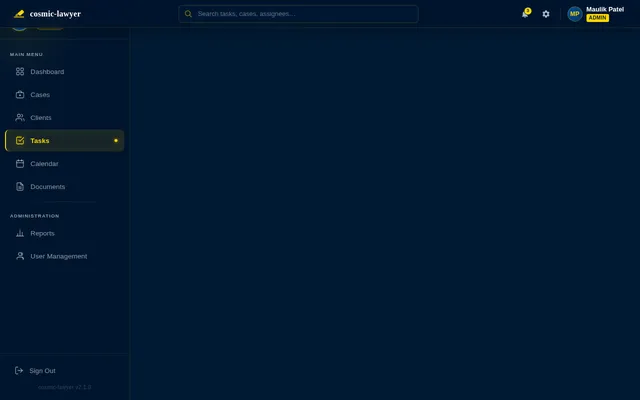
Task Management:
- As Admin or User, I should be able to create tasks related to a case.
- As Admin, I should be able to assign tasks to lawyers or staff.
- As Admin or User, I should be able to track task deadlines and statuses.
-
Calendar & Hearing Schedule:
- As Admin or User, I should be able to view a calendar of upcoming hearing dates.
- As Admin or User, I should receive alerts for upcoming hearings.
- As Admin or User, I should be able to view daily and weekly schedules.
-
Dashboard:
- As Admin, I should be able to view metrics such as total cases, active cases, completed cases, upcoming hearings, recently added clients, and pending tasks.
-
Search & Filter:
- As Admin or User, I should be able to search by client name or case number.
- As Admin or User, I should be able to filter cases by status or lawyer.
-
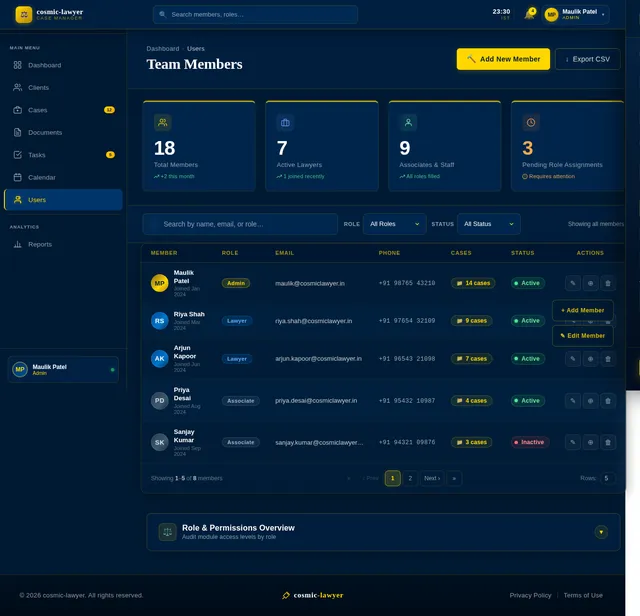
User Management:
- As Admin, I should be able to add new team members.
- As Admin, I should be able to assign roles and control access permissions.
-
Notifications:
- As Admin or User, I should receive reminders for upcoming hearing dates and task deadlines.
-
Reports:
- As Admin, I should be able to generate reports on cases by status, cases by lawyer, and monthly case activity.
4. User Personas
-
Admin:
- Role: Law firm owner or senior lawyer.
- Responsibilities: Manage team members, oversee cases, assign tasks, and generate reports.
-
User:
- Role: Lawyers, associates, and staff.
- Responsibilities: Manage assigned cases, update case details, upload documents, and complete tasks.
5. Visuals Colors and Theme
The cosmic-lawyer application will feature a professional and modern design with the following color scheme:
- Primary Color: Deep Blue (#003366) — conveys trust and professionalism.
- Secondary Color: White (#FFFFFF) — ensures a clean and minimalistic look.
- Accent Color: Gold (#FFD700) — adds a touch of sophistication.
- Error/Warning Color: Red (#FF4C4C) — for alerts and errors.
- Success Color: Green (#28A745) — for confirmations and success messages.
Typography:
- Primary Font: Roboto (Sans-serif) for readability.
- Secondary Font: Merriweather (Serif) for headings and emphasis.
6. Signature Design Concept
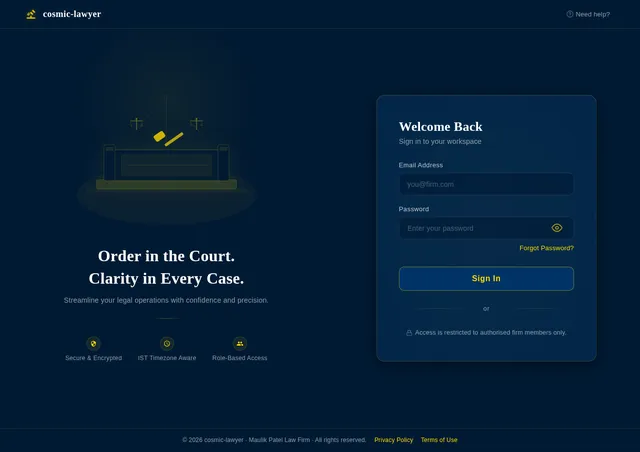
The cosmic-lawyer homepage will feature an interactive courtroom aesthetic.
- Visuals: The homepage will resemble a courtroom with a 3D-rendered judge’s bench, lawyer desks, and a gallery. Each section of the homepage (e.g., Client Management, Case Management, Reports) will be represented as clickable elements within this courtroom scene.
- Animations: When users hover over a section, the corresponding element (e.g., a lawyer’s desk) will subtly glow and expand slightly, inviting interaction.
- Transitions: Smooth transitions will guide users into the respective modules, with animations that mimic flipping through legal documents or opening case files.
- Micro-interactions: Icons and buttons will have subtle haptic feedback-like animations, such as a gavel striking when a task is completed.
- Theme Shift: The background will subtly shift between day and night themes based on the user’s local time (IST).
This design will create an immersive and memorable first impression, setting the tone for a professional yet approachable platform.
7. Non-Functional Requirements
- The system must support at least 100 concurrent users.
- The application must load within 3 seconds on a standard broadband connection.
- Data must be encrypted in transit and at rest.
- The system must comply with Indian data protection laws.
- The platform must be mobile-responsive.
8. Tech Stack
- Frontend: React for Web.
- Backend: Python with FastAPI.
- Database: MySQL with Alembic for migrations.
- AI Models: GPT 5.2 for user-friendly responses.
- AI Tools: Langchain for workflow automation.
- Orchestration: Docker and Kubernetes for deployment.
9. Assumptions and Constraints
- The system will be used only by internal staff of the law firm.
- All users will have access to modern devices with internet connectivity.
- The system will operate in the IST timezone.
- File uploads will be limited to 50MB per file.
10. Glossary
- Admin: The primary user with full access to all system features.
- User: A lawyer, associate, or staff member with limited access based on role.
- Case: A legal matter being handled by the law firm.
- Client: An individual or organization represented by the law firm.
- Hearing: A scheduled court session for a case.
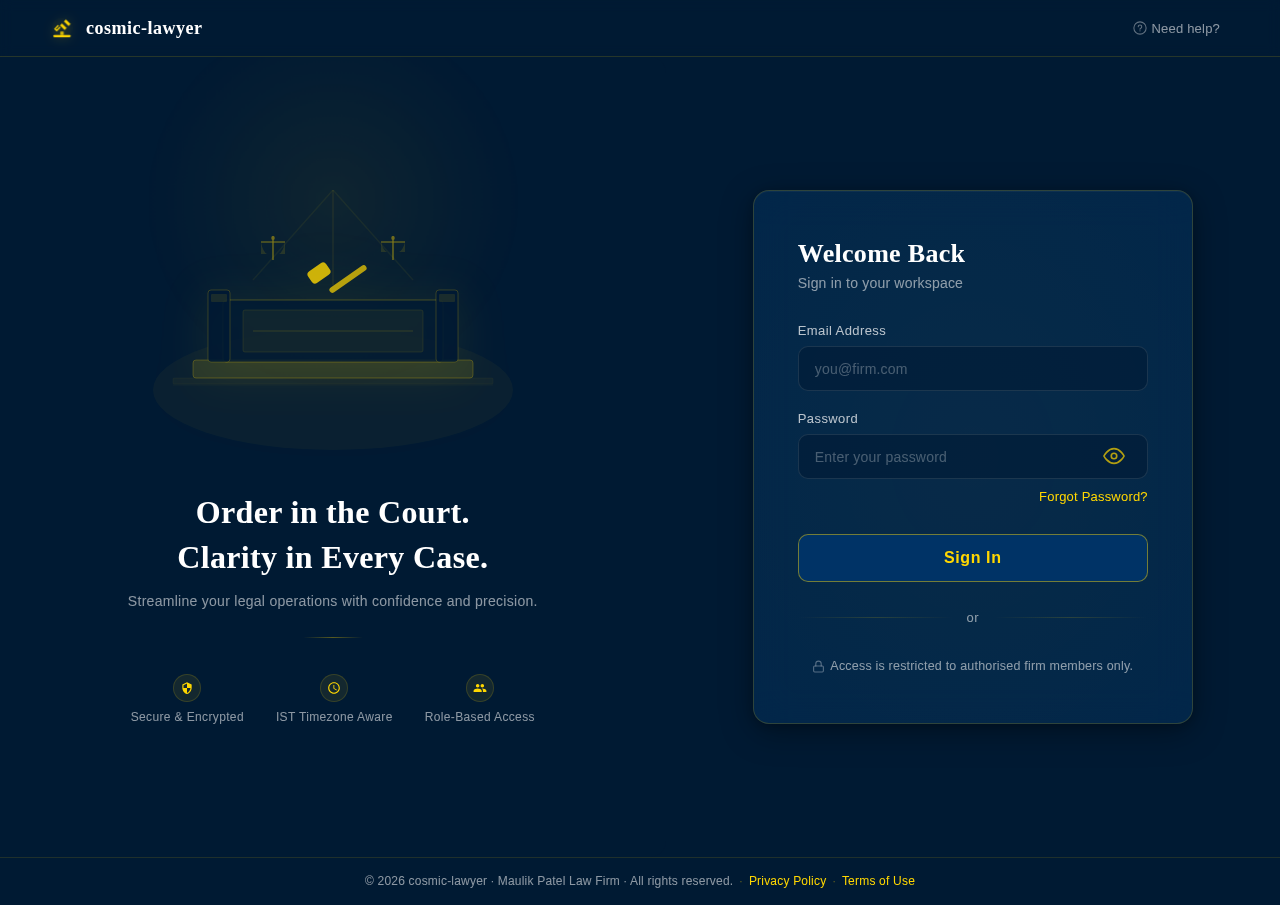
Order in the Court.
Clarity in Every Case.
Streamline your legal operations with confidence and precision.
Welcome Back
Sign in to your workspace
Access is restricted to authorised firm members only.
No comments yet. Be the first!