Page 1 of 12
System Requirements Document for cosmetics-products
1. Introduction
This document specifies a website for cosmetics products: a public storefront where shoppers browse a range of cosmetics items and inspect individual products, paired with a private workspace where the store owner curates the product catalog that shoppers see.
The product intent is a colour-driven beauty storefront with a point of view — playful, confident, saturated — rather than a clinical skincare or restrained-luxury template. The audience is twofold:
- Shoppers — visitors who arrive without an account, browse the cosmetics range, open individual products, and evaluate them before deciding what to buy.
- The Store Owner — the person building and running the storefront, who enrolls, signs in, and keeps the catalog of cosmetics product listings and their details accurate and current.
The website is delivered as a first-party web application with its own identity for the store owner, a public catalog surface for shoppers, and backend persistence for cosmetics product listings and their details.
Page 2 of 12
2. System Overview
The cosmetics-products website has two clearly separated halves that share one brand and one catalog of truth:
- The public storefront — a Landing page that introduces the storefront and directs shoppers into the range, a Products page that lists the available cosmetics products, and a Product Details page that presents one product and its details.
- The store-owner workspace — a Catalog page for reviewing and managing the durable product catalog, and a Product Editor for adding and updating individual cosmetics product listings and their details. Access to these two pages is restricted to the signed-in store owner.
Identity is application-owned. The store owner establishes identity through self-service enrollment on Sign Up and regains access through returning verification on Login. Shoppers browse the public surfaces without an account.
Actors
- Shopper (human persona) — browses the public range and evaluates individual products.
- Store Owner (human persona) — enrolls, signs in, and curates the catalog.
- Application backend (system actor) — persists cosmetics product listings and their details and serves them to both the public storefront and the store-owner workspace.
Accepted behavior in scope
- A public storefront presenting a cosmetics product range.
- Browsing the range and opening individual product details.
- Self-service enrollment and returning verification for the store owner.
- Reviewing and managing the durable catalog, including adding and updating product listings and their details.
Narrow exclusions
- No checkout, cart, payment, order, shipping, or fulfillment capability is specified.
- No customer accounts, wishlists, reviews, or ratings are specified.
- No multi-role permission model beyond the store owner's restricted access to the workspace is specified.
Page 3 of 12
2a. Product Interpretation and Delivery Boundary
The website is delivered as a first-party application. The public storefront — Landing, Products, and Product Details — is reachable anonymously and requires no account. The store-owner workspace — Catalog and Product Editor — is owned by the application and restricted to the signed-in store owner, because catalog content is durable, shared, and must remain bound to the correct owner across sessions.
Identity is application-owned and self-service: there is no provisioning or invitation boundary in the accepted scope, so the store owner establishes identity on first use through Sign Up and regains access through Login. These two access surfaces are themselves anonymously reachable, since a protected destination cannot own the interaction that establishes access to itself.
Everything described in this document is current. No future-horizon capabilities are accepted; anything not listed above is out of scope for this generation.
2b. Source Content Inventory
No reference directive in this project declares a content_source. There is no verified external factual content to inventory, and no inventory is included.
2c. Page Content and Component Coverage
Page 4 of 12
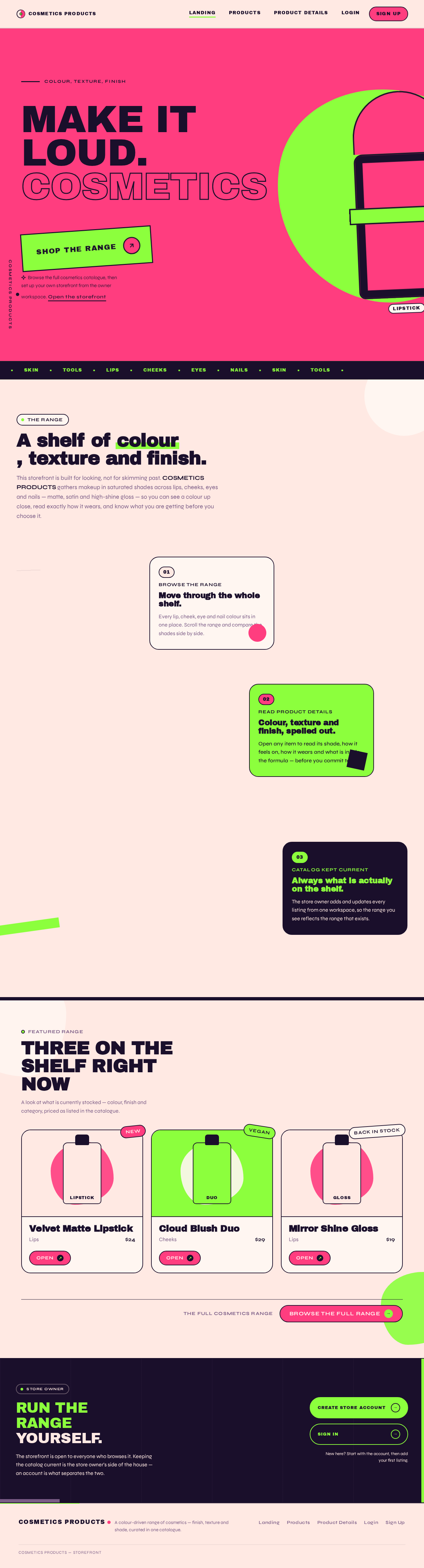
Landing
- Purpose and information/state: Anonymous first impression of the cosmetics storefront. Explains what the storefront offers and directs shoppers into the product range. No account state; identical for every visitor.
- Primary actions: Enter the product range (primary call to action into Products). Navigate to the store-owner access surfaces (Login / Sign Up) from the site header.
- Supporting actions: Scroll through the stacked colour-blocked sections; follow the category marquee strip.
- Domain entities: Storefront introduction content; category names surfaced in the marquee; featured product cut-outs.
- Component responsibilities: Full-viewport hero field with the oversized headline and the bleeding product cut-out; rotated call-to-action block; bottom marquee strip of category names; site header with brand mark and access links; stacked colour-blocked sections introducing the range; footer.
- States: Loading — hero and section content render from static storefront content, with a lightweight placeholder for any featured product imagery. Empty — if no products exist yet, the range call to action still renders and leads to the Products page, which shows its own empty state. Success — hero, sections, and call to action render; the call to action navigates to Products. Error — if featured product imagery fails to load, the flat colour field and headline remain intact and the call to action still works. Recovery — imagery retries on next visit; no blocking failure exists on this page.
Login
- Purpose and information/state: Returning verification for the store owner, so they can regain authorized control of durable catalog content. Anonymous entry state; no protected content is shown here.
- Primary actions: Submit credentials to sign in. Navigate to Sign Up if the store owner has not enrolled yet.
- Supporting actions: Correct an entry mistake and resubmit; return to the public storefront.
- Domain entities: Store-owner identity (email address and password).
- Component responsibilities: Credential form with labeled email and password fields; submit control; inline validation messaging; link to Sign Up; link back to the public storefront.
- States: Loading — submit control shows an in-progress state and is disabled while verification is in flight. Empty — blank form with no error messaging. Success — verification succeeds and the store owner is taken to the Catalog workspace. Error — invalid credentials show an inline message that does not reveal which field was wrong; the form retains the entered email and clears the password. Recovery — the store owner can correct and resubmit immediately, or navigate to Sign Up.
Sign Up
- Purpose and information/state: Self-service first-use enrollment for the store owner. Anonymous entry state; no protected content is shown here.
- Primary actions: Submit enrollment details to create the store-owner identity. Navigate to Login if already enrolled.
- Supporting actions: Correct an entry mistake and resubmit; return to the public storefront.
- Domain entities: Store-owner identity (email address and password).
- Component responsibilities: Enrollment form with labeled email and password fields; submit control; inline validation messaging; link to Login; link back to the public storefront.
- States: Loading — submit control shows an in-progress state and is disabled while enrollment is in flight. Empty — blank form with no error messaging. Success — enrollment succeeds and the store owner is taken into the Catalog workspace with an empty catalog ready for the first product. Error — an already-enrolled email or invalid input shows an inline message; the form retains the entered email and clears the password. Recovery — the store owner can correct and resubmit, or navigate to Login if the identity already exists.
Page 5 of 12
Products
- Purpose and information/state: Public catalog listing the available cosmetics products. Anonymous; no account state.
- Primary actions: Browse the product grid; open an individual product to view its details.
- Supporting actions: Filter the range using the sticky filter rail; follow the category marquee strip.
- Domain entities: Cosmetics product listings (name, image, price, category, availability status).
- Component responsibilities: Dense product grid of rounded cards; sticky filter rail; category marquee strip; product card with image, name, price, and rotated status badge; empty-state panel; pagination or progressive loading control.
- States: Loading — grid shows placeholder cards in the brand palette while listings load. Empty — a clear panel states that no products are available yet and invites the shopper to check back. Success — the grid renders the available products and each card opens its Product Details page. Error — a retryable message replaces the grid when listings cannot be loaded. Recovery — the shopper can retry loading without leaving the page.
Product Details
- Purpose and information/state: Focused view of one cosmetics product and its details. Anonymous; no account state.
- Primary actions: Read the product's details, including its specification and ingredient information.
- Supporting actions: Return to the Products listing; move to another product from the same range.
- Domain entities: A single cosmetics product listing and its details (name, imagery, price, category, availability status, description, specification, ingredient list).
- Component responsibilities: Full-bleed product image region; detail panel with name, price, and status badge; specification and ingredient list with rule dividers; back-to-range control; not-found panel.
- States: Loading — image and detail panel show placeholders while the product loads. Empty — not applicable to a single product; an unknown or removed product resolves to the not-found state instead. Success — the product image and all details render. Error — an unknown, removed, or unloadable product shows a not-found panel with a control back to the Products listing. Recovery — the shopper returns to the range and selects another product.
Catalog
- Purpose and information/state: Store-owner workspace for reviewing and managing the durable cosmetics product catalog. Restricted to the signed-in store owner; shows the current catalog state.
- Primary actions: Review the catalog of product listings; open a listing in the Product Editor to update it; start a new product listing.
- Supporting actions: Search or scan the catalog list; read each listing's status indicator; sign out.
- Domain entities: Cosmetics product listings (name, image, price, category, availability status, last-updated information).
- Component responsibilities: Catalog table with hot-pink headers and lime status dots; row-level open control; new-product control; empty-state panel; sign-out control; workspace navigation.
- States: Loading — the table shows placeholder rows while the catalog loads. Empty — a panel states that the catalog has no products yet and offers the control to create the first listing. Success — the table lists every product listing with its status, and each row opens the Product Editor. Error — a retryable message replaces the table when the catalog cannot be loaded. Recovery — the store owner retries loading; if the session has expired, they are returned to Login and then back to the Catalog.
Page 6 of 12
Product Editor
- Purpose and information/state: Focused store-owner workspace for adding and updating a cosmetics product listing and its details. Restricted to the signed-in store owner; shows either a blank new listing or the current values of an existing listing.
- Primary actions: Enter or change the product's name, imagery, price, category, availability status, description, specification, and ingredient details; save the listing.
- Supporting actions: Cancel and return to the Catalog without saving; correct validation errors and resave.
- Domain entities: A single cosmetics product listing and its details (name, imagery, price, category, availability status, description, specification, ingredient list).
- Component responsibilities: Labeled field group for listing details; imagery control; availability status control; save and cancel controls; inline validation messaging; unsaved-change notice.
- States: Loading — when editing an existing listing, fields show placeholders until the current values load. Empty — a blank form for a new listing, with no validation errors shown. Success — the listing is saved and the store owner returns to the Catalog, where the saved listing appears with its current values. Error — validation failures are shown inline against the offending fields and the entered values are preserved; a save failure shows a retryable message without discarding the form. Recovery — the store owner corrects the fields and resaves, or cancels back to the Catalog.
Page 7 of 12
3. Functional Requirements
FR-1 — Public storefront for cosmetics products (explicit)
As a Shopper, I should be able to visit a public website that presents a range of cosmetics products, so that I can see what the storefront offers.
- Trigger/input: The shopper opens the website.
- Observable result: The Landing page renders the storefront introduction and a call to action into the product range.
- Access state: Anonymous; no account required.
- Failure/recovery: If featured imagery fails to load, the page still renders and the call to action still works.
- Continuation: The shopper follows the call to action into the Products page.
FR-2 — Browse the cosmetics product range (required_inference)
As a Shopper, I should be able to browse the available cosmetics products as a listing, so that I can survey the range before choosing what to look at.
- Trigger/input: The shopper opens the Products page.
- Observable result: The page renders the available cosmetics product listings with their name, image, price, category, and availability status.
- Access state: Anonymous; no account required.
- Failure/recovery: If listings cannot be loaded, a retryable message replaces the grid and the shopper can retry without leaving the page.
- Continuation: The shopper opens an individual product, or narrows the range with the filter rail.
FR-3 — View an individual cosmetics product and its details (required_inference)
As a Shopper, I should be able to open a single cosmetics product and read its details, so that I can evaluate it before deciding what to buy.
- Trigger/input: The shopper selects a product from the Products listing.
- Observable result: The Product Details page renders that product's imagery, name, price, availability status, description, specification, and ingredient list.
- Access state: Anonymous; no account required.
- Failure/recovery: If the product is unknown, removed, or cannot be loaded, a not-found panel appears with a control back to the Products listing.
- Continuation: The shopper returns to the range and selects another product.
FR-4 — Self-service enrollment for the store owner (required_inference)
As a Store Owner, I should be able to enroll myself on first use, so that I can gain authorized control of the durable catalog.
- Trigger/input: The store owner opens Sign Up and submits an email address and password.
- Observable result: The store-owner identity is created and the store owner is taken into the Catalog workspace.
- Access state: Sign Up is anonymously reachable; the Catalog it leads to is restricted to the signed-in store owner.
- Failure/recovery: An already-enrolled email or invalid input shows an inline message, the entered email is retained, and the store owner can correct and resubmit or navigate to Login.
- Continuation: The store owner lands in the Catalog with an empty catalog ready for the first product listing.
FR-5 — Returning verification for the store owner (required_inference)
As a Store Owner, I should be able to sign in again on a later visit, so that I can regain access to catalog management.
- Trigger/input: The store owner opens Login and submits their email address and password.
- Observable result: Verification succeeds and the store owner is taken to the Catalog workspace.
- Access state: Login is anonymously reachable; the Catalog it leads to is restricted to the signed-in store owner.
- Failure/recovery: Invalid credentials show an inline message that does not reveal which field was wrong; the entered email is retained, the password is cleared, and the store owner can resubmit or navigate to Sign Up.
- Continuation: The store owner resumes catalog management in the Catalog.
FR-6 — Review the durable product catalog (required_inference)
As a Store Owner, I should be able to review the current catalog of cosmetics product listings, so that I can see what the storefront is presenting.
- Trigger/input: The signed-in store owner opens the Catalog.
- Observable result: The Catalog lists every product listing with its name, image, price, category, availability status, and last-updated information.
- Access state: Restricted to the signed-in store owner.
- Failure/recovery: If the catalog cannot be loaded, a retryable message replaces the table; if the session has expired, the store owner is returned to Login and then back to the Catalog.
- Continuation: The store owner opens a listing in the Product Editor, or starts a new product listing.
FR-7 — Add a cosmetics product listing (required_inference)
As a Store Owner, I should be able to add a new cosmetics product listing with its details, so that the storefront presents an accurate and current range.
- Trigger/input: The store owner starts a new product from the Catalog and enters the listing's name, imagery, price, category, availability status, description, specification, and ingredient details.
- Observable result: The listing is saved to the durable catalog and appears in the Catalog with its current values.
- Access state: Restricted to the signed-in store owner.
- Failure/recovery: Validation failures are shown inline against the offending fields with entered values preserved; a save failure shows a retryable message without discarding the form.
- Continuation: The store owner returns to the Catalog, where the new listing is visible and available to shoppers on the public range.
FR-8 — Update an existing cosmetics product listing (required_inference)
As a Store Owner, I should be able to update an existing cosmetics product listing and its details, so that the storefront stays accurate as the range changes.
- Trigger/input: The store owner opens an existing listing from the Catalog, changes one or more of its details, and saves.
- Observable result: The updated values are persisted and the Catalog reflects them.
- Access state: Restricted to the signed-in store owner.
- Failure/recovery: Validation failures are shown inline with entered values preserved; a save failure shows a retryable message without discarding the form; cancelling leaves the stored listing unchanged.
- Continuation: The store owner returns to the Catalog; shoppers see the updated details on the public range.
FR-9 — Durable persistence of cosmetics product listings and their details (required_inference)
As the application, I should persist cosmetics product listings and their details in backend storage, so that catalog content survives across sessions and is served consistently to both the storefront and the workspace.
- Trigger/input: A store owner saves a new or updated listing; a shopper requests the range or a single product.
- Observable result: Saved listings are stored durably and returned to both the public storefront and the store-owner workspace.
- Access state: Writes are restricted to the signed-in store owner; reads on the public range are anonymous.
- Failure/recovery: A failed write is reported to the store owner as a retryable save error; a failed read surfaces the retryable or not-found state on the requesting page.
- Continuation: The store owner retries the save; the shopper retries the load or returns to the range.
Page 8 of 12
4. User Personas
Page 9 of 12
Shopper
Product context. The Shopper arrives at the cosmetics storefront without an account and without any prior relationship to the store. They are browsing colour, texture, and finish — the material of a cosmetics range — and they judge the storefront on whether the range is legible and the products are worth a closer look.
Primary goal. Find a suitable cosmetics product to purchase by moving through the range and evaluating individual items.
Distinct accepted responsibilities.
- Surveying the available cosmetics products as a listing, using the range's own signals (name, image, price, category, availability status) to decide what deserves attention.
- Opening an individual product and reading its details, including its specification and ingredient information, to evaluate it before deciding.
- Comparing options across the range by moving back and forth between the listing and individual products.
Relevant inputs and decisions. The Shopper's inputs are their own browsing choices: which category or filter to apply, which card to open, and which product to compare next. Their decision is which product, if any, is the one they want.
Interactions with other accepted participants. The Shopper never interacts with the Store Owner directly. Their interaction is indirect and one-directional: the Shopper reads the catalog content the Store Owner has published, and the accuracy of what they read depends entirely on the Store Owner's curation. The Shopper's experience is anonymous throughout — no account, no handoff, no shared state.
Observable success. The Shopper reaches a product whose details answer their question about it, and leaves the range having identified a suitable cosmetics product.
What makes this role different. The Shopper is a read-only, anonymous participant. They never create, change, or own durable state; every action they take is a read of content someone else authored. Their success is measured by finding, not by maintaining.
Page 10 of 12
Store Owner
Product context. The Store Owner is the person building and running the cosmetics storefront. They are the sole author of the catalog that shoppers browse, and they work in a private workspace that is unmistakably the same brand as the public storefront but calmer and more legible.
Primary goal. Keep a live, accurate storefront that shoppers can browse, by presenting the product range and keeping catalog content current.
Distinct accepted responsibilities.
- Establishing their own identity on first use through self-service enrollment, and regaining access on later visits through returning verification.
- Reviewing the durable catalog to see exactly what the storefront is currently presenting.
- Adding new cosmetics product listings with their full details.
- Updating existing listings as the range changes, including their name, imagery, price, category, availability status, description, specification, and ingredient details.
Relevant inputs and decisions. The Store Owner's inputs are the product facts they author — names, imagery, prices, categories, availability statuses, descriptions, specifications, and ingredient details. Their decisions are what belongs in the range, what each listing should say, and when a listing is accurate enough to save.
Interactions with other accepted participants. The Store Owner's work is the Shopper's experience. Every listing they save becomes content a Shopper reads on the public range; every detail they leave stale is a detail a Shopper reads as current. This is the only cross-persona relationship in the product, and it is asynchronous — the Store Owner never sees the Shopper, and the Shopper never sees the Store Owner.
Observable success. The catalog reflects the real range, the public storefront shows the Store Owner's latest saved values, and shoppers can browse an accurate product range.
What makes this role different. The Store Owner is the only participant who writes durable state and the only one whose work requires identity continuity. Their responsibilities are authoring and maintenance rather than discovery, and their access is restricted precisely because the content they own must remain bound to them across sessions.
Page 11 of 12
5. Core User Flows
Flow 1 — Shopper browses the range and evaluates a product
- Starting context. The Shopper arrives at the cosmetics storefront with no account and no prior session. They land on the Landing page.
- Entry. The Landing page presents the storefront introduction and a call to action into the range. The Shopper follows it.
- Browse. The Products page renders the available cosmetics product listings as a dense grid of cards, each showing the product's image, name, price, and availability status. The Shopper scans the range.
- Narrow (optional). If the range is large, the Shopper uses the sticky filter rail to narrow the listings, and the grid updates to the narrowed set.
- Select. The Shopper opens a product that interests them.
- Evaluate. The Product Details page renders that product's full-bleed imagery alongside its name, price, availability status, description, specification, and ingredient list. The Shopper reads the details.
- Compare (optional). The Shopper returns to the Products page and opens a second product, repeating steps 5–6 until they have compared the options they care about.
- Observable result. The Shopper has read the details of the products they were considering and has identified a suitable cosmetics product.
- Failure and recovery. If the Products page cannot load its listings, a retryable message replaces the grid and the Shopper retries without leaving the page. If a selected product is unknown, removed, or cannot be loaded, the Product Details page shows a not-found panel with a control back to the range, and the Shopper selects another product.
- Continuation. The Shopper leaves the range having found what they were looking for, or returns later and repeats the flow from the Landing page.
Flow 2 — Store Owner enrolls on first use
- Starting context. The Store Owner has no identity yet and opens the website for the first time.
- Entry. From the site header, the Store Owner navigates to Sign Up.
- Enroll. The Store Owner enters an email address and password and submits the enrollment form.
- Observable result. The store-owner identity is created, and the Store Owner is taken into the Catalog workspace.
- First-run state. Because no products exist yet, the Catalog shows its empty state with a control to create the first listing.
- Failure and recovery. If the email is already enrolled or the input is invalid, an inline message appears, the entered email is retained, and the Store Owner either corrects and resubmits or navigates to Login because the identity already exists.
- Continuation. The Store Owner proceeds to Flow 4 to add the first product listing.
Page 12 of 12
Flow 3 — Store Owner signs in on a later visit
- Starting context. The Store Owner has an existing identity and returns on a later visit, without an active session.
- Entry. The Store Owner navigates to Login.
- Verify. The Store Owner enters their email address and password and submits.
- Observable result. Verification succeeds and the Store Owner is taken to the Catalog workspace, where the current catalog is listed.
- Failure and recovery. If the credentials are invalid, an inline message appears that does not reveal which field was wrong; the entered email is retained, the password is cleared, and the Store Owner resubmits or navigates to Sign Up.
- Continuation. The Store Owner resumes catalog management — reviewing listings, or opening one in the Product Editor.
Flow 4 — Store Owner adds a new product listing
- Starting context. The Store Owner is signed in and is on the Catalog page.
- Start. The Store Owner uses the new-product control to open the Product Editor with a blank listing.
- Author. The Store Owner enters the listing's name, imagery, price, category, availability status, description, specification, and ingredient details.
- Commit. The Store Owner saves the listing.
- Observable result. The listing is persisted to the durable catalog, and the Store Owner returns to the Catalog, where the new listing appears with its current values and status indicator.
- Failure and recovery. If validation fails, inline messages appear against the offending fields and the entered values are preserved so the Store Owner can correct and resave. If the save itself fails, a
 jagruti thakor
No comments yet. Be the first!