coral-travel
 Bhoomi Panchal
Create a mobile app that helps people travel around the city easily. Users can enter their starting point and destination, and the app will show the best route using metro, bus, train, taxi, bike, or walking. The app should provide live travel updates, estimated travel time, route suggestions, and step-by-step directions. The goal is to make daily travel simple, convenient, and stress-free by bringing all transportation options into one app.


Comments (0)
Sign in to leave a comment
Project Tasks121
Implement Navbar for Landing
As a frontend developer, implement the Navbar section for the Landing page. Build the Navbar component with NAV_LINKS array (Home, Routes, Booking, Alerts, Reports), mobileOpen and elevated useState hooks, scroll-triggered elevation effect via window.addEventListener, GSAP-animated SVG logo path draw on mount using strokeDasharray/strokeDashoffset with gsap.timeline, logo hover re-trigger animation via handleLogoHover callback, and magnetic underline effect that moves an underlineRef element to track hovered nav links using getBoundingClientRect offset calculations and gsap.to animations. Component uses navRef, logoRef, underlineRef, linksContainerRef, and linkRefs for DOM targeting. Note: this component may already exist from a previous page.
Implement TransportDataHeader for TransportData
As a frontend developer, implement the TransportDataHeader section for the TransportData page. Build the `TransportDataHeader` component featuring: (1) a breadcrumb nav with Admin → TransportData links using `tdh-breadcrumb` and `tdh-breadcrumb-sep` classes; (2) an `AnimatedStat` sub-component using `useRef` and GSAP `gsap.context()` to animate counting from 0 to target value (`val`) via `gsap.to()` with `power2.out` ease over 1.4s, and a card entrance animation (`y: 16, opacity: 0`) on mount; (3) three stat cards rendered from `statsData` array: Total Routes (142), Active Buses (86), Last Update (12 min ago); (4) a `StatIcon` component rendering three distinct SVGs — polyline waveform for routes, truck/bus SVG with circles for buses, and clock circle for update time; (5) a title row with `tdh-page-title` heading 'Transportation Data Management' and an accent line `tdh-accent-line`. Uses `gsap` imported from 'gsap'. Apply `TransportDataHeader.css` styles with `tdh-stat-icon-wrap--{type}` modifier classes.
Implement FareManagementHero for FareManagement
As a frontend developer, implement the FareManagementHero section for the FareManagement page. This section renders a hero banner (`fmh-root`) with decorative blur and line elements (`fmh-decor-blur`, `fmh-decor-line`). It uses `useState` to track `lastUpdated` (initialized to 2 hours ago) and a `useEffect` with a `setInterval` running every 3,600,000ms (1 hour) to increment the counter. A `formatRelativeTime` helper converts the hour count to human-readable strings ('just now', '1 hour ago', 'N hours ago'). The rendered output includes an `fmh-top-row` with an `h1#fmh-heading` ('Fare Management') and a subheadline listing all transport modes, plus an `fmh-status-row` showing a live status dot, 'Active' label, divider, and dynamic 'Last updated' text. Implements ARIA labeling via `aria-labelledby` and `aria-hidden` on decorative elements.
Implement AlertsManagerHeader for AlertsManager
As a frontend developer, implement the AlertsManagerHeader section for the AlertsManager page. This is a static header component rendered inside a <header className="amh-root"> element. It includes: (1) two decorative aria-hidden accent dot divs (amh-accent-dot, amh-accent-dot-secondary), (2) a breadcrumb <nav> with an anchor link to /AdminDashboard and a current-page span separated by a chevron SVG icon, and (3) a headline row containing an amh-icon-wrapper div with a bell SVG (path for bell body and clapper arc) alongside an amh-title-col div with an <h1> reading 'Manage Service Disruptions', plus a <p className="amh-description"> paragraph describing the alerts management purpose for Ahmedabad transport. No state or interactivity. Apply AlertsManagerHeader.css with amh- prefixed class tokens.
Implement UserAnalyticsHeader for UserAnalytics
As a frontend developer, implement the UserAnalyticsHeader section for the UserAnalytics page. This section renders a `<header className='uah-root'>` with two main rows: a top row containing `uah-title-group` (h1 with `uah-title-pulse` animated span and accent span for 'Dashboard') plus an export button with an inline SVG download icon; and a bottom controls row with date preset toggles (DATE_PRESETS: '7d', '30d', 'custom'), custom date range inputs using `calendarDate()` ISO formatter, and transport filter chips (TRANSPORT_FILTERS: metro, bus, train, taxi, bike with individual dot color classes). State: `useState` for `datePreset`, `customFrom`, `customTo`, `activeFilters` (defaults to ['metro', 'bus']). `toggleFilter` adds/removes keys; `clearFilter` resets array. Includes a `clearIcon` SVG and `exportIcon` SVG helper functions. Import from `../styles/UserAnalyticsHeader.css`.
Admin Authentication API
As a Backend Developer, implement the Admin Authentication API using FastAPI. Create POST /api/auth/login endpoint accepting email and password, validating credentials against the database, and returning a JWT access token with expiry. Implement POST /api/auth/logout for token invalidation and GET /api/auth/me for current user info. Use python-jose for JWT handling and passlib for password hashing. Include rate limiting and proper HTTP error responses (401, 403). Note: Frontend tasks AdminLoginForm (567358cf) and AdminLoginHero (f1f88eec) depend on this API.
Database Models and Migrations
As a Backend Developer, design and implement MySQL database models and Alembic migrations for all entities. Core models: User (id, email, password_hash, role, created_at), Route (id, name, type, status, operator, start_point, end_point, stops_count, last_updated), Schedule (id, route_id, service_type, departure_times JSON, frequency, next_update), Fare (id, transport_mode, base_fare, distance_rate, per_min_rate, peak_multiplier, effective_date), Booking (id, user_id, route_id, confirmation_id, status, total_amount, created_at), Passenger (id, booking_id, name, email, phone, id_type, id_number), Payment (id, booking_id, transaction_id, method, amount, status), Alert (id, severity, type, route, description, status, created_at, resolved_at), AlertSubscription (id, user_id, transport_modes JSON, channels JSON). Create initial seed data for development (Ahmedabad routes, fare configs, sample alerts). Use SQLAlchemy ORM with Alembic for migrations.
Global State Management Setup
As a Frontend Developer, set up global state management for the React Native application. Configure a state management solution (Redux Toolkit or Zustand) with slices/stores for: auth (currentUser, token, isAuthenticated), routes (searchParams, selectedRoute, results), booking (currentBooking, passengerDetails, selectedTicket, paymentMethod), alerts (activeAlerts, subscriptions), and ui (theme, loading states, toasts). Implement persistent storage for auth token using AsyncStorage. Create typed hooks (useAppSelector, useAppDispatch) and action creators. Set up API client (axios instance) with auth token injection interceptor and 401 refresh token handling. This is a prerequisite for all frontend pages that fetch data from the backend.
Design System and Theme Setup
As a Frontend Developer, set up the shared design system and theme for the coral-travel React Native app. Define the color palette constants: primary #1E90FF, primary_light #63B8FF, secondary #FF6347, accent #32CD32, highlight #FFD700, bg #F0F8FF, surface rgba(255,255,255,0.9), text #000000, text_muted #696969, border rgba(0,0,0,0.1). Create a StyleSheet theme file with shared typography scales (headline, subhead, body, caption), spacing constants (generous whitespace), border radius values (rounded containers), shadow presets (soft shadows), and animation duration constants. Export reusable styled components: Card, Badge, Button (primary/secondary/ghost), Input, Divider. Register GSAP plugins (ScrollTrigger, ScrollToPlugin) globally. This system is referenced by all section-level frontend tasks.
Implement LandingHero for Landing
As a frontend developer, implement the LandingHero section for the Landing page. Build the hero with an Ahmedabad-inspired SVG city grid using BUILDINGS array (15 building rects with x/y/w/h positions), GRID_LINES_H and GRID_LINES_V arrays for road grid lines, and three animated ROUTES (metro blue, bus tomato, taxi gold) with SVG path animations using gsap and ScrollTrigger. Include four ORBIT_ICONS (metro at angle 0/radius 180, bus at 60/210, taxi at 120/195, bike at 180/220) orbiting a central point as animated SVG icons. Register ScrollTrigger plugin via gsap.registerPlugin. Use useRef for SVG canvas elements and useEffect for GSAP timeline entrance and scroll-parallax animations.
Implement LandingValueProp for Landing
As a frontend developer, implement the LandingValueProp section for the Landing page. Build three flip cards from VALUE_CARDS array (transport, realtime, fares) using framer-motion with containerVariants (staggerChildren: 0.15) and cardVariants (hidden: opacity 0 y 30, visible: opacity 1 y 0 duration 0.6). Each card has a front face showing a custom inline SVG icon, title, and desc, and a back face showing a large backIcon SVG, backStat (e.g. '1.5M+'), backLabel, and backDetail. Use useState for flipped card state and useInView from framer-motion for scroll-triggered animation entry. Cards use motion.div with whileHover and animate props.
Implement InteractiveMap for Landing
As a frontend developer, implement the InteractiveMap section for the Landing page. Build a full 3D map using @react-three/fiber Canvas with OrbitControls, Line, Text, and Html from @react-three/drei, and THREE.js. Render MODES array (metro #1E90FF, bus #FF6347, taxi #32CD32, bike #FFD700) with per-mode steps, fare, time, stops, and frequency. Render ROUTE_PATHS as 3D Line geometries for metro, bus, taxi, and bike paths. Use useState for active mode selection, useRef for Three.js scene refs, useFrame for animation loop, useThree for camera access, useMemo for geometry optimization, and useCallback for event handlers. Wrap 3D content in Suspense fallback. Use gsap for panel transition animations when switching modes. Display a detail panel with steps list, fare, time, and frequency info outside the Canvas via Html component.
Implement TransportOptions for Landing
As a frontend developer, implement the TransportOptions section for the Landing page. Build a horizontally scrollable or grid card layout from transportModes array (5 modes: mode_card_1 Metro blue, mode_card_2 Bus coral, mode_card_3 Train blue, mode_card_4 Taxi coral, mode_card_5 Bike blue), each with a custom inline SVG icon, name, description, detail text, and color theme. Use framer-motion motion.div for card entrance and hover animations. Use useState for active/selected card state, useRef for card DOM refs, useCallback for interaction handlers, and useEffect with gsap for staggered card entrance animations. Cards expand or highlight on selection to reveal the detail text.
Implement RouteFeatures for Landing
As a frontend developer, implement the RouteFeatures section for the Landing page. Build a 4-card feature grid from FEATURES array (feature_card_1 Step-by-Step Directions blue, feature_card_2 Live Travel Updates coral, feature_card_3 Fare Comparison blue, feature_card_4 Alternative Routes coral), each with a custom inline SVG icon. Use rootRef, gridWrapperRef, svgRef, cardRefs, lineRefs, descRefs, centerDotRef, and headerRef for DOM targeting. Implement calcPositions useCallback that computes connector line positions from card centers to a central dot using getBoundingClientRect offsets, stored in linePositions state. Use GSAP ScrollTrigger (registered via gsap.registerPlugin) for scroll-triggered card and line entrance animations. Handle mobile via isMobileRef (window.innerWidth < 600) with a resizeRafRef debounced resize handler. Render SVG connector lines between cards and center dot on desktop.
Implement LiveUpdates for Landing
As a frontend developer, implement the LiveUpdates section for the Landing page. Build an animated live feed from UPDATES array (6 items: u1 metro normal, u2 bus delay, u3 taxi disruption, u4 bike normal, u5 train delay, u6 walk disruption), each with message, detail, timestamp, status, badge, and type fields. Use PULSE_SPEEDS object (normal: 2.4s, delay: 1.4s, disruption: 0.7s) to drive CSS pulse animation speed per status. Implement TransportIcon switch component rendering distinct inline SVGs for metro, bus, taxi, bike, train, and walk types. Use framer-motion motion.div and AnimatePresence for item entrance/exit animations, useAnimation for programmatic controls, and gsap for supplemental micro-animations. Use useState for expanded item detail panel, useEffect for auto-cycling updates, useRef for scroll container, and useCallback for interaction handlers.
Implement BookingFlow for Landing
As a frontend developer, implement the BookingFlow section for the Landing page. Build a 4-step horizontal flow from STEPS array (step_1 Enter Route map icon, step_2 Select Mode transport icon, step_3 Review Fare ticket icon, step_4 Book & Pay payment icon), each with number, title, description, and icon type. Render icon components MapIcon, TransportIcon, TicketIcon, PaymentIcon, and ArrowIcon as standalone SVG function components, resolved via ICON_MAP object. Use rootRef, stepRefs array, arrowRefs array, progressLineRef, progressLineMobileRef, progressLineBgRef, and progressLineBgMobileRef for DOM targeting. Implement GSAP ScrollTrigger entrance animation (dynamically registered) that animates steps in sequence. Use hoveredStep useState to highlight active step. Render a horizontal progress line with animated fill between steps on desktop and vertical variant on mobile.
Implement Testimonials for Landing
As a frontend developer, implement the Testimonials section for the Landing page. Build a carousel from testimonials array (5 entries: Priya Mehta, Rajesh Patel, Ananya Singh, Vikram Joshi, Sarah Thompson), each with name, role, quote, stars (4-5), avatarClass, and initials. Implement useCardsPerView custom hook that returns 1/2/3 based on window.innerWidth breakpoints (768px, 1024px) with resize listener. Use current, isPaused, and direction useState hooks for carousel state; maxIndex computed from testimonials.length minus cardsPerView. Render StarIcon component that conditionally fills SVG star path with #FFD700 or transparent. Use framer-motion AnimatePresence and motion.div for slide transition animations with direction-aware variants. Auto-advance carousel via useEffect interval, pause on hover via setIsPaused, and expose prev/next controls.
Implement LandingCTA for Landing
As a frontend developer, implement the LandingCTA section for the Landing page. Build a CTA section with animated gradient flow background via GSAP timeline (repeat: -1, yoyo: true, backgroundPosition cycling between '100% 0%' and '0% 100%', duration 3s sine.inOut) targeting gradientRef. Implement magnetic button effect via handleMagneticMove useCallback that calculates distX/distY from button center and applies gsap.to translate when dist < 80px, with handleMagneticLeave resetting via elastic.out(1, 0.4). Implement triggerParticleBurst useCallback that generates 14 particles per click with random angle/distance/color from ['#1E90FF','#FF6347','#32CD32','#FFD700','#63B8FF']/size, stored in particles state array with particleIdRef auto-increment id, cleared via setTimeout. Use lineRevealed useState for animated underline reveal. Use framer-motion fadeUp variants (custom delay: 0.12*i) with AnimatePresence for text entrance. Refs: gradientRef, primaryBtnRef, secondaryBtnRef, primaryWrapRef, secondaryWrapRef.
Implement Footer for Landing
As a frontend developer, implement the Footer section for the Landing page. Build the Footer component with three link groups: productLinks (Home, Route Results, Booking, Fare Info), companyLinks (About, Blog, Careers, Contact), and legalLinks (Privacy, Terms, Safety, FAQ). Use rootRef, dividerRef, contentRef, bottomRef, and socialRefs array for DOM targeting. Implement GSAP context (gsap.context with ctx.revert cleanup) that animates: SVG divider line draw via strokeDasharray/strokeDashoffset (length 2000, duration 1.8s power2.inOut) on ScrollTrigger 'top 95%'; contentRef fade-in (opacity 1, y 0, duration 0.9s) on 'top 90%'; bottomRef fade-in (duration 0.8s delay 0.3s) on 'top 85%'. Social icon hover via handleSocialEnter/handleSocialLeave applying gsap scale 1.2 with back.out(1.7) and green glow boxShadow. Note: this component may already exist from a previous page.
Implement AdminLoginHero for AdminLogin
As a frontend developer, implement the AdminLoginHero section for the AdminLogin page. This section renders a full decorative hero panel using a custom inline SVG compass icon (with outer/inner rings, N/S/E/W polygon pointers, crosshair lines, and a center dot) positioned top-right with low opacity via `alh-decor` class. A secondary decorative dashed ring `alh-accent-ring` sits bottom-left. The content area (`alh-content`) renders an admin badge with a pulsing dot (`alh-badge-dot`), an `<h1>` headline 'Administrator Portal', a gradient divider (`alh-divider`), and a subheadline paragraph. All decorative elements use `aria-hidden='true'`. No state or interactivity — pure static layout with CSS-driven decorative elements. Note: Navbar component may already exist from the Landing page tasks.
Implement LandingHero for Home
As a frontend developer, implement the LandingHero section for the Home page. This section renders an Ahmedabad city transit map using D3.js with ROUTE_PATHS data (9 named corridors: Metro East-West, Metro North-South, BRTS corridors, Ring Road, SG Highway, Ashram Road, CG Road, SP Ring Road) rendered as SVG polylines with distinct colors and widths. TRANSIT_NODES (10+ nodes including Kalupur Station, SVP Airport, Vastrapur Lake, etc.) are plotted as interactive markers with type-based icons (train/bus/metro/airport). Uses @react-three/fiber Canvas for a 3D overlay layer. GSAP + ScrollTrigger animate hero entrance and parallax. useState/useRef/useEffect manage map state and D3 projection. Note: this component may already exist from a previous Landing page task (c99b2e65-33f3-4369-a313-e605a92778ea) — verify and reuse if present.
Implement LandingValueProp for Home
As a frontend developer, implement the LandingValueProp section for the Home page. This section renders three value proposition cards defined in VALUE_PROPS array: 'All Transport Modes' (with inline SVG icon and four chip badges for Metro/Bus/Taxi/Bike, each with their own SVG icon), 'Real-Time Updates' (clock SVG icon), and 'Best Fares Guaranteed' (currency SVG icon). Cards animate in using Framer Motion with scroll-triggered entrance. GSAP handles supplemental micro-animations. useRef/useEffect used for animation orchestration. Note: this component may already exist from the Landing page task (13e6826a-0074-4096-9166-e1be0442bbb2) — verify and reuse if present.
Implement InteractiveMap for Home
As a frontend developer, implement the InteractiveMap section for the Home page. This section uses @react-three/fiber Canvas with OrthographicCamera and THREE.js to render a 3D interactive transit map. TRANSPORT_MODES array defines 4 modes (metro, bus/BRTS, taxi, bike) each with named routes, stops arrays, time/fare/frequency metadata. useState manages active mode selection and route highlight. useFrame drives per-frame animations; useThree accesses renderer context. useMemo optimizes geometry calculations; useCallback memoizes handlers. gsap animates mode-switch transitions. OrthographicCamera from @react-three/drei provides top-down map projection. Suspense wraps 3D canvas. Note: may already exist from Landing page task (4244c2da-4aa2-4015-9eec-366fff339af4) — verify and reuse if present.
Implement TransportOptions for Home
As a frontend developer, implement the TransportOptions section for the Home page. This section renders a 6-card grid from TRANSPORT_MODES array (metro, bus, train, taxi, bike, walking), each with an id, name, desc, single-letter icon, and theme class. Framer Motion staggerContainer/cardItem variants animate cards in with scale+opacity on scroll using IntersectionObserver (threshold 0.15) toggling isInView state. barVariants drive scaleX hover underline animations. GSAP handles per-link color transitions on mouseenter/mouseleave, with theme-based hover colors (#FF6347 for bus/taxi, #32CD32 for bike/walking, #005dc7 for metro/train). ScrollTrigger registered via gsap.registerPlugin. Note: may already exist from Landing page task (25cff986-a585-453f-9d24-926282087643) — verify and reuse if present.
Implement RouteFeatures for Home
As a frontend developer, implement the RouteFeatures section for the Home page. This section renders 4 feature cards from the FEATURES array: 'Step-by-Step Directions' (polygon/navigation SVG), 'Live Travel Updates' (clock-circle SVG), 'Fare Comparison' (currency line SVG), and 'Alternative Routes' (chevron-polyline SVG). All icons use rf-card-icon className. GSAP + ScrollTrigger animate a heading reveal (y: 30, opacity: 0 → 1 at top 85%) and per-card entrance with background gradient shift on ScrollTrigger.create (start: 'top 88%'). cardRefs, iconRefs, headingRef used for targeted animations. Note: may already exist from Landing page task (104a20e4-61f7-4cfe-8751-aa79ef6b5705) — verify and reuse if present.
Implement LiveUpdates for Home
As a frontend developer, implement the LiveUpdates section for the Home page. This section renders a live-scrolling feed of 6 UPDATES items using Lucide icons (Bus, Train, CarTaxiFront, Bike, AlertTriangle, Clock) with per-status color coding (#1E90FF normal, #32CD32 delay, #FF6347 disruption, #FFD700 warning). STATUS_CONFIG maps status keys to label/CSS class pairs (lu-status-dot--normal/delay/disruption). useState manages pinnedId (expand/collapse detail text) and scrollY for parallax midground layer. useCallback wraps startFeedAnimation for GSAP auto-scroll on feedTrackRef. window scroll listener updates scrollY passively. itemRefs array enables per-item GSAP entrance. feedContainerRef and midgroundRef used for parallax background. BULLETS array renders 3 descriptive list items. Note: may already exist from Landing page task (12517449-9c06-4f3e-8854-cd1cf91fceca) — verify and reuse if present.
Implement BookingFlow for Home
As a frontend developer, implement the BookingFlow section for the Home page. This section renders a 4-step booking funnel from the STEPS array using Lucide icons (MapPin, Bus, Ticket, CreditCard, ChevronRight). Each StepCard component uses cardRef/iconRef, useState for tooltip visibility, and GSAP on mouseenter/mouseleave to animate boxShadow (green glow: rgba(50,205,50,0.55) / blue tint: rgba(30,144,255,0.12)). Framer Motion animates bf-step-num with whileInView scale+rotate (0 → 1, -180° → 0°) with staggered delay (index * 0.2) and backOut easing. ConnectorArrow component renders animated SVG connectors between steps using lineRef/arrowRef. BOOKING_FLOW_CTA links to '/Booking'. Note: may already exist from Landing page task (bb09a27f-16a8-49dc-a15a-2f2b7627587f) — verify and reuse if present.
Implement Testimonials for Home
As a frontend developer, implement the Testimonials section for the Home page. This section renders a horizontally scrollable carousel of 5 testimonial cards from the testimonials array (Priya Sharma, James Okafor, Meera Desai, Rajesh Patel, Ananya Tiwari) with name, role, stars count, quote, initials, and avatarClass fields. StarRating sub-component renders filled/empty SVG stars (ts-star/ts-star-empty classes). useState manages activeIndex; trackRef and wrapperRef reference the carousel DOM elements. gsapRef stores the GSAP timeline instance; isPausedRef tracks hover pause state. cardWidthRef caches computed card width from trackRef.firstElementChild with 24px gap. useCallback wraps getCardWidth. visibleCards is hardcoded to 3. Note: may already exist from Landing page task (e872e37a-6f6d-45df-870e-72cca72659ff) — verify and reuse if present.
Implement LandingCTA for Home
As a frontend developer, implement the LandingCTA section for the Home page. This section renders a full-width CTA with an animated gradient background (bgRef) driven by a GSAP infinite tween cycling backgroundPosition from '0% 50%' → '100% 50%' → '0% 50%' over 20s. Two CTA buttons (primaryBtnRef, secondaryBtnRef) have magnetic hover via handleMouseMove (GSAP x/y delta at 0.25 multiplier, power2.out) and handleMouseLeave (elastic.out(1, 0.4) spring-back). handleMouseEnterGlow / handleMouseLeaveGlow animate boxShadow on hover. spawnParticles on click generates 14 particles via useState (particles array), each with calculated polar angle, random distance (60–110px), and random size (4–10px); GSAP animates each particle element (lcta-particle-{id}) from origin with x/y/opacity/scale. sectionRef wraps the entire section. Note: may already exist from Landing page task (44a95381-6541-4b07-b6a9-5fa7368db0c0) — verify and reuse if present.
Implement TransportDataFilters for TransportData
As a frontend developer, implement the TransportDataFilters section for the TransportData page. Build the `TransportDataFilters` component with: (1) five controlled state hooks: `search` (text input), `routeType` (select from `ROUTE_TYPES` array: metro/bus/train/taxi/bike), `status` (select from `STATUS_OPTIONS`: active/inactive), `dateFrom` and `dateTo` (date inputs); (2) a `GetActiveFilterCount` utility function that counts how many of the 5 filter fields are non-empty; (3) a sticky scroll behavior using `useRef` + `window.scroll` event listener (passive) that sets `isScrolled` when `rootRef.current.getBoundingClientRect().top <= 65`, toggling `tdf-scrolled` CSS class; (4) `handleApply` (placeholder for parent context integration) and `handleClear` (resets all state to empty) handlers; (5) inline SVG icon components: `SearchIcon`, `ChevronDownIcon`, `CloseIcon`, `FilterIcon`; (6) active filter badge showing count. Apply `TransportDataFilters.css`. No page-level depends; depends on `TransportDataHeader` for layout context.
Implement FareManagementTable for FareManagement
As a frontend developer, implement the FareManagementTable section for the FareManagement page. This section uses `useState`, `useRef`, `useEffect`, `useCallback`, and `useMemo` from React along with `gsap` for row animations. It renders a data table of fares from the static `FARES_DATA` array (5 entries: Metro, Bus, Train, Taxi, Bike) each with `baseFare`, `distanceRate`, `perMinRate`, `currency`, and `updated` fields. Inline SVG `MODE_ICONS` are defined per transport mode (Metro, Bus, Train, Taxi, Bike) using `rect`, `line`, `circle`, and `path` SVG elements. The section includes filtering by mode using `ALL_MODES` derived from `FARES_DATA`, with GSAP animations on row entrance/exit. Columns include mode icon, mode name, base fare, distance rate (per km), per-minute rate, currency, and last updated timestamp. Implements `useMemo` for filtered rows and `useCallback` for filter change handler, with `useRef` on table rows for GSAP targeting.
Implement FareManagementForm for FareManagement
As a frontend developer, implement the FareManagementForm section for the FareManagement page. This section manages a controlled form with `useState` for `form` (initialized from `INITIAL_FORM` with fields: `transportMode`, `baseFare`, `distanceRate`, `perMinuteRate`, `effectiveDate`, `notes`), `errors`, `touched`, `submitSuccess`, and `submitting` states. Uses `useRef` on `sectionRef`, `cardRef`, `headerRef`, and `toastRef` for GSAP targeting. On mount, a `gsap.context` timeline animates `headerRef` (y:24, opacity:0, 0.55s) followed by `cardRef` (y:30, opacity:0, 0.6s, offset -=0.3) using `power3.out` easing. A `useEffect` auto-dismisses the success toast after 3200ms when `submitSuccess` is true. Validation via `useCallback`-wrapped `validate` function handles `baseFare`, `distanceRate`, `perMinuteRate` (numeric, non-negative checks) and `effectiveDate` (required, not in the past). `validateAll` runs all field validations on submit. Transport mode selector renders `TRANSPORT_MODES` array (metro, bus, train, taxi, bike, walking) with emoji icons. Implements `handleChange` for controlled inputs with per-field touched tracking and inline error display.
Implement AlertsToolbar for AlertsManager
As a frontend developer, implement the AlertsToolbar section for the AlertsManager page. Uses useState for activeFilter (default 'all'), searchQuery, activeSort (default 'newest'), and sortDesc (default true). Uses useRef for rootRef and pillsRef array. Defines FILTER_OPTIONS array (all/47, active/12, archived/35) and SORT_OPTIONS (newest, oldest, severity). On mount, a GSAP context animates: atb-inner slides up from y:20 opacity:0 with power2.out delay 0.15s; atb-filter-pill elements stagger in from scale:0.9 with back.out(1.4) delay 0.25s; atb-post-btn bounces in from scale:0.8 with elastic.out(1,0.65) delay 0.5s. handleFilterChange triggers a GSAP yoyo scale:1.08 pulse on the clicked pill ref. handleSortChange toggles sortDesc if same sort selected, else sets new sort. Renders filter pills as <button> with ref callbacks into pillsRef, a search input with clear button (handleClearSearch sets searchQuery to ''), sort buttons with direction indicator, and a primary atb-post-btn CTA. Apply AlertsToolbar.css with atb- prefixed tokens. GSAP dependency required.
Implement ActiveAlertsList for AlertsManager
As a frontend developer, implement the ActiveAlertsList section for the AlertsManager page. Uses useState for expandedId (accordion), hoveredId, and confirmDeleteId. Uses useRef for containerRef, cardRefs map, and a D3 severity donut/bar chart ref. Imports d3 and gsap. Defines ALERTS array of 7 mock alerts (ALT-001 through ALT-007) with fields: id, mode, route, disruption, severity (critical/warning/info), postedAt ISO timestamp, and icon (train/bus/car). Defines SEVERITY_COLORS map (critical:#FF6347, warning:#FFD700, info:#1E90FF) and TRANSPORT_ICONS map rendering inline SVGs for train (rect+line+circles), bus (rect+line+circles+rect), and car (path). On mount, GSAP staggers alert cards in from y:30/opacity:0. D3 is used to render a small severity distribution visualization. Each card shows the transport icon, severity badge with color from SEVERITY_COLORS, route name, disruption description, mode tag, relative time from postedAt, and action buttons (Edit, Archive, Delete with confirm state). Clicking a card expands accordion detail. Apply ActiveAlertsList.css with aal- prefixed tokens. D3 and GSAP dependencies required.
Implement CreateAlertPanel for AlertsManager
As a frontend developer, implement the CreateAlertPanel section for the AlertsManager page. Uses useState for expanded (default false), form (INITIAL_FORM object with fields: transportModes[], route, disruptionType, description, severity, duration, durationUnit:'hours', alternatives), errors object, toastVisible, and submitting. Uses useRef for bodyRef, toastRef, and toastTimer. Defines TRANSPORT_MODES array of 6 modes (metro, bus, train, taxi, bike, walking) each with id, label, and SVG path string for icon. Defines DISRUPTION_TYPES dropdown options (strike, delay, closure, accident, other) and SEVERITY_LEVELS (low, medium, high, critical) with dot color variants. togglePanel uses GSAP to animate bodyRef height/opacity for accordion expand/collapse, resetting form and errors on collapse. toggleTransportMode toggles modeId in form.transportModes array with error clearing. handleChange updates a single form field and clears its error. validate() checks required fields and returns errs object. On submit: runs validate, sets submitting, animates a success toast via toastRef with GSAP fromTo opacity/y, auto-dismisses after timer, resets form. Renders a collapsible panel header with toggle button, and inside: transport mode icon-button grid, route text input, disruption type <select>, description <textarea>, severity radio pills with colored dots, duration input+unit toggle (hours/days), alternatives textarea, and a submit button with disabled+loading state. Inline field error messages shown from errors state. Apply CreateAlertPanel.css with cap- prefixed tokens. GSAP dependency required.
Implement UserAnalyticsMetricsCard for UserAnalytics
As a frontend developer, implement the UserAnalyticsMetricsCard section for the UserAnalytics page. Renders four KPI cards from `KPI_DATA` array (Total Users 48,293, Active Users 12,847, New Users Weekly 1,204, Session Duration 8m 24s). Each card uses a lucide-react icon (Users, UserCheck, UserPlus, Clock) with tone variants (blue, green, orange, purple), displays change percentage with TrendingUp/TrendingDown icons, status badges ('stable', 'live', 'warning', 'info'), and an inline `<Sparkline>` D3 component. The `Sparkline` component uses `useRef` to measure container dimensions, builds `d3.scaleLinear` x/y scales, draws an SVG line path with `d3.line()`, and fills an area beneath it. GSAP is imported for potential entrance animations. KPI sparkline data is pre-computed as delta arrays. Import from `../styles/UserAnalyticsMetricsCard.css`.
Implement UserAnalyticsCharts for UserAnalytics
As a frontend developer, implement the UserAnalyticsCharts section for the UserAnalytics page. Registers Chart.js modules (CategoryScale, LinearScale, PointElement, LineElement, ArcElement, Filler, Tooltip, Legend) via `ChartJS.register()`. Renders two chart panels: a `<Line>` chart using `LINE_DATA` (12-month user growth Jan–Dec) with `LINE_CHART_OPTIONS` (responsive, index interaction mode, custom tooltip callbacks formatting values as '1.2k', tension 0.38, point hover radius 7, hoverBackgroundColor '#FF6347'); and a `<Pie>` chart using `PIE_DATA` (Mobile 68%, Desktop 22%, Tablet 10%) with `PIE_CHART_OPTIONS` (no legend, custom dark tooltip). D3 and GSAP are imported for potential supplemental animations. Section icons use TrendingUp and PieChartIcon from lucide-react. Import from `../styles/UserAnalyticsCharts.css`.
Implement UserAnalyticsSegmentation for UserAnalytics
As a frontend developer, implement the UserAnalyticsSegmentation section for the UserAnalytics page. This is the most complex section, containing three sub-visualizations: (1) A D3-rendered geographic bubble map of 15 Ahmedabad zones (GEO_DATA with lat/lng, density, users) using `d3.scaleLinear` for bubble sizing and color intensity, rendered to SVG with zone labels and interactive tooltip on hover; (2) An age distribution horizontal bar chart (AGE_DATA: 18-25, 25-35, 35-50, 50+) with animated bar widths and percentage labels; (3) A transportation mode breakdown list (MODE_DATA: Metro 34.2%, Bus 26.8%, Train 15.4%, Taxi 11.2%, Bike 8.1%, Walking 4.3%) with custom `<ModeIcon>` SVG components per mode, color-coded progress bars, growth trend badges, and user counts. Uses `useState`, `useEffect`, `useRef`, `useCallback` hooks. GSAP animates entrance transitions. lucide-react icons: MapPin, Users, Bike, X. Import from `../styles/UserAnalyticsSegmentation.css`.
Implement UserAnalyticsEngagement for UserAnalytics
As a frontend developer, implement the UserAnalyticsEngagement section for the UserAnalytics page. Contains three sub-cards: (1) `SessionFrequencyCard` — D3/CSS bar chart over `sessionData` (7 days Mon–Sun, peak 2,276 Thu), with `useState` for `active` hover day, inline tooltip showing '% of peak', TrendingUp badge '+8.4%'; (2) Feature usage horizontal bars over `features` array (Route Search 24,780, Fare Calculator, Live Tracking, Booking, Alerts Check) with color-coded fills and Zap/BarChart3 icons; (3) Retention cohort heatmap table over `retentionData` (5 weekly cohorts × week0–week4 retention percentages), `cellClass()` function assigns CSS classes 'ue-ret-cell--high/mid/low' based on value thresholds (≥60, ≥40, else); plus a churn metrics card with SVG circular progress ring using `CIRC = 2π×52` and `CHURN_OFFSET`, showing 12.4% churn rate, 423 at-risk users, 187 lost. lucide-react: Clock, Zap, TrendingUp, AlertTriangle, Users, BarChart3. Import from `../styles/UserAnalyticsEngagement.css`.
Implement UserAnalyticsConversion for UserAnalytics
As a frontend developer, implement the UserAnalyticsConversion section for the UserAnalytics page. Renders a D3 waterfall/funnel chart using `svgRef` for the SVG element across 5 `STAGES` (Landing 48,620 → Route Search 38,240 → Booking Initiated 21,450 → Ticket Purchased 14,630 → Confirmation 13,580). D3 scales: `d3.scaleLinear` for y-axis, `d3.scaleBand` with `paddingInner(0.35)` for x-axis. SVG cleared and rebuilt on `mounted` state (set via `useEffect`). Interactive mouse tooltip via `tooltipRef`, positioned relative to `chartWrapRef.current.getBoundingClientRect()`, tracking `handleMouseEnter`, `handleMouseMove`, `handleMouseLeave` callbacks. GSAP animates bar entrance. Summary stats computed: `overallRate` = Math.round(13580/48620×100), `totalDropOff` = 48620-13580. TrendingUp and Info icons from lucide-react. Import from `../styles/UserAnalyticsConversion.css`.
Implement UserAnalyticsTable for UserAnalytics
As a frontend developer, implement the UserAnalyticsTable section for the UserAnalytics page. Renders a paginated, sortable, filterable data table over `ALL_USERS` (20+ seeded user records with fields: id, name, lastActive ISO timestamp, journeys, avgFare, mode, location). Uses `useMemo` for derived filtered/sorted/paginated data. Filter controls: text search input, transport mode dropdown (TRANSPORT_MODES: Metro, Bus, Taxi, Train, Bike, Walking), location dropdown (LOCATIONS: 12 Ahmedabad areas). Sort state tracks column key and direction, toggled via column header clicks with ChevronUp/ChevronDown icons. Pagination with ChevronLeft/ChevronRight buttons and page count display. RotateCcw button resets all filters. Empty state renders Inbox icon with 'No users found' message. MapPin icon used for location column. Import from `../styles/UserAnalyticsTable.css`.
Implement UserAnalyticsExport for UserAnalytics
As a frontend developer, implement the UserAnalyticsExport section for the UserAnalytics page. Renders an export configuration panel with: format selector cards (FORMATS: CSV/FileSpreadsheet, PDF/FileText, JSON/FileJson) using `useState` for `format`; report type dropdown (REPORT_TYPES: daily, weekly, monthly, custom) with `useState` for `reportType`; date range inputs (`startDate`, `endDate`) defaulting via `getDefaultStartDate()`/`getDefaultEndDate()` helpers; date preset quick-select buttons (DATE_PRESETS: Last 7/30/90 days, This year) with `activePreset` state; download button (`btnRef`) with `loading` boolean state simulating async export; GSAP-animated notification (`notifRef`) that slides in via `fromTo({opacity:0, y:-12, scale:0.96})` with `back.out(1.6)` ease and auto-dismisses via `setTimeout`; a recent exports list (`recentExports` state initialized from `RECENT_EXPORTS` array of 3 entries) showing format badges and report type labels. Card entrance animations via `cardRefs` array ref. lucide-react icons: FileSpreadsheet, FileText, FileJson, Download, ChevronDown, CheckCircle2, AlertTriangle, Info, Clock, ArrowDownToLine. Import from `../styles/UserAnalyticsExport.css`.
Implement ReportsHeader for Reports
As a frontend developer, implement the ReportsHeader section for the Reports page. This section renders a full-width header with a decorative `rh-bg-pattern` div, a two-column `rh-header-row` containing an `rh-text-block` (h1 with `rh-headline-accent` span, subheadline paragraph) and an `rh-export-btn-wrapper` with a Download icon button. A `rh-controls-row` houses a date range selector using `DATE_RANGES` array (7d/30d/90d/custom), powered by `useState(selectedRange)` and `useState(dropdownOpen)`. The dropdown uses a `dropdownRef` with `useEffect` to close on outside `mousedown` events. The trigger button renders `ChevronDown` with rotation animation and shows the selected label; options render with `Check` icon on active state. A Filter button sits alongside the date selector. `handleExport` and `handleSelect` manage interactions. May already exist from a previous page's shared header component — check before recreating.
Routes and Transport API
As a Backend Developer, implement the Routes and Transport Data API using FastAPI. Create endpoints: GET /api/routes (list all routes with filtering by type, status, mode), GET /api/routes/{id} (single route detail), POST /api/routes (create route), PUT /api/routes/{id} (update route), DELETE /api/routes/{id} (delete route). Also implement GET /api/transport-modes for all available transport modes and GET /api/schedules for schedule data. Support query params for search, pagination, and sorting. Use MySQL via SQLAlchemy ORM. Note: RouteDataTable (23b401f6), ScheduleManagement (1f1f4765), TransportDataFilters (068c063e) depend on this API.
Fare Management and Calculation API
As a Backend Developer, implement the Fare Management and Calculation API. Create GET /api/fares returning fare configurations per transport mode (base fare, distance rate, per-minute rate, peak multipliers, discounts). Implement POST /api/fares/calculate accepting mode, distance, duration, and time-of-day, returning itemized fare breakdown including surcharges and discounts. Create admin endpoints: PUT /api/fares/{mode} for updating fare configurations and GET /api/fares/history for audit trail. Support Indian Rupee (INR) currency. Note: FareCalculator (f08953a3), FareBreakdown (8449b094, 3d029b42), FareTiers (fdfdaa28), TransportModes (2362a09a), FareManagementTable (3dbd511b), FareManagementForm (676bbe27) depend on this API.
Payment Processing API
As a Backend Developer, implement the Payment Processing API. Create POST /api/payments/initiate accepting booking_id, amount, and payment_method (credit_card, debit_card, wallet, upi, netbanking), returning a payment session. Implement POST /api/payments/confirm for payment verification and GET /api/payments/{transaction_id} for payment status. Include webhook handler for payment gateway callbacks. Ensure PCI-DSS compliance for card data handling — do not store raw card numbers, use tokenization. Support Indian payment methods including UPI and Net Banking. Note: PaymentMethod (dba03e40), PaymentReceipt (c491f53d) depend on this API.
Disruptions and Alerts API
As a Backend Developer, implement the Disruptions and Alerts API. Create GET /api/alerts returning active disruptions with severity (critical, moderate, minor), type, affected route, and ETA. Implement POST /api/alerts for admins to create new alerts, PUT /api/alerts/{id} for updates, DELETE /api/alerts/{id} for removal. Add GET /api/alerts/history for paginated historical disruption records and GET /api/alerts/map returning geo-coded disruption markers (lat/lng). Include POST /api/alerts/subscribe for user notification subscriptions (SMS, push, email) per transport mode. Note: ActiveAlertsList (25043b7d), AlertsToolbar (35aa39b5), CreateAlertPanel (6c32d2cd), DisruptionsFeed (97cfdfaa), AlertsMap (63b54be7), AlertsHistoryTimeline (e7b8629c), AlertSubscriptionSettings (43dff766) depend on this API.
User Analytics API
As a Backend Developer, implement the User Analytics API. Create GET /api/analytics/users returning KPI data (total users, active users, new weekly users, session duration). Implement GET /api/analytics/users/list with pagination, sort, search, and filters (transport mode, location). Add GET /api/analytics/engagement for session frequency, feature usage, retention cohorts, and churn metrics. Create GET /api/analytics/conversion for booking funnel data (landing→route search→booking→purchase→confirmation). Implement GET /api/analytics/segmentation for geographic bubble map data (zone density, users per area), age distribution, and mode breakdown. Note: UserAnalyticsMetricsCard (05c12500), UserAnalyticsCharts (30ed0966), UserAnalyticsEngagement (378327ad), UserAnalyticsConversion (7e96ca26), UserAnalyticsTable (9212732e), UserAnalyticsSegmentation (d29b1078), UserAnalyticsExport (a076ce2b) depend on this API.
Auth Middleware and RBAC
As a Backend Developer, implement JWT authentication middleware and role-based access control (RBAC) for the FastAPI backend. Create a reusable `get_current_user` dependency that validates Bearer tokens on protected routes. Implement role guards: `require_admin` for admin-only endpoints (FareManagement, TransportData, AlertsManager, UserAnalytics, Reports) and `require_authenticated` for traveler endpoints (Booking, Payment). Add CORS middleware configuration for React Native frontend. Implement refresh token rotation. Include request logging middleware for audit trails. All admin API endpoints must be protected; public endpoints (route search, live updates, alerts read) remain open.
Implement AdminLoginForm for AdminLogin
As a frontend developer, implement the AdminLoginForm section for the AdminLogin page. This section renders an animated login card using `useState` hooks for `email`, `password`, `rememberMe`, `showPassword`, `errors`, `bannerError`, and `loading` states, plus `useRef` for `cardRef` and `formRef`. On mount, a GSAP animation fades the card in (`opacity: 1, y: 0`) with `power3.out` ease and 0.15s delay. Client-side validation via `validate()` checks for non-empty email with regex pattern and password minimum 6 characters, setting field-level `errors` state. `handleSubmit` prevents default, calls `validate()`, sets `loading`, then simulates an auth request via `setTimeout` (1200ms) that resolves with a banner error for invalid credentials. `clearFieldError(field)` removes individual field errors on input change. The card header includes an inline SVG lock icon, an `<h2>` title 'Admin Sign In', and subtitle text. An `alf-error-banner` div uses `role='alert'` and `aria-live='assertive'` with an inline SVG info icon — conditionally visible via `alf-visible` class when `bannerError` is set. Note: currently simulates auth; will need real API integration later.
Implement AdminLoginSupport for AdminLogin
As a frontend developer, implement the AdminLoginSupport section for the AdminLogin page. This section renders two support cards in an `als-grid` layout using `useRef` for `rootRef` and a `cardRefs` array ref. On mount, a GSAP ScrollTrigger animation (`start: 'top 88%'`) stagger-animates both cards from `opacity: 0, y: 24` to `opacity: 1, y: 0` with `power2.out` ease, 0.15s stagger, and `toggleActions: 'play none none none'`. Card 1 ('Need Help?') links to `/Landing` with a question-circle SVG icon, descriptive text about FAQ/support articles, and an arrow-right link hint. Card 2 (first-time/onboarding) also links to `/Landing` with a dual-book SVG icon. Both cards use `ref={(el) => { cardRefs.current[N] = el; }}` pattern for GSAP targeting. The section uses `als-root`, `als-inner`, and `als-grid` CSS classes for layout.
Implement RouteResultsHeader for RouteResults
As a frontend developer, implement the RouteResultsHeader section for the RouteResults page. This section renders a `<section className='rrh-root'>` containing: (1) a decorative `rrh-glow-line` div animated via GSAP `gsap.fromTo` pulsing opacity between 0.08 and 0.22 with `sine.inOut` easing on repeat/yoyo, using `glowRef`; (2) an origin-destination display (`rrh-od`) showing 'Maninagar → Bodakdev' with `rrh-od-dot` colored dots and an `ArrowRight` lucide icon in `arrowRef`; (3) a metrics row (`rrh-metrics`) with `Route` and `Clock` lucide icons showing '12 routes found' and '18 min fastest route' in `rrh-metric-badge` pills; (4) a 'Refine Search' button with `SlidersHorizontal` lucide icon. Uses `useRef` for `arrowRef` and `glowRef`, `useEffect` for GSAP context cleanup via `ctx.revert()`. Import `gsap` and lucide icons `ArrowRight`, `Route`, `Clock`, `SlidersHorizontal`.
Implement RouteDataTable for TransportData
As a frontend developer, implement the RouteDataTable section for the TransportData page. Build the `RouteDataTable` component with: (1) static `ROUTES_DATA` array of 12 routes (RT-001 through RT-012) with fields: id, name, type, status, operator, stops, startPoint, endPoint, lastUpdated; (2) `TYPE_CONFIG` map associating types (bus/metro/train/bike/taxi/walking) to lucide-react icons (`Bus`, `Train`, `Bike`, `Footprints`, `Car`) with label and `rdt-type-icon--{type}` className; (3) `useMemo`-based sorting logic triggered by sort column/direction state, with `ChevronUp`/`ChevronDown` icons from lucide-react on sortable column headers; (4) row-level action buttons using lucide-react `Pencil`, `Copy`, `Trash2` icons for edit/duplicate/delete; (5) status badge rendering with `rdt-status--active/inactive/maintenance` classes; (6) pagination controls using `ChevronLeft`/`ChevronRight` with page state; (7) `Search` icon in search input; (8) `AlertCircle` for empty/error states. Apply `RouteDataTable.css`. Parallel to ScheduleManagement, BulkActions, DataValidation, SyncStatus.
Implement ScheduleManagement for TransportData
As a frontend developer, implement the ScheduleManagement section for the TransportData page. Build the `ScheduleManagement` component with: (1) static `scheduleData` array of 6 schedule entries (SCH-1001 through SCH-1006) with fields: id, routeId, routeName, serviceType (Weekday/Weekend/Holiday), departureTimes array, frequency (High/Standard/Low), nextUpdate timestamp, and `timingGrid` array of `{time, eta}` objects; (2) expandable accordion rows — clicking a schedule row expands an inline `timingGrid` table showing departure times and ETAs; (3) `useState` for `expandedId` tracking which row is open, and `useCallback` for toggle handler; (4) frequency badge rendering with color variants for High/Standard/Low; (5) serviceType tag (Weekday/Weekend/Holiday) with distinct styling; (6) `useRef` for animation targets and `useEffect` for smooth expand/collapse transitions; (7) nextUpdate formatted timestamp display; (8) edit/update action buttons per row. Apply `ScheduleManagement.css`. Parallel to RouteDataTable, BulkActions, DataValidation, SyncStatus.
Implement BulkActions for TransportData
As a frontend developer, implement the BulkActions section for the TransportData page. Build the `BulkActions` component with: (1) `BULK_ACTIONS` array defining 5 actions: edit-status, update-schedules, export-selected, a divider, and delete (danger); (2) `ACTION_DETAILS` map with title, desc, confirmLabel, and danger flag for each action; (3) `IconSvg` component rendering inline SVGs for edit (pencil path), schedule (clock circle/polyline), export (download arrow), delete (trash), and check icons via switch statement; (4) dropdown menu state (`isOpen`) toggled via `useCallback`, with `useEffect` for outside-click detection using `useRef`; (5) confirmation modal state (`confirmAction`) showing `ACTION_DETAILS` for the selected action, with a danger variant modal for delete using red styling; (6) `useRef` for dropdown panel animation; (7) selected-count display in the trigger button; (8) success/processing state feedback after confirm. Apply `BulkActions.css`. Parallel to RouteDataTable, ScheduleManagement, DataValidation, SyncStatus.
Implement DataValidation for TransportData
As a frontend developer, implement the DataValidation section for the TransportData page. Build the `DataValidation` component with: (1) static `validationData` array of 4 validation issues: 'Routes Missing Operators' (12, error), 'Schedules with Gaps' (7, warning), 'Invalid Stop Sequences' (5, error), 'Duplicate Route IDs' (3, warning); (2) `DataValidationCard` sub-component accepting `item` and `onDismiss` props, featuring: a `dismissing` state with `setTimeout` 350ms delay before calling `onDismiss(item.id)`, a `dv-dismissing` CSS class for exit animation, severity-colored left accent bar (`dv-card-accent dv-severity-{severity}`), lucide-react icon (`AlertTriangle` for error, `AlertCircle` for warning, `Info` for info) with `dv-card-icon dv-severity-{severity}` class, count badge with `dv-badge-pulse` animation, severity tag, Fix button, and X dismiss button; (3) parent `DataValidation` component tracking `dismissedIds` as a `Set` in `useState`, filtering `activeItems`; (4) all-clear `ShieldCheck` icon state when all items are dismissed. Apply `DataValidation.css`. Parallel to RouteDataTable, ScheduleManagement, BulkActions, SyncStatus.
Implement SyncStatus for TransportData
As a frontend developer, implement the SyncStatus section for the TransportData page. Build the `SyncStatus` component with: (1) `OPERATOR_SOURCES` array of 6 data sources (Ahmedabad Metro, AMTS Bus Network, BRTS Janmarg, Indian Railways ADI, Taxi Aggregator Feeds, Bike Sharing Operators) each with a `synced` boolean; (2) state hooks: `syncState` ('connected'/'syncing'/'disconnected'), `autoSync` (boolean toggle), `lastSync` (Date), `countdown` ({h, m, s}), `isSyncing` (boolean), `syncHistory` (array of `{status}` objects with 'success'/'warn' values); (3) `formatTimestamp` useCallback converting Date to relative strings ('Just now', 'X min ago', 'Xh ago', locale string); (4) `computeNextSync` useCallback calculating next 15-minute interval countdown using modulo math; (5) `useEffect` initializing `lastSync` 8 minutes in the past; (6) `useEffect` with 1-second `setInterval` updating countdown display; (7) `handleManualSync` simulating 2800ms sync delay, updating `lastSync` and prepending `{status: 'success'}` to `syncHistory`; (8) `handleToggleAuto` toggling autoSync; (9) dynamic `statusBadgeClass` with `ss-status-badge--syncing/connected/disconnected` variants; (10) sync history dots visualization. Apply `SyncStatus.css`. Parallel to RouteDataTable, ScheduleManagement, BulkActions, DataValidation.
Implement ReportsOverviewMetrics for Reports
As a frontend developer, implement the ReportsOverviewMetrics section for the Reports page. This section renders metric cards each containing a `Sparkline` sub-component built with D3 (`d3.scalePoint`, `d3.scaleLinear`, `d3.curveCatmullRom`, area + line path, end-dot circle, and animated `stroke-dashoffset` draw over 1200ms). Each card also contains a `CardScene` sub-component with a `useRef` canvas that draws a 2D context-based parallax tilt effect on hover. Icons from lucide-react (`TrendingUp`, `TrendingDown`, `Users`, `Route`, `DollarSign`, `Clock`) indicate metric types. GSAP is used for card entrance animations. State includes `useState` hooks for hover tilt values. The section uses `useMemo` for derived metric computations and `useRef` for canvas and animation refs.
Implement ReportsTravelMetrics for Reports
As a frontend developer, implement the ReportsTravelMetrics section for the Reports page. This section displays a Travel Mode Distribution chart using `travelModes` data array (Metro, Bus, Taxi, Train, Bike, Walking with pct, trips, revenue, avgTime, color, cssClass). An `IntersectionObserver` (threshold 0.25) on `sectionRef` triggers `setAnimated(true)` on viewport entry. Once animated, GSAP animates each bar in `barsRef` array from `width: 0%` to `width: ${pct}%` with staggered 0.12s delays and `power3.out` ease. `useState(selectedMode)` tracks hover state via `handleBarHover`/`handleBarLeave` for tooltip/highlight. An `rtm-legend` maps colored swatches per mode using `rtm-swatch-{cssClass}` classes. Each `rtm-bar-row` is both a visual bar and an interactive hover target showing trip/revenue details.
Implement ReportsRouteAnalytics for Reports
As a frontend developer, implement the ReportsRouteAnalytics section for the Reports page. This section renders a sortable, filterable data table of 24 Ahmedabad routes from the `ROUTES_DATA` array (routeName, trips, avgTime, rating, 7-point trend array). `useMemo` computes sorted and filtered route lists. Each row displays a mini inline sparkline built from the 7-point `trend` array. Sorting is controlled via `useState` (sortKey, sortDir) with column header click handlers toggling ascending/descending. Rating displays as star icons with partial fill. Trend arrows (up/down) are conditionally rendered based on first-vs-last trend value. The table is paginated or scrollable with row hover states.
Implement ReportsFareAnalytics for Reports
As a frontend developer, implement the ReportsFareAnalytics section for the Reports page. This section uses Three.js for an ambient particle field background via the `useAmbientThree(canvasRef)` custom hook — a `ResizeObserver` drives renderer resize, spawning 60 `THREE.Points` with `AdditiveBlending` on a `PerspectiveCamera`. A D3 dual-line chart renders `FARE_DATA` (15 date entries, `fare` and `trend` lines) using `d3.scaleLinear`, `d3.line`, and GSAP-animated `stroke-dashoffset` path draw. `useState(period)` toggles between `DATE_PERIODS` ('7D','14D','30D'). Three `METRICS` cards show Min/Max/Avg fare with `Triangle`/`ArrowDown`/`ArrowUp`/`BarChart3`/`TrendingUp` lucide icons. `FARE_RANGES` data renders as horizontal bar segments showing trip distribution across 6 fare buckets. `useMemo` filters data per selected period.
Implement ReportsDisruptionAnalytics for Reports
As a frontend developer, implement the ReportsDisruptionAnalytics section for the Reports page. This section renders disruption event data from `disruptionData` (10 records with dateTime, route, type, durationMin, affectedTrips, status). `Chart.js` is registered via `Chart.register(...registerables)` and rendered on `chartRef` canvas as a doughnut chart using `chartColors`/`chartBorderColors` maps (strike: #FF6347, delay: #FFD700, maintenance: #1E90FF, other: #696969). `chartInstance` ref manages chart lifecycle. `useState(filter)` drives type filtering ('all'|'strike'|'delay'|'maintenance'|'other') via `computeCounts()`. Derived stats (`activeCount`, `resolvedCount`, `totalImpact`, `totalDuration`) are computed from `filteredData`. Lucide icons `AlertTriangle`, `TrendingDown`, `CheckCircle2`, `Clock`, `AlertCircle` decorate status badges. Chart updates on filter change via `chartInstance.current.update()`.
Implement ReportsExportSection for Reports
As a frontend developer, implement the ReportsExportSection section for the Reports page. This section renders three export format buttons (CSV, PDF, Excel) from `EXPORT_OPTIONS` array, each with a lucide icon (`Table2`, `FileText`, `FileSpreadsheet`). A `CheckSVG` sub-component animates an SVG checkmark on export success using GSAP: circle animates `strokeDashoffset` from 88→0 (0.55s), checkmark path from 30→0 (0.45s, 0.18s delay). `useState(exported)` tracks per-format completion state; `exportTimers` ref holds `setTimeout` handles that auto-reset after 2200ms. `useCallback(handleExport)` prevents re-creation. A newsletter subscription sub-section uses `useState(email)`, `useState(weeklyEnabled)`, `useState(subscribed)`, `useState(successMsg)` with a `BellRing`/`CheckCircle2`/`Mail` lucide icon display. `handleSubscribe` validates email+weeklyEnabled before setting subscribed state and showing a success message.
Route Search and Suggestions API
As a Backend Developer, implement the Route Search and Suggestions API. Create POST /api/routes/search accepting origin and destination (with autocomplete support via GET /api/locations/autocomplete), returning ranked route suggestions across all transport modes (metro, bus, train, taxi, bike, walking) with estimated travel time, fare, stops, and step-by-step directions. Implement GET /api/routes/alternatives returning alternative routes when disruptions are detected. Include GET /api/directions/{route_id} for detailed step-by-step instructions. Note: RouteCardsGrid (9fdcfd7f), RouteResultsHeader (dd556050), FilterBar (9b6d5c2f), MapPreview (0133360e), DirectionsPanel (ac6b7662), AlternativeRoutes (59c8b48f) all depend on this API.
Live Travel Updates API
As a Backend Developer, implement the Live Travel Updates API. Create GET /api/live-updates returning real-time transport status updates with status types (normal, delay, disruption, warning), mode, route, and message. Implement WebSocket endpoint ws://.../api/ws/live-updates for push-based real-time updates to clients with <5 second latency as per NFR. Include GET /api/live-updates/{route_id} for route-specific updates. Integrate with local transportation authority data feeds. Note: LiveUpdates sections on Home (6c03c36c) and RouteDetails (681f503f) depend on this API.
Booking and Ticketing API
As a Backend Developer, implement the Booking and Ticketing API. Create POST /api/bookings for creating a new booking (accepting route_id, passenger details array, ticket_type, payment_method), returning booking confirmation with confirmationId and QR code data. Implement GET /api/bookings/{id} for booking details, GET /api/tickets for available ticket types per route, and POST /api/bookings/{id}/cancel for cancellations. Include validation for passenger details (Aadhaar, Passport, Driver's License, Voter ID, PAN Card). Support up to 6 passengers per booking. Note: BookingConfirmation (918eab75), PassengerDetails (2e1ac722), TicketOptions (cf5e27a6), BookingHero (5207a2fd), ConfirmationHero (f83fc035), BookingDetails (2930a98e) depend on this API.
Transport Data Sync API
As a Backend Developer, implement the Transport Data Sync API. Create POST /api/sync/trigger to manually trigger a data sync from external transport authority feeds (Ahmedabad Metro, AMTS Bus Network, BRTS Janmarg, Indian Railways ADI, Taxi Aggregator Feeds, Bike Sharing Operators). Implement GET /api/sync/status returning sync state (connected/syncing/disconnected), last_sync timestamp, next_sync time, auto_sync flag, and per-source sync results. Add PUT /api/sync/config to toggle auto-sync and set sync interval. Background sync task runs every 15 minutes via APScheduler. Implements validation on ingested data, flagging issues (missing operators, schedule gaps, invalid stop sequences, duplicate route IDs). Note: SyncStatus (376b8c89), DataValidation (44183534), BulkActions (93109087) depend on this API.
Integrate Admin Login Flow
As a Tech Lead, verify the end-to-end integration between the AdminLogin frontend implementation and the Admin Authentication backend API. Ensure the AdminLoginForm (567358cf) correctly calls POST /api/auth/login, handles JWT token storage in global state, redirects to AdminDashboard on success, displays server-side errors in the banner, and that the auth middleware (backend-auth-middleware) properly protects all admin routes. Test the full login → dashboard flow.
Integrate Fare Calculator and Info
As a Tech Lead, verify the end-to-end integration between the FareInfo frontend sections and the Fare Management backend API. Ensure FareCalculator (f08953a3) calls POST /api/fares/calculate with correct mode, distance, and duration params, and renders the D3 gauge with the API-returned fare. Validate FareBreakdown (8449b094) displays server-returned itemized fare line items. Confirm FareTiers (fdfdaa28) renders base fares fetched from GET /api/fares. Test TransportModes (2362a09a) correctly displays fareStages data from the API.
Integrate Alerts Manager Flow
As a Tech Lead, verify the end-to-end integration between the AlertsManager frontend sections and the Disruptions and Alerts backend API. Ensure CreateAlertPanel (6c32d2cd) calls POST /api/alerts successfully and the new alert appears in ActiveAlertsList (25043b7d) via re-fetch. Validate AlertsToolbar (35aa39b5) filter/sort params are passed to GET /api/alerts. Confirm edit, archive, and delete actions in ActiveAlertsList call the correct PUT/DELETE endpoints. Test that DisruptionsFeed (97cfdfaa) on the Alerts page and AlertsMap (63b54be7) display live data from the backend.
Integrate Fare Management Admin
As a Tech Lead, verify the end-to-end integration between the FareManagement frontend sections and the Fare Management backend API. Ensure FareManagementTable (3dbd511b) fetches live fare data from GET /api/fares and renders the correct values. Validate FareManagementForm (676bbe27) submits fare updates via PUT /api/fares/{mode} and displays success/error feedback. Confirm that updated fares are reflected immediately in the table after form submission. Test that the effectiveDate validation rejects past dates on both client and server.
Integrate User Analytics Dashboard
As a Tech Lead, verify the end-to-end integration between the UserAnalytics frontend sections and the User Analytics backend API. Ensure UserAnalyticsMetricsCard (05c12500) fetches KPI data from GET /api/analytics/users. Validate UserAnalyticsCharts (30ed0966) receives and renders monthly user growth and device breakdown data. Confirm UserAnalyticsTable (9212732e) pagination, search, and filter params are correctly passed to GET /api/analytics/users/list. Test UserAnalyticsConversion (7e96ca26) funnel data from the API and UserAnalyticsExport (a076ce2b) triggers the correct export endpoint. Validate UserAnalyticsHeader (0efd6c91) date/filter params propagate to all child API calls.
Implement FilterBar for RouteResults
As a frontend developer, implement the FilterBar section for the RouteResults page. This section manages `activeModes` (useState defaulting to ['metro','bus','train','taxi']), `priceRange` (useState [0,500]), `duration` (useState 'any'), `sort` (useState 'recommended'), and `scrolled` (useState for sticky shadow). Renders six transport mode chips from `transportModes` array (metro, bus, train, taxi, bike, walking) each with lucide icons (TramFront, Bus, Train, CarTaxiFront, Bike, Footprints) and a count badge; clicking `toggleMode` adds/removes from `activeModes`. Implements magnetic tilt effect via `handleChipMove`/`handleChipLeave` callbacks setting CSS custom properties `--fb-tilt-y` and `--fb-tilt-x` on chip elements via `chipRefs`. Uses D3 `d3.scaleLinear()` in `priceScaleRef` for a reactive price range track between PRICE_MIN=0 and PRICE_MAX=500. Includes `durationOptions` select (6 options from 'Any duration' to 'Under 90 min') and `sortOptions` select (5 options: recommended, fastest, cheapest, eco, fewest transfers). Scroll listener sets sticky shadow class when `window.scrollY > 80`.
Implement MapPreview for RouteResults
As a frontend developer, implement the MapPreview section for the RouteResults page. Uses a `<canvas>` element rendered via D3 for drawing 4 transit route paths (ROUTES array: metro-blue, bus-brt, taxi, walk) as SVG-like polylines with colors (#1E90FF, #FF6347, #32CD32, #FFD700). The walking route uses a `dashed: true` flag. Implements `drawPin(ctx, cx, cy, r, color, pulse)` helper for map pin rendering with pulse animation using `Math.sin(Date.now() / 600)`. Registers `gsap.ScrollTrigger` via `gsap.registerPlugin(ScrollTrigger)` for scroll-driven reveal animations. Uses `useState` for active route selection, `useEffect` for D3 canvas drawing and GSAP ScrollTrigger setup, `useRef` for canvas element, and `useCallback` for event handlers. Each route shows time, distance, and fare metadata. START_LABEL is 'Motera Stadium' and END_LABEL is 'Maninagar'. Imports `MapPin`, `Navigation`, `Footprints` from lucide-react.
Implement AlternativeRoutesSection for RouteResults
As a frontend developer, implement the AlternativeRoutesSection for the RouteResults page. Renders a disruption alert banner for `disruption` object (type: 'metro_strike', title: 'Metro Line Strike Affecting Blue Line') showing impacts array ('+25-40 min delay', 'Fare increase ₹45-₹90') with `AlertTriangle` lucide icon. Displays 3 alternative route cards from `alternativeRoutes` array (alt-1: Metro+Bus+Walking 52min ₹110; alt-2: BRTS+Walking 48min ₹70; alt-3: Bike+Walking 38min ₹55). Each card is accordion-expandable via `expandedId` useState and `toggle(id)` handler comparing `prev === id ? null : id`. Cards show `transportModes` badge pills, `timeExtra` and `fareExtra` delta badges, and an expandable `steps` array list. `routeNumClass(n)` applies variant CSS classes `ars-alt-2` and `ars-alt-3` for cards 2 and 3. Uses lucide icons: `AlertTriangle`, `Clock`, `DollarSign`, `MapPin`, `ChevronDown`, `Navigation`, `Bus`, `Train`, `Bike`, `Footprints`, `ArrowRight`, `CheckCircle2`, `AlertCircle`, `Zap`.
Implement RouteDetailsHero for RouteDetails
As a frontend developer, implement the RouteDetailsHero section for the RouteDetails page. This section renders a hero banner displaying breadcrumb navigation (Home → Route Results → Maninagar → Vastrapur), departure/arrival city names with a text scramble animation (scrambleText function using requestAnimationFrame, randomizing characters before resolving to final text), and three metric cards (⏱️ 42 min Total Time, 📏 12.4 km Distance, 💰 ₹85 Est. Cost). Uses multiple useRef hooks (departureRef, arrivalRef, metricsRef, arrowRef, breadcrumbRef, cleanupRef) and a GSAP timeline with power3.out easing that sequences: breadcrumb fade-in (opacity 0→1, y -8→0), arrow pop-in (scale 0→1), then staggered scramble calls for departure then arrival text. Cleanup cancels animationFrame on unmount. Imports from RouteDetailsHero.css.
Implement FareInfoHero for FareInfo
As a frontend developer, implement the FareInfoHero section for the FareInfo page. This section features a full-viewport hero with two cursor-reactive glow orbs (fih-glow-orb, fih-glow-accent) that follow mouse position via handleMouseMove updating orbPos state with percentage coordinates. Uses useState for orbPos and multiple useRef instances (sectionRef, headlineRef, subheadRef, descRef, ctaRef, statsRef, dividerRef). GSAP entrance animation on mount stagger-fades 6 elements from y:28/opacity:0 to y:0/opacity:1 with 0.75s duration, 0.12s stagger, power3.out ease, 0.15s delay — cleaned up via ctx.revert(). Renders an fih-badge with animated dot, h1 with fih-headline-accent gradient span, two paragraph elements (fih-subhead, fih-desc), a divider, CTA buttons, and stats row. Import FareInfoHero.css. Note: depends on RouteResults page tasks for page-level chaining.
Reports and Analytics Export API
As a Backend Developer, implement the Reports and Analytics Export API. Create GET /api/reports/overview returning aggregated metrics (total trips, revenue, active routes, disruption count) for a given date range. Implement GET /api/reports/routes for per-route analytics (trip count, avg time, rating, trend data), GET /api/reports/fares for fare analytics over time, GET /api/reports/disruptions for disruption event data with type/duration/affected trips. Add GET /api/reports/travel-modes for mode distribution data. Implement export endpoints: GET /api/reports/export?format=csv|pdf|xlsx generating downloadable files. Note: ReportsOverviewMetrics (984b20ec), ReportsRouteAnalytics (af350987), ReportsFareAnalytics (e32f748b), ReportsDisruptionAnalytics (59baf8be), ReportsTravelMetrics (c4c52801), ReportsExportSection (98967891) depend on this API.
Admin Dashboard Overview API
As a Backend Developer, implement the Admin Dashboard Overview API. Create GET /api/admin/dashboard returning a summary object with: active_routes count, total_disruptions count, daily_bookings count, revenue_today, active_alerts array (top 5), recent_bookings array (last 10), sync_status per data source. This endpoint aggregates data from routes, bookings, alerts, and transport data tables. Requires admin authentication. Note: The AdminDashboard page (listed in design pages) navigates to TransportData, FareManagement, AlertsManager, UserAnalytics — the dashboard overview API supports that hub page.
Integrate Route Search Flow
As a Tech Lead, verify the end-to-end integration between the RouteResults frontend and the Route Search backend API. Ensure FilterBar (9b6d5c2f) and RouteCardsGrid (9fdcfd7f) correctly call POST /api/routes/search, display results from the API response, and that RouteResultsHeader (dd556050) reflects live result counts. Validate that filter params (modes, price range, duration, sort) are passed as query parameters. Test that MapPreview (0133360e) renders route data received from the API and that AlternativeRoutesSection (016e9174) fetches from GET /api/routes/alternatives when disruptions exist.
Integrate Live Updates WebSocket
As a Tech Lead, verify the end-to-end integration between the LiveUpdates frontend sections (Home: 6c03c36c, RouteDetails: 681f503f) and the Live Travel Updates backend API. Ensure WebSocket connection is established on mount, real-time status updates (normal/delay/disruption) are rendered with correct color coding, and updates arrive within the 5-second latency SLA. Validate reconnection logic on connection drop and graceful degradation to polling fallback. Test that route-specific updates filter correctly for the RouteDetails page.
Integrate Full Booking Flow
As a Tech Lead, verify the end-to-end integration of the complete booking flow across frontend and backend. Validate: TicketOptions (cf5e27a6) fetches available tickets from GET /api/tickets, PassengerDetails (2e1ac722) submits validated passenger data, PaymentMethod (dba03e40) calls POST /api/payments/initiate, BookingConfirmation (918eab75) calls POST /api/bookings with all accumulated state, and ConfirmationHero (f83fc035) + BookingDetails (2930a98e) + PaymentReceipt (c491f53d) render data from GET /api/bookings/{id}. Ensure the booking state flows correctly through global state management and that error handling (payment failure, validation errors) is gracefully displayed.
Integrate Transport Data Management
As a Tech Lead, verify the end-to-end integration between the TransportData frontend sections and the Routes/Sync backend APIs. Ensure RouteDataTable (23b401f6) fetches from GET /api/routes with pagination and search params. Validate ScheduleManagement (1f1f4765) loads from GET /api/schedules. Confirm TransportDataFilters (068c063e) passes filter values to API calls. Test SyncStatus (376b8c89) polls GET /api/sync/status and the manual sync button triggers POST /api/sync/trigger. Verify DataValidation (44183534) displays validation issues from the sync API response. Ensure BulkActions (93109087) calls appropriate batch endpoints.
Implement RouteCardsGrid for RouteResults
As a frontend developer, implement the RouteCardsGrid section for the RouteResults page. Uses `useState` for `results` initialized with the `ROUTE_CARDS` array of 6 route objects (r1–r6 covering Metro, Bus, Train, Taxi, Bike, Walking modes). Each card displays: a transport mode badge via `transportBadgeClass(mode)`, the route title, duration, fare (with `IndianRupee` lucide icon, showing 'Free' when fare=0), arrival time, and a live status indicator using `liveStatusConfig` map with classes `rcg-live-warning` (departing_soon) and `rcg-live-delayed` (delayed). The first card (Metro, r1) renders with a `recommended` badge. Transport icons are mapped via `transportIcons` object using lucide icons `TrainFront`, `Bus`, `Car`, `Bike`, `Footprints`. Empty state renders `SearchX` lucide icon with 'No routes found' heading. Uses lucide icons: `TrainFront`, `Bus`, `Bike`, `Footprints`, `Car`, `MapPin`, `Clock`, `IndianRupee`, `Navigation`, `TrendingUp`, `AlertTriangle`, `ArrowRight`, `SearchX`, `ChevronRight`.
Implement LiveMapSection for RouteDetails
As a frontend developer, implement the LiveMapSection section for the RouteDetails page. This section renders a 3D interactive map using @react-three/fiber Canvas and @react-three/drei OrbitControls, plotting 9 ROUTE_NODES (Ahmedabad realistic waypoints: Bhadra Fort, Old High Court Metro, Lal Darwaja AMTS, Ahmedabad Junction, Ashram Road, Riverfront West, Nehrunagar AMTS, Vastrapur Metro, IIM Ahmedabad) projected from lat/lng to scene coordinates using d3.scaleLinear. Includes a GridPlane mesh (planeGeometry, meshStandardMaterial transparent floor), AnimatedRouteLine component using THREE.CatmullRomCurve3 and THREE.BufferGeometry with animated draw-count via useRef/useEffect, and mode-colored node markers with MODE_COLORS map (metro: #E91E63, bus: #FF9800, train: #673AB7, taxi: #FFD700, bike: #00BCD4). Uses useMemo for point/curve/geometry computation, gsap for entry animations, and d3 for coordinate scaling. Imports from LiveMapSection.css.
Implement DirectionsPanel for RouteDetails
As a frontend developer, implement the DirectionsPanel section for the RouteDetails page. This section renders a step-by-step directions panel with 7 STEPS (walk 200m to Maninagar Metro, Metro Line 1 East-West 6.4km, exit Old High Court Gate 2, walk 150m to Lal Darwaja AMTS, AMTS Bus No. 49 4.8km, exit Shivranjani Cross Road, walk 300m to destination). Each step displays a custom inline SVG icon keyed by MODE_ICONS (walk, metro, bus, exit variants), distance, duration, and instruction text. Uses useState(activeStep) for step highlighting, useState(visible) toggled by IntersectionObserver (threshold 0.15) on rootRef, and useRef(activeRef) for auto-scrolling to the active step. Entry animation triggered on visibility using CSS transitions. Imports from DirectionsPanel.css.
Implement LiveUpdates for RouteDetails
As a frontend developer, implement the LiveUpdates section for the RouteDetails page. This section renders LiveUpdateCard sub-components, each containing a D3 mini pulse area+line chart drawn into an SVG ref (chartRef) using d3.area and d3.line with curveMonotoneX, random 20-point data, and status-conditional fill/stroke colors (ontime: lime, delayed: tomato, else: gold). The line path animates in via stroke-dasharray/dashoffset transition (1200ms, delay index*200+400ms, easeCubicOut). Cards use a useCallback setRefs pattern to register refs via onCardRef prop. GSAP animates cards in on mount. Status icons are inline SVGs (checkmark, warning, clock). Uses useState, useEffect, useRef, useCallback, and gsap from parent. Note: a LiveUpdates section also exists on the Home page — verify if the component can be reused or needs page-specific variants. Imports from LiveUpdates.css.
Implement FareBreakdown for RouteDetails
As a frontend developer, implement the FareBreakdown section for the RouteDetails page. This section renders a fare breakdown with 4 SEGMENTS (Metro ₹25, BRTS Bus ₹15, Auto Rickshaw ₹30, Walking ₹0) plus ₹8 discount, computing BASE_TOTAL=70 and FINAL_TOTAL=62. Features a custom useGSAPCountUp hook that animates a DOM element's textContent from 0 to endValue using gsap.to on an objRef. Renders a D3 horizontal bar chart (d3.scaleBand for Y-axis, d3.scaleLinear for X-axis, animated bar widths via GSAP, grid lines, Y-axis mode labels) inside chartSvgRef. An expanded toggle (useState) reveals individual segment rows. IntersectionObserver sets chartReady state to trigger chart draw and count-up. Displays fare source attribution ('AMTS + Ahmedabad Metro API') and currency symbol ₹. Imports from FareBreakdown.css.
Implement TransitModeDetails for RouteDetails
As a frontend developer, implement the TransitModeDetails section for the RouteDetails page. This section renders detail cards for 4 TRANSIT_MODES (Ahmedabad Metro accent #1E90FF, BRTS Bus accent #FF6347, Ahmedabad Railway accent #32CD32, Ride-Hailing & Taxis) each with custom inline SVG icons, schedule info (first/last departure, frequency), occupancy percentage with occupancyLabel (Moderate 67%, Crowded 82%, Available 45%), and status badge. Uses D3 for occupancy bar/arc visualization drawn via useCallback, IntersectionObserver for entry trigger, and mode-specific accent colors applied dynamically. Each card links to a relevant page (metro→/RouteDetails, bus→/RouteResults, train→/FareInfo). Uses useState for active/selected mode, useRef for chart containers, and useEffect/useCallback for D3 render lifecycle. Imports from TransitModeDetails.css.
Implement DisruptionAlerts for RouteDetails
As a frontend developer, implement the DisruptionAlerts section for the RouteDetails page. This section renders 3 ALERTS_DATA items with severity levels (critical: Metro Line Workers Union Strike on Blue Line Thaltej→Vastral Gam; caution: Planned Track Maintenance Red Line Motera→APMC; caution: SG Highway Traffic near ISKCON). Each alert card shows severity icon/label (⚠️ critical, ℹ️ caution), type badge, title, description, affected route, alternativesCount, and updatedAt timestamp. Uses useState(alerts) and useState(dismissed as Set) for dismiss tracking, useRef(alertRefs array) for per-card GSAP refs with data-alertId dataset attribute. animateIn useCallback fires GSAP fromTo (x: -40→0, opacity 0→1, staggered 0.12*i delay, power3.out). handleDismiss triggers GSAP exit animation (x: 60, opacity: 0, maxHeight: 0, marginBottom/padding collapse, power2.in) then adds id to dismissed Set. gsap.context used for cleanup. Imports from DisruptionAlerts.css.
Implement FareTiers for FareInfo
As a frontend developer, implement the FareTiers section for the FareInfo page. Renders a grid of 5 transport-mode tier cards using the TIER_DATA array (metro, bus/BRTS, train, taxi, bike) with baseFare, perUnit, timeCost, premium flag, and link properties. Uses useState for any hover/active state interactions. Each card renders an inline SVG icon via dedicated icon components: IconMetro, IconBus, IconTrain, IconTaxi, IconBike — all hand-crafted SVGs with stroke-based paths and filled circles for wheels. Premium cards receive a distinct visual treatment (premium flag). Cards link to /FareInfo or /Booking depending on mode. Import FareTiers.css.
Implement FareCalculator for FareInfo
As a frontend developer, implement the FareCalculator section for the FareInfo page. Features an interactive fare calculator with useState hooks for distance (0–50 km slider), timeMinutes (0–120 min slider), activeMode (metro/bus/bike/taxi), and calculated (boolean toggle). computeFare useCallback computes base + distCost + timeCost + 15% surge when distance > 25, returning rounded breakdowns. Uses D3.js to render a semicircular gauge SVG on a gaugeRef div — dynamically sized via getBoundingClientRect, renders background arc plus a gradient active arc (fc-gauge-grad linearGradient from #1E90FF to #32CD32) scaled to the computed total fare. Mode selector renders MODES array with lucide-react icons (Train, Bus, Bike, Car). Imports Calculator, TrendingUp, Zap, MapPin, Clock, Activity from lucide-react. Import FareCalculator.css.
Implement TransportModes for FareInfo
As a frontend developer, implement the TransportModes section for the FareInfo page. Renders a comprehensive tabbed breakdown for 5 modes (metro, bus, bike, taxi, train) defined in MODES array, each with fareStages array and rules array. Uses useState for active mode selection. Each mode panel displays: baseFare, peakHours, offPeakMultiplier, peakMultiplier, a D3-rendered bar chart on a ref element visualising fareStages price data, and an expandable rules accordion. Rules have three types: surcharge (AlertTriangle icon, orange badge), discount (Percent icon, green badge), info (Info icon, blue badge) — rendered with dangerouslySetInnerHTML for inline HTML in detail strings. Lucide icons used: TrainFront, Bus, Bike, CarTaxiFront, TramFront, ChevronDown, AlertTriangle, Percent, Info, Clock, Zap. Import TransportModes.css.
Implement FareBreakdown for FareInfo
As a frontend developer, implement the FareBreakdown section for the FareInfo page. Renders a tabbed fare breakdown for 4 modes (metro, bus, taxi, train) using FARE_DATA and MODES arrays. useState manages activeMode. Each mode panel shows a route label and 5 line items (base, distance, tax, fee, discount) with amounts and descriptions. Uses GSAP ScrollTrigger (registered via gsap.registerPlugin) on a svgRef to animate D3-rendered horizontal bar charts into view on scroll — bars colored via BAR_COLORS map keyed by item type (primary blue, secondary red, highlight gold, accent green for discount). Discount items render with negative amounts. GSAP animations triggered on ScrollTrigger intersection via useEffect with cleanup. Import FareBreakdown.css.
Implement SaveAndBook for FareInfo
As a frontend developer, implement the SaveAndBook section for the FareInfo page. Uses IntersectionObserver (threshold 0.25) on sectionRef to trigger a one-time reveal (hasRevealed ref guard). On intersection, runs a scrambleText animation via GSAP for 4 route summary fields (origin 'Maninagar', dest 'SG Highway', mode 'BRTS Bus', fare '₹35') — each scrambles through a random chars string ('!@#$%^&*><?/+=-_~[]{}|') over 1.2s using power2.out ease and a GSAP-driven progress value, updating routeText state. TRUST_BADGES (4 items) are revealed with staggered delays after scramble completes via setBadgesVisible state array. Lucide icons: ScrollText, Ticket, ArrowRight, MapPin, Clock, Bus, Navigation. Import SaveAndBook.css.
Implement FAQSection for FareInfo
As a frontend developer, implement the FAQSection section for the FareInfo page. Renders an accordion FAQ with FAQ_DATA array of 5 items across categories (general, pricing, refunds). useState manages open/expanded item and active category filter. useCallback manages toggle handler. GSAP animates accordion panel height expansion/collapse on open/close via useRef on each panel element. Category filter buttons (general, pricing, refunds) filter visible FAQ items. Each FAQ item renders a question header with chevron icon that rotates on open, and an animated answer panel. Content includes coral-travel-specific copy about fare calculation methods, student/senior discounts, refund policy tiers (24h/2-24h/2h windows), peak surcharge multipliers, and mode comparison features. Import FAQSection.css.
Implement AlertsHero for Alerts
As a frontend developer, implement the AlertsHero section for the Alerts page. This section features a Three.js WebGL particle field background rendered on a canvas ref (`canvasRef`) with 120 colored particles in gold (#FFD700), light blue (#63B8FF), and tomato (#FF6347) using additive blending, plus an animated ring geometry. Includes a GSAP-driven ticker strip cycling through `TICKER_ITEMS` (8 transit status messages), a search input with `useState('search')`, and stat badges using Lucide icons (`Search`, `AlertTriangle`, `Navigation`, `Clock`). The Three.js animation loop is managed via `animRef` with proper resize handling and cleanup. Note: Navbar component may already exist from a previous page.
Implement BookingHero for Booking
As a frontend developer, implement the BookingHero section for the Booking page. This section uses Three.js (WebGLRenderer, Scene, PerspectiveCamera) to render 55 floating particles via BufferGeometry with custom position/size attributes and PointsMaterial (AdditiveBlending, sizeAttenuation). Two ambient glow rings are added using TorusGeometry — a blue ring (0x63b8ff, opacity 0.12) and a gold ring (0xffd700, opacity 0.08) — both with tilt/position offsets. The scene animates via a requestAnimationFrame loop stored in animFrameRef. GSAP drives the hero text and CTA entrance animation (animatedIn state toggled after mount). A scroll listener toggles isSticky state for a sticky header effect. Uses useRef for canvas, scene, and animFrame lifecycle management, with proper cleanup on unmount. Canvas is sized using devicePixelRatio (capped at 2) and parent element bounding rect.
Integrate Reports and Export
As a Tech Lead, verify the end-to-end integration between the Reports frontend sections and the Reports backend API. Ensure ReportsOverviewMetrics (984b20ec) fetches from GET /api/reports/overview with the selected date range. Validate ReportsRouteAnalytics (af350987) loads route performance data from GET /api/reports/routes. Confirm ReportsFareAnalytics (e32f748b) fetches fare trend data from GET /api/reports/fares. Test ReportsDisruptionAnalytics (59baf8be) renders disruption event data from GET /api/reports/disruptions. Verify ReportsExportSection (98967891) triggers CSV/PDF/Excel download from GET /api/reports/export and ReportsHeader (5dde80d0) date-range selector propagates to all report API calls.
Implement BookingPrompt for RouteResults
As a frontend developer, implement the BookingPrompt section for the RouteResults page. Uses `useState` for `saved` (bookmark toggle) and `mousePos` ({x,y} for ambient blob tracking). Uses `useRef` for `cardRef`, `waveRef`, `ctaRef`, `blobARef`, `blobBRef`. Implements cursor-reactive 3D card tilt via `handleMouseMove` useCallback: computes `deltaX`/`deltaY` from cursor vs card center and applies `perspective(800px) rotateX rotateY` transform and dynamic multi-layer `boxShadow` to `cardRef`. `handleMouseLeave` resets transform. GSAP pulse animation in `useEffect` targets `.bkp-cta-pulse` child element inside `ctaRef` with `gsap.fromTo` scaling 0.96→1.06 and opacity 0.5→0, repeat -1, repeatDelay 1.2. Ambient blob follow uses `gsap.to` on `blobARef` and `blobBRef` with `overwrite:'auto'` reacting to `mousePos`. Displays `routeSummary` object (origin: 'Bopal', destination: 'Maninagar', mode: 'Metro + Bus', duration: '42 min', fare: 45, stations: 8). D3 imported but used for scale utilities. Imports lucide icons: `ArrowRight`, `Ticket`, `MapPin`, `Navigation`, `Clock`, `IndianRupee`, `Bookmark`, `Train`, `ChevronRight`.
Implement AlternativeRoutes for RouteDetails
As a frontend developer, implement the AlternativeRoutes section for the RouteDetails page. This section renders alternative route cards with multiple inline SVG icon components (AlertTriangleIcon, CheckCircleIcon, ClockIcon, MapPinIcon, DollarIcon, ArrowRightIcon, BusIcon, TrainIcon, BikeIcon). Each alternative route card displays disruption-aware status (using AlertTriangleIcon or CheckCircleIcon), duration, distance, price, and a transit mode icon sequence. Uses useState for selected/active route card, useRef for card container refs, D3 for comparison bar chart or sparkline visualization (d3.scaleLinear, area/line generators), and GSAP for card entrance animations (staggered fromTo on mount, triggered by IntersectionObserver via useCallback). useEffect handles D3 chart draw lifecycle. Cards are interactive with click selection state. Imports from AlternativeRoutes.css.
Implement ActiveDisruptionsHeader for Alerts
As a frontend developer, implement the ActiveDisruptionsHeader section for the Alerts page. This sticky filter/sort header uses an IntersectionObserver on `rootRef` to detect sticky activation and toggle the `adh-stuck` class (adding a box-shadow). A GSAP `fromTo` entrance animation (`scale: 0 → 1, opacity: 0 → 1, back.out(1.7)`) fires on the badge element (`badgeRef`) showing active disruption count (7). Renders `FILTER_TABS` (All, Metro, Bus, Train, Taxi, Bike) with per-tab counts from `tabCounts`, using Lucide icons (`Train`, `Bus`, `Bike`, `Car`). Includes a sort dropdown (`SORT_OPTIONS`: Newest, Oldest, Most Severe, A-Z) with outside-click dismissal via `mousedown` listener on `sortRef`. State: `activeTab`, `sortBy`, `sortOpen`, `stuck`.
Implement DisruptionsFeed for Alerts
As a frontend developer, implement the DisruptionsFeed section for the Alerts page. This section renders a scrollable feed of 6 disruption cards from the `DISRUPTIONS` array, each with severity levels (`critical`, `moderate`, `minor`), type badges (`closed`, `warning`, `delay`, `info`), mode icons from Lucide (`AlertTriangle`, `AlertOctagon`, `Clock`, `Bus`, `Train`, `Bike`, `Footprints`, `Car`, `Navigation`), route tags, duration, and ETA. Uses `useState` for expanded/collapsed card state and `useCallback` for interaction handlers. Includes infinite scroll or load-more behavior tracked via `useRef` and `useEffect` with IntersectionObserver. Severity-based color coding (critical=red, moderate=amber, minor=blue) applied via CSS class variants.
Implement AlternativeRoutesPanel for Alerts
As a frontend developer, implement the AlternativeRoutesPanel section for the Alerts page. This panel renders 4 alternative route cards from `alternativeRoutes` array (BRTS Route 8, Metro Blue Line, Express Bus 401, Taxi Share Pool) with mode icons via `modeConfig` lookup (`TrainFront`, `Bus`, `RailSymbol`, `CarTaxiFront`). Each card shows time, fare (₹ formatted), stops list, and a `MiniRouteSVG` component that uses D3 to draw a line diagram with start/end dots and intermediate stop nodes on an SVG ref. GSAP is used for card entrance animations on mount. State: `useState` for selected route. Includes `isBest` badge on the recommended route. Uses Lucide icons `Shuffle`, `ChevronDown`, `Ticket`, `Clock`, `Zap`, `Star`.
Implement AlertsMap for Alerts
As a frontend developer, implement the AlertsMap section for the Alerts page. This section renders a D3-powered SVG map of Ahmedabad (bounds: lat 22.98–23.08, lng 72.50–72.64) using a custom `project()` function to convert lat/lng to SVG coordinates. Renders 8 disruption markers from `DISRUPTIONS` with severity-coded colors (critical/moderate/info) via `markerGroupRef`. GSAP animates marker entrance. A tooltip system (`useState({ visible, x, y, data })`) shows disruption details on hover with `MapPin`, `Clock`, `AlertTriangle` Lucide icons. Stats bar counts critical/moderate/info disruptions. Uses `useCallback` for resize handler and `setDims` to track SVG dimensions. `mapRef` and `svgRef` manage DOM attachment.
Implement AlertsHistoryTimeline for Alerts
As a frontend developer, implement the AlertsHistoryTimeline section for the Alerts page. This section renders a paginated vertical timeline of 10+ historical disruption entries from `HISTORY_DATA`, each with timestamp, title, description, status badge (`resolved`/`ongoing`/`scheduled`), and route tags. Uses `useMemo` for filtered/paginated data slices. Pagination controls use `useState` for current page and `ChevronLeft`/`ChevronRight` Lucide icons. A `Clock` icon marks each timeline entry. Status badges have distinct color coding (resolved=green, ongoing=amber, scheduled=blue). The timeline spine is a CSS vertical line with dot connectors per entry.
Implement AlertSubscriptionSettings for Alerts
As a frontend developer, implement the AlertSubscriptionSettings section for the Alerts page. This section provides per-mode subscription toggles for 5 transport modes (`TRANSPORT_MODES`: Metro, Bus, Train, Taxi, Bike) using Lucide icons (`Bus`, `Train`, `Bike`, `Car`, `TrendingUp`). Notification channel checkboxes for SMS (`MessageCircle`), Push (`Smartphone`), Email (`Mail`). Includes a quiet hours toggle (`Moon` icon) and a Save button (`Save`/`Check` icons) with saved-state feedback. Features an `AlertFrequencyViz` sub-component that renders a D3 donut/pie chart (inner radius 28, outer 52) from `ALERT_FREQ` data with 5-color ordinal scale and interactive arc hover scaling via D3 transitions. State: `useState` for mode subscriptions, channel selections, quiet hours toggle, save status. `useCallback` for handlers.
Implement AlertsCTA for Alerts
As a frontend developer, implement the AlertsCTA section for the Alerts page. This two-column CTA section uses an IntersectionObserver (threshold 0.15) on `rootRef` to set `visible` state and trigger a CSS entrance animation class `acta-in--visible`. Left column renders a `Stay Informed` badge with animated dot, headline with highlighted `<span>`, subtext paragraph, and a `benefits` list (3 items: BellRing, ShieldCheck, Zap icons). Right column shows a phone mockup (`acta-phone-mock`) with notch, coral-travel app branding, `Smartphone` icon, and app store download buttons. Three decorative background orbs (`acta-orb--blue`, `--green`, `--gold`) add visual depth. State: `useState(false)` for `visible`.
Implement BookingSummary for Booking
As a frontend developer, implement the BookingSummary section for the Booking page. This section uses GSAP ScrollTrigger to stagger-reveal a section label (labelRef) followed by a summary card (cardRef), each animating from opacity 0 / y offset to full visibility. The card displays inline SVG transport icons (BusIcon, EditIcon, ClockIcon, UsersIcon, TicketIcon, CalendarIcon) alongside booking metadata fields such as route, departure time, duration, passenger count, and ticket type. An EditIcon button allows users to modify booking details. GSAP context (ctxRef) is used for proper cleanup on unmount. Scroll trigger fires at 'top 85%' with toggleActions 'play none none none'.
Implement TicketOptions for Booking
As a frontend developer, implement the TicketOptions section for the Booking page. This section renders a selectable list of 5 ticket types (Standard Bus, Premium Metro, Express Train, Shared Taxi, Bike Rental) defined in a TICKETS constant array, each with id, type, className, inline SVG icon, seats, price (INR), arrival time, departure time, and amenities string. useState tracks the selected ticket ID. useCallback is used for selection handlers. GSAP animates card entrance with stagger on scroll (ScrollTrigger, 'top 85%'). Each ticket card shows a selected state with visual highlight, seat count badge, price display, and amenities list. A confirm/continue CTA becomes active once a ticket is selected.
Implement PassengerDetails for Booking
As a frontend developer, implement the PassengerDetails section for the Booking page. This section uses useState to manage an array of passenger objects (max 6, enforced by MAX_PASSENGERS constant), each with fields: name, email, phone, idType, idNumber, and a touched map for blur-driven validation. VALIDATORS object contains field-specific validation functions for all five fields (regex for email/phone, min-length checks). ID_TYPES array populates a select dropdown (Aadhaar, Passport, Driver's License, Voter ID, PAN Card). addPassenger (useCallback) appends a new emptyPassenger (using crypto.randomUUID), removePassenger filters by id. getError and getInputClass return validation feedback per field. framer-motion AnimatePresence handles passenger card enter/exit animations. A submit CTA is enabled only when allFieldsValid is true across all passengers.
Implement PaymentMethod for Booking
As a frontend developer, implement the PaymentMethod section for the Booking page. This section manages activeMethod state (default 'credit-card') across 5 payment methods (Credit Card, Debit Card, Wallet, UPI, Net Banking) defined in PAYMENT_METHODS, each with a lucide-react icon and a badge (cashback/secure/fast/rewards types with Gift, Shield, Zap, Star icons). Credit/debit card form state includes cardNumber, cardName, expiryMonth, expiryYear, cvc, saveCard, and errors. GSAP ScrollTrigger animates .pm-method-card elements with stagger (fromTo opacity/y/scale, 'top 85%'), form panel fades in (formRef, delay 0.3s), and footer security badge fades in (footerRef). Errors object is validated on submission. Switching activeMethod swaps the displayed form panel (card form vs. UPI/wallet/netbanking simplified views).
Implement BookingFAQ for Booking
As a frontend developer, implement the BookingFAQ section for the Booking page. This section renders 6 FAQ accordion items (refund, cancellation, seat-change, payment-security, confirmation, disruption) defined in FAQ_ITEMS constant. expandedId state (useState, null default) tracks the open item. toggleItem (useCallback) opens/closes items. answerWrappersRef and answerInnersRef (keyed by FAQ id) are used by GSAP to animate accordion height expansion/collapse — measuring the inner content height and tweening the wrapper's max-height or height. Collapsed items show only the question with a chevron/plus icon; expanded items reveal the answer paragraph with a smooth slide-down. Items cover refund policy (24h rule), booking modification, seat upgrades, SSL/PCI-DSS payment security, confirmation email with QR code, and disruption/alternative-route alerts.
Implement ConfirmationHero for Confirmation
As a frontend developer, implement the ConfirmationHero section for the Confirmation page. This section renders a full-screen success hero using `useState(mounted)` with an 80ms delayed `useEffect` to trigger entrance animation. It displays a decorative `ch-glow` radial backdrop, four absolutely-positioned `ch-particle` floating elements, and an animated checkmark composed of two `ch-check-ring` pulse rings plus a `ch-check-circle` containing an SVG `<path>` with CSS stroke-dashoffset draw animation (`ch-check-path`). Below the checkmark, render an `<h1>` headline with `ch-headline-accent` gradient span, a subtitle paragraph, and a `ch-details` card showing three `ch-detail-row` rows — Confirmation number (CT-2026-8473-KX92) with a `ch-conf-num` styled span, Route summary, and a timestamp row using the `Clock` icon from lucide-react with `ch-timestamp-icon`. All constants (CONFIRMATION_NUMBER, BOOKING_TIMESTAMP, ROUTE_SUMMARY) are defined at module level. Wire the `mounted` class onto `ch-root` to trigger CSS entrance transitions.
Implement BookingCTA for RouteDetails
As a frontend developer, implement the BookingCTA section for the RouteDetails page. This section renders a booking call-to-action with ROUTE_SUMMARY data (origin: Manek Chowk, destination: SG Highway, mode: Metro + Bus, duration: 42 min, price: ₹45) and a PulseRing sub-component built with D3. PulseRing creates a 48×48 SVG with a background track circle, an animated foreground arc using d3.arc (innerRadius 16, outerRadius 20, cornerRadius 3) filled via a linearGradient (#1E90FF→#32CD32 id='bctPulseGrad'), and an outer glow ring circle. The arc animates from 0 to targetAngle (DEMAND_LEVEL/100 * 2π = 78%) using d3 transition attrTween interpolation (1200ms, easeCubicInOut), while the glow ring pulses opacity with a repeating loop. Uses useRef(svgRef, animRef), GSAP for CTA button entrance animation (fromTo, power3.out), useState for booking confirmation state, and useCallback for interaction handlers. Imports from BookingCTA.css.
Implement BookingConfirmation for Booking
As a frontend developer, implement the BookingConfirmation section for the Booking page. This section renders a fare breakdown card using FARE_ITEMS constant (Base Fare ₹1,250, Platform Fee ₹45, GST 5% ₹64.75, Promotional Discount −₹150) and a TOTAL_AMOUNT of ₹1,209.75 for ROUTE_LABEL 'Ahmedabad Metro — Line 1 (Vastral to Thaltej)'. GSAP timeline on mount animates: cardRef slides in (opacity/y/scale, 0.7s), fareItemsRef rows stagger in from x:-20 (0.45s, 0.08 stagger), totalRef pops in with back.out(1.7) spring, actionsRef fades up. termsAccepted state drives a checkbox; showTermsError triggers a GSAP shake animation (x:-8 → 0) on the card. handleConfirm validates terms acceptance, sets isSubmitting true, then redirects to '/Confirmation' after 800ms. handleCancel calls window.history.back().
Implement BookingDetails for Confirmation
As a frontend developer, implement the BookingDetails section for the Confirmation page. This is a static data-display section using a `bookingData` constant object containing origin ('Maninagar'), destination ('SG Highway'), transportMode ('Metro'), date, departureTime ('08:45 AM'), arrivalTime ('09:28 AM'), duration ('43 min'), distance ('16.4 km'), and confirmationId. Render a `bd-root` section with `bd-inner` containing: a `bd-heading-row` with `MapPin` icon (size 18) and `<h2>`; a `bd-card` with (1) `bd-route` showing origin→destination via `bd-route-point` divs and an `ArrowRight` icon arrow, (2) a `bd-distance-line` visual separator with two `bd-distance-dot` elements, `bd-distance-line-inner` spans, and centered `bd-distance-text`, (3) a `bd-transport-row` with a `bd-transport-badge` containing `Train` icon and mode label, and (4) a two-column `bd-times` grid showing Date (`Calendar` icon), Departure time with sub-label, Arrival time, Duration (`Timer` icon), and a `bd-conf-row` with `Hash` icon showing the confirmationId. Import `MapPin, ArrowRight, Clock, Calendar, Train, Timer` from lucide-react.
Implement ItineraryTimeline for Confirmation
As a frontend developer, implement the ItineraryTimeline section for the Confirmation page. This is a complex section using Three.js, GSAP, and D3. It maintains `stepNodes`, `visibleSet` state and uses `sectionRef`, `svgRef`, `nodeRefs`, `stepRefs` refs. An `IntersectionObserver` (threshold 0.3, rootMargin '0px 0px -60px 0px') watches each step element via `data-idx` attribute, populating `visibleSet` via `setStepRef` callback. A second `useEffect` fires when `visibleSet` changes to collect DOM node positions for D3/Three.js rendering. Render 5 `ITINERARY_STEPS` items (Vastrapur Lake→Old High Court→Sabarmati Riverfront→Sabarmati Bus Stop→Ahmedabad Airport T2) each with `id`, `location`, `time`, `instruction`, `duration`, `transport`, and `completed` flags. Use `TRANSPORT_ICONS` map to resolve icons: `Train` for metro, `Bus` for bus, `Footprints` for walk, `Bike` for bike, `Navigation` for arrival. Each step card animates into view when entering the viewport. An SVG overlay (`svgRef`) rendered by D3 draws connector lines between step nodes whose positions are tracked via `nodeRefs`. Import `gsap` and `* as d3` and `* as THREE` from their respective packages.
Implement PaymentReceipt for Confirmation
As a frontend developer, implement the PaymentReceipt section for the Confirmation page. Uses `useState(copied)` to manage a 2200ms share-link copy feedback state. Renders a `pr-root` section with `pr-inner` containing: a `pr-header` with `<h2>` title and a `pr-badge` with animated `pr-badge-dot` pulse and 'Paid' label; a `pr-card` with three fare line items (`fareLines` array: Base Fare ₹42, Connecting Bus ₹15, Booking Fee ₹5), two discount rows (`discounts` array) using `Zap` icon with conditional `pr-discount-early` styling for 'Early Bird' variant, a `pr-tax-section` showing subtotal + 2 tax lines (`taxLines`: GST 5% ₹2.32, Service Charge ₹2.50), and a `pr-total-section` with total row (₹48.82). Below the card render a `pr-actions` row with a Download button using `Download` icon and a Share button using `Share2` icon that calls `handleShare()` to toggle `copied` state. Also show a `pr-transaction-row` with `Hash` icon and transactionId 'CT-2026-06-04-X8F2K9'. Import `Download, Share2, CreditCard, Receipt, Hash, CheckCircle2, Zap` from lucide-react.
Implement NextSteps for Confirmation
As a frontend developer, implement the NextSteps section for the Confirmation page. Uses `useState(reminderOn)` and `useState(toast)` for reminder toggle and toast notification state, plus `cardRefs`, `iconRefs`, and `toastTimer` refs. On mount, GSAP animates cards from `{y:32, opacity:0, scale:0.94}` to resting state with 0.1s stagger (power3.out, 0.15s delay), and icons from `{scale:0, rotate:-30}` with back.out(1.8) ease. Implements cursor-reactive 3D card tilt via `handleMouseMove` callback: calculates `rotateX`/`rotateY` from cursor position relative to card center (±8deg), applies via `gsap.to`. Renders 4 cards from `cards` array: 'save' (FileDown, green, Download PDF), 'share' (Share2, tomato, Copy Link with `Copy` icon), 'reminder' (Bell, blue — renders a toggle switch instead of button using `reminderOn` state), 'alerts' (AlertTriangle, gold, Open Alerts linking to '/Alerts' with `ExternalLink` icon). Toast (`TOAST_DURATION` = 2800ms) shows feedback after share/download actions. Import `gsap` and `FileDown, Share2, Bell, AlertTriangle, CheckCheck, Copy, ExternalLink` from lucide-react.
Implement SupportBanner for Confirmation
As a frontend developer, implement the SupportBanner section for the Confirmation page. Uses `useState(liveChatOnline)` (hardcoded true) and `useState(chatOpen)` for live chat panel toggle, plus `cardRefs` (keyed by card id string) and `liveCardRef` refs. Implements CSS-variable-based 3D card tilt via `handleMouseMove` and `handleMouseLeave` callbacks: sets inline `perspective(600px) rotateX rotateY scale(1.02)` transform and `--sb-ripple-x`/`--sb-ripple-y` CSS custom properties from cursor position (±4deg tilt). Renders `sb-inner` with `sb-header` (heading with `sb-heading-accent` span + subtitle), then `sb-grid` containing: two anchor `sb-card` elements from `supportCards` array (Help Center→'/Home' with `LifeBuoy` icon; Email Support→'mailto:support@coral-travel.com' with `Mail` icon, each with `sb-icon-wrap`, `sb-card-text` with title+desc, and `ArrowRight` arrow icon), plus a third live-chat `div` card (not an anchor) with `MessageCircle` icon, online status indicator, chat-open toggle via `handleLiveClick`, and conditional expanded chat panel when `chatOpen` is true. Import `LifeBuoy, Mail, MessageCircle, ArrowRight` from lucide-react.
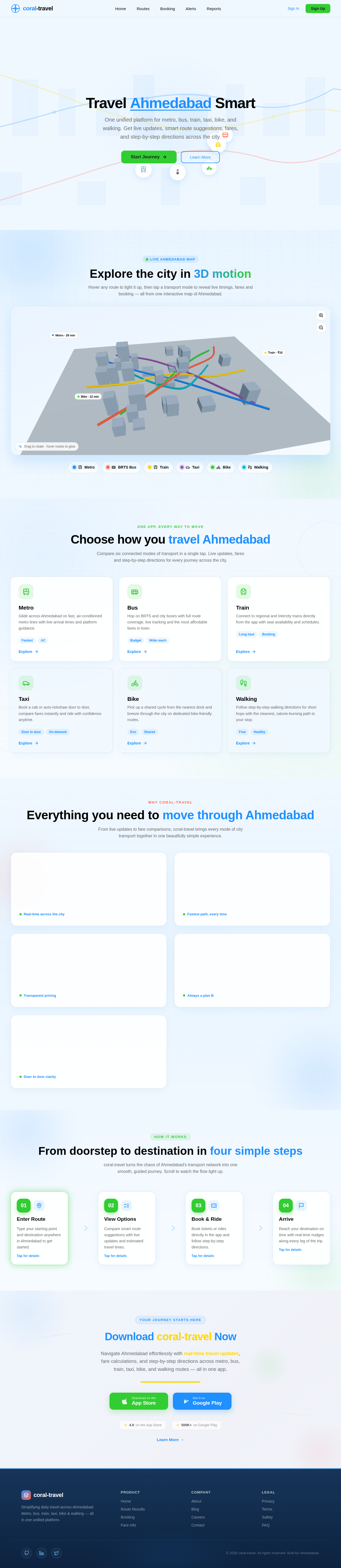
No comments yet. Be the first!