copper-todo
 Diya Trivedi
start a project to build a simple single page design of todo application

Comments (0)
Sign in to leave a comment
System Requirements
System Requirements Document for copper-todo
1. Introduction
copper-todo is a simple todo application delivered as a single page design. The product intent is narrow and deliberate: one page where a single everyday user captures tasks, sees them all in one place, and ticks them off. There is no navigation, no multi-screen flow, and no account ceremony — the page is the product.
The audience is one person using the app for themselves: someone who opens a lightweight utility many times a day to jot a task down and clear it. The experience should feel like a piece of gear — labelled, tagged, honestly utilitarian — rather than a soft productivity poster. The visual direction (Section 6–8) carries that attitude through industrial labels, quotation marks and construction-tape accents while keeping the checklist itself completely legible.
This document is the System Requirements Document for copper-todo, prepared for Diya Trivedi.
2. System Overview
copper-todo is a single-page web application. The page is anonymously reachable and requires no identity, sign-in, or account of any kind. It owns the complete todo lifecycle for the user: adding a task, viewing the list, and marking a task complete.
Actors
- Todo user (human, active) — the single person who adds, views, and completes todo items on the page.
- Application backend (system) — the shared FastAPI process that persists todo items and serves the page's data.
- Database (system) — MariaDB, holding application-owned todo records.
Current delivery
- A React frontend renders the single Todo page.
- A shared FastAPI backend exposes the todo APIs consumed by that page.
- MariaDB persists todo items so the list survives a page reload.
Ownership
- All human-facing behavior lives on the single Todo page. There are no other pages, routes, or destinations.
- The backend and database are supporting system processes; they hold no human interaction of their own.
Narrow exclusions
- No additional pages, screens, or navigation.
- No user accounts, sign-in, or profiles.
- No sharing, collaboration, or multi-user lists.
- No due-date scheduling engine, reminders, or notifications.
- No projects, tags taxonomy, or categories beyond the row's status label.
Removed from scope
- None — no concept was removed from the authoritative requirement thread.
2a. Product Interpretation and Delivery Boundary
The user asked for a simple single page design of a todo application. That is read literally: exactly one page, and that page is the whole product. Everything the user does — typing a task, reading the list, ticking a box — happens on that one page with no navigation away from it.
Access ownership. The page is public and anonymous. The source establishes no identity requirement, and the accepted lifecycle (capture a task, see it, complete it) does not create a durable relationship, obligation, entitlement, or value transfer that must be bound to a named participant. Application-owned identity is therefore not introduced. The todo list is application-owned state persisted by the backend so the user's list is still there when they return to the page; this is state continuity for the page, not an account.
Current vs. future. Current scope is exactly the single Todo page and its add / view / complete lifecycle. Anything beyond that — accounts, sharing, scheduling, multiple lists — is out of scope and is not represented in the page, the requirements, or the flows.
Delivery shape. Custom first-party UI (React) over a shared FastAPI backend with MariaDB storage, run as the provisioned frontend, backend, and database services.
2c. Page Content and Component Coverage
Todo
The single page of the application. Anonymous, publicly reachable, and the sole owner of adding, viewing, and completing todo items.
Information and state
- The oversized stacked headline "THINGS / TO DO" (decorative quotation-mark glyph cropped at the top-left).
- The live remaining-count: the number of tasks not yet completed, rendered as a large tabular numeral captioned by a quoted label "REMAINING".
- The current task list, each row showing: a checkbox, the task text, a status tag label ("OPEN" / "DONE"), and a tabular timestamp.
- The active filter state: one of "ALL", "OPEN", "DONE".
- Page-level states: loading (list being fetched), empty (no tasks at all), empty-filtered (filter yields no rows), success (list rendered), error (fetch or mutation failed, with retry).
Primary actions
- Type a task into the add-task input and submit via the ADD button (or Enter).
- Toggle a task's checkbox to mark it complete or reopen it.
- Switch the filter between "ALL", "OPEN", and "DONE".
Supporting actions
- Retry a failed list fetch.
- Dismiss an inline error after a failed add or toggle.
Domain entities
- Todo item: identifier, task text, completion status (open / done), created timestamp.
Component responsibilities
- Header zone — headline block (columns 1–8) and remaining-count block (columns 9–12); reads the count from the current list.
- Hazard-stripe band — 10px repeating 45° black/orange ticker separating header from input; static under
prefers-reduced-motion. - Add-task slab — full-width white input with a black-outlined ADD button pinned right; validates non-empty text; shows inline error on failure.
- Filter strip — quoted caps labels "ALL" "OPEN" "DONE" on the rule above the list; the active label carries the orange underline.
- Task list — full-width white rows separated by 1px rules; each row is a grid of [checkbox | task text | tag label | time]; renders empty and empty-filtered states.
- Task row — 22px square checkbox (fills #FF4D00 with a black check when done), 17px sentence-case task text with a 180ms left-to-right strikethrough wipe on completion, a black 1px boxed status tag, and a tabular timestamp.
- Error banner — inline, dismissible, with a retry control for fetch failures.
States
- Loading: list area shows a neutral placeholder; header count shows a dash until data arrives.
- Empty: no tasks exist — the list area shows a short quoted-caps empty label inviting the first task; the count reads 0.
- Empty-filtered: tasks exist but none match the active filter — a quoted-caps label states nothing matches; the count still reflects all open tasks.
- Success: rows render; count updates immediately after add or toggle.
- Error: a failed fetch shows the error banner with retry; a failed add keeps the typed text in the input and shows an inline error; a failed toggle reverts the checkbox to its prior state and shows an inline error.
3. Functional Requirements
FR-1 — Add a todo item (explicit) As a Todo user I should type a task into the add-task input and submit it, so that the task appears in my list.
- Trigger: the user types non-empty text and presses ADD or Enter.
- Observable result: the new row slides in (200ms) at the list, the remaining-count increments if the task is open, and the input clears.
- Access: anonymous; no identity required.
- Failure/recovery: empty or whitespace-only input is rejected without a request and the input keeps focus; a backend failure keeps the typed text, shows an inline error, and allows resubmission.
- Continuation: the user can immediately add another task or toggle the new one.
FR-2 — View the todo list (explicit) As a Todo user I should see all my tasks in one place on the page, so that I know what remains to be done.
- Trigger: opening or reloading the page.
- Observable result: the persisted list renders as rows, and the remaining-count reflects the number of open tasks.
- Access: anonymous.
- Failure/recovery: a failed fetch shows the error banner with a retry control; retry re-requests the list.
- Continuation: the user can add or toggle once the list loads.
FR-3 — Mark a todo item complete (explicit) As a Todo user I should tick a task's checkbox, so that it is recorded as done and the list reflects what remains.
- Trigger: the user clicks a task's checkbox.
- Observable result: the checkbox fills #FF4D00 with a black check, a black strikethrough wipes across the task text in 180ms, the row's tag label changes to "DONE", and the remaining-count decrements.
- Access: anonymous.
- Failure/recovery: if the update fails, the checkbox and strikethrough revert to their prior state and an inline error appears.
- Continuation: the user can continue with other rows.
FR-4 — Reopen a completed todo item (required_inference) As a Todo user I should untick a completed task's checkbox, so that a task marked done by mistake returns to the open list.
- Trigger: the user clicks the checkbox of a completed row.
- Observable result: the fill and strikethrough are removed, the tag label returns to "OPEN", and the remaining-count increments.
- Access: anonymous.
- Failure/recovery: a failed update reverts the row and shows an inline error.
- Continuation: the row behaves as an open task again.
- Rationale: completion is a reversible state on a persisted item; without reversal a mis-tick would be permanent, which would make the accepted "list reflects what remains" outcome untruthful.
FR-5 — Filter the list by status (required_inference) As a Todo user I should switch the filter between "ALL", "OPEN", and "DONE", so that I can focus on what is left or review what I finished.
- Trigger: the user selects a filter label.
- Observable result: the list shows only matching rows, the selected label carries the orange underline, and the remaining-count continues to reflect all open tasks.
- Access: anonymous.
- Failure/recovery: if no rows match, an empty-filtered label is shown; the user can switch back to "ALL".
- Continuation: the filter persists for the session on the page.
- Rationale: the direction specifies a filter strip as part of the single page's list zone; it is the minimal control that makes the "what remains" outcome inspectable without adding a new destination.
FR-6 — Persist todo items across reloads (required_inference) As a Todo user I should find my tasks still present when I return to the page, so that the list is a reliable record rather than a scratchpad.
- Trigger: page reload or revisit.
- Observable result: previously added items and their completion states are restored from the backend.
- Access: anonymous; state is application-owned, not account-bound.
- Failure/recovery: a failed fetch falls back to the error banner with retry.
- Rationale: a todo list whose items vanish on reload would not satisfy "see them in one place and tick them off"; persistence is the indispensable mechanic.
4. User Personas
Todo user
Product context. One person using copper-todo for themselves, many times a day, on a single page. They are not managing a team, a project, or a schedule — they are capturing small things and clearing them. They like their utilities with attitude: labelled, tagged, a little streetwise, but never at the cost of legibility.
Primary goal. Get a task out of their head and onto the page in seconds, then see at a glance what is still open and tick things off as they finish.
Distinct responsibilities.
- Capture: type a task and commit it with ADD.
- Survey: read the list and the remaining-count to know what is left.
- Resolve: tick a checkbox to mark a task done, or untick to reopen it.
- Focus: switch the filter to "OPEN" or "DONE" to narrow the view.
Inputs and decisions. The task text they type; whether a task is done or open; which filter they want. They decide when a task is finished and when a mis-tick should be reversed.
Interactions with other participants. None — the Todo user is the only human actor. The backend and database serve them silently.
Observable success. The new task appears immediately, the remaining-count matches the open tasks, completed rows read "DONE" with a struck-through text, and the list is still there on the next visit.
What makes this role different. There is exactly one human role, and its work is defined by speed and honesty of state: every action must produce an immediate, visible change on the same page, with no navigation and no confirmation dialogs.
5. Core User Flows
Flow 1 — Capture a task
- The Todo user opens the Todo page. The list loads from the backend; the header shows the remaining-count.
- The user clicks the add-task input and types a task in sentence case.
- The user presses ADD (or Enter).
- The page validates the text is non-empty and sends the new item to the backend.
- The backend stores the item in MariaDB and returns it.
- The new row slides in (200ms) at the list, the input clears, and the remaining-count increments.
- Failure: if the backend call fails, the typed text stays in the input, an inline error appears, and the user can resubmit.
- Continuation: the user can add another task or move on to ticking one off.
Flow 2 — Survey the list
- The Todo user opens or reloads the Todo page.
- The page requests the persisted list from the backend.
- The backend returns the items; the page renders rows and sets the remaining-count to the number of open tasks.
- The user reads the rows and the count to see what remains.
- Failure: if the fetch fails, the error banner appears with a retry control; the user clicks retry to re-request the list.
- Continuation: once loaded, the user can add, toggle, or filter.
Flow 3 — Complete a task
- The Todo user locates an open row in the list.
- The user clicks the row's 22px checkbox.
- The page fills the checkbox #FF4D00 with a black check, wipes a black strikethrough across the task text in 180ms, and changes the row's tag label to "DONE".
- The page sends the completion to the backend, which persists it.
- The remaining-count decrements.
- Failure: if the update fails, the checkbox and strikethrough revert and an inline error appears.
- Continuation: the user continues with other rows.
Flow 4 — Reopen a task
- The Todo user notices a completed row that should still be open.
- The user clicks that row's checkbox.
- The fill and strikethrough are removed, the tag label returns to "OPEN", and the remaining-count increments.
- The page persists the reopened state to the backend.
- Failure: a failed update reverts the row and shows an inline error.
- Continuation: the row behaves as an open task again.
Flow 5 — Filter the list
- The Todo user wants to focus on what is left (or review what is done).
- The user selects "OPEN" (or "DONE", or "ALL") from the filter strip.
- The list shows only matching rows and the selected label carries the orange underline; the remaining-count still reflects all open tasks.
- If no rows match, a quoted-caps empty-filtered label is shown.
- Continuation: the user switches back to "ALL" or acts on a visible row.
6. Visuals Colors and Theme
Muse and headline. Virgil Abloh — the 3% approach applied to the most familiar object in software. Headline: Remixed familiarity: a todo list with quotation marks around it.
Mode. Light mode only.
Colour tokens (exact hex, by role)
| Role | Hex | Use |
|---|---|---|
| Background (concrete ground) | #F2F0EB | Page ground, with 4% concrete-noise texture |
| Surface | #FFFFFF | Task panels, input slab, task rows |
| Text / primary | #111111 | Type, 1px rules, 2px outlines, primary button |
| Accent | #FF4D00 | Exactly three uses: active filter underline, checkbox fill on completion, hazard-stripe band |
| Muted | #8A8781 | Metadata, counters, completed-task strikethrough |
No blue, indigo, or violet anywhere, including links and focus rings. No gradients.
Typography
- Headings: Archivo, weight 800–900, all-caps, tracking +0.02em, set enormous and flush-left.
- Labels and metadata: Archivo 500 caps, tracking +0.14em, wrapped in quotation marks ("TO DO", "DONE", "3 LEFT", "REMAINING").
- Body and task text: Archivo 400/500, sentence case, 17–18px.
- Numerals: tabular throughout; the remaining-count is set at 40px on mobile and up to 148px on desktop.
- Scale: 1.25 modular with a display jump — display
clamp(56px, 11vw, 148px)/ 40 / 28 / 20 / 17 / 14 / 11.
Shape language. Hard 0px corners on every panel, input, and button. 1px black rules divide rows; 2px black outlines on the input and the ADD button. Checkboxes are 22px squares with a 1.5px black border, filled solid #FF4D00 with a black check when done. Construction-tape hazard stripes (repeating 45° black/orange) appear as a 10px band under the header and as the left edge marker on the focused row. Labels sit in small black outlined boxes, like garment tags.
Layout. Single page, three stacked zones on a 12-column grid with 24px gutters and a max width of 1200px.
- Zone 1: oversized stacked headline "THINGS / TO DO" in columns 1–8; live remaining-count as a giant tabular numeral in columns 9–12.
- Zone 2: the add-task input as a full-width white slab with a black-outlined ADD button pinned to its right edge.
- Zone 3: the task list as full-width white rows separated by 1px rules, each row a grid of [checkbox | task text | tag label | time], with the filter strip of quoted caps labels ("ALL" "OPEN" "DONE") sitting on the rule above.
At 375px the headline stacks to two lines, the count numeral moves under it at 40px, the row collapses to [checkbox | text] with the tag and time wrapping beneath the text, and every element stays inside the viewport.
Imagery. No photography and no illustration. The imagery is the interface itself: hazard-stripe tape, outlined labels, a concrete-noise texture at 4% opacity on the ground, and a single halftone-dotted black arrow pointing from the headline to the input. Iconography is thick-line, 2px, black — plus, check, trash — drawn on a 24px grid.
Readability rule. Headlines, labels, numbers, task text, and controls stay entirely inside the viewport and their container at 375px, 768px, and 1280px, wrapping or scaling to fit. Decoration (the cropped quotation mark, the ticker, the halftone arrow) may bleed off edges; readable text and controls never do.
7. Signature Design Concept
The poster that is the app. The first screen is not a SaaS hero — it is a printed poster that happens to be interactive. The words "THINGS TO DO" are set in Archivo Black caps at clamp(56px, 11vw, 148px), flush-left, stacked on two lines spanning columns 1–8 and bleeding to the left edge of the grid. A black quotation-mark glyph at 1.4× the headline size sits half-cropped off the top-left corner as pure decoration — the "quotation marks around it" made literal.
To its right, columns 9–12 hold the remaining-count as a 148px tabular numeral in safety orange over a small black-outlined quoted label "REMAINING". Beneath, a full-bleed 10px hazard-stripe ticker separates the headline from the white input slab. Ground is concrete #F2F0EB; no gradient, no centred stack, no blue button.
The signature move repeats down the page: every task row is a tagged garment — a black 1px boxed label in wide-tracked caps ("OPEN" / "DONE") at the row's right, task text in 17px sentence case, a tabular timestamp. Completion fills the hard 22px square with #FF4D00 and wipes a black strikethrough across the text in 180ms — the only animation in the list.
This concept only recomposes accepted content and controls: the headline, the count, the input, the ADD button, the filter strip, and the task rows. It adds no behavior and no destination.
8. Interaction Model & Motion Direction
Interaction Model: Animated Motion Tempo: expressive Hero Dimensionality: flat
Landing Hero Motion Brief
- Focal subject. The oversized "THINGS / TO DO" headline with its cropped quotation-mark glyph, paired with the live orange remaining-count numeral.
- Input → transformation → outcome thesis. As the user adds or completes tasks, the remaining-count numeral updates in place and the hazard-stripe band beneath the header keeps a slow continuous ticker running — the poster is alive, but only through the product's own state.
- Motion vocabulary. Snappy and mechanical: 120–160ms ease-out on checkbox fill, 180ms row strikethrough wipe from left, 200ms slide-in for newly added tasks, and a slow continuous ticker on the 10px hazard-stripe band. No bounces, no spring physics, no hover-lift on cards — hover only swaps the row's label box from white to black.
- Composed first frame. Concrete ground with 4% noise; cropped quotation mark top-left; "THINGS / TO DO" flush-left in two lines; orange tabular count at right under a quoted "REMAINING" tag; hazard-stripe band; white input slab with black-outlined ADD; filter strip; task rows below.
- Reduced-motion state. Under
prefers-reduced-motion, the ticker freezes to a static stripe, the slide-in and strikethrough wipe resolve instantly, and the checkbox fill applies without transition. The layout remains fully usable and every item stays readable.
9. Non-Functional Requirements
- Single page (explicit). The application is delivered as exactly one page. No additional routes, screens, or navigation may be introduced.
- Simplicity (explicit). The design stays simple: one input, one list, one filter strip, one count. No feature may add a second working context.
- Anonymous access (required_inference). The page is publicly reachable with no sign-in. No account, profile, or identity establishment is introduced, because the accepted lifecycle creates no durable participant-bound relationship.
- Persistence (required_inference). Todo items and their completion state survive page reloads, stored in MariaDB via the shared backend.
- Responsive integrity (explicit, from direction). Readable text and controls remain whole and inside the viewport at 375px, 768px, and 1280px.
- Accessibility (required_inference). Checkboxes are real focusable controls with accessible labels; the filter strip is keyboard-operable; focus rings are visible and never blue;
prefers-reduced-motionis honoured as described in Section 8. - Performance (required_inference). Add and toggle actions reflect in the UI immediately (optimistic), with revert on failure, so the page feels instant at the user's many-times-a-day cadence.
10. Tech Stack
- Frontend: React — renders the single Todo page.
- Backend: Python / FastAPI — the shared backend process exposing the todo APIs (list, create, update completion state).
- Database: MariaDB — persists todo items (identifier, task text, completion status, created timestamp).
- Orchestration: docker-compose with the provisioned services
frontend,backend, anddatabase. No additional services are required for the current scope.
11. Assumptions and Constraints
- Single page is a hard constraint. The page count is exactly one; the Todo page is the only destination.
- No identity. The source establishes no accounts; the page is anonymous and state is application-owned, not user-bound.
- One human role. The Todo user is the only persona; there are no collaborators or administrators.
- Persistence is inferred, not stated. The source does not name storage, but a todo list that forgets on reload would not satisfy the accepted outcome; MariaDB persistence is therefore included as
required_inference. - Filter and reopen are inferred. Both are minimal mechanics that make the accepted "see what remains / tick it off" outcome truthful and reversible; neither adds a new destination or a new user goal beyond the single page.
- Visual defaults. Palette, fonts, shape, layout, and motion come from the supplied creative direction and are treated as binding for this project.
12. Glossary
- Todo item — a single task with text, a completion status (open / done), and a created timestamp.
- Remaining-count — the number of todo items not yet completed, shown as the large tabular numeral in the header.
- Filter strip — the quoted caps labels "ALL" "OPEN" "DONE" above the list that narrow which rows are shown.
- Tag label — the small black outlined box on each row reading "OPEN" or "DONE".
- Hazard-stripe band — the 10px repeating 45° black/orange ticker separating the header from the input slab.
- Add-task slab — the full-width white input with the black-outlined ADD button.
- Todo page — the single page of the application and the sole owner of all human-facing behavior.
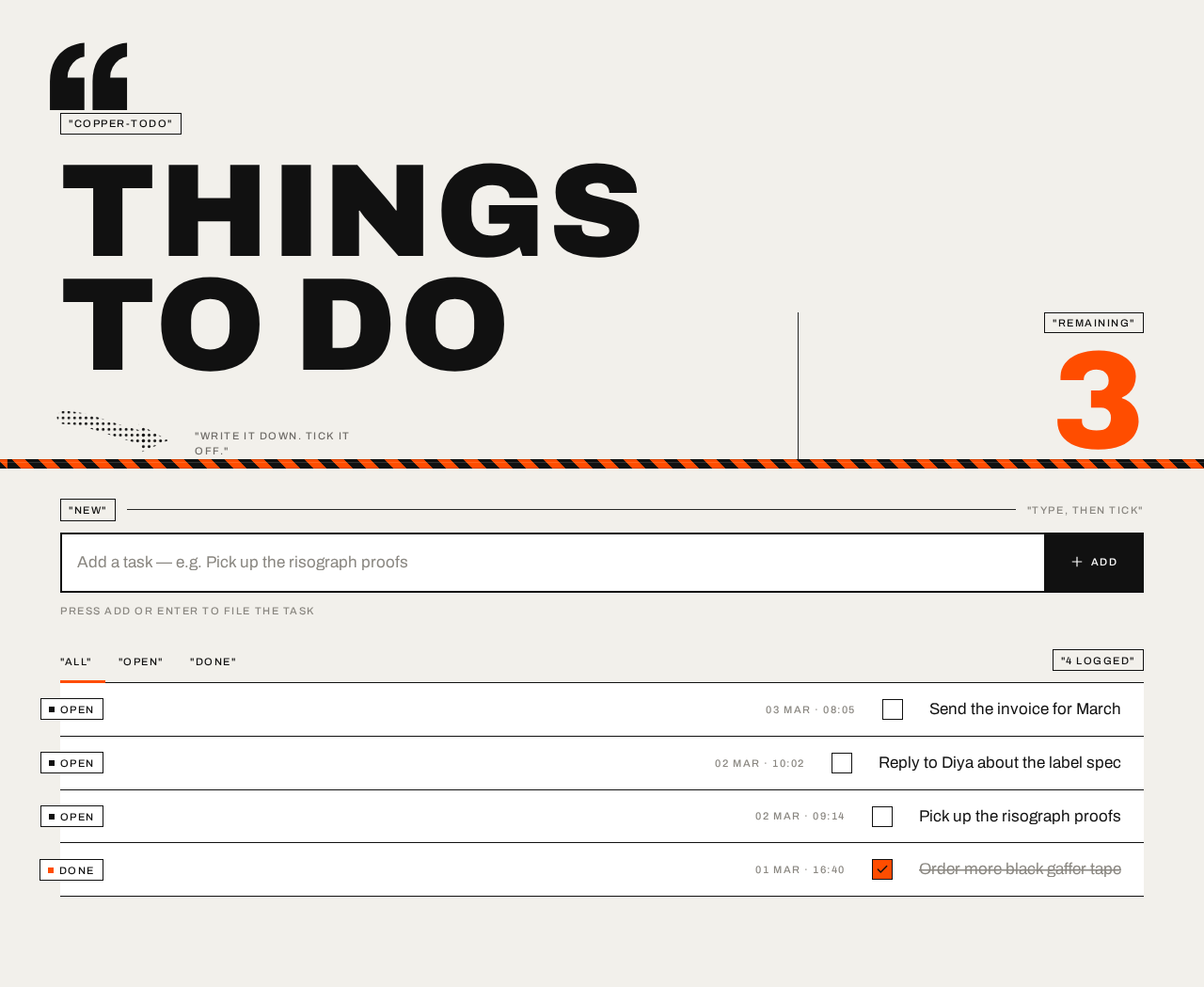
THINGSTO DO
"WRITE IT DOWN. TICK IT OFF."
Press ADD or Enter to file the task
Send the invoice for March
OPENReply to Diya about the label spec
OPENPick up the risograph proofs
OPENOrder more black gaffer tape
DONE
THINGSTO DO
"WRITE IT DOWN. TICK IT OFF."
Press ADD or Enter to file the task
Send the invoice for March
OPENReply to Diya about the label spec
OPENPick up the risograph proofs
OPENOrder more black gaffer tape
DONE
No comments yet. Be the first!