cool-senior
 saikiran saidesigns
Senior UX/UI Design portfolio, which gets me hired


Comments (0)
Sign in to leave a comment
System Requirements
System Requirements Document for UX/UI Design Portfolio
1. Introduction
This System Requirements Document specifies UX/UI Design Portfolio (project name: cool-senior), a public portfolio website for senior UX/UI designer saikiran saidesigns, based in India. The product's intent is singular and explicit: it is a senior UX/UI design portfolio, and it must help the owner get hired.
The audience is twofold. First, hiring reviewers — recruiters, design leads, and hiring managers — who arrive anonymously, judge craft and evidence quickly, and need to understand who the designer is, what they have shipped, and how to reach them. Second, the portfolio owner, who presents case studies and keeps the portfolio current so that the work itself becomes the hiring argument.
The portfolio is delivered as a public, no-account, first-party web experience. Its visual and interaction direction — "Craft that hires: design and code in split dialogue" — treats the site as proof of both design and engineering capability in a single frame.
2. System Overview
2a. Product Interpretation and Delivery Boundary
The product is a three-destination public portfolio: Landing, Case Studies, and Contact. All three are anonymously reachable; no visitor account, sign-in, or identity establishment exists anywhere in the accepted scope. The hiring reviewer is the primary anonymous visitor; the portfolio owner is the author whose work and contact details the site presents.
Delivery is first-party custom UI backed by a shared application backend and an application database. The backend serves the portfolio's content and the contact handoff; the frontend renders the split design/code composition described in the creative direction. Nothing in the accepted requirements calls for provider-owned surfaces, external destinations, or headless delivery.
The current horizon covers exactly the three accepted pages and the accepted behaviors described below. Future ideas — additional case studies, richer content management, analytics — are not current requirements and are not represented in any page or acceptance criterion.
Removed from scope
- Smart Micro-Grid Dashboard (also: Smart Engine, EMS, Random Forest, Predictive Load Shedding, ESP32, Relay, SoC, Telemetri) — the reusable design-system skill's domain content is not part of this product; only its general dark-surface craft sensibility is superseded entirely by the project creative direction.
2c. Page Content and Component Coverage
Landing
- Information and state: The public entry surface. A full-height 50/50 split. Left half: warm paper panel (#F5F2EC) carrying an oversized ink headline in three stacked lines — "Senior UX/UI design, built and shipped" — a short subline ("I design interfaces and write the code that proves them. Read the case studies."), and an ink CTA "View case studies" sitting under the headline, left-aligned, not centred. Right half: deep ink code panel (#121417) with mono metadata rows and a thin tangerine (#E4572E) rule. A 1px ink hairline divides the halves. A mono metadata strip under the project title carries role, year, and platform.
- Primary action: "View case studies" CTA navigates to Case Studies.
- Supporting actions: Navigation to Contact; hover on the split moves a hairline highlight across both halves (180ms ease-out).
- Domain entities: Portfolio owner profile (name, role, location), hero copy, metadata strip (role, year, platform).
- Component responsibilities: Split hero container (12-column grid, 50/50); headline block with
clamp(52px, 9vw, 132px)type; subline; ink CTA button (0px radius); code panel with mono rows; hairline divider; tangerine section rule. - States: Loading — static content, no spinner required; Empty — not applicable (hero copy is authored content); Success — hero renders fully at 375px, 768px, and 1280px with all readable text and the CTA fully inside the viewport and container; Error — if content fails to load, the hero copy and CTA remain rendered from the authored baseline; Recovery — reload restores the full hero.
Case Studies
- Information and state: The body of the designer's work. Each case study row shows a wireframe sketch that swaps to the final screen on hover (180ms ease-out). Every project title carries a mono metadata strip: role, year, platform. One tangerine rule marks the section start. Case study screens sit on the paper half; the code half shows the same screen as a wireframe with mono labels. No stock photos and no people.
- Primary action: Read a case study; hover a row to swap wireframe for final screen.
- Supporting actions: Navigate to Contact; return to Landing.
- Domain entities: Case study (title, role, year, platform, wireframe sketch, final screen, description).
- Component responsibilities: Case study list; hover-swap row component; mono metadata strip; tangerine section rule; wireframe/final-screen pair.
- States: Loading — rows render with wireframe sketches as the resting state; Empty — if no case studies are published, a plain ink message states that case studies are coming and offers the Contact link; Success — each row swaps on hover and returns to wireframe on leave; Error — if a final screen fails to load, the wireframe remains visible and the row stays readable; Recovery — reload or re-hover restores the swap.
Contact
- Information and state: A way to contact the designer. Presents the owner's contact details and a contact form (name, email, message) that submits to the shared backend. One tangerine rule marks the section start.
- Primary action: Submit the contact form.
- Supporting actions: Return to Landing or Case Studies.
- Domain entities: Contact message (name, email, message, submitted timestamp).
- Component responsibilities: Contact detail block; contact form with labelled fields; ink submit button; inline validation messages; success confirmation.
- States: Loading — submit button shows a pending state while the request is in flight; Empty — form fields start empty with placeholders; Success — an inline confirmation states the message was received; Error — invalid or missing fields show inline messages and the form is not submitted; a server failure shows a retry message and preserves the entered values; Recovery — the visitor can correct fields and resubmit.
3. Functional Requirements
FR-1 — Public portfolio entry (explicit) As a Hiring Reviewer, I should open the public Landing page and immediately understand who the designer is, what they do, and where to go next, so that I can decide whether to continue.
- Trigger: visitor navigates to the site root.
- Observable result: the split hero renders with the headline, subline, CTA, and code panel.
- Access: anonymous, no account.
- Failure/recovery: if content fails to load, the authored baseline hero remains visible; reload restores full state.
- Continuation: the CTA leads to Case Studies.
FR-2 — Senior UX/UI portfolio identity (explicit) As a Portfolio Owner, I should present the portfolio as a senior UX/UI design portfolio, so that the site itself communicates seniority and craft.
- Observable result: the Landing hero, Case Studies, and Contact all carry the senior UX/UI positioning and the split design/code composition.
- Access: anonymous public surface.
FR-3 — Get hired (explicit) As a Portfolio Owner, I should give hiring reviewers the evidence and the contact path they need, so that the portfolio helps me get hired.
- Observable result: reviewers can read case studies and reach the owner through Contact.
- Continuation: reviewer submits a contact message or leaves with the owner's details.
FR-4 — Read case studies (required_inference) As a Hiring Reviewer, I should read the designer's case studies and profile, so that I can judge fit for a role.
- Trigger: visitor opens Case Studies.
- Observable result: case study rows render with title, mono metadata strip (role, year, platform), wireframe sketch, and final screen on hover.
- Access: anonymous.
- Failure/recovery: a failed final screen leaves the wireframe visible; reload restores.
- Continuation: the reviewer moves to Contact.
FR-5 — Contact the designer (required_inference) As a Hiring Reviewer, I should find a way to contact the designer, so that I can start a conversation about a role.
- Trigger: visitor opens Contact and submits the form.
- Observable result: the message is accepted by the backend and an inline confirmation appears.
- Access: anonymous.
- Failure/recovery: validation errors show inline; server failure preserves entered values and offers retry.
- Continuation: the reviewer receives confirmation and may return to Case Studies.
FR-6 — Keep the portfolio current (required_inference) As a Portfolio Owner, I should have the portfolio present my current case studies and contact details, so that reviewers always see accurate work.
- Observable result: Case Studies and Contact render the owner's current published content.
- Access: content is served by the shared backend; no owner-facing editing surface is in current scope.
4. User Personas
Portfolio Owner
Saikiran saidesigns is a senior UX/UI designer based in India. The portfolio is his professional argument: it must feel made by a designer who also builds. His primary goal is to get hired — every page exists to move a hiring reviewer toward that decision. His distinct responsibilities are authoring the hero positioning, publishing case studies with role/year/platform metadata, and keeping contact details accurate. His inputs are his own project work and contact information; his decisions are what to show and how to frame it. He interacts with the Hiring Reviewer only indirectly, through the evidence and contact path the site presents. Observable success: reviewers read case studies and reach out through Contact.
Hiring Reviewer
The hiring reviewer is a recruiter, design lead, or hiring manager evaluating the designer for a role. They arrive anonymously, with no account, and judge craft and evidence fast. Their primary goal is to decide whether this designer fits the role. Their distinct responsibilities are scanning the hero for positioning, reading case studies for evidence of shipped work, and using Contact to start a conversation. Their inputs are the hero copy, case study rows, and contact form; their decisions are whether to continue reading and whether to reach out. They interact with the Portfolio Owner through the contact message. Observable success: they understand the designer's work and can contact them without friction.
5. Core User Flows
Flow A — Hiring Reviewer evaluates the portfolio
- The reviewer opens the site root and lands on Landing.
- The split hero renders: warm paper left with the oversized headline "Senior UX/UI design, built and shipped", subline, and ink CTA; deep ink code panel right with mono metadata and a tangerine rule.
- The reviewer reads the positioning and hovers the split; a hairline highlight moves across both halves (180ms ease-out).
- The reviewer selects View case studies and arrives on Case Studies.
- Case study rows render with wireframe sketches and mono metadata strips (role, year, platform).
- The reviewer hovers a row; the wireframe swaps to the final screen (180ms ease-out). On leave, it returns to the wireframe.
- If a final screen fails to load, the wireframe remains and the row stays readable; the reviewer continues.
- The reviewer navigates to Contact.
- The reviewer fills name, email, and message and submits.
- On success, an inline confirmation appears. On validation error, inline messages appear and the form is not submitted. On server failure, entered values are preserved and a retry message is shown.
- The reviewer may return to Case Studies or Landing.
Flow B — Portfolio Owner's portfolio is experienced
- The owner authors the hero copy, case studies, and contact details that the shared backend serves.
- A reviewer opens Landing and sees the owner's current positioning.
- The reviewer reads Case Studies and sees the owner's current work with accurate metadata.
- The reviewer opens Contact and sees the owner's current contact details and form.
- The reviewer submits a message; the owner receives it through the backend's stored contact messages.
6. Visuals Colors and Theme
The creative direction "Craft that hires: design and code in split dialogue" (muse: Adham Dannaway) is authoritative.
- Mode: Light.
- Background: #F5F2EC (warm paper).
- Surface: #FFFFFF.
- Text / Primary: #121417 (deep ink).
- Accent: #E4572E (tangerine) — one action and one rule per screen.
- Muted: #6B6F76.
- Code panel: #121417 ground with light mono text.
- Headings: Space Grotesk, 600 weight, tight -0.03em tracking, sentence case, oversized.
- Body: IBM Plex Sans.
- Type scale: 1.25 modular — 52/40/28/20/16, with display
clamp(52px, 9vw, 132px). - Shape: Sharp 0px corners on panels and images; 1px ink hairline divides the split halves; buttons are ink rectangles with no radius.
- Layout: 12-column grid, hero split 50/50; 8-pt rhythm; sections align to column edges.
- Imagery: Case study screens on the paper half; the code half shows the same screen as a wireframe with mono labels. No stock photos and no people.
- Avoid: No blue or indigo accents on white; no gradient blobs or glass panels; no grid of identical hover-lift cards; no Inter, Roboto, Arial, or system-ui fonts; no centred headline with a blue button.
7. Signature Design Concept
The public entry is a full-height 50/50 split that stages design and code in dialogue. The left half is a warm paper panel carrying an oversized ink headline stacked in three lines, a short subline, and an ink CTA sitting under the headline, left-aligned. The right half is a deep ink code panel with mono metadata rows and a thin tangerine rule. A 1px ink line divides the halves. The headline spans the left panel edge to edge at clamp(52px, 9vw, 132px). One tangerine rule marks the section start. The composition recomposes only the accepted hero copy, CTA, and metadata — it introduces no new behavior or destination.
8. Interaction Model & Motion Direction
Interaction Model: Animated Motion Tempo: expressive Hero Dimensionality: layered_2d
Landing Hero Motion Brief
- Focal subject: the split itself — warm paper type left, deep ink code panel right, divided by a 1px ink hairline.
- Input → transformation → outcome thesis: hovering the split moves a hairline highlight across both halves (180ms ease-out), reinforcing the design/code dialogue without changing content.
- Motion vocabulary: 180ms ease-out; hairline highlight sweep; wireframe-to-final-screen swap on case study rows.
- Composed first frame: headline, subline, and CTA fully rendered on the paper half; mono metadata rows and tangerine rule on the code half; hairline divider at rest.
- Reduced-motion state: the split renders statically with all readable text and the CTA fully visible; case study rows show the wireframe as the resting state and remain fully readable.
9. Non-Functional Requirements
- Readability at every viewport (explicit, creative direction): headlines, wordmarks, labels, numbers, cards' text, and controls stay entirely inside the viewport and their container at 375px, 768px, and 1280px, wrapping or scaling to fit; no other element covers any part of them.
- Reduced motion (explicit, creative direction): with
prefers-reduced-motion, a usable static arrangement is provided; all items remain fully readable. - Performance of hover swaps (required_inference): wireframe-to-final-screen swaps complete within 180ms ease-out without layout shift.
- Accessibility of form controls (required_inference): contact form fields have visible labels and inline error messages associated with their fields.
- Content integrity (required_inference): case study metadata (role, year, platform) is served consistently with the case study it describes.
10. Tech Stack
- Frontend: React application UI.
- Backend: shared FastAPI process for application APIs and domain modules (portfolio content, contact message intake).
- Database: MariaDB for application-owned persistent data (case studies, contact messages).
- Infrastructure: docker-compose with the provisioned
backend,database, andfrontendservices; the backend is extended with routes and modules rather than adding new services.
11. Assumptions and Constraints
- A-1 (required_inference): The portfolio owner's content (hero copy, case studies, contact details) is authored and served by the shared backend; no owner-facing editing surface is in current scope.
- A-2 (required_inference): Contact messages are stored by the backend; delivery to the owner's inbox is out of current scope beyond storage.
- A-3 (explicit): All three pages are anonymously reachable; no visitor account or sign-in exists.
- A-4 (explicit, creative direction): The visual direction is authoritative; the generic indigo/blue-on-white SaaS template is forbidden.
- A-5 (explicit): The reusable design-system skill's micro-grid dashboard content is not part of this product.
12. Glossary
- Portfolio Owner: saikiran saidesigns, the senior UX/UI designer whose work the site presents.
- Hiring Reviewer: the anonymous visitor evaluating the designer for a role.
- Split hero: the full-height 50/50 composition of warm paper type and deep ink code panel.
- Mono metadata strip: the monospaced row under each project title carrying role, year, and platform.
- Wireframe swap: the hover interaction replacing a case study's wireframe sketch with its final screen.
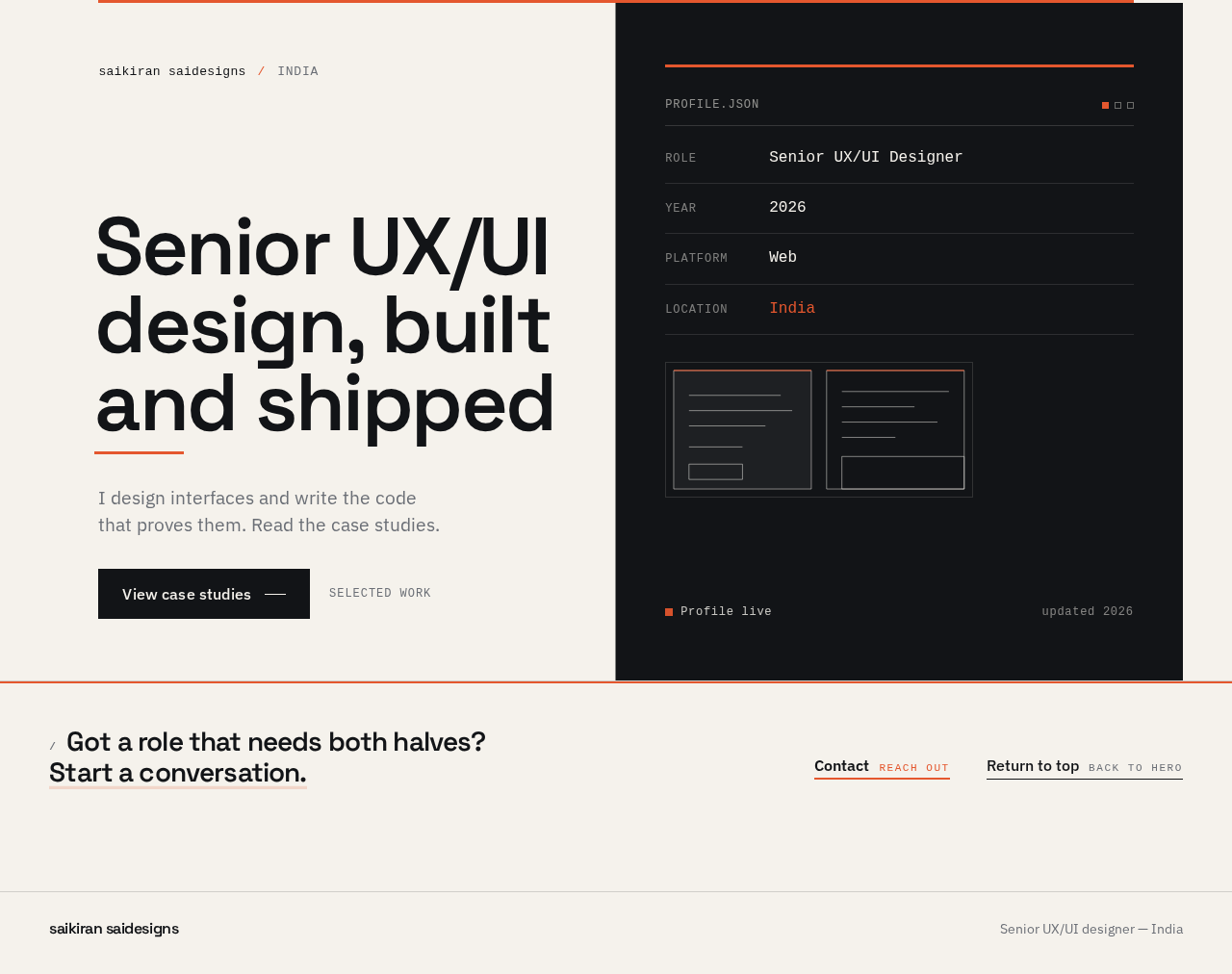
saikiran saidesignsIndia
Senior UX/UIdesign, builtand shipped
I design interfaces and write the code that proves them. Read the case studies.
Got a role that needs both halves? Start a conversation.
saikiran saidesignsIndia
Senior UX/UIdesign, builtand shipped
I design interfaces and write the code that proves them. Read the case studies.
No comments yet. Be the first!