convo
 Taiwo Lawal
I want to build a chatting app like WhatsApp but with better features like WhatsApp and telegram


Comments (0)
Sign in to leave a comment
System Requirements
System Requirements Document for convo
1. Introduction
The project "convo" aims to develop a chatting application that combines the best features of existing platforms like WhatsApp and Telegram, while introducing enhanced functionalities to provide a superior user experience. The target audience includes users seeking a more vibrant, engaging, and feature-rich chat application.
2. System Overview
The "convo" application will deliver a chat platform with enhanced features compared to WhatsApp and Telegram. The application will focus on providing a vibrant and friendly user interface, enriched communication features, and a seamless user experience. The system will cater to individual users who wish to communicate in a lively and engaging environment.
2a. Product Interpretation and Delivery Boundary
The application will be delivered as a mobile app, accessible to users who download it from app stores. It will require user registration to access the chat features, ensuring a personalized experience. The app will not include adjacent capabilities such as video conferencing or file storage beyond chat-related functionalities. Future enhancements may include additional features inspired by user feedback and technological advancements.
2b. Source Content Inventory
Not applicable as no content source directive was provided.
2c. Page Content and Component Coverage
Home
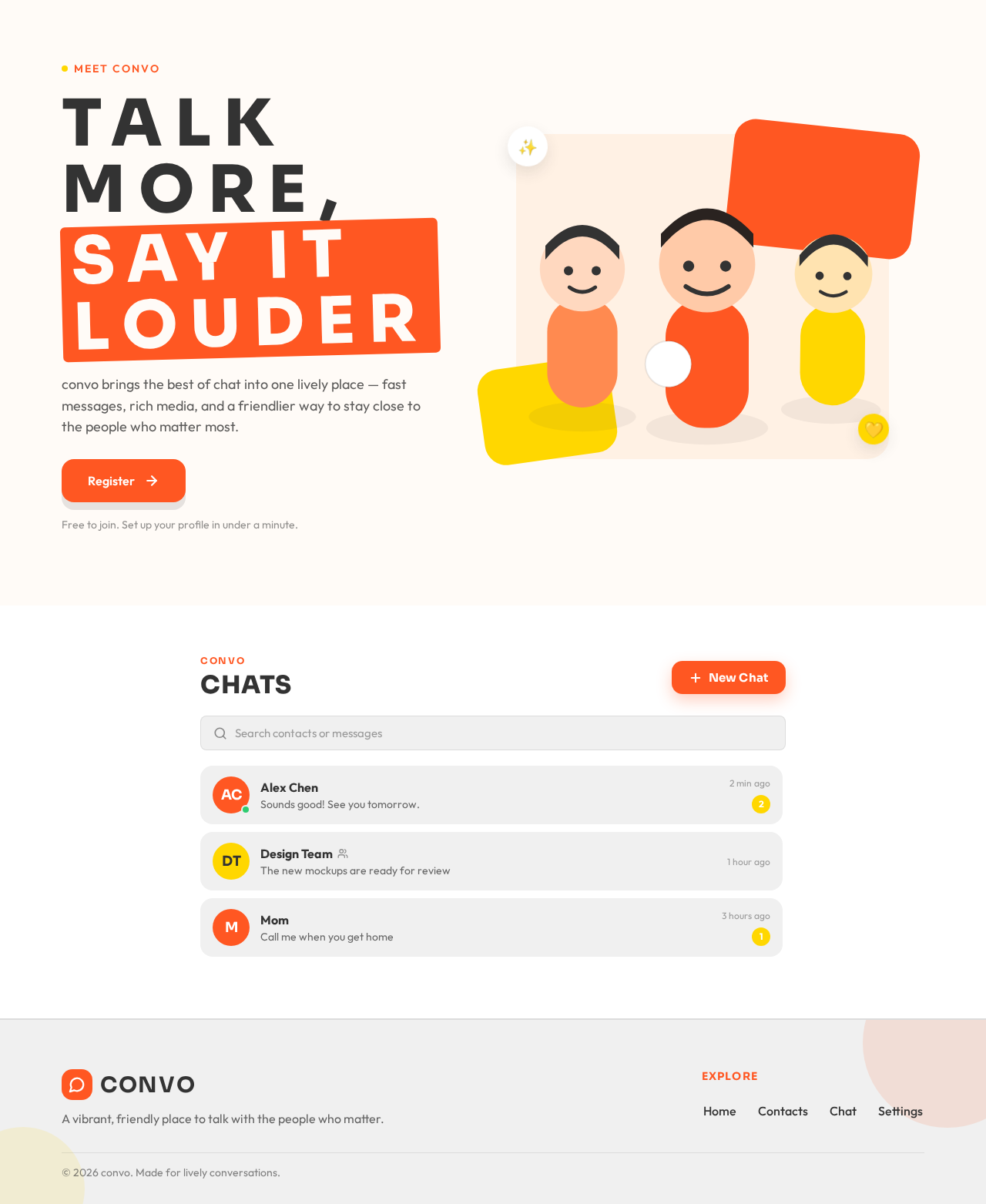
- Chat List: Displays recent chats with contacts, showing the latest message and timestamp.
- New Chat Button: Allows users to start a new conversation.
- Search Bar: Enables users to search for contacts or messages.
- Notifications: Displays unread message counts and highlights active chats.
Chat
- Message Display: Shows the conversation history with timestamps.
- Message Input: Text input field for sending messages, with support for emojis and attachments.
- Send Button: Sends the typed message.
- Attachment Options: Allows users to attach images, videos, and documents.
- Voice Message: Option to record and send voice messages.
Contacts
- Contact List: Displays all contacts with online/offline status.
- Add Contact: Option to add new contacts via phone number or username.
- Contact Search: Search functionality to find specific contacts.
Settings
- Profile Management: Allows users to update their profile picture, status, and personal information.
- Privacy Settings: Options to manage who can see the user's online status, last seen, and profile picture.
- Notification Settings: Customize notification preferences for messages and group chats.
- Theme Settings: Choose between light and dark mode.
3. Functional Requirements
- As a user, I should be able to register and create a profile to start using the chat application. (explicit)
- As a user, I should be able to send and receive text messages, images, videos, and documents in a chat. (explicit)
- As a user, I should be able to search for contacts and messages within the app. (explicit)
- As a user, I should be able to manage my privacy settings to control who can see my online status and profile information. (explicit)
- As a user, I should be able to customize notification settings for individual and group chats. (explicit)
- As a user, I should be able to switch between light and dark themes for the app interface. (explicit)
4. User Personas
- Individual User: A person who uses the app to communicate with friends and family. They are responsible for managing their profile, sending and receiving messages, and customizing their app settings.
5. Core User Flows
-
User Registration and Profile Setup
- User downloads the app and opens it.
- User registers using their phone number or email.
- User sets up their profile by adding a picture and personal information.
- User completes registration and is directed to the Home page.
-
Sending a Message
- User selects a contact from the Chat List or starts a new chat.
- User types a message in the Message Input field.
- User optionally attaches media or records a voice message.
- User taps the Send Button.
- Message is delivered and displayed in the conversation history.
-
Managing Privacy Settings
- User navigates to Settings.
- User selects Privacy Settings.
- User adjusts settings for online status, last seen, and profile picture visibility.
- Changes are saved and applied immediately.
-
Customizing Notifications
- User navigates to Settings.
- User selects Notification Settings.
- User customizes preferences for message alerts and group notifications.
- Changes are saved and applied immediately.
-
Switching Themes
- User navigates to Settings.
- User selects Theme Settings.
- User chooses between light and dark mode.
- Theme is applied immediately, changing the app's appearance.
6. Visuals Colors and Theme
- Muse: Haraldur Thorleifsson
- Palette:
- Background: #ffffff
- Surface: #f0f0f0
- Text: #333333
- Primary: #ff5722
- Accent: #ffd700
- Muted: #cfcfcf
- Typography:
- Headings: Sora — Bold, uppercase, wide tracking
- Body: Outfit
- Scale: 1.5 modular, 48/32/24/18/16
- Shape Language: Chunky rounded cards, generous radii
- Layout: Color-blocked sections with illustration-led heroes
- Motion: Lively entrance animations, hover pops, smooth transitions
7. Signature Design Concept
The public entry page will feature a vibrant full-width illustration of a conversation, with oversized type and bold color blocks on a cream backdrop. The primary color will highlight call-to-action elements, creating an inviting and energetic atmosphere.
8. Interaction Model & Motion Direction
- Interaction Model: Animated
- Motion Tempo: Expressive
- Hero Dimensionality: Layered_2d
- Landing Hero Motion Brief: The focal subject is a lively conversation illustration. Upon user interaction, the illustration elements animate with hover pops and smooth transitions, emphasizing the vibrant and friendly nature of the app. The first frame features bold typography and color blocks, with a reduced-motion state offering static visuals for accessibility.
9. Non-Functional Requirements
- The application must support a minimum of 10,000 concurrent users without performance degradation. (explicit)
- The app should load within 2 seconds on a standard mobile network. (explicit)
- The system must ensure data privacy and comply with relevant data protection regulations. (explicit)
10. Tech Stack
- Frontend: React Native
- Backend: Python/FastAPI
- Storage: Appropriate cloud-based storage solution
- Deployment: Docker/docker-compose, Kubernetes (if required for scaling)
11. Assumptions and Constraints
- The app will initially be available only on mobile platforms.
- User data will be stored securely and will not be shared with third parties without consent.
- The app will not include video calling features in the initial release.
12. Glossary
- Chat List: A list of recent conversations displayed on the Home page.
- Message Input: The field where users type their messages.
- Attachment: Media files such as images, videos, and documents that can be sent in a chat.
- Privacy Settings: Options that allow users to control the visibility of their profile information.
- Notification Settings: Preferences for how and when users receive alerts about new messages.
Talk more,
say it louder
convo brings the best of chat into one lively place — fast messages, rich media, and a friendlier way to stay close to the people who matter most.
Free to join. Set up your profile in under a minute.
Alex Chen
Design Team
Mom
Talk more,
say it louder
convo brings the best of chat into one lively place — fast messages, rich media, and a friendlier way to stay close to the people who matter most.
Free to join. Set up your profile in under a minute.
Alex Chen
Design Team
Mom
No comments yet. Be the first!