consignment-shipment
 Hello Mcdonald
build a consignment shipment named fast forward deliver services make this email hellomcdonald8@gmail.com as the only admin build from start to finish

Comments (0)
Sign in to leave a comment
System Requirements
System Requirements Document for consignment-shipment
1. Introduction
Fast Forward Deliver Services is a consignment shipment service built for a single operator. It exists so that one administrator — identified by the email address hellomcdonald8@gmail.com — can set up and run a consignment shipment operation from start to finish: registering consignments, issuing waybills, moving shipments through a defined custody chain, and giving the people on either end of a shipment a trustworthy, at-a-glance read on where their goods are.
The product intent is precision and chain-of-custody certainty. A consignment is treated as a tracked object with a serial, a route, a weight and a timestamp — not as a chat thread or a generic order. The audience is therefore narrow and operational:
- the Administrator, who owns and runs the service end to end;
- the Consignment Sender, who hands goods over for shipment and needs to know they arrived;
- the Consignment Recipient, who is expecting those goods and needs visibility through to delivery.
The interface is deliberately instrument-like: dark titanium surfaces, ruled data rows, tabular numerals, and circular status gauges that read a shipment's stage the way a dial reads a value.
2. System Overview
Fast Forward Deliver Services is delivered as a first-party web application with its own backend and durable storage. It is not a marketplace, not a multi-tenant logistics platform, and not a public carrier-integration hub. Its current scope is the complete consignment lifecycle for one operator:
- an anonymous public entry that explains the service and offers a way in;
- identity establishment and returning verification for the administrator and for senders and recipients who hold durable shipment records;
- an administrator workspace for creating, editing and advancing consignment shipments;
- a participant-facing tracking surface that shows a shipment's stage, route, weight and estimated delivery;
- a sole-admin administration surface for the service account and configuration.
Actors. The active human actors are the Administrator, the Consignment Sender and the Consignment Recipient. The backend, the durable shipment store and the notification/status machinery are non-persona system actors; they execute work but are not product personas.
Ownership. All five surfaces are application-owned custom pages. Identity is application-owned: the service issues and verifies its own accounts, because shipment records must remain bound to the correct participant across sessions.
Narrow exclusions. This document does not add carrier API integrations, payment processing, multi-admin role hierarchies, warehouse or fleet management, or customer support tooling. The administrator role is singular by explicit constraint.
2a. Product Interpretation and Delivery Boundary
Delivery ownership. Fast Forward Deliver Services is a first-party application. The public entry, the identity surface, the administrator's shipment workspace, the participant tracking surface and the administration surface are all owned and rendered by this application. No accepted requirement delegates a user-facing capability to a third-party provider or external destination, and no accepted requirement calls for a headless or provider-owned delivery model.
Access ownership. Identity is application-owned. The service establishes its own accounts and verifies returning users itself. This is required because accepted behavior produces durable, participant-bound state: a consignment shipment record belongs to a specific sender, is addressed to a specific recipient, and must remain retrievable by those same people on a later visit. The public entry and the identity surface are anonymously reachable; the shipment workspace, the tracking surface and the administration surface require an established identity.
Role boundary. The administrator role is singular and fixed to hellomcdonald8@gmail.com. This is a hard, explicit constraint, not a default. Senders and recipients hold their own accounts and their own shipment visibility; they do not gain administrative control over the service, its configuration, or other participants' shipments. No broader role hierarchy, permission matrix or delegated administration is part of the current scope.
Current vs. future. Everything described in this document is current. No future-horizon requirements were accepted in the authoritative thread; section 11 records the boundaries that keep the current scope honest.
2b. Source Content Inventory
Not applicable. No reference directive in this project declares a content_source, so no verified factual inventory is carried into this document.
2c. Page Content and Component Coverage
The page inventory below is the final, ordered page contract for this project. Each page appears exactly once.
Landing
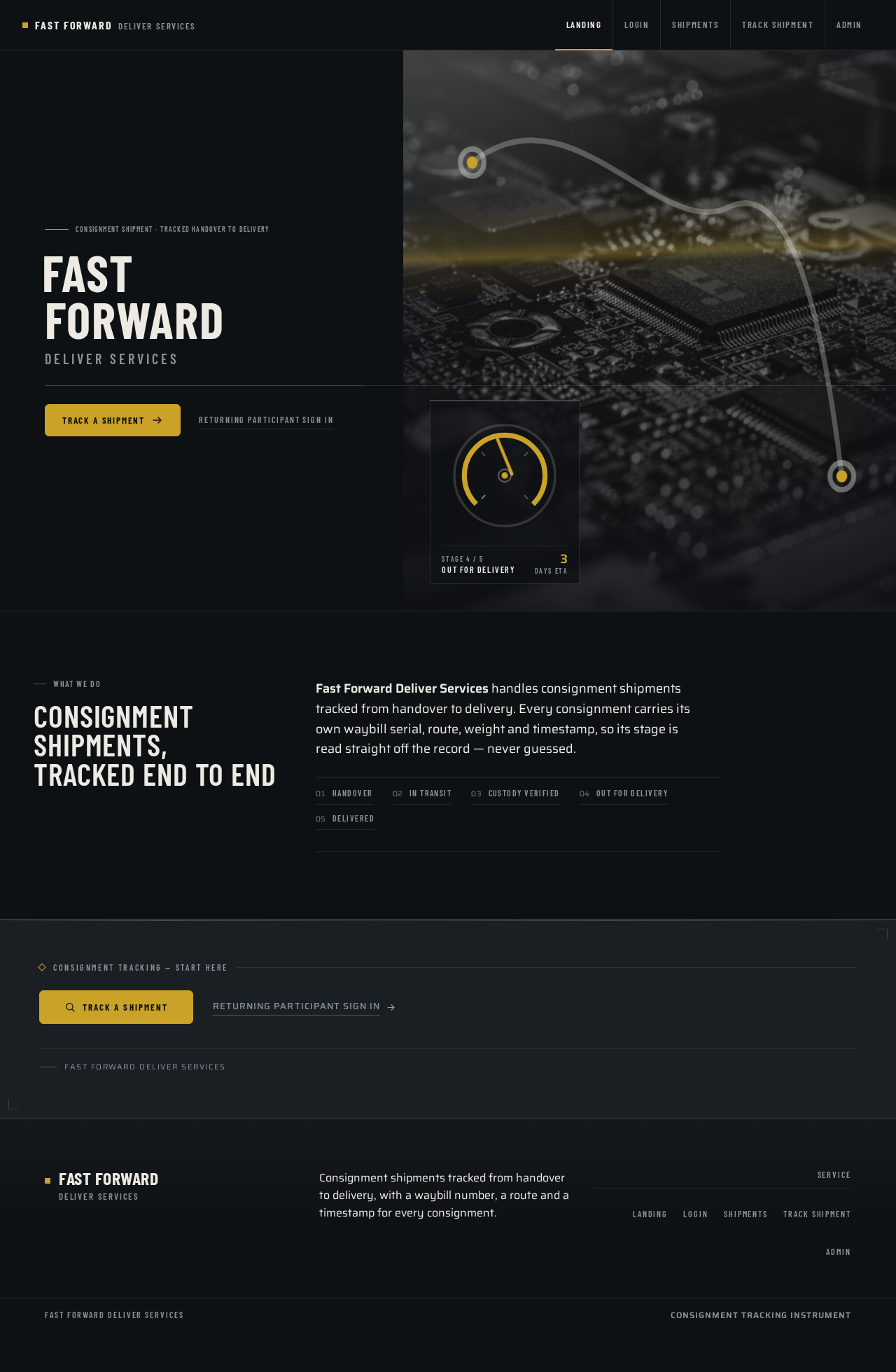
- Information and state. Anonymous public entry. Presents the service identity — the wordmark FAST FORWARD with the sub-line DELIVER SERVICES — and a plain statement of what the service does: consignment shipments, tracked from handover to delivery. No shipment data, no account data, and no participant-specific state is shown here.
- Primary action. A single amber CTA pill, Track a shipment, pinned beneath the wordmark, which carries an anonymous visitor toward the tracking surface and, when identity is required, into the identity surface.
- Supporting actions. A secondary text link into the identity surface for returning participants and for the administrator.
- Domain entities. Service identity only. No shipment, account or waybill entity is loaded on this page.
- Component responsibilities. Full-bleed hero: left 45% solid dark colour block carrying the oversized condensed wordmark and the CTA; right 55% edge-to-edge macro titanium imagery with a live circular status gauge overlaid at its lower-left corner showing an animated amber needle and a tabular ETA; a thin brushed-steel rule running the full viewport width at the wordmark's baseline; a thin topographic route line drawn across the image connecting origin and destination pins.
- States. Loading: the hero image and gauge render as a composed first frame; no spinner is shown over the wordmark. Empty: not applicable — the page has no collection. Success: the wordmark, sub-line, CTA and gauge are all fully legible and inside the viewport at 375px, 768px and 1280px. Error: if the hero image fails to load, the dark ground and the wordmark remain intact and the CTA stays operable. Recovery: the CTA remains the single path forward regardless of imagery state.
Login
- Information and state. Anonymous identity surface. Establishes a first-time account for a sender or recipient, and verifies a returning account for the administrator, senders and recipients. Shows the service wordmark in condensed uppercase and a short statement that an account is what keeps a shipment's record attached to its owner.
- Primary action. Submit credentials to establish or verify identity.
- Supporting actions. Switch between first-time establishment and returning verification; recover access when a returning participant cannot verify.
- Domain entities. Account (email identity, credential), session.
- Component responsibilities. Ruled form rows with 1px hairline dividers; inputs and the submit control take the 6px machined-control radius; labels set in condensed uppercase with tracked letter-spacing; error text placed on the ruled baseline beneath its field.
- States. Loading: the submit control shows a restrained in-progress state; the form stays readable. Empty: first-time establishment shows empty fields with no pre-filled identity. Success: on verification the participant is returned to the destination they were heading for — the tracking surface for senders and recipients, the shipment workspace or administration surface for the administrator. Error: invalid credentials, an unrecognized email, or a duplicate first-time registration each produce a specific, field-anchored message; the entered email is preserved so the participant does not retype it. Recovery: a returning participant who cannot verify can restart verification from the same surface without losing their place in the journey.
Shipments
- Information and state. Administrator-owned recurring workspace. Lists consignment shipments as ruled instrument rows: waybill number at the left, route at the centre, weight and dimensions in tabular numerals at the right, and a small circular status gauge at the far right. Each row carries the shipment's current stage — Picked up, In transit, Customs, Out for delivery, Delivered — with the stage label in condensed uppercase beneath the dial.
- Primary action. Create a new consignment shipment.
- Supporting actions. Open a shipment to edit its details; advance a shipment's stage; record a custody handoff; assign or correct the sender and recipient; read the full waybill and timestamp history for a shipment.
- Domain entities. Consignment shipment (waybill number, origin, destination, weight, dimensions, declared contents, current stage, estimated delivery, created timestamp), custody event (stage, timestamp, actor), sender account, recipient account.
- Component responsibilities. Ruled instrument row list on a 12-column ruled grid with a fixed 24px gutter; circular status gauge per row with an amber needle that sweeps to the current stage; tabular count-up numerals on reveal for waybill numbers, weights and ETAs, counting once and then holding still; a create control styled as a machined pusher; a persistent left rail (72px collapsed, 240px expanded) with icon plus condensed label navigation.
- States. Loading: ruled row placeholders hold the grid so the layout does not shift. Empty: when no consignments exist, the ruled grid is shown with a single explanatory row and the create control remains the prominent next step. Success: a newly created shipment appears as a ruled row with its gauge at the first stage and its waybill number counted up once. Error: a failed save or a failed stage advance leaves the row at its last confirmed state and surfaces a specific message on the row's baseline; the administrator can retry without re-entering data. Recovery: any partially entered shipment can be corrected and re-saved from the same row.
Track Shipment
- Information and state. Participant-facing tracking surface for senders and recipients. Shows one consignment shipment's current stage on a large circular gauge, its waybill number, origin and destination, weight and dimensions, the custody event history with timestamps, and the estimated delivery in tabular numerals.
- Primary action. Look up a shipment by its waybill number.
- Supporting actions. Read the full custody event history; read the current stage label in condensed uppercase; return to the lookup to check a different shipment.
- Domain entities. Consignment shipment, custody event, waybill number, estimated delivery.
- Component responsibilities. Large circular status gauge with an amber needle sweeping to the current stage; ruled data rows with 1px hairline dividers and tabular numerals; a topographic route line connecting origin and destination pins; a waybill lookup input taking the 6px machined-control radius.
- States. Loading: the gauge renders at its last known value while the record resolves; no layout shift. Empty: before a lookup, the surface shows the waybill input and an explanatory ruled row rather than a blank panel. Success: the gauge needle sweeps to the shipment's current stage over 600ms and the stage label, route, weight and ETA are all legible. Error: an unknown or malformed waybill number produces a specific message on the ruled baseline and keeps the entered value so it can be corrected. Recovery: the participant can immediately retry the lookup, and a participant who is not yet verified is carried into the identity surface and returned to this lookup afterwards.
Admin
- Information and state. Sole-admin administration surface. Shows the service account identity —
hellomcdonald8@gmail.comas the only administrator — and the service configuration for Fast Forward Deliver Services: service name, the stage vocabulary used by the status gauges, and the default units for weight and dimensions. - Primary action. Save service configuration changes.
- Supporting actions. Review the administrator identity; review the current stage vocabulary and default units.
- Domain entities. Service configuration (service name, stage vocabulary, default units), administrator account.
- Component responsibilities. Ruled configuration rows with 1px hairline dividers; condensed uppercase labels with tracked letter-spacing; inputs and the save control taking the 6px machined-control radius; the administrator identity presented as a read-only ruled row.
- States. Loading: ruled rows hold the grid while configuration resolves. Empty: not applicable — the service always has a name, a stage vocabulary and default units. Success: a saved change is confirmed on the ruled baseline and takes effect on the shipment workspace and tracking surface. Error: an invalid configuration value is rejected with a specific message on its own baseline and the previous value is retained. Recovery: the administrator can correct the value and re-save without leaving the surface.
3. Functional Requirements
Each requirement below is a distinct story point with its provenance, lifecycle facts and observable acceptance.
FR-1 — Service identity and public entry (explicit) As an anonymous visitor, I should reach a public entry for Fast Forward Deliver Services that names the service and explains that it handles consignment shipments tracked from handover to delivery, so that I understand what the service is before I identify myself.
- Trigger/input: an anonymous visit to the Landing page.
- Observable result: the wordmark FAST FORWARD with the sub-line DELIVER SERVICES, a plain statement of the consignment shipment service, and a single amber Track a shipment CTA are all fully legible and inside the viewport at 375px, 768px and 1280px.
- Access state: anonymous; no identity required.
- Failure/recovery: if hero imagery fails to load, the dark ground, wordmark and CTA remain intact and operable.
- Continuation: the CTA carries the visitor toward the tracking surface; a secondary link carries returning participants into the identity surface.
FR-2 — First-time identity establishment (required_inference) As a Consignment Sender or Consignment Recipient, I should be able to establish my own account on first use, so that my consignment shipment records stay attached to me and remain retrievable on a later visit.
- Trigger/input: submitting an email identity and credential on the Login page when no account exists for that email.
- Observable result: an account is created and the participant is returned to the destination they were heading for — the tracking surface for senders and recipients.
- Access state: anonymous entry into Login; the destination reached afterwards requires the established identity.
- Failure/recovery: a duplicate registration for an existing email is rejected with a specific, field-anchored message and the entered email is preserved.
- Continuation: the participant proceeds directly to looking up their shipment.
FR-3 — Returning verification for the sole administrator (required_inference)
As the Administrator, I should be able to verify my returning identity as hellomcdonald8@gmail.com, so that I regain control of the Fast Forward Deliver Services account and its shipment workspace.
- Trigger/input: submitting the administrator email and credential on the Login page.
- Observable result: the administrator session is established and the administrator reaches the shipment workspace and the administration surface.
- Access state: anonymous entry into Login; the shipment workspace and administration surface require the verified administrator identity.
- Failure/recovery: invalid credentials produce a specific message; the entered email is preserved so it need not be retyped.
- Continuation: the administrator proceeds to the shipment workspace or the administration surface.
FR-4 — Returning verification for senders and recipients (required_inference) As a Consignment Sender or Consignment Recipient with durable shipment records, I should be able to verify my returning identity, so that I can resume tracking the shipments that belong to me.
- Trigger/input: submitting my email and credential on the Login page.
- Observable result: my session is established and I reach the tracking surface with my shipment records available.
- Access state: anonymous entry into Login; the tracking surface requires the verified identity.
- Failure/recovery: invalid credentials produce a specific message and the entered email is preserved; a participant who cannot verify can restart verification from the same surface without losing their place.
- Continuation: the participant proceeds to look up a shipment.
FR-5 — Create a consignment shipment (explicit) As the Administrator, I should create a consignment shipment with its waybill number, origin, destination, weight, dimensions, declared contents, sender and recipient, so that the consignment exists as a tracked object in the service.
- Trigger/input: the create control on the Shipments page plus the shipment's details.
- Observable result: the shipment appears as a ruled instrument row with its waybill number, route, weight and dimensions in tabular numerals, and its status gauge at the first stage.
- Access state: requires the verified administrator identity.
- Failure/recovery: a failed save leaves the row at its last confirmed state with a specific message on the row's baseline; the administrator can retry without re-entering data.
- Continuation: the administrator can open the new shipment to edit it or advance its stage.
FR-6 — Manage the consignment shipment list (required_inference) As the Administrator, I should see all consignment shipments as ruled instrument rows with waybill number, route, weight and dimensions, and current stage, so that I can read the state of the operation at a glance.
- Trigger/input: opening the Shipments page.
- Observable result: each shipment renders as a ruled row with a small circular status gauge at the far right whose amber needle points at the current stage, and the stage label in condensed uppercase beneath the dial.
- Access state: requires the verified administrator identity.
- Failure/recovery: if the list cannot load, ruled row placeholders hold the grid and a specific message is shown; the administrator can retry.
- Continuation: the administrator opens any row to work on that shipment.
FR-7 — Edit consignment shipment details (required_inference) As the Administrator, I should edit a consignment shipment's details — including correcting its sender and recipient — so that the record stays accurate as the consignment is prepared.
- Trigger/input: opening a shipment row and changing one or more of its fields.
- Observable result: the ruled row reflects the corrected waybill number, route, weight, dimensions, declared contents, sender or recipient.
- Access state: requires the verified administrator identity.
- Failure/recovery: a rejected change leaves the previous value in place with a specific message on that field's baseline.
- Continuation: the administrator returns to the list or advances the shipment's stage.
FR-8 — Advance a shipment through its custody stages (required_inference) As the Administrator, I should advance a consignment shipment through its stages — Picked up, In transit, Customs, Out for delivery, Delivered — so that the shipment's progress reflects what has actually happened to the goods.
- Trigger/input: selecting the next stage for a shipment on the Shipments page.
- Observable result: the shipment's status gauge needle sweeps to the new stage over 600ms, the stage label updates in condensed uppercase, and a custody event with its timestamp is appended to the shipment's history.
- Access state: requires the verified administrator identity.
- Failure/recovery: a failed advance leaves the gauge at its last confirmed stage and surfaces a specific message; the administrator can retry.
- Continuation: the shipment's new stage is immediately visible to the sender and recipient on the tracking surface.
FR-9 — Record a custody handoff (required_inference) As the Administrator, I should record a custody handoff for a consignment shipment, so that the chain of custody is auditable from handover to delivery.
- Trigger/input: recording a handoff against a shipment on the Shipments page.
- Observable result: a custody event with its stage, timestamp and recording actor is appended to the shipment's ruled event history.
- Access state: requires the verified administrator identity.
- Failure/recovery: a failed handoff record is not appended and a specific message is shown; the administrator can retry.
- Continuation: the handoff appears in the history the sender and recipient read on the tracking surface.
FR-10 — Look up a shipment by waybill number (required_inference) As a Consignment Sender or Consignment Recipient, I should look up a consignment shipment by its waybill number, so that I can see the state of the goods I handed over or am expecting.
- Trigger/input: entering a waybill number on the Track Shipment page.
- Observable result: the shipment's current stage, waybill number, origin and destination, weight and dimensions, custody event history with timestamps, and estimated delivery in tabular numerals are shown.
- Access state: requires a verified identity; an unverified participant is carried into the identity surface and returned to this lookup afterwards.
- Failure/recovery: an unknown or malformed waybill number produces a specific message on the ruled baseline and keeps the entered value so it can be corrected.
- Continuation: the participant can immediately retry the lookup or check a different shipment.
FR-11 — Read a shipment's live status on a gauge (required_inference) As a Consignment Sender or Consignment Recipient, I should read my shipment's current stage on a circular status gauge with its stage label and estimated delivery, so that I get certainty at a glance rather than reading a log.
- Trigger/input: a resolved shipment record on the Track Shipment page.
- Observable result: the large circular gauge's amber needle sweeps to the current stage over 600ms, the stage label reads in condensed uppercase, and the ETA is set in tabular numerals.
- Access state: requires a verified identity.
- Failure/recovery: if the record cannot resolve, the gauge renders at its last known value and a specific message is shown; the participant can retry the lookup.
- Continuation: the participant reads the custody history beneath the gauge for detail.
FR-12 — Read the custody event history (required_inference) As a Consignment Sender or Consignment Recipient, I should read my shipment's custody event history with timestamps, so that I can see when each stage was reached and trust the chain of custody.
- Trigger/input: a resolved shipment record on the Track Shipment page.
- Observable result: ruled data rows with 1px hairline dividers list each custody event's stage and timestamp in tabular numerals.
- Access state: requires a verified identity.
- Failure/recovery: if the history cannot load, the gauge and route remain readable and a specific message is shown; the participant can retry.
- Continuation: the participant returns to the lookup to check another shipment.
FR-13 — Sole-admin administration of the service (explicit) As the Administrator, I should administer the Fast Forward Deliver Services account and service configuration as its only administrator, so that the service is set up and run from start to finish under my control.
- Trigger/input: opening the Admin page.
- Observable result: the administrator identity
hellomcdonald8@gmail.comis shown as the only administrator, alongside the service name, the stage vocabulary used by the status gauges, and the default units for weight and dimensions. - Access state: requires the verified administrator identity; no other participant can reach this surface.
- Failure/recovery: an invalid configuration value is rejected with a specific message on its own baseline and the previous value is retained.
- Continuation: saved configuration takes effect on the shipment workspace and the tracking surface.
FR-14 — Enforce the single-administrator constraint (explicit)
As the service, I should enforce that hellomcdonald8@gmail.com is the only administrator, so that no other account can hold administrative control over Fast Forward Deliver Services.
- Trigger/input: any attempt to reach the shipment workspace or the administration surface, or any attempt to register an administrative account.
- Observable result: only the verified
hellomcdonald8@gmail.comidentity reaches the shipment workspace and the administration surface; senders and recipients reach only the tracking surface and their own shipment records. - Access state: enforced at the access boundary of the role-restricted surfaces.
- Failure/recovery: a non-administrator attempt is refused and the participant is returned to a surface their identity permits.
- Continuation: the refused participant can still track their own shipments.
FR-15 — Durable shipment records (required_inference) As the service, I should persist consignment shipments, their custody events and their participant bindings durably, so that a sender or recipient who returns later sees the same record and the same history.
- Trigger/input: any shipment creation, edit, stage advance or handoff record.
- Observable result: the shipment and its full custody history are retrievable on a later visit by the administrator, the bound sender and the bound recipient.
- Access state: retrieval requires the verified identity bound to the record.
- Failure/recovery: a write that does not complete leaves the record at its last confirmed state and surfaces a specific message to the acting participant.
- Continuation: the acting participant can retry the operation.
4. User Personas
Administrator
Product context. The Administrator is the sole operator of Fast Forward Deliver Services, identified by hellomcdonald8@gmail.com. This role is singular by explicit constraint: there is exactly one administrator, and no other account can hold administrative control. The Administrator is the person who sets the service up and runs it from start to finish.
Primary goal. To run a consignment shipment operation end to end — registering consignments, issuing waybills, moving goods through the custody chain, and keeping the service's own configuration correct — with the confidence that the record matches reality.
Distinct accepted responsibilities. The Administrator is the only actor who creates consignment shipments (FR-5), the only actor who edits shipment details and corrects sender or recipient bindings (FR-7), the only actor who advances a shipment's stage (FR-8), the only actor who records custody handoffs (FR-9), and the only actor who administers the service account and configuration (FR-13). This is what separates the role from the other two: senders and recipients read shipment state, but they never author it.
Relevant inputs and decisions. Waybill numbers, origins and destinations, weights and dimensions, declared contents, and the sender and recipient each consignment is bound to. The Administrator decides when a shipment has genuinely moved to its next stage, and decides the service's stage vocabulary and default units.
Interactions with other accepted participants. The Administrator's stage advances and handoff records are precisely what the Consignment Sender and Consignment Recipient read on the tracking surface. The Administrator does not act on a sender's or recipient's behalf, and does not see or manage their credentials.
Observable success. The shipment list reads as a clean instrument panel — every row's gauge pointing at a stage that matches what actually happened — and the sender and recipient see the same truth when they look up their waybill.
Consignment Sender
Product context. The Consignment Sender is a customer who hands goods over to Fast Forward Deliver Services for consignment shipment. They are not an operator; they are the party who gave something up and needs to know it arrived.
Primary goal. To hand over goods for consignment shipment and then confirm, without chasing anyone, that those goods reached the recipient.
Distinct accepted responsibilities. The Sender establishes their own account on first use (FR-2), verifies their returning identity (FR-4), looks up their shipment by waybill number (FR-10), reads its live stage on the status gauge (FR-11), and reads the custody event history with timestamps (FR-12). The Sender's work is read-and-confirm: they consume the record the Administrator authors.
Relevant inputs and decisions. The waybill number for their consignment, and their own email identity and credential. Their decision is whether the record gives them enough certainty to stop worrying about the shipment.
Interactions with other accepted participants. The Sender depends on the Administrator's stage advances and handoff records for everything they see. The Sender and the Consignment Recipient read the same shipment record from opposite ends of the route; neither can alter it.
Observable success. The gauge reads Delivered with a timestamped custody history beneath it, and the Sender can see the whole chain from handover to delivery in one view.
Consignment Recipient
Product context. The Consignment Recipient is the party the consigned goods are addressed to. They did not initiate the shipment and they do not hold the commercial relationship with the sender, but they are materially affected by it: goods are arriving, and they need to know when.
Primary goal. To know where the consignment addressed to them currently is and when it will arrive, so they can be ready to receive it.
Distinct accepted responsibilities. The Recipient establishes their own account on first use (FR-2), verifies their returning identity (FR-4), looks up the shipment addressed to them by waybill number (FR-10), reads its live stage and estimated delivery on the status gauge (FR-11), and reads the custody event history to see when each stage was reached (FR-12). The Recipient's work is anticipation-and-receipt: they need the ETA and the delivery confirmation, not the operational detail of how the goods were prepared.
Relevant inputs and decisions. The waybill number for the consignment addressed to them, and their own email identity and credential. Their decision is whether to be available to receive the goods on the indicated day.
Interactions with other accepted participants. The Recipient reads the same record the Sender reads and the Administrator authors. The Recipient's binding to the shipment is what makes the record retrievable by them on a later visit rather than only by the Sender.
Observable success. The gauge reads Out for delivery or Delivered with a tabular ETA or delivery timestamp, and the Recipient can confirm the goods reached them.
5. Core User Flows
Flow A — The Administrator sets up and runs the service (Administrator)
- The Administrator arrives at the Landing page anonymously and reads the service identity: the FAST FORWARD wordmark, the DELIVER SERVICES sub-line, and the statement that consignment shipments are tracked from handover to delivery.
- The Administrator follows the secondary link into the Login page.
- On Login, the Administrator submits
hellomcdonald8@gmail.comand their credential to verify their returning identity (FR-3). - On successful verification, the Administrator is returned to the destination they were heading for and reaches the Shipments workspace and the Admin surface.
- The Administrator opens Admin and reviews the service configuration: the service name, the stage vocabulary used by the status gauges, and the default units for weight and dimensions. They adjust a value and save it (FR-13). The saved change is confirmed on the ruled baseline and takes effect on the shipment workspace and tracking surface.
- The Administrator moves to Shipments and uses the create control to register a consignment shipment, entering its waybill number, origin, destination, weight, dimensions, declared contents, and the sender and recipient it is bound to (FR-5).
- The new shipment appears as a ruled instrument row: waybill number at the left, route at the centre, weight and dimensions in tabular numerals at the right, and a small circular status gauge at the far right with its needle at Picked up and the stage label in condensed uppercase beneath the dial (FR-6).
- As the goods move, the Administrator advances the shipment's stage — Picked up → In transit → Customs → Out for delivery → Delivered (FR-8). On each advance the gauge needle sweeps to the new stage over 600ms and a custody event with its timestamp is appended to the shipment's history.
- At each physical handover, the Administrator records a custody handoff against the shipment (FR-9), appending a timestamped event to the ruled event history.
- If a shipment's details need correcting — a mistyped weight, the wrong recipient — the Administrator opens the row and edits it (FR-7). A rejected change leaves the previous value in place with a specific message on that field's baseline, and the Administrator corrects and re-saves.
- Failure and recovery. If a save or a stage advance fails, the row stays at its last confirmed state with a specific message on its baseline; the Administrator retries without re-entering data. If the shipment list itself cannot load, ruled row placeholders hold the grid and the Administrator retries.
- Continuation. Every stage advance and handoff the Administrator records becomes immediately visible to the bound sender and recipient on the tracking surface. The Administrator's recurring work is this loop: create, advance, hand off, correct.
Flow B — The Consignment Sender hands over goods and confirms delivery (Consignment Sender)
- The Sender hands goods over to Fast Forward Deliver Services and receives a waybill number for the consignment.
- The Sender arrives at the Landing page anonymously and reads what the service does.
- The Sender follows the amber Track a shipment CTA toward the Track Shipment surface.
- Because the tracking surface requires an established identity, the Sender is carried into the Login page. On first use, the Sender establishes their own account with their email identity and a credential (FR-2); the account is created and the Sender is returned to the lookup they were heading for.
- On Track Shipment, the Sender enters the waybill number (FR-10).
- The shipment resolves: the large circular gauge's amber needle sweeps to the current stage over 600ms, the stage label reads in condensed uppercase, and the waybill number, origin and destination, weight and dimensions, and estimated delivery are set in tabular numerals (FR-11).
- The Sender reads the custody event history beneath the gauge — ruled data rows with 1px hairline dividers listing each stage and its timestamp (FR-12) — and sees the chain from handover onward.
- Failure and recovery. If the Sender mistypes the waybill number, a specific message appears on the ruled baseline and the entered value is preserved so it can be corrected; the Sender retries immediately. If the record cannot resolve, the gauge renders at its last known value and the Sender retries the lookup.
- Continuation. The Sender returns later — on a new visit they verify their returning identity (FR-4) and resume tracking the same shipment. When the Administrator advances the shipment to Delivered, the Sender's gauge reads Delivered with the delivery timestamp in the custody history, and the Sender has their confirmation.
Flow C — The Consignment Recipient anticipates and confirms receipt (Consignment Recipient)
- The Recipient learns that a consignment is addressed to them and obtains its waybill number.
- The Recipient arrives at the Landing page anonymously and reads what the service does.
- The Recipient follows the amber Track a shipment CTA toward the Track Shipment surface.
- Because the tracking surface requires an established identity, the Recipient is carried into the Login page. On first use, the Recipient establishes their own account with their email identity and a credential (FR-2); the account is created and the Recipient is returned to the lookup they were heading for.
- On Track Shipment, the Recipient enters the waybill number (FR-10).
- The shipment resolves: the gauge needle sweeps to the current stage, and the Recipient reads the stage label, the route, and the estimated delivery in tabular numerals (FR-11).
- The Recipient reads the custody event history to see when each stage was reached (FR-12), and uses the ETA to decide whether to be available to receive the goods.
- Failure and recovery. An unknown or malformed waybill number produces a specific message on the ruled baseline with the entered value preserved; the Recipient corrects it and retries. If the record cannot resolve, the gauge holds its last known value and the Recipient retries.
- Continuation. The Recipient returns later — on a new visit they verify their returning identity (FR-4) and resume tracking the same shipment. When the shipment reaches Out for delivery the Recipient sees the stage and ETA; when it reaches Delivered the gauge reads Delivered with the delivery timestamp, and the Recipient has confirmed receipt.
6. Visuals Colors and Theme
The creative direction is authoritative for this section. The muse is MARQ by Garmin — precision-luxury instrument aesthetics — and the headline read is instrument-grade logistics: titanium darkness, amber signal, dial-driven tracking.
Colour tokens (dark mode)
| Role | Token | Value |
|---|---|---|
| Background / titanium graphite ground | --bg | #0E1114 |
| Raised panel surface | --surface | #1A1F24 |
| Body text (warm off-white) | --text | #EDEAE4 |
| Primary — instrument amber-gold | --primary | #C9A227 |
| Accent — delivered / verified teal | --accent | #2FB6A6 |
| Muted — labels, units, metadata | --muted | #8A9299 |
| Hairline brushed-steel border | --hairline | rgba(237,234,228,0.12) |
| Ruled baseline divider | --rule | rgba(237,234,228,0.10) |
Proportion. 70% dark ground, 20% surface panels, 6% text, 4% amber, 2% teal. Amber is reserved for the live/active state, the currently selected shipment, CTA fills, and the needle of the status gauge. Teal marks delivered/verified states and secondary data traces. Muted carries labels, units and metadata.
Typography
- Headings: Barlow Condensed — condensed technical sans, uppercase for section heads and data labels, weight 600–700, tracking
+0.02em, tight leading0.92for the oversized hero wordmark. - Body: Saira.
- Numerals: always tabular and set in Saira with monospace-style alignment, so waybill numbers, weights and timestamps stack as ruled columns.
- Scale: 1.25 modular with a display step.
- display:
clamp(56px, 9vw, 144px)(56px mobile → 96px tablet → 144px desktop) - h1: 40 / 56 / 72
- h2: 28 / 36 / 44
- h3: 20 / 24 / 28
- body: 16 / 17 / 18
- label: 12 / 12 / 13, uppercase, tracked
- data: 14 / 16 / 18, tabular
- display:
Shape language
Circular gauge bezels and ruled data rows. Panels are square-cornered with a 2px top edge in brushed-steel hairline. Only controls — buttons, inputs, status pills — take a 6px radius, like machined watch pushers. Every data block sits on a ruled baseline grid with 1px dividers at rgba(237,234,228,0.10). Progress is expressed as an arc, never a rounded bar.
Layout
Dark instrument console. A persistent left rail (72px collapsed, 240px expanded) carries icon plus condensed label navigation. Main content is a 12-column ruled grid with a fixed 24px gutter. Shipment rows are ruled instrument rows: waybill number left, route centre, weight and dimensions tabular right, status as a small circular gauge at the far right. The hero is edge-to-edge with a full-bleed dark macro image on the right 55% and the oversized wordmark bleeding off the left edge. At 768px the rail collapses to a top bar and the grid falls to 6 columns; at 375px everything is single-column with the gauge moved above the data rows.
Imagery
Macro photography of dark titanium surfaces, brushed metal, machined bezels and topographic route lines; expedition-grade documentary photography of freight, crates, pallets and handovers treated in graphite duotone with a single amber highlight. No stock smiling people, no flat clip art, no glassmorphism blobs. Icons are 1.5px stroke technical pictograms (parcel, waybill, handoff, route) drawn on a 24px grid.
Readability guarantee
Headlines, wordmarks, labels, numbers, card text and controls stay entirely inside the viewport and their container at 375px, 768px and 1280px, wrapping or scaling to fit, with no other element covering any part of them. Imagery, decoration and motion may be cropped, bled off an edge, rotated, overlapped or cut exactly as the direction asks, as long as they cover no readable text or control. The wordmark's bleed off the left viewport edge is carried by the colour block and the crop, never by clipping the letterforms out of legibility.
7. Signature Design Concept
The Instrument Panel Entry. The public entry is not a centred SaaS stack; it is a machined case edge presented as a working instrument.
The viewport is split. The left 45% is a solid #0E1114 colour block carrying the wordmark FAST FORWARD set in Barlow Condensed 700 at clamp(56px, 9vw, 144px), uppercase, tracking +0.02em, with DELIVER SERVICES as a condensed sub-line beneath it. A single amber CTA pill — Track a shipment — is pinned under the type. The right 55% is an edge-to-edge macro image of a machined titanium case edge lit from the top-left, with a live circular status gauge overlaid on its lower-left corner: an animated amber needle and a tabular ETA. A thin brushed-steel rule runs the full viewport width at the wordmark's baseline, and the wordmark's final letter is allowed to bleed off the left viewport edge as a deliberate crop — the gesture is carried by the colour block and the crop, while the letterforms themselves stay whole and legible.
The gauge is the concept's argument: the product's defining state — a shipment at a stage on a route — is shown as an instrument reading before the visitor has read a single word of explanation. The topographic route line drawn across the image connects origin and destination pins, so the hero states the product's whole thesis in one frame: a tracked object, a route, a stage, a time.
No centred headline, no subtext paragraph, no blue button, no gradient blob.
8. Interaction Model & Motion Direction
Interaction Model: Animated Motion Tempo: cinematic Hero Dimensionality: dimensional_css
Landing Hero Motion Brief
- Focal subject. The machined titanium case edge in the right 55% of the hero, with the live circular status gauge overlaid at its lower-left corner.
- Input → transformation → outcome thesis. As the hero enters the viewport, the macro titanium image begins a slow 20s turntable and the topographic route line draws across it connecting origin and destination pins; the gauge's amber needle sweeps to the current stage and the tabular ETA counts up once and holds. The visitor's outcome is a single composed frame that reads as a live instrument — a shipment at a stage on a route — before any copy is read.
- Motion vocabulary. Needle sweeps on status gauges when a shipment advances (600ms,
cubic-bezier(0.22,1,0.36,1)); numbers count up on reveal once, no repeat; slow 20s product turntable on the hero macro image; scroll-linked subtle parallax between hero image and wordmark, maximum 24px. No bounce, no particles, no gradient drift. - Composed first frame. The wordmark and sub-line are already fully set on the solid dark block, the CTA is already pinned beneath them, the brushed-steel rule already runs the full viewport width at the wordmark's baseline, and the gauge already reads a stage with its ETA — the motion adds the sweep and the count-up, it does not assemble the layout.
- Reduced-motion state. Gauges render at their final value, counters show their final numbers, parallax is disabled, and the turntable is replaced by a static still. The hero remains a complete, legible instrument frame with the wordmark, sub-line, CTA, rule and gauge all in place.
9. Non-Functional Requirements
NFR-1 — Durable state (explicit — Planning Scope durable_state_required)
Consignment shipments, their custody events, their participant bindings, accounts and service configuration must persist across sessions and restarts. Rationale: accepted behavior produces durable, participant-bound records that a sender or recipient must be able to retrieve on a later visit.
NFR-2 — Single-administrator enforcement (explicit)
The service must enforce that hellomcdonald8@gmail.com is the only administrator. No other account may hold administrative control, and no administrative account may be registered. Rationale: explicit hard constraint in the authoritative user evidence.
NFR-3 — Access boundary integrity (required_inference) The Landing and Login surfaces must be reachable anonymously. The Shipments and Admin surfaces must be reachable only by the verified administrator identity. The Track Shipment surface must be reachable only by a verified identity. Rationale: the accepted journeys require an anonymous entry and identity-bound retrieval of durable records.
NFR-4 — Readability at every viewport (explicit — creative direction) Headlines, wordmarks, labels, numbers, card text and controls must stay entirely inside the viewport and their container at 375px, 768px and 1280px, wrapping or scaling to fit, with no other element covering any part of them. Rationale: explicit readability guarantee in the creative direction.
NFR-5 — Reduced-motion support (explicit — creative direction)
Under prefers-reduced-motion, gauges must render at their final value, counters must show final numbers, parallax must be disabled, and the hero turntable must be replaced by a static still. Rationale: explicit reduced-motion requirement in the creative direction.
NFR-6 — Motion performance (required_inference) Gauge needle sweeps, count-up numerals and the hero turntable must not block interaction with the CTA, the waybill lookup or the shipment rows. Rationale: the accepted journeys require the CTA and the lookup to remain operable while hero motion runs.
NFR-7 — Tabular numeral integrity (explicit — creative direction) Waybill numbers, weights, dimensions, ETAs and timestamps must render in tabular numerals so they stack as ruled columns. Rationale: explicit typographic requirement in the creative direction.
NFR-8 — Progress as arc (explicit — creative direction) Shipment progress must be expressed as an arc or a ruled scale, never as a rounded bar. Rationale: explicit shape-language requirement in the creative direction.
10. Tech Stack
No technology choices were specified by the user. The following are coherent defaults for the accepted scope, labeled as such.
- Frontend: React with a component-based single-page application structure.
[Default — not specified by user] - Backend: Python with FastAPI, serving the shipment, custody, identity and configuration APIs from one shared backend process.
[Default — not specified by user] - Storage: A relational database for accounts, consignment shipments, custody events and service configuration, with durable persistence across restarts.
[Default — not specified by user] - Containerization: Docker with
docker-compose.ymlas the inventory of runnable services — one frontend service and one backend service, with the database as its own service.[Default — not specified by user] - Orchestration: Kubernetes is not required for this scope.
[Default — not specified by user]
The backend is extended with routes and modules for the shipment, custody, identity and configuration domains rather than split into separate services; no independent queue worker or additional ingress route is needed for the accepted workflows.
11. Assumptions and Constraints
Constraints (binding).
hellomcdonald8@gmail.commust be the only admin of the service. This is an explicit hard constraint and is not negotiable within the current scope.- The service is named Fast Forward Deliver Services.
- The service must be built from start to finish — the full accepted lifecycle is current, not partial.
- The creative direction is authoritative for visuals, typography, shape language, layout, imagery and motion. The generic indigo/blue-on-white SaaS template is forbidden for this project.
- Readable text and controls stay whole at every viewport; the wordmark's edge bleed is carried by imagery and decoration, never by clipping legible letterforms.
Assumptions (narrow, labeled).
- Assumption 1. Senders and recipients reach the service by waybill number and their own email identity. The authoritative thread does not specify how a participant first learns their waybill number; this document assumes it is provided outside the application, at handover or by the sender.
[Default — not specified by user] - Assumption 2. The stage vocabulary — Picked up, In transit, Customs, Out for delivery, Delivered — is the service's default custody chain, editable by the sole administrator on the Admin surface.
[Default — not specified by user] - Assumption 3. Weight and dimension units default to a single service-wide setting chosen by the administrator.
[Default — not specified by user] - Assumption 4. Identity is application-owned because accepted behavior produces durable, participant-bound shipment records that must remain retrievable by the correct participant on a later visit.
[required_inference] - Assumption 5. No carrier API integration, payment processing, multi-admin hierarchy, warehouse or fleet management, or customer support tooling is part of the current scope. These were not accepted in the authoritative thread.
Future horizon. No future-horizon requirements were accepted. Nothing in this document is deferred; everything described is current.
12. Glossary
- Consignment shipment — A tracked consignment of goods moving from an origin to a destination under Fast Forward Deliver Services, identified by a waybill number and carrying a route, weight, dimensions, declared contents, a bound sender and a bound recipient.
- Waybill number — The serial identifier for a consignment shipment, used by the administrator to manage it and by senders and recipients to look it up.
- Custody event — A timestamped record of a shipment reaching a stage or being handed over, appended to the shipment's history and readable by the bound sender and recipient.
- Custody stage — One of the shipment's progress states: Picked up, In transit, Customs, Out for delivery, Delivered.
- Status gauge — The circular dial component that expresses a shipment's current stage as an arc with an amber needle and a condensed uppercase stage label. Progress is always an arc, never a rounded bar.
- Ruled instrument row — A shipment or data row set in tabular numerals on a ruled baseline grid with 1px hairline dividers, reading like a flight instrument readout rather than a card.
- Administrator — The sole operator of Fast Forward Deliver Services, identified by
hellomcdonald8@gmail.com. Singular by explicit constraint. - Consignment Sender — The participant who hands goods over for consignment shipment and tracks them to delivery.
- Consignment Recipient — The participant the consigned goods are addressed to, who tracks the shipment and confirms receipt.
- Service configuration — The service name, stage vocabulary and default units administered by the sole administrator on the Admin surface.
Consignment shipment · tracked handover to delivery
FASTFORWARD
Deliver Services
What we do
Consignment shipments,
tracked end to end
Fast Forward Deliver Services handles consignment shipments tracked from handover to delivery. Every consignment carries its own waybill serial, route, weight and timestamp, so its stage is read straight off the record — never guessed.
- 01Handover
- 02In transit
- 03Custody verified
- 04Out for delivery
- 05Delivered
Consignment tracking — start here
Fast Forward Deliver Services
Consignment shipment · tracked handover to delivery
FASTFORWARD
Deliver ServicesWhat we do
Consignment shipments,
tracked end to end
Fast Forward Deliver Services handles consignment shipments tracked from handover to delivery. Every consignment carries its own waybill serial, route, weight and timestamp, so its stage is read straight off the record — never guessed.
- 01Handover
- 02In transit
- 03Custody verified
- 04Out for delivery
- 05Delivered
Consignment tracking — start here
Fast Forward Deliver Services
No comments yet. Be the first!