college-placement

byKhushi Shah

Build a college placement management system with student registration and login, company listings, job search, application tracking, student dashboard, admin dashboard, application status updates, search and filters, responsive React frontend, REST APIs and database integration.

Company Listings
Company Listings

Comments (0)

No comments yet. Be the first!

System Requirements

System Requirement Document
Page 1 of 8

College Placement Management System

1. Introduction

The College Placement Management System is designed to facilitate the process of student registration, job searching, application tracking, and management of placement activities within a college setting. This system aims to streamline the interaction between students and potential employers, providing a seamless experience for both parties.

2. System Overview

2a. Product Interpretation and Delivery Boundary

The College Placement Management System will include the following components:

  • Student Registration and Login: Allows students to create accounts and access the system.
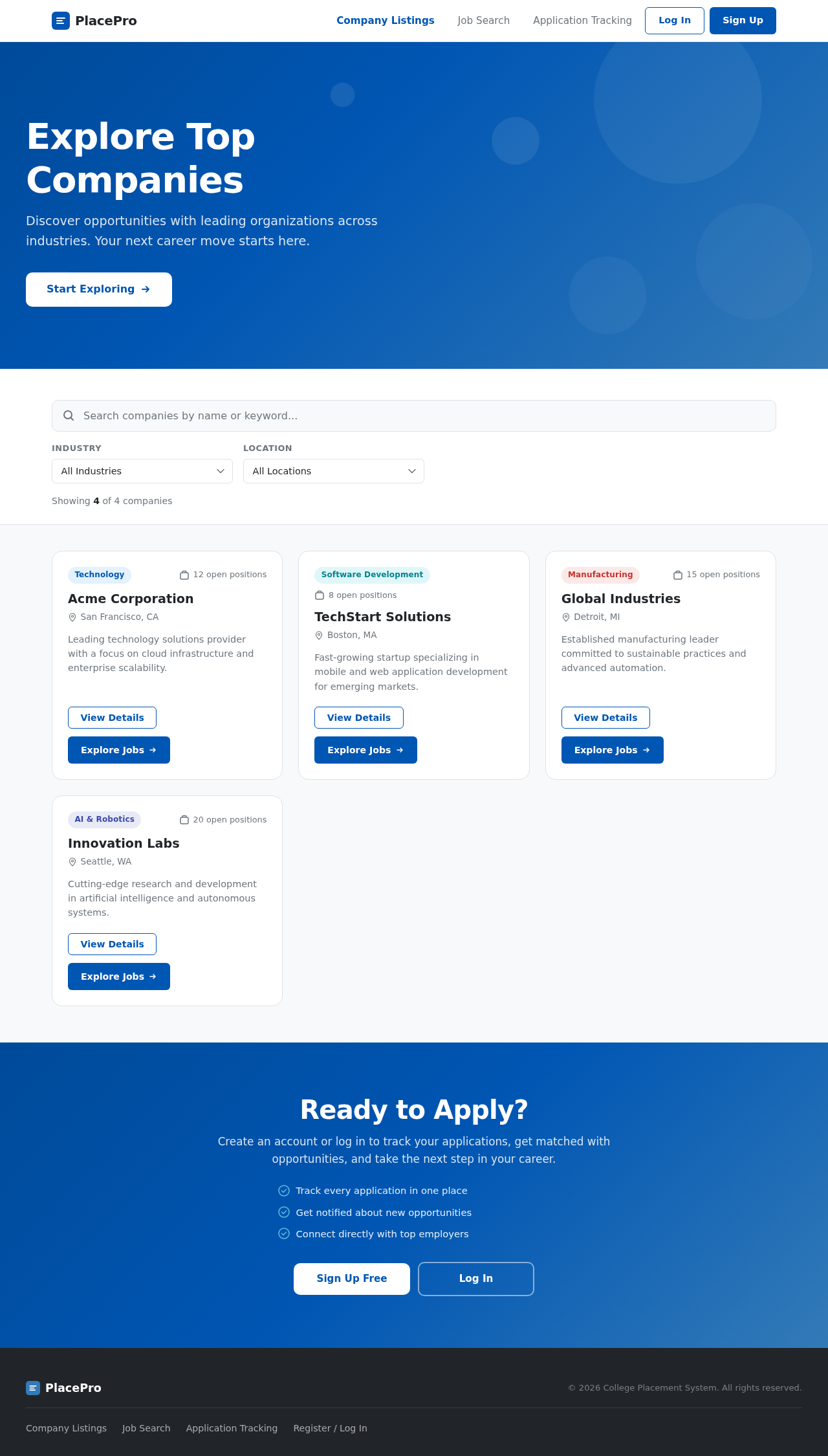
  • Company Listings: Displays available companies for students to explore.
  • Job Search: Enables students to search for job opportunities.
  • Application Tracking: Allows students to track their job applications.
  • Student Dashboard: Provides students with a personalized interface to manage their activities.
  • Admin Dashboard: Allows administrators to oversee and manage the system's operations.

Excluded assumptions include generic e-commerce features and unrelated enterprise modules.

Access is application-owned, with a focus on providing a responsive React frontend, REST APIs, and database integration.

Page 2 of 8

Accepted Page Manifest (ordered)

  1. Company Listings — provenance explicit; semantic role public_entry_surface; horizon current.
  2. Job Search — provenance explicit; semantic role public_entry_surface; horizon current.
  3. Application Tracking — provenance explicit; semantic role unspecified; horizon current.
  4. Student Registration and Login — provenance required_inference; semantic role identity_access_surface; horizon current.
  5. Admin Dashboard — provenance required_inference; semantic role unspecified; horizon current.

Accepted Persona Manifest

  • Student — provenance required_inference; horizon current; rationale: Primary user interacting with the system for job placement.
  • Admin — provenance required_inference; horizon current; rationale: User managing the system and overseeing operations.
Page 3 of 8

Accepted Behavior Contracts

behavior-e100811f5f6259a4 — Student Registration
  • Actor: Student
  • Trigger: Student initiates registration
  • Inputs: Student details
  • Observable outcomes: Student account created
  • Persisted state changes: Student account.
  • State lifetime: durable
  • Identity continuity: persistent
  • Audience entry: public
  • Owning surfaces/processes: Student Registration and Login (custom_page, application access).
  • Access owner/state: application
  • Human touchpoints: Registration form.
  • Material failure/manual-review outcome: Registration failed.
behavior-908b89ec5fc1af95 — Student Login
  • Actor: Student
  • Trigger: Student submits login credentials
  • Inputs: Username; Password
  • Observable outcomes: Access to student dashboard
  • Persisted state changes: No persisted state change.
  • State lifetime: none
  • Identity continuity: persistent
  • Audience entry: public
  • Owning surfaces/processes: Student Registration and Login (custom_page, application access).
  • Access owner/state: application
  • Human touchpoints: Login page.
  • Material failure/manual-review outcome: Login failed.
behavior-a535874a6e6206d8 — Admin Oversees Student Registration and Login
  • Actor: Admin
  • Trigger: Admin reviews or audits student registration and login activity
  • Inputs: Student registration records; Login activity logs
  • Observable outcomes: Visibility into student account creation and access patterns
  • Persisted state changes: No persisted state change.
  • State lifetime: none
  • Identity continuity: none
  • Audience entry: internal
  • Owning surfaces/processes: Admin Dashboard (custom_page, application access).
  • Access owner/state: application
  • Human touchpoints: Admin dashboard.
  • Material failure/manual-review outcome: No access to registration or login records.
Page 4 of 8

2b. Source Content Inventory

No explicit content_source was provided; therefore, no content inventory is included.

2c. Page Content and Component Coverage

  • Student Registration and Login Page:

    • Registration form for new students.
    • Login form for existing students.
    • Error handling for failed registration or login attempts.
  • Company Listings Page:

    • List of companies with search and filter options.
    • Company details view.
  • Job Search Page:

    • Search bar for job opportunities.
    • Filters for job type, location, and other criteria.
    • Job details view.
  • Application Tracking Page:

    • List of applications with status updates.
    • Detailed view of each application.
  • Student Dashboard:

    • Overview of student activities.
    • Quick access to job search and application tracking.
  • Admin Dashboard:

    • Overview of student registrations and login activities.
    • Tools for managing and auditing system operations.
Page 5 of 8

3. Functional Requirements as Story Points

  • As a Student, I should be able to register for an account to access the system. explicit
  • As a Student, I should be able to log in to access my dashboard. required_inference
  • As a Student, I should be able to view a list of companies available for placement opportunities. explicit
  • As a Student, I should be able to search for job opportunities using various filters. explicit
  • As a Student, I should be able to track the status of my job applications. explicit
  • As an Admin, I should be able to oversee student registration and login activities. required_inference
  • As an Admin, I should be able to manage the system's operations and audit activities. required_inference

4. User Personas

  • Student: The primary user interacting with the system for job placement.
  • Admin: The user managing the system and overseeing operations.

5. Core User Flows

Page 6 of 8

Student Flow

  1. Registration/Login:

    • Access the registration/login page.
    • Register or log in to the system.
  2. Explore Companies:

    • Navigate to the company listings page.
    • Use search and filters to find companies of interest.
  3. Search for Jobs:

    • Access the job search page.
    • Use filters to refine job searches.
  4. Track Applications:

    • Navigate to the application tracking page.
    • View and manage application statuses.

Admin Flow

  1. Login:

    • Access the admin dashboard.
    • Log in to manage system operations.
  2. Manage Registrations:

    • Review student registration records.
    • Audit login activities.
Page 7 of 8

6. Visuals Colors and Theme

  • Primary: #0056b3
  • Primary Light: #337ab7
  • Secondary: #f7f7f7
  • Accent: #d9534f
  • Highlight: #5bc0de
  • Background: #ffffff
  • Surface: #f8f9fa
  • Text: #212529
  • Text Muted: #6c757d
  • Border: #dee2e6

7. Signature Design Concept

The design will focus on a clean, modern interface that emphasizes ease of use and accessibility. The student dashboard will feature a prominent navigation bar with quick links to key functionalities such as job search and application tracking. The admin dashboard will provide a comprehensive view of system activities with tools for managing and auditing operations.

8. Interaction Model & Motion Direction

The interaction model will be animated, featuring moderate scroll-triggered reveals and hover transitions to enhance user engagement. The design will prioritize clarity and ease of navigation, ensuring that users can efficiently access the information and tools they need.

Page 8 of 8

9. Non-Functional Requirements

  • Responsive Design: The system must be accessible on various devices and screen sizes. explicit
  • Security: Secure access control for student and admin functionalities. required_inference

10. Tech Stack

  • Frontend: React for Web
  • Backend: Python, FastAPI
  • Database: MySQL or MariaDB, using Alembic for migrations

11. Assumptions and Constraints

  • The system will not include unrelated enterprise modules or generic e-commerce features.
  • The system will require authentication for access to student and admin functionalities.

12. Glossary

  • Student: A user who registers and logs in to the system to search for job opportunities.
  • Admin: A user who manages and oversees the system's operations.
  • Responsive Design: A design approach that ensures the system is usable on various devices and screen sizes.
  • REST API: An architectural style for designing networked applications, allowing for interaction with the backend services.
Company Listings design preview
Admin Dashboard: 1. access dashboard to audit student registration and login activity
Admin Dashboard: visibility into student account creation and access patterns
Admin Dashboard: 2. no access to registration or login records
Company Listings design preview
Admin Dashboard: 1. access dashboard to audit student registration and login activity
Admin Dashboard: visibility into student account creation and access patterns
Admin Dashboard: 2. no access to registration or login records