cobalt-interactive

bySmit Bhikadiya

Create an interactive coding education website for beginners. Include Home, HTML, CSS, JavaScript, Python, Courses, Tutorials, Challenges, and Contact sections. Add course cards, lesson lists, coding tips, quiz cards, progress indicators, and a simple online code editor UI. Use JavaScript for interactive quizzes and progress tracking. Make the interface modern, clean, responsive, and beginner-friendly.

Home
Home

Comments (0)

No comments yet. Be the first!

System Requirements

System Requirement Document
Page 1 of 10

System Requirements Document for cobalt-interactive

1. Introduction

Cobalt-interactive is an interactive coding education website designed specifically for beginners. The platform aims to provide a modern, clean, responsive, and beginner-friendly interface that facilitates learning HTML, CSS, JavaScript, and Python through various courses, tutorials, challenges, and interactive elements. The website includes features such as course cards, lesson lists, coding tips, quiz cards, progress indicators, and a simple online code editor UI. JavaScript is used for interactive quizzes and progress tracking to enhance the learning experience.

2. System Overview

Cobalt-interactive is delivered as a web-based platform accessible to users without authentication, starting from the Home page. The platform is designed for beginner learners who wish to explore and learn coding through structured courses and interactive challenges. The system includes several distinct sections: Home, HTML, CSS, JavaScript, Python, Courses, Tutorials, Challenges, Code Editor, Progress, and Contact. Each section serves a specific purpose in the learning journey, from introducing coding concepts to providing hands-on practice and tracking progress.

Page 2 of 10

2a. Product Interpretation and Delivery Boundary

The product is strictly for beginners, focusing on providing a friendly and approachable learning environment. The interface is designed to be modern, clean, and responsive, ensuring accessibility across various devices. The system does not require user authentication for access, allowing learners to freely explore the content. JavaScript is utilized for client-side interactions, including quizzes and progress tracking. The platform's design and interaction elements are inspired by Pablo Stanley's warm and approachable style, ensuring a welcoming experience for new coders.

2b. Source Content Inventory

Not applicable as no content source directive was provided.

2c. Page Content and Component Coverage

Home

  • Introduction: Overview of the platform and its purpose.
  • Navigation: Links to all main sections.
  • Featured Courses: Highlighted courses for quick access.
  • Call to Action: Encouragement to start learning.

HTML

  • Course Content: Beginner HTML lessons.
  • Lesson List: Overview of available lessons.
  • Coding Tips: Helpful tips for learning HTML.
Page 3 of 10

CSS

  • Course Content: Beginner CSS lessons.
  • Lesson List: Overview of available lessons.
  • Coding Tips: Helpful tips for learning CSS.

JavaScript

  • Course Content: Beginner JavaScript lessons.
  • Lesson List: Overview of available lessons.
  • Coding Tips: Helpful tips for learning JavaScript.

Python

  • Course Content: Beginner Python lessons.
  • Lesson List: Overview of available lessons.
  • Coding Tips: Helpful tips for learning Python.

Courses

  • Course Cards: Overview of all available courses.
  • Lesson Lists: Detailed view of lessons within each course.

Tutorials

  • Study Content: In-depth tutorials on various topics.
  • Quiz Cards: Interactive quizzes to test knowledge.
  • Coding Tips: Additional tips for learners.
Page 4 of 10

Challenges

  • Interactive Quizzes: Quizzes to reinforce learning.
  • Practice Challenges: Coding challenges for hands-on practice.

Code Editor

  • Online Editor: Simple UI for coding practice.
  • Syntax Highlighting: Support for HTML, CSS, JavaScript, and Python.
  • Run Code: Execute code directly within the editor.

Progress

  • Progress Indicators: Visual representation of learning progress.
  • Progress Tracking: Detailed tracking of completed lessons and quizzes.

Contact

  • Contact Form: Method for users to reach out for support or inquiries.
  • Social Media Links: Links to the platform's social media profiles.
Page 5 of 10

3. Functional Requirements

  • As a Beginner Learner, I should be able to access the Home page without authentication to start exploring the platform. (Provenance: required_inference)
  • As a Beginner Learner, I should be able to navigate to HTML, CSS, JavaScript, and Python sections to access beginner lessons and coding tips. (Provenance: explicit)
  • As a Beginner Learner, I should be able to view course cards and lesson lists in the Courses section to choose my learning path. (Provenance: explicit)
  • As a Beginner Learner, I should be able to access tutorials and quizzes in the Tutorials section to deepen my understanding. (Provenance: explicit)
  • As a Beginner Learner, I should be able to complete interactive quizzes and challenges in the Challenges section to test my skills. (Provenance: explicit)
  • As a Beginner Learner, I should be able to use the Code Editor for hands-on coding practice. (Provenance: required_inference)
  • As a Beginner Learner, I should be able to track my progress in the Progress section to monitor my learning journey. (Provenance: required_inference)
  • As a Beginner Learner, I should be able to contact the platform through the Contact section for support or inquiries. (Provenance: explicit)

4. User Personas

Page 6 of 10

Beginner Learner

Product Context: The primary user of cobalt-interactive, seeking to learn coding from scratch. This persona is characterized by limited prior coding experience and a desire to explore HTML, CSS, JavaScript, and Python through structured courses and interactive challenges.

Primary Goal: To gain foundational coding skills in a supportive and engaging environment.

Distinct Responsibilities:

  • Navigate through various sections to access learning materials.
  • Engage with interactive quizzes and challenges to reinforce learning.
  • Utilize the online code editor for practical coding exercises.
  • Track learning progress and revisit lessons as needed.

Relevant Inputs or Decisions:

  • Selecting courses and lessons based on interest and skill level.
  • Deciding when to attempt quizzes and challenges.

Interactions with Other Participants: None, as the platform is designed for individual learning.

Observable Success: Completion of courses and challenges, demonstrated understanding of coding concepts, and visible progress in the Progress section.

5. Core User Flows

Page 7 of 10

5.1 Accessing the Platform

  1. Start: User opens the Home page.
  2. Action: User reads the introduction and navigates to desired section.
  3. Result: User accesses learning content without authentication.
  4. Next Step: User selects a course or tutorial to begin learning.

5.2 Engaging with Courses

  1. Start: User navigates to the Courses section.
  2. Action: User browses course cards and selects a course.
  3. Result: User views lesson list and selects a lesson.
  4. Next Step: User engages with lesson content and coding tips.

5.3 Completing Quizzes and Challenges

  1. Start: User navigates to the Challenges section.
  2. Action: User selects a quiz or challenge.
  3. Result: User completes the quiz or challenge.
  4. Next Step: User views results and feedback.

5.4 Practicing with the Code Editor

  1. Start: User navigates to the Code Editor section.
  2. Action: User writes and executes code in the editor.
  3. Result: User sees output and iterates on code.
  4. Next Step: User applies learned concepts to challenges.
Page 8 of 10

5.5 Tracking Progress

  1. Start: User navigates to the Progress section.
  2. Action: User reviews progress indicators and completed lessons.
  3. Result: User gains insight into learning journey.
  4. Next Step: User decides on next learning steps based on progress.

6. Visuals Colors and Theme

  • Muse: Pablo Stanley
  • Palette:
    • Background: #FFFFFF
    • Surface: #FAF9F6
    • Text: #333333
    • Primary: #FF6F61
    • Accent: #FFD700
    • Muted: #B0C4DE
  • Typography:
    • Headings: Nunito — Bold, rounded, large sizes with ample line-height
    • Body: DM Sans
    • Scale: 1.25 modular, 48/32/24/18/16
  • Shape Language: Rounded shapes, pill buttons, blob elements
  • Layout: Grid-based with card components, generous spacing
  • Motion: Springy transitions, playful hover effects
Page 9 of 10

7. Signature Design Concept

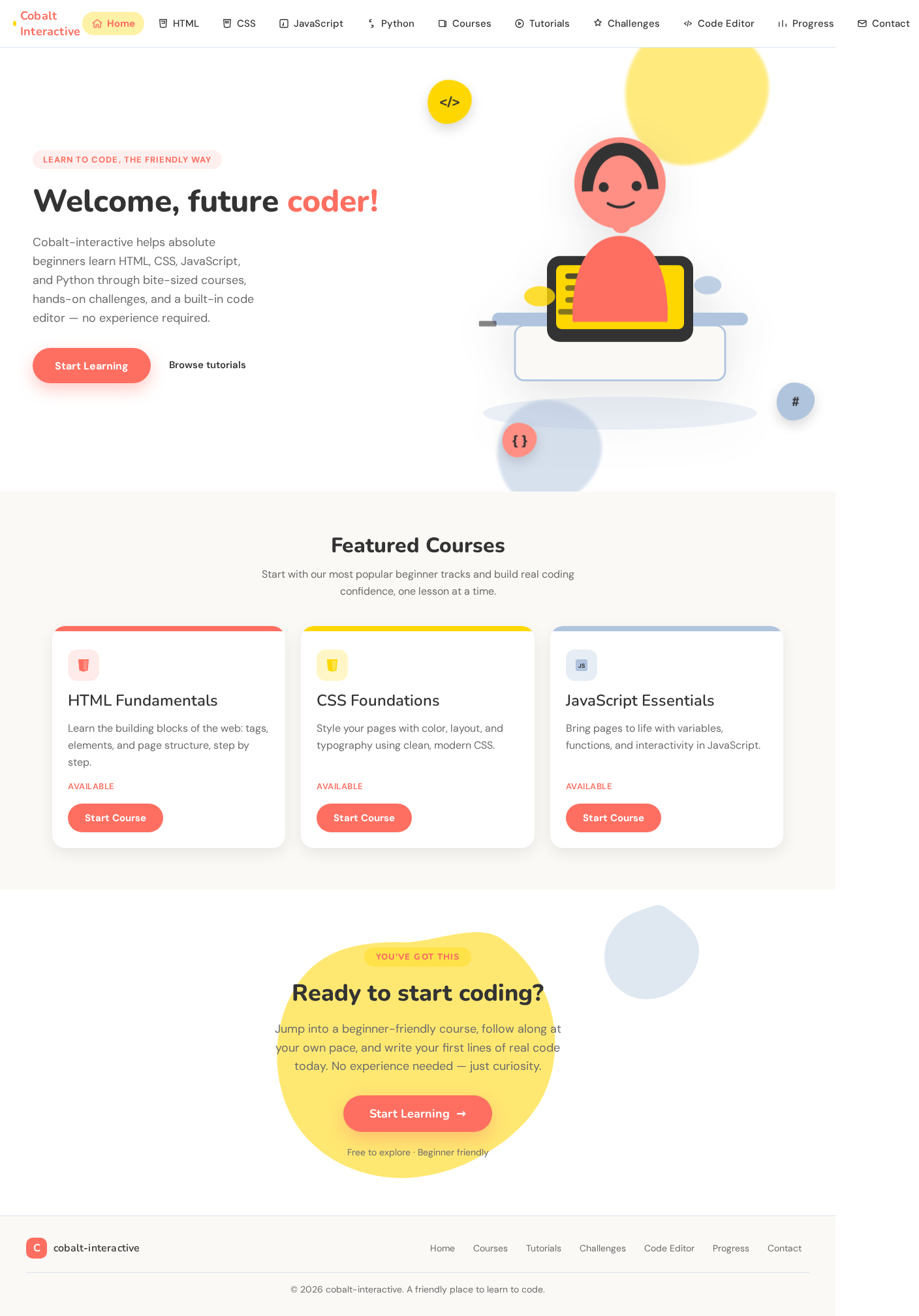
The Home page will feature a large, colorful illustration of a character coding, set on a cream background. The primary color will be used for the hero call-to-action (CTA). Oversized, friendly typography will welcome users, with blob-shaped elements providing tips and trivia interactively on hover. Course cards will have soft shadows and rounded corners to create an approachable navigation experience.
8. Interaction Model & Motion Direction

  • Interaction Model: Animated
  • Motion Tempo: Expressive
  • Hero Dimensionality: Layered_2d
  • Landing Hero Motion Brief: The hero section will feature a large illustration of a coding character. On page load, the character will animate into view with a springy transition, and the oversized headline will appear with a playful bounce. Hovering over blob elements will reveal tips and trivia with a smooth fade-in effect. In reduced-motion mode, animations will be minimized to simple fades.

9. Non-Functional Requirements

  • The platform must be accessible on various devices, ensuring a responsive design. (Provenance: explicit)
  • The interface must load quickly and efficiently to maintain user engagement. (Provenance: required_inference)
  • The system should handle multiple users accessing content simultaneously without performance degradation. (Provenance: required_inference)
Page 10 of 10

10. Tech Stack

  • Frontend: React
  • Backend: Node.js with Express
  • Database: MongoDB
  • Code Editor: Integrated with Ace Editor
  • Deployment: Docker and Kubernetes for containerization and orchestration

11. Assumptions and Constraints

  • The platform is designed exclusively for beginners, and advanced coding topics are not covered.
  • User authentication is not required, allowing open access to all content.
  • The design and interaction elements are inspired by Pablo Stanley's style, focusing on a warm and friendly user experience.

12. Glossary

  • Beginner Learner: The primary user persona, characterized by limited prior coding experience.
  • Course Card: A visual representation of a course, providing an overview and access to lessons.
  • Quiz Card: An interactive element used to test the user's knowledge on a topic.
  • Progress Indicator: A visual element that shows the user's progress through the learning material.
  • Code Editor: An online interface that allows users to write and execute code within the platform.
Preview dataChanges stay in this preview.
Home design preview
Home: Read platform introduction
Courses: 1. Browse course cards
HTML: 2. View HTML lessons
CSS: 3. View CSS lessons
JavaScript: 4. View JavaScript lessons
Python: 5. View Python lessons
Tutorials: 6. Study tutorial content
Tutorials: 7. Review coding tips
Challenges: 8. Select quiz or challenge
Challenges: 9. Complete quiz challenge
Code Editor: 10. Write practice code
Code Editor: 11. Run and view output
Progress: 12. Review progress indicators
Contact: Submit support inquiry
Preview dataChanges stay in this preview.
Home design preview
Home: Read platform introduction
Courses: 1. Browse course cards
HTML: 2. View HTML lessons
CSS: 3. View CSS lessons
JavaScript: 4. View JavaScript lessons
Python: 5. View Python lessons
Tutorials: 6. Study tutorial content
Tutorials: 7. Review coding tips
Challenges: 8. Select quiz or challenge
Challenges: 9. Complete quiz challenge
Code Editor: 10. Write practice code
Code Editor: 11. Run and view output
Progress: 12. Review progress indicators
Contact: Submit support inquiry