clever-something

byHussain Bekhushi

build something unique

LandingExperience
Landing

Comments (0)

No comments yet. Be the first!

System Requirements

System Requirements Document for clever-something

1. Introduction

clever-something is a public creative web experience built around one idea: a single, unique, memorable interaction that a curious visitor can open and complete in one sitting. The user (Hussain Bekhushi) did not prescribe a domain, feature list, or workflow; the explicit instruction was to build something unique and to create it from the builder's side. This document therefore defines the product concept, its one main activity, and the experience around it, while holding to the hard constraint that the result must be unique and memorable rather than a template application.

The product intent is a one-off, self-contained experience: a visitor arrives on a public landing surface, understands in a glance that this is something new, and enters a single interactive activity — a draggable, generative curve field — that responds to their input and produces a visible, personal result. There is no account, no marketplace, no dashboard, and no multi-step business workflow. The audience is any curious visitor on the open web, on desktop or mobile, who wants to be surprised by a bold, forward piece of interactive design.

The product is delivered as a first-party web application: a React front end, a shared FastAPI backend, and a MariaDB database, run together with docker-compose. The visual and motion language is authoritative and drawn from a Zaha Hadid-inspired creative direction: fluid parametric grandeur, dark charcoal ground, pearl and gold light, teal accents, sweeping curves, and a real-time WebGL hero.

2. System Overview

Page 1 of 20

2a. Product Interpretation and Delivery Boundary

clever-something is a public, anonymous, first-party web experience. Both accepted surfaces — the Landing page and the Experience page — are open to any visitor with no sign-in, no account creation, and no stored identity. This is a deliberate delivery boundary: the accepted journeys are single-session, self-contained, and produce their result in the moment, so there is no durable actor-specific state that would require application-owned identity. The product does not ask the visitor who they are, and it does not need to.

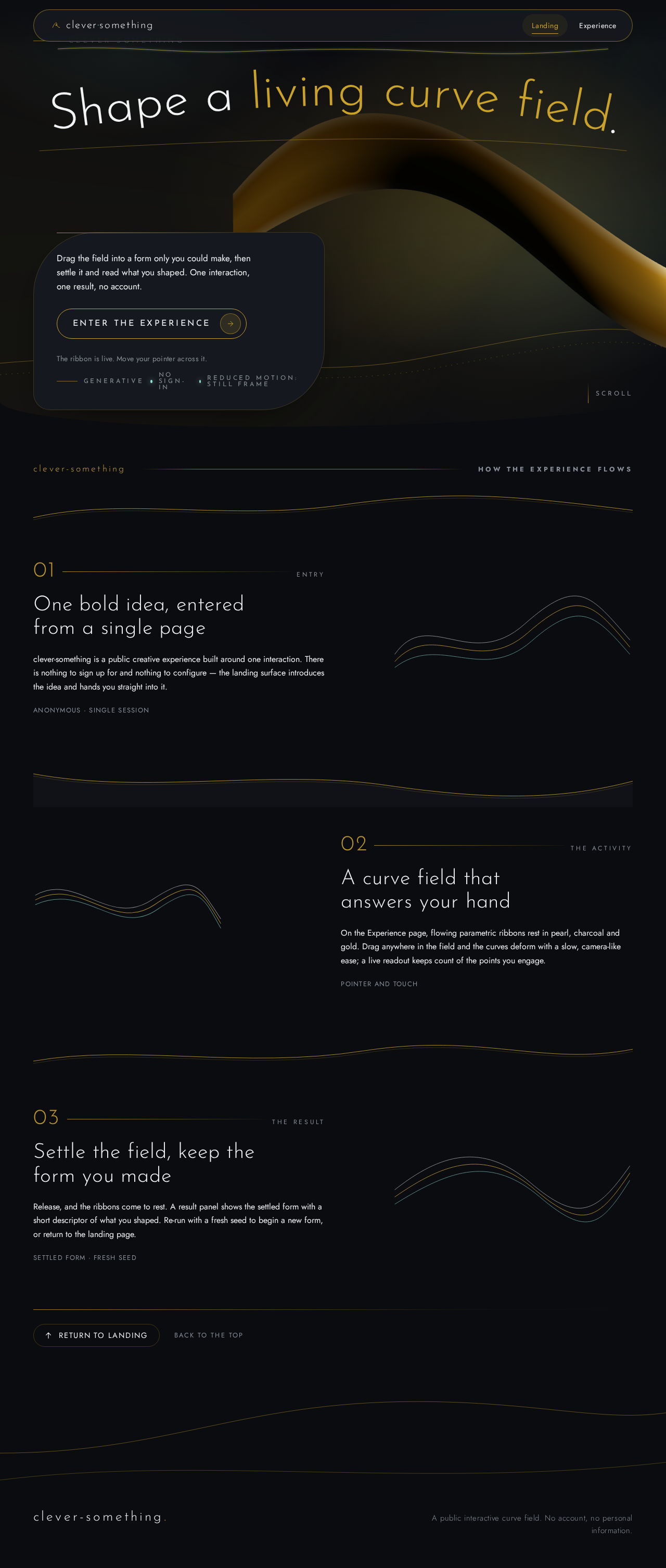
The Landing page is the public entry surface. It introduces the experience, establishes the visual world (the flowing ribbon hero, the curved headline, the capsule call to action), and hands the visitor into the activity. The Experience page owns the main activity itself: the visitor manipulates a draggable curve field, watches it respond in real time, and receives a visible result they can keep looking at and re-run. The backend supports the experience with the small amount of server-side work the activity needs (generating and serving the parametric curve configuration that seeds each session, and recording anonymous, non-identifying session outcomes so the experience can be tuned). The database stores only that anonymous session data; it stores no personal information and no account records.

Everything beyond these two surfaces is out of scope for the current delivery. There is no user account system, no social layer, no sharing feed, no payments, no admin console, and no content management surface. The experience is intentionally narrow: one bold idea, executed well.

2b. Source Content Inventory

Not applicable. No reference directive in this request declares a content_source, so no source content inventory is included.

Page 2 of 20

2c. Page Content and Component Coverage

Page 3 of 20

Landing

  • Purpose and information: The anonymous visitor learns what clever-something is and what it does, and is invited to begin the one main activity.
  • Information and state shown:
    • An oversized headline that bends along an SVG curve spanning the viewport, naming the experience and its promise in one line.
    • A short supporting line of body copy explaining that the visitor will shape a living curve field and get a result of their own.
    • A single capsule call-to-action button, low left on a solid charcoal block, labelled to begin the experience.
    • Gold hairline rules tracing section boundaries as architectural flow lines.
  • Primary action: Activate the capsule call-to-action to enter the Experience.
  • Supporting actions: Scroll through the curved hero and the short diagonal flow sections that follow it; no other commitment is required.
  • Domain entities: None persisted. The page reads only static presentation content and the experience's public description.
  • Component responsibilities:
    • Full-bleed curved hero holding the real-time WebGL ribbon form in gold and pearl.
    • Curved-headline component that lays the headline along an SVG path and scales it responsively.
    • Capsule CTA component that routes the visitor to the Experience.
    • Diagonal flow section components on a 12-column grid with sweeping curved cuts between bands.
  • States:
    • Loading: the WebGL hero shows a charcoal ground with a faint gold hairline placeholder while the scene initialises; headline and CTA are readable immediately and never blocked by the scene.
Page 4 of 20
  • Empty: not applicable; the page always has content.
  • Success: hero renders, headline and CTA are fully visible and operable at 375px, 768px, and 1280px.
  • Error/recovery: if WebGL is unavailable or the scene fails, the hero falls back to a static curved ribbon artwork in the same palette; the headline and CTA remain fully usable and the visitor can still enter the Experience.
  • Reduced motion: the hero renders as a still composed frame; no camera sweep or parallax.
Page 5 of 20

Experience

  • Purpose and information: The visitor performs the main activity — shaping a draggable curve field — and receives a visible result.
  • Information and state shown:
    • The interactive curve field: a full-bleed canvas of flowing parametric ribbons in pearl, charcoal, and gold, with teal and gold glows.
    • A live readout of the current curve state (for example the number of control points engaged and the current form descriptor) presented as readable text, never covered by decoration.
    • A result panel that appears when the visitor settles the field, showing the resulting form and a short generated descriptor of what they made.
    • A capsule control to re-run the activity with a fresh seed.
  • Primary action: Drag within the curve field to deform and shape the ribbons.
  • Supporting actions: Release to settle the field and reveal the result; re-run with a fresh seed; return to the Landing page.
  • Domain entities:
    • Curve session: an anonymous, server-seeded configuration of control points and palette parameters that initialises the field.
    • Session outcome: an anonymous record of the settled form descriptor and interaction summary, used only to tune the experience.
  • Component responsibilities:
    • WebGL/R3F curve-field canvas that renders the parametric ribbons and responds to pointer and touch input.
    • Input handler translating drag into control-point deformation with smooth, camera-like easing.
    • Live readout component displaying current curve state as readable text.
    • Result panel component presenting the settled form and its descriptor.
    • Re-run control that requests a fresh seed from the backend.
  • States:
Page 6 of 20
  • Loading: the field shows a charcoal ground with a single gold hairline curve while the seed is fetched; a readable "preparing the field" label is shown.
  • Empty: before the visitor interacts, the field shows its seeded resting form and a readable prompt inviting the first drag.
  • Success: the field responds smoothly to drag, the readout updates, and on release the result panel shows the settled form and descriptor.
  • Error/recovery: if the seed request fails, the field initialises from a locally generated fallback seed so the activity remains completable; a readable notice explains the fallback. If the outcome record fails to save, the result is still shown and the visitor can continue or re-run.
  • Reduced motion: the field renders without ambient sweep or parallax; drag response remains direct and the result is still produced.
Page 7 of 20

3. Functional Requirements

FR-1 — The builder selects the product concept and its main features. As the product owner, I should have the builder choose the product concept and its main features, so that a complete, coherent product exists without me specifying it.

  • Provenance: explicit.
  • Lifecycle: the concept (a public generative curve-field experience) and its features (curved hero landing, draggable curve field, live readout, settled result, re-run) are fixed by this document; the visitor encounters them on the Landing and Experience pages.
  • Observable acceptance: the delivered product presents exactly the Landing and Experience surfaces with the features described here, and no additional product modules.

FR-2 — The product gives one unique, memorable experience to its users. As a Visitor, I should have one distinctive, memorable experience, so that the product feels new and unlike a template app.

  • Provenance: explicit.
  • Lifecycle: the visitor enters from the Landing, performs the single main activity on the Experience page, and leaves with a result they shaped themselves.
  • Observable acceptance: the experience consists of one main activity; its visual and motion language follows the Zaha Hadid-inspired direction (dark charcoal ground, pearl and gold light, teal accents, sweeping curves, real-time WebGL hero); no straight-edged card grid, indigo-on-white styling, gradient blob hero, or stock photography appears.
Page 8 of 20

FR-3 — The visitor opens the app and starts the main activity. As a Visitor, I should open the app and start the main activity, so that I can begin the experience immediately.

  • Provenance: required_inference.
  • Lifecycle: the visitor lands anonymously on the Landing page, reads the curved headline and supporting copy, and activates the capsule call-to-action; the Experience page loads and fetches a curve session seed from the backend.
  • Access: public, anonymous, no account.
  • Failure/recovery: if the seed request fails, the Experience initialises from a locally generated fallback seed and shows a readable notice; the visitor can still start the activity.
  • Continuation: once the field is ready, the visitor is prompted to make the first drag.

FR-4 — The visitor completes the main activity and gets a result. As a Visitor, I should complete the main activity and get a result, so that my interaction produces something visible and personal.

  • Provenance: required_inference.
  • Lifecycle: the visitor drags within the curve field, the ribbons deform with smooth easing, the live readout updates, and on release the field settles and the result panel presents the resulting form and a short generated descriptor. The backend records the anonymous session outcome.
  • Failure/recovery: if the outcome record fails to save, the result is still displayed and the visitor may continue or re-run.
  • Continuation: the visitor may re-run with a fresh seed or return to the Landing page.
Page 9 of 20

FR-5 — The visitor re-runs the activity with a fresh seed. As a Visitor, I should re-run the activity with a fresh seed, so that I can explore a new starting form.

  • Provenance: required_inference.
  • Lifecycle: from the Experience page, the visitor activates the re-run control; the backend supplies a new curve session seed; the field resets to the new resting form and the readout clears.
  • Failure/recovery: if the fresh seed request fails, the previous field is retained and a readable notice explains that a new seed could not be fetched.

4. User Personas

Page 10 of 20

Visitor

  • Product context: A curious person on the open web who has arrived at clever-something with no prior knowledge of it and no account. They may be on a desktop with a large display or on a phone at 375px wide, and they have a short attention window in which the product must prove it is something new.
  • Primary goal: To try one distinctive interactive experience and come away with a result they shaped themselves.
  • Distinct accepted responsibilities:
    • Reading the Landing page's curved headline and supporting copy to understand what the experience is.
    • Activating the capsule call-to-action to enter the Experience.
    • Dragging within the curve field to shape the ribbons.
    • Releasing to settle the field and reading the result panel.
    • Optionally re-running with a fresh seed or returning to the Landing page.
  • Relevant inputs and decisions: Where and how to drag within the field; whether to settle and read the result; whether to re-run or leave.
  • Interactions with other accepted participants: None. The Visitor is the only active human persona; the backend and database act only in support and are not personas.
  • Observable success: The visitor sees the field respond smoothly to their drag, receives a settled result with a readable descriptor, and can re-run or leave at will — all without signing in or providing any personal information.
  • Constraints carried from source: The experience must be unique and memorable; readable text and controls must stay whole at 375px, 768px, and 1280px; reduced-motion users must get a usable static arrangement.
Page 11 of 20

5. Core User Flows

Flow A — Visitor discovers the experience and enters the activity

  1. The Visitor opens clever-something at the public Landing page, anonymously, with no account.
  2. The Landing page renders the full-bleed curved hero: the WebGL ribbon form in gold and pearl initialises over the charcoal ground, while the curved headline and capsule call-to-action are readable immediately.
  3. The Visitor reads the oversized headline bending along its SVG curve and the short supporting copy, and understands that they will shape a living curve field and get a result.
  4. The Visitor activates the capsule call-to-action low left on the solid charcoal block.
  5. The Experience page loads and requests a curve session seed from the backend; the field shows a charcoal ground with a single gold hairline curve and a readable "preparing the field" label.
  6. On success, the field initialises to its seeded resting form and a readable prompt invites the first drag.
  7. Failure/recovery: if the seed request fails, the field initialises from a locally generated fallback seed and a readable notice explains the fallback; the Visitor can still proceed.
  8. Continuation: the Visitor is now ready to perform the main activity.
Page 12 of 20

Flow B — Visitor completes the main activity and gets a result

  1. From the ready Experience page, the Visitor presses and drags within the curve field.
  2. The ribbons deform in response, with smooth camera-like easing; the live readout updates with the current curve state as readable text.
  3. The Visitor continues shaping the field until satisfied, then releases.
  4. The field settles into its resulting form; the result panel appears showing the settled form and a short generated descriptor of what the Visitor made.
  5. The backend records the anonymous session outcome (form descriptor and interaction summary); no personal information is stored.
  6. Failure/recovery: if the outcome record fails to save, the result panel is still shown and the Visitor may continue or re-run.
  7. Continuation: the Visitor may re-run with a fresh seed (Flow C) or return to the Landing page.

Flow C — Visitor re-runs the activity with a fresh seed

  1. From the Experience page, the Visitor activates the re-run control.
  2. The backend supplies a new curve session seed; the field resets to the new resting form and the readout clears.
  3. The Visitor shapes the new field as in Flow B.
  4. Failure/recovery: if the fresh seed request fails, the previous field is retained and a readable notice explains that a new seed could not be fetched.
  5. Continuation: the Visitor may settle and read a new result, re-run again, or leave.
Page 13 of 20

6. Visuals Colors and Theme

The creative direction is authoritative for this section. The muse is Zaha Hadid; the headline is Fluid parametric grandeur for one clever, memorable experience.

Page 14 of 20
  • Mode: dark.
  • Colour tokens (exact hex by role):
    • Background: #0B0C10 (charcoal ground, ~70% of surface).
    • Surface: #16181F (raised blocks, result panel, capsule CTA block).
    • Text: #F2F3F5 (pearl white, ~20% with gold hairlines).
    • Primary: #C9A227 (gold — hairlines, light sweeps, ribbon highlights).
    • Accent: #8FE3D6 (teal — glows and secondary highlights, ~10% with gold).
    • Muted: #8A8F99 (secondary text, readout labels).
  • Typography:
    • Headings: Josefin Sans, Light 300, wide tracking, large scale, sentence case.
    • Body: Jost.
    • Scale: 1.333 modular — 40/30/22/17/15 px on mobile, up to 128 px display on desktop. Headline sizes use clamp(...) with their mobile size as the floor.
  • Shape language: continuous sweeping curves, thin luminous strokes, soft capsule controls; edges flow, no hard corners.
  • Layout: full-bleed curved hero, then diagonal flow sections on a 12-column grid, with large negative space between curved bands.
  • Imagery: generative flowing 3D curves and ribbon forms in pearl, charcoal, and gold; no stock photography.
  • Motion: slow camera-like sweeps and morphing curve parallax; gold light sweeps cross the surface on scroll.
  • Avoid: straight-edged card grids; blue or indigo accents on white; gradient blob heroes; stock photography of people.
Page 15 of 20

7. Signature Design Concept

The public entry is a full-bleed dark scene holding one large flowing ribbon form in gold and pearl, rendered in real time in WebGL. An oversized light headline curves over it, laid along an SVG path that spans the viewport and scales from 40px on mobile to 128px on desktop. A capsule call-to-action sits low left on a solid charcoal block, fully readable and never covered by the ribbon or its motion. Gold hairline rules trace the section boundaries like architectural flow lines, and the section edge below the hero is a sweeping curved cut rather than a straight line.

The concept recomposes only accepted content and controls: the headline, the supporting copy, the capsule CTA, and the ribbon form. It introduces no new behaviour, page, or destination. On the Experience page the same language continues: the draggable curve field is the hero subject made interactive, with the live readout and result panel presented as readable text on charcoal surfaces with gold hairlines.

8. Interaction Model & Motion Direction

Interaction Model: Animated Motion Tempo: cinematic Hero Dimensionality: webgl

Page 16 of 20

Landing Hero Motion Brief

  • Focal subject: one large flowing ribbon form in gold and pearl, rendered in real time over the charcoal ground.
  • Input → transformation → outcome thesis: as the visitor scrolls and moves the pointer, the ribbon's curves morph and a gold light sweep crosses its surface; the oversized headline bends along its SVG curve in response to scroll position; the outcome is a composed, luminous first frame that resolves into the capsule CTA.
  • Motion vocabulary: slow camera-like sweeps, morphing curve parallax, gold light sweeps on scroll, continuous easing with no hard stops.
  • Composed first frame: charcoal ground; the ribbon form centred and slightly right; the curved headline arcing across the upper third; the capsule CTA low left on a solid charcoal block; gold hairlines tracing the lower edge.
  • Reduced-motion state: the hero renders as a still composed frame with the ribbon at rest, the headline fully readable, and the CTA fully operable; no sweep or parallax.

Landing Hero 3D Scene Brief — DIRECTION-DERIVED

The direction specifies webgl hero dimensionality, so a real-time 3D hero is expected. Build one crafted ribbon object — a continuous parametric surface in pearl and gold — that shows the product's defining state: a flowing curve field at rest, ready to be shaped. The scene uses a dark charcoal environment, a single warm key light for the gold highlights, and a soft teal rim light. It must degrade gracefully to a static curved artwork when WebGL is unavailable and must respect prefers-reduced-motion.

Page 17 of 20

9. Non-Functional Requirements

  • Uniqueness and memorability (explicit): the product must be unique and memorable; it must not resemble a template app. Rationale: hard constraint from the user.
  • Readable text and controls (explicit): headlines, wordmarks, labels, numbers, and controls stay entirely inside the viewport and their container at 375px, 768px, and 1280px, wrapping or scaling with clamp(...); no element covers any part of them. Imagery and decoration may bleed, crop, or overlap freely. Rationale: explicit design constraint.
  • Reduced motion (explicit): with prefers-reduced-motion, provide a usable static arrangement; the hero and curve field render still, and the activity remains completable. Rationale: explicit design constraint.
  • Anonymous access (required_inference): both surfaces are public and require no account; no personal information is collected or stored. Rationale: the accepted journeys are single-session and self-contained.
  • Graceful degradation (required_inference): if WebGL is unavailable or the backend seed request fails, the experience falls back to a static hero and a locally generated seed so the activity remains completable. Rationale: the main activity must be completable.
  • Performance (required_inference): the WebGL hero and curve field target smooth interaction on mid-range mobile devices; the scene initialises without blocking the headline or CTA. Rationale: the experience must feel immediate and memorable.
Page 18 of 20

10. Tech Stack

  • Frontend: React application UI, with React Three Fiber / Drei for the WebGL hero and curve field; Josefin Sans and Jost loaded as web fonts.
  • Backend: shared FastAPI process for application APIs and domain modules (curve session seeding, anonymous outcome recording).
  • Database: MariaDB for application-owned persistent data (anonymous curve sessions and session outcomes only; no personal data, no account records).
  • Orchestration: docker-compose with the frontend, backend, and database services.

11. Assumptions and Constraints

  • Assumption (narrow): the product concept and its features are selected by the builder per the explicit instruction; this document fixes them as the public generative curve-field experience described above.
  • Assumption (narrow): the backend seed and outcome endpoints are small supporting APIs within the shared FastAPI process; they do not introduce accounts, authentication, or personal data.
  • Constraint (explicit): the product must be unique and memorable.
  • Constraint (explicit): the visual and motion language follows the Zaha Hadid-inspired creative direction; the generic indigo/blue-on-white SaaS template is forbidden.
  • Constraint (explicit): readable text and controls stay whole at 375px, 768px, and 1280px; reduced-motion users get a usable static arrangement.
  • Boundary: no user accounts, social features, sharing feeds, payments, admin console, or content management surface are in scope.
Page 19 of 20

12. Glossary

  • Curve field: the interactive canvas of flowing parametric ribbons that the Visitor shapes by dragging.
  • Curve session: an anonymous, server-seeded configuration of control points and palette parameters that initialises the curve field.
  • Session outcome: an anonymous record of the settled form descriptor and interaction summary, used only to tune the experience.
  • Seed: the server-supplied configuration that determines the field's resting form; a fresh seed resets the field.
  • Settled form: the resulting shape of the curve field after the Visitor releases their drag.
  • Capsule CTA: the soft, rounded call-to-action control that sits low left on a solid charcoal block on the Landing page.
  • Ribbon form: the large flowing 3D surface in gold and pearl that is the hero subject.
Page 20 of 20
Live
Landing design preview
Landing: Read curved headline and copy
Landing: Activate capsule call-to-action
Experience: Wait for field to prepare
Experience: Proceed with fallback seed notice
Experience: 1. Drag within curve field
Experience: 2. Read live curve state
Experience: 3. Release to settle field
Experience: 4. Read settled result descriptor
Experience: 5. Continue despite outcome save failure
Experience: 6. Re-run with fresh seed
Experience: 7. Keep previous field after seed failure
Landing: Return to landing page
Live
Landing design preview
Landing: Read curved headline and copy
Landing: Activate capsule call-to-action
Experience: Wait for field to prepare
Experience: Proceed with fallback seed notice
Experience: 1. Drag within curve field
Experience: 2. Read live curve state
Experience: 3. Release to settle field
Experience: 4. Read settled result descriptor
Experience: 5. Continue despite outcome save failure
Experience: 6. Re-run with fresh seed
Experience: 7. Keep previous field after seed failure
Landing: Return to landing page