clever-expenses

byAnubhab Roy

Build a expenses tracker application for mobile . Features:- all expenses related features including the money we gave to friends, keep record of those things and all posible features related to Expense or manage management. Claymorphisms and liquids glass style. Bold texts clean ui/ux. Security on top. Sms auto detects to track.

LandingLogin
Landing

Comments (0)

No comments yet. Be the first!

System Requirements

System Requirement Document
Page 1 of 7

System Requirements Document for clever-expenses

1. Introduction

The clever-expenses project aims to develop a mobile application for tracking and managing personal expenses. The application will include features for recording expenses, tracking money lent to friends, and utilizing SMS auto-detection to capture expense information. The design will incorporate claymorphism and liquid-glass styles, with a focus on bold text and a clean user interface. Security is a top priority for this application.

2. System Overview

The clever-expenses application is a mobile-based expense tracker designed for tech-savvy users who value stylish and functional design. It supports comprehensive expense management, including tracking money lent to friends. The application will automatically detect and process SMS messages related to expenses. Security is prioritized throughout the application to ensure the protection of user data.

2a. Product Interpretation and Delivery Boundary

The application is delivered as a mobile app with custom UI, managed provider surfaces, and background automation. It requires user authentication for accessing protected records. The application uses SMS auto-detection for tracking expenses and ensures secure storage for durable expense data. The claymorphism and liquid-glass visual style, along with bold text, are integral to the design.

Page 2 of 7

2b. Source Content Inventory

Not applicable as no content source directive was provided.

2c. Page Content and Component Coverage

Landing

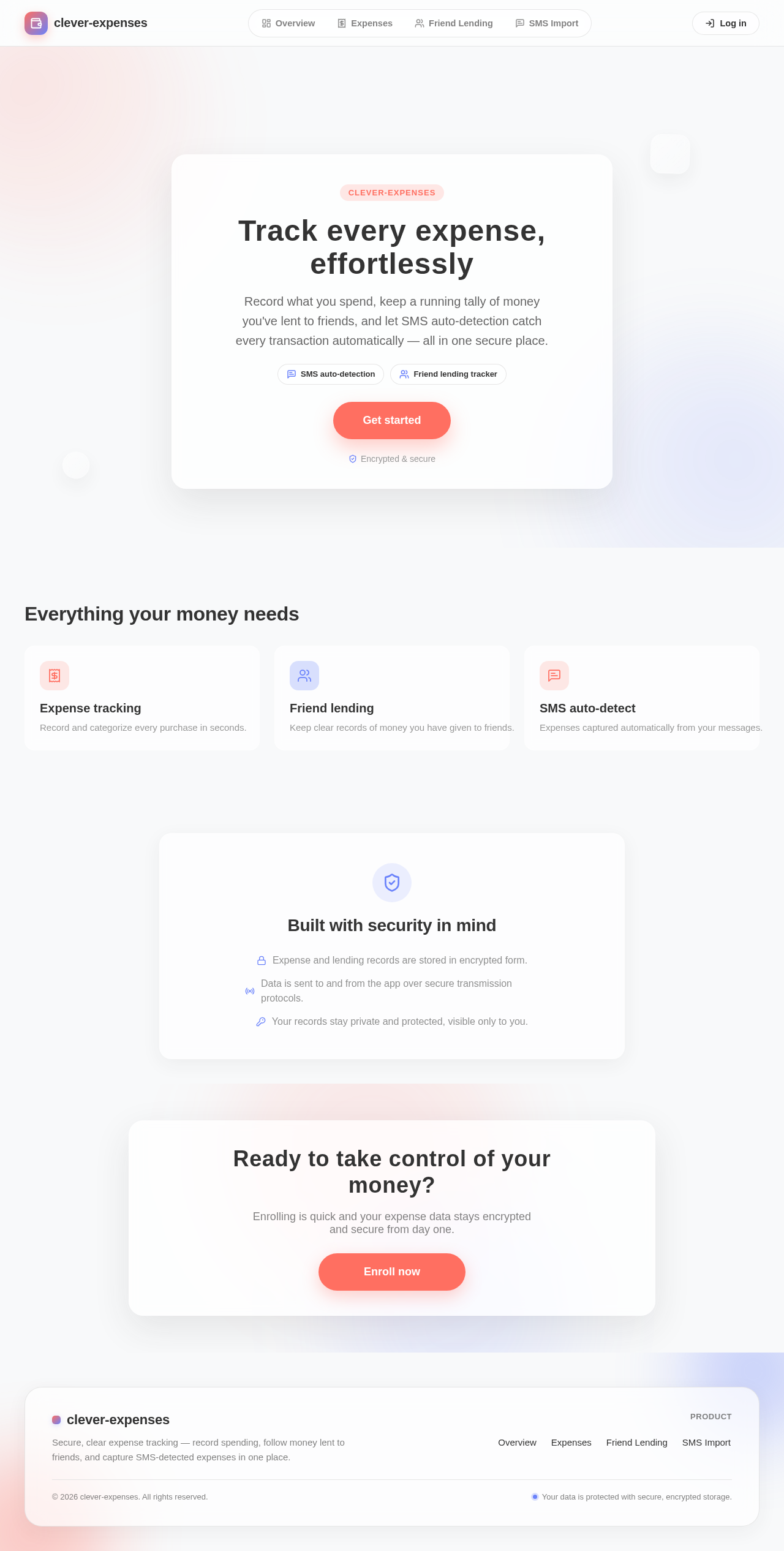
  • Purpose: Introduce the mobile expense tracker and its secure expense-management purpose.
  • Components:
    • Introduction to the app's features and benefits.
    • Call-to-action for user enrollment.
    • Visual style: Claymorphism and liquid-glass elements.

Login

  • Purpose: Allow returning users to verify their identity and access protected records.
  • Components:
    • User authentication form.
    • Password recovery option.
    • Security notices.

Overview

  • Purpose: Provide a summary and monitoring destination for expenses and money given to friends.
  • Components:
    • Dashboard with expense summaries.
    • Visual representation of financial data.
    • Quick access to detailed records.
Page 3 of 7

Expenses

  • Purpose: Workspace for creating, editing, categorizing, and managing personal expense records.
  • Components:
    • Form for adding new expenses.
    • List of categorized expenses.
    • Editing and deletion options.

Friend Lending

  • Purpose: Manage records of money given to friends.
  • Components:
    • Form for recording lending transactions.
    • List of outstanding and settled loans.
    • Notifications for due payments.

SMS Import

  • Purpose: Review and track expense information detected from SMS messages.
  • Components:
    • List of detected expenses from SMS.
    • Option to confirm or edit detected entries.
    • Background processing status.

3. Functional Requirements

  • As an Expense Tracker User, I should be able to record and manage all personal expenses, including money lent to friends, to maintain accurate financial records. (Provenance: explicit)
  • As an Expense Tracker User, I should be able to utilize SMS auto-detection to automatically track expenses from messages, ensuring no manual entry is missed. (Provenance: explicit)
  • As an Expense Tracker User, I should be able to securely log in to access and manage my expense records, ensuring data privacy and security. (Provenance: required_inference)
  • As an Expense Tracker User, I should be able to view a comprehensive overview of my expenses and lending activities to monitor my financial status effectively. (Provenance: required_inference)
Page 4 of 7

4. User Personas

  • Expense Tracker User: Responsible for recording, monitoring, categorizing, and managing personal expenses, including money given to friends, using the mobile application.

5. Core User Flows

  1. User Enrollment and Login

    • User accesses the Landing page and is introduced to the app's features.
    • User enrolls by creating an account.
    • User logs in through the Login page to access protected records.
  2. Expense Management

    • User navigates to the Expenses page.
    • User adds a new expense, categorizes it, and saves it.
    • User edits or deletes existing expenses as needed.
  3. Friend Lending Management

    • User navigates to the Friend Lending page.
    • User records a new lending transaction.
    • User reviews outstanding loans and receives notifications for due payments.
  4. SMS Auto-Detection and Import

    • User grants SMS access to the application.
    • The system processes SMS messages in the background.
    • User reviews detected expenses on the SMS Import page and confirms or edits entries.
Page 5 of 7

6. Visuals Colors and Theme

  • Muse: Michal Malewicz
  • Palette (light mode):
    • Background: #F8F9FA
    • Surface: #FFFFFF
    • Text: #333333
    • Primary: #FF6F61
    • Accent: #6A82FB
    • Muted: #E0E0E0
  • Typography:
    • Headings: Manrope — Semi-bold, large size contrast, tight tracking, sentence case
    • Body: Plus Jakarta Sans
    • Scale: 1.25 modular, 48/32/24/20/16
  • Shape language: Rounded corners, frosted glass cards, layered translucency
  • Layout: Floating layers with ample white space, tidy grid for clarity
  • Motion: Gentle float and hover-lift, blur transitions, gradient drift

7. Signature Design Concept

The Landing page will feature a frosted glass card with a translucent layered background. Bold white text will introduce the app, and a coral call-to-action button will invite users to enroll. Accent elements will drift subtly in the background, creating a dynamic and engaging first impression.
Page 6 of 7

8. Interaction Model & Motion Direction

  • Interaction Model: Animated
  • Motion Tempo: Expressive
  • Hero Dimensionality: Layered_2d
  • Landing Hero Motion Brief: The focal subject is a frosted glass card with bold text and a coral button. Upon user interaction, the card gently lifts, and background elements drift, emphasizing the app's modern and secure design. A reduced-motion state will maintain clarity without dynamic effects.

9. Non-Functional Requirements

  • The application must ensure data security and privacy, using encryption for stored data and secure transmission protocols. (Provenance: explicit)
  • The UI must adhere to the claymorphism and liquid-glass style, ensuring a modern and visually appealing design. (Provenance: explicit)

10. Tech Stack

  • Frontend: React Native for mobile application development.
  • Backend: Python with FastAPI for handling API requests.
  • Storage: Secure database for storing user data.
  • Deployment: Docker for containerization and Kubernetes for orchestration if required.

11. Assumptions and Constraints

  • The application will be developed as a mobile app only.
  • Security is a top priority and must be integrated into all aspects of the application.
  • The visual design will strictly follow the claymorphism and liquid-glass style guidelines.
Page 7 of 7

12. Glossary

  • Expense Tracker User: The individual using the application to manage personal finances.
  • SMS Auto-Detection: The feature that allows the application to automatically detect and process expense-related information from SMS messages.
Landing design preview
Landing: View features
Landing: Enroll account
Login: Sign in
Overview: View summary
Expenses: Add expense
Expenses: Categorize expense
Expenses: Edit expense
Expenses: Delete expense
Friend Lending: Record lending
Friend Lending: Review outstanding loans
SMS Import: Grant SMS access
SMS Import: Review detected expenses
SMS Import: Confirm or edit entry
Landing design preview
Landing: View features
Landing: Enroll account
Login: Sign in
Overview: View summary
Expenses: Add expense
Expenses: Categorize expense
Expenses: Edit expense
Expenses: Delete expense
Friend Lending: Record lending
Friend Lending: Review outstanding loans
SMS Import: Grant SMS access
SMS Import: Review detected expenses
SMS Import: Confirm or edit entry