clearvoice-aac-communication
 Nebula Vibez
Build Clearvoice AAC as a faithful, accessible, mobile-first AAC communication web app, using the existing Clearvoice AAC (Test Demo) in Replit as the behavioral and content reference. This is a parallel implementation experiment; preserve the actual product, do not invent new clinical claims. Shared acceptance brief: provide a calm home screen with message composer, accessible word buttons and vocabulary tabs: Core (29 high-frequency choices including urgent help and stop), Quick Phrases (phrases are added for review before speaking), More (topic categories), and Spell (letter-by-letter composition). Support composing and undo/clear, speech synthesis with user-initiated Speak, and share/copy through device-native mechanisms where available. Make touch, keyboard, screen reader labels, focus, and responsive layouts first-class. Keep the honest notice: usability demo, not a clinical AAC device or substitute for individualized AAC assessment. Explain that the app does not store, monitor, or independently deliver messages. Phase one is local-only: no accounts, database, analytics, prediction, caregiver monitoring, external message delivery, or claims of personalized clinical suitability. Include settings and persistence only where supported by the reference; do not add unsupported data collection. Build a working first vertical slice, not just a marketing landing page. Start with the home communication journey, then provide a concise implementation plan, files/routes, and concrete gaps/assumptions. No deployment or public sharing. Use a single shared spec so the parallel v0 implementation can be compared against this one. Preserve clearvoice brand name.

Comments (0)
Sign in to leave a comment
System Requirements
System Requirements Document for clearvoice-aac-communication
1. Introduction
Clearvoice AAC is a faithful, accessible, mobile-first AAC (augmentative and alternative communication) communication web app. It is a parallel implementation experiment that reproduces the behavior and content of the existing Clearvoice AAC (Test Demo) in Replit, preserving the actual product rather than inventing new clinical claims. The brand name Clearvoice is preserved throughout.
The product's intent is narrow and honest: give a person a calm, predictable surface on which to build a message from high-frequency words, phrases, topic vocabulary, or letter-by-letter spelling, then speak that message aloud on demand or hand it off through the device's own share/copy mechanisms. The app is a usability demo, not a clinical AAC device and not a substitute for individualized AAC assessment. It does not store, monitor, or independently deliver messages.
The audience is people who rely on AAC to communicate — including non-speaking autistic and motor-impaired users — together with the communication partners physically present with them (caregivers, teachers, speech-language pathologists, family, and peers). The emotional register is deliberately unhurried, forgiving, and non-performative: the interface should disappear into the act of speaking.
2. System Overview
Clearvoice AAC is delivered as a single first-party web application with four pages: Landing, Home, Settings, and About. All four are openly reachable with no identity establishment, because phase one is local-only and no accounts exist.
The working surface is Home, which owns the message composer, the four vocabulary tabs (Core, Quick Phrases, More, Spell), undo and clear, user-initiated Speak through the browser's speech synthesis, and device-native share/copy. Landing is the public entry that explains what Clearvoice is, who it is for, and what it does before a user begins. Settings carries only the settings and persistence that the reference supports, with no unsupported data collection. About carries the honest usability-demo notice and the explanation that the app does not store, monitor, or independently deliver messages.
Two accepted human roles are active in the product: the AAC Communicator, who builds and speaks messages, and the Communication Partner, who reads or receives the spoken, shared, or copied message and responds in the conversation. The Communication Partner is a materially affected participant: the message is produced for them, and their receipt and response complete the communication act. They interact with the app only through the communicator's user-initiated Speak and the device's own share/copy output — there is no in-app monitoring, delivery, or caregiver dashboard.
Narrow exclusions for phase one: no accounts, no database, no analytics, no prediction or next-word suggestion, no caregiver monitoring, no external message delivery, no claims of personalized clinical suitability, and no deployment or public sharing.
2a. Product Interpretation and Delivery Boundary
Clearvoice AAC is a first-party, browser-delivered communication surface. Everything a user does — composing, undoing, clearing, switching vocabulary tabs, spelling, speaking, sharing, copying — happens on the user's own device. The app owns the composition state and the vocabulary content; the device owns speech synthesis and the native share/copy sheet.
Access is open. Because phase one is local-only and no accounts exist, no page requires identity establishment, and no page owns a sign-in, sign-up, or provisioning interaction. The composer's message is transient working state on the device; it is not persisted to any server, and the app does not retain a history of what was said.
The current delivery boundary is the working first vertical slice: the home communication journey, from opening the app to a spoken or handed-off message, is fully functional. The Landing page is not a marketing substitute for that slice — it is a short, honest entry that routes the user into the working communicator. Settings and About are supporting surfaces, not separate products.
Future horizons (not current): any account system, cloud persistence, analytics, prediction or next-word suggestion, caregiver monitoring, external message delivery, or clinical-suitability claims are explicitly out of scope for phase one and are not represented in any current page, requirement, or flow.
2b. Source Content Inventory
The reference directive for the existing Clearvoice AAC (Test Demo) in Replit declares content_source authority. The authoritative user requirement thread specifies the following verified content facts, which are preserved exactly:
- Core vocabulary tab: 29 high-frequency choices, including the urgent choices HELP and STOP.
- Quick Phrases tab: phrases are added for review before speaking.
- More tab: topic categories.
- Spell tab: letter-by-letter composition.
- Honest notice text: usability demo, not a clinical AAC device or substitute for individualized AAC assessment; the app does not store, monitor, or independently deliver messages.
- Brand name: Clearvoice.
No additional factual entities, collection items, dates, contacts, links, or media references are supplied by the authoritative source beyond these. The full Core word list beyond HELP and STOP, the Quick Phrases list, and the More topic categories are drawn from the reference artifact at implementation time and are not invented here.
2c. Page Content and Component Coverage
Landing
- Information and state: A short, calm explanation of what Clearvoice AAC is, who it is for, and what it does; the honest usability-demo notice; a clear statement that the app does not store, monitor, or independently deliver messages; a single primary entry into the working communicator.
- Primary action: Enter the communicator (route to Home).
- Supporting actions: Open About for the full honest notice; open Settings.
- Domain entities: None persisted. The page is static explanatory content plus navigation.
- Component responsibilities: Clearvoice wordmark (top-left, small, not a display headline); a short prose block at body measure capped at 68ch; the honest notice as a permanent, always-visible muted line; a primary entry control with a visible text label and matching accessible name.
- States: Loading — not applicable (static content). Empty — not applicable. Success — the page renders and the entry control is reachable by touch and keyboard. Error — not applicable. Recovery — not applicable.
Home
- Information and state: The composed message as it grows in place; the currently active vocabulary tab; the vocabulary grid for the active tab; the honest notice as a permanent muted line directly under the composer; the Speak control's press state while speech synthesis is active.
- Primary actions: Add a word, phrase, or letter to the composer; Speak the composed message; Undo the last addition; Clear the composer.
- Supporting actions: Switch vocabulary tabs (Core, Quick Phrases, More, Spell); share the composed message through the device-native share mechanism where available; copy the composed message through the device-native copy mechanism where available; open Settings; open About.
- Domain entities: The composed message (transient, device-local working state); the Core word set (29 high-frequency choices, HELP and STOP first and urgent); the Quick Phrases set (phrases added for review before speaking); the More topic categories; the A–Z letter set plus Space and Backspace.
- Component responsibilities:
- Composer panel: a bordered white panel showing the composed message at 20–26px ink, fixed height, with the sentence growing in place as words are added.
- Undo and Clear: quiet text buttons on the composer's lower-left.
- Speak pill: the only fully round element, moss, pinned to the composer's lower-right corner at every viewport, showing a subtle two-step press state while speech synthesis is active.
- Honest notice: a permanent, always-visible muted line directly under the composer, never collapsed into a tooltip, modal, footer link, or first-run dismissal.
- Vocabulary tab control: a single rounded white block with equal-width 44px segments; the active tab is filled solid moss with white text, inactive tabs are transparent with ink text; no underline, no pill, no sliding indicator.
- Core grid: 3 columns at 375px, 4 at 768px, 6 at 1280px; HELP and STOP are the first two tiles, terracotta, and the only tiles with a 2px terracotta border; the remaining 27 core words are warm white tiles of equal size; tiles are ordered by frequency.
- Quick Phrases grid: phrases presented as tiles; selecting a phrase adds it to the composer for review before speaking.
- More grid: topic categories presented as tiles; selecting a category reveals its vocabulary.
- Spell pad: a 6-column A–Z grid of identical 48px white tiles with 17px letters, each with an aria-label of "letter A" etc., plus a full-width Space tile and a Backspace tile at the bottom, and a preview line.
- Word tiles: solid objects with a 12px radius, a 1px hairline (#E4E0D8), and a single low shadow (0 1px 0 rgba(42,41,37,0.06)); labels at 500 weight, 17px mobile → 20px desktop; each tile carries a visible text label with a matching accessible name; Core tiles may carry a decorative 1.5px-stroke 24px line-art glyph marked aria-hidden that is never the only carrier of meaning.
- States:
- Loading: the vocabulary content renders immediately from local data; no network fetch is required.
- Empty: the composer shows an empty state with Undo, Clear, and Speak present but inert until content exists; the honest notice remains visible.
- Success: a word, phrase, or letter appears in the composer with a 120ms fade; Speak produces audible speech; share/copy hands the message to the device.
- Error: if speech synthesis is unavailable, the Speak control reports the failure in text and the composed message remains intact so the user can share or copy instead; if the device-native share or copy mechanism is unavailable, the corresponding control is absent or reports unavailability in text, and the composed message remains intact.
- Recovery: Undo reverses the last addition; Clear empties the composer; both leave the vocabulary grid and tab state untouched so the user can immediately rebuild.
Settings
- Information and state: Only the settings and persistence that the reference supports. No unsupported data collection is presented or implied.
- Primary actions: Adjust a supported setting; return to Home.
- Supporting actions: Open About.
- Domain entities: Only the settings the reference supports; no account, profile, or analytics entity exists.
- Component responsibilities: A calm single-column list of supported settings, each with a visible text label and matching accessible name; a return path to Home.
- States: Loading — not applicable. Empty — if the reference supports no settings, the page states plainly that there are none. Success — a changed setting takes effect and persists only as the reference supports. Error — an unsupported or failed change reports in text and leaves the prior value intact. Recovery — the user can revert the setting.
About
- Information and state: The honest usability-demo notice in full — usability demo, not a clinical AAC device or substitute for individualized AAC assessment — and the explanation that the app does not store, monitor, or independently deliver messages.
- Primary actions: Read the notice; return to Home.
- Supporting actions: Open Settings.
- Domain entities: None persisted.
- Component responsibilities: A prose block at body measure capped at 68ch; the honest notice as permanent, always-visible muted text; a return path to Home.
- States: Loading — not applicable. Empty — not applicable. Success — the notice renders in full and is never hidden behind a tooltip, modal, footer link, or first-run dismissal. Error — not applicable. Recovery — not applicable.
3. Functional Requirements
FR-1 — Open the communicator from the public entry As an AAC Communicator, I should be able to open Clearvoice AAC from its public entry and reach the working communicator, so that I can begin building a message without an account or any setup.
- Provenance: explicit (working first vertical slice; no accounts).
- Lifecycle: Trigger — the user opens the app. Input — none. Observable result — the Landing page renders with a clear entry into the communicator. Access state — open, no identity required. Failure/recovery — if the entry control is unreachable, the user can still navigate by keyboard. Continuation — the user enters Home.
FR-2 — Compose a message from Core vocabulary As an AAC Communicator, I should be able to add any of the 29 high-frequency Core choices to my message by selecting its word tile, so that I can build a sentence from the words I use most.
- Provenance: explicit (Core: 29 high-frequency choices).
- Lifecycle: Trigger — the user selects a Core tile. Input — the selected word. Observable result — the word appears in the composer with a 120ms fade, and the sentence grows in place. Access state — open. Failure/recovery — if a tile is not reachable, the user can reach it by keyboard or screen reader. Continuation — the user adds more words or speaks.
FR-3 — Reach urgent help and stop first As an AAC Communicator, I should see HELP and STOP as the first two Core tiles, marked in terracotta with a 2px terracotta border, so that the most urgent messages are the easiest to find and are distinguishable by colour as well as by word.
- Provenance: explicit (Core includes urgent help and stop).
- Lifecycle: Trigger — the user opens the Core tab. Input — none. Observable result — HELP and STOP occupy the first two tiles and are the only terracotta elements in the app. Access state — open. Failure/recovery — the tiles remain reachable by touch, keyboard, and screen reader. Continuation — the user selects HELP or STOP and speaks.
FR-4 — Compose from Quick Phrases with review before speaking As an AAC Communicator, I should be able to select a Quick Phrase and have it added to my message for review before it is spoken, so that I can confirm the phrase is what I mean before it is voiced.
- Provenance: explicit (Quick Phrases: phrases are added for review before speaking).
- Lifecycle: Trigger — the user selects a Quick Phrase tile. Input — the selected phrase. Observable result — the phrase appears in the composer for review; nothing is spoken automatically. Access state — open. Failure/recovery — the user can Undo the added phrase. Continuation — the user reviews, edits, then speaks.
FR-5 — Compose from More topic categories As an AAC Communicator, I should be able to open a topic category in the More tab and select vocabulary from it, so that I can find words outside my core set.
- Provenance: explicit (More: topic categories).
- Lifecycle: Trigger — the user opens the More tab and selects a category. Input — the selected category and word. Observable result — the category's vocabulary is shown and the selected word is added to the composer. Access state — open. Failure/recovery — the user can return to the category list. Continuation — the user adds more words or speaks.
FR-6 — Spell a message letter by letter As an AAC Communicator, I should be able to compose letter by letter on the Spell pad, using A–Z tiles plus Space and Backspace, so that I can produce words that are not on the board.
- Provenance: explicit (Spell: letter-by-letter composition).
- Lifecycle: Trigger — the user opens the Spell tab. Input — letters, Space, Backspace. Observable result — letters appear in the composer and in the preview line; Backspace removes the last character. Access state — open. Failure/recovery — Backspace and Clear let the user correct mistakes. Continuation — the user returns to another tab or speaks.
FR-7 — Undo the last addition As an AAC Communicator, I should be able to undo the last thing I added, so that a mistaken selection does not force me to start over.
- Provenance: explicit (support composing and undo).
- Lifecycle: Trigger — the user activates Undo. Input — none. Observable result — the most recent addition is removed from the composer. Access state — open. Failure/recovery — Undo is inert when the composer is empty. Continuation — the user continues composing or speaks.
FR-8 — Clear the whole message As an AAC Communicator, I should be able to clear the entire composed message, so that I can start a new message cleanly.
- Provenance: explicit (support composing and clear).
- Lifecycle: Trigger — the user activates Clear. Input — none. Observable result — the composer is emptied; the vocabulary grid and active tab are untouched. Access state — open. Failure/recovery — Clear is inert when the composer is empty. Continuation — the user begins a new message.
FR-9 — Speak the composed message on demand As an AAC Communicator, I should be able to trigger Speak myself and hear my composed message spoken aloud, so that I can voice it to the person in front of me.
- Provenance: explicit (speech synthesis with user-initiated Speak).
- Lifecycle: Trigger — the user activates the Speak pill. Input — the composed message. Observable result — the message is spoken through the device's speech synthesis, and the Speak control shows a subtle two-step press state while speech is active. Access state — open. Failure/recovery — if speech synthesis is unavailable, the failure is reported in text and the composed message remains intact so the user can share or copy instead. Continuation — the user speaks again, edits, or shares.
FR-10 — Share the composed message through the device As an AAC Communicator, I should be able to share my composed message through the device's native share mechanism where it is available, so that I can hand the message to someone through a channel I already use.
- Provenance: explicit (share/copy through device-native mechanisms where available).
- Lifecycle: Trigger — the user activates Share. Input — the composed message. Observable result — the device's native share sheet opens with the message. Access state — open. Failure/recovery — where the native share mechanism is unavailable, the control is absent or reports unavailability in text, and the composed message remains intact. Continuation — the user returns to the composer.
FR-11 — Copy the composed message through the device As an AAC Communicator, I should be able to copy my composed message through the device's native copy mechanism where it is available, so that I can paste it wherever I need it.
- Provenance: explicit (share/copy through device-native mechanisms where available).
- Lifecycle: Trigger — the user activates Copy. Input — the composed message. Observable result — the message is placed on the device clipboard and the copy is confirmed in text. Access state — open. Failure/recovery — where the native copy mechanism is unavailable, the control is absent or reports unavailability in text, and the composed message remains intact. Continuation — the user returns to the composer.
FR-12 — Receive and respond to the message as a communication partner As a Communication Partner, I should be able to hear the spoken message or receive the shared or copied message and respond in the conversation, so that the communication act is completed.
- Provenance: required_inference (the message is produced for a physically present partner; the app's own output is the only channel, since there is no in-app monitoring or delivery).
- Lifecycle: Trigger — the communicator activates Speak, Share, or Copy. Input — the spoken, shared, or copied message. Observable result — the partner hears or reads the message and responds. Access state — open; the partner does not sign in and does not use an in-app inbox. Failure/recovery — if the partner does not understand, the communicator can re-speak, edit, or re-share. Continuation — the conversation proceeds.
FR-13 — Use the app with touch, keyboard, screen reader, and focus As an AAC Communicator, I should be able to operate every control by touch, by keyboard, and by screen reader, with visible focus and a matching accessible name on every control, so that the app works with the access method I actually use.
- Provenance: explicit (touch, keyboard, screen reader labels, focus first-class).
- Lifecycle: Trigger — the user operates any control. Input — touch, key press, or assistive technology command. Observable result — the control responds and its state is announced. Access state — open. Failure/recovery — focus is never trapped and never lost. Continuation — the user continues composing.
FR-14 — Use the app at any viewport As an AAC Communicator, I should be able to use the app on a phone, a tablet, and a desktop without any readable text or control being cut off or covered, so that the board works on the device I have with me.
- Provenance: explicit (responsive layouts first-class).
- Lifecycle: Trigger — the user opens the app at 375px, 768px, or 1280px. Input — none. Observable result — the layout reflows (3 columns at 375px, 4 at 768px, 6 at 1280px) and all labels, tiles, and controls stay whole inside the viewport and their container. Access state — open. Failure/recovery — text wraps or scales rather than clipping. Continuation — the user composes as normal.
FR-15 — See the honest usability-demo notice As an AAC Communicator, I should always see the honest notice that this is a usability demo, not a clinical AAC device or a substitute for individualized AAC assessment, so that I am never misled about what the app is.
- Provenance: explicit (keep the honest notice).
- Lifecycle: Trigger — the user views Home, Landing, or About. Input — none. Observable result — the notice is permanently visible as a muted line directly under the composer and in full on About, never hidden behind a tooltip, modal, footer link, or first-run dismissal. Access state — open. Failure/recovery — not applicable; the notice is never conditionally hidden. Continuation — the user continues composing.
FR-16 — Understand that messages are not stored, monitored, or delivered As an AAC Communicator, I should be told plainly that the app does not store, monitor, or independently deliver my messages, so that I understand where my message does and does not go.
- Provenance: explicit (explain that the app does not store, monitor, or independently deliver messages).
- Lifecycle: Trigger — the user reads Landing or About. Input — none. Observable result — the statement is present in plain text. Access state — open. Failure/recovery — not applicable. Continuation — the user composes with accurate expectations.
FR-17 — Adjust only reference-supported settings As an AAC Communicator, I should be able to adjust only the settings the reference supports, with no unsupported data collection, so that the app does not quietly collect anything about me.
- Provenance: explicit (include settings and persistence only where supported by the reference; do not add unsupported data collection).
- Lifecycle: Trigger — the user opens Settings. Input — a supported setting change. Observable result — the change takes effect and persists only as the reference supports. Access state — open. Failure/recovery — an unsupported or failed change reports in text and leaves the prior value intact. Continuation — the user returns to Home.
4. User Personas
AAC Communicator
Product context. The AAC Communicator is the primary in-product human role: a person who uses Clearvoice AAC to build and speak messages. They may be a non-speaking autistic person, a motor-impaired person, or anyone who relies on AAC to be understood. They open the app on a phone or a tablet — often one mounted to a wheelchair tray — and they need the board to be in the same place every time.
Primary goal. To express a message out loud, or hand it off through the device's own share/copy features, with as few taps as possible and without the interface getting in the way.
Distinct accepted responsibilities. They open the calm home screen; tap accessible word buttons across the Core, Quick Phrases, More, and Spell vocabulary tabs; compose a message; undo or clear it; trigger Speak for speech synthesis; and share or copy the message through device-native mechanisms. They are the only actor who initiates composition and the only actor who triggers speech.
Relevant inputs and decisions. Which tab to open; which word, phrase, category, or letter to select; whether to review a Quick Phrase before speaking; whether to undo or clear; whether to speak, share, or copy; and which access method to use — touch, keyboard, or screen reader.
Interactions with other accepted participants. The communicator produces the message for the Communication Partner physically present with them. The partner's receipt and response complete the act; the communicator may re-speak, edit, or re-share if the partner does not understand.
Observable success. A message is spoken aloud or handed off through the device's own share/copy features, with touch, keyboard, screen reader labels, focus, and responsive layout all working.
Communication Partner
Product context. The Communication Partner is a person physically present with the communicator — a caregiver, teacher, speech-language pathologist, family member, or peer. They do not operate the app's composition surface; they receive what it produces.
Primary goal. To understand the message and respond in the conversation.
Distinct accepted responsibilities. They hear the spoken message or receive the shared or copied message, and they respond. They rely entirely on the app's user-initiated Speak and device-native share/copy output.
Relevant inputs and decisions. What the spoken, shared, or copied message says; whether they understood it; and how to respond.
Interactions with other accepted participants. Their receipt and response complete the communication act initiated by the AAC Communicator. There is no in-app channel between them: phase one is local-only, with no accounts, no monitoring, and no external message delivery, so the partner never signs in and never opens an in-app inbox.
Observable success. The partner understands the message and responds, and the conversation proceeds.
5. Core User Flows
Flow 1 — First arrival and entry into the communicator (AAC Communicator)
- The AAC Communicator opens Clearvoice AAC in their browser. No account, sign-in, or setup is required.
- The Landing page renders: the Clearvoice wordmark top-left, a short explanation of what the app is and who it is for, the honest notice as a permanent muted line, and a clear entry control into the communicator.
- The communicator reads the honest notice — usability demo, not a clinical AAC device or substitute for individualized AAC assessment — and the statement that the app does not store, monitor, or independently deliver messages.
- The communicator activates the entry control by touch or keyboard.
- Home opens with the composer empty, the Core tab active, and the honest notice visible directly under the composer.
- Continuation: the communicator begins composing (Flow 2).
Flow 2 — Compose and speak a message from Core (AAC Communicator)
- On Home, the composer panel is empty and the Core grid shows 29 high-frequency tiles, with HELP and STOP first and terracotta.
- The communicator selects a Core tile. The word appears in the composer with a 120ms fade, and the sentence grows in place at 20–26px ink inside the fixed-height white panel.
- The communicator selects more tiles. Each addition appears in place; the moss Speak pill stays pinned to the composer's lower-right corner at every viewport.
- If the communicator selects a word by mistake, they activate Undo on the composer's lower-left; the most recent addition is removed.
- When the message is complete, the communicator activates the Speak pill. The device's speech synthesis speaks the message aloud, and the Speak control shows a subtle two-step press state while speech is active.
- Observable result: the message is voiced.
- Failure/recovery: if speech synthesis is unavailable, the failure is reported in text and the composed message remains intact; the communicator can share or copy instead (Flow 5).
- Continuation: the communicator speaks again, edits with Undo, or clears with Clear and starts a new message.
Flow 3 — Compose from Quick Phrases with review before speaking (AAC Communicator)
- On Home, the communicator switches to the Quick Phrases tab. The tab control is a single rounded white block; the active tab fills solid moss with white text.
- The communicator selects a phrase tile.
- The phrase is added to the composer for review — nothing is spoken automatically.
- The communicator reads the phrase in the composer and confirms it is what they mean.
- If it is wrong, they activate Undo and select a different phrase.
- When satisfied, the communicator activates Speak.
- Observable result: the reviewed phrase is voiced.
- Continuation: the communicator continues composing or clears the message.
Flow 4 — Compose from More and from Spell (AAC Communicator)
- On Home, the communicator switches to the More tab and selects a topic category. The category's vocabulary is shown.
- The communicator selects a word from the category; it is added to the composer.
- For a word that is not on the board, the communicator switches to the Spell tab. The grid becomes a 6-column A–Z pad of identical 48px white tiles with 17px letters, each with an aria-label of "letter A" etc., plus a full-width Space tile and a Backspace tile at the bottom, and a preview line.
- The communicator selects letters; each appears in the composer and in the preview line. Backspace removes the last character.
- Observable result: the spelled word is in the composer alongside the words chosen from More.
- Failure/recovery: Backspace and Clear let the communicator correct any mistake.
- Continuation: the communicator returns to Core, Quick Phrases, or More, or activates Speak.
Flow 5 — Share or copy the message through the device (AAC Communicator)
- On Home, the communicator has a composed message in the composer.
- The communicator activates Share. Where the device's native share mechanism is available, the native share sheet opens with the message.
- Alternatively, the communicator activates Copy. Where the device's native copy mechanism is available, the message is placed on the device clipboard and the copy is confirmed in text.
- Observable result: the message has left the app through a channel the communicator already uses.
- Failure/recovery: where the native share or copy mechanism is unavailable, the corresponding control is absent or reports unavailability in text, and the composed message remains intact in the composer.
- Continuation: the communicator returns to the composer and continues.
Flow 6 — Receive and respond to the message (Communication Partner)
- The Communication Partner is physically present with the AAC Communicator.
- The communicator activates Speak, or hands over the shared or copied message.
- The partner hears the spoken message or reads the shared or copied message.
- The partner responds in the conversation.
- Observable result: the communication act is completed — the message was received and answered.
- Failure/recovery: if the partner does not understand, the communicator re-speaks, edits with Undo, or re-shares.
- Continuation: the conversation proceeds, and the communicator may compose a new message.
Flow 7 — Read the honest notice and adjust a supported setting (AAC Communicator)
- From Home, the communicator opens About and reads the full honest notice: usability demo, not a clinical AAC device or substitute for individualized AAC assessment, and the explanation that the app does not store, monitor, or independently deliver messages.
- The communicator opens Settings.
- The communicator adjusts a setting that the reference supports. The change takes effect and persists only as the reference supports; no unsupported data is collected.
- Failure/recovery: if a change is unsupported or fails, it is reported in text and the prior value remains.
- Continuation: the communicator returns to Home and continues composing.
6. Visuals Colors and Theme
The creative direction is authoritative for this section. The muse is Naoto Fukasawa; the headline is super-normal calm: an AAC surface that feels inevitable, not designed. The surface should read as an object, not a page.
Colour tokens (light mode)
| Role | Hex | Use |
|---|---|---|
| Background | #F4F2ED | Warm paper ground |
| Surface | #FFFFFF | Word tiles, composer panel, tab control |
| Text | #2A2925 | Body, labels, composer ink |
| Primary | #3E5B4C | Composer bar, Speak control, active vocabulary tab |
| Accent | #C9622E | Reserved exclusively for HELP and STOP |
| Muted | #8C877C | Secondary labels, honest notice, hairline dividers |
| Hairline | #E4E0D8 | 1px borders on tiles and panels |
Proportion: ~70% warm ground, ~20% white surfaces, ~7% moss, ~3% terracotta. No blue, indigo, or violet appears as a primary or accent anywhere.
Typography
- Headings and body: Karla throughout. No Inter, Roboto, Arial, Helvetica, Open Sans, Lato, Poppins, or system-ui.
- Headings: Karla medium (500), tracking −0.01em, sentence case for the app name and page titles; all-caps only for tiny tab and category labels at 0.08em tracking. No display weight above 600.
- Word-tile labels: 500 weight, 17px mobile → 20px desktop.
- Scale: 1.25 modular — 40 / 32 / 26 / 20 / 17 / 15 / 13.
- Hero wordmark:
clamp(32px, 4vw, 40px). Composer text:clamp(20px, 2.4vw, 26px). Tab labels: 13px uppercase. Honest notice: 15px. - Line-height: 1.45 body, 1.15 headings. Body measure capped at 68ch.
Shape language
- Tiles and controls: 12px radius. Panels: 16px radius. Speak control: 999px — the only fully round element in the app.
- Every interactive surface is a solid object with a 1px hairline (
#E4E0D8) and a single low shadow (0 1px 0 rgba(42,41,37,0.06)). No glass, no gradient, no glow. - Corners are never sharp, and never pill-shaped except the Speak control.
Layout
- Calm vertical stack, single column, max-width 720px on desktop, centred with 24px gutters at 375px and 40px at 768px and up.
- Top: a slim bar with the Clearvoice wordmark, a Settings icon button, and an About icon button.
- Below: the composer — a bordered white panel with Undo, Clear, and the moss Speak pill pinned to its right.
- Below: the tab row (Core · Quick Phrases · More · Spell) as a segmented control, each tab a full-height 44px touch target.
- Below: the vocabulary grid — 3 columns at 375px, 4 at 768px, 6 at 1280px. Core tiles ordered by frequency, urgent tiles first and terracotta.
- Spell swaps the grid for a 6-column A–Z letter pad plus Space, Backspace, and a preview line.
- The honest notice sits as a quiet muted line under the composer, never hidden behind a tooltip.
Imagery
No photography and no illustration. The only imagery is the interface itself: the word tiles, the letters, and one small line-art glyph per Core word drawn in a single 1.5px stroke at 24px (a hand raised for HELP, an open palm for STOP, a cup for DRINK). These glyphs are decorative next to the always-present text label, marked aria-hidden, and never the only carrier of meaning.
7. Signature Design Concept
The home screen is the hero, and it is a working communicator, not a landing panel.
The dominant element is the composer — a large white rounded panel spanning the column, holding the composed sentence in 20–26px ink, with the moss Speak pill sitting inside its lower-right corner and Undo/Clear as quiet text buttons on its lower-left. As words are added, the sentence grows in place inside the fixed-height panel, and the Speak pill stays pinned to that corner at every viewport, so the act of speaking is always one target away.
Directly beneath, the Core grid begins immediately above the fold: HELP and STOP as terracotta tiles in the first row — the only terracotta elements in the entire app, and the only tiles with a 2px terracotta border — with the remaining 27 core words in warm white tiles below, all equal size, no card hover-lift, no gradient behind them. Urgency is encoded in colour and position, never in animation or size.
The Clearvoice wordmark is small and top-left, not a 128px display headline. This screen's drama is the fact that a person can build and speak a sentence in two taps, and the layout should look like a well-proportioned object rather than a campaign.
The honest notice is a permanent, always-visible muted line directly under the composer — "Usability demo, not a clinical AAC device. Clearvoice does not store, monitor, or deliver your messages." — never collapsed into an info tooltip and never styled as a warning banner.
8. Interaction Model & Motion Direction
Interaction Model: Static (direction) Motion Tempo: still Hero Dimensionality: flat
Landing Hero Motion Brief
- Focal subject: the composer panel and the Core grid beneath it — the working communicator itself, not a decorative hero.
- Input → transformation → outcome thesis: a press on a word tile depresses the tile (90ms scale to 0.97 with a slightly darker fill) and releases; the word fades into the composer over 120ms; the sentence grows in place. The outcome is a composed message that is one target away from being spoken.
- Motion vocabulary: tile depress and release; 120ms composer fade on word addition; 100ms cross-fade of the grid on tab change; a subtle two-step press state on the Speak pill while
speechSynthesisis active. Nothing loops, nothing floats, nothing animates on scroll. - Composed first frame: the composer panel empty and bordered, the moss Speak pill pinned to its lower-right, Undo and Clear quiet on its lower-left, the honest notice as a muted line beneath, and the Core grid beginning immediately below with HELP and STOP terracotta in the first row.
- Reduced-motion state: with
prefers-reduced-motion, the press scale is removed and only the fill change remains; the composer fade and grid cross-fade resolve instantly. The layout is unchanged and fully usable.
No 3D or WebGL scene is required or requested; the hero is flat by direction.
9. Non-Functional Requirements
NFR-1 — Accessibility is first-class. Touch, keyboard, screen reader labels, focus, and responsive layouts are first-class. Every tile, tab, and button carries a visible text label with a matching accessible name; no icon or glyph is the sole label for any control. Focus is visible and never trapped. Provenance: explicit.
NFR-2 — Touch targets. Every interactive control is at least a 44px full-height touch target; Spell letter tiles are 48px. Provenance: explicit (touch first-class) plus the creative direction's shape language.
NFR-3 — Responsive integrity. At 375px, 768px, and 1280px, all readable text and controls stay entirely inside the viewport and their container, wrapping or scaling (for example font-size: clamp(...) with its mobile size) to fit. No element covers any part of a readable label or control. Provenance: explicit (responsive layouts first-class).
NFR-4 — Local-only operation. Phase one is local-only: no accounts, no database, no analytics, no prediction, no caregiver monitoring, no external message delivery, and no claims of personalized clinical suitability. The composed message is transient device-local working state. Provenance: explicit.
NFR-5 — No unsupported data collection. Settings and persistence exist only where the reference supports them; no unsupported data collection is added. Provenance: explicit.
NFR-6 — Honest notice is permanent. The usability-demo notice is always visible on Home, Landing, and About, and is never hidden behind a tooltip, modal, footer link, or first-run dismissal. Provenance: explicit.
NFR-7 — No clinical claims. No clinical claims, outcome statistics, testimonial quotes, or language such as "clinically validated", "evidence-based", or "individualised for you" appears on Landing, Home, Settings, or About. Provenance: explicit.
NFR-8 — No deployment or public sharing. The deliverable is a working first vertical slice run locally; no deployment or public sharing is performed. Provenance: explicit.
NFR-9 — Single shared spec. One shared specification governs this implementation so the parallel v0 implementation can be compared against it. Provenance: explicit.
NFR-10 — Brand preservation. The Clearvoice brand name is preserved throughout. Provenance: explicit.
NFR-11 — Motion restraint. Motion is limited to the tile depress/release, the composer fade, the grid cross-fade, and the Speak press state. No decorative looping motion, particles, marquees, confetti, or celebration animations on Speak or on adding a word. prefers-reduced-motion removes the press scale and keeps only the fill change. Provenance: explicit (creative direction).
10. Tech Stack
- Frontend: React, delivered as a mobile-first web app. The interface is a single-column, responsive layout with the composer, tab control, and vocabulary grids described in section 2c.
- Speech synthesis: the browser's built-in
speechSynthesisAPI, triggered only by the user-initiated Speak control. - Share/copy: the device's native share and clipboard mechanisms, used where available, with a text fallback when they are not.
- Persistence: only what the reference supports, held locally on the device. No database and no server-side storage.
- Backend: none required for phase one. The app is local-only, with no accounts, no database, and no external message delivery, so no server process is introduced.
- Packaging: a local development setup sufficient to run the working first vertical slice. No deployment or public sharing.
11. Assumptions and Constraints
Assumptions
- The full Core word list beyond HELP and STOP, the Quick Phrases list, and the More topic categories are taken from the existing Clearvoice AAC (Test Demo) reference at implementation time; they are not invented here.
- The reference supports at least some settings and persistence; if it supports none, the Settings page states plainly that there are none.
- The user's device provides
speechSynthesisand, where available, native share and clipboard mechanisms; where they are absent, the app reports unavailability in text and keeps the composed message intact. - The Communication Partner is physically present with the communicator, since phase one has no external message delivery.
Constraints
- Phase one is local-only: no accounts, no database, no analytics, no prediction, no caregiver monitoring, no external message delivery, and no claims of personalized clinical suitability.
- Do not invent new clinical claims; preserve the actual product behavior and content from the reference.
- Include settings and persistence only where supported by the reference; do not add unsupported data collection.
- No deployment or public sharing.
- Keep the honest notice: usability demo, not a clinical AAC device or substitute for individualized AAC assessment.
- Explain that the app does not store, monitor, or independently deliver messages.
- Build a working first vertical slice, not just a marketing landing page.
- Preserve the Clearvoice brand name.
- Use a single shared spec so the parallel v0 implementation can be compared against this one.
- The generic indigo/blue-on-white SaaS template is forbidden for this project.
12. Glossary
- AAC — Augmentative and alternative communication; methods and tools that support or replace speech for people who cannot rely on spoken language.
- AAC Communicator — The primary in-product human role: the person who builds and speaks messages in Clearvoice.
- Communication Partner — The person physically present with the communicator who receives the spoken, shared, or copied message and responds.
- Composer — The bordered white panel on Home that holds the composed message as it grows in place.
- Core — The vocabulary tab holding 29 high-frequency choices, including the urgent choices HELP and STOP.
- Quick Phrases — The vocabulary tab holding phrases that are added to the composer for review before speaking.
- More — The vocabulary tab holding topic categories.
- Spell — The vocabulary tab for letter-by-letter composition, using an A–Z pad plus Space and Backspace.
- Speak — The user-initiated control that voices the composed message through the device's speech synthesis.
- Undo — The control that removes the most recent addition to the composer.
- Clear — The control that empties the entire composed message.
- Honest notice — The permanent, always-visible statement that Clearvoice is a usability demo, not a clinical AAC device or a substitute for individualized AAC assessment, and that it does not store, monitor, or independently deliver messages.
- Vertical slice — A working end-to-end implementation of the home communication journey, rather than a marketing landing page.
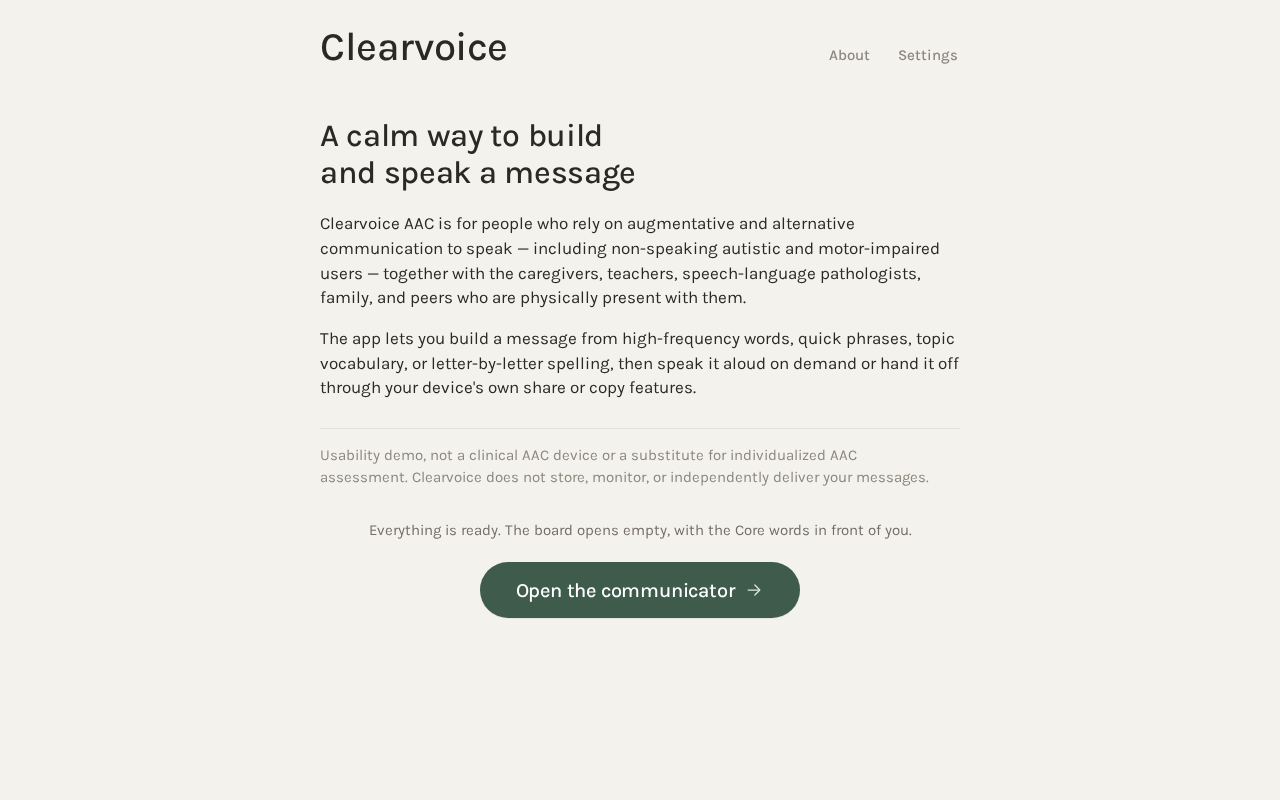
A calm way to build and speak a message
Clearvoice AAC is for people who rely on augmentative and alternative communication to speak — including non-speaking autistic and motor-impaired users — together with the caregivers, teachers, speech-language pathologists, family, and peers who are physically present with them.
The app lets you build a message from high-frequency words, quick phrases, topic vocabulary, or letter-by-letter spelling, then speak it aloud on demand or hand it off through your device's own share or copy features.
Usability demo, not a clinical AAC device or a substitute for individualized AAC assessment. Clearvoice does not store, monitor, or independently deliver your messages.
Everything is ready. The board opens empty, with the Core words in front of you.
Open the communicatorA calm way to build and speak a message
Clearvoice AAC is for people who rely on augmentative and alternative communication to speak — including non-speaking autistic and motor-impaired users — together with the caregivers, teachers, speech-language pathologists, family, and peers who are physically present with them.
The app lets you build a message from high-frequency words, quick phrases, topic vocabulary, or letter-by-letter spelling, then speak it aloud on demand or hand it off through your device's own share or copy features.
Usability demo, not a clinical AAC device or a substitute for individualized AAC assessment. Clearvoice does not store, monitor, or independently deliver your messages.
Everything is ready. The board opens empty, with the Core words in front of you.
Open the communicator
No comments yet. Be the first!