clash-royale-ai
Make me a app that uses ai for clash royale on iOS


Comments (0)
Sign in to leave a comment
System Requirements
System Requirements Document for Clash Royale AI
1. Introduction
Clash Royale AI is an iOS application that uses AI to help Clash Royale players. The product intent is narrow and direct: a player opens the app on iOS, asks a Clash Royale question, and receives AI-generated advice they can use in their next battle. The app is a coaching companion for the game, not a game client, not a deck tracker, and not a match simulator.
The audience is Clash Royale players who want quick, friendly, confident answers to their in-game questions while playing on iOS. The product's tone and visual language follow a Susan Kare-inspired pixel aesthetic: clear, playful, and fast rather than corporate.
The current delivery is a first-party iOS-facing application with two surfaces — an anonymous Landing page that explains the AI Clash Royale help and the iOS app, and a Coach page where the player sends a Clash Royale question and reads the AI answer. Both surfaces are reachable without an account. AI responses are produced through a backend that calls a LiteLLM gateway.
2. System Overview
Clash Royale AI delivers a single accepted capability: an iOS player asks a Clash Royale question and reads an AI answer. The current delivery consists of:
- A Landing page (anonymous, public entry) that introduces the AI Clash Royale coach and the iOS app, and routes the player to the Coach.
- A Coach page (anonymous) where the player submits a Clash Royale question and reads the AI-generated answer.
- A shared backend (FastAPI) that receives the player's question, calls the LiteLLM gateway for model-provider access, and returns the answer to the app.
- MariaDB for application-owned persistent data, and PostgreSQL supporting LiteLLM (separate from application-owned storage).
- A React frontend rendering the application UI.
The only active human persona is the Clash Royale player. No account, sign-in, or identity continuity is required by the accepted journeys; both surfaces are anonymous. No differentiated permissions, roles, or visibility controls are established by the source.
Removed from scope
- None. No concepts were explicitly removed by the user.
2a. Product Interpretation and Delivery Boundary
The user asked for an app that uses AI for Clash Royale on iOS. That request is the whole product boundary. The app is a first-party iOS-facing experience with two pages: a public Landing that explains the coach, and a Coach page where the player asks a question and reads the AI answer. Both pages are anonymous; the source establishes no account, login, or identity requirement, and none is indispensable to the accepted journey of asking a question and reading an answer.
AI model access is owned by the backend through the LiteLLM gateway. The app does not expose provider credentials to the client, and the player never interacts with the provider directly. The backend is the sole owner of model calls; the frontend owns the question input, submission, and answer display.
Nothing beyond asking a question and reading an AI answer is current. Future ideas (for example, saved history, deck analysis, or match tracking) are not part of this delivery and are not represented as pages, requirements, or flows.
2c. Page Content and Component Coverage
Landing
- Information and state: Product name "Clash Royale AI"; hero headline "Your Clash Royale AI coach"; subline "Ask a question and get clear advice for your next battle on iOS."; a primary call to action "Ask the coach". Anonymous, no account state.
- Primary action: Navigate to the Coach page via the "Ask the coach" call to action.
- Supporting actions: None required by source.
- Domain entities: None persisted; the page is presentational plus navigation.
- Component responsibilities:
- Hero block: pixel crown and elixir drop imagery at right, stacked pixel headline at left over a yellow block, CTA pinned beneath.
- Fixed left icon rail (desktop): one pixel pictogram marking the section; stacks away on mobile.
- Outlined tiles on an 8-point grid for supporting copy.
- States:
- Loading: not applicable (static content).
- Empty: not applicable.
- Success: page renders fully; CTA routes to Coach.
- Error: not applicable.
- Recovery: not applicable.
Coach
- Information and state: A question input for the player's Clash Royale question; a submit control; an answer region that displays the AI response in an outlined tile with a coral header bar. Anonymous; no account state.
- Primary action: Submit a Clash Royale question and read the AI answer.
- Supporting actions: Clear or edit the question input before resubmitting; ask a follow-up question after reading an answer.
- Domain entities: A question (player-authored text) and an answer (AI-generated text returned by the backend). Neither requires durable identity-bound storage for the accepted journey.
- Component responsibilities:
- Question input: single-line or multi-line text entry for the Clash Royale question.
- Submit control: sends the question to the backend.
- Answer tile: outlined tile with coral header bar; renders the AI answer with tabular pixel spacing for numbers and card names in yellow; types on in blocks per the motion direction.
- Error region: displays a material failure message when the backend or model call fails, with a retry affordance.
- States:
- Loading: answer tile shows a pending/typing state while the backend awaits the model response.
- Empty: no question submitted yet; answer region shows an empty prompt state.
- Success: AI answer rendered in the answer tile.
- Error: backend or model failure surfaces a readable error in the answer region with a retry control.
- Recovery: player can resubmit the same or an edited question after an error.
3. Functional Requirements
-
FR-1 (explicit): As a Clash Royale player, I should use an app that uses AI for Clash Royale, so that I get AI help for the game.
- Trigger/input: player opens the app on iOS.
- Observable result: the app presents AI coaching for Clash Royale.
- Access state: anonymous.
- Failure/recovery: not applicable at this level.
- Continuation: player proceeds to ask a question (FR-4).
-
FR-2 (explicit): As a Clash Royale player, I should use the app on iOS, so that I can access the AI coach on my iOS device.
- Trigger/input: player launches the app on an iOS device.
- Observable result: the app runs on iOS and presents the Landing page.
- Access state: anonymous.
- Failure/recovery: not applicable.
- Continuation: player proceeds to the Coach.
-
FR-3 (required_inference): As a Clash Royale player, I should open the app on iOS and see the Landing page, so that I understand what the AI coach does and how to start.
- Trigger/input: player launches the app.
- Observable result: Landing page renders with headline, subline, and "Ask the coach" CTA.
- Access state: anonymous.
- Failure/recovery: not applicable (static content).
- Continuation: player taps "Ask the coach" to reach the Coach page.
- FR-4 (required_inference): As a Clash Royale player, I should send a Clash Royale question to the AI on the Coach page, so that I receive advice for my next battle.
- Trigger/input: player enters a Clash Royale question and submits it.
- Observable result: the backend calls the LiteLLM gateway, and the AI answer appears in the answer tile.
- Access state: anonymous.
- Failure/recovery: if the backend or model call fails, the answer region shows a readable error with a retry control; the player can resubmit.
- Continuation: player reads the answer and may ask a follow-up question.
4. User Personas
Clash Royale player
- Product context: A Clash Royale player on iOS who wants quick, clear AI advice about the game. They are in or near a match context and want a fast answer, not a long report.
- Primary goal: Ask a Clash Royale question and get a clear AI answer they can use in their next battle.
- Distinct accepted responsibilities: Opens the app on iOS, reads the Landing to understand the coach, navigates to the Coach, enters a Clash Royale question, submits it, and reads the AI answer. May ask follow-up questions.
- Relevant inputs or decisions: The content of the question (what they want advice on) and whether to submit, edit, or resubmit.
- Interactions with other accepted participants: None beyond the app itself; the AI answer is produced by the backend via the LiteLLM gateway, which the player does not interact with directly.
- Observable success: The player sees a clear AI answer in the answer tile and can act on it in their next battle.
- Constraints: The app is for iOS. No account is required.
5. Core User Flows
Flow A — First open and orientation (Clash Royale player)
- The player launches Clash Royale AI on an iOS device.
- The Landing page renders with the headline "Your Clash Royale AI coach", the subline "Ask a question and get clear advice for your next battle on iOS.", and the "Ask the coach" CTA.
- The player reads the page and taps "Ask the coach".
- The app navigates to the Coach page.
- Next step: the player asks a question (Flow B).
Flow B — Ask a Clash Royale question and read the AI answer (Clash Royale player)
- The player is on the Coach page.
- The player enters a Clash Royale question in the question input.
- The player submits the question.
- The backend receives the question and calls the LiteLLM gateway for the model response.
- While awaiting the response, the answer tile shows a pending/typing state.
- On success, the AI answer appears in the outlined answer tile with a coral header bar; numbers and card names render in yellow with tabular pixel spacing.
- The player reads the answer and uses it in their next battle.
- Continuation: the player may enter a follow-up question and repeat from step 2.
Flow C — Failure and recovery (Clash Royale player)
- The player submits a question on the Coach page.
- The backend or LiteLLM gateway call fails.
- The answer region displays a readable error message with a retry control.
- The player taps retry or edits the question and resubmits.
- On success, the AI answer appears as in Flow B step 6.
6. Visuals Colors and Theme
Following the Susan Kare-inspired creative direction (dark mode):
- Background:
#14121C - Surface:
#221F2E - Text:
#F4F1E8 - Primary (actions, key data):
#FFC93C - Accent (AI answer header, alerts):
#FF4D6D - Muted:
#8C86A0 - Headings font: Press Start 2P — short all-caps pixel display lines, small tracking, large size, used only for the headline and section marks.
- Body font: Space Grotesk.
- Type scale: 1.25 modular — 40/32/24/18/16; headline
clamp(32px, 8vw, 88px). - Shape language: Chunky 2px outlines, hard 0px corners; icon tiles are square with a 4px inset border; pills avoided.
- Layout: Single column with a fixed left icon rail on desktop; content in outlined tiles on an 8-point grid; mobile stacks one tile per row.
- Imagery: Pixel icons for cards, crowns, elixir drops, and towers; simple pictograms replace photos.
- Avoid: Soft rounded cards with hover lift; gradient blobs or glass panels; photographs of people or game art; blue-on-white surfaces; the generic indigo/blue-on-white SaaS template.
7. Signature Design Concept
The public entry (Landing) is a full-width dark board. A large pixel crown and elixir drop sit at right, built from square tiles on the #14121C ground. At left, the pixel headline "Your Clash Royale AI coach" stacks over a yellow (#FFC93C) block, with the "Ask the coach" CTA pinned beneath it. A fixed left icon rail marks the section with one pixel pictogram on desktop and stacks away on mobile. All readable text and controls stay whole at 375px, 768px, and 1280px, wrapping or scaling to fit; decoration may bleed or crop but never covers text or controls.
8. Interaction Model & Motion Direction
Interaction Model: Animated Motion Tempo: restrained Hero Dimensionality: flat
Landing Hero Motion Brief
- Focal subject: The pixel crown and elixir drop at right, built from square tiles on the dark ground.
- Input → transformation → outcome thesis: On load, the pixel crown and elixir tiles blink and slide in over 3 frames; the stacked pixel headline settles over the yellow block; the "Ask the coach" CTA appears pinned beneath. The outcome is a composed, readable hero that invites the player to tap the CTA.
- Motion vocabulary: Frame-by-frame steps with no easing; icons blink and slide in 3 frames; answers type on in blocks.
- Composed first frame: Dark board, pixel crown and elixir at right, stacked pixel headline at left over a yellow block, CTA pinned beneath.
- Reduced-motion state: Static arrangement with all hero elements fully visible and readable; no blinking or sliding; CTA remains available.
9. Non-Functional Requirements
- NFR-1 (explicit): The app is for iOS. The client experience must run on iOS devices.
- NFR-2 (required_inference): The backend must not expose model-provider credentials to the client; all model calls go through the backend and the LiteLLM gateway.
- NFR-3 (required_inference): Readable text and controls must stay whole and inside the viewport and their container at 375px, 768px, and 1280px, wrapping or scaling to fit; decoration and motion may crop or bleed but must not cover text or controls.
- NFR-4 (required_inference): With
prefers-reduced-motion, the app must provide a usable static arrangement. - NFR-5 (required_inference): The Coach page must surface a readable error and a retry affordance when the backend or model call fails.
10. Tech Stack
- Frontend: React application UI (iOS-facing).
- Backend: Shared FastAPI process for application APIs and domain modules.
- Database: MariaDB for application-owned persistent data.
- AI gateway: LiteLLM gateway for the backend's model-provider calls.
- Supporting database: PostgreSQL supporting LiteLLM; separate from application-owned storage.
- Deployment: Docker/docker-compose for the listed services.
11. Assumptions and Constraints
- Assumption (required_inference): The player has an iOS device and can launch the app.
- Assumption (required_inference): The backend can reach the LiteLLM gateway and a model provider at runtime.
- Constraint (explicit): The app is for iOS.
- Constraint (explicit): The app uses AI for Clash Royale.
- Constraint (required_inference): Both Landing and Coach are anonymous; no account or identity continuity is required by the accepted journeys.
- Constraint (required_inference): No differentiated permissions or role-based visibility are established by the source.
12. Glossary
- Clash Royale: The mobile strategy game the app provides AI coaching for.
- Clash Royale player: The sole active human persona; an iOS user who asks Clash Royale questions and reads AI answers.
- Coach: The page where the player submits a Clash Royale question and reads the AI answer.
- Landing: The anonymous public entry page that introduces the AI coach and routes to the Coach.
- LiteLLM: The gateway the backend uses for model-provider calls.
- AI answer: The model-generated response displayed in the answer tile on the Coach page.
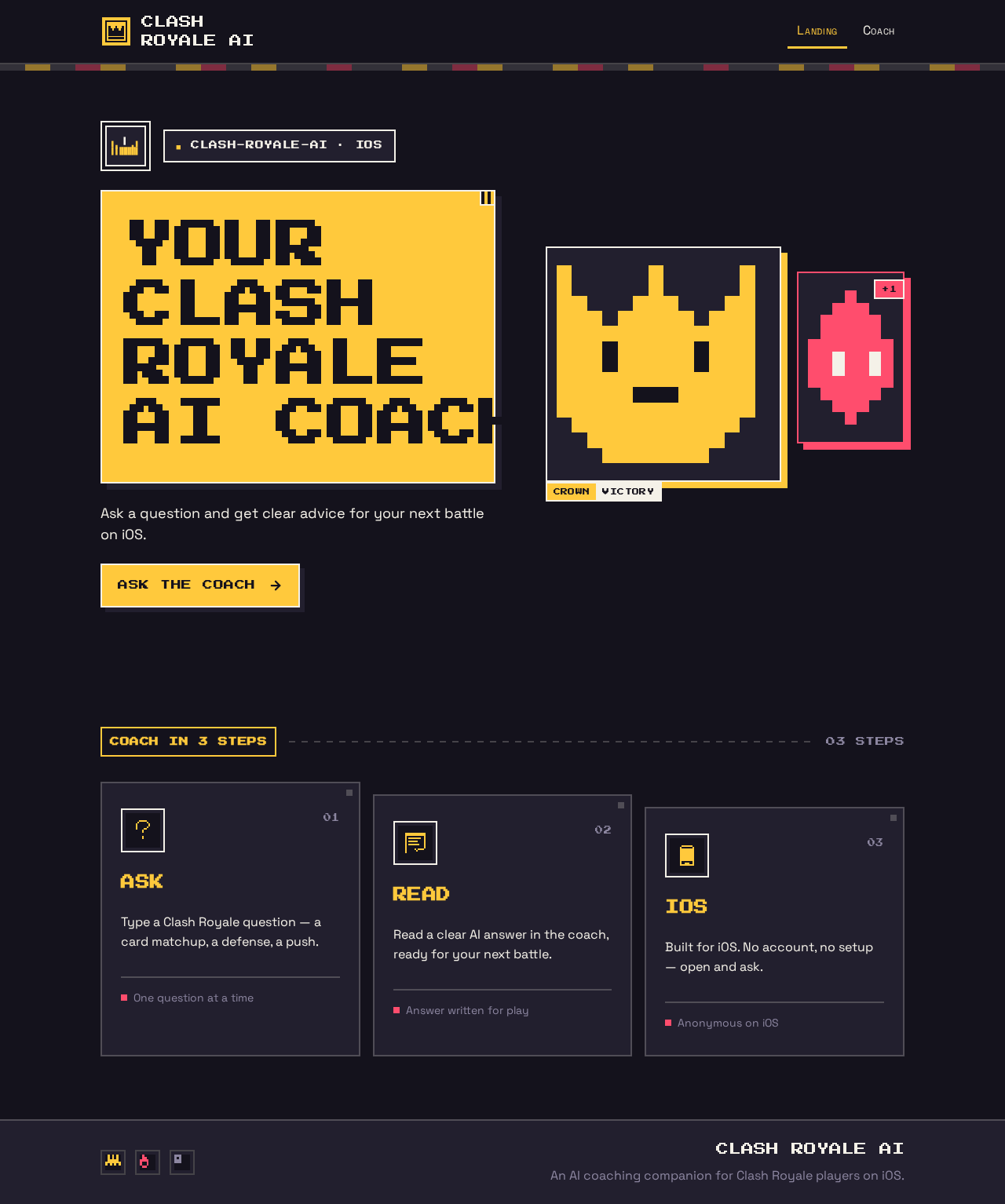
clash-royale-ai · iOS
Your Clash RoyaleAI coach
Ask a question and get clear advice for your next battle on iOS.
Ask the coachCoach in 3 steps
Ask
Type a Clash Royale question — a card matchup, a defense, a push.
One question at a timeRead
Read a clear AI answer in the coach, ready for your next battle.
Answer written for playiOS
Built for iOS. No account, no setup — open and ask.
Anonymous on iOS
clash-royale-ai · iOS
Your Clash RoyaleAI coach
Ask a question and get clear advice for your next battle on iOS.
Ask the coachCoach in 3 steps
Ask
Type a Clash Royale question — a card matchup, a defense, a push.
One question at a timeRead
Read a clear AI answer in the coach, ready for your next battle.
Answer written for playiOS
Built for iOS. No account, no setup — open and ask.
Anonymous on iOS
No comments yet. Be the first!