chill-ride

bySunday Robson

So I want you to help build an app when people can use to order rides around the area that can work um online when you are online and it should have a good security and um the network should be stable and should be secure and people's information should be confidential and in this app you can also listen to music if you want to like after ordering your right you just want to chill and listen to music you can do that

LandingSign UpLogin
Landing

Comments (0)

No comments yet. Be the first!

System Requirements

System Requirement Document
Page 1 of 7

System Requirements Document for chill-ride

1. Introduction

The chill-ride application is designed to provide users with the ability to order rides within their local area while online. The app emphasizes security, network stability, and confidentiality of user information. Additionally, it offers a music streaming feature for users to enjoy after booking a ride, enhancing the overall user experience.

2. System Overview

The chill-ride app is a ride-ordering platform that allows users to book rides online. It ensures secure and stable network operations and maintains the confidentiality of user information. The app also includes a music streaming feature for users to enjoy after booking a ride. The primary user of the app is the Rider, who can order rides and listen to music. The app requires users to sign up and log in to access ride booking and music features.

2a. Product Interpretation and Delivery Boundary

The chill-ride app operates online, requiring users to have an internet connection to order rides. It ensures secure handling of user data and stable network connectivity. The app mandates user enrollment and login for accessing ride and music features, ensuring continuity and security. The app's design is inspired by a youthful and dynamic audience, with a bold and inviting interface.

Page 2 of 7

2b. Source Content Inventory

Not applicable as no content_source directive is provided.

2c. Page Content and Component Coverage

Landing

  • Information: Introduction to the app's ride-ordering and music features.
  • Primary Actions: Navigate to Sign Up or Login.
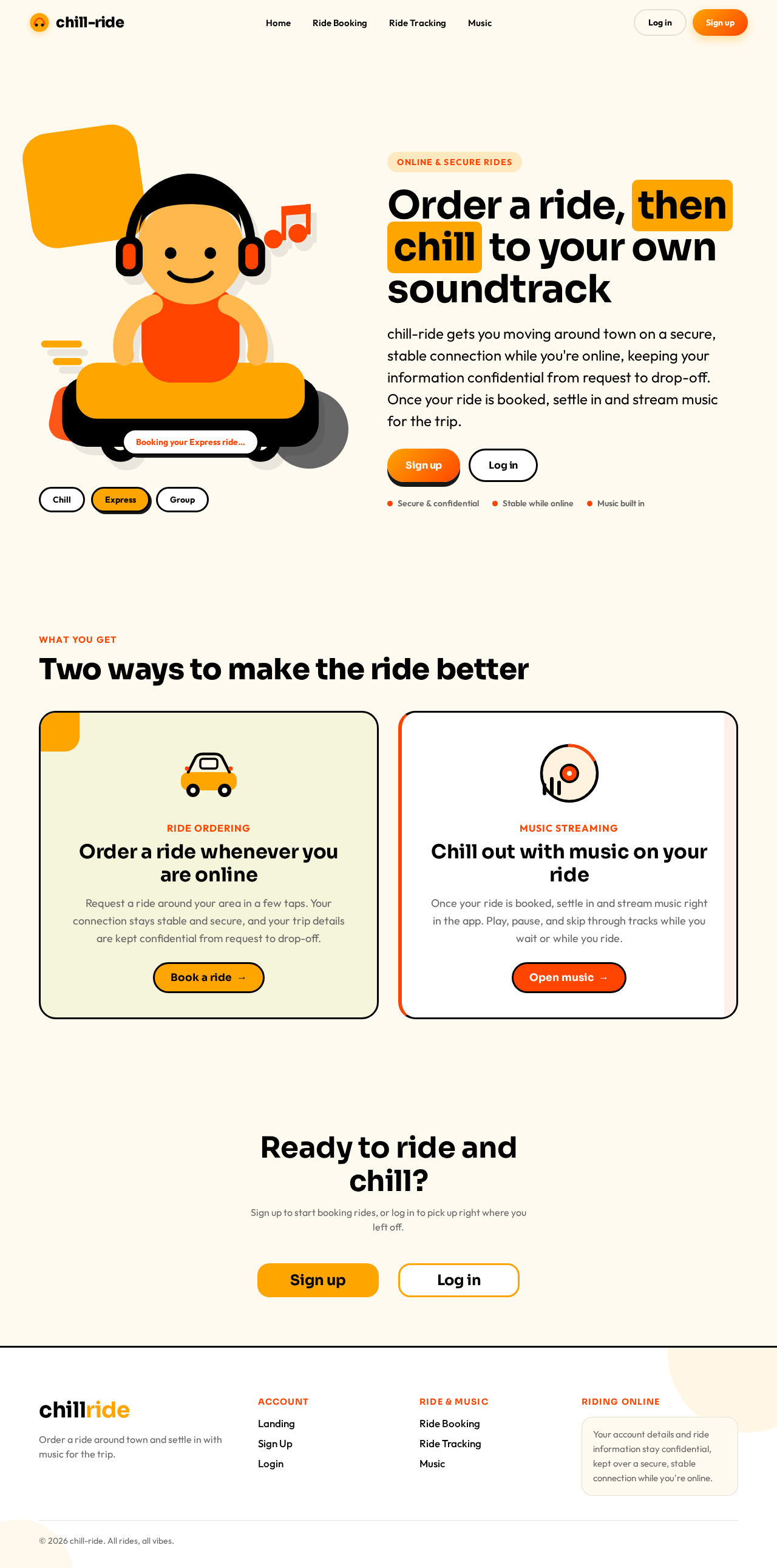
  • Components: Hero section with character illustration, bold typography.
  • States: Loading, success, error.

Sign Up

  • Information: User enrollment form.
  • Primary Actions: Submit registration details.
  • Components: Form fields for user information, submit button.
  • States: Loading, success, error.

Login

  • Information: User authentication form.
  • Primary Actions: Submit login credentials.
  • Components: Form fields for username and password, submit button.
  • States: Loading, success, error.
Page 3 of 7

Ride Booking

  • Information: Ride request form.
  • Primary Actions: Submit ride request.
  • Components: Pickup and drop-off location fields, ride options, submit button.
  • States: Loading, success, error.

Ride Tracking

  • Information: Current ride status and location.
  • Primary Actions: View ride details.
  • Components: Map view, ride details section.
  • States: Loading, success, error.

Music

  • Information: Music streaming interface.
  • Primary Actions: Play, pause, skip tracks.
  • Components: Music player controls, playlist.
  • States: Loading, success, error.

3. Functional Requirements

  • As a Rider, I should be able to order rides around the area while online. (explicit)
  • As a Rider, I should be able to listen to music after ordering a ride. (explicit)
  • As a Rider, I should be able to sign up for the app to start using it. (required_inference)
  • As a Rider, I should be able to log in to access ride and music features. (required_inference)
  • The app should protect user information as confidential. (explicit)
  • The app should provide secure and stable network operations. (explicit)
Page 4 of 7

4. User Personas

  • Rider: The primary user who orders rides and listens to music. Responsible for signing up, logging in, booking rides, and using the music feature.

5. Core User Flows

  1. Rider Sign Up

    • Access the Sign Up page from the Landing page.
    • Enter personal information and submit the form.
    • Receive confirmation and proceed to log in.
  2. Rider Login

    • Access the Login page from the Landing page.
    • Enter credentials and submit.
    • Access the Ride Booking page upon successful login.
  3. Ride Booking

    • Navigate to the Ride Booking page after logging in.
    • Enter pickup and drop-off locations.
    • Submit the ride request.
    • View ride details on the Ride Tracking page.
  4. Ride Tracking

    • Access the Ride Tracking page to view current ride status.
    • Monitor ride progress and estimated arrival time.
  5. Music Streaming

    • Navigate to the Music page after booking a ride.
    • Use music player controls to play, pause, or skip tracks.
Page 5 of 7

6. Visuals Colors and Theme

  • Muse: Haraldur Thorleifsson
  • Palette:
    • Background: #FFFAF0
    • Surface: #FFFFFF
    • Text: #000000
    • Primary: #FFA500
    • Accent: #FF4500
    • Muted: #F5F5DC
  • Typography:
    • Headings: Sora — Bold, large size, tight tracking, sentence case
    • Body: Outfit
    • Scale: 1.414 modular, 64/48/32/24/18
  • Shape Language: Chunky rounded cards and sections
  • Layout: Playful, color-blocked sections
  • Imagery: Custom character and spot illustrations
  • Hero Direction: Oversized character illustration on a light cream background

7. Signature Design Concept

The Landing page features a full-width character illustration leading the hero section, with bold typographic headlines that span the viewport. The design uses color-blocked sections with rounded card elements and vibrant hover pops and entrance animations. Navigation is illustration-led with playful transitions.
Page 6 of 7

8. Interaction Model & Motion Direction

  • Interaction Model: Animated
  • Motion Tempo: Expressive
  • Hero Dimensionality: Layered_2d
  • Landing Hero Motion Brief:
    • Focal Subject: Oversized character illustration
    • Input→Transformation→Outcome: User selects a ride option, character illustration animates to show a ride being booked, resulting in a confirmation message.
    • Motion Vocabulary: Lively entrance animations, hover pops
    • Composed First Frame: Character illustration with bold typography and primary colors
    • Reduced-Motion State: Static illustration with minimal animations

9. Non-Functional Requirements

  • The app must ensure secure data handling and confidentiality controls. (explicit)
  • The app must maintain stable network connectivity. (explicit)
  • The app must operate online for ride ordering. (explicit)

10. Tech Stack

  • Frontend: React Native
  • Backend: Python/FastAPI
  • Storage: Appropriate secure storage solution
  • Deployment: Docker/docker-compose, Kubernetes (if required)
Page 7 of 7

11. Assumptions and Constraints

  • The app requires an online connection for ride ordering.
  • User information must remain confidential and secure.
  • The app is designed for a youthful and dynamic audience.

12. Glossary

  • Rider: A user who orders rides and listens to music through the app.
  • Ride Booking: The process of requesting a ride within the app.
  • Music Streaming: The feature allowing users to listen to music after booking a ride.
Landing design preview
Landing: View landing page
Sign Up: Submit registration details
Login: Submit login credentials
Ride Booking: Submit ride request
Ride Tracking: View ride details
Music: Play music track
Landing design preview
Landing: View landing page
Sign Up: Submit registration details
Login: Submit login credentials
Ride Booking: Submit ride request
Ride Tracking: View ride details
Music: Play music track