children-day-care
 Monin Modi
Create an app for the children day care

Comments (0)
Sign in to leave a comment
System Requirements
System Requirements Document for children-day-care
1. Introduction
children-day-care is a first-party web application for a children's day care center. It serves the center's three human audiences in one product: parents and guardians who need to learn about the center, enroll their child, and stay close to their child's day; caregivers who record and share daily care as it happens; and administrators who run enrollment records and publish communication to families.
The product intent is a well-run, well-loved room expressed as software: warm and human for families, fast and legible for caregivers working one-handed between children, and ordered and current for administrators. The app owns its own identity so that a parent's enrollment request, a caregiver's daily log entries, and an administrator's records remain bound to the correct person and can be resumed later.
2. System Overview
The current delivery is a custom web application with an application-owned identity layer and a shared backend. Anonymous visitors land on a public entry surface that explains the center, who it serves, and what enrollment involves. Parents and guardians create their own accounts and submit a child enrollment request; administrators review those requests and manage the resulting child and family records. Caregivers record daily activity and care notes for children, and those records surface to the child's family alongside announcements published by administrators.
Actors:
- Parent / Guardian — self-service account holder acting on behalf of their child.
- Day Care Staff / Caregiver — provisioned account holder recording daily care.
- Day Care Administrator — provisioned account holder managing enrollment records and announcements.
The backend is a single shared service that owns accounts, enrollment requests, child and family records, daily care log entries, and announcements. No separate worker, queue, or additional container is required by the accepted behavior.
Narrow exclusions: the app does not provide medical or clinical record keeping, billing or payment processing, transport scheduling, staff payroll, or third-party integrations. No capability beyond the accepted requirements is included.
2a. Product Interpretation and Delivery Boundary
The application is delivered as a first-party web app with its own sign-in. Parents and guardians establish their own access through self-service sign-up; caregivers and administrators receive accounts provisioned by the day care center rather than enrolling publicly. Returning users verify through the login surface before reaching protected work.
The public entry surface is anonymously reachable and carries the center's information and enrollment details that parents review before deciding to enroll. Everything that depends on a durable, person-specific relationship — a submitted enrollment request, a child's daily updates, a caregiver's log entries, an administrator's records — sits behind sign-in and is scoped to the signed-in person's role.
Current scope covers the full accepted lifecycle: discovery, identity, enrollment request and administrative review, daily care recording, family-facing updates, and announcements. Nothing in this document describes future or out-of-scope work; there is no deferred horizon in the accepted requirements.
2c. Page Content and Component Coverage
Landing
- Information / state: Anonymous public entry. Explains what the day care is, who it serves (ages 1–5), and what it does, including the day care information and enrollment details parents review before enrolling. Presents hours, ratios, and locations as inline facts.
- Primary actions: "Start an enrollment" (routes an anonymous visitor toward account creation and the enrollment path); "See how a day looks" (routes to the day-in-the-life content on this surface).
- Supporting actions: Navigate to Login for returning parents, caregivers, and administrators.
- Domain entities: Center information (description, ages served, hours, ratios, locations), enrollment details (what enrollment involves, what a family provides).
- Component responsibilities: Split hero with eyebrow, display headline, primary CTA, secondary text link, and inline fact row; full-height warm photographic panel with an overlapping mustard colour-block carrying "Enrolling now · Autumn"; teal band with asymmetric arc transition; gallery of center-life panels; mustard band presenting enrollment steps with the toy-block progress indicator.
- States: Loading — imagery panels resolve progressively with the cream ground and text present immediately. Empty — not applicable; content is authored center information. Success — full page renders with all bands and imagery. Error — if imagery fails, colour-block panels and all text remain fully readable. Recovery — visitor can still reach Sign Up and Login from the hero and nav.
Sign Up
- Information / state: Anonymous first-use enrollment for parents and guardians. Collects the identity details needed to create a parent/guardian account.
- Primary actions: Create the parent/guardian account.
- Supporting actions: Navigate to Login if the visitor already has an account.
- Domain entities: Parent/guardian account (name, email, password).
- Component responsibilities: Account form with labelled fields, inline validation messaging, submit control, and a link across to Login.
- States: Loading — submit control shows in-progress state and prevents duplicate submission. Empty — blank form with helper text. Success — account created and the parent continues to the enrollment path. Error — field-level validation errors (missing or malformed email, weak or mismatched password) and a form-level error if the account cannot be created (for example, email already in use), with the entered values preserved. Recovery — correct the flagged fields and resubmit, or switch to Login.
Login
- Information / state: Anonymous returning verification for parents, caregivers, and administrators who already have accounts.
- Primary actions: Verify and enter the app.
- Supporting actions: Navigate to Sign Up for parents who do not yet have an account.
- Domain entities: Account credentials, session.
- Component responsibilities: Credential form, submit control, error region, and a link across to Sign Up.
- States: Loading — submit control shows in-progress state. Empty — blank credential form. Success — session established and the person lands on the Dashboard. Error — invalid credentials message that does not reveal which field was wrong. Recovery — re-enter credentials; parents without an account are routed to Sign Up.
Dashboard
- Information / state: Signed-in, role-appropriate starting point. Summarizes and routes to each persona's recurring work rather than completing it. Parents see their enrollment status and recent family updates; caregivers see the children they log care for; administrators see pending enrollment requests and recent announcements.
- Primary actions: Route to the role's primary working surface (Enrollment or Family Updates for parents; Daily Care Log for caregivers; Enrollment Records or Announcements for administrators).
- Supporting actions: Sign out.
- Domain entities: Signed-in account and role, enrollment request status, child records, recent updates, pending requests, recent announcements.
- Component responsibilities: Left rail (220px, cream, hairline right border) with role-appropriate nav; content column of non-uniform panels; summary panels that link into their owning surface.
- States: Loading — panel skeletons in the cream/off-white palette. Empty — a parent with no enrollment request sees a prompt to start one; a caregiver with no assigned children sees an explanatory empty panel; an administrator with no pending requests sees a clear "nothing pending" panel. Success — role-appropriate panels populated. Error — a panel that fails to load shows an inline retry without blocking the rest of the dashboard. Recovery — retry the failed panel or navigate directly via the left rail.
Enrollment
- Information / state: Focused owner where a parent or guardian submits a child enrollment/registration request. Shows the current state of the parent's request (not yet submitted, submitted and awaiting review, or reviewed) and the child and family details captured.
- Primary actions: Submit the child enrollment request.
- Supporting actions: Save progress before submitting; review entered details before committing.
- Domain entities: Enrollment request (child details, family/guardian details, requested start, status), linked to the submitting parent/guardian account.
- Component responsibilities: Multi-step enrollment form with the toy-block progress indicator stamping block-by-block; labelled field groups; review step; submit control; status panel reflecting the request's current state.
- States: Loading — existing request state loads before the form is shown. Empty — no request yet; the form starts fresh. Success — request submitted and the status panel shows it awaiting administrator review. Error — field-level validation errors and a form-level error if submission fails, with entered values preserved. Recovery — correct and resubmit; a previously submitted request remains visible with its status rather than being silently replaced.
Family Updates
- Information / state: Independently revisitable owner where parents and guardians view daily updates and announcements about their child. Presents the child's daily care entries and the center's announcements in one reading surface.
- Primary actions: Read the child's daily updates and announcements.
- Supporting actions: Move between the update feed and the metadata/photo strip; revisit at any time.
- Domain entities: Daily care log entries for the parent's child (activity, care notes, attendance, timestamps, caregiver), announcements published to families.
- Component responsibilities: Single 7-column reading column in Fraunces for care notes and announcement text; 5-column metadata/photo strip beside it; announcement entries marked with the tomato "new announcement" dot; timestamps and metadata in muted.
- States: Loading — reading column and metadata strip load with skeletons. Empty — a parent whose child has no entries yet sees a clear explanatory panel; a parent with no announcements sees the feed without the announcement block. Success — entries and announcements render in reverse-chronological order. Error — a failed load shows an inline retry. Recovery — retry, or return later; the surface is independently revisitable.
Daily Care Log
- Information / state: Focused owner where caregivers record daily activity and care notes for a child. Shows the selected child and the day's existing entries.
- Primary actions: Record a daily activity or care note for a child.
- Supporting actions: Select which child to log for; review the day's entries as recorded.
- Domain entities: Daily care log entry (child, caregiver, activity, care note, attendance, timestamp).
- Component responsibilities: Wide ruled table on desktop with walnut hairline rules, tabular numerals in Jost for times and values, and notes in Fraunces italic; collapses to stacked labelled rows on mobile; child selector; entry control.
- States: Loading — the day's entries load for the selected child. Empty — a child with no entries yet shows an empty ruled sheet ready for the first entry. Success — the new entry appears in the day's sheet immediately and becomes visible to the child's family. Error — a failed save shows an inline error and keeps the entered note so it is not lost. Recovery — retry the save; the caregiver can continue logging other children.
Enrollment Records
- Information / state: Administrator-owned browse and management owner for child and family enrollment records, including reviewing submitted requests. Shows submitted requests awaiting review and the active child and family records.
- Primary actions: Review a submitted enrollment request and approve it so the child and family record becomes active.
- Supporting actions: Browse and search the record list; open an individual record to read its aligned label/value detail.
- Domain entities: Enrollment request (with status), child record, family/guardian record, linked parent/guardian account.
- Component responsibilities: Dense but ordered ruled list with aligned label/value pairs (not a card grid); request detail view; approve control; status indicators.
- States: Loading — the record list loads with row skeletons. Empty — no requests and no records yet shows a clear explanatory panel. Success — an approved request moves out of the pending set and the child and family record becomes active. Error — a failed list load or failed approval shows an inline error with retry. Recovery — retry the action; the request remains in its prior state until approval succeeds.
Announcements
- Information / state: Administrator-owned owner for publishing announcements and schedules to families. Shows published announcements and their delivery state.
- Primary actions: Publish an announcement or schedule to families.
- Supporting actions: Review previously published announcements.
- Domain entities: Announcement (title, body, publish time, audience), schedule.
- Component responsibilities: Composition panel with title and body fields (body authored in the human voice, rendered in Fraunces for families); publish control; list of published announcements with timestamps.
- States: Loading — the published list loads. Empty — no announcements yet shows an explanatory panel with the compose control ready. Success — the published announcement appears in the list and becomes visible to families in Family Updates. Error — a failed publish shows an inline error and preserves the composed text. Recovery — retry publishing without re-entering the announcement.
3. Functional Requirements
FR-1 — Public center information and enrollment details (explicit) As a Parent / Guardian, I should be able to read what the day care is, who it serves, and what enrollment involves on the public entry surface, so that I can decide whether to enroll my child.
- Trigger: anonymous visit to Landing.
- Observable result: center description, ages served, hours, ratios, locations, and enrollment details are readable without an account.
- Access state: anonymous; no sign-in required.
- Failure/recovery: if imagery fails to load, all text and controls remain readable and the visitor can still reach Sign Up and Login.
- Continuation: the visitor proceeds to Sign Up to begin enrollment, or to Login if already a parent.
FR-2 — Parent/guardian self-service account creation (required_inference) As a Parent / Guardian, I should be able to create my own account, so that my enrollment request and my child's updates stay bound to me and can be resumed later.
- Trigger: the parent chooses to start an enrollment from Landing.
- Observable result: a parent/guardian account exists and the parent is signed in.
- Access state: anonymous entry; the account is created before any protected state is reached.
- Failure/recovery: field-level validation errors and a form-level error if the account cannot be created (for example, email already in use), with entered values preserved; the parent can correct and resubmit or switch to Login.
- Continuation: the parent continues into the enrollment path.
FR-3 — Returning verification for all three roles (required_inference) As a Parent / Guardian, Day Care Staff / Caregiver, or Day Care Administrator, I should be able to verify my existing account, so that I can reach my protected work.
- Trigger: a returning person opens Login.
- Observable result: a session is established and the person lands on the Dashboard.
- Access state: anonymous entry to Login; protected destinations remain unavailable until verification succeeds.
- Failure/recovery: invalid credentials produce a message that does not reveal which field was wrong; the person can re-enter credentials, and a parent without an account is routed to Sign Up.
- Continuation: the person proceeds to their role-appropriate Dashboard.
FR-4 — Provisioned caregiver and administrator accounts (required_inference) As a Day Care Administrator, I should have my account provisioned by the day care center rather than created through public self-enrollment, so that staff access is controlled by the center.
- Trigger: the center provisions the caregiver or administrator account.
- Observable result: the provisioned person can verify through Login and reach their role-appropriate work.
- Access state: no public self-enrollment path exists for these roles.
- Failure/recovery: a provisioned person who cannot verify uses the same Login error and recovery path as any returning user.
- Continuation: the person proceeds to their role-appropriate Dashboard.
FR-5 — Role-appropriate signed-in starting point (required_inference) As a Parent / Guardian, Day Care Staff / Caregiver, or Day Care Administrator, I should land on a starting point that summarizes and routes to my recurring work, so that I can get to what I need without hunting.
- Trigger: successful verification.
- Observable result: role-appropriate summary panels and navigation are shown; the Dashboard routes rather than completes work.
- Access state: requires sign-in.
- Failure/recovery: a panel that fails to load shows an inline retry without blocking the rest of the dashboard.
- Continuation: the person navigates into the owning surface for their task.
FR-6 — Child enrollment request submission (explicit) As a Parent / Guardian, I should be able to submit a child enrollment/registration request, so that my child can be considered for enrollment.
- Trigger: the signed-in parent opens Enrollment and completes the request.
- Observable result: the request is submitted and its status shows it awaiting administrator review.
- Access state: requires sign-in as a parent/guardian.
- Failure/recovery: field-level validation errors and a form-level error if submission fails, with entered values preserved; a previously submitted request remains visible with its status rather than being silently replaced.
- Continuation: the parent can revisit Enrollment to see the request's current state, and can read Family Updates once the child is enrolled.
FR-7 — Administrator review of submitted enrollment requests (required_inference) As a Day Care Administrator, I should be able to review a submitted enrollment request and approve it, so that the child and family record becomes active.
- Trigger: a parent submits an enrollment request and it appears in the pending set.
- Observable result: on approval, the request leaves the pending set and the child and family record becomes active.
- Access state: requires sign-in as an administrator.
- Failure/recovery: a failed approval shows an inline error with retry; the request remains in its prior state until approval succeeds.
- Continuation: the administrator continues browsing records; the parent's Enrollment status reflects the review outcome.
FR-8 — Child and family enrollment record management (explicit) As a Day Care Administrator, I should be able to browse and manage child and family enrollment records, so that the center's records stay current.
- Trigger: the administrator opens Enrollment Records.
- Observable result: a dense, ordered ruled list of records with aligned label/value detail is available to browse and open.
- Access state: requires sign-in as an administrator.
- Failure/recovery: a failed list load shows an inline error with retry.
- Continuation: the administrator opens an individual record or returns to the list.
FR-9 — Daily activity and care note recording (explicit) As a Day Care Staff / Caregiver, I should be able to record daily activity and care notes for a child, so that each child's day is accurately documented.
- Trigger: the caregiver selects a child in Daily Care Log and records an entry.
- Observable result: the entry appears in the day's ruled sheet for that child and becomes visible to the child's family.
- Access state: requires sign-in as a caregiver.
- Failure/recovery: a failed save shows an inline error and keeps the entered note so it is not lost; the caregiver can retry and continue logging other children.
- Continuation: the caregiver continues logging for the same or another child.
FR-10 — Family visibility into daily updates (explicit) As a Parent / Guardian, I should be able to view daily updates about my child, so that I have reliable visibility into my child's day.
- Trigger: the parent opens Family Updates.
- Observable result: the child's daily care entries render in a reading column with metadata and photos beside them.
- Access state: requires sign-in as a parent/guardian; the parent sees only their own child's updates.
- Failure/recovery: a failed load shows an inline retry; the surface is independently revisitable.
- Continuation: the parent returns to the Dashboard or revisits later.
FR-11 — Announcement and schedule publishing (explicit) As a Day Care Administrator, I should be able to publish announcements and schedules to families, so that the center communicates clearly with parents.
- Trigger: the administrator composes and publishes an announcement in Announcements.
- Observable result: the announcement appears in the published list and becomes visible to families in Family Updates.
- Access state: requires sign-in as an administrator.
- Failure/recovery: a failed publish shows an inline error and preserves the composed text so it can be retried without re-entry.
- Continuation: the administrator reviews the published list or composes another announcement.
FR-12 — Family receipt of announcements (explicit) As a Parent / Guardian, I should be able to read announcements and schedules published by the center, so that I stay informed about center notices.
- Trigger: the parent opens Family Updates after an announcement is published.
- Observable result: the announcement renders in the reading column, marked with the tomato "new announcement" dot.
- Access state: requires sign-in as a parent/guardian.
- Failure/recovery: a failed load shows an inline retry.
- Continuation: the parent returns to the Dashboard or revisits later.
4. User Personas
Parent / Guardian
Product context. The parent or guardian of a child at (or applying to) the center. They are time-poor and often checking in from work, on a phone, between other obligations. They arrive at the app either curious about the center or already committed and needing to enroll.
Primary goal. A child enrolled and cared for, with reliable visibility into daily activities and center notices.
Distinct responsibilities. Parents are the only self-service account holders: they create their own access, submit the child enrollment request, and are the sole audience for their own child's daily updates and the center's announcements. Their work is reading and deciding — reviewing what the center is, what enrollment involves, and what happened in their child's day.
Inputs and decisions. They read center information, ages served, hours, ratios, locations, and enrollment details; they decide whether to enroll; they enter child and family details into the enrollment request; they read daily care entries and announcements.
Interactions with other participants. Their enrollment request is reviewed by the Day Care Administrator, whose approval activates the child and family record. Their child's daily updates are authored by the Day Care Staff / Caregiver. Their announcements come from the administrator.
Observable success. Their enrollment request shows a reviewed status and their child's record is active; Family Updates shows their child's daily entries and the center's announcements.
Day Care Staff / Caregiver
Product context. The caregiver working in the room, on their feet, logging care one-handed between children. Their account is provisioned by the center, not self-created. Speed and legibility matter more than exploration.
Primary goal. Accurate, timely daily records and updates delivered to each child's family.
Distinct responsibilities. Caregivers are the only authors of daily care log entries. They select a child and record activity, care notes, and attendance as the day happens. They do not manage enrollment records or publish announcements.
Inputs and decisions. They choose which child to log for, decide what to record, and enter activity, care notes, and attendance with timestamps.
Interactions with other participants. Their entries are read by the child's Parent / Guardian in Family Updates. Their access is provisioned by the Day Care Administrator.
Observable success. The day's ruled sheet for a child shows the entries they recorded, and those entries are visible to the child's family.
Day Care Administrator
Product context. The administrator runs the center's operations from a desk: records, enrollment, and communication. Their account is provisioned by the center. They work in dense, ordered lists rather than feeds.
Primary goal. A well-run center with current enrollment records and clear communication to parents.
Distinct responsibilities. Administrators are the only reviewers of enrollment requests and the only publishers of announcements and schedules. They browse and manage child and family records, and they provision caregiver and administrator accounts.
Inputs and decisions. They read submitted enrollment requests and decide whether to approve them; they browse and open child and family records; they compose announcements and schedules and decide when to publish.
Interactions with other participants. Their approval activates the record that a Parent / Guardian's enrollment request created. Their announcements are read by parents in Family Updates. Their provisioning gives caregivers and fellow administrators access.
Observable success. Pending requests are reviewed and approved, records are current, and published announcements appear in the list and reach families.
5. Core User Flows
Flow 1 — A parent discovers the center and creates an account
- The Parent / Guardian opens the app anonymously and lands on Landing.
- They read the center's description, ages served (1–5), hours, ratios, and locations, and the enrollment details explaining what enrolling involves.
- They choose Start an enrollment (the tomato pill CTA) and are routed to Sign Up.
- On Sign Up, they enter their name, email, and password and submit.
- If a field is invalid or the email is already in use, the form shows the error and preserves their entries; they correct and resubmit, or switch to Login if they already have an account.
- On success, their account exists and they are signed in, and they continue into the enrollment path.
Flow 2 — A returning parent, caregiver, or administrator verifies and reaches their work
- The person opens Login.
- They enter their credentials and submit.
- If the credentials are invalid, a message appears that does not reveal which field was wrong; they re-enter credentials. A parent without an account is routed to Sign Up.
- On success, a session is established and they land on Dashboard.
- The Dashboard shows role-appropriate summary panels: a parent sees their enrollment status and recent family updates; a caregiver sees the children they log care for; an administrator sees pending enrollment requests and recent announcements.
- If a panel fails to load, they retry it inline without losing the rest of the dashboard, or navigate directly via the left rail.
Flow 3 — A parent submits a child enrollment request
- The signed-in Parent / Guardian opens Enrollment from the Dashboard or the left rail.
- If they have an existing request, its current status loads first so they can see where things stand.
- They work through the enrollment form, entering child details, family/guardian details, and the requested start. The toy-block progress indicator fills block-by-block as they advance.
- They review the entered details before committing.
- They submit the request.
- If validation fails or submission errors, the form shows the error and preserves their entries; they correct and resubmit. A previously submitted request remains visible with its status rather than being silently replaced.
- On success, the status panel shows the request awaiting administrator review.
- They can revisit Enrollment at any time to see the request's current state.
Flow 4 — An administrator reviews and approves an enrollment request
- The signed-in Day Care Administrator opens Enrollment Records from the Dashboard or the left rail.
- The pending set shows the submitted request from Flow 3.
- They open the request and read its aligned label/value detail — child details, family/guardian details, requested start, and the linked parent/guardian account.
- They decide to approve.
- If approval fails, an inline error appears with retry and the request remains in its prior state; they retry.
- On success, the request leaves the pending set and the child and family record becomes active.
- The parent's Enrollment status reflects the review outcome, and the child's family can now receive daily updates.
- The administrator continues browsing records or returns to the list.
Flow 5 — A caregiver records a child's daily care
- The signed-in Day Care Staff / Caregiver opens Daily Care Log from the Dashboard or the left rail.
- They select the child they are logging for. The day's existing entries load into the ruled sheet.
- They record an activity or care note, with attendance and the time. On desktop this is a wide ruled table with walnut hairline rules, tabular numerals in Jost, and notes in Fraunces italic; on mobile it is stacked labelled rows.
- If the save fails, an inline error appears and the entered note is kept so it is not lost; they retry.
- On success, the entry appears in the day's sheet for that child and becomes visible to the child's family.
- They continue logging for the same child or select another child.
Flow 6 — A parent reads their child's daily updates
- The signed-in Parent / Guardian opens Family Updates from the Dashboard or the left rail.
- The child's daily care entries render in a single reading column in Fraunces, with a metadata/photo strip beside them showing timestamps and the recording caregiver.
- If the load fails, an inline retry is offered; the surface is independently revisitable at any time.
- If their child has no entries yet, a clear explanatory panel is shown instead of an empty feed.
- They read the entries and return to the Dashboard, or revisit later.
Flow 7 — An administrator publishes an announcement
- The signed-in Day Care Administrator opens Announcements from the Dashboard or the left rail.
- They compose an announcement or schedule, entering a title and body. The body is written in the human voice and renders in Fraunces for families.
- They publish.
- If publishing fails, an inline error appears and the composed text is preserved; they retry without re-entering it.
- On success, the announcement appears in the published list with its timestamp and becomes visible to families in Family Updates.
- They review the published list or compose another announcement.
Flow 8 — A parent receives a center announcement
- The signed-in Parent / Guardian opens Family Updates.
- The published announcement renders in the reading column, marked with the tomato "new announcement" dot.
- If the load fails, an inline retry is offered.
- They read the announcement and return to the Dashboard, or revisit later.
6. Visuals Colors and Theme
Muse and headline. Charles & Ray Eames — Warm modernism for small humans: mid-century joy inside a calm, ordered day.
The direction is authoritative for this section. The system is a warm cream paper ground with joyful colour held inside strict order: honest materials, legible structure, and everyday delight rather than clinical or cartoonish treatment.
Colour tokens (light mode).
| Role | Hex | Use |
|---|---|---|
| Background | #F7F1E4 | Warm cream paper ground — never pure white |
| Surface | #FFFCF5 | Off-white card and panel surface |
| Text | #2B241C | Soft walnut-black ink for body and headings (~12:1 on the ground) |
| Primary | #1F6E63 | Teal: nav bar, links, primary buttons, focus rings, active log state |
| Accent | #D8542B | Tomato: enrollment CTA, "new announcement" dot, child's name in a log row, one hero shape |
| Muted | #8A7C68 | Metadata, timestamps, helper text |
| Secondary fill | #E0A32E | Mustard: tag chips, section bands, toy-block motif |
| Secondary fill | #7FB3A6 | Teal-light: tag chips, section bands |
Mustard and teal-light are colour-block fills only, never text. Proportion: ~70% cream/off-white, ~18% teal, ~7% walnut ink, ~5% tomato + mustard combined. No blue or indigo appears anywhere; pure white #FFFFFF is never used as a ground.
Typography.
- Headings and UI labels: Jost, 500–600 weight, tight tracking (-0.01em). Hero display is 500 weight, not black, so it stays warm rather than shouty. Section eyebrows and data labels are Jost 500, uppercase, +0.12em tracking, 12–13px, in muted or teal. Buttons and nav are Jost 500 sentence case.
- Body: Fraunces — a warm, slightly quirky serif with optical sizing — for body copy, long-form care notes, announcement text, and parent-facing reading surfaces.
- Scale: 1.25 modular on a 16px base: 14 / 16 / 20 / 25 / 31 / 39, plus display 48 (mobile) → 88 (desktop) via
clamp(48px, 7vw, 88px). Hero headlineclamp(44px, 8vw, 96px). Section headingsclamp(28px, 4vw, 40px). Card titles 20px. Body/reading text 16px, line-height 1.6, max measure 68ch.
Shape language. Organic-modern: cards and panels use 14px radii with a soft, low-offset shadow (0 2px 0 rgba(43,36,28,0.06), 0 8px 24px rgba(43,36,28,0.07)) — a physical paper-on-table shadow, never a glow. Buttons are 999px pills in teal or tomato. Section boundaries are gentle asymmetric arcs (3–6% viewport-height curve) rather than straight rules or diagonal cuts. Dividers are 1px walnut at 12% opacity. A recurring "toy-block" motif — 24px squares with 6px radii in mustard/teal/tomato — serves as bullet markers, list icons, and step indicators. Nothing is skeuomorphic.
Layout. A gallery-like, modular panel sequence rather than a dashboard grid. Max content width 1200px with 24px mobile / 40px tablet / 64px desktop gutters. The landing page reads as stacked full-width colour bands: cream hero, teal band, cream gallery, mustard band for enrollment steps. Signed-in surfaces use a two-column shell: a 220px cream left rail with a hairline right border and role-appropriate nav, plus a wide content column. Panels are deliberately non-uniform: Family Updates is a 7-column reading column with a 5-column metadata/photo strip beside it; Daily Care Log is a wide ruled table on desktop that collapses to stacked labelled rows on mobile; Enrollment Records uses a dense ordered ruled list with aligned label/value pairs, not a card grid. At 375px everything becomes one column, nav moves to a bottom tab bar using the toy-block motif as icons, and tables become labelled stacks.
Imagery. Warm, natural-light documentary photography — children's hands, wooden blocks, a coat peg with a small jacket, a caregiver and child at a low table, a sunlit reading corner. Candid, close, softly lit, warm-toned; never stock-photo smiles-at-camera. Photographs are cropped into confident mid-century rectangles and circles and are always accompanied by a solid colour-block panel (teal, mustard, or tomato) so imagery and colour-block sit in dialogue. Hand-drawn line accents (a wobbly sun, a paper boat, a small house) in walnut ink at 1.5px serve as section openers. No 3D renders, no gradient blobs, no illustrated cartoon children.
7. Signature Design Concept
The overlapping block. The public entry is a 12-column split, not a centred stack. The left 6 columns sit on the cream ground: a small uppercase teal eyebrow ("CHILDREN'S DAY CARE · AGES 1–5"), then the display headline in Jost 500 at clamp(44px, 8vw, 96px) breaking across three lines and running flush to the column edge, then a single tomato pill CTA ("Start an enrollment") with a plain teal text link ("See how a day looks") beside it, then a hairline row of three inline facts (Hours · Ratios · Locations) in muted. The right 6 columns is a full-height warm photographic panel of a sunlit room, cropped hard to the column edge, with a mustard colour-block square overlapping its lower-left corner by 40px carrying the words "Enrolling now · Autumn" in Jost 500 caps. The overlap is the identity, not a decoration. The whole hero sits on cream; a teal band begins immediately below with a soft asymmetric arc. Nothing is centred, there is no gradient, and no blue appears anywhere.
This concept recomposes only accepted content and controls: the center's information, the enrollment details, the enrollment CTA, the day-in-the-life link, and the inline facts. It introduces no new behavior, page, or destination.
8. Interaction Model & Motion Direction
Interaction Model: Animated Motion Tempo: restrained Hero Dimensionality: layered_2d
Landing Hero Motion Brief. The focal subject is the warm photographic panel of a sunlit room on the right six columns, with the mustard colour-block square overlapping its lower-left corner. The input→transformation→outcome thesis: as the page settles, the photographic panel drifts slowly (translate 0 → -8px over 6 seconds, yoyo) as ambient life while the mustard block holds its overlap position — the room breathes, the identity stays put. Motion vocabulary: opacity + 12px rise over 420ms with a gentle ease-out for page and section entrances; no spring, no scale-pop. The composed first frame shows the cream ground, the eyebrow, the full headline, the tomato pill CTA and teal text link, the inline fact row, and the photographic panel with the mustard block already in place. The one signature motion belongs to the enrollment progress indicator, which fills block-by-block with each toy-block stamping in on a 90ms stagger. Hover states are 160ms colour/underline swaps, never lift-and-shadow. With prefers-reduced-motion: all entrances become instant, the hero drift stops, and the progress indicator renders fully filled without animation. No parallax, no scroll-jacking.
9. Non-Functional Requirements
- NFR-1 — Durable state (explicit, from Planning Scope): Accounts, enrollment requests, child and family records, daily care log entries, and announcements persist durably so that a parent's request, a caregiver's entries, and an administrator's records survive across sessions and can be resumed.
- NFR-2 — Application-owned identity (required_inference): The app owns its identity layer. Parents and guardians self-enroll; caregivers and administrators are provisioned by the center. Protected destinations are unavailable until verification succeeds.
- NFR-3 — Role-scoped visibility (required_inference): A parent sees only their own child's updates and their own enrollment request; a caregiver sees the children they log care for; an administrator sees enrollment records and announcements. This scoping is required by the accepted lifecycles, not a general permission system.
- NFR-4 — Readable text and controls at every viewport (explicit, from Creative Direction): Headlines, wordmarks, labels, numbers, cards' text, and controls stay entirely inside the viewport and their container at 375px, 768px, and 1280px, wrapping or scaling (for example
font-size: clamp(...)with its mobile size) to fit, and no other element covers any part of them. Imagery, decoration, and motion may be cropped, bled, rotated, or overlapped as the direction asks, as long as they cover no readable text or control. - NFR-5 — Reduced-motion support (explicit, from Creative Direction): With
prefers-reduced-motion, all entrances become instant, the hero drift stops, and the enrollment progress indicator renders fully filled without animation.
- NFR-6 — Accessible contrast (required_inference): The walnut-black ink on the cream ground provides approximately 12:1 contrast; teal and tomato are used for controls and accents at sizes and weights that remain legible, and mustard and teal-light are never used as text.
- NFR-7 — Responsive collapse (explicit, from Creative Direction): At 375px the layout becomes one column, nav moves to a bottom tab bar with toy-block icons, and tables become labelled stacks; the Daily Care Log's ruled table and the Enrollment Records ruled list both collapse without losing any label/value pairing.
10. Tech Stack
- Frontend: React (web), with the Jost and Fraunces typefaces and the token system described in Section 6.
- Backend: Python / FastAPI, extended as a single shared service that owns accounts, enrollment requests, child and family records, daily care log entries, and announcements. No separate worker, queue, or additional container is required by the accepted behavior.
- Storage: A relational database appropriate to the durable entities above (accounts, enrollment requests, child and family records, daily care log entries, announcements).
- Packaging: Docker / docker-compose for the frontend and the shared backend. Kubernetes is not required by the current deployment scope.
11. Assumptions and Constraints
- A-1 (required_inference): The app owns its identity layer. Parents and guardians self-enroll through Sign Up; caregivers and administrators are provisioned by the day care center and do not use public self-enrollment.
- A-2 (required_inference): A submitted enrollment request does not activate the child and family record until an administrator reviews and approves it.
- A-3 (required_inference): A parent sees only their own child's daily updates and their own enrollment request; role scoping is required by the accepted lifecycles and is not a general permission system.
- A-4 (explicit, from Creative Direction): The palette, typography, shape language, layout, motion, and imagery in Sections 6–8 are authoritative. No blue or indigo primary/accent and no pure white ground appear anywhere.
- A-5 (explicit, from Creative Direction): Jost and Fraunces are the only typefaces; Inter, Roboto, Arial, Helvetica, Open Sans, Lato, Poppins, Nunito, Quicksand, and system-ui are not used for headings or body.
- A-6 (explicit, from Creative Direction): Motion is restrained and film-like — no bouncy, springy, or elastic motion; no confetti; no particles; no parallax scroll-jacking.
- A-7 (explicit, from Creative Direction): The generic indigo/blue-on-white SaaS template is forbidden for this project.
- A-8 (assumption): The center's information shown on Landing — description, ages served, hours, ratios, locations, and enrollment details — is authored center content maintained by the administrator.
- A-9 (assumption): No payment, billing, medical record keeping, transport scheduling, or staff payroll capability is in scope.
12. Glossary
- Enrollment request — A parent/guardian's submitted request to enroll a child, which remains pending until an administrator reviews and approves it.
- Child and family record — The active record created when an enrollment request is approved, linking the child, the family/guardian details, and the parent/guardian account.
- Daily care log entry — A caregiver's record of a child's activity, care note, attendance, and timestamp for a given day.
- Announcement — A notice or schedule published by an administrator and read by families in Family Updates.
- Toy-block motif — The recurring 24px rounded square in mustard, teal, or tomato used as bullet markers, nav icons, and the enrollment progress indicator.
- Toy-block progress indicator — The enrollment progress control that fills block-by-block, each block stamping in on a 90ms stagger.
- Reading column — The single 7-column Fraunces column in Family Updates where care notes and announcement text are read, with a 5-column metadata/photo strip beside it.
- Ruled sheet — The Daily Care Log's wide table on desktop with walnut hairline rules, tabular numerals in Jost, and notes in Fraunces italic, collapsing to stacked labelled rows on mobile.
- Provisioned account — A caregiver or administrator account created by the day care center rather than through public self-enrollment.
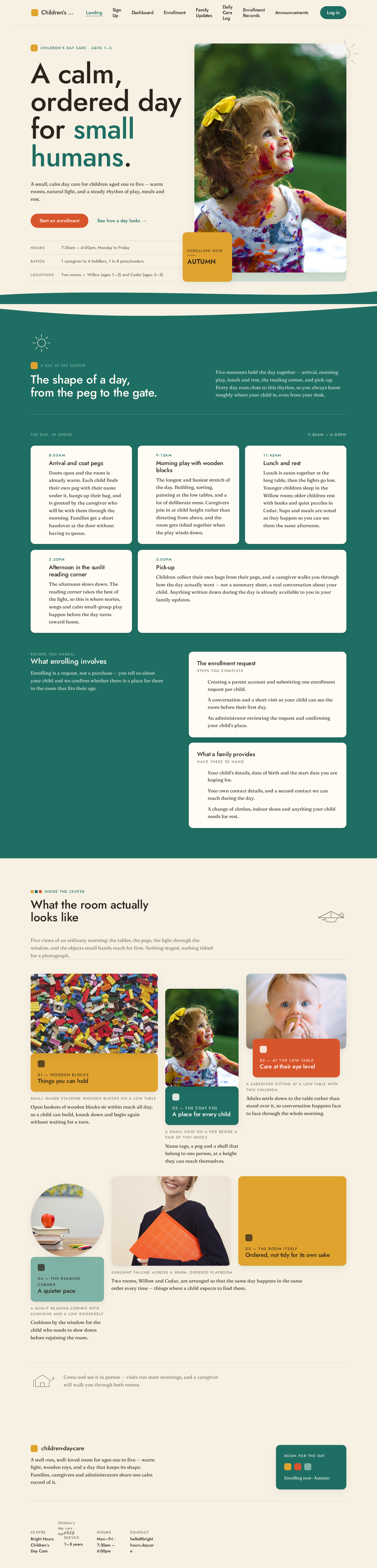
Children’s day care · Ages 1–5
A calm, ordered day for small humans.
A small, calm day care for children aged one to five — warm rooms, natural light, and a steady rhythm of play, meals and rest.
7:30am – 6:00pm, Monday to Friday
1 caregiver to 4 toddlers, 1 to 8 preschoolers
Two rooms — Willow (ages 1–3) and Cedar (ages 3–5)

Inside the center
What the room actually looks like
Five views of an ordinary morning: the tables, the pegs, the light through the window, and the objects small hands reach for first. Nothing staged, nothing tidied for a photograph.

Things you can hold

A place for every child

Care at their eye level

A quieter pace

Ordered, not tidy for its own sake
Come and see it in person — visits run most mornings, and a caregiver will walk you through both rooms.
Enrolling now
Four steps from first visit to first day
Enrollment is a short, ordered path. Each step keeps your request bound to you, so you can stop and return to it whenever you have a moment.
- One
- Two
- Three
- Four · Place confirmed
Step 1
Create your parent account
Sign up with your name, email and a password so your request stays bound to you.
Step 2
Tell us about your child and family
Child details, guardian details and the start date you are hoping for.
Step 3
Review and submit your enrollment request
Check every detail, then submit. You can revisit the request at any time to see its status.
Step 4
We review and confirm your child's place
An administrator reviews your request and confirms your child's place at the center.
Most families complete the request in one sitting. Nothing is charged to create an account.
Start an enrollmentChildren’s day care · Ages 1–5
A calm, ordered day for small humans.
A small, calm day care for children aged one to five — warm rooms, natural light, and a steady rhythm of play, meals and rest.
7:30am – 6:00pm, Monday to Friday
1 caregiver to 4 toddlers, 1 to 8 preschoolers
Two rooms — Willow (ages 1–3) and Cedar (ages 3–5)
Inside the center
What the room actually looks like
Five views of an ordinary morning: the tables, the pegs, the light through the window, and the objects small hands reach for first. Nothing staged, nothing tidied for a photograph.
Things you can hold
A place for every child
Care at their eye level
A quieter pace
Ordered, not tidy for its own sake
Come and see it in person — visits run most mornings, and a caregiver will walk you through both rooms.
Enrolling now
Four steps from first visit to first day
Enrollment is a short, ordered path. Each step keeps your request bound to you, so you can stop and return to it whenever you have a moment.
- One
- Two
- Three
- Four · Place confirmed
Step 1
Create your parent account
Sign up with your name, email and a password so your request stays bound to you.
Step 2
Tell us about your child and family
Child details, guardian details and the start date you are hoping for.
Step 3
Review and submit your enrollment request
Check every detail, then submit. You can revisit the request at any time to see its status.
Step 4
We review and confirm your child's place
An administrator reviews your request and confirms your child's place at the center.
Most families complete the request in one sitting. Nothing is charged to create an account.
Start an enrollment
No comments yet. Be the first!