chatbot-wordpress
 Aqsa dmt
chatbot AI plugin for wordpress


Comments (0)
Sign in to leave a comment
System Requirements
System Requirements Document for Chatbot AI Plugin
1. Introduction
The Chatbot AI Plugin is a WordPress plugin that gives a WordPress site an AI-powered chat interface. Site visitors open the chat on the WordPress site, send messages, and read AI-generated replies. The WordPress site owner installs the plugin, verifies identity, and configures the chatbot settings that govern how the chat behaves for visitors.
The product intent is narrow and concrete: add an AI chat to a WordPress site, let visitors ask questions and receive AI answers, and let the site owner control the chatbot's configuration. The audience is two roles — the WordPress site owner who operates the plugin, and the site visitor who converses with the chatbot.
This document is the System Requirements Document for the Chatbot AI Plugin. It records the accepted current behavior, the delivery and access boundaries, the page contract, the personas, the core user flows, and the supporting technical and design constraints.
2. System Overview
The Chatbot AI Plugin is delivered as a WordPress plugin with a first-party application surface. The current delivery includes:
- A public Landing page that explains the chatbot AI plugin for WordPress to an anonymous audience.
- A Login page where the WordPress site owner verifies identity before changing durable chatbot settings.
- A Chat page where a site visitor sends a message and reads the AI reply.
- A Chatbot Settings page, restricted to the authenticated WordPress site owner, where the chatbot settings for the WordPress site are configured.
The active human actors are the WordPress site owner and the Site visitor. The system also relies on an AI model provider reached through a LiteLLM gateway, and on application-owned persistent storage.
The provisioned infrastructure comprises a shared FastAPI backend for application APIs and domain modules, a MariaDB database for application-owned persistent data, a React frontend, a LiteLLM gateway for the backend's model-provider calls, and a PostgreSQL database supporting LiteLLM (separate from application-owned storage). These services support the accepted behavior; they do not add product requirements.
Removed from scope
- None. No concept was explicitly removed by the user.
2a. Product Interpretation and Delivery Boundary
The product is a plugin for WordPress. Its first-party surfaces are the Landing page, the Login page, the Chat page, and the Chatbot Settings page. The Landing page is anonymously reachable and explains the plugin. The Login page is anonymously reachable and establishes the site owner's identity; it does not itself grant access to protected settings. The Chat page is anonymously reachable by site visitors, who send messages and read AI replies. The Chatbot Settings page is role-restricted and requires the site owner to have verified identity through Login.
AI replies are produced by the backend calling a model provider through the LiteLLM gateway. Application-owned durable state — the site owner's identity and the chatbot settings — is stored in the application's MariaDB database. LiteLLM's PostgreSQL database is separate and is not application-owned storage.
Current scope covers the four pages above and the two personas. No adjacent account-management, billing, analytics, or multi-site administration capabilities are included.
2c. Page Content and Component Coverage
Landing
- Information and state: Anonymous public entry. Explains that the product is an AI chat plugin for WordPress. Presents the hero headline "Your site answers every question", the subline "Add an AI chat to WordPress. Visitors ask, the chatbot replies.", and the call to action "Add the plugin". Shows a chat preview panel as a visual representation of the visitor experience.
- Primary action: "Add the plugin" call to action, which leads the site owner toward installing/configuring the plugin (continuing to Login for settings access).
- Supporting actions: Navigate to Login; navigate to Chat to try the visitor experience.
- Domain entities: Plugin description content; chat preview (illustrative).
- Component responsibilities: Hero band with curved gold ribbon carrying the headline; subline; primary call to action; floating chat preview capsule with mint live dot; curved section boundaries.
- States: Loading — static content, no data fetch required. Empty — not applicable. Success — hero and call to action render fully at 375px, 768px, and 1280px. Error — not applicable for static content. Recovery — not applicable.
Login
- Information and state: Anonymous identity-access surface for the WordPress site owner. Collects the site owner's credentials to verify identity before durable chatbot settings can be changed. Does not itself expose settings.
- Primary action: Submit credentials to verify identity.
- Supporting actions: Return to Landing; proceed to Chatbot Settings after successful verification.
- Domain entities: Site owner identity (application-owned).
- Component responsibilities: Credential input fields; submit control; inline validation messaging; link back to Landing.
- States: Loading — submission in progress indicator. Empty — blank fields with labels. Success — identity verified, redirect to Chatbot Settings. Error — invalid credentials shown inline with a retry path. Recovery — user can correct input and resubmit; can return to Landing.
Chat
- Information and state: Anonymous visitor-facing chat surface. Displays the conversation history for the current session, the visitor's sent messages, and the AI replies. Shows a mint live dot indicating the chat is active.
- Primary action: Send a message to the chatbot.
- Supporting actions: Read AI replies; continue the conversation.
- Domain entities: Chat message (visitor message, AI reply); conversation session.
- Component responsibilities: Floating capsule chat panel on a wide curve; message input; send control; message list with visitor and AI message styling; live-state indicator; reply fade-in with soft rise.
- States: Loading — pending reply indicator after send. Empty — initial greeting or empty conversation prompt. Success — AI reply appears in the message list. Error — reply failure shown with a retry path. Recovery — visitor can resend or continue.
Chatbot Settings
- Information and state: Role-restricted surface for the authenticated WordPress site owner. Presents the chatbot settings for the WordPress site as calm two-column rows on a wide curve, each with a gold toggle or control. Reflects the currently saved settings.
- Primary action: Change and save chatbot settings.
- Supporting actions: Review current settings; toggle options; save changes.
- Domain entities: Chatbot settings (durable, application-owned).
- Component responsibilities: Two-column settings rows; gold toggles per option; save control; saved/unsaved state indication.
- States: Loading — settings being fetched. Empty — defaults presented when no settings saved yet. Success — settings saved confirmation. Error — save failure shown with retry. Recovery — owner can retry save or revert changes.
3. Functional Requirements
FR-1 — Plugin delivery. As a WordPress site owner, I should be able to use the product as a plugin for WordPress, so that the chatbot is delivered within my WordPress site. (explicit)
- Trigger/input: The site owner installs the plugin on a WordPress site.
- Observable result: The plugin is present and its surfaces are available.
- Access state: Public entry via Landing.
- Failure/recovery: If installation fails, the site owner retries installation.
- Continuation: Proceed to configure settings via Login and Chatbot Settings.
FR-2 — Visitor chat with AI answers. As a site visitor, I should be able to open the chat on the WordPress site, send my messages, and read AI replies, so that my questions are answered. (explicit)
- Trigger/input: The visitor opens the Chat page and submits a message.
- Observable result: The visitor's message appears in the conversation and an AI reply is displayed.
- Access state: Anonymous; no identity required.
- Failure/recovery: If a reply fails, the visitor sees an error with a retry path and can resend.
- Continuation: The visitor continues the conversation.
FR-3 — Site owner configures settings. As a WordPress site owner, I should be able to configure the chatbot settings in WordPress, so that the chatbot behaves as I intend for my site. (explicit)
- Trigger/input: The authenticated site owner opens Chatbot Settings and changes options.
- Observable result: The changed settings are saved and reflected on return.
- Access state: Role-restricted; requires verified identity via Login.
- Failure/recovery: If saving fails, the owner sees an error and can retry or revert.
- Continuation: The owner returns to review or adjust settings later.
FR-4 — Site owner verifies identity before changing settings. As a WordPress site owner, I should verify my identity before changing chatbot settings, so that durable settings remain protected. (required_inference)
- Trigger/input: The site owner opens Login and submits credentials.
- Observable result: Identity is verified and the owner is granted access to Chatbot Settings.
- Access state: Anonymous entry at Login; protected state at Chatbot Settings.
- Failure/recovery: Invalid credentials show an inline error and allow correction and resubmission.
- Continuation: On success, proceed to Chatbot Settings.
FR-5 — Visitor opens the chat on the WordPress site. As a site visitor, I should be able to open the chat on the WordPress site, so that I can begin a conversation. (required_inference)
- Trigger/input: The visitor navigates to the Chat page.
- Observable result: The chat interface is displayed and ready for input.
- Access state: Anonymous.
- Failure/recovery: If the chat does not load, the visitor can reload the page.
- Continuation: The visitor sends a message (FR-2).
4. User Personas
WordPress site owner
- Product context: Operates a WordPress site and installs the Chatbot AI Plugin to add an AI chat to that site. Reaches the product through the Landing page and manages the chatbot through Login and Chatbot Settings.
- Primary goal: Keep an AI chat available to site visitors and control how the chatbot is configured for the site.
- Distinct accepted responsibilities: Installs the plugin; verifies identity via Login; configures and saves chatbot settings on Chatbot Settings.
- Relevant inputs or decisions: Credentials for identity verification; choices among chatbot settings options.
- Interactions with other accepted participants: The site owner's settings govern the chatbot that site visitors converse with on the Chat page.
- Observable success: Settings are saved and reflected on return; the chat remains available to visitors.
Site visitor
- Product context: Arrives at the WordPress site and uses the chat to ask questions. Reaches the product through the Chat page.
- Primary goal: Get answers to questions by sending messages and reading AI replies.
- Distinct accepted responsibilities: Opens the chat; sends messages; reads AI replies; retries on failure.
- Relevant inputs or decisions: The message text the visitor submits; whether to continue or resend after a failure.
- Interactions with other accepted participants: The visitor experiences the chatbot as configured by the WordPress site owner.
- Observable success: The visitor's message appears and an AI reply is displayed in the conversation.
5. Core User Flows
Flow A — Site owner installs and configures the chatbot
- The WordPress site owner arrives at the Landing page and reads that the product adds an AI chat to WordPress.
- The site owner selects the "Add the plugin" call to action to proceed with installing the plugin on the WordPress site.
- The site owner opens Login and submits credentials to verify identity.
- On successful verification, the site owner is taken to Chatbot Settings.
- The site owner reviews the current settings presented as two-column rows and adjusts options using the gold toggles.
- The site owner saves the changes; a saved confirmation is shown.
- Failure/recovery: If saving fails, the site owner sees an error and can retry or revert changes.
- Continuation: The site owner can return to Chatbot Settings later to review or adjust settings.
Flow B — Site owner verifies identity
- The WordPress site owner opens Login.
- The site owner enters credentials and submits.
- Success: Identity is verified and the site owner proceeds to Chatbot Settings.
- Failure/recovery: Invalid credentials show an inline error; the site owner corrects input and resubmits, or returns to Landing.
Flow C — Site visitor chats with the chatbot
- The site visitor opens the Chat page on the WordPress site.
- The chat interface is displayed with a mint live dot indicating the chat is active.
- The visitor types a message and sends it.
- The visitor's message appears in the conversation; a pending reply indicator is shown.
- The backend calls the model provider through the LiteLLM gateway, and the AI reply fades in with a soft rise.
- The visitor reads the reply and continues the conversation.
- Failure/recovery: If a reply fails, the visitor sees an error with a retry path and can resend or continue.
6. Visuals Colors and Theme
The creative direction is authoritative for this section. Muse: Zaha Hadid — fluid parametric grandeur for an AI chat plugin. Headline: "Your site answers every question."
Mode: Dark.
Color tokens (exact hex by role):
- Background:
#121316 - Surface:
#1C1E23 - Text:
#F2F1ED - Primary (gold, key actions):
#C9A227 - Accent (mint teal, live chat state):
#8FD6C9 - Muted:
#8A8D94
Gold stays under 10 percent of each screen. Charcoal ground with pearl-white text; gold marks key actions; mint teal marks live chat state.
Typography:
- Headings: Jost, Light 300, wide tracking, large size contrast, sentence case.
- Body: Work Sans.
- Scale: 1.333 modular — 44/32/24/18/16px on mobile; 96/64/40/20/16px on desktop.
Shape language: Long sweeping curves, capsule controls, soft diagonal section edges. Corners are continuous, not sharp.
Layout: Asymmetric editorial grid with a curved hero band. Settings use calm two-column rows. The chat window floats on a wide curve.
Imagery: Smooth 3D curved surfaces and flowing light lines. No stock photos and no flat clip art.
Avoid: Flat grey admin panels; sharp 90-degree card corners; blue primary buttons on white; photographic stock people; grids of identical hover-lift cards. The generic indigo/blue-on-white SaaS template is forbidden.
Readability constraint: Headlines, wordmarks, labels, numbers, cards' text and controls stay entirely inside the viewport and their container at 375px, 768px, and 1280px, wrapping or scaling (for example font-size: clamp(...) with its mobile size) to fit, with no other element covering any part of them. Imagery, decoration, and motion may be cropped, bled, rotated, overlapped, or cut as the direction asks, as long as they cover no readable text or control. With prefers-reduced-motion, provide a usable static arrangement.
7. Signature Design Concept
The public entry (Landing) is built around a full-bleed charcoal field holding one large golden curved ribbon that sweeps from the left edge. A pearl-white headline — "Your site answers every question" — sits over the curve at 96px on desktop and 44px on mobile, carried on the ribbon's upper arc. The subline "Add an AI chat to WordPress. Visitors ask, the chatbot replies." sits beneath, and the "Add the plugin" call to action is a capsule control in gold. A chat preview panel floats at the lower right as a floating capsule with a mint live dot, recomposing the accepted Chat page's message-and-reply state. Section boundaries curve as soft diagonal arcs rather than straight rules. The concept recomposes only accepted content, states, and controls; it introduces no new behavior or destination.
8. Interaction Model & Motion Direction
Interaction Model: Animated Motion Tempo: cinematic Hero Dimensionality: dimensional_css
Landing Hero Motion Brief
- Focal subject: The large golden curved ribbon sweeping from the left edge across the charcoal field, with the pearl-white headline riding its upper arc and the floating chat preview capsule at the lower right.
- Input → transformation → outcome thesis: As the visitor arrives and scrolls, the curved ribbon layers sweep slowly like a camera move, gently parallaxing against the headline; the chat preview capsule's mint live dot pulses softly, and the preview's reply fades in with a soft rise — showing the accepted visitor experience of sending a message and reading an AI reply.
- Motion vocabulary: Slow camera-like sweeps; gentle parallax on the curved layers; soft rise and fade for chat replies.
- Composed first frame: Charcoal field, gold ribbon entering from the left, headline on the upper arc, subline beneath, gold capsule call to action, chat preview capsule at lower right with mint live dot.
- Reduced-motion state: A static arrangement with the ribbon, headline, subline, call to action, and chat preview all fully visible and readable; no parallax or sweeps; the live dot rendered static.
9. Non-Functional Requirements
- NFR-1 — WordPress plugin constraint. The product is a plugin for WordPress. (explicit) Rationale: explicit hard constraint in the authoritative source.
- NFR-2 — Durable settings state. Chatbot settings are durable application-owned state persisted in MariaDB, so the site owner's configuration survives across sessions. (required_inference) Rationale: the accepted settings lifecycle requires durable state.
- NFR-3 — Protected settings access. Chatbot Settings is role-restricted and requires verified identity via Login; the Login page is anonymously reachable and does not itself expose settings. (required_inference) Rationale: durable settings must remain bound to the correct site owner.
- NFR-4 — AI reply delivery. AI replies are produced by the backend calling a model provider through the LiteLLM gateway. (required_inference) Rationale: the accepted visitor chat requires AI answers.
- NFR-5 — Readable text and controls. Readable text and controls stay whole and inside the viewport and their container at 375px, 768px, and 1280px; decoration and motion may bleed but never cover readable text or controls. (explicit)
- NFR-6 — Reduced motion. With
prefers-reduced-motion, a usable static arrangement is provided. (explicit)
10. Tech Stack
- Frontend: React application UI.
- Backend: Shared FastAPI process for application APIs and domain modules.
- Application storage: MariaDB for application-owned persistent data (site owner identity, chatbot settings).
- AI gateway: LiteLLM gateway for the backend's model-provider calls.
- Gateway storage: PostgreSQL supporting LiteLLM, separate from application-owned storage.
- Plugin constraint: Delivered as a plugin for WordPress. (explicit)
11. Assumptions and Constraints
- The product is a plugin for WordPress. (explicit)
- The active human personas are exactly the WordPress site owner and the Site visitor. (required_inference)
- The page contract is exactly Landing, Login, Chat, and Chatbot Settings, with the access states recorded in Section 2a. (required_inference)
- Application-owned identity is used for the site owner; the Login page is anonymously reachable and protected settings remain unavailable until identity is established. (required_inference)
- AI replies are delivered through the LiteLLM gateway; no specific model provider is named by the user. (required_inference)
- No adjacent account-management, billing, analytics, or multi-site administration capabilities are included. (required_inference)
12. Glossary
- Chatbot AI Plugin: The product — a WordPress plugin that adds an AI chat to a WordPress site.
- WordPress site owner: The persona who installs the plugin, verifies identity, and configures chatbot settings.
- Site visitor: The persona who opens the chat on the WordPress site, sends messages, and reads AI replies.
- Chatbot settings: The durable, application-owned configuration that governs the chatbot's behavior for the site.
- LiteLLM gateway: The service through which the backend calls the model provider to produce AI replies.
- Landing: The anonymous public entry page explaining the plugin.
- Login: The anonymous identity-access page where the site owner verifies identity.
- Chat: The visitor-facing page where messages are sent and AI replies are read.
- Chatbot Settings: The role-restricted page where the authenticated site owner configures the chatbot.
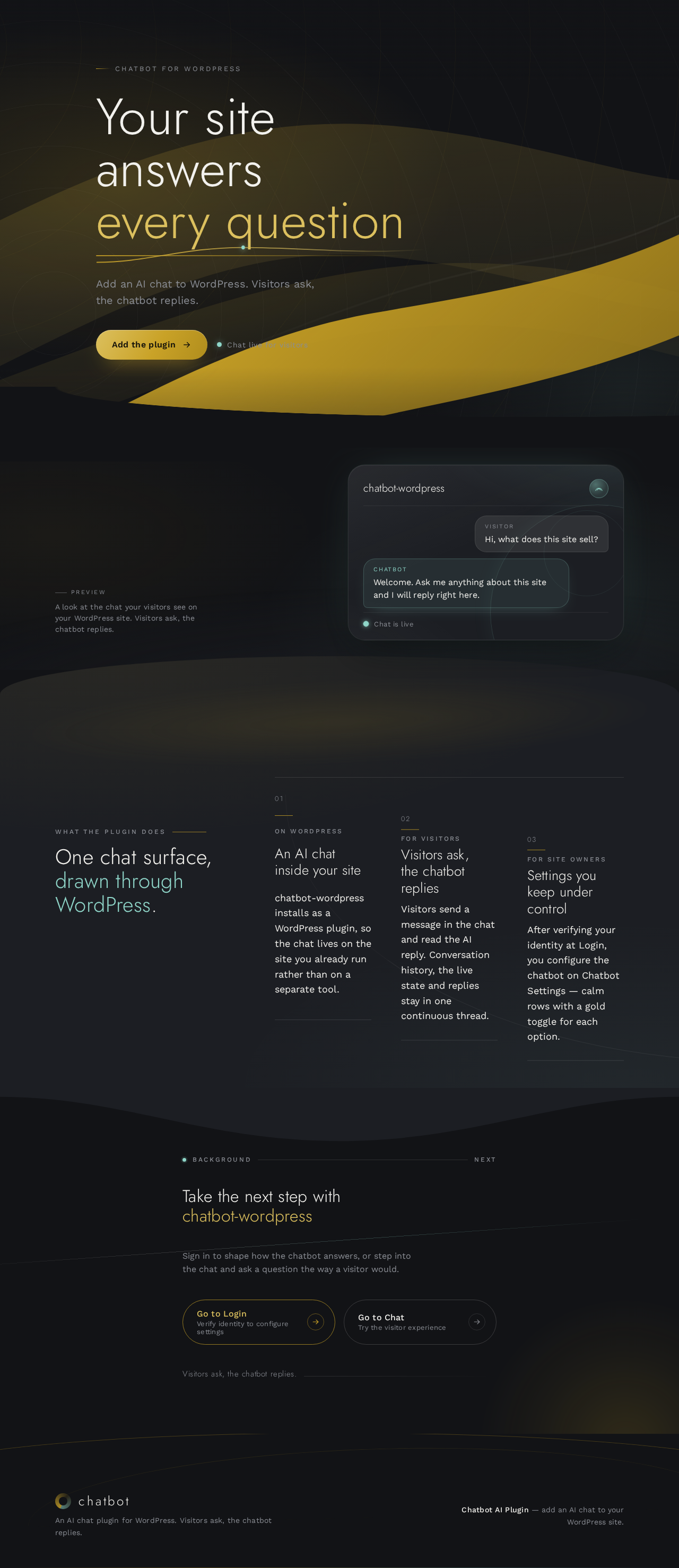
Chatbot for WordPress
Your site answers every question
Add an AI chat to WordPress. Visitors ask, the chatbot replies.
PreviewA look at the chat your visitors see on your WordPress site. Visitors ask, the chatbot replies.
chatbot-wordpress
VisitorHi, what does this site sell?
ChatbotWelcome. Ask me anything about this site and I will reply right here.
What the plugin does
One chat surface, drawn through WordPress.
- On WordPress
An AI chat inside your site
chatbot-wordpress installs as a WordPress plugin, so the chat lives on the site you already run rather than on a separate tool.
- For visitors
Visitors ask, the chatbot replies
Visitors send a message in the chat and read the AI reply. Conversation history, the live state and replies stay in one continuous thread.
- For site owners
Settings you keep under control
After verifying your identity at Login, you configure the chatbot on Chatbot Settings — calm rows with a gold toggle for each option.
Chatbot for WordPress
Your site answers every question
Add an AI chat to WordPress. Visitors ask, the chatbot replies.
PreviewA look at the chat your visitors see on your WordPress site. Visitors ask, the chatbot replies.
chatbot-wordpress
VisitorHi, what does this site sell?
ChatbotWelcome. Ask me anything about this site and I will reply right here.
What the plugin does
One chat surface, drawn through WordPress.
- On WordPress
An AI chat inside your site
chatbot-wordpress installs as a WordPress plugin, so the chat lives on the site you already run rather than on a separate tool.
- For visitors
Visitors ask, the chatbot replies
Visitors send a message in the chat and read the AI reply. Conversation history, the live state and replies stay in one continuous thread.
- For site owners
Settings you keep under control
After verifying your identity at Login, you configure the chatbot on Chatbot Settings — calm rows with a gold toggle for each option.
No comments yet. Be the first!