cedar-https

byamjad

[https://maps.app.goo.gl/xwdNMUWtFTxyd4kx8](https://www.google.com/maps/place/%D9%83%D8%A7%D9%81%D8%AA%D9%8A%D8%B1%D9%8A%D8%A7+%D9%88%D9%85%D8%B7%D8%B9%D9%85+%D8%AD%D8%A8%D9%82%E2%80%AD/@35.013599,[phone],19z/data=!4m10!1m2!2m1!1z2YXYt9in2LnZhQ!3m6!1s0x152359002f548b05:0x6c2436273a8aca65!8m2!3d35.013599!4d37.051082!15sCgrZhdi32KfYudmFkgEKcmVzdGF1cmFudOABAA!16s%2Fg%2F11z8s0052l?entry=ttu&g_ep=EgoyMDI2MTExMC4wIKXMDSoASAFQAw%3D%3D) بدي برومت اعطيه لموقع بيعمل تطبيقات موبايل للكافيه هي شوف كل بياناته و حطهم بالبرومت بحيث يكون شامل ( منتجات - اسعار - الموقع - الرقم - و ازرار متل حجز وبيوصل الطلب للواتساب و هيك حلل كلشي فيه

LandingContactReservationMenu
Landing

Comments (0)

No comments yet. Be the first!

System Requirements

System Requirements Document for كافيتيريا ومطعم حبق

1. Introduction

This document specifies a mobile café application for كافيتيريا ومطعم حبق, a local café and restaurant. The product intent, derived from the requester's instruction, is to give the café a single mobile app that presents its full offering — products, prices, location, and phone number — and provides action buttons, including a reservation button, with orders delivered to WhatsApp. The requester asked for a comprehensive treatment of everything the café's Google Maps listing contains, analyzed and carried into the app.

The audience is the café's guests: families and young guests in a friendly local setting who want to see what the café serves, what it costs, where it is, how to call it, how to reserve a table, and how to send an order straight to the café's WhatsApp.

The authoritative content source is the café's Google Maps listing (https://maps.app.goo.gl/xwdNMUWtFTxyd4kx8). The listing could not be retrieved programmatically during analysis (Google Maps access restrictions), so the specific menu items, prices, street address, and phone number are not verified facts in this document. The app is specified to display them from a single café data source that the café supplies; no menu item, price, address, or phone number is invented here. See Section 2b and Section 11.

Page 1 of 24

2. System Overview

The product is a mobile-first café app with four destinations — Landing, Menu, Contact, and Reservation — all reachable without an account. The café customer browses the menu with prices, checks the café's location and phone number, starts a table reservation from a reservation button, and sends an order to the café's WhatsApp. WhatsApp is an external recipient: the app composes the order message and hands it to WhatsApp; the app does not process, accept, or track the order itself.

Current delivery comprises a React frontend, a shared FastAPI backend serving the application APIs and domain modules, and a MariaDB database holding the café's application-owned data (menu items, prices, café contact and location details, and reservation requests). No customer account, login, or profile exists.

Removed from scope

  • None. No concept was removed by the requester.
Page 2 of 24

2a. Product Interpretation and Delivery Boundary

The app is a first-party mobile application owned by the café. All four destinations are public and anonymous: a customer opens the app and immediately sees the café's offering without registering, signing in, or providing identity. There is no account lifecycle, no customer profile, and no stored customer history.

The café's factual content — products, prices, location, and phone number — is application-owned data served by the backend and rendered by the app. Because the Google Maps listing could not be read during analysis, this content is modeled as café-supplied data with a defined shape (Section 2c, Menu and Contact) rather than as invented values; the café's real listing values populate it.

Two boundaries are external and stay external:

  • WhatsApp owns message delivery. The app builds the order text from what the customer selected and opens WhatsApp addressed to the café's number. Whether the message is sent, and any reply from the café, happens inside WhatsApp, not inside this app.
  • Maps/navigation for the café location is opened through the device's map handler from the Contact page; the app itself does not provide turn-by-turn navigation.

Reservations are initiated in the app and recorded as reservation requests in the café's own database so the request is not lost when the customer leaves the app; the app shows the customer the request state it can truthfully observe. Nothing beyond these boundaries — no payment, no delivery tracking, no loyalty program, no table-availability engine — is part of current delivery.

Page 3 of 24

2b. Source Content Inventory

The reference directive for https://maps.app.goo.gl/xwdNMUWtFTxyd4kx8 declares content_source with authoritative instruction: "Use the café listing data: products, prices, location and phone number."

Verified source observations returned an access error: the Google Maps URL could not be retrieved due to access restrictions. Consequently no listing item, price value, address string, or phone number could be verified, and none is fabricated here. The inventory is therefore the verified business identity only, plus the required content slots that the café's listing must fill:

  • Business name (verified from the listing URL and requester text): كافتيريا ومطعم حبق
  • Business category (verified from the listing URL): café and restaurant (كافيتيريا ومطعم)
  • Listing coordinates present in the listing URL (verified as URL parameters, not as a postal address): latitude 35.013599, longitude 37.051082
  • Products: not verified — to be supplied from the café listing; displayed on Menu
  • Prices: not verified — to be supplied from the café listing; displayed on Menu
  • Location (address / map reference): not verified beyond the coordinates above — to be supplied from the café listing; displayed on Contact
  • Phone number: not verified — to be supplied from the café listing; displayed on Contact and used as the WhatsApp destination number

2c. Page Content and Component Coverage

Page 4 of 24

Landing

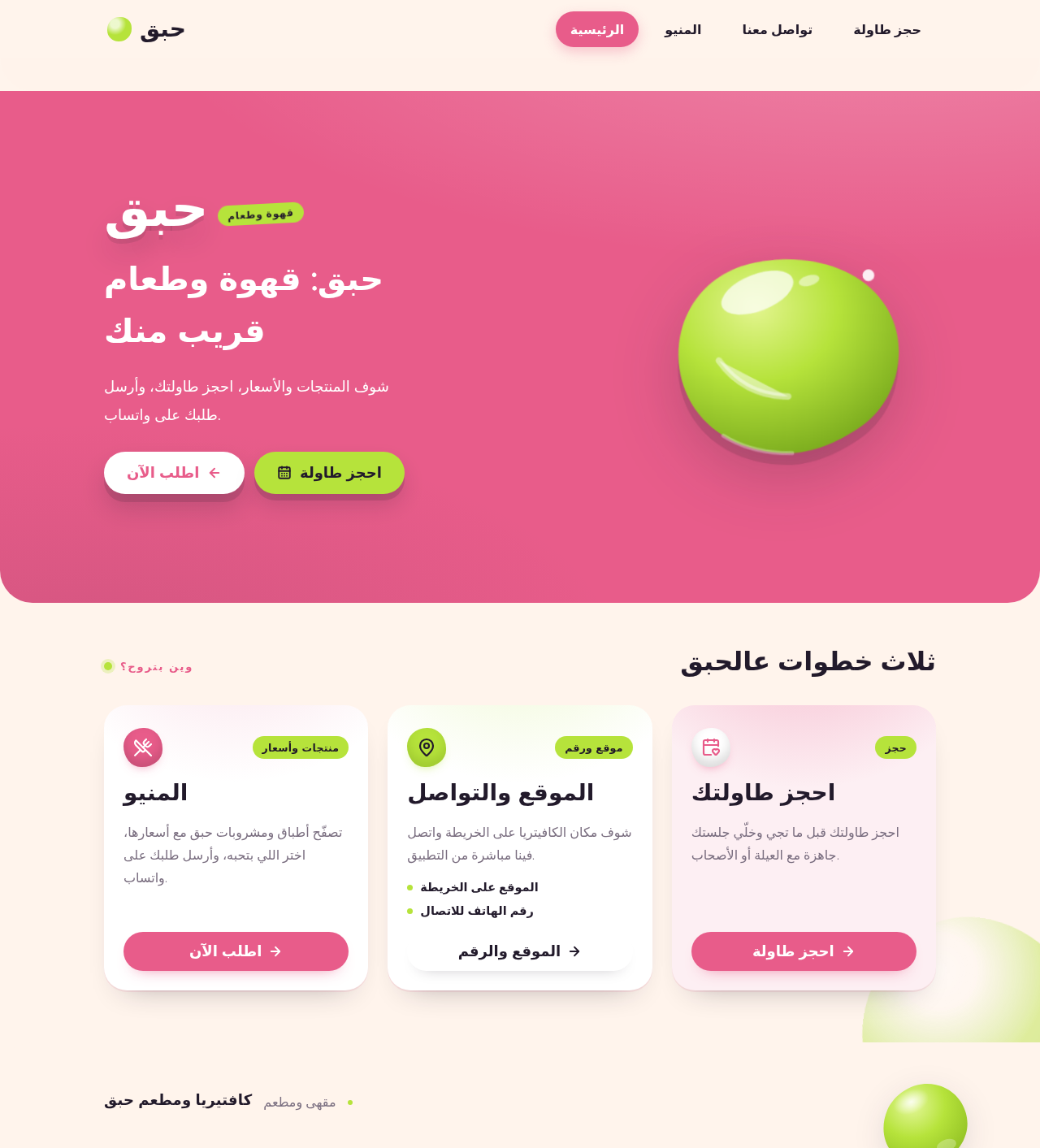
  • Information and state: café name "حبق" as the wordmark; hero headline "حبق: قهوة وطعام قريب منك"; subline "شوف المنتجات والأسعار، احجز طاولتك، وأرسل طلبك على واتساب."; a capsule call-to-action "اطلب الآن"; entry points to Menu, Contact, and Reservation. No identity state; always publicly viewable.
  • Primary actions: "اطلب الآن" capsule → Menu. Supporting actions: navigation to Contact and Reservation; a reservation capsule button that leads to Reservation.
  • Domain entities: café profile (name, tagline copy).
  • Component responsibilities: pink hero band with the café name in bold rounded type and one glossy lime blob drifting behind it; capsule CTA below the name; curved 40px section edge into the next block; navigation affordances to the other three destinations.
  • States: Loading — hero copy and name render from static app content, so no blocking load; navigation targets resolve immediately. Empty — not applicable (no collection on this page). Success — hero and all three destination entries visible and tappable. Error — if the café profile cannot be read, the name and hero copy still render from bundled copy and destination entries remain usable. Recovery — retry the profile read on next visit; no dead end.
Page 5 of 24

Menu

  • Information and state: the café's product list, each item with its name and its price; prices shown in lime capsule chips on the right edge of each row. Grouping follows the café's listing structure when supplied. Public, no account.
  • Primary actions: browse products and prices; select items to build an order; send the order to WhatsApp. Supporting actions: move to Contact or Reservation.
  • Domain entities: menu item (name, price, optional category/description as supplied by the café listing); order selection (chosen items and quantities held for the WhatsApp handoff).
  • Component responsibilities: menu grid (single column on mobile, wide grid on desktop); row with product name and lime capsule price chip; selection control per item; order summary showing chosen items and quantities; "send order to WhatsApp" action that composes the message and opens WhatsApp to the café's number.
  • States: Loading — menu skeleton rows while products load. Empty — "لا توجد منتجات معروضة حالياً" with a retry action when the café has published no items. Success — all items with prices visible; selection reflected in the order summary; WhatsApp handoff opens with the composed message. Error — menu fetch failure shows an inline error with retry; WhatsApp unavailable on the device shows an explanatory message with the café phone number as fallback. Recovery — retry fetch; keep the current selection so the customer does not rebuild the order.
Page 6 of 24

Contact

  • Information and state: café location (address and/or map reference as supplied by the listing, with the verified coordinates as the map anchor) and café phone number; the same number is the WhatsApp destination.
  • Primary actions: call the café; open the location in the device map handler; open WhatsApp to the café. Supporting actions: move to Menu or Reservation.
  • Domain entities: café contact record (phone number, address/location, map coordinates).
  • Component responsibilities: location block with a map-open capsule; phone block with a tap-to-call capsule; WhatsApp capsule; graceful display when a field is not yet supplied.
  • States: Loading — contact skeleton while the record loads. Empty — a field the café has not supplied shows "غير متوفر حالياً" instead of a broken control. Success — location and phone visible and actionable. Error — fetch failure shows an inline error with retry. Recovery — retry; tap-to-call and map-open remain available from cached values when present.
Page 7 of 24

Reservation

  • Information and state: a reservation request form — customer name, phone number, party size, date, time, and optional note — plus the observable state of the submitted request (submitted / failed). Public, no account.
  • Primary actions: submit the reservation request. Supporting actions: return to Menu or Contact; start a new request after submission.
  • Domain entities: reservation request (name, phone, party size, date, time, note, created timestamp, status).
  • Component responsibilities: full-width capsule reservation submit button with soft press bounce; field validation; submission to the backend; confirmation panel showing the request was recorded; failure panel with retry.
  • States: Loading — submit button shows a pending state and is not double-submittable. Empty — pristine form with no errors. Success — confirmation panel restating the submitted details and the café phone number for follow-up. Error — field-level validation messages for missing/invalid name, phone, party size, date, or time; submission failure shows a retry panel preserving entered values. Recovery — correct fields and resubmit, or retry the failed submission without re-entering data.
Page 8 of 24

3. Functional Requirements

FR-1 — Products with prices. As a café customer, I should see the café's products with their prices so that I know what is served and what it costs. (explicit)

  • Trigger/input: customer opens Menu.
  • Observable result: every published product appears with its name and price; prices render in lime capsule chips.
  • Access: public, no account.
  • Failure/recovery: fetch failure shows an inline error with retry; empty catalogue shows an empty state with retry.
  • Continuation: customer selects items to order or moves to Contact/Reservation.

FR-2 — Café location. As a café customer, I should see the café's location so that I can find it. (explicit)

  • Trigger/input: customer opens Contact.
  • Observable result: the café's location (address and/or map reference, anchored on the listing coordinates) is displayed.
  • Access: public, no account.
  • Failure/recovery: unsupplied location shows "غير متوفر حالياً"; fetch failure shows retry.
  • Continuation: customer opens the location in the device map handler.
Page 9 of 24

FR-3 — Café phone number. As a café customer, I should see the café's phone number so that I can call it. (explicit)

  • Trigger/input: customer opens Contact.
  • Observable result: the café's phone number is displayed and tappable to call.
  • Access: public, no account.
  • Failure/recovery: unsupplied number shows "غير متوفر حالياً"; fetch failure shows retry.
  • Continuation: customer places a call or uses the number as the WhatsApp destination.

FR-4 — Action buttons including reservation. As a café customer, I should have action buttons, including a reservation button, so that I can act on what I see. (explicit)

  • Trigger/input: customer views Landing, Menu, or Contact.
  • Observable result: capsule action buttons are present, including a reservation button that opens Reservation.
  • Access: public, no account.
  • Failure/recovery: if a destination cannot load, the button remains visible and shows an inline error on arrival with retry.
  • Continuation: customer proceeds into the chosen destination.
Page 10 of 24

FR-5 — Order sent to WhatsApp. As a café customer, I should send my order to the café's WhatsApp so that the café receives it. (explicit)

  • Trigger/input: customer selects items on Menu and activates "send order to WhatsApp".
  • Observable result: the app composes an order message listing chosen items and quantities and opens WhatsApp addressed to the café's number.
  • Access: public, no account; WhatsApp is an external recipient.
  • Failure/recovery: WhatsApp unavailable shows an explanatory message with the café phone number as fallback; the selection is preserved.
  • Continuation: the customer sends the message inside WhatsApp; the app does not track delivery.

FR-6 — Content from the café listing. As a café customer, I should see content that comes from the café's Google Maps listing — كافتيريا ومطعم حبق — so that the app reflects the real café. (explicit)

  • Trigger/input: any page that renders café data.
  • Observable result: products, prices, location, and phone number are served from the café's single application-owned data record populated from the listing.
  • Access: public, no account.
  • Failure/recovery: unpopulated fields degrade to explicit "not available" states rather than fabricated values.
  • Continuation: café data updates propagate to all pages from the one record.
Page 11 of 24

FR-7 — No-account entry. As a café customer, I should open the app without an account so that I can use it immediately. (required_inference)

  • Trigger/input: customer launches the app.
  • Observable result: Landing renders with no sign-in, registration, or identity prompt; all four destinations are reachable.
  • Access: anonymous.
  • Failure/recovery: none required; no identity state exists to fail.
  • Continuation: customer navigates to any destination.

FR-8 — Customer sends the order to WhatsApp. As a café customer, I should complete the WhatsApp handoff myself so that the order reaches the café under my control. (required_inference)

  • Trigger/input: customer reviews the composed order message in WhatsApp.
  • Observable result: the customer sends the message to the café's WhatsApp number; the café receives it in WhatsApp.
  • Access: public; external recipient owns delivery.
  • Failure/recovery: if the customer cancels in WhatsApp, the app retains the selection so the handoff can be retried.
  • Continuation: the customer may return to the app and adjust the selection.
Page 12 of 24

FR-9 — Reservation request recorded. As a café customer, I should submit a reservation request and see that it was recorded so that I know my request was not lost. (required_inference)

  • Trigger/input: customer fills name, phone, party size, date, time, and optional note on Reservation and submits.
  • Observable result: the request is stored in the café's database and a confirmation panel restates the submitted details.
  • Access: public, no account.
  • Failure/recovery: validation errors appear per field; submission failure shows a retry panel preserving entered values.
  • Continuation: customer may start a new request or call the café using the number shown on the confirmation.

4. User Personas

Page 13 of 24

Café customer

  • Product context: a guest of كافتيريا ومطعم حبق — a family member or young guest — using a phone in a friendly, social café setting. The customer arrives with no account and no prior relationship stored in the app.
  • Primary goal: decide what to eat or drink and at what price, know where the café is and how to reach it, reserve a table, and get an order to the café.
  • Distinct accepted responsibilities: browses products and prices on Menu; checks location and phone number on Contact; starts a table reservation from the reservation button on Reservation; selects items and sends the order to the café's WhatsApp; completes the WhatsApp send personally.
  • Relevant inputs or decisions: which items and quantities to order; whether to call, open the map, or message on WhatsApp; reservation details (name, phone, party size, date, time, note); whether to send or cancel the WhatsApp message.
  • Interactions with other accepted participants: the café as WhatsApp recipient receives the composed order message; the café as reservation owner receives the recorded reservation request and the customer's phone number for follow-up.
  • Observable success: prices visible on every product; location and phone number visible and actionable; reservation confirmation shown after submission; WhatsApp opens pre-addressed to the café with the order text.

5. Core User Flows

Page 14 of 24

Flow A — Browse products and prices

  1. Customer launches the app; Landing renders the café name, hero headline, subline, and the "اطلب الآن" capsule, with no sign-in prompt.
  2. Customer taps "اطلب الآن" and arrives at Menu.
  3. Menu shows skeleton rows, then every published product with its name and a lime capsule price chip.
  4. Customer scrolls the menu grid (single column on mobile, wide grid on desktop) and reads prices.
  5. Failure/recovery: if the menu fetch fails, an inline error with a retry action appears; the customer retries and the list loads. If the café has published no items, the empty state "لا توجد منتجات معروضة حالياً" appears with retry.
  6. Continuation: customer moves to Contact, Reservation, or begins selecting items.

Flow B — Check location and phone number

  1. Customer opens Contact from the app navigation.
  2. Contact shows the café's location (address/map reference anchored on the listing coordinates) and the café phone number.
  3. Customer taps the location capsule; the device map handler opens the café location.
  4. Customer taps the phone capsule; the device places a call to the café number.
  5. Failure/recovery: a field the café has not supplied shows "غير متوفر حالياً" instead of a broken control; a fetch failure shows an inline error with retry.
  6. Continuation: customer returns to Menu or Reservation.
Page 15 of 24

Flow C — Send an order to WhatsApp

  1. Customer is on Menu and taps items to select them, setting quantities in the order summary.
  2. The order summary lists the chosen items and quantities.
  3. Customer activates "send order to WhatsApp".
  4. The app composes the order message from the selection and opens WhatsApp addressed to the café's number.
  5. Customer reviews the message in WhatsApp and sends it; the café receives the order in WhatsApp.
  6. Failure/recovery: if WhatsApp is unavailable on the device, the app shows an explanatory message with the café phone number as fallback and keeps the selection. If the customer cancels in WhatsApp, the selection remains on Menu for a retry.
  7. Continuation: customer may adjust the selection and repeat, or leave the app. The app does not track delivery or the café's reply.
Page 16 of 24

Flow D — Reserve a table

  1. Customer taps the reservation button (on Landing, Menu, or Contact) and arrives at Reservation.
  2. Customer enters name, phone number, party size, date, time, and an optional note.
  3. Customer taps the full-width capsule reservation submit button; it enters a pending state and cannot be double-submitted.
  4. The backend records the reservation request in the café's database.
  5. A confirmation panel restates the submitted details and shows the café phone number for follow-up.
  6. Failure/recovery: missing or invalid fields show field-level messages; a submission failure shows a retry panel that preserves the entered values, and the customer retries without re-entering data.
  7. Continuation: customer starts a new request, calls the café, or returns to Menu.

6. Visuals Colors and Theme

The creative direction — sensual pop minimalism for a warm café, after Karim Rashid — is authoritative for this section.

Page 17 of 24
  • Mode: light.
  • Colour tokens by role:
    • Background (warm cream ground, most area): #FFF4EC
    • Surface (cards, panels): #FFFFFF
    • Text (ink, body and headings): #221A2B
    • Primary (bubblegum pink — buttons, headers, hero band): #E85C8A
    • Accent (lime — prices, small tags, hero blob): #B6E33B
    • Muted (secondary text, unavailable states): #7A6E80
  • Typography: headings Comfortaa, bold, rounded geometric, short Arabic lines with wide line height; body Quicksand. Modular scale 1.333 — 64 / 40 / 28 / 18 / 16 — with clamp() from 34px mobile to 64px desktop for the hero headline.
  • Shape language: capsule buttons; blob panels; curved section edges; cards with soft glossy highlights and large radii of 28px; section edges curve into the next block with a 40px radius.
  • Layout: single column on mobile, wide menu grid on desktop; a pink hero band above a cream menu list with rounded lime price chips on the right edge.
  • Imagery style: glossy 3D blobs in pink and lime beside simple food and coffee photos on plain cream grounds.
  • Motion: soft bounces on button press; slow glossy highlight drift on hero shapes; one purposeful loop only.
  • Forbidden: flat white background with no colour block; square corners and thin hairline borders; blue or indigo buttons anywhere; identical hover-lift card grids; the generic indigo/blue-on-white SaaS template.
  • Readability rule: headlines, wordmark, labels, numbers, card text, and controls stay entirely inside the viewport and their container at 375px, 768px, and 1280px, wrapping or scaling to fit; imagery and decoration may bleed, crop, or overlap but never cover readable text or controls.
Page 18 of 24

7. Signature Design Concept

The public entry — Landing — is a full-width bubblegum-pink band (#E85C8A) with a large rounded blob on the right holding one glossy lime (#B6E33B) blob that drifts slowly behind the café name. The café name "حبق" sits left in bold Comfortaa at 64px desktop / 34px mobile, with the headline "حبق: قهوة وطعام قريب منك" and subline "شوف المنتجات والأسعار، احجز طاولتك، وأرسل طلبك على واتساب." beneath it. A capsule "اطلب الآن" button sits below the name, and the band's lower edge curves into the cream (#FFF4EC) block below with a 40px radius. The concept recomposes only accepted content and controls: the hero copy, the order CTA leading to Menu, and the reservation capsule leading to Reservation.

Page 19 of 24

8. Interaction Model & Motion Direction

Interaction Model: Animated Motion Tempo: expressive Hero Dimensionality: layered_2d

Landing Hero Motion Brief

  • Focal subject: the glossy lime blob drifting behind the café name inside the pink hero band.
  • Input → transformation → outcome thesis: on load, the hero band and name settle into place; the lime blob drifts slowly on a single purposeful loop; pressing the "اطلب الآن" capsule produces a soft bounce and opens Menu. No motion implies behavior beyond navigation.
  • Motion vocabulary: soft bounces on button press; slow glossy highlight drift on hero shapes; one purposeful loop only.
  • Composed first frame: pink band full width, café name left in bold rounded type, lime blob at rest on the right, capsule CTA below the name, curved 40px edge into cream.
  • Reduced-motion state: the blob holds a static position with its glossy highlight fixed; buttons respond with an instant state change instead of a bounce; all text and controls remain fully readable and inside their containers.
Page 20 of 24

9. Non-Functional Requirements

  • Mobile-first constraint (explicit): the product is a mobile app for the café; layouts are designed for phone viewports first, with the wide menu grid as the desktop adaptation.
  • Readable-content integrity (explicit, from the creative direction): all readable text and controls stay whole and inside the viewport and their container at 375px, 768px, and 1280px; decoration and imagery may bleed but never cover text or controls.
  • Reduced motion (explicit): with prefers-reduced-motion, a usable static arrangement is provided; the single hero loop stops.
  • Anonymous access (required_inference): no page requires an account; no authentication, session, or profile is implemented.
  • Data integrity for reservations (required_inference): a submitted reservation request is persisted before the confirmation is shown, so a confirmed request is never lost.
  • Graceful degradation of café data (required_inference): unsupplied listing fields render explicit "not available" states; the app never fabricates a product, price, address, or phone number.
  • External handoff honesty (required_inference): the app never claims an order was delivered or a reservation confirmed by the café; it reports only what it can observe — the WhatsApp handoff was opened, and the reservation request was recorded.
Page 21 of 24

10. Tech Stack

  • Frontend: React application UI (mobile-first), implementing the four destinations and the creative direction's tokens.
  • Backend: shared FastAPI process serving the café profile, menu, contact, and reservation APIs and domain modules; reused for all feature APIs.
  • Database: MariaDB for application-owned persistent data — café profile, menu items and prices, contact/location record, and reservation requests.
  • Infrastructure: docker-compose.yml with the three provisioned services — frontend, backend, database — with the frontend reaching the backend API and the backend reaching MariaDB.
  • External integration: WhatsApp deep link (message handoff) and the device map/call handlers; no WhatsApp Business API, no payment provider.
Page 22 of 24

11. Assumptions and Constraints

  • Assumption — listing content is café-supplied. The Google Maps listing could not be retrieved during analysis; the café's real products, prices, address, and phone number are entered into the app's café data record from the listing. Until then, pages show explicit "not available" states. (required_inference)
  • Assumption — WhatsApp destination number. The café's phone number from the listing is the WhatsApp destination number. (required_inference)
  • Assumption — reservation handling is manual. The café reviews recorded reservation requests outside the app; the app does not confirm, accept, or reject reservations. (required_inference)
  • Constraint — mobile app. The product is a mobile app for the café. (explicit)
  • Constraint — no accounts. Customers use the app without an account. (required_inference)
  • Constraint — no fabricated content. No product, price, address, or phone number may be invented to fill the listing gap. (required_inference)
  • Out of scope: online payment, delivery tracking, table-availability engine, loyalty program, customer accounts, order status inside the app.
Page 23 of 24

12. Glossary

  • حبق (Habaq): the café and restaurant this app serves — كافتيريا ومطعم حبق.
  • Café customer: the anonymous guest who browses, reserves, and orders.
  • Menu item: a product offered by the café with a name and a price.
  • Price chip: the lime capsule on the right edge of a menu row that displays a price.
  • Order selection: the set of chosen menu items and quantities held on Menu for the WhatsApp handoff.
  • WhatsApp handoff: the app composing an order message and opening WhatsApp addressed to the café's number; delivery is owned by WhatsApp.
  • Reservation request: the customer-submitted record of name, phone, party size, date, time, and optional note, stored in the café's database.
  • Café data record: the single application-owned source of the café's products, prices, location, and phone number, populated from the Google Maps listing.
Page 24 of 24
Live
Landing design preview
Landing: Open app anonymously
Menu: 1. Browse products and prices
Menu: 2. Retry failed menu load
Menu: Select items and quantities
Menu: Review order summary
Menu: 1. Send order to WhatsApp
Menu: 2. Retry handoff after cancel
Menu: Call café as fallback
Contact: 1. View location and phone
Contact: 2. Retry contact load
Contact: Open location in maps
Contact: Call café number
Contact: Open WhatsApp to café
Reservation: 1. Enter reservation details
Reservation: 2. Correct invalid fields
Reservation: 3. Submit reservation request
Reservation: 4. Retry failed submission
Reservation: 5. View confirmation details
Reservation: 6. Start new request
Live
Landing design preview
Landing: Open app anonymously
Menu: 1. Browse products and prices
Menu: 2. Retry failed menu load
Menu: Select items and quantities
Menu: Review order summary
Menu: 1. Send order to WhatsApp
Menu: 2. Retry handoff after cancel
Menu: Call café as fallback
Contact: 1. View location and phone
Contact: 2. Retry contact load
Contact: Open location in maps
Contact: Call café number
Contact: Open WhatsApp to café
Reservation: 1. Enter reservation details
Reservation: 2. Correct invalid fields
Reservation: 3. Submit reservation request
Reservation: 4. Retry failed submission
Reservation: 5. View confirmation details
Reservation: 6. Start new request