cedar-flutter
 Bheda Nikhilkumar
📱 Product Requirements Document (PRD) Product Name: MyMoney (Offline Expense Tracker) 🎯 Objective Build a completely offline personal finance app using Flutter that helps users: Track income & expenses Categorize spending View analytics (charts) Plan budgets Secure data locally ⚠️ No backend, no cloud sync. All data stored locally using SharedPreferences. 🧱 Tech Overview Framework: Flutter Storage: SharedPreferences (JSON encoded objects) Charts: fl_chart (or similar) State Management: Provider / Riverpod (simple) Security: Local passcode (stored hashed in SharedPreferences) 🧩 Core Features 1. 💰 Transaction Management Add income / expense / transfer Edit & delete transactions Assign category Payment mode (Cash / Card / Wallet) Date & time selection 2. 📊 Analytics (Interactive Charts) Pie chart for expense distribution Monthly summary: Total Income Total Expense Balance Category-wise breakdown 3. 🏷️ Category Management Default categories (Food, Bills, Shopping, etc.) Create unlimited custom categories Separate: Income categories Expense categories 4. 📅 Budget Planning Monthly budget per category Track: Spent amount Remaining balance Visual progress bar Alerts (UI-based, no push notifications) 5. 🎨 Themes Multiple color themes Light / Dark mode Accent color customization 6. 🔐 Passcode Protection 4-digit passcode Lock app on launch Optional enable/disable 7. 📱 Widgets (Simulated In-App Widget View) Quick summary card: Total balance Last transaction (Note: Real OS widgets optional later) 📺 Screen-wise Breakdown 🏠 1. Home / Records Screen Purpose: View all transactions UI Elements: Header: Month selector (← Jan 2021 →) Summary: Income Expense Total balance Transaction list: Grouped by date Each item shows: Category icon Title Payment type Amount (color-coded) Actions: ➕ Floating button → Add transaction Tap → Edit transaction Swipe → Delete ➕ 2. Add / Edit Transaction Screen Purpose: Add new entry Fields: Type: Income / Expense / Transfer Amount (numeric keypad UI) Category selector Account (Card / Wallet / Cash) Note (optional) Date & Time Actions: Save Cancel 📊 3. Analysis Screen Purpose: Spending insights Components: Pie chart (expense distribution) Category legend Time filter: Monthly Custom range Data: Category % Total per category 💸 4. Budget Screen Purpose: Manage budgets Sections: Total Budget vs Spent Category budgets list: Limit Spent Remaining Progress bar States: Normal → Green Warning → Yellow Exceeded → Red Actions: Set/Edit budget Remove budget 🏦 5. Accounts Screen Purpose: Manage money sources Default Accounts: Wallet Card Features: Add account Edit name/icon View balance per account 🏷️ 6. Categories Screen Purpose: Manage categories Sections: Income categories Expense categories Features: Add category Edit / delete Icon & color selection 🔐 7. Passcode Screen Purpose: Secure app Flow: First time → Set passcode Later → Enter passcode Features: Enable/Disable lock Reset passcode 🎨 8. Theme Settings Screen Purpose: Personalization Options: Light / Dark mode Accent color picker Preview UI 📊 9. Dashboard Widget Screen (In-App) Purpose: Quick overview Cards: Total balance Last transaction Monthly summary 💾 Data Model (Stored in SharedPreferences) All data stored as JSON strings. Transaction Model { "id": "uuid", "type": "expense", "amount": 120.0, "categoryId": "cat_1", "account": "card", "note": "Groceries", "date": "2026-04-04T10:00:00" } Category Model { "id": "cat_1", "name": "Food", "type": "expense", "icon": "🍔", "color": "#FF5733" } Budget Model { "categoryId": "cat_1", "limit": 500, "month": "2026-04" } Settings Model { "theme": "dark", "accentColor": "#6C63FF", "passcodeEnabled": true, "passcodeHash": "****" } 🔄 Data Handling Logic Store lists as JSON arrays: transactions categories budgets On app start: Load all from SharedPreferences On update: Overwrite full list (simple approach) ⚙️ Key Flows Add Expense Flow Tap ➕ Enter details Save Update: Transactions list Budget usage Analytics Budget Tracking Logic Remaining = Limit - Total Expenses (category, month) Analytics Calculation Group transactions by category Sum amounts Convert to percentage 🚫 Limitations (Intentional) No cloud sync No multi-device support No real-time notifications SharedPreferences size limitations 🚀 Future Enhancements (Optional) SQLite (for scalability) Export to CSV Backup/Restore Real home screen widgets Biometric authentication ✅ Success Criteria Smooth offline performance Simple UX (1–2 taps for adding expense) Clear financial insights Zero data loss locally
Comments (0)
Sign in to leave a comment
System Requirements
System Requirements Document (SRD)
Project Name: cedar-flutter
1. Introduction
The cedar-flutter project aims to deliver a robust offline personal finance application tailored for users in India. This app, named MyMoney, will empower users to track their income and expenses, categorize spending, view analytics, plan budgets, and secure their financial data locally. By leveraging Flutter's cross-platform capabilities, the app will ensure seamless performance across devices while maintaining a lightweight, user-friendly experience.
The focus is on simplicity, security, and offline functionality, with all data stored locally using SharedPreferences. The app is designed to cater to individual users who value privacy and prefer managing their finances without relying on cloud services.
2. System Overview
The cedar-flutter project is a completely offline personal finance tracker built using Flutter. It provides users with tools to manage their transactions, analyze spending patterns, plan budgets, and customize the app's appearance.
Key Features:
- Transaction Management: Add, edit, and delete transactions with category and payment mode assignment.
- Analytics: Interactive charts for expense distribution and monthly summaries.
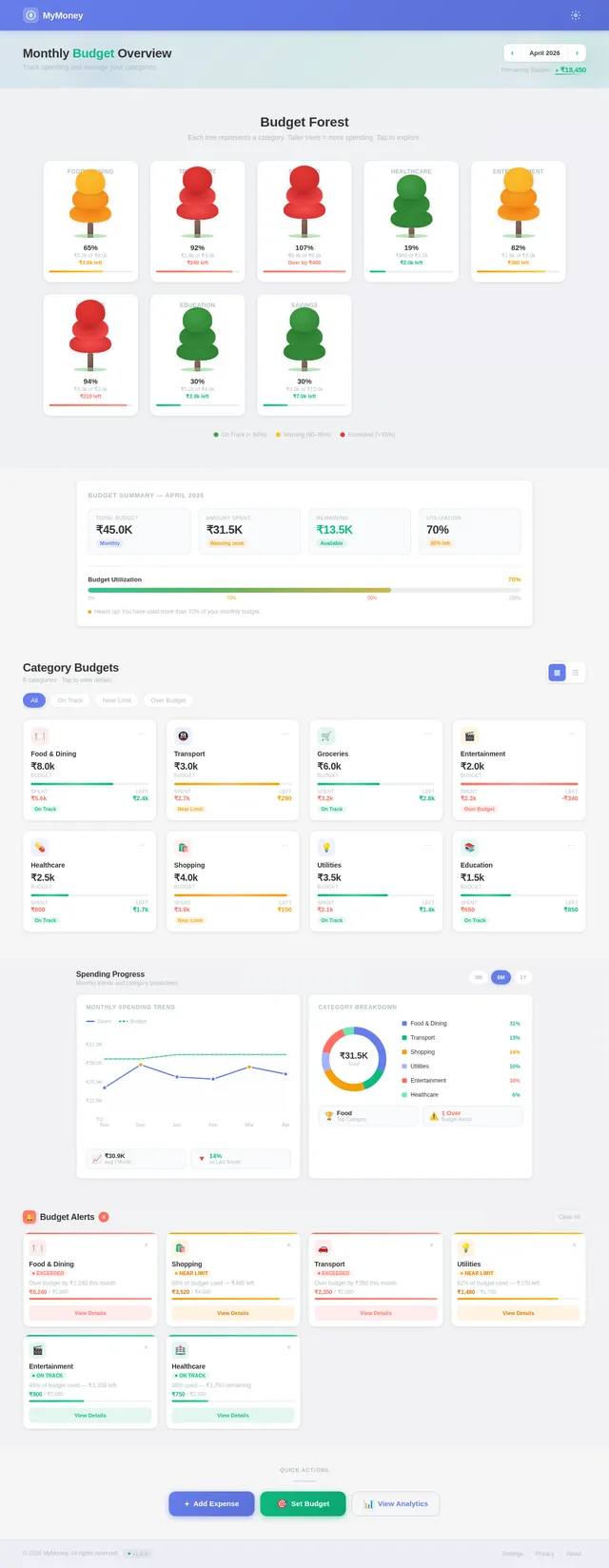
- Budget Planning: Set monthly budgets per category with visual progress tracking.
- Themes: Light/Dark mode and accent color customization.
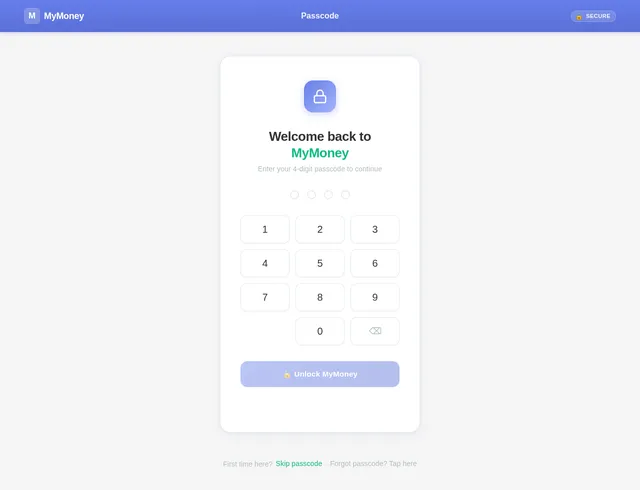
- Passcode Protection: Secure the app with a 4-digit passcode stored locally.
Locale-Specific Defaults:
- Currency: Indian Rupee (₹)
- Timezone: IST (Indian Standard Time)
- Date Format: DD-MM-YYYY
3. Functional Requirements
Transaction Management
- As a User, I should be able to add income, expense, and transfer transactions.
- As a User, I should be able to edit and delete transactions.
- As a User, I should be able to assign categories and payment modes to transactions.
- As a User, I should be able to select the date and time for transactions.
Analytics
- As a User, I should be able to view a pie chart showing expense distribution.
- As a User, I should be able to view monthly summaries of income, expenses, and balance.
- As a User, I should be able to filter analytics by category and time range.
Budget Planning
- As a User, I should be able to set monthly budgets for categories.
- As a User, I should be able to track spent amounts and remaining balances.
- As a User, I should be alerted visually when budgets are exceeded.
Category Management
- As a User, I should be able to create custom categories for income and expenses.
- As a User, I should be able to edit and delete categories.
Themes
- As a User, I should be able to switch between Light and Dark modes.
- As a User, I should be able to customize accent colors.
Passcode Protection
- As a User, I should be able to set, reset, and disable a 4-digit passcode.
Widgets
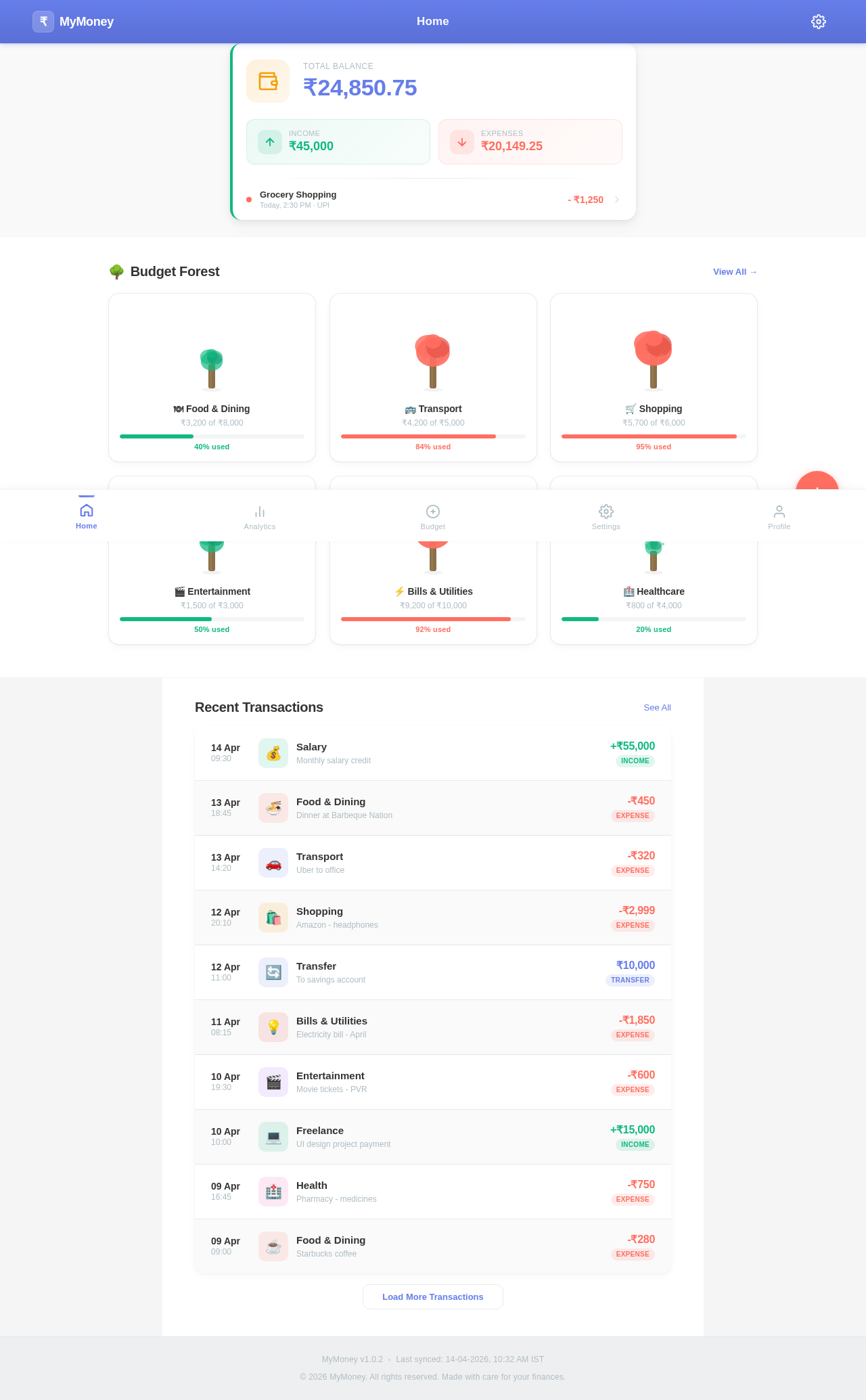
- As a User, I should be able to view a quick summary card with total balance and last transaction.
4. User Personas
1. Regular User
- Description: Individuals managing personal finances offline.
- Needs: Privacy, simplicity, and clear financial insights.
- Goals: Track expenses, analyze spending, and plan budgets effectively.
2. Guest User
- Description: First-time users exploring the app without passcode protection.
- Needs: Easy onboarding and intuitive navigation.
- Goals: Understand app features and decide whether to adopt it.
5. Visuals Colors and Theme
Unique Color Palette:
- Background: #F5F5F5 (Soft Gray)
- Surface: #FFFFFF (Pure White)
- Text: #333333 (Deep Charcoal)
- Accent: #FF6F61 (Warm Coral)
- Muted Tones: #B0BEC5 (Cool Steel Blue)
Mood Direction:
The theme should evoke simplicity, clarity, and warmth, aligning with the app's purpose of financial empowerment.
6. Signature Design Concept
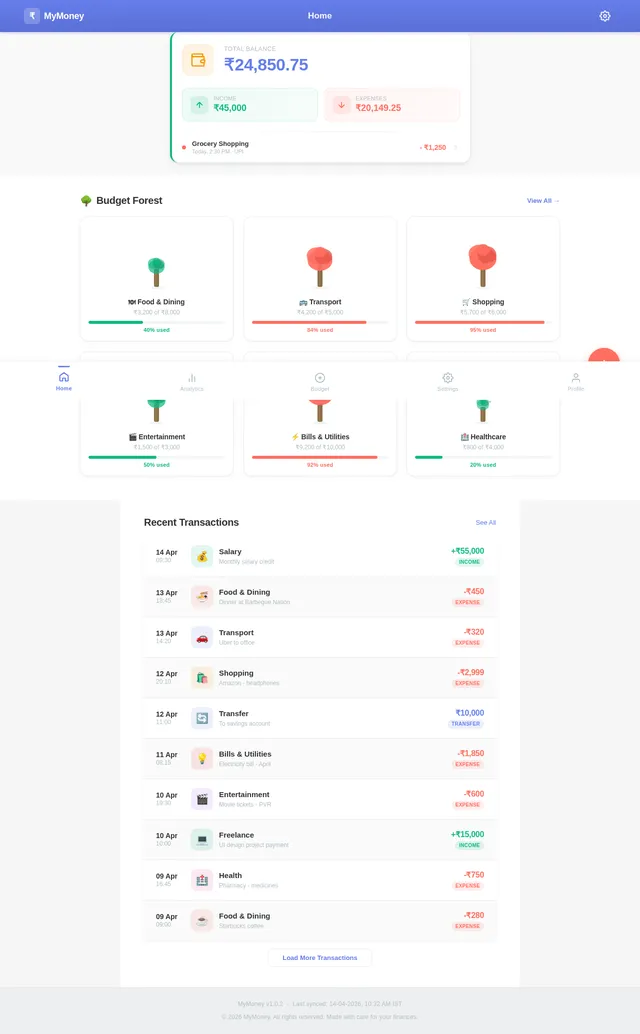
Concept: Interactive Budget Forest
The Home Page will feature a visually stunning Interactive Budget Forest. Each category will be represented as a tree, with its height and fullness reflecting the budget's status.
- Animations: Trees grow taller as budgets are utilized, and leaves change color (green → yellow → red) based on spending thresholds.
- User Interaction: Tapping a tree opens a detailed view of the category's transactions and analytics.
- Transitions: Smooth zoom-in/out effects when navigating between trees.
- Micro-Interactions: Hovering over a tree displays a tooltip with the category name, budget limit, and remaining balance.
This design will make budgeting visually engaging and memorable, ensuring users feel connected to their financial goals.
7. Non-Functional Requirements
- Performance: The app must load within 2 seconds and handle up to 10,000 transactions without lag.
- Security: Passcode hashes must be securely stored using industry-standard hashing algorithms.
- Compatibility: The app must run smoothly on Android 8.0+ and iOS 12+.
- Localization: Support INR currency and IST timezone by default.
8. Tech Stack
Frontend
- Flutter
Backend
- None (Offline app)
Storage
- SharedPreferences (JSON encoded objects)
Charts
- fl_chart
State Management
- Provider / Riverpod
Security
- Local passcode hashing
9. Assumptions and Constraints
Assumptions
- Users prefer offline functionality over cloud sync.
- SharedPreferences storage size is sufficient for typical usage.
Constraints
- No backend or cloud services will be integrated.
- Limited to single-device usage.
10. Glossary
- SharedPreferences: A Flutter library for storing key-value pairs locally.
- Budget: A predefined spending limit for a category.
- Passcode: A 4-digit code used to secure the app.
- Accent Color: A customizable color used for highlighting UI elements.
This SRD is tailored to your vision for cedar-flutter, Bheda. Let me know if you'd like to refine or expand any section!
No comments yet. Be the first!