cedar-flutter
 Bheda Nikhilkumar
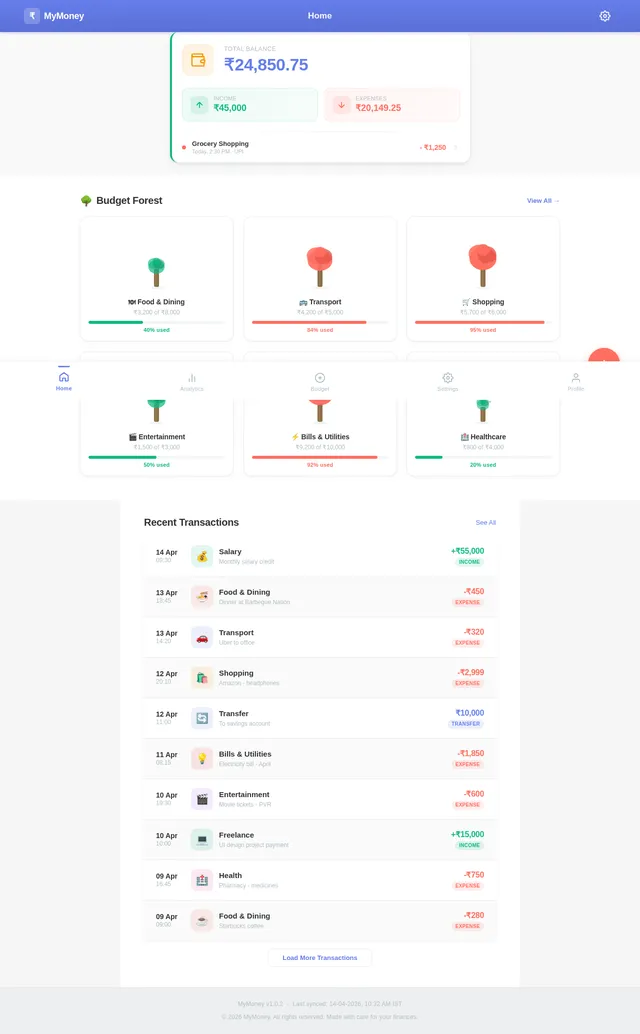
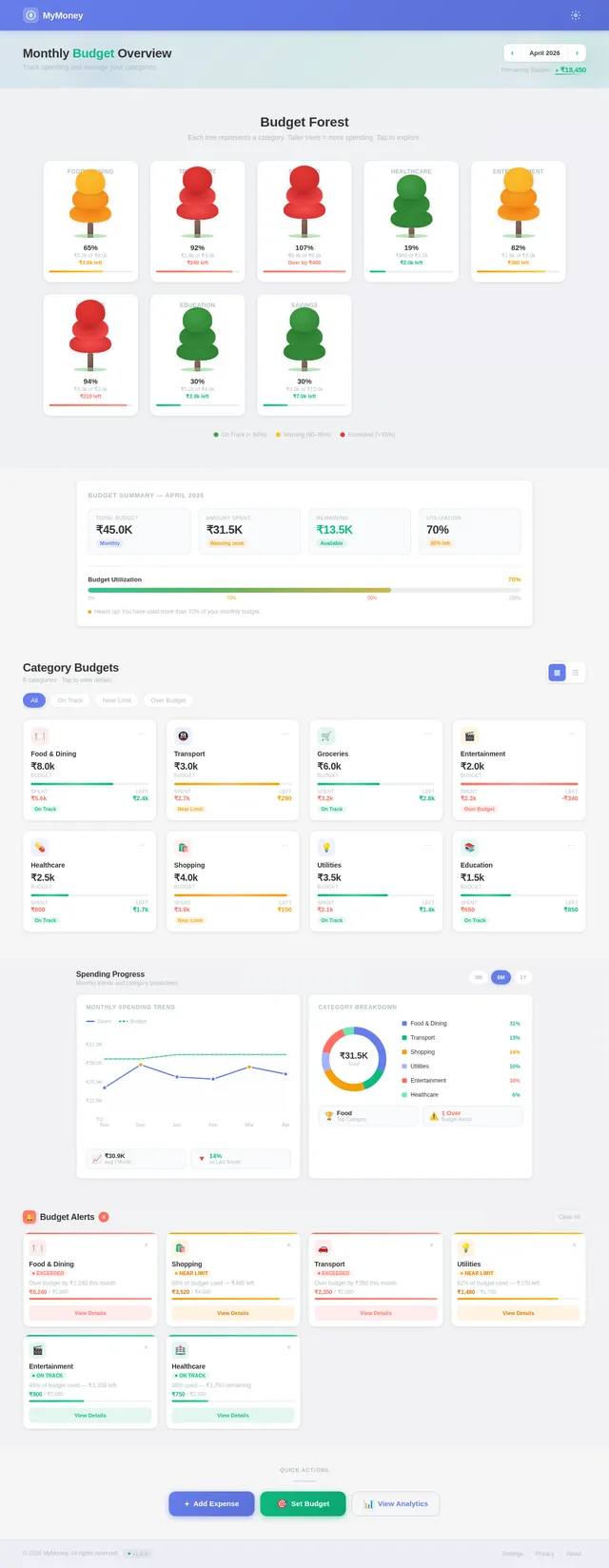
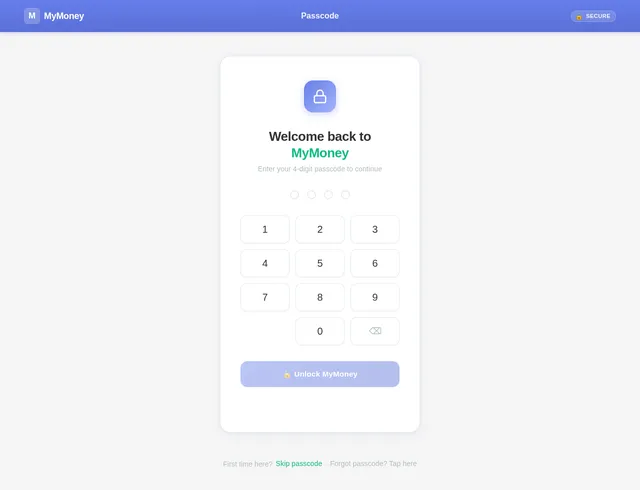
📱 Product Requirements Document (PRD) Product Name: MyMoney (Offline Expense Tracker) 🎯 Objective Build a completely offline personal finance app using Flutter that helps users: Track income & expenses Categorize spending View analytics (charts) Plan budgets Secure data locally ⚠️ No backend, no cloud sync. All data stored locally using SharedPreferences. 🧱 Tech Overview Framework: Flutter Storage: SharedPreferences (JSON encoded objects) Charts: fl_chart (or similar) State Management: Provider / Riverpod (simple) Security: Local passcode (stored hashed in SharedPreferences) 🧩 Core Features 1. 💰 Transaction Management Add income / expense / transfer Edit & delete transactions Assign category Payment mode (Cash / Card / Wallet) Date & time selection 2. 📊 Analytics (Interactive Charts) Pie chart for expense distribution Monthly summary: Total Income Total Expense Balance Category-wise breakdown 3. 🏷️ Category Management Default categories (Food, Bills, Shopping, etc.) Create unlimited custom categories Separate: Income categories Expense categories 4. 📅 Budget Planning Monthly budget per category Track: Spent amount Remaining balance Visual progress bar Alerts (UI-based, no push notifications) 5. 🎨 Themes Multiple color themes Light / Dark mode Accent color customization 6. 🔐 Passcode Protection 4-digit passcode Lock app on launch Optional enable/disable 7. 📱 Widgets (Simulated In-App Widget View) Quick summary card: Total balance Last transaction (Note: Real OS widgets optional later) 📺 Screen-wise Breakdown 🏠 1. Home / Records Screen Purpose: View all transactions UI Elements: Header: Month selector (← Jan 2021 →) Summary: Income Expense Total balance Transaction list: Grouped by date Each item shows: Category icon Title Payment type Amount (color-coded) Actions: ➕ Floating button → Add transaction Tap → Edit transaction Swipe → Delete ➕ 2. Add / Edit Transaction Screen Purpose: Add new entry Fields: Type: Income / Expense / Transfer Amount (numeric keypad UI) Category selector Account (Card / Wallet / Cash) Note (optional) Date & Time Actions: Save Cancel 📊 3. Analysis Screen Purpose: Spending insights Components: Pie chart (expense distribution) Category legend Time filter: Monthly Custom range Data: Category % Total per category 💸 4. Budget Screen Purpose: Manage budgets Sections: Total Budget vs Spent Category budgets list: Limit Spent Remaining Progress bar States: Normal → Green Warning → Yellow Exceeded → Red Actions: Set/Edit budget Remove budget 🏦 5. Accounts Screen Purpose: Manage money sources Default Accounts: Wallet Card Features: Add account Edit name/icon View balance per account 🏷️ 6. Categories Screen Purpose: Manage categories Sections: Income categories Expense categories Features: Add category Edit / delete Icon & color selection 🔐 7. Passcode Screen Purpose: Secure app Flow: First time → Set passcode Later → Enter passcode Features: Enable/Disable lock Reset passcode 🎨 8. Theme Settings Screen Purpose: Personalization Options: Light / Dark mode Accent color picker Preview UI 📊 9. Dashboard Widget Screen (In-App) Purpose: Quick overview Cards: Total balance Last transaction Monthly summary 💾 Data Model (Stored in SharedPreferences) All data stored as JSON strings. Transaction Model { "id": "uuid", "type": "expense", "amount": 120.0, "categoryId": "cat_1", "account": "card", "note": "Groceries", "date": "2026-04-04T10:00:00" } Category Model { "id": "cat_1", "name": "Food", "type": "expense", "icon": "🍔", "color": "#FF5733" } Budget Model { "categoryId": "cat_1", "limit": 500, "month": "2026-04" } Settings Model { "theme": "dark", "accentColor": "#6C63FF", "passcodeEnabled": true, "passcodeHash": "****" } 🔄 Data Handling Logic Store lists as JSON arrays: transactions categories budgets On app start: Load all from SharedPreferences On update: Overwrite full list (simple approach) ⚙️ Key Flows Add Expense Flow Tap ➕ Enter details Save Update: Transactions list Budget usage Analytics Budget Tracking Logic Remaining = Limit - Total Expenses (category, month) Analytics Calculation Group transactions by category Sum amounts Convert to percentage 🚫 Limitations (Intentional) No cloud sync No multi-device support No real-time notifications SharedPreferences size limitations 🚀 Future Enhancements (Optional) SQLite (for scalability) Export to CSV Backup/Restore Real home screen widgets Biometric authentication ✅ Success Criteria Smooth offline performance Simple UX (1–2 taps for adding expense) Clear financial insights Zero data loss locally
Comments (0)
Sign in to leave a comment
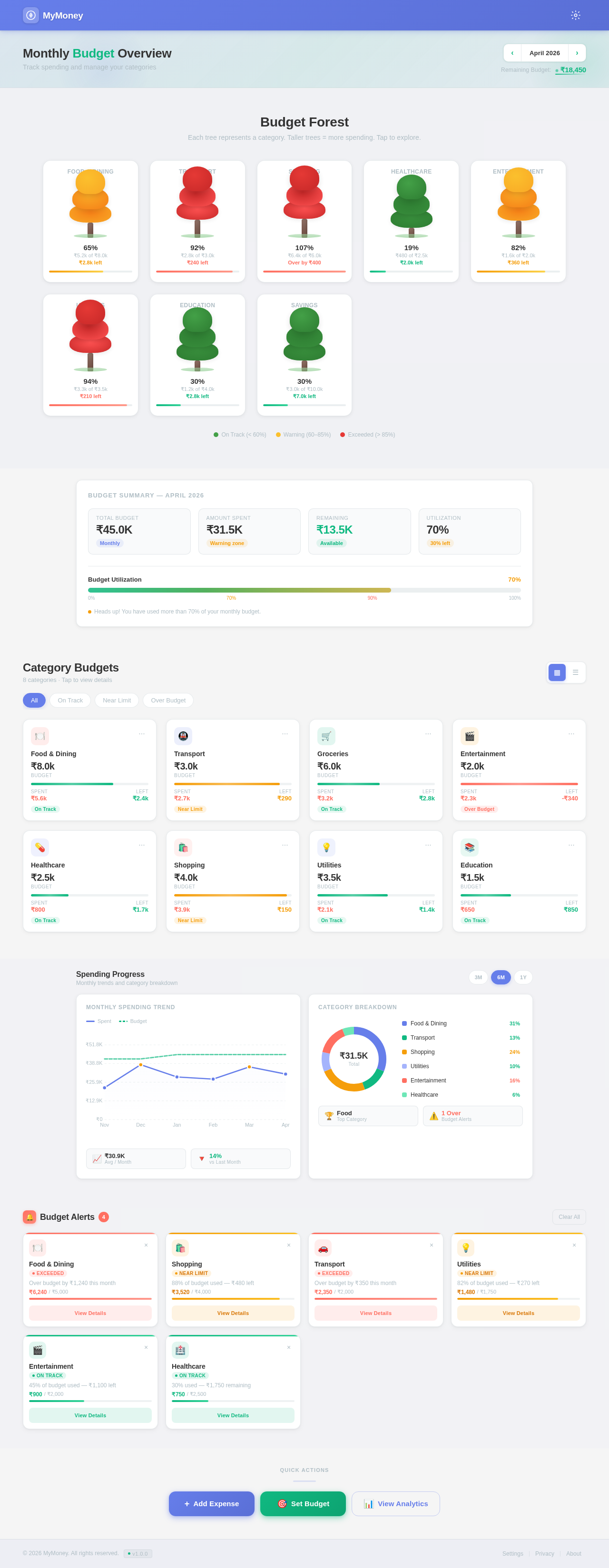
Monthly Budget Overview
Track spending and manage your categories
Budget Forest
Each tree represents a category. Taller trees = more spending. Tap to explore.
Budget Summary — April 2026
Category Budgets
8 categories · Tap to view details
Food & Dining
Transport
Groceries
Entertainment
Healthcare
Shopping
Utilities
Education
Spending Progress
Monthly trends and category breakdown
Monthly Spending Trend
Category Breakdown
Budget Alerts
4Over budget by ₹1,240 this month
88% of budget used — ₹480 left
Over budget by ₹350 this month
82% of budget used — ₹270 left
45% of budget used — ₹1,100 left
30% used — ₹1,750 remaining
No comments yet. Be the first!