cedar-bot
 tas divyesh
Lead Generation Automation System, it's best to design it as a set of modules. Below is a detailed breakdown of each module along with suggested database tables and columns. 1. Lead Capture Module This module collects leads from multiple sources: Website forms Landing pages Facebook Lead Ads Google Ads LinkedIn forms WhatsApp Chatbots Manual entry CSV imports Table: leads Column Type Description id BIGINT PK Lead ID first_name VARCHAR(100) First Name last_name VARCHAR(100) Last Name email VARCHAR(255) Email Address phone VARCHAR(20) Contact Number company_name VARCHAR(255) Company Name job_title VARCHAR(255) Designation website VARCHAR(255) Company Website country VARCHAR(100) Country state VARCHAR(100) State city VARCHAR(100) City source_id BIGINT FK Lead Source status_id BIGINT FK Lead Status score INT Lead Score assigned_to BIGINT FK Sales User notes TEXT Notes created_at TIMESTAMP Created Date updated_at TIMESTAMP Updated Date 2. Lead Source Management Tracks where leads originate. Table: lead_sources Column Type id BIGINT PK source_name VARCHAR(100) source_type VARCHAR(50) active BOOLEAN created_at TIMESTAMP Example Sources Facebook Ads Google Ads LinkedIn Website Referral WhatsApp Cold Email 3. Lead Qualification Module Automatically determines lead quality. Table: lead_scores Column Type id BIGINT PK lead_id BIGINT FK score_type VARCHAR(100) points INT reason TEXT created_at TIMESTAMP Example Rules Action Points Open Email +5 Click Email +10 Visit Pricing Page +20 Download Ebook +15 Book Demo +50 4. Lead Status Management Pipeline tracking. Table: lead_statuses Column Type id BIGINT PK status_name VARCHAR(100) color_code VARCHAR(20) sort_order INT Statuses New Contacted Interested Qualified Demo Scheduled Proposal Sent Negotiation Won Lost 5. Lead Assignment Automation Automatically distributes leads. Table: lead_assignments Column Type id BIGINT PK lead_id BIGINT FK user_id BIGINT FK assigned_by BIGINT FK assigned_at TIMESTAMP Assignment Rules Round Robin Territory Based Industry Based Country Based 6. Email Automation Module Sends nurture campaigns automatically. Table: email_templates Column Type id BIGINT PK template_name VARCHAR(255) subject VARCHAR(255) html_content LONGTEXT created_at TIMESTAMP Table: email_campaigns Column Type id BIGINT PK campaign_name VARCHAR(255) template_id BIGINT FK trigger_type VARCHAR(100) active BOOLEAN created_at TIMESTAMP Table: email_logs Column Type id BIGINT PK lead_id BIGINT FK campaign_id BIGINT FK email_sent BOOLEAN opened BOOLEAN clicked BOOLEAN sent_at TIMESTAMP 7. WhatsApp Automation Automated messaging and follow-ups. Table: whatsapp_templates Column Type id BIGINT PK template_name VARCHAR(255) message_body TEXT active BOOLEAN Table: whatsapp_logs Column Type id BIGINT PK lead_id BIGINT FK template_id BIGINT FK status VARCHAR(50) sent_at TIMESTAMP 8. Follow-Up Automation Schedules future actions. Table: followups Column Type id BIGINT PK lead_id BIGINT FK assigned_to BIGINT FK followup_type VARCHAR(100) due_date DATETIME status VARCHAR(50) remarks TEXT created_at TIMESTAMP Follow-Up Types Call Email WhatsApp Meeting Demo 9. Activity Tracking Records every interaction. Table: lead_activities Column Type id BIGINT PK lead_id BIGINT FK activity_type VARCHAR(100) description TEXT user_id BIGINT FK created_at TIMESTAMP Activities Email Opened Email Clicked Call Made Meeting Done Website Visit Demo Attended 10. Workflow Automation Engine Handles trigger-based actions. Table: workflows Column Type id BIGINT PK workflow_name VARCHAR(255) trigger_event VARCHAR(255) active BOOLEAN created_at TIMESTAMP Table: workflow_actions Column Type id BIGINT PK workflow_id BIGINT FK action_type VARCHAR(100) action_data JSON sequence_no INT Example Workflow Trigger: Lead Created Actions: Assign Salesperson ↓ Send Welcome Email ↓ Wait 1 Day ↓ Send WhatsApp Message ↓ Create Follow-Up Task 11. CRM Users Module Table: users Column Type id BIGINT PK name VARCHAR(255) email VARCHAR(255) phone VARCHAR(20) role_id BIGINT FK active BOOLEAN created_at TIMESTAMP 12. Roles & Permissions Table: roles Column Type id BIGINT PK role_name VARCHAR(100) Table: permissions Column Type id BIGINT PK permission_name VARCHAR(255) Table: role_permissions Column Type role_id BIGINT FK permission_id BIGINT FK 13. Analytics Dashboard KPIs: Total Leads Qualified Leads Conversion Rate Cost Per Lead Revenue Generated Salesperson Performance Campaign ROI Table: lead_metrics Column Type id BIGINT PK metric_date DATE total_leads INT qualified_leads INT converted_leads INT revenue DECIMAL(15,2) 14. API & Integration Module Connects with: CRM Facebook Lead Ads Google Ads LinkedIn WhatsApp Business API Email Providers Zapier Make.com Table: integrations Column Type id BIGINT PK integration_name VARCHAR(255) api_key TEXT status VARCHAR(50) created_at TIMESTAMP Complete Lead Automation Flow Lead Form Submitted ↓ Capture Lead ↓ Duplicate Check ↓ Lead Scoring ↓ Lead Assignment ↓ Send Welcome Email ↓ Send WhatsApp Message ↓ Create Follow-Up Task ↓ Track Engagement ↓ Update Lead Score ↓ Move Pipeline Stage ↓ Convert To Opportunity ↓ Close Won / Lost ↓ Analytics Dashboard For a production SaaS platform, I would also add: Multi-tenant architecture Audit logs Webhook management AI lead scoring Campaign attribution tracking UTM tracking Opportunity/Deal management Customer conversion module Data enrichment (LinkedIn, Clearbit, Apollo) Duplicate detection engine Workflow builder (drag-and-drop) Real-time notifications SLA tracking Revenue forecasting These additions make the system comparable to enterprise lead-generation platforms and CRMs. how to gemerate lead Lead generation means finding potential customers and collecting their contact information (name, email, phone, company, etc.) so your sales team can contact them. Lead Generation Process Traffic Source ↓ Landing Page/Form ↓ Lead Captured ↓ Store in Database ↓ Qualification & Scoring ↓ Assign to Sales Team ↓ Follow-up Automation ↓ Convert to Customer 1. Generate Leads Through Website Forms Flow User visits website ↓ Fills Contact Form ↓ Data saved in database ↓ Welcome email sent ↓ Sales team notified Form Fields Name Email Phone Company Message Database leads Column Type id BIGINT name VARCHAR email VARCHAR phone VARCHAR company VARCHAR source VARCHAR created_at TIMESTAMP 2. Generate Leads Through Facebook Ads Flow Facebook Lead Ad ↓ User submits form ↓ Webhook receives data ↓ Store in database ↓ Trigger automation Database facebook_leads Column Type id BIGINT fb_lead_id VARCHAR name VARCHAR email VARCHAR phone VARCHAR campaign_name VARCHAR ad_name VARCHAR created_at TIMESTAMP 3. Generate Leads Through Google Ads Flow Google Ad ↓ Landing Page ↓ Form Submission ↓ Database Additional Columns Column Type gclid VARCHAR campaign_id VARCHAR keyword VARCHAR 4. Generate Leads Through LinkedIn Flow LinkedIn Lead Form ↓ Webhook ↓ CRM Database Database linkedin_leads Column Type id BIGINT linkedin_lead_id VARCHAR full_name VARCHAR email VARCHAR company VARCHAR job_title VARCHAR 5. Generate Leads Through WhatsApp Flow WhatsApp Message ↓ Bot asks questions ↓ Collect details ↓ Save lead Database whatsapp_leads Column Type id BIGINT phone VARCHAR name VARCHAR interested_product VARCHAR created_at TIMESTAMP 6. Generate Leads Through Chatbot Flow Website Chat ↓ Ask Questions ↓ Capture Details ↓ Create Lead Database chatbot_leads Column Type id BIGINT session_id VARCHAR name VARCHAR email VARCHAR phone VARCHAR interest VARCHAR 7. Generate Leads Through Cold Email Flow Send Email ↓ User replies ↓ Create lead Database email_leads Column Type id BIGINT email VARCHAR reply_status BOOLEAN campaign_name VARCHAR 8. Generate Leads Through Web Scraping (B2B) You can collect: Company Name Website Email Phone Industry Database scraped_leads Column Type id BIGINT company_name VARCHAR website VARCHAR email VARCHAR phone VARCHAR industry VARCHAR Automation Workflow Lead Source ↓ API/Webhook ↓ Save to Database ↓ Check Duplicate ↓ Lead Scoring ↓ Assign Salesperson ↓ Send Email ↓ Send WhatsApp ↓ Create Follow-up ↓ Dashboard Recommended Database Structure Main Table: leads Column Type id BIGINT first_name VARCHAR last_name VARCHAR email VARCHAR phone VARCHAR company_name VARCHAR website VARCHAR source VARCHAR source_id VARCHAR campaign_name VARCHAR status VARCHAR score INT assigned_to BIGINT country VARCHAR state VARCHAR city VARCHAR created_at TIMESTAMP updated_at TIMESTAMP Tables Needed for Full Automation users leads lead_sources lead_statuses lead_scores lead_activities followups email_campaigns email_logs whatsapp_logs workflows workflow_actions notifications audit_logs Example API Payload { "name": "John Smith", "email": "john@example.com", "phone": "+1234567890", "company": "ABC Ltd", "source": "Facebook Ads", "campaign": "Summer Campaign" } This payload can be received through a webhook and automatically create a new lead in your system. laravel language with mysql


Comments (0)
Sign in to leave a comment
System Requirements
System Requirements Document for Cedar-Bot
1. Introduction
Cedar-Bot is a comprehensive lead generation automation system designed to streamline the process of capturing, managing, and converting leads into customers. This document outlines the system requirements for Cedar-Bot, focusing on its modular architecture and the functionalities each module provides.
2. System Overview
Cedar-Bot is designed as a modular system to automate lead generation and management processes. It integrates with various platforms such as Facebook, Google Ads, LinkedIn, WhatsApp, and more to capture leads from multiple sources. The system includes modules for lead capture, qualification, assignment, email and WhatsApp automation, follow-up scheduling, activity tracking, workflow automation, and analytics. It is built to support a multi-tenant architecture with robust API and integration capabilities.
3. Functional Requirements
- As a User, I should be able to capture leads from website forms, landing pages, Facebook Lead Ads, Google Ads, LinkedIn forms, WhatsApp, chatbots, manual entry, and CSV imports.
- As an Admin, I should be able to manage lead sources and track where leads originate.
- As a User, I should be able to automatically determine lead quality through a lead qualification module.
- As an Admin, I should be able to manage lead statuses for pipeline tracking.
- As a User, I should be able to automate lead assignment based on rules like round robin, territory, industry, or country.
- As a User, I should be able to send nurture campaigns automatically through an email automation module.
- As a User, I should be able to automate messaging and follow-ups through WhatsApp.
- As a User, I should be able to schedule future actions with a follow-up automation module.
- As a User, I should be able to track every interaction with leads through an activity tracking module.
- As an Admin, I should be able to create and manage workflows for trigger-based actions.
- As an Admin, I should be able to manage CRM users and their roles and permissions.
- As an Admin, I should be able to view analytics dashboards to track KPIs like total leads, qualified leads, conversion rate, and more.
- As an Admin, I should be able to integrate Cedar-Bot with external systems like CRM, Facebook Lead Ads, Google Ads, LinkedIn, WhatsApp Business API, and email providers.
4. User Personas
- Admin: Responsible for managing the system, configuring modules, and overseeing lead generation processes.
- Sales User: Engages with leads, follows up, and converts them into customers.
- Marketing User: Manages campaigns and analyzes lead data to optimize marketing strategies.
5. Core User Flows
- Lead Capture: User visits website -> Fills contact form -> Data saved in database -> Welcome email sent -> Sales team notified.
- Lead Assignment: Lead captured -> Duplicate check -> Lead scoring -> Lead assignment -> Salesperson notified.
- Email Campaign: Campaign created -> Email template selected -> Campaign triggered -> Emails sent -> Engagement tracked.
- WhatsApp Automation: WhatsApp message received -> Bot asks questions -> Details collected -> Lead saved.
- Workflow Automation: Lead created -> Assign salesperson -> Send welcome email -> Wait 1 day -> Send WhatsApp message -> Create follow-up task.
6. Visuals Colors and Theme
- primary: #2A9D8F (Teal)
- primary_light: #A8DADC (Light Teal)
- secondary: #E76F51 (Coral)
- accent: #F4A261 (Orange)
- highlight: #E9C46A (Yellow)
- bg: #F1FAEE (Off White)
- surface: rgba(42, 157, 143, 0.8)
- text: #264653 (Dark Blue)
- text_muted: #8D99AE (Gray)
- border: rgba(233, 69, 96, 0.2)
7. Signature Design Concept
Interactive Lead Galaxy: The homepage will feature a 3D interactive galaxy map where each star represents a lead source or module. Users can click on stars to zoom into specific modules or features. The galaxy will rotate as users drag their mouse, and hovering over stars will display brief descriptions. This concept will be implemented using @react-three/fiber and @react-three/drei for 3D rendering, providing an engaging and exploratory experience.
8. Interaction Model & Motion Direction
The landing page will use a "parallax" interaction model, creating a layered depth effect as users scroll. Decorative elements like stars and nebulae will move at different speeds, enhancing the immersive experience. Internal pages will adopt a "static" model for clarity and ease of use.
9. Non-Functional Requirements
- The system must support a multi-tenant architecture.
- It should provide real-time notifications and updates.
- The system must ensure data security and privacy compliance.
- It should be scalable to handle increasing lead volumes.
10. Tech Stack
- Frontend: React for Web
- Backend: Laravel with MySQL
- Database: MySQL
- AI Models: Not specified
- AI Tools: Not specified
- Local Orchestration: Docker
- Server-side Orchestration: Kubernetes
11. Assumptions and Constraints
- The system will primarily operate in the Indian market, considering local regulations and user preferences.
- Integration with third-party platforms assumes availability of APIs.
- The system should be designed to handle high volumes of data and user interactions.
12. Glossary
- Lead: A potential customer whose contact information has been captured.
- CRM: Customer Relationship Management, a system for managing interactions with current and potential customers.
- API: Application Programming Interface, a set of tools and protocols for building software applications.
- Webhook: A method of augmenting or altering the behavior of a web page or web application with custom callbacks.
This document outlines the comprehensive requirements for Cedar-Bot, ensuring a robust and efficient lead generation automation system.
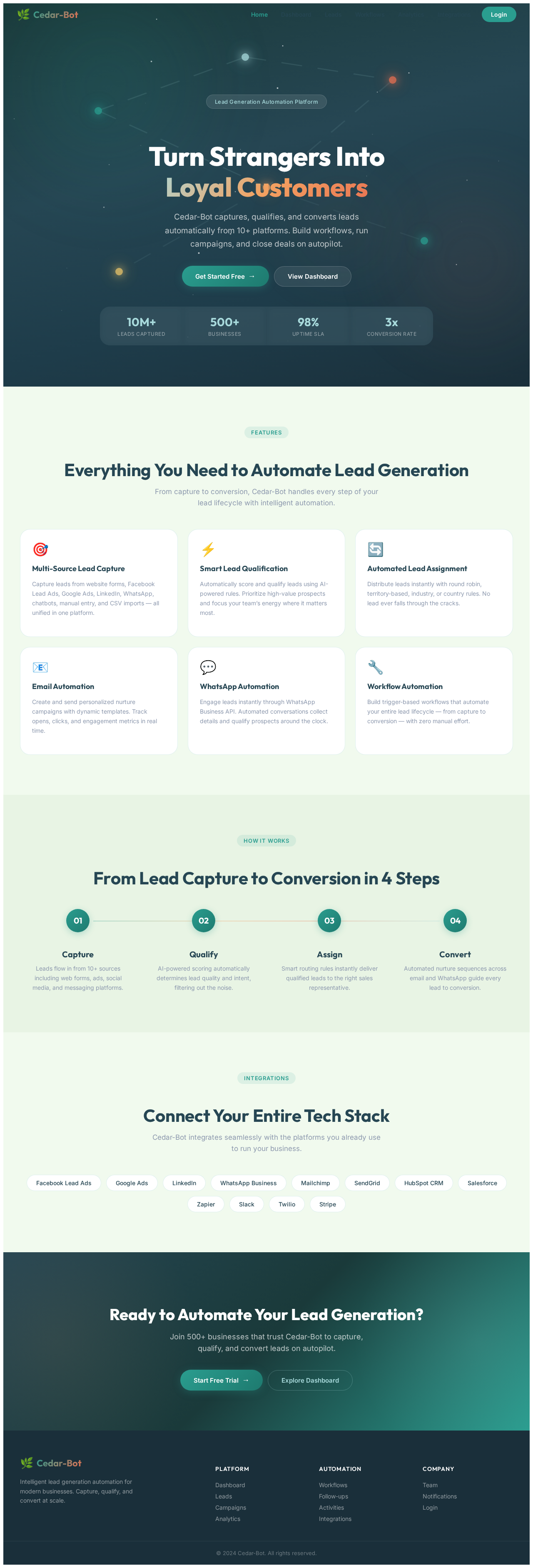
Turn Strangers IntoLoyal Customers
Cedar-Bot captures, qualifies, and converts leads automatically from 10+ platforms. Build workflows, run campaigns, and close deals on autopilot.
Everything You Need to Automate Lead Generation
From capture to conversion, Cedar-Bot handles every step of your lead lifecycle with intelligent automation.
Multi-Source Lead Capture
Capture leads from website forms, Facebook Lead Ads, Google Ads, LinkedIn, WhatsApp, chatbots, manual entry, and CSV imports — all unified in one platform.
Smart Lead Qualification
Automatically score and qualify leads using AI-powered rules. Prioritize high-value prospects and focus your team’s energy where it matters most.
Automated Lead Assignment
Distribute leads instantly with round robin, territory-based, industry, or country rules. No lead ever falls through the cracks.
Email Automation
Create and send personalized nurture campaigns with dynamic templates. Track opens, clicks, and engagement metrics in real time.
WhatsApp Automation
Engage leads instantly through WhatsApp Business API. Automated conversations collect details and qualify prospects around the clock.
Workflow Automation
Build trigger-based workflows that automate your entire lead lifecycle — from capture to conversion — with zero manual effort.
From Lead Capture to Conversion in 4 Steps
Capture
Leads flow in from 10+ sources including web forms, ads, social media, and messaging platforms.
Qualify
AI-powered scoring automatically determines lead quality and intent, filtering out the noise.
Assign
Smart routing rules instantly deliver qualified leads to the right sales representative.
Convert
Automated nurture sequences across email and WhatsApp guide every lead to conversion.
Connect Your Entire Tech Stack
Cedar-Bot integrates seamlessly with the platforms you already use to run your business.
Ready to Automate Your Lead Generation?
Join 500+ businesses that trust Cedar-Bot to capture, qualify, and convert leads on autopilot.
No comments yet. Be the first!