cedar-bot
 tas divyesh
Lead Generation Automation System, it's best to design it as a set of modules. Below is a detailed breakdown of each module along with suggested database tables and columns. 1. Lead Capture Module This module collects leads from multiple sources: Website forms Landing pages Facebook Lead Ads Google Ads LinkedIn forms WhatsApp Chatbots Manual entry CSV imports Table: leads Column Type Description id BIGINT PK Lead ID first_name VARCHAR(100) First Name last_name VARCHAR(100) Last Name email VARCHAR(255) Email Address phone VARCHAR(20) Contact Number company_name VARCHAR(255) Company Name job_title VARCHAR(255) Designation website VARCHAR(255) Company Website country VARCHAR(100) Country state VARCHAR(100) State city VARCHAR(100) City source_id BIGINT FK Lead Source status_id BIGINT FK Lead Status score INT Lead Score assigned_to BIGINT FK Sales User notes TEXT Notes created_at TIMESTAMP Created Date updated_at TIMESTAMP Updated Date 2. Lead Source Management Tracks where leads originate. Table: lead_sources Column Type id BIGINT PK source_name VARCHAR(100) source_type VARCHAR(50) active BOOLEAN created_at TIMESTAMP Example Sources Facebook Ads Google Ads LinkedIn Website Referral WhatsApp Cold Email 3. Lead Qualification Module Automatically determines lead quality. Table: lead_scores Column Type id BIGINT PK lead_id BIGINT FK score_type VARCHAR(100) points INT reason TEXT created_at TIMESTAMP Example Rules Action Points Open Email +5 Click Email +10 Visit Pricing Page +20 Download Ebook +15 Book Demo +50 4. Lead Status Management Pipeline tracking. Table: lead_statuses Column Type id BIGINT PK status_name VARCHAR(100) color_code VARCHAR(20) sort_order INT Statuses New Contacted Interested Qualified Demo Scheduled Proposal Sent Negotiation Won Lost 5. Lead Assignment Automation Automatically distributes leads. Table: lead_assignments Column Type id BIGINT PK lead_id BIGINT FK user_id BIGINT FK assigned_by BIGINT FK assigned_at TIMESTAMP Assignment Rules Round Robin Territory Based Industry Based Country Based 6. Email Automation Module Sends nurture campaigns automatically. Table: email_templates Column Type id BIGINT PK template_name VARCHAR(255) subject VARCHAR(255) html_content LONGTEXT created_at TIMESTAMP Table: email_campaigns Column Type id BIGINT PK campaign_name VARCHAR(255) template_id BIGINT FK trigger_type VARCHAR(100) active BOOLEAN created_at TIMESTAMP Table: email_logs Column Type id BIGINT PK lead_id BIGINT FK campaign_id BIGINT FK email_sent BOOLEAN opened BOOLEAN clicked BOOLEAN sent_at TIMESTAMP 7. WhatsApp Automation Automated messaging and follow-ups. Table: whatsapp_templates Column Type id BIGINT PK template_name VARCHAR(255) message_body TEXT active BOOLEAN Table: whatsapp_logs Column Type id BIGINT PK lead_id BIGINT FK template_id BIGINT FK status VARCHAR(50) sent_at TIMESTAMP 8. Follow-Up Automation Schedules future actions. Table: followups Column Type id BIGINT PK lead_id BIGINT FK assigned_to BIGINT FK followup_type VARCHAR(100) due_date DATETIME status VARCHAR(50) remarks TEXT created_at TIMESTAMP Follow-Up Types Call Email WhatsApp Meeting Demo 9. Activity Tracking Records every interaction. Table: lead_activities Column Type id BIGINT PK lead_id BIGINT FK activity_type VARCHAR(100) description TEXT user_id BIGINT FK created_at TIMESTAMP Activities Email Opened Email Clicked Call Made Meeting Done Website Visit Demo Attended 10. Workflow Automation Engine Handles trigger-based actions. Table: workflows Column Type id BIGINT PK workflow_name VARCHAR(255) trigger_event VARCHAR(255) active BOOLEAN created_at TIMESTAMP Table: workflow_actions Column Type id BIGINT PK workflow_id BIGINT FK action_type VARCHAR(100) action_data JSON sequence_no INT Example Workflow Trigger: Lead Created Actions: Assign Salesperson ↓ Send Welcome Email ↓ Wait 1 Day ↓ Send WhatsApp Message ↓ Create Follow-Up Task 11. CRM Users Module Table: users Column Type id BIGINT PK name VARCHAR(255) email VARCHAR(255) phone VARCHAR(20) role_id BIGINT FK active BOOLEAN created_at TIMESTAMP 12. Roles & Permissions Table: roles Column Type id BIGINT PK role_name VARCHAR(100) Table: permissions Column Type id BIGINT PK permission_name VARCHAR(255) Table: role_permissions Column Type role_id BIGINT FK permission_id BIGINT FK 13. Analytics Dashboard KPIs: Total Leads Qualified Leads Conversion Rate Cost Per Lead Revenue Generated Salesperson Performance Campaign ROI Table: lead_metrics Column Type id BIGINT PK metric_date DATE total_leads INT qualified_leads INT converted_leads INT revenue DECIMAL(15,2) 14. API & Integration Module Connects with: CRM Facebook Lead Ads Google Ads LinkedIn WhatsApp Business API Email Providers Zapier Make.com Table: integrations Column Type id BIGINT PK integration_name VARCHAR(255) api_key TEXT status VARCHAR(50) created_at TIMESTAMP Complete Lead Automation Flow Lead Form Submitted ↓ Capture Lead ↓ Duplicate Check ↓ Lead Scoring ↓ Lead Assignment ↓ Send Welcome Email ↓ Send WhatsApp Message ↓ Create Follow-Up Task ↓ Track Engagement ↓ Update Lead Score ↓ Move Pipeline Stage ↓ Convert To Opportunity ↓ Close Won / Lost ↓ Analytics Dashboard For a production SaaS platform, I would also add: Multi-tenant architecture Audit logs Webhook management AI lead scoring Campaign attribution tracking UTM tracking Opportunity/Deal management Customer conversion module Data enrichment (LinkedIn, Clearbit, Apollo) Duplicate detection engine Workflow builder (drag-and-drop) Real-time notifications SLA tracking Revenue forecasting These additions make the system comparable to enterprise lead-generation platforms and CRMs. how to gemerate lead Lead generation means finding potential customers and collecting their contact information (name, email, phone, company, etc.) so your sales team can contact them. Lead Generation Process Traffic Source ↓ Landing Page/Form ↓ Lead Captured ↓ Store in Database ↓ Qualification & Scoring ↓ Assign to Sales Team ↓ Follow-up Automation ↓ Convert to Customer 1. Generate Leads Through Website Forms Flow User visits website ↓ Fills Contact Form ↓ Data saved in database ↓ Welcome email sent ↓ Sales team notified Form Fields Name Email Phone Company Message Database leads Column Type id BIGINT name VARCHAR email VARCHAR phone VARCHAR company VARCHAR source VARCHAR created_at TIMESTAMP 2. Generate Leads Through Facebook Ads Flow Facebook Lead Ad ↓ User submits form ↓ Webhook receives data ↓ Store in database ↓ Trigger automation Database facebook_leads Column Type id BIGINT fb_lead_id VARCHAR name VARCHAR email VARCHAR phone VARCHAR campaign_name VARCHAR ad_name VARCHAR created_at TIMESTAMP 3. Generate Leads Through Google Ads Flow Google Ad ↓ Landing Page ↓ Form Submission ↓ Database Additional Columns Column Type gclid VARCHAR campaign_id VARCHAR keyword VARCHAR 4. Generate Leads Through LinkedIn Flow LinkedIn Lead Form ↓ Webhook ↓ CRM Database Database linkedin_leads Column Type id BIGINT linkedin_lead_id VARCHAR full_name VARCHAR email VARCHAR company VARCHAR job_title VARCHAR 5. Generate Leads Through WhatsApp Flow WhatsApp Message ↓ Bot asks questions ↓ Collect details ↓ Save lead Database whatsapp_leads Column Type id BIGINT phone VARCHAR name VARCHAR interested_product VARCHAR created_at TIMESTAMP 6. Generate Leads Through Chatbot Flow Website Chat ↓ Ask Questions ↓ Capture Details ↓ Create Lead Database chatbot_leads Column Type id BIGINT session_id VARCHAR name VARCHAR email VARCHAR phone VARCHAR interest VARCHAR 7. Generate Leads Through Cold Email Flow Send Email ↓ User replies ↓ Create lead Database email_leads Column Type id BIGINT email VARCHAR reply_status BOOLEAN campaign_name VARCHAR 8. Generate Leads Through Web Scraping (B2B) You can collect: Company Name Website Email Phone Industry Database scraped_leads Column Type id BIGINT company_name VARCHAR website VARCHAR email VARCHAR phone VARCHAR industry VARCHAR Automation Workflow Lead Source ↓ API/Webhook ↓ Save to Database ↓ Check Duplicate ↓ Lead Scoring ↓ Assign Salesperson ↓ Send Email ↓ Send WhatsApp ↓ Create Follow-up ↓ Dashboard Recommended Database Structure Main Table: leads Column Type id BIGINT first_name VARCHAR last_name VARCHAR email VARCHAR phone VARCHAR company_name VARCHAR website VARCHAR source VARCHAR source_id VARCHAR campaign_name VARCHAR status VARCHAR score INT assigned_to BIGINT country VARCHAR state VARCHAR city VARCHAR created_at TIMESTAMP updated_at TIMESTAMP Tables Needed for Full Automation users leads lead_sources lead_statuses lead_scores lead_activities followups email_campaigns email_logs whatsapp_logs workflows workflow_actions notifications audit_logs Example API Payload { "name": "John Smith", "email": "john@example.com", "phone": "+1234567890", "company": "ABC Ltd", "source": "Facebook Ads", "campaign": "Summer Campaign" } This payload can be received through a webhook and automatically create a new lead in your system. laravel language with mysql


Comments (0)
Sign in to leave a comment
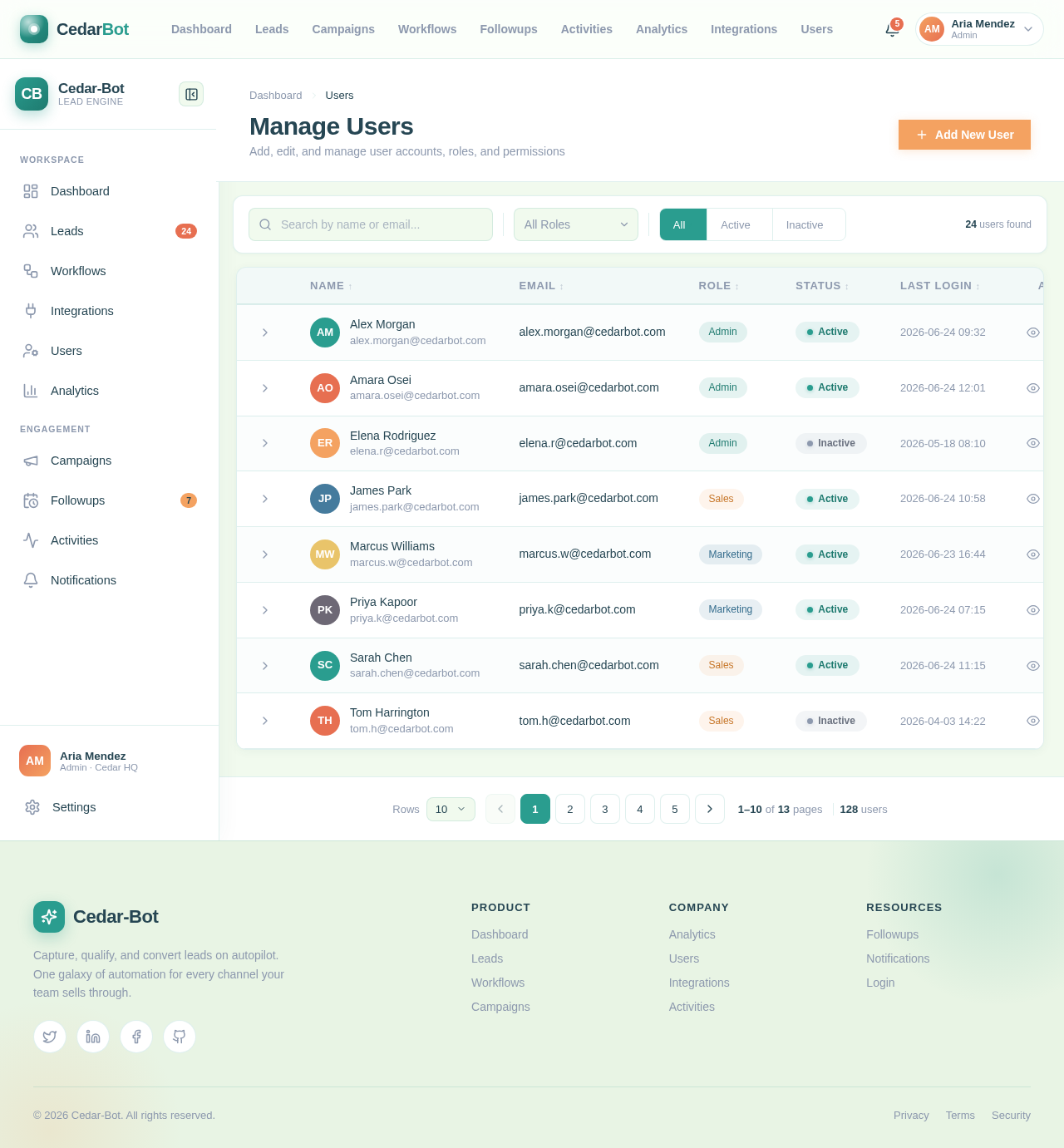
Manage Users
Add, edit, and manage user accounts, roles, and permissions
| Name | Role | Status | Last Login | Actions | ||
|---|---|---|---|---|---|---|
AM Alex Morgan alex.morgan@cedarbot.com | alex.morgan@cedarbot.com | Admin | Active | 2026-06-24 09:32 | ||
AO Amara Osei amara.osei@cedarbot.com | amara.osei@cedarbot.com | Admin | Active | 2026-06-24 12:01 | ||
ER Elena Rodriguez elena.r@cedarbot.com | elena.r@cedarbot.com | Admin | Inactive | 2026-05-18 08:10 | ||
JP James Park james.park@cedarbot.com | james.park@cedarbot.com | Sales | Active | 2026-06-24 10:58 | ||
MW Marcus Williams marcus.w@cedarbot.com | marcus.w@cedarbot.com | Marketing | Active | 2026-06-23 16:44 | ||
PK Priya Kapoor priya.k@cedarbot.com | priya.k@cedarbot.com | Marketing | Active | 2026-06-24 07:15 | ||
SC Sarah Chen sarah.chen@cedarbot.com | sarah.chen@cedarbot.com | Sales | Active | 2026-06-24 11:15 | ||
TH Tom Harrington tom.h@cedarbot.com | tom.h@cedarbot.com | Sales | Inactive | 2026-04-03 14:22 |
No comments yet. Be the first!