cedar-admin
 Poirei Lam
I have uploaded my App ..zip file the admin panel ..A.I training menu button is not working and Grammer rules menu button are not working
Comments (0)
Sign in to leave a comment
System Requirements
System Requirements Document (SRD)
Project Name: cedar-admin
1. Introduction
The cedar-admin project is an administrative panel designed to manage and oversee various functionalities of an application. Developed for Poirei Lam in India, this system aims to provide seamless control over AI training processes, grammar rule management, and other administrative tasks. The platform is tailored to meet locale-specific needs, such as timezone settings (IST) and currency preferences (INR).
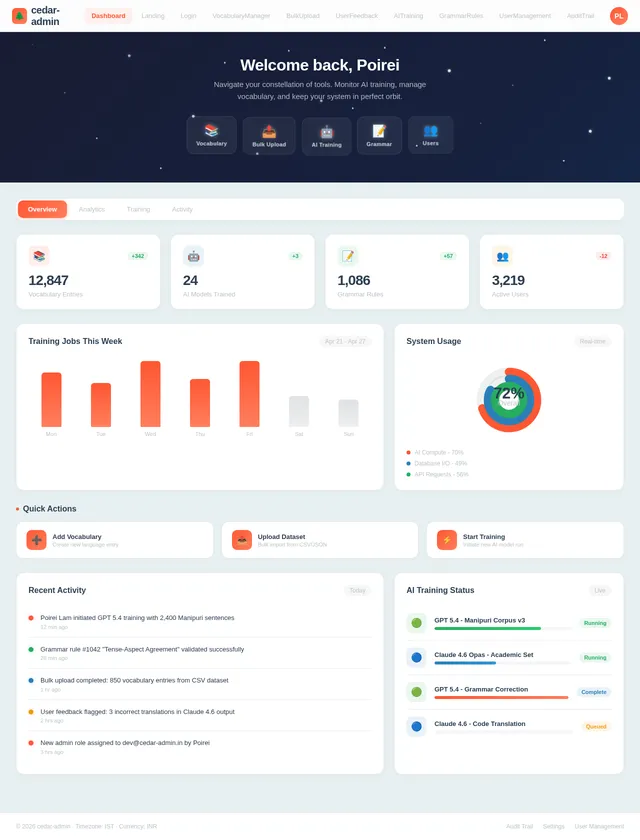
This document outlines the updated system requirements based on Poirei's request to ensure the functionality of all menu items, including Dashboard, Vocabulary Manager, Bulk Upload, User Feedback, AI Training, Grammar Rules, User Management, and Audit Trail. It also includes enhancements to ensure the system operates efficiently and meets user expectations.
2. System Overview
The cedar-admin system is a web-based administrative panel designed for managing backend processes and configurations. It serves as the control center for AI model training, grammar rule management, vocabulary management, and other administrative tasks.
Key features include:
- AI model training initiation and monitoring.
- Grammar rule creation, editing, and validation.
- Vocabulary management for language processing.
- Bulk upload functionality for efficient data handling.
- User feedback collection and analysis.
- User management for role-based access control.
- Audit trail for compliance and debugging.
- A user-friendly interface with responsive design.
The system leverages modern technologies such as React for the frontend, FastAPI for the backend, and MySQL for relational database management. AI capabilities are powered by advanced models like GPT 5.4 and Claude 4.6 Opas.
3. Functional Requirements
Story Points
- As Admin, I should be able to view a comprehensive Dashboard with key metrics and activity logs.
- As Admin, I should be able to manage vocabulary through the Vocabulary Manager, including adding, editing, and deleting entries.
- As Admin, I should be able to perform Bulk Uploads of datasets efficiently.
- As Admin, I should be able to collect and analyze User Feedback to improve system functionality.
- As Admin, I should be able to initiate and monitor AI Training processes.
- As Admin, I should be able to manage Grammar Rules, including creating, editing, and validating rules.
- As Admin, I should be able to manage users and roles through the User Management menu.
- As Admin, I should be able to view an Audit Trail for compliance and debugging purposes.
4. User Personas
Admin
- Role: Oversees the system and manages functionalities such as AI training, grammar rules, and user management.
- Goals: Ensure smooth operation of the admin panel, troubleshoot issues, and maintain system integrity.
- Pain Points: Non-functional buttons, lack of error feedback, and difficulty in debugging.
Developer
- Role: Maintains and updates the system codebase.
- Goals: Fix bugs, enhance features, and ensure system reliability.
- Pain Points: Lack of clear documentation or debugging tools.
End User
- Role: Provides feedback and interacts indirectly with the admin panel through system outputs.
- Goals: Ensure the system meets their needs and provides accurate results.
- Pain Points: Errors in AI outputs or grammar rules, lack of vocabulary customization.
5. Visuals Colors and Theme
Unique Color Palette
The cedar-admin project adopts a professional yet vibrant theme to reflect its administrative nature while maintaining user engagement.
- Background: #E8F0F2 (Soft Blue-Gray)
- Surface: #FFFFFF (Pure White)
- Text: #2C3E50 (Deep Navy)
- Accent: #FF5733 (Vivid Orange)
- Muted Tones: #BDC3C7 (Light Gray)
This palette ensures readability, modern aesthetics, and a clean interface suitable for administrative tasks.
6. Signature Design Concept
Interactive Galaxy Dashboard
The cedar-admin homepage will feature an interactive galaxy-style dashboard. Upon landing, users will see a visually stunning interface resembling a starry galaxy, where each star represents a menu item.
Key Features:
- Dynamic Animations: Stars twinkle and pulse gently, creating a sense of exploration and wonder.
- Hover Effects: Hovering over a star will reveal its name and description, styled like a glowing tooltip.
- Interactive Elements: Clicking on a star will zoom into its "constellation," revealing submenus or related features.
- Color Transitions: The galaxy background shifts subtly between shades of blue and purple, enhancing focus and reducing eye strain.
- Micro-Interactions: Real-time feedback for button clicks, including animations and status updates.
This design concept ensures the cedar-admin panel stands out as a visually engaging and memorable tool for administrators, while maintaining functionality and ease of use.
7. Non-Functional Requirements
- Performance: The system should respond to user actions within 2 seconds.
- Scalability: Support up to 10,000 concurrent users.
- Security: Implement role-based access control (RBAC) and secure API endpoints.
- Compatibility: Ensure cross-browser functionality (Chrome, Firefox, Edge).
- Localization: Default timezone set to IST and currency to INR.
8. Tech Stack
Frontend
- React for Web
Backend
- Python
- FastAPI
Database
- MySQL (preferred)
- Alembic for migrations
AI Models
- GPT 5.4 for user-friendly responses
- Claude 4.6 Opas for academic or coding work
AI Tools
- Litellm for LLM Routing
- Langchain
Orchestration
- Docker for local orchestration
- Kubernetes for server-side orchestration
9. Assumptions and Constraints
Assumptions
- The admin panel will primarily be accessed by users in India.
- The system will integrate seamlessly with existing backend APIs.
- AI models and tools are pre-configured and accessible via the backend.
Constraints
- Limited budget for additional third-party integrations.
- Backend server must remain operational 24/7 to support admin panel functionalities.
10. Glossary
- AI Training: The process of training artificial intelligence models using predefined datasets.
- Grammar Rules: Rules governing the structure and syntax of language used in the application.
- RBAC: Role-Based Access Control, a security mechanism for managing user permissions.
- IST: Indian Standard Time, the timezone used in India.
- INR: Indian Rupee, the currency used in India.
- Audit Trail: A record of system activities for compliance and debugging purposes.
Your Blueprint for Intelligent Administration
Manage AI training, grammar rules, and system configurations from a single, precision-crafted control panel. Built for administrators in India with locale-aware defaults.
AI Training
Initiate and monitor AI model training with GPT 5.4 and Claude 4.6 Opas. Track progress in real-time.
→Grammar Rules
Create, edit, and validate grammar rules governing language structure and syntax across your application.
→System Logs
View error messages, debug information, and filter logs for efficient troubleshooting.
→Dashboard
View system overview, monitor active processes, and track operational health at a glance.
→API Settings
Configure FastAPI endpoints, update routes, and manage backend integrations seamlessly.
→Access Control
Role-based access management for admins and developers. Secure endpoints with RBAC policies.
→Powered by Advanced AI Models
cedar-admin integrates GPT 5.4 for user-friendly responses and Claude 4.6 Opas for academic and coding tasks. Orchestrated with LiteLLM routing and Langchain pipelines.
- ✓FastAPI backend with MySQL and Alembic migrations
- ✓Docker local orchestration, Kubernetes for production
- ✓Role-based access control with secure API endpoints
- ✓Locale defaults: IST timezone, INR currency
GPT 5.4 model fine-tuning in progress. Dataset: 42,000 records. ETA: 3h 12m remaining.
128 rules active. Last validated: 2 minutes ago. All rules passing syntax checks.
API latency: 140ms avg. Memory usage: 68%. 2 warnings in last 24h.
No comments yet. Be the first!