cedar-1

byJagadeeshwar S

1. Localized Compliance & Permit Trackers The Core Problem: Small businesses (like boutique restaurants, local construction contractors, or medical clinics) face a shifting maze of city- or state-specific operating licenses, health codes, and environmental reporting rules. Missing a renewal results in steep fines or shutdowns. Why It Has Demand: Generic reminders (like Google Calendar) don't store jurisdictional document requirements, nor do they map directly to localized regulatory changes. Revenue Model: $49–$149/month per location. Businesses happily pay because it shields them from multi-thousand-dollar compliance penalties. Proof of Revenue: Solo founders running hyper-local compliance alert dashboards for specific states/industries report high retention because the switching cost is tied to legal security.

Dashboard
Dashboard

Comments (0)

No comments yet. Be the first!

System Requirements

System Requirement Document
Page 1 of 8

System Requirements Document for cedar-1

1. Introduction

Cedar-1 is a micro SaaS solution designed to help small businesses, such as boutique restaurants, local construction contractors, and medical clinics, navigate the complex landscape of city- or state-specific operating licenses, health codes, and environmental reporting rules. The product provides localized compliance and permit tracking, ensuring that businesses do not miss renewals and avoid steep fines or shutdowns. The service is offered on a subscription basis, with pricing ranging from $49 to $149 per month per location.

2. System Overview

Cedar-1 delivers a localized compliance and permit tracking service that integrates with APIs for jurisdiction-specific regulations. The system targets small businesses that require precise and reliable tracking of permits and licenses. The product is designed with a focus on functional clarity, following the design principles of Dieter Rams, ensuring honest controls and a strict grid layout. The service is subscription-based, providing businesses with a cost-effective solution to avoid compliance penalties.

Page 2 of 8

2a. Product Interpretation and Delivery Boundary

Cedar-1 is delivered as a web-based application accessible to small business owners and managers. It provides a centralized dashboard for tracking compliance requirements and deadlines. The application integrates with external APIs to fetch jurisdiction-specific regulations and updates. The system is designed to be intuitive, with a focus on clear and reliable compliance tracking. Future expansions may include additional integrations or features based on user feedback and regulatory changes.

2b. Source Content Inventory

Not applicable as no explicit content_source directive was provided.

2c. Page Content and Component Coverage

Page 3 of 8

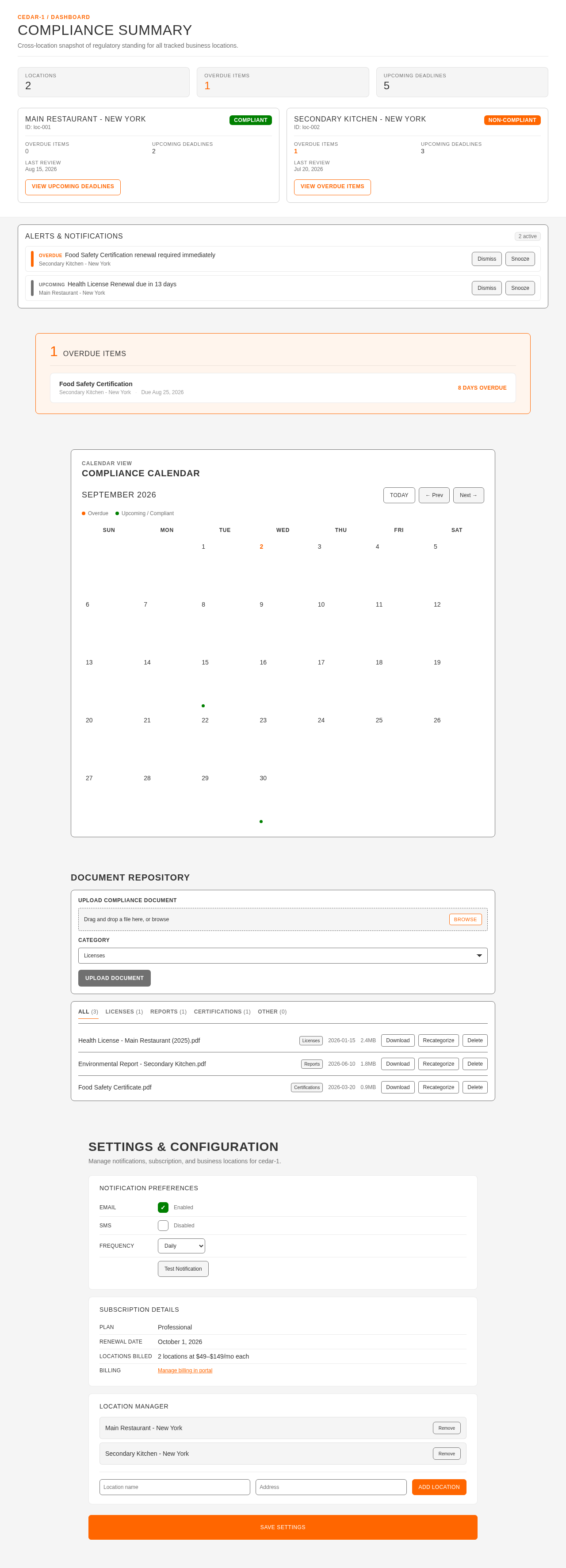
Dashboard

  • Overview Section

    • Displays a summary of compliance status for all tracked locations.
    • Uses orange highlights for overdue items and green for compliant statuses.
  • Compliance Calendar

    • Interactive calendar showing upcoming compliance deadlines.
    • Allows users to click on a date to view detailed requirements.
  • Alerts & Notifications

    • Lists critical alerts for upcoming or missed deadlines.
    • Provides options to dismiss or snooze alerts.
  • Document Repository

    • Secure storage for compliance documents.
    • Allows uploading, downloading, and organizing documents by category.
  • Settings

    • Configuration options for notification preferences and subscription management.
    • Allows users to update business information and add new locations.

3. Functional Requirements

  • As a small business owner, I should be able to view a dashboard that summarizes my compliance status across all locations to quickly assess my business's regulatory standing. (explicit)
  • As a small business owner, I should receive alerts for upcoming compliance deadlines to ensure timely renewals and avoid penalties. (explicit)
  • As a small business owner, I should be able to upload and organize compliance documents in a secure repository for easy access and management. (explicit)
  • As a small business owner, I should be able to configure notification preferences to receive alerts via email or SMS. (explicit)
  • As a small business owner, I should be able to manage my subscription and update business information through the settings page. (explicit)
Page 4 of 8

4. User Personas

  • Small Business Owner
    • Responsible for managing compliance requirements for their business.
    • Uses the dashboard to track compliance status and deadlines.
    • Uploads and organizes compliance documents.
    • Configures notification preferences and manages subscription settings.
Page 5 of 8

5. Core User Flows

  1. Dashboard Overview

    • The user logs into the application.
    • The dashboard displays a summary of compliance status.
    • The user reviews overdue items highlighted in orange and compliant items in green.
  2. Managing Compliance Deadlines

    • The user navigates to the Compliance Calendar.
    • The user clicks on a date to view detailed compliance requirements.
    • The user sets reminders for upcoming deadlines.
  3. Handling Alerts & Notifications

    • The user receives an alert for an upcoming deadline.
    • The user clicks on the alert to view details.
    • The user chooses to dismiss or snooze the alert.
  4. Document Management

    • The user accesses the Document Repository.
    • The user uploads a new compliance document.
    • The user organizes documents by category for easy retrieval.
  5. Configuring Settings

    • The user navigates to the Settings page.
    • The user updates notification preferences to receive alerts via email.
    • The user manages subscription details and adds a new business location.
Page 6 of 8

6. Visuals Colors and Theme

  • Muse: Dieter Rams
  • Palette:
    • Background: #F5F5F5
    • Surface: #FFFFFF
    • Text: #333333
    • Primary: #FF6600 (alerts)
    • Accent: #008000 (confirmations)
    • Muted: #CCCCCC
  • Typography:
    • Headings: Archivo, Medium weights, uppercase for labels, tight tracking.
    • Body: IBM Plex Sans
    • Scale: 1.25 modular, 48/32/24/16
  • Shape Language: Rounded-rectangle controls, aligned label/value pairs, modular grid.
  • Layout: Dense but ordered; strict grid with clear labels and value pairs.

7. Signature Design Concept

The public entry features a split-screen hero with diagrammatic line art on the left and a list of compliance tasks on the right. The design uses off-white and grey with orange highlights for call-to-action elements. Rounded-rectangle controls and aligned label/value pairs are used throughout the interface, providing instant state changes with mechanical feedback.
Page 7 of 8

8. Interaction Model & Motion Direction

  • Interaction Model: Static
  • Motion Tempo: Restrained
  • Hero Dimensionality: Flat
  • Landing Hero Motion Brief: The hero section features a split-screen with diagrammatic line art illustrating compliance processes on the left, and a task list on the right. The use of orange highlights draws attention to critical actions, while green accents confirm successful compliance. The design provides instant feedback with clear state changes.

9. Non-Functional Requirements

  • The system must integrate with external APIs to fetch jurisdiction-specific regulations and updates. (explicit)
  • The application must ensure data security and privacy for all stored compliance documents. (explicit)
  • The system should provide a reliable uptime of 99.9% to ensure continuous access for users. (required_inference)

10. Tech Stack

  • Frontend: React
  • Backend: Python/FastAPI
  • Storage: Secure cloud storage for document management
  • Deployment: Docker/docker-compose for containerization

11. Assumptions and Constraints

  • The system assumes that users have internet access to use the web-based application.
  • The application is constrained to support only English language localization initially.
  • The system will not handle payment processing directly; it will integrate with a third-party service for subscription management.
Page 8 of 8

12. Glossary

  • Compliance: Adherence to city- or state-specific operating licenses, health codes, and environmental reporting rules.
  • Dashboard: A user interface that provides a summary of compliance status and deadlines.
  • Document Repository: A secure storage area for compliance-related documents.
  • Notification Preferences: User-configurable settings for receiving alerts and reminders.
Dashboard design preview
Dashboard: View compliance summary
Dashboard: Review overdue items
Dashboard: Open compliance calendar
Dashboard: View deadline details
Dashboard: Review alerts
Dashboard: Dismiss or snooze alert
Dashboard: Open document repository
Dashboard: Upload compliance document
Dashboard: Organize documents by category
Dashboard: Open settings
Dashboard: Update notification preferences
Dashboard: Manage subscription
Dashboard: Add new location
Dashboard design preview
Dashboard: View compliance summary
Dashboard: Review overdue items
Dashboard: Open compliance calendar
Dashboard: View deadline details
Dashboard: Review alerts
Dashboard: Dismiss or snooze alert
Dashboard: Open document repository
Dashboard: Upload compliance document
Dashboard: Organize documents by category
Dashboard: Open settings
Dashboard: Update notification preferences
Dashboard: Manage subscription
Dashboard: Add new location