car-washing-detailing

byTanmay Patil

Build a modern responsive and professional website for a Indian car washing and detailing business offerings affordable pricing and quality service across metro and non metro cities.

LandingBook ServiceServices
Landing

Comments (0)

No comments yet. Be the first!

System Requirements

System Requirements Document for Car Washing and Detailing

1. Introduction

Car Washing and Detailing is the public website for an Indian car washing and detailing business. The business offers affordable pricing and quality service in Indian cities. The website exists to present that offer clearly to vehicle owners, show the services and their affordable prices, communicate the quality of the work, and let a vehicle owner book a washing or detailing service.

The audience is vehicle owners in Indian cities who want fair prices and clean, careful work, and the business owner who uses the site to win new bookings. The site must be modern, responsive and professional at every viewport.

The offer, pattern and flow cover four vehicle types: cars, bikes, commercial vehicles and non-commercial vehicles. Service quality is expressed in three levels — low, medium and premium — set according to the city and its locality. The Hoora application is used as a reference for content, concept, pattern and flow; its content is not copied wholesale.

This document is the System Requirements Document for the project named Car Washing and Detailing, requested by Tanmay Patil.

2. System Overview

Page 1 of 18

2a. Product Interpretation and Delivery Boundary

The product is a first-party, application-owned public website with three destinations: Landing, Services and Book Service. All three are anonymously reachable; no visitor account, login or sign-up is part of the accepted scope. A vehicle owner moves from the Landing page's service offer, to comparing services and prices on Services, to submitting booking contact and vehicle details on Book Service.

The business serves Indian cities only. The site must not use the words "metro" or "non-metro" anywhere in its copy, labels, headings or metadata. Coverage is communicated as service in Indian cities, with the city and its locality determining the applicable service quality level (low, medium or premium).

The offer, pattern and flow cover four vehicle types — car, bike, commercial vehicle and non-commercial vehicle — each with its own service set, price stamps and quality levels. The Hoora application is a reference for content, concept, pattern and flow only; its content is not copied wholesale.

Booking submissions are durable application-owned records: the backend stores each booking so the business owner can see incoming bookings and act on them. This is the only durable state the site owns. There is no customer account area, no payment processing, no scheduling calendar, and no service-history feature in the current scope.

Removed from scope

  • Non-metro city coverage (also: non-metro, non metro cities, non-metro India)
  • Metro city terminology (also: metro, metro cities, metro India)

Page 2 of 18

Delivery uses a React frontend, a shared FastAPI backend that owns the application APIs and domain modules, and a MariaDB database for the persisted booking records. The backend is a single shared process; booking APIs live inside it rather than in a separate service.

2b. Source Content Inventory

Not applicable — no reference directive in this request declares content_source.

2c. Page Content and Component Coverage

Page 3 of 18

Landing

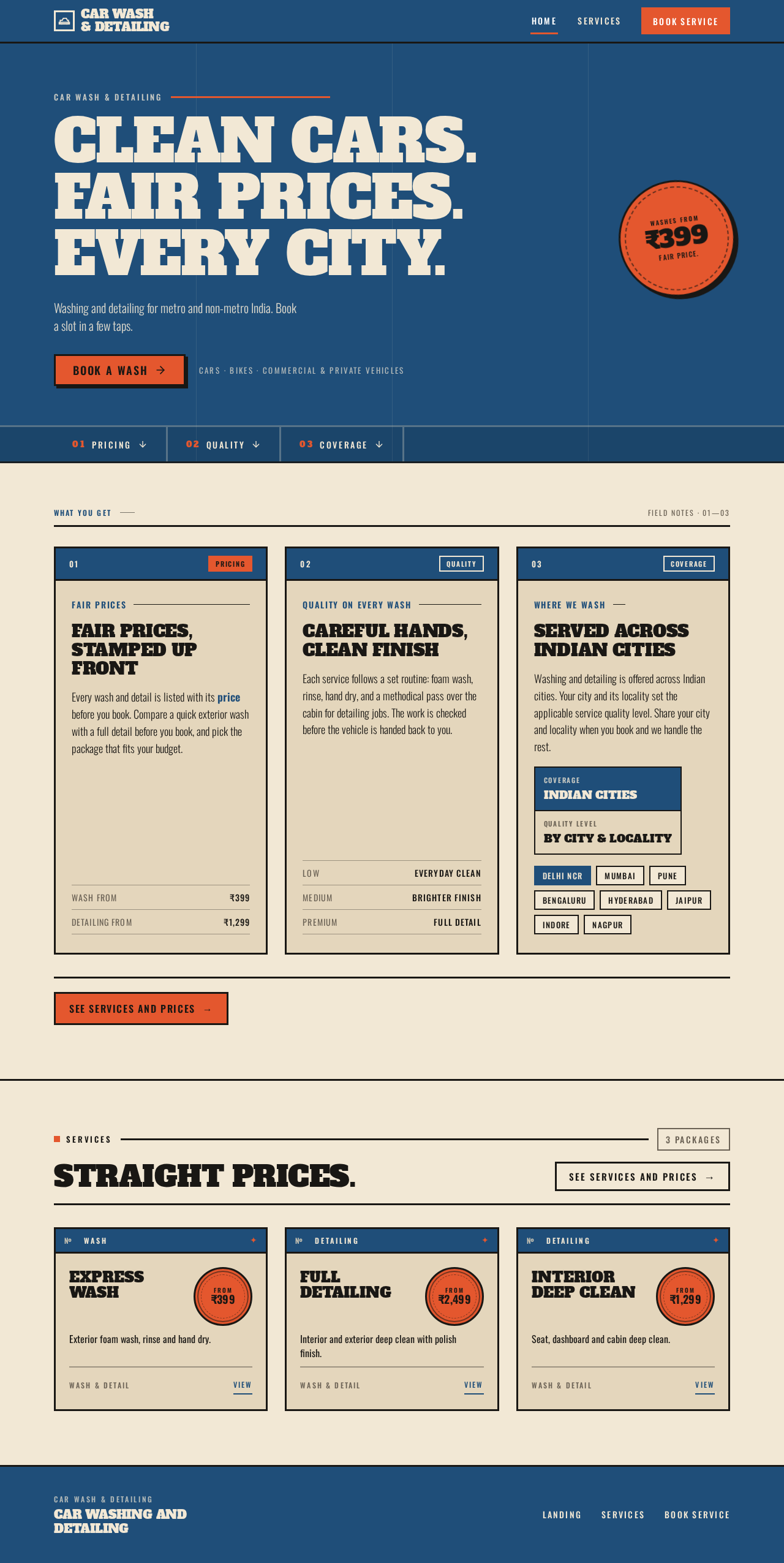
  • Information and state: The business identity and offer; the hero headline "Clean cars. Fair prices. Every city."; the subline "Washing and detailing for metro and non-metro India. Book a slot in a few taps."; the primary call to action "Book a wash"; a summary of the affordable pricing promise; a summary of the quality-of-service promise; a statement that the business serves metro and non-metro cities; a preview of services with price stamps; a link onward to Services.
  • Primary actions: "Book a wash" (goes to Book Service); "See services and prices" (goes to Services).
  • Supporting actions: In-page navigation to the pricing, quality and coverage sections.
  • Domain entities: Business offer (pricing promise, quality promise, coverage), service summary (name, starting price).
  • Component responsibilities: Denim hero band with oversized slab headline and circular orange price stamp; all-caps Oswald micro-labels above each section heading with a wide rule; thick ruled dividers between sections; kraft panels for pricing, quality and coverage; service preview cards with stamp badges; footer with business identity and navigation.
  • States: Loading — service preview shows a placeholder panel while service data loads. Empty — if no services are available, the preview shows a plain ruled panel directing the visitor to Services. Success — hero, promises and preview render fully. Error — if service data fails to load, the preview is replaced by a ruled panel with a retry control; the rest of the page remains usable. Recovery — retry re-requests service data without leaving the page.
Page 4 of 18

Services

  • Information and state: The full list of car washing and detailing services, each with its name, a short description of what the service includes, and its affordable price shown as an orange stamp badge; a quality statement explaining the standard of work; a note that services are available in metro and non-metro cities.
  • Primary actions: Select a service to book (goes to Book Service with that service carried forward).
  • Supporting actions: Return to Landing; jump to Book Service without a preselected service.
  • Domain entities: Service (name, description, price, category such as wash or detailing).
  • Component responsibilities: Ruled service list or grid of kraft panels with denim headers; circular orange price stamp per service; all-caps Oswald micro-labels; thick 3px borders and hard square corners; quality statement panel; coverage note panel.
  • States: Loading — ruled skeleton panels in place of service cards. Empty — a ruled panel stating that services are being updated, with a link to Book Service. Success — every service renders with name, description and price stamp. Error — a ruled error panel with a retry control; navigation remains usable. Recovery — retry reloads the service list in place.
Page 5 of 18

Book Service

  • Information and state: The booking form; the selected service carried forward from Services when one was chosen; the fields the car owner supplies — name, phone number, city, car make and model, preferred service, and any notes; a confirmation state after submission showing the booking reference and the details submitted. Every text box in the form auto-fits its text: each input and textarea grows and shrinks with the content it holds so the full entered value stays visible without clipping, truncation or a fixed-height cut-off, and the surrounding ruled panel reflows to the new height.
  • Primary actions: Submit the booking.
  • Supporting actions: Change the selected service; return to Services to compare prices; start a new booking after confirmation.
  • Domain entities: Booking (customer name, phone, city, car make and model, service, notes, booking reference, submitted timestamp, status).
  • Component responsibilities: Ruled form panel with denim header; thick-bordered square input fields with all-caps Oswald labels; auto-fitting text boxes that resize to their content (single-line inputs widen or wrap within the panel, multi-line notes grow line by line) while keeping the thick 3px border and hard square corners; orange submit button; inline field validation messages; confirmation panel with the booking reference in a stamp badge.
  • States: Loading — submit button shows a pressed/working state and is disabled while the request is in flight. Empty — form starts blank except for any carried-forward service. Success — confirmation panel replaces the form with the booking reference and submitted details. Error — field-level validation messages for missing or malformed name, phone, city, car details or service; a ruled submission-error panel with a retry control if the request fails. Recovery — the form retains entered values after a failed submission so the car owner can correct and resubmit.
Page 6 of 18

3. Functional Requirements

FR-1 — Present the business offer on Landing (explicit) As a car owner, I should open the Landing page and read the service offer, so that I understand what the business does and why it is worth booking.

  • Trigger: the visitor opens the site.
  • Observable result: the hero headline "Clean cars. Fair prices. Every city.", the subline "Washing and detailing for metro and non-metro India. Book a slot in a few taps.", and the "Book a wash" call to action are visible without scrolling on desktop and within the first viewport on mobile.
  • Access: anonymous.
  • Failure/recovery: if supporting content fails to load, the hero and call to action still render.
  • Continuation: the visitor can go to Services or Book Service.

FR-2 — Show affordable pricing (explicit) As a car owner, I should see the affordable price of each car washing and detailing service, so that I can judge whether it fits my budget.

  • Trigger: the visitor views the Landing service preview or the Services page.
  • Observable result: each service displays its price as an orange stamp badge alongside its name.
  • Access: anonymous.
  • Failure/recovery: if prices fail to load, a ruled panel with a retry control appears in place of the price list.
  • Continuation: the visitor can select a service to book.
Page 7 of 18

FR-3 — Show service quality (explicit) As a car owner, I should see what the quality of the service means, so that I trust the work before booking.

  • Trigger: the visitor reads the quality statement on Landing or Services.
  • Observable result: a quality statement describing the standard of work is visible in a ruled kraft panel.
  • Access: anonymous.
  • Continuation: the visitor can proceed to Services or Book Service.

FR-4 — Communicate metro and non-metro coverage (explicit) As a car owner, I should see that the business serves metro and non-metro cities, so that I know the service is available where I live.

  • Trigger: the visitor reads the coverage statement on Landing or Services.
  • Observable result: a coverage note stating service across metro and non-metro Indian cities is visible.
  • Access: anonymous.

FR-5 — Compare services and prices on Services (required_inference) As a car owner, I should select a service and price on the Services page, so that I can choose the right wash or detailing package.

  • Trigger: the visitor opens Services.
  • Observable result: every service renders with name, description and price stamp; selecting one carries it forward to Book Service.
  • Access: anonymous.
  • Failure/recovery: a load error shows a ruled error panel with retry; the visitor can still reach Book Service.
  • Continuation: the visitor lands on Book Service with the chosen service preselected.
Page 8 of 18

FR-6 — Submit a booking with contact and car details (required_inference) As a car owner, I should give my booking contact and car details on the Book Service page, so that the business can confirm and deliver my wash or detailing.

  • Trigger: the car owner completes the form and submits.
  • Inputs: name, phone number, city, car make and model, preferred service, optional notes.
  • Observable result: the booking is stored by the backend and a confirmation panel shows the booking reference and the submitted details.
  • Access: anonymous.
  • Failure/recovery: missing or malformed fields show inline validation messages and block submission; a failed request shows a ruled error panel with retry while retaining entered values.
  • Continuation: the car owner can start a new booking or return to Services.

FR-7 — Receive and act on bookings (required_inference) As the business owner, I should see incoming bookings with the customer's contact, city, car and chosen service, so that I can follow up and deliver the service.

  • Trigger: a car owner submits a booking.
  • Observable result: the booking is persisted with a reference, submitted timestamp and status, and is available to the business owner through the backend booking records.
  • Access: business-owner access to booking records is not a public page in the accepted page contract; records are held by the application backend.
  • Failure/recovery: a failed persistence returns an error to the car owner's form so the booking is not silently lost.
  • Continuation: the business owner contacts the car owner using the submitted phone number.
Page 9 of 18

FR-8 — Modern, responsive, professional presentation (explicit) As a visitor, I should experience a modern, responsive and professional site, so that the business feels credible on any device.

  • Trigger: the visitor opens any page at 375px, 768px or 1280px.
  • Observable result: headlines, labels, prices, cards' text and controls stay whole inside the viewport and their containers; layout reflows without horizontal overflow of readable content.
  • Access: anonymous.

FR-9 — Auto-fit text boxes in the booking flow (explicit) As a car owner, I should see every text box in the booking flow fit the text I type, so that I can read back exactly what I entered before submitting.

  • Trigger: the car owner types, pastes or clears text in any field on Book Service, or a carried-forward service value is prefilled.
  • Observable result: each text box resizes to its content — single-line inputs grow or wrap within the ruled form panel and multi-line notes grow line by line — so the full value stays visible with no clipping, truncation or fixed-height cut-off; the form panel and its ruled dividers reflow to the new height without overlapping neighbouring fields, labels or the submit button.
  • Access: anonymous.
  • Failure/recovery: if a value is longer than the available width, the text box wraps or scrolls internally rather than overflowing the panel; entered values are never hidden by the resize.
  • Continuation: the car owner can review the auto-fitted values and submit the booking.

4. User Personas

Page 10 of 18

Car owner

  • Product context: An Indian car owner in a metro or non-metro city looking for an affordable, quality car wash or detailing service.
  • Primary goal: Find a service at a fair price and book it quickly.
  • Distinct responsibilities: Reads the offer on Landing; compares services and prices on Services; selects a service; supplies contact and car details on Book Service in text boxes that auto-fit the entered text; submits and receives a booking reference.
  • Inputs and decisions: Budget versus service scope; which wash or detailing package fits the car; which city the service is needed in.
  • Interactions with other participants: Hands off a booking to the business owner, who follows up using the submitted phone number.
  • Observable success: A confirmation panel with a booking reference for the chosen service.

Business owner

  • Product context: Runs the Indian car washing and detailing business serving metro and non-metro cities.
  • Primary goal: Win new bookings by showing affordable pricing and quality service.
  • Distinct responsibilities: Presents the offer, prices, quality statement and coverage through the site; receives incoming bookings with customer contact, city, car and chosen service; follows up with the car owner.
  • Inputs and decisions: Which services and prices to offer; which bookings to accept and schedule.
  • Interactions with other participants: Receives bookings from car owners and contacts them using the submitted phone number.
  • Observable success: New bookings recorded with complete contact and car details.
Page 11 of 18

5. Core User Flows

Flow A — Car owner discovers the offer and books a service

  1. The car owner opens the Landing page anonymously. The denim hero band shows "Clean cars. Fair prices. Every city.", the subline, and the "Book a wash" button.
  2. The car owner scrolls through the ruled kraft panels covering the pricing promise, the quality statement and the metro/non-metro coverage note.
  3. The car owner taps "See services and prices" and arrives on Services.
  4. On Services, the car owner compares each service's description and orange price stamp, then selects a service to book.
  5. The car owner arrives on Book Service with the chosen service preselected and fills in name, phone number, city, car make and model, and optional notes. Each text box auto-fits the text as it is typed, growing or wrapping so the whole value stays visible inside the ruled form panel.
  6. The car owner submits. The submit button enters a working state and is disabled while the request is in flight.
  7. On success, a confirmation panel replaces the form and shows the booking reference in a stamp badge with the submitted details.
  8. Failure/recovery: if a field is missing or malformed, an inline message appears beside it and submission is blocked. If the request fails, a ruled error panel with a retry control appears and the entered values are retained so the car owner can resubmit.
  9. Continuation: the car owner can start a new booking or return to Services.
Page 12 of 18

Flow B — Car owner books directly from the hero

  1. The car owner opens Landing and taps "Book a wash" in the hero.
  2. The car owner arrives on Book Service with no service preselected and chooses a service from the form.
  3. The car owner completes the remaining fields, with each text box auto-fitting its text as in Flow A, and submits, following the same success, failure and recovery steps as Flow A.

Flow C — Business owner receives and acts on a booking

  1. A car owner submits a booking through Book Service.
  2. The backend persists the booking with a reference, submitted timestamp and status.
  3. The business owner sees the incoming booking with the customer's name, phone number, city, car make and model, and chosen service.
  4. The business owner contacts the car owner using the submitted phone number to confirm and deliver the service.
  5. Failure/recovery: if persistence fails, the car owner's form shows an error and retains the values, so no booking is silently lost.
Page 13 of 18

6. Visuals Colors and Theme

Following the Aaron Draplin workwear-honesty direction:

  • Muse and headline: Aaron Draplin — bold workwear honesty. Headline: "Clean cars. Fair prices. Every city."
  • Mode: light.
  • Colours by role:
    • Background (kraft ground): #F2E8D5
    • Surface (panels): #E4D6BC
    • Text: #191714
    • Primary (denim, panel headers and framing): #1F4E79
    • Accent (orange, price stamps and actions only): #E4572E
    • Muted: #6B6255
  • Fonts: headings Alfa Slab One, heavy slab caps with tight tracking and stacked lines; body and labels Oswald, with small all-caps Oswald labels above each heading.
  • Type scale: 1.25 modular — display 48/64/96/128, body 18/20/16/14.
  • Shape language: thick 3px borders, stamp and badge marks, ruled panels, hard square corners, no soft radii.
  • Spacing rhythm: a ruled 12-column poster grid; sections stack as kraft panels with denim headers and orange price stamps; thick ruled dividers between sections.
  • Imagery: thick-line vector icons of cars, buckets and polish pads; halftone photos of clean cars on plain grounds. No stock photos of smiling people.
  • Avoid: gradient blobs, glass panels, rounded pill buttons, soft shadows, blue-indigo accent on white ground.
Page 14 of 18

7. Signature Design Concept

The public entry is a full-width denim band across the viewport holding a 9-column Alfa Slab One headline in kraft cream: "Clean cars. Fair prices. Every city." A circular orange price stamp sits at the right edge of the band. Beneath the headline, a thick-bordered orange "Book a wash" button anchors the entry. Below the band, the page reads like a field-notes sheet: thick ruled dividers separate kraft panels for pricing, quality and coverage, each introduced by an all-caps Oswald micro-label with a wide rule. Service preview cards carry circular orange stamp badges for their prices. The concept recomposes only the accepted offer, prices, quality statement, coverage note and booking call to action.

Page 15 of 18

8. Interaction Model & Motion Direction

Interaction Model: Animated Motion Tempo: restrained Hero Dimensionality: flat

Landing Hero Motion Brief

  • Focal subject: the denim hero band with the oversized slab headline and the circular orange price stamp at its right edge.
  • Thesis: as the page loads, the headline and stamp snap into place with a single stamp effect; on scroll, each price stamp presses down once as its panel enters view — input is page load and scroll, transformation is a restrained snap-and-press, outcome is the offer and prices settling into a field-notes layout.
  • Motion vocabulary: restrained snap-in reveals with a stamp effect; price stamps press down once on scroll; no bounce.
  • Composed first frame: denim band, kraft-cream headline, orange stamp at the right edge, thick-bordered orange button under the headline, ruled divider below.
  • Reduced-motion state: all elements render in their final positions with no snap or press animation; the layout remains fully usable and readable.
Page 16 of 18

9. Non-Functional Requirements

  • Responsiveness (explicit): the site must be modern, responsive and professional; readable text and controls stay whole inside the viewport and their containers at 375px, 768px and 1280px.
  • Market constraint (explicit): the business operates in India and serves metro and non-metro cities; content, currency and city references reflect that.
  • Durability (required_inference): submitted bookings persist in MariaDB so the business owner can act on them after submission.
  • Accessibility (required_inference): a usable static arrangement is provided under prefers-reduced-motion; text and controls meet readable contrast against the kraft and denim grounds.
  • Performance (required_inference): the Landing hero and call to action render without waiting on service data.

10. Tech Stack

  • Frontend: React application UI.
  • Backend: shared FastAPI process hosting the application APIs and domain modules, including the booking API.
  • Database: MariaDB for application-owned persistent booking records.
  • Infrastructure: docker-compose with the backend, database and frontend services.
Page 17 of 18

11. Assumptions and Constraints

  • The site is a public, anonymous website; no visitor account, login or sign-up is in scope.
  • Booking is a request for service; confirmation happens when the business owner contacts the car owner by phone.
  • No online payment, scheduling calendar or service-history feature is in scope.
  • Prices are displayed in Indian Rupees.
  • The business owner's access to booking records is through the application backend, not a public page in the accepted page contract.

12. Glossary

  • Washing: exterior cleaning service for a car.
  • Detailing: deeper cleaning and finishing service covering interior and exterior.
  • Price stamp: the circular orange badge that marks each service price.
  • Booking reference: the identifier shown to the car owner after a successful booking submission.
  • Auto-fit text box: a form text box that resizes with its content so the full entered value stays visible without clipping or truncation.
  • Metro / non-metro cities: the Indian city categories the business serves.
Page 18 of 18
Live
Landing design preview

Landing: Present offer and pricing

Landing: Review city and locality coverage note

Services: Present services and prices by vehicle type

Services: Confirm quality statement and service quality levels

Book Service: Receive incoming booking

Book Service: Review customer and vehicle details

Book Service: Confirm booking reference recorded

Book Service: Follow up by phone

Live
Landing design preview

Landing: Present offer and pricing

Landing: Review city and locality coverage note

Services: Present services and prices by vehicle type

Services: Confirm quality statement and service quality levels

Book Service: Receive incoming booking

Book Service: Review customer and vehicle details

Book Service: Confirm booking reference recorded

Book Service: Follow up by phone