canvas-posters

byUmang Suthar

create me an application like canvas where user can create the posters

LandingMy PostersLoginEditorSign Up
Landing

Comments (0)

No comments yet. Be the first!

System Requirements

System Requirements Document for canvas-posters

1. Introduction

canvas-posters is a web application in the spirit of Canva, where a user can create posters. The product intent is a canvas-style poster editor: a Poster Creator opens the application, starts a poster, adds and arranges design elements — text, images, and shapes — on a poster canvas, and saves the poster so it persists across sessions and can be reopened later.

The audience is aspiring poster makers — young creators, small businesses, event organisers, students and side-hustlers — who want Canva-like ease without design-software expertise, and who want the act of making a poster to feel like walking into a bright studio rather than filing a ticket. The product's whole job is visual expression, so the interface itself is colour-saturated and poster-like, while the design surface stays a clean white sheet.

This document is the System Requirements Document for canvas-posters. It specifies the current delivery: anonymous entry, self-service enrollment, returning verification, a saved-poster library, and the canvas editor.

Page 1 of 27

2. System Overview

canvas-posters is delivered as a first-party web application with three provisioned services: a React frontend, a shared FastAPI backend that hosts all application APIs and domain modules, and a MariaDB database for application-owned persistent data. Poster designs, their elements, and their ownership are durable application state, so the backend and database carry the saved-poster lifecycle; the frontend carries the anonymous entry, identity establishment, poster library, and the canvas editor.

The only active human actor is the Poster Creator. There are no other human roles, no administrative surface, and no differentiated permissions: every Poster Creator sees and edits only their own posters, and that separation follows from ownership of saved designs, not from a role system.

Current accepted behavior, in brief:

  • An anonymous visitor reaches the Landing page, which explains the product and offers entry into enrollment or returning verification.
  • A new Poster Creator enrolls through Sign Up; a returning Poster Creator verifies through Login.
  • A verified Poster Creator browses their saved posters on My Posters and starts a new poster from there.
  • In the Editor, a Poster Creator adds and arranges text, images, and shapes on the poster canvas and saves the poster so it persists across sessions and can be reopened.

Narrow exclusions: there is no export/download pipeline, no template marketplace, no collaboration or sharing, no commenting, no print ordering, and no account-management surface beyond enrollment and verification. The product is a poster creation and saving tool.

Removed from scope

Page 2 of 27
  • None. No concept from the authoritative requirement thread was removed or replaced.

2a. Product Interpretation and Delivery Boundary

The product is a first-party, application-owned experience. The Landing page is anonymously reachable and explains the product before any identity exists. Sign Up and Login are also anonymously reachable, because a protected destination cannot own the interaction that establishes access to itself. My Posters and the Editor require a verified Poster Creator, because saved poster designs are durable, actor-specific state that must remain bound to the correct owner across sessions.

Identity is application-owned and self-service: a Poster Creator enrolls with their own credentials and returns later to verify them. There is no invitation, provisioning, or deployment-bootstrap path, and no third-party identity provider. Session continuity is what protects saved work; it does not create roles, permissions, or visibility tiers.

Everything specified here is current. No future-horizon capabilities are committed in this document.

2c. Page Content and Component Coverage

Page 3 of 27

Landing

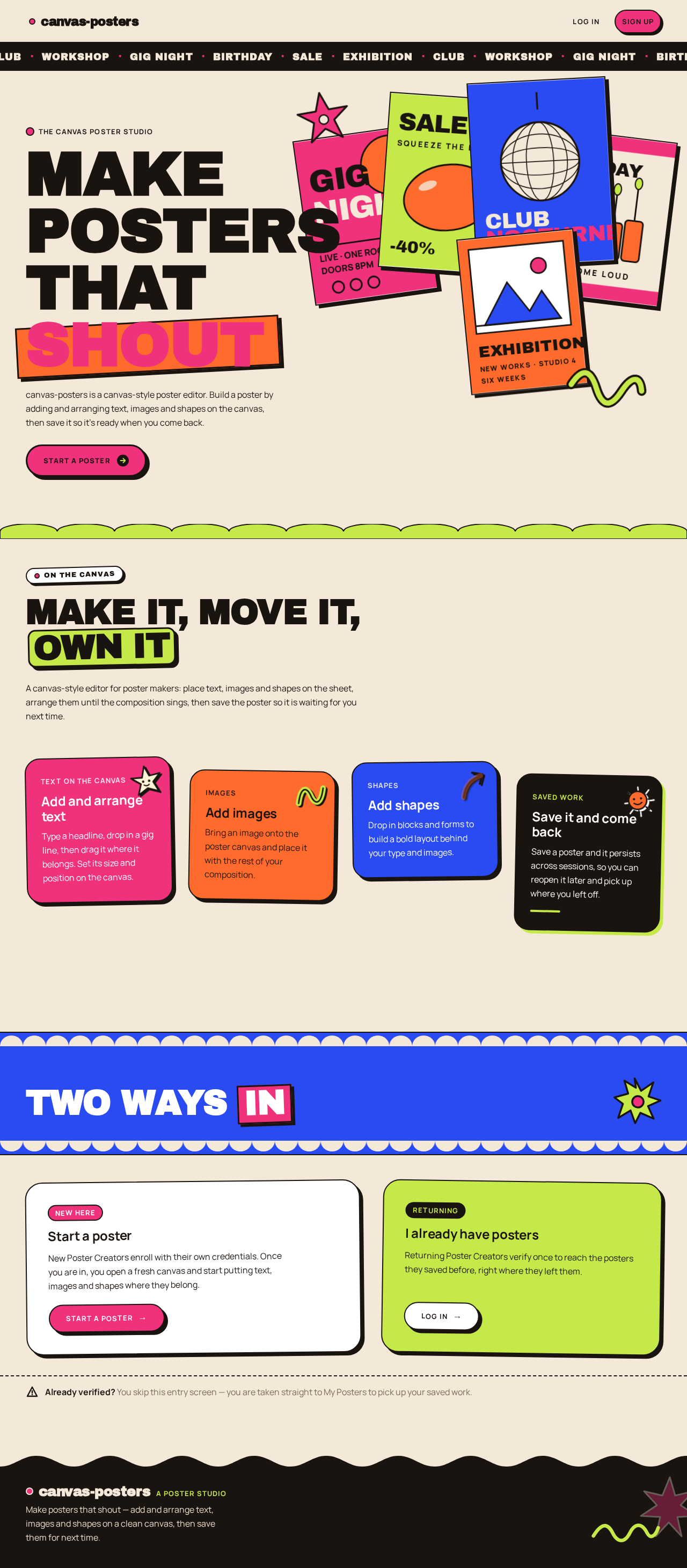
  • Information and state. Anonymous public entry. Presents the product's purpose — create posters in a canvas-style editor — and the two entry paths: start a poster (enrollment) and return to existing work (verification). No poster data is shown, because no identity exists yet.
  • Primary actions. "Start a poster" leads to Sign Up. A secondary "Log in" / "I already have posters" action leads to Login.
  • Supporting actions. Navigate to Sign Up or Login from anywhere in the page's header or hero.
  • Domain entities. None persisted. The page reads no poster data.
  • Component responsibilities. Hero with the product statement and the primary call to action; a short explanation of what a Poster Creator can do (add and arrange text, images, and shapes on a canvas; save posters so they persist); entry controls for Sign Up and Login; a category ticker of poster kinds as decoration only, carrying no filtering behavior.
  • States. Loading: not applicable (static content). Empty: not applicable. Success: navigation to Sign Up or Login. Error: not applicable. Recovery: if a visitor arrives here while already verified, they are routed to My Posters rather than shown the anonymous entry.
Page 4 of 27

Sign Up

  • Information and state. Anonymous identity-establishment surface. Collects the minimum credentials needed to create an application-owned account for a Poster Creator.
  • Primary actions. Submit enrollment to create the account and establish a session.
  • Supporting actions. Navigate to Login if the visitor already has an account; return to Landing.
  • Domain entities. Poster Creator account (identity, credential, creation time).
  • Component responsibilities. Enrollment form with credential fields and a submit control; inline validation messaging; a link to Login.
  • States. Loading: submit control shows in-progress state and blocks duplicate submission. Empty: blank form with helper copy. Success: account created, session established, and the Poster Creator is taken to My Posters. Error: invalid or incomplete input is reported inline next to the offending field and the form remains filled; an already-registered identity is reported with a direct route to Login. Recovery: the Poster Creator corrects the field and resubmits, or switches to Login without losing their place.
Page 5 of 27

Login

  • Information and state. Anonymous returning-verification surface for a Poster Creator who already has an account and saved posters.
  • Primary actions. Submit credentials to verify identity and establish a session.
  • Supporting actions. Navigate to Sign Up if the visitor has no account; return to Landing.
  • Domain entities. Poster Creator account.
  • Component responsibilities. Verification form with credential fields and a submit control; inline error messaging; a link to Sign Up.
  • States. Loading: submit control shows in-progress state and blocks duplicate submission. Empty: blank form. Success: session established and the Poster Creator is taken to My Posters. Error: incorrect credentials are reported without revealing which field was wrong, and the form remains usable. Recovery: retry, or switch to Sign Up.
Page 6 of 27

My Posters

  • Information and state. Protected library of the verified Poster Creator's saved posters, most recently updated first. Each entry shows the poster's title, a preview of its composition, and when it was last saved. This is both the recurring browse-and-reopen owner and the starting point for a new poster.
  • Primary actions. Open a saved poster in the Editor; start a new poster, which creates a new design and opens it in the Editor.
  • Supporting actions. Rename a poster from the library; sign out.
  • Domain entities. Poster (title, owner, canvas dimensions, last-saved time, element composition for preview).
  • Component responsibilities. Poster wall of tiles with preview, title, and last-saved metadata; a prominent "New poster" control; per-tile open and rename controls; empty-state panel; sign-out control.
  • States. Loading: poster wall shows placeholder tiles while the library is fetched. Empty: a first-use panel explaining that no posters exist yet, with the "New poster" control as the only emphasized action. Success: tiles render with previews and metadata; a newly saved poster appears at the top. Error: a failed library fetch shows a retry control and does not present an empty library as if it were real. Recovery: retry the fetch; a failed rename leaves the previous title intact and reports the failure.
Page 7 of 27

Editor

  • Information and state. Protected canvas-style editor for one poster owned by the verified Poster Creator. Holds the poster's title, canvas dimensions, and its ordered set of elements (text, images, shapes) with position, size, and stacking order. Shows whether the current state has unsaved changes and when the poster was last saved.
  • Primary actions. Add a text element, add an image element, add a shape element; select an element and move, resize, reorder, edit its content, or delete it; save the poster.
  • Supporting actions. Rename the poster; return to My Posters; discard unsaved changes with confirmation.
  • Domain entities. Poster; Poster Element (kind: text | image | shape; content or source; position; size; stacking order).
  • Component responsibilities. Three-pane layout: a left tool rail for adding elements and choosing element kinds; a centre canvas rendering the poster at its true aspect ratio with selection handles on the selected element; a right properties drawer for the selected element's editable attributes. A save control that reflects dirty state, and a last-saved indicator.
  • States. Loading: the canvas shows a loading state until the poster and its elements are fetched. Empty: a new poster opens with an empty canvas and the tool rail as the obvious next action. Success: element additions and edits render immediately on the canvas; a successful save updates the last-saved indicator and clears the dirty state. Error: a failed save keeps the dirty state, reports the failure, and preserves the in-editor composition so nothing is lost; a failed load offers retry and does not present a blank canvas as an empty poster. Recovery: retry the save; retry the load; confirm before leaving with unsaved changes.
Page 8 of 27

3. Functional Requirements

FR-1 — Create a poster design in a canvas-style editor (explicit) As a Poster Creator, I should create a poster design in a canvas-style editor similar to Canva, so that I can produce a poster without design-software expertise.

  • Trigger: the Poster Creator chooses "New poster" on My Posters.
  • Observable result: a new poster owned by that Poster Creator is created and opened in the Editor with an empty canvas.
  • Access: requires a verified Poster Creator.
  • Failure/recovery: if creation fails, the Poster Creator remains on My Posters with an error and a retry, and no partial poster appears in the library.
  • Continuation: the Poster Creator proceeds to add elements (FR-2) and save (FR-3).
Page 9 of 27

FR-2 — Add and arrange design elements on the poster canvas (explicit) As a Poster Creator, I should add and arrange design elements — text, images, and shapes — on the poster canvas, so that I can compose the poster I intend.

  • Trigger: the Poster Creator uses the Editor's tool rail and canvas.
  • Observable result: each added element appears on the canvas; selecting an element exposes move, resize, reorder, content-edit, and delete controls, and each change is reflected immediately on the canvas.
  • Access: requires a verified Poster Creator, and only for a poster they own.
  • Failure/recovery: an image that cannot be loaded is reported on the canvas and can be removed or replaced; an invalid edit is rejected without corrupting the element's previous state.
  • Continuation: the Poster Creator saves the composition (FR-3).

FR-3 — Save poster designs so they persist across sessions (explicit) As a Poster Creator, I should save my poster designs so they persist across sessions, so that I can leave and return to finished or in-progress work.

  • Trigger: the Poster Creator saves from the Editor.
  • Observable result: the poster's title, canvas dimensions, and full element composition are stored against that Poster Creator; the last-saved indicator updates and the dirty state clears; the poster appears in My Posters with an updated preview and timestamp.
  • Access: requires a verified Poster Creator, and only for a poster they own.
  • Failure/recovery: a failed save preserves the in-editor composition, keeps the dirty state, and reports the failure with a retry; leaving the Editor with unsaved changes requires confirmation.
  • Continuation: the Poster Creator returns later, verifies (FR-5), and reopens the poster from My Posters.
Page 10 of 27

FR-4 — Self-service enrollment for a new Poster Creator (required_inference) As a new Poster Creator, I should be able to enroll myself with my own credentials, so that I can own and later return to my saved posters.

  • Trigger: the visitor submits the Sign Up form.
  • Observable result: an application-owned account is created, a session is established, and the Poster Creator lands on My Posters.
  • Access: anonymous entry; the interaction that establishes access is not itself protected.
  • Failure/recovery: invalid or incomplete input is reported inline with the form preserved; an already-registered identity is reported with a route to Login.
  • Continuation: the Poster Creator starts a poster (FR-1).

FR-5 — Returning verification before accessing saved poster designs (required_inference) As a returning Poster Creator, I should verify my identity before reaching my saved posters, so that my designs remain private to me.

  • Trigger: the visitor submits the Login form, or reaches a protected destination without a session.
  • Observable result: on success a session is established and the Poster Creator lands on My Posters; on failure access to My Posters and the Editor is refused.
  • Access: anonymous entry to the verification interaction; My Posters and the Editor remain unavailable until verification succeeds.
  • Failure/recovery: incorrect credentials are reported without revealing which field was wrong, and the form remains usable for retry.
  • Continuation: the Poster Creator browses and reopens saved posters.
Page 11 of 27

FR-6 — Browse and reopen saved posters (required_inference) As a Poster Creator, I should see my saved posters and reopen any of them, so that I can continue or revisit earlier work.

  • Trigger: the Poster Creator opens My Posters, or selects a poster tile.
  • Observable result: the library lists only that Poster Creator's posters with preview, title, and last-saved time; selecting a tile opens that poster in the Editor with its saved composition.
  • Access: requires a verified Poster Creator; the library is scoped to the owner.
  • Failure/recovery: a failed library fetch shows a retry rather than a false empty state; a poster that fails to load in the Editor offers retry and does not present a blank canvas as the saved design.
  • Continuation: the Poster Creator edits and saves (FR-2, FR-3), or starts a new poster (FR-1).

FR-7 — Name a poster (required_inference) As a Poster Creator, I should give a poster a title, so that I can tell my posters apart in the library.

  • Trigger: the Poster Creator renames a poster from My Posters or from the Editor.
  • Observable result: the new title is stored and shown on the tile and in the Editor.
  • Access: requires a verified Poster Creator, and only for a poster they own.
  • Failure/recovery: a failed rename leaves the previous title intact and reports the failure.
  • Continuation: the Poster Creator continues browsing or editing.

4. User Personas

Page 12 of 27

Poster Creator

Product context. A Poster Creator is someone who needs a poster — for a gig night, a birthday, a sale, an exhibition, a club night, a workshop — and wants to make it themselves in a browser without learning design software. They may be a student, a small-business owner, an event organiser, or a side-hustler who shares their work on social. They arrive with an idea in their head and no patience for a grey dashboard.

Primary goal. Produce a finished poster design in a canvas-style editor and keep it, so it can be reopened and reused.

Distinct accepted responsibilities.

  • Establish their own account through self-service enrollment, and verify identity on return.
  • Start a new poster from their library.
  • Add text, images, and shapes to the canvas, and arrange them — move, resize, reorder, edit content, delete.
  • Save the poster so it persists across sessions.
  • Browse their saved posters, reopen one, and rename it.

Relevant inputs and decisions. What the poster is for (which shapes the composition and the title); which elements to add and where to place them; when the composition is finished enough to save; whether to continue an existing poster or start a new one.

Interactions with other accepted participants. None. The Poster Creator is the only active human actor; there is no collaborator, reviewer, approver, or recipient inside the product. The backend and database act on the Poster Creator's behalf but make no decisions for them.

Page 13 of 27

Observable success. The Poster Creator signs up or logs in, starts a poster, composes it from text, images, and shapes, saves it, and later returns to find that exact poster intact in their library and reopenable in the Editor.

What makes this role different. The work is compositional and visual rather than transactional: the value is in arranging elements on a canvas and having that arrangement survive, not in submitting, approving, or routing anything. The role's only continuity requirement is that their own saved designs stay theirs.

5. Core User Flows

Flow A — First-time Poster Creator enrolls and makes a first poster

Page 14 of 27
  1. The visitor lands on Landing anonymously and reads what the product does: create posters in a canvas-style editor by adding and arranging text, images, and shapes, and save them.
  2. The visitor selects "Start a poster" and arrives at Sign Up.
  3. On Sign Up, the Poster Creator enters their credentials and submits. The submit control shows in-progress state and blocks duplicate submission.
  4. If input is invalid or incomplete, inline errors appear next to the offending fields, the form stays filled, and the Poster Creator corrects and resubmits. If the identity is already registered, the page reports it and offers Login; the Poster Creator follows Flow B instead.
  5. On success, an application-owned account is created, a session is established, and the Poster Creator lands on My Posters.
  6. My Posters is empty on first use, so it shows the first-use panel with "New poster" as the only emphasized action. The Poster Creator selects it.
  7. A new poster owned by this Poster Creator is created and opens in the Editor with an empty canvas, the tool rail, and the properties drawer.
  8. The Poster Creator adds a text element from the tool rail, types the poster's headline, and positions and resizes it on the canvas using the selection handles.
  9. The Poster Creator adds a shape element and an image element, arranging them around the text — moving, resizing, and reordering as needed. Each change renders immediately.
  10. The Poster Creator renames the poster to something recognizable.
  11. The Poster Creator saves. The composition is stored against their account, the last-saved indicator updates, and the dirty state clears.
  12. The Poster Creator returns to My Posters, where the new poster appears with its preview, title, and last-saved time.
Page 15 of 27

Failure and recovery. If the save fails, the Editor keeps the composition, keeps the dirty state, and reports the failure with a retry; the Poster Creator retries rather than losing work. If an image fails to load, it is reported on the canvas and can be removed or replaced. If the Poster Creator tries to leave with unsaved changes, they are asked to confirm.

Continuation. The Poster Creator signs out, or closes the browser and returns later via Flow B.

Page 16 of 27

Flow B — Returning Poster Creator verifies and reopens a saved poster

  1. The returning Poster Creator arrives at Landing and selects the login action, or is sent to Login because they requested a protected destination without a session.
  2. On Login, they enter their credentials and submit. The submit control shows in-progress state and blocks duplicate submission.
  3. If the credentials are incorrect, an error is reported without revealing which field was wrong, and the form remains usable; the Poster Creator retries, or switches to Sign Up if they have no account.
  4. On success, a session is established and they land on My Posters.
  5. My Posters lists only their own posters, most recently updated first, each with preview, title, and last-saved time. While the library is being fetched, placeholder tiles are shown.
  6. If the library fetch fails, a retry control is shown and the page does not present an empty library as if it were real; the Poster Creator retries.
  7. The Poster Creator selects a poster tile. That poster opens in the Editor with its saved composition — title, canvas dimensions, and every element in its saved position, size, and stacking order.
  8. If the poster fails to load, the Editor offers retry and does not present a blank canvas as the saved design; the Poster Creator retries.
  9. The Poster Creator continues composing — adding, moving, resizing, reordering, editing, or deleting elements — and saves again.
  10. The updated poster returns to the top of My Posters with a refreshed preview and timestamp.

Continuation. The Poster Creator can rename posters from the library, start another new poster, or sign out.

Page 17 of 27

Flow C — Poster Creator renames a poster from the library

  1. From My Posters, the verified Poster Creator selects the rename control on a poster tile.
  2. They enter a new title and confirm.
  3. The new title is stored and shown on the tile. If the rename fails, the previous title remains intact and the failure is reported.
  4. The Poster Creator continues browsing, or opens the poster in the Editor, where the new title is shown.
Page 18 of 27

6. Visuals Colors and Theme

The visual language is poster-making as a colour-saturated playground, after Jessica Walsh: playful confidence, colour-first, never white-first. The page itself is a warm poster wall; white is reserved for the design surface.

Colour tokens (light mode)

RoleTokenValue
Background (cream ground)--bg#F4E9D8
Surface (canvas, form and editor panels)--surface#FFFFFF
Text / ink--ink#1A1410
Primary action--primary#F0327D
Accent (stickers, badges, hover)--accent#FF6B2C
Muted metadata--muted#7A6A5C
Colour block — lime--lime#C6E94A
Colour block — cobalt--cobalt#2B4BF2

Rules: the cream ground dominates every page except the canvas surface and form/editor panels. Hot pink is the primary action and marquee colour; tangerine is the secondary accent. Ink is used for all readable text and 2px borders. Muted is for metadata and helper copy only, at 16px and above. Colour blocks in hero and section openers rotate through pink, tangerine, lime, and cobalt as flat fields behind white or ink type — never as gradients. No blue/indigo primary buttons on white; pink and tangerine are the only action colours. Cream and ink tones are never lifted toward neutral grey.

Typography

Page 19 of 27
  • Headings: Archivo Black, weight 900, tight tracking -0.02em, all-caps for hero and section openers, sentence case for card titles.
  • Subheads: Manrope 700.
  • Body: Manrope.
  • Secondary display: Syne 800, used sparingly for sticker labels and editor panel titles.
  • Scale (1.4 modular): hero clamp(56px, 9vw, 148px); section opener clamp(36px, 5vw, 72px); card title 24/28; body 16/26; label 13/18 uppercase Manrope 700 with 0.08em tracking.
  • Numerals are tabular in editor panels.
  • Inter, Roboto, Arial, Helvetica, Poppins, and system-ui are forbidden for any heading or body text.

Shape language. Big radii: 24–40px on cards, 999px pill buttons. Overlapping sticker shapes with 3px ink outlines and hard offset shadows (6px 6px 0 #1A1410). Blob and squiggle accents drawn as SVG. Colour-block section boundaries with diagonal or scalloped cuts. Sharp-cornered exception: the poster canvas itself is a crisp rectangle with a 1px ink rule, so the design surface reads as real paper against the playful chrome.

Layout. Asymmetric editorial grid. The Landing hero is a 12-column spread: a wall of tilted poster mockups occupies the right 7 columns, a stacked all-caps headline occupies the left 5 and bleeds off the top edge. My Posters is a masonry-style poster wall with varied tile sizes and rotated stickers. The Editor is a three-pane layout — left tool rail, centre canvas on a warm dotted ground, right properties drawer — with the canvas never smaller than 60% of the viewport. All readable text and controls wrap inside their container at 375, 768, and 1280; decorations and mockups may crop.

Page 20 of 27

Imagery. Art-directed flat vector poster mockups in the Walsh palette — bold colour fields, oversized type, surreal props such as a giant lemon, a hand holding a paintbrush, a disco ball — shown tilted and overlapping on the cream ground. Custom sticker illustrations (stars, squiggles, arrows, a smiling sun) as SVG. No stock photography, no gradient blobs, no device mockups, no corporate illustration.

Accessibility of the visual system. Readable text and controls stay whole at every viewport: headlines, wordmarks, labels, numbers, card text, and controls stay entirely inside the viewport and their container at 375px, 768px, and 1280px, wrapping or scaling to fit, and no other element covers any part of them. Where the direction asks for a cropped or bleeding gesture, the gesture is carried by imagery or decoration instead. Moving content (the marquee ticker) may cross the viewport edge by design, and every item becomes fully readable as it passes.

Page 21 of 27

7. Signature Design Concept

The poster wall that becomes your poster. The public entry is a split editorial hero on warm cream. The left five columns hold a four-line all-caps Archivo Black headline at clamp(56px, 9vw, 148px) — MAKE / POSTERS / THAT / SHOUT — with the word "SHOUT" set in hot pink on a rotated tangerine block that breaks the column grid and bleeds toward the poster fan. Beneath it sits a pill CTA, "Start a poster", in hot pink with an ink outline and a hard offset shadow, flipping to tangerine on hover.

The right seven columns are a layered fan of five tilted poster mockups, each a real mini-composition in the palette, overlapping and cropping off the top-right edge, with two floating sticker SVGs — a pink star and a lime squiggle — pinned to corners. A thin full-bleed ink marquee ticker runs along the very top with poster categories in Archivo Black all-caps: GIG NIGHT · BIRTHDAY · SALE · EXHIBITION · CLUB · WORKSHOP.

The concept is implementable with accepted content only: the headline states what the product does, the CTA enters Sign Up, the secondary entry enters Login, and the poster fan and stickers are decoration. No centred stack, no gradient, no blue button. Section openers below the hero use a scalloped colour-block edge in lime or cobalt behind an all-caps Archivo Black label, creating a poster-wall rhythm down the page.

Page 22 of 27

8. Interaction Model & Motion Direction

Interaction Model: Animated Motion Tempo: expressive Hero Dimensionality: layered_2d

Landing Hero Motion Brief

  • Focal subject. The layered fan of five tilted poster mockups on the right, with the pink star and lime squiggle stickers pinned to its corners, against the cream ground and the ink marquee ticker above.
  • Input → transformation → outcome thesis. As the visitor moves through the hero, the two hero layers — the headline block and the poster fan — drift at different rates, so the fan appears to sit behind the type; hovering the CTA flips it from pink to tangerine; hovering a sticker wobbles it 2°. The outcome is a hero that behaves like a physical poster wall being walked past, using only accepted content and entry controls.
  • Motion vocabulary. Slow parallax drift between the two hero layers; continuous marquee scroll on the ink ticker, pausable on hover; hover colour-flips on buttons (pink → tangerine); 2° sticker wobble on hover; bouncy scale-in on poster tiles at cubic-bezier(0.34, 1.56, 0.64, 1) over 320ms; snappy 120ms transforms on editor selection handles.
  • Composed first frame. The marquee already in motion along the top; the headline fully set with "SHOUT" on its rotated tangerine block; the poster fan composed and slightly cropped off the top-right; both stickers in place. Nothing is hidden waiting for interaction.
  • Reduced-motion state. prefers-reduced-motion freezes the marquee into wrapping rows so every category is fully readable, removes the parallax drift, and swaps bounces for instant state changes. All text and controls remain whole and reachable.
Page 23 of 27

9. Non-Functional Requirements

  • Durability of saved work (explicit — "save their poster designs so they persist across sessions"). Saved posters, their elements, and their ownership are stored in the application database and survive session end, sign-out, and redeployment of application processes. A save that reports success must be readable on a later visit.
  • Ownership isolation (required_inference). Poster data is scoped to its owning Poster Creator. A verified Poster Creator can read and modify only their own posters; requests for another owner's poster are refused. This is ownership scoping, not a role or permission system.
  • Session continuity (required_inference). My Posters and the Editor are reachable only with a verified session. An unverified request to either is redirected to Login, and after verification the Poster Creator reaches My Posters.
  • Credential handling (required_inference). Credentials are transmitted over HTTPS and stored only as a salted, slow hash; plaintext credentials are never stored or logged. Verification failures do not disclose which field was wrong.
  • No silent data loss (required_inference). A failed save never discards the in-editor composition; leaving the Editor with unsaved changes requires explicit confirmation.
  • Responsive integrity (explicit design constraint). All readable text and controls remain whole and inside their container at 375px, 768px, and 1280px. The Editor canvas is never smaller than 60% of the viewport.
  • Reduced motion (explicit design constraint). prefers-reduced-motion yields a usable static arrangement: marquees wrap into rows, parallax is removed, and bounces become instant state changes.
  • Editor responsiveness (required_inference). Element selection, movement, and resize feedback render within 120ms of the input so the canvas feels direct.
Page 24 of 27
  • Accessible contrast (required_inference). Ink #1A1410 on cream #F4E9D8, on white, and on lime #C6E94A meets WCAG AA for body text; white type on pink #F0327D and on cobalt #2B4BF2 is used only at large display sizes where it meets AA.

10. Tech Stack

  • Frontend: React application UI, served as the first-party web client. Canvas rendering and element manipulation are implemented in the React client.
  • Backend: a single shared FastAPI process hosting all application APIs and domain modules — identity, poster library, and poster composition. New feature APIs extend this process rather than adding services.
  • Database: MariaDB for application-owned persistent data: Poster Creator accounts and saved posters with their elements.
  • Orchestration: docker-compose.yml with three services — frontend, backend, database — with the frontend depending on the backend and the backend depending on the database.

No additional infrastructure is required for the accepted workflows.
Page 25 of 27

11. Assumptions and Constraints

  • A-1 (assumption). Poster Creator identity is application-owned and self-service, with no third-party identity provider, invitation, or provisioning path.
  • A-2 (assumption). A poster's canvas dimensions are fixed per poster at creation; the accepted requirements do not include changing a poster's dimensions after creation.
  • A-3 (assumption). Images are added to a poster by reference to a source the Poster Creator supplies; the accepted requirements do not specify an upload pipeline, stock library, or asset storage service.
  • A-4 (assumption). "Like Canva" describes the canvas-style editing experience — adding and arranging text, images, and shapes — and does not import Canva's template marketplace, brand kits, collaboration, or export features.
  • A-5 (constraint). There is exactly one active human role, Poster Creator. No administrative, reviewer, or collaborator surface exists, and no differentiated permissions are introduced.
  • A-6 (constraint). Export, download, sharing, commenting, print ordering, and template browsing are out of scope for this delivery.
  • A-7 (constraint). The visual system is binding: cream ground, pink and tangerine as the only action colours, Archivo Black / Manrope / Syne typography, and no white-first layout, gradient, glassmorphism, or stock photography.
Page 26 of 27

12. Glossary

  • Poster Creator — the only active human actor; a person who enrolls, verifies, composes posters, and saves them.
  • Poster — a saved design owned by one Poster Creator, with a title, canvas dimensions, and an ordered set of elements.
  • Poster Element — a single item on the canvas: text, image, or shape, with position, size, and stacking order.
  • Canvas — the crisp white rectangular design surface inside the Editor on which elements are placed.
  • Editor — the three-pane canvas-style editing surface: tool rail, canvas, properties drawer.
  • My Posters — the protected library of a Poster Creator's saved posters and the starting point for a new poster.
  • Dirty state — the Editor's indication that the current composition differs from the last saved version.
  • Marquee ticker — the full-bleed ink strip of poster categories scrolling across the top of the Landing page; decoration only.
Page 27 of 27
Live
Landing design preview
Landing: Read product purpose
Sign Up: Start a poster
Sign Up: 1. Submit enrollment
Sign Up: 2. Correct invalid fields
Login: Switch to login
My Posters: View first-use panel
Editor: Start new poster
Editor: Add text element
Editor: Position and resize text
Editor: Add shape element
Editor: Add image element
Editor: Arrange elements
Editor: Rename poster
Editor: 1. Save poster
Editor: 2. Retry failed save
Editor: Confirm leaving unsaved
My Posters: 1. View saved poster
Landing: 2. Return to entry
Login: 3. Submit credentials
Login: 4. Retry incorrect credentials
My Posters: 5. Retry library fetch
My Posters: 6. Open saved poster
Editor: 7. Retry poster load
Editor: 8. Continue composing
Editor: 9. Save updated poster
My Posters: 10. Rename poster tile
My Posters: 11. Confirm new title
My Posters: Sign out
Live
Landing design preview
Landing: Read product purpose
Sign Up: Start a poster
Sign Up: 1. Submit enrollment
Sign Up: 2. Correct invalid fields
Login: Switch to login
My Posters: View first-use panel
Editor: Start new poster
Editor: Add text element
Editor: Position and resize text
Editor: Add shape element
Editor: Add image element
Editor: Arrange elements
Editor: Rename poster
Editor: 1. Save poster
Editor: 2. Retry failed save
Editor: Confirm leaving unsaved
My Posters: 1. View saved poster
Landing: 2. Return to entry
Login: 3. Submit credentials
Login: 4. Retry incorrect credentials
My Posters: 5. Retry library fetch
My Posters: 6. Open saved poster
Editor: 7. Retry poster load
Editor: 8. Continue composing
Editor: 9. Save updated poster
My Posters: 10. Rename poster tile
My Posters: 11. Confirm new title
My Posters: Sign out