Page 1 of 14
System Requirements Document for candy
1. Introduction
candy is a funny proposal app built for romance. It exists so that a person who wants to propose — romantically, for marriage — can do it in a way that lands the joke and the ask, instead of sending a plain message or a stiff formal gesture.
The product intent, derived from the authoritative requirement thread, is narrow and deliberate:
- Build a funny proposal app.
- It is for romance — romance/marriage proposals, not business proposals.
- The tone is humorous: the app should make the recipient laugh before (and while) it makes the ask.
The audience is two people:
- The Proposal Creator — the person who wants to propose romantically and needs a funny way to do it. They build a humorous marriage/romance proposal and deliver it to the person they are proposing to.
- The Proposal Recipient — the person being proposed to, who opens and experiences the funny romance proposal created for them.
The successful outcome for the Creator is a shareable, funny proposal that lands the joke and the ask. The successful outcome for the Recipient is receiving and responding to the proposal.
Page 2 of 14
2. System Overview
candy is a small, focused web product with two human actors and one shared artifact: the proposal.
Current delivery. The app is delivered as a first-party web application with custom UI. It has a public entry surface, a self-service enrollment surface for the Proposal Creator, two Creator-owned working surfaces (building a proposal and sharing it), and a public proposal surface that the Proposal Recipient reaches through a delivered link without an account.
Actors.
- Proposal Creator (human, active) — enrolls, builds a funny romance proposal, shares it, and can return to manage previously created proposals.
- Proposal Recipient (human, active) — opens the shared link and experiences the proposal, then responds.
- Application (system) — owns identity, proposal storage, link delivery, and the rendering of the proposal experience.
- External link channel (outbound delivery) — the mechanism by which the shared proposal link reaches the Recipient. This is a delivery channel, not a persona.
Accepted behavior. The Creator can establish their own account, create a humorous romance/marriage proposal, share it to a recipient, and return later to manage proposals they previously created. The Recipient can open the shared proposal without an account and respond to it.
Ownership. Identity, proposal content, and proposal state are application-owned. The Recipient's access to a specific proposal is link-based and does not require an account.
Narrow exclusions. Business proposals are explicitly out of scope. candy is for romance/marriage proposals only. No adjacent capability — contracts, pitch decks, client-facing documents, or any non-romantic proposal type — is part of this product.
Page 3 of 14
2a. Product Interpretation and Delivery Boundary
candy is a gift, not a utility. The Creator is not filling in a form to produce a document; they are art-directing a tiny experience for one specific person. The Recipient is not reviewing a submission; they are being surprised, made to laugh, and then asked a real question.
Delivery ownership. The application owns the Creator's identity, the proposal content, and the proposal's state. The Creator's working surfaces (creating and sharing a proposal) require the Creator to be signed in, because a proposal must remain bound to the correct Creator so it can be resumed and managed later. The public entry surface and the enrollment surface are reachable before any identity exists. The Recipient's proposal surface is reachable through the delivered link without an account, because the Recipient is not a user of candy — they are the guest of honor at a one-time experience.
Current vs. future. Everything described in this document is current. No future-horizon requirements were stated in the authoritative thread; the only forward-looking material is the explicit exclusion of business proposals, which is a boundary rather than a planned feature.
What this document does not add. No analytics dashboards, no social feeds, no messaging, no payment flows, no template marketplaces, no team collaboration, and no account-management surface beyond first-use enrollment and returning verification. Those are not in the source and are not inferred here.
2c. Page Content and Component Coverage
Page 4 of 14
Landing
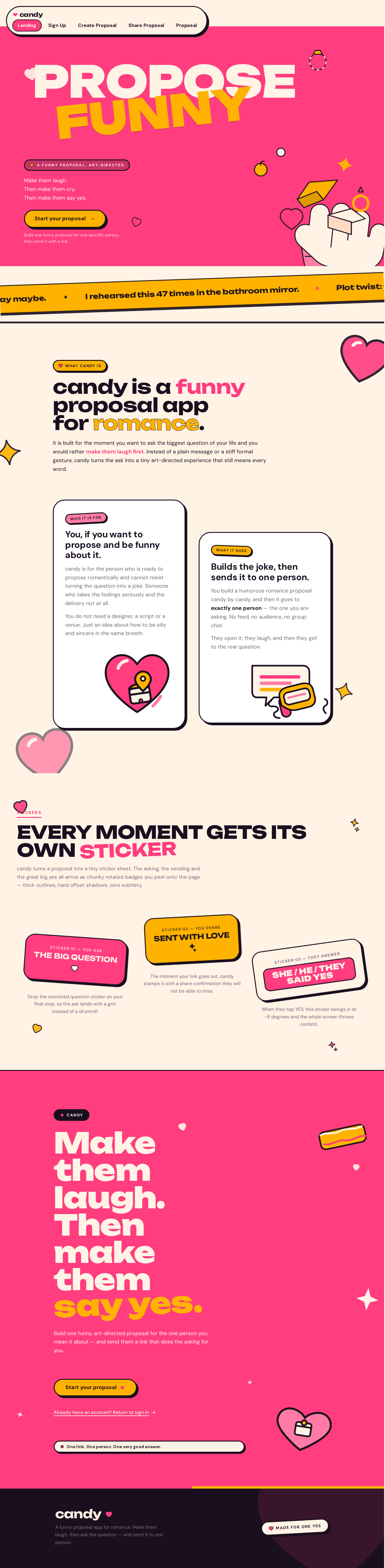
- Information / state. Anonymous public entry. Explains what candy is (a funny proposal app for romance), who it is for (someone who wants to propose and wants to be funny about it), and what it does (build a humorous romance proposal and send it to one person). No identity required.
- Primary action. Start your proposal — moves the visitor toward enrollment.
- Supporting actions. Navigate to enrollment for a returning-intent visitor; read the marquee of funny proposal one-liners.
- Domain entities. None owned; presents the product concept only.
- Component responsibilities. Hero band with oversized screen-print type; marquee ticker of funny one-liners; sticker badges; a floating pill nav; a single primary CTA with hard offset shadow.
- States. Loading: static content, no data fetch required. Empty: not applicable. Success: visitor understands the product and can proceed. Error: not applicable for static content. Recovery: not applicable.
Sign Up
- Information / state. Anonymous, pre-identity. Collects the minimum needed to establish a Creator account so proposals can be owned, resumed, and managed.
- Primary action. Create the Creator's account.
- Supporting actions. Move to the signed-in Create Proposal surface after successful enrollment; return to Landing.
- Domain entities. Creator identity (application-owned).
- Component responsibilities. Enrollment form; validation feedback; submission control; link back to Landing.
- States. Loading: submission in progress, control disabled. Empty: initial blank form. Success: account established, Creator routed to Create Proposal. Error: invalid or incomplete input, or enrollment failure, with the entered values preserved. Recovery: correct the flagged input and resubmit; if enrollment fails, retry without losing the form.
Create Proposal
- Information / state. Signed-in Creator surface. Holds the in-progress funny romance proposal: its content and its draft state. Owns the Creator's recurring work of building a humorous marriage/romance proposal.
- Primary action. Build and save the proposal content.
- Supporting actions. Continue an existing draft; start a new proposal; move to Share Proposal once the proposal is ready.
- Domain entities. Proposal (owned by the Creator), proposal content, draft/ready state.
- Component responsibilities. Proposal editing surface; step/stage presentation with oversized type and one sticker illustration per step; save control; progression to sharing.
- States. Loading: retrieving the Creator's existing proposals. Empty: no proposals yet — present a clear starting point for the first one. Success: proposal content saved and ready to share. Error: save failure or load failure, with the Creator's work preserved locally in the surface. Recovery: retry the save; the Creator's entered content is not discarded.
Page 5 of 14
Share Proposal
- Information / state. Signed-in Creator surface. Holds the delivery state of a finished proposal: whether a shareable link has been produced and who it is intended for.
- Primary action. Produce and deliver the shareable proposal link to the intended Recipient.
- Supporting actions. Copy the link; return to Create Proposal to revise; share another proposal.
- Domain entities. Proposal, shareable link, delivery state.
- Component responsibilities. Link generation and display; copy control; delivery confirmation presented as a rotated sticker badge; route back to editing.
- States. Loading: generating the link. Empty: no finished proposal available to share — route back to Create Proposal. Success: link produced and delivery confirmed. Error: link generation or delivery failure, with a clear retry. Recovery: regenerate the link and retry delivery; the proposal content is unaffected.
Proposal
- Information / state. Anonymous, link-reached surface for the Proposal Recipient. Presents the funny romance proposal exactly as the Creator built it. No account required.
- Primary action. Experience the proposal and respond to it.
- Supporting actions. Advance through the proposal's steps; deliver the response.
- Domain entities. Proposal (read), Recipient response.
- Component responsibilities. Single centred stage card with oversized type; one sticker illustration per step; the response moment with its celebratory sticker and confetti burst.
- States. Loading: retrieving the proposal behind the link. Empty: not applicable — a valid link always resolves to a proposal. Success: the Recipient has experienced the proposal and responded. Error: the link is invalid, expired, or the proposal cannot be retrieved — show a clear, non-blaming message. Recovery: the Recipient can retry loading; the Creator can re-share a fresh link from Share Proposal.
Page 6 of 14
3. Functional Requirements
Each requirement below is a distinct story point. Provenance is marked as explicit (stated in the authoritative thread), basic_default (accepted default), or required_inference (indispensable mechanics needed to make an accepted journey executable).
FR-1 — Funny proposal creation
As a Proposal Creator, I should be able to build a proposal that is deliberately funny, so that the person I am proposing to laughs before I ask the real question.
- Provenance: explicit.
- Trigger / input: the Creator opens Create Proposal while signed in and enters proposal content.
- Observable result: a saved proposal whose content is the Creator's humorous proposal.
- Access state: signed in.
- Failure / recovery: if saving fails, the Creator's entered content is preserved in the surface and the save can be retried.
- Continuation: the Creator proceeds to Share Proposal.
FR-2 — Romance/marriage purpose
As a Proposal Creator, I should be able to make a proposal whose purpose is romance and marriage, so that the proposal reads as a real romantic ask rather than anything else.
- Provenance: explicit.
- Trigger / input: the Creator builds the proposal on Create Proposal.
- Observable result: the proposal is a romance/marriage proposal and is presented as such to the Recipient.
- Access state: signed in.
- Failure / recovery: not applicable — this is a purpose constraint on the content, not a fallible operation.
- Continuation: the proposal is shared as a romance proposal.
FR-3 — Humorous tone throughout
As a Proposal Creator, I should be able to rely on the app's tone being humorous, so that the joke is carried by the product and not only by my own words.
- Provenance: explicit.
- Trigger / input: the Creator and the Recipient interact with the app's surfaces.
- Observable result: the app's copy, presentation, and moments read as funny rather than formal.
- Access state: applies on all surfaces.
- Failure / recovery: not applicable.
- Continuation: the humorous tone carries into the Recipient's experience.
FR-4 — Self-service enrollment
As a Proposal Creator, I should be able to establish my own account without an invitation or provisioning step, so that I can start building a proposal on my own.
- Provenance: required_inference.
- Trigger / input: an anonymous visitor on Sign Up submits their enrollment details.
- Observable result: a Creator account exists and the Creator is taken to Create Proposal.
- Access state: anonymous entry; the enrollment surface itself is reachable before identity exists.
- Failure / recovery: invalid or incomplete input is flagged with the entered values preserved; a failed enrollment can be retried.
- Continuation: the Creator begins their first proposal.
FR-5 — Returning verification
As a Proposal Creator, I should be able to verify my identity when I return, so that I can get back to proposals I previously created.
- Provenance: required_inference.
- Trigger / input: a returning Creator provides their credentials.
- Observable result: the Creator regains access to their own previously created proposals.
- Access state: anonymous entry to verification; protected state remains unavailable until identity is established.
- Failure / recovery: incorrect credentials are rejected with a clear message and can be retried.
- Continuation: the Creator resumes or manages an existing proposal.
FR-6 — Proposal ownership and continuity
As a Proposal Creator, I should have my proposals remain bound to me, so that I can come back later and manage what I created.
- Provenance: required_inference.
- Trigger / input: the Creator creates a proposal while signed in.
- Observable result: the proposal is stored as belonging to that Creator and is retrievable on return.
- Access state: signed in.
- Failure / recovery: if retrieval fails, the Creator is told and can retry.
- Continuation: the Creator can revise or re-share the proposal.
FR-7 — Sharing the proposal
As a Proposal Creator, I should be able to deliver my finished funny proposal to the person I am proposing to, so that they actually receive it.
- Provenance: required_inference.
- Trigger / input: the Creator opens Share Proposal for a finished proposal and initiates sharing.
- Observable result: a shareable link to the proposal is produced and delivered to the intended Recipient.
- Access state: signed in.
- Failure / recovery: if link generation or delivery fails, the Creator sees the failure and can retry; the proposal content is unaffected.
- Continuation: the Creator can copy the link again or return to editing.
FR-8 — Recipient opens without an account
As a Proposal Recipient, I should be able to open the proposal through the link I was sent without creating an account, so that nothing stands between me and the proposal.
- Provenance: required_inference.
- Trigger / input: the Recipient opens the delivered link.
- Observable result: the proposal is displayed to the Recipient.
- Access state: no account required.
- Failure / recovery: if the link is invalid, expired, or the proposal cannot be retrieved, the Recipient sees a clear, non-blaming message and can retry.
- Continuation: the Recipient experiences the proposal.
FR-9 — Recipient experiences the proposal
As a Proposal Recipient, I should be able to experience the funny romance proposal as the Creator built it, so that I get the joke and the ask together.
- Provenance: required_inference.
- Trigger / input: the Recipient advances through the proposal's steps.
- Observable result: the Recipient reaches the proposal's ask.
- Access state: no account required.
- Failure / recovery: if the proposal fails to load mid-experience, the Recipient can retry.
- Continuation: the Recipient responds.
FR-10 — Recipient responds
As a Proposal Recipient, I should be able to respond to the proposal, so that the Creator learns my answer.
- Provenance: required_inference.
- Trigger / input: the Recipient gives their response on the Proposal surface.
- Observable result: the response is recorded against the proposal and the Recipient sees a celebratory confirmation.
- Access state: no account required.
- Failure / recovery: if the response cannot be delivered, the Recipient is told and can retry.
- Continuation: the Creator can see the response on their proposal.
FR-11 — Romance-only scope
As a product owner, the app should serve romance/marriage proposals only, so that the product stays the thing it was asked to be.
- Provenance: explicit.
- Trigger / input: any proposal created in candy.
- Observable result: candy is used for romance/marriage proposals; business proposals are not a supported use.
- Access state: applies to all surfaces.
- Failure / recovery: not applicable.
- Continuation: not applicable.
Page 7 of 14
4. User Personas
Page 8 of 14
Proposal Creator
Product context. The Proposal Creator is the person who wants to propose romantically and has decided that the way to do it is to be funny about it. They are not looking for a document generator; they are looking for a way to make one specific person laugh and then say yes. They likely have a sense of humor about the whole thing and want the app to match their nerve.
Primary goal. Build a humorous marriage/romance proposal and deliver it to the person they are proposing to.
Distinct accepted responsibilities.
- Establish their own account through self-service enrollment — no invitation, no provisioning.
- Verify their identity when they return, so they can get back to proposals they previously created.
- Build the proposal content on Create Proposal, including its funny beats and its romantic ask.
- Own the proposal: it stays bound to them so it can be resumed and managed later.
- Deliver the finished proposal to the intended Recipient from Share Proposal.
- Revise and re-share when the first attempt does not land.
Relevant inputs and decisions. What the joke is; how far to push it; when the proposal is finished enough to send; who the Recipient is; whether to revise after sending.
Interactions with other accepted participants. The Creator's work is aimed entirely at the Proposal Recipient. The Creator never sees the Recipient's experience directly — they see the delivery confirmation and, later, the Recipient's response. The Creator's relationship to the app is recurring and owned; the Recipient's is one-time and anonymous.
Observable success. A shareable, funny proposal that lands the joke and the ask, and a response from the Recipient.
What makes this role different. The Creator is the only actor with durable state in candy. They have an identity, a body of work, a return path, and a reason to come back. Every protected surface in the product exists because of them.
Page 9 of 14
Proposal Recipient
Product context. The Proposal Recipient is the person being proposed to. They did not sign up for candy and did not ask for an account. They received a link from someone they know, opened it, and are now inside a small, art-directed experience that was made for them and only them.
Primary goal. Experience the joke and the proposal, and respond to it.
Distinct accepted responsibilities.
- Open the delivered link and reach the proposal without creating an account.
- Move through the proposal's steps as the Creator built them.
- Give their response to the proposal.
- See a confirmation that their response was received.
Relevant inputs and decisions. Whether to keep going through the proposal; what their answer is; when to give it.
Interactions with other accepted participants. The Recipient's entire experience is authored by the Proposal Creator. They never interact with the Creator inside the app — the Creator's presence is felt through the content, not through a live channel. The Recipient's response is the thing the Creator is waiting on.
Observable success. Receiving the proposal, getting the joke, and responding to it.
What makes this role different. The Recipient has no account, no history, and no return path by design. Their experience is a single, self-contained moment. Nothing in candy asks them to become a user — the product's job is to get out of the way of the proposal.
5. Core User Flows
Page 10 of 14
Flow A — Proposal Creator enrolls and starts a proposal
- The Creator arrives at Landing as an anonymous visitor. The page explains that candy is a funny proposal app for romance, who it is for, and what it does.
- The Creator reads the marquee of funny proposal one-liners and understands the tone of the product.
- The Creator selects the primary call to action, Start your proposal.
- The Creator lands on Sign Up, still anonymous. They enter the details needed to establish their own account. No invitation or provisioning step is involved.
- The Creator submits. On success, an account exists and the Creator is taken to Create Proposal.
- Failure and recovery: if the input is invalid or incomplete, the flagged fields are shown with the Creator's entered values preserved, and the Creator corrects and resubmits. If enrollment itself fails, the Creator can retry without losing the form.
- Continuation: the Creator begins building their first proposal.
Flow B — Proposal Creator builds a funny romance proposal
- The Creator is on Create Proposal, signed in.
- The surface loads the Creator's existing proposals. If there are none, it presents a clear starting point for the first one.
- The Creator builds the proposal content: the funny beats and the romantic ask, presented as a sequence of steps with oversized type and a sticker illustration per step.
- The Creator saves. On success, the proposal content is stored and the proposal is marked ready to share.
- Failure and recovery: if saving fails, the Creator's entered content is preserved in the surface and the save can be retried. Nothing the Creator typed is discarded.
- Continuation: the Creator moves to Share Proposal.
Flow C — Proposal Creator shares the proposal
- The Creator is on Share Proposal, signed in, with a finished proposal.
- The Creator initiates sharing. The app generates a shareable link to the proposal.
- The link is delivered to the intended Recipient through the external link channel.
- On success, the Creator sees a delivery confirmation presented as a rotated sticker badge, and can copy the link.
- Failure and recovery: if link generation or delivery fails, the Creator sees the failure and can retry. The proposal content is unaffected by the failure.
- Continuation: the Creator can copy the link again, return to Create Proposal to revise, or share another proposal.
Page 11 of 14
Flow D — Proposal Creator returns and manages a previous proposal
- The Creator returns to candy and verifies their identity. Protected state remains unavailable until identity is established.
- On success, the Creator regains access to the proposals they previously created.
- The Creator opens a previous proposal on Create Proposal to revise it, or on Share Proposal to re-share it.
- Failure and recovery: if credentials are incorrect, they are rejected with a clear message and can be retried. If retrieving proposals fails, the Creator is told and can retry.
- Continuation: the Creator revises and re-shares, or leaves the proposal as it is.
Flow E — Proposal Recipient opens and experiences the proposal
- The Recipient receives the delivered link from the Creator.
- The Recipient opens the link and lands on Proposal. No account is required and none is requested.
- The proposal loads and presents the Creator's funny romance proposal as a single centred stage card with oversized type and one sticker illustration per step.
- The Recipient advances through the proposal's steps and reaches the ask.
- Failure and recovery: if the link is invalid, expired, or the proposal cannot be retrieved, the Recipient sees a clear, non-blaming message and can retry. The Creator can re-share a fresh link from Share Proposal if needed.
- Continuation: the Recipient responds.
Flow F — Proposal Recipient responds
- The Recipient is on Proposal, at the ask.
- The Recipient gives their response.
- On success, the response is recorded against the proposal and the Recipient sees a celebratory confirmation — a full-screen confetti burst in pink, amber, and cream, with a sticker rotating in at -8deg reading "SHE/HE/THEY SAID YES".
- Failure and recovery: if the response cannot be delivered, the Recipient is told and can retry.
- Continuation: the Creator can see the response on their proposal.
Page 12 of 14
6. Visuals Colors and Theme
The creative direction is authoritative for this section. The muse is Jessica Walsh, and the headline idea is playful maximalism for a proposal that lands the joke and the ask. candy must feel like a gift, not a utility: joyful, playful, a little surreal, high-stakes but low-pressure, celebratory.
Colour tokens (light mode)
| Role | Hex | Usage |
|---|
| Background | #FFF3E6 | Cream-candy ground — the brand's base, never white-first |
| Surface | #FFFFFF | Cards and stage surfaces sitting on the cream ground |
| Text | #1A0F1F | Ink-plum, warmer than pure black |
| Primary | #FF3D7F | Hot pink — dominant brand colour, large colour blocks, buttons, type highlights |
| Accent | #FFB300 | Tangerine amber — the single hot accent for CTAs and "YES" moments |
| Muted | #7A6A7E | Mauve-grey for secondary copy |
Pink and amber are used as full-bleed section grounds, not merely as button colours. Blue and indigo appear nowhere in the palette.
Typography
- Headings: Unbounded, weights 700–900, all-caps or sentence case, very large —
clamp(48px, 18vw, 160px) for hero lines, tight leading 0.9–1.0, tracking -0.02em on oversized hero lines.
- Smaller headings: DM Sans Bold at 24–32px for readability.
- Body: DM Sans regular, 16–18px, line-height 1.6.
- Scale: 1.5 modular — 160 / 96 / 64 / 40 / 28 / 18 / 16. Unbounded is used only at 40 and above; DM Sans at 28 and below.
- Inter, Roboto, Poppins, and system-ui are not used for any text.
Page 13 of 14
Shape language
Sticker-like and confident. Large 32–48px radii on cards. Pill buttons at 999px. Overlapping colour fields with hard edges. Rotated sticker badges (for example "SHE SAID YES" at -8deg). Thick 3px black outlines on key interactive elements. Heart and sparkle shapes cut out of colour blocks. No soft glass, no subtle shadows — surfaces are flat colour with a single hard offset shadow: 6px 6px 0 #1A0F1F on hero cards.
Layout
Colour-blocked sections that collide rather than stack neatly: a hot-pink hero band, an amber band tilted -2deg overlapping it, then a cream section. Asymmetric 12-column grid with content deliberately off-centre — the headline spans columns 2–11, and illustration breaks out to full-bleed on the right. Navigation is a floating pill bar in cream with a pink active state, not a top navbar. Proposal pages use a single centred "stage" card with oversized type and one sticker illustration per step.
Spacing rhythm
Generous, poster-like spacing driven by the oversized type: section padding scales with the type scale, and colour bands butt directly against each other with hard edges rather than fading into each other. The rhythm is blocky and confident, not airy and even.
Page 14 of 14
Imagery style
Surreal art-directed 3D props and illustrated characters: a giant glossy pink heart holding a ring box, a cartoon hand offering a ring on a velvet pillow, floating candy pieces, a retro phone receiver with a speech bubble. Flat illustration with thick outlines and a single highlight, consistent with the sticker aesthetic. No stock photography, no generic gradient blobs, no photography of couples.
7. Signature Design Concept
The misregistered poster.
The public entry is built as a single screen-printed


No comments yet. Be the first!